

DJM-A7
Before the gig: know this mixer, check its firmware (the mixer's software), and check the settings the last DJ left.
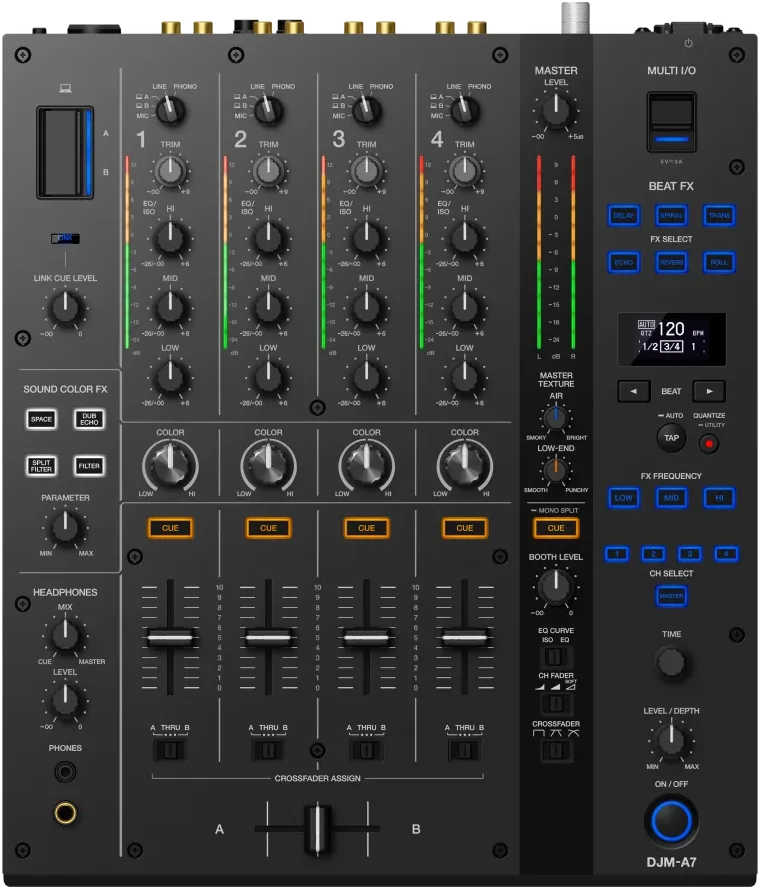
- Released
- 2026
- Width
- 33.1 cm · 13 in
- Depth
- 38.8 cm · 15.3 in
- Height
- 10.8 cm · 4.2 in
- Weight
- 6.7 kg · 14.8 lb
Know the mixerbefore you play
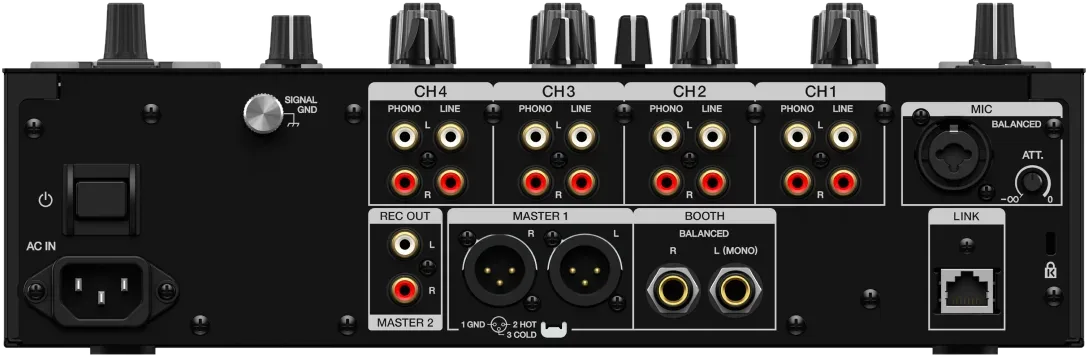
Connectionson the back
CChannel inputsPHONO and LINE on all four
EBOOTHTwo 1/4 in jacks, balanced
FMICXLR or 1/4 in, with an ATT. knob
GLINKOne network socket (PRO DJ LINK)
Five things that can affect your gig
1Both computer ports are USB Type-C. Bring the right laptop cable.
2One mic input, and no talkover. The music does not dip for the mic: ride it by hand.
3MASTER TEXTURE (AIR, LOW END) changes the sound of the whole room. Check what the last DJ left.
4SonicLink Touch Pairing needs the updated firmware. Wired headphones always work.
511 mm wider than a DJM-750MK2. Measure before you swap one for the other.
Based on the Save My Gig guide for this model and AlphaTheta's own documents.