

DJM-750MK2, the field manual
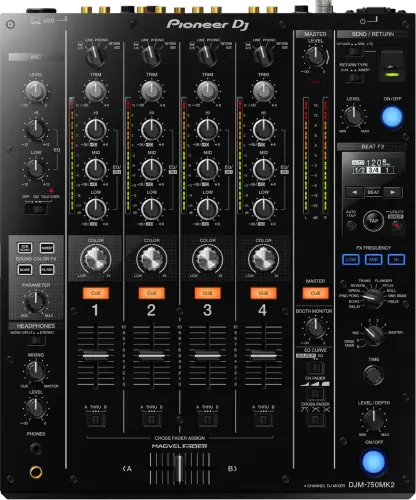
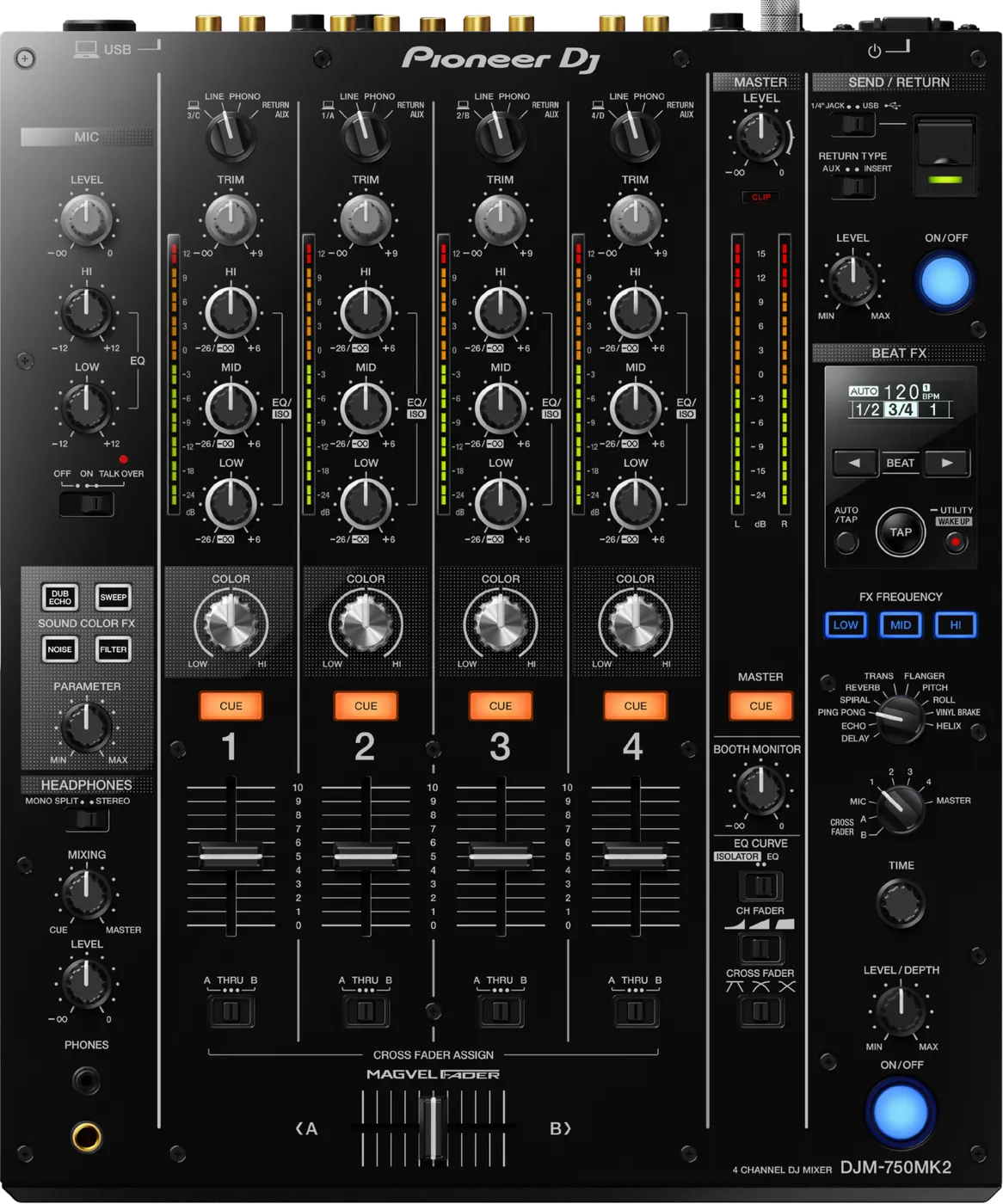
Booth briefing. The DJM-750MK2 has no PRO DJ LINK. There is no LAN terminal on it, so in a CDJ booth that means no linked BPM, no quantised sync arriving from the players and no rekordbox over LAN. Nothing is broken and nothing is switched off in a menu, so this is a question for the booking, not for soundcheck. The other thing to know before you patch anything: 9 effects never reach the RETURN AUX channel, by design.
When it goes wrong: No sound from the mixer
Fast Lane
The five things that decide your gig
The five things on the DJM-750MK2 that change what happens next, if you are reading this in the booth. All five are explained in full further down this page.
There is no PRO DJ LINK on this mixer. Nothing is faulty or disabled.
It was built without the port. Players connect to it by audio and nothing else, so no shared library, no shared clock, no Link data.
Ask which mixer is installed before you accept a booking that assumes a Link booth.
Serato DJ is not certified for this mixer, in AlphaTheta's own words.
"Serato DJ may not work normally with DJM-750MK2 as the application has not been certified under the Pioneer DJ Certification Program."
DVS here means rekordbox dvs or TRAKTOR PRO 3. If your set runs on Serato, that sentence is the one that matters.
9 of the effects never reach the RETURN AUX channel, by design.
Your outboard pedal or iOS effect goes silent in AUX mode and neither it nor the mixer is broken.
Documented behaviour with a named list, which is the difference between a five-minute check and a lost soundcheck.
Beat FX will not pre-listen on channels 1 to 4.
AlphaTheta: when 1 to 4 is selected with the effect channel selector, the effect sound cannot be monitored.
So you audition an effect, hear nothing, and conclude the headphones are dead. They are not.
If it switched itself off between sets, press UTILITY (WAKE UP).
AlphaTheta: pressing the UTILITY (WAKE UP) button cancels the Off mode state. The desk is asleep, not dead.
Worth knowing before you start tracing power in a dark booth with a room waiting.
If something goes wrong
A channel has no signal, or the master is quiet
Short answer. On the DJM-750MK2 the crossfader assign is the first suspect, then the input selector, then a hidden attenuator on the master. The manual's own remedy for a silent channel is to set the [CROSS FADER ASSIGN (A, THRU, B)] selector switches for the different channels properly.
Why this happens. Every channel has its own crossfader assign, so a channel routed to the side of the Magvel crossfader you are not pushing is silent while its fader is up and its meter can still move. The input selector can also be sitting on PHONO while you feed it a line source. For a master that is present but small, AlphaTheta's troubleshooting table points at the attenuator: check whether ATT. for MASTER OUT is set to a value such as minus 6 dB in the UTILITY screen. A previous DJ or an installer can leave that there and nothing on the surface says so.
Fix it now. Crossfader assign to THRU on the channel you want, input selector matched to the source, then UTILITY and the master attenuator. If it is still silent, move the source to another channel to decide whether the fault is the strip or upstream of the mixer, and take send and return out of the path while you are there.
Avoid it next time. One routing pass before doors, every channel, including the crossfader assign switches and the utility settings you inherited.
A turntable distorts and its TRIM does nothing
Short answer. It is a turntable with a built in phono equaliser plugged into the DJM-750MK2's PHONO inputs. AlphaTheta's remedy is to connect it to the LINE terminals instead.
Why this happens. The PHONO inputs already apply phono equalisation and gain. A deck that has done that internally arrives at line level into a phono stage, which distorts, and the TRIM control has no useful range left to give you.
Fix it now. Move that deck to a LINE input and set the channel's input selector to match. If the turntable has a switch for its internal equaliser, the other option is to switch it off and stay on PHONO.
Avoid it next time. Ask what the guest is bringing. A modern belt drive deck with a USB output usually has a preamp inside it, and it will be the second thing that goes wrong at a hybrid gig.
Beat FX sounds like it is doing nothing
Short answer. Usually the DJM-750MK2's FX FREQUENCY band buttons rather than a fault. AlphaTheta's remedy is to press the FX FREQUENCY button for the band you want so that it lights.
Why this happens. Beat FX on this desk can be applied to chosen frequency bands, and an unlit band is a band the effect is not being applied to. Leave all of them unlit and the effect is engaged, indicated, and inaudible.
Fix it now. Light the band or bands you want, then check the effect channel switch is pointing at the channel you are playing, then the effect level and depth control.
Avoid it next time. Look at the FX FREQUENCY row as part of the same glance that checks the effect channel switch. The two together decide whether an effect is heard at all.
Your outboard or iOS effect is silent in AUX mode
Short answer. Neither your pedal nor the mixer is broken. 9 of the DJM-750MK2's effects never reach the RETURN AUX channel, by design. AlphaTheta's wording: "The following effect sounds of this DJM applied to the channel selected by the effect channel switch at [SEND/RETURN] are not outputted to the RETURN AUX channel due to the specification."
Which ones. DUB ECHO, DELAY, ECHO, PING PONG, SPIRAL, REVERB, TRANS, FLANGER, PITCH. The ones AlphaTheta does not name in that list are ROLL, VINYL BRAKE, HELIX, SWEEP, NOISE, FILTER.
Why this happens. AUX return brings the external signal back as its own channel rather than back into the channel it left. The internal effect stays on the channel the effect channel switch selected, and it is not carried into that returning AUX path. The symptom is the one that fools people: the send is working, the app or the pedal is making sound, and the mixer output has none of it.
Fix it now. Switch the return from AUX to INSERT, so the external signal comes back into the path it left. If AUX is what you need, take the internal effect off the send channel, or use one of the effects AlphaTheta does not list. Check the effect channel switch position as well, because it decides which channel the internal effect is applied to in the first place.
Avoid it next time. Rehearse the exact combination you plan to use, the same effect on the same return mode, at home. This is not a fault that shows up in a general soundcheck, it shows up in the one setup you were relying on.
The SEND/RETURN button will not stay lit
Short answer. Nothing on the DJM-750MK2 is broken. A SEND/RETURN button that refuses to latch is the mixer switching its own function off, and AlphaTheta document four states that do it. Work through the four before you suspect the hardware.
One: nothing is connected to the effector. With no outboard and no iOS device on the send, the Operating Instructions say the function is "forcibly disabled and the lit [ON/OFF] button of SEND/RETURN turns off". So a loop left engaged after the pedal was unplugged does not silently eat a channel. What it does instead is refuse to stay lit, which reads as a broken button rather than a working safeguard.
The other three, and all three are AUX routing. RETURN TYPE on AUX with the effect channel set to 1, 2, 3 or 4 and that channel's input selector on RETURN AUX. RETURN TYPE on AUX with the effect channel on CROSS FADER A or B and any channel assigned to that side sitting on RETURN AUX. RETURN TYPE on AUX with the effect channel set to MASTER. Each one is the mixer refusing to route its own output back into its own input.
Fix it now. Check the send first, because something has to be connected to the effector for the button to hold at all. Then look at RETURN TYPE. If it is on AUX, move the effect channel switch off the channel that is itself set to RETURN AUX, or take it off MASTER, or put the return on INSERT. The button latches once none of the four states is true.
Avoid it next time. Set the effect channel switch and RETURN TYPE together as one decision. They are the pair that decides whether the button will hold, and setting one without looking at the other is what produces the fault.
What this is not. This is not the AUX silence problem. That one is a different symptom with a different cause: the button is lit, the send is working, and the sound still does not arrive. It has its own section.
Beat FX will not pre-listen on channels 1 to 4
Short answer. Documented DJM-750MK2 behaviour, not a headphone fault. AlphaTheta: "When [1] to [4] is selected with the effect channel selector switch, the effect sound cannot be monitored even if the [CUE] button of the selected channel is pressed." It applies to DELAY, ECHO, PING PONG, SPIRAL, REVERB.
Why this happens. These are the time based effects, and on this desk their output is not fed to the cue bus for a channel selected on the effect channel switch. So the headphone check you would normally make before committing an effect to the room is not available for those five.
Fix it now. Bring the effect in on the master with the depth and level control low and open it up, rather than trying to audition it first. If you want to hear one in isolation before it reaches the floor, that has to happen somewhere other than this desk's cue.
Avoid it next time. Know these five by ear and by control position before the gig. A time based effect you have to commit to blind is one you should already be able to predict.
The computer does not see the mixer
Short answer. A DJM-750MK2 a computer will not recognise, and computer audio that will not come out of it, are one fault with four checks. The driver software has to be installed, and if it already is, the manual's own instruction is to reinstall it. The connection has to be the included USB cable, direct from the computer. The computer's audio output device has to be set to this mixer. And the channel's input selector has to be on the USB position, because a channel switched to PHONO is silent to a computer by design.
Fix it now. Input selector first, because it is free and it is on the front of the desk. Then the audio output device on the computer. Then reinstall the driver, which is the manual’s own instruction rather than a last resort.
The BPM reading will not settle
Short answer. Use TAP on the DJM-750MK2. AlphaTheta says plainly that for some tracks it may not be possible to measure the tempo, and names the [TAP] button as the manual way in.
Why this happens. With no PRO DJ LINK there is no tempo arriving from the players, so the mixer measures the audio itself. Sparse intros, live drums, half time and swung material are the usual material it cannot lock to.
Fix it now. Tap the tempo in. The beat effects then run off the value you gave it rather than a reading that is jumping around.
Avoid it next time. Treat TAP as part of playing this desk rather than as a workaround, especially on a set with live or non-quantised material in it.
The mixer switched itself off between sets
Short answer. Press the [UTILITY (WAKE UP)] button. AlphaTheta: "Pressing the [UTILITY (WAKE UP)] button cancels the Off mode state." The DJM-750MK2 is asleep, not dead.
Why this happens. From firmware 1.06 the power management timing follows EU Ecodesign, and the feature was renamed from auto standby to POWER MANAGEMENT at the same time. AlphaTheta's condition, verbatim: the unit automatically enters the Off mode if 20 minutes elapses with all of the following conditions met, none of this unit's buttons or controls are operated, and no audio signal is input to any channel of this unit. A soundcheck that finishes early, a break between sets, or a support DJ who plays entirely off their own gear all meet it. The desk also ships this way: AlphaTheta states the unit is shipped with the Power Management function turned on.
Below 1.06 the timeout is different, and the old value is not published. So on an older desk, expect the same behaviour on a schedule nobody can tell you.
Fix it now. [UTILITY (WAKE UP)], then check the master level before you push a fader, because you are coming back into a room that has been quiet.
Avoid it next time. On a desk you control, set POWER MANAGEMENT to OFF in the utility menu and leave it off for the show. On a desk you do not control, keep something feeding a channel during a long gap rather than trusting silence.
It is behaving strangely and nothing else explains it
Short answer. Static electricity can put a DJM-750MK2 into a state that looks like hardware failure, and the recovery is not a switch cycle. The manual asks you to disconnect the power cord and connect it again. On a desk in a rack that means reaching behind it rather than reaching for the power button.
Why this matters. A desk that has taken a static hit does not look damaged and does not report anything. It just behaves oddly, and the instinct is to start changing settings, which buries the real state under new ones.
What to watch for
Documented fixes, by firmware version
Where the record starts. AlphaTheta's published change history for the DJM-750MK2 begins at 1.03. Versions 1.00 to 1.02 are not listed at all, so what they changed is not public and this page does not pretend otherwise.
What is in it. Fixed in 1.03: a popping noise through USB audio on the FX send and return path when the FX assign was switched in rekordbox with Beat FX enabled. Fixed in 1.04: recording or live streaming with DJM-REC sometimes stopping. 1.05 is published as minor issues with no detail. Fixed in 1.07, which shipped in June 2026: an issue with audio communication with iOS and iPadOS devices, so any desk sitting below it is exposed the moment an iPhone or iPad is used for DJM-REC or for effects.
One behaviour change, not a bug. 1.06 moved the automatic switch off to 20 minutes under EU Ecodesign and renamed the feature POWER MANAGEMENT. A desk that turned itself off between soundcheck and doors is obeying that, not failing.
What is not in it, and this is worth knowing. No crash, no freeze, no channel going silent by itself and no total audio dropout appears anywhere in the published history. For a mixer that has been in rooms since 2017, a record whose worst entries are a popping noise, a recording halt and an iOS audio fault is a genuinely reassuring one.
Do this. Note the version on any desk you play. On one you control, sit at 1.07 if anything in your setup is an iPhone or an iPad.
Official documentation. Firmware change history, PDF →
Operating Instructions, PDF →
Found an entry we have missed? Tell us and we will add it.
There is no PRO DJ LINK on this mixer
Short answer. Correct, and nothing is faulty or disabled. The DJM-750MK2 was built without the port. The rear panel list in AlphaTheta's Operating Instructions runs power button, RETURN, SIGNAL GND, PHONO, LINE, MIC, Kensington slot, USB, BOOTH, MASTER2, MASTER1, SEND and AC IN, and there is no LAN terminal in it. AlphaTheta also publishes no PRO DJ LINK documentation for this desk, because there is nothing to document.
Why this happens. AlphaTheta's own definition ties the feature to the cable: PRO DJ LINK is what you get when multi players and a DJ mixer are connected via LAN cables. Take the LAN terminal away and the feature has nowhere to live. In a booth with CDJs this is a standalone mixer, so no BPM arrives at the desk from the players, no quantised sync comes back the other way, and rekordbox does not reach it over a network.
Fix it now. Nothing to fix, so work the way the desk works. The players still feed the mixer through their own audio outputs, so the set is unaffected. Beat FX run from the mixer's own BPM reading rather than a linked value, and the TAP button sets the tempo by hand when a track will not read. Player to player sync, where the players support it, is a job for a LAN cable between the players and never touches this mixer.
Avoid it next time. Ask which mixer is installed when you take the booking, and say out loud what your set expects from Link. A set built on quantised FX and shared browsing needs a different desk, and that is a conversation for the promoter weeks out.
One menu setting, two opposite faults
Short answer. The same menu item fixes a quiet master and a distorted one on the DJM-750MK2, in opposite directions, which is why it catches people twice. ATT. for MASTER OUT lives in the UTILITY screen. If the room is quiet with everything looking correct, the manual's first question is whether that is sitting at -6 dB. If the master is distorting instead, the manual's remedy is to take the same setting from -6 dB down to -12 dB. Nothing on the surface moves either way.
Do this. Read ATT. for MASTER OUT during setup, before you set a level to it. Whatever it says, you now know which way the desk is already leaning.
Compatibility
Players, software and DVS
Short answer. The DJM-750MK2 has no PRO DJ LINK, so players connect by audio and nothing else. DVS is supported with rekordbox dvs and with Native Instruments TRAKTOR PRO 3.
The rekordbox licence comes in the box, on a card, and that is not the same as an unlock. The Operating Instructions describe the mechanism plainly: the unit comes with a licence key for rekordbox dj and rekordbox dvs, printed on a licence key card, and you enter that key once to activate the software. So the licence key is on a card in the box, and the manual warns it cannot be reissued. For a first owner that is real money not spent on a subscription. For a second-hand buyer it is the first question to ask the seller, and for a DJ walking up to a venue's mixer it is not a capability the connection confers.
Set the control tone per channel. In the Settings Utility, CH followed by the channel number and Control Tone PHONO for a turntable, or the same setting on LINE for a DJ player. A DVS channel that will not track is very often that setting on the wrong option rather than a timecode or needle problem.
DJM-REC works with this mixer. It is on AlphaTheta's official compatibility list, so recording a set or streaming from an iPhone or iPad needs no extra hardware. Sit at 1.04 or above for the recording halt fix, and at 1.07 for the iOS audio fix.
Do this. Confirm what the booth expects to do over a network before you arrive, because none of it happens at this desk. Library format on a USB drive is a player side question and never touches this mixer.
Serato DJ is not certified for this mixer
Short answer. AlphaTheta's own wording: "Serato DJ may not work normally with DJM-750MK2 as the application has not been certified under the Pioneer DJ Certification Program." Read that as it is written, not as a promise it will fail and not as a promise it will work.
Why it matters. A Serato DJ arriving with their own laptop and their own control vinyl has no supported path on this desk, and no support line to call if something is off. On a mixer where rekordbox dvs and TRAKTOR PRO 3 are both supported, Serato is the one that is not.
Do this. If you play Serato and the booth has a DJM-750MK2, test your exact setup before the gig, and have a plan that does not need the mixer's own interface, such as playing out of your own controller or interface into a pair of line inputs.
The laptop side, before you rely on it
Short answer. Install and test the driver at home. The macOS driver was taken to 4.0.4 in April 2026 for macOS Tahoe. The Windows driver has not been updated since 1.110 in December 2021, so a Windows DVS user on this mixer is working on a driver that is years old.
Why it matters. One of the fixes in the macOS line is exactly the failure that ruins a load in: the audio driver not being recognised after a Mac restart, addressed in the 4.0.0 release for Big Sur. A laptop that boots and cannot see the mixer is not a mixer fault, and it is not something you want to meet for the first time in a booth.
Do this. Boot the laptop, connect the mixer and open your software, at home, in the state you will arrive in. Reboot once with the mixer connected. Then pack.
Features explained
Beat FX, Sound Color FX and FX FREQUENCY
Short answer. 11 Beat FX, DELAY, ECHO, PING PONG, SPIRAL, REVERB, TRANS, FLANGER, PITCH, ROLL, VINYL BRAKE, HELIX. 4 Sound Color FX, DUB ECHO, SWEEP, NOISE, FILTER, one knob per channel. Two effect units, and Beat FX carries an FX FREQUENCY band control.
Why it matters. AlphaTheta's own claim for this desk is that it is equipped with the EQ and fader curve, SOUND COLOR FX, BEAT FX and SEND/RETURN functions that were newly developed for the DJM-900NXS2, which is the permanent equipment in a club. That is the useful way to read it: the FX and the feel come from the club desk, the network does not.
When professionals use it. The effect channel switch is the control that decides what is being processed, and it reaches channels 1 to 4, MIC, either side of the crossfader, and MASTER. Sound Color FX for per channel colour under your hand throughout, Beat FX for the moments.
Common mistakes. Leaving every FX FREQUENCY band unlit and concluding the effect section is dead, and expecting the five time based effects to be auditionable in headphones on channels 1 to 4, which they are not.
Send and return, analogue or USB
Short answer. An independent send and return section with a choice of AUX or INSERT for how the signal comes back, and two ways to connect: analogue quarter inch jacks on the rear, or the digital USB route on the top panel for an iOS app.
Why it matters. This is the part of the desk borrowed straight from the DJM-900NXS2, and on a mixer with no Link it is where the creative headroom is. An iPad running an effect over USB is a serious instrument to have in a booth for the effort of carrying one cable.
When professionals use it. Outboard on a resident rig with the return set to INSERT, and iOS effects for a set that has a signature sound in it. The source channel is whatever the effect channel switch is pointing at, so plan the two controls together.
The button has a safeguard, and it can look like a fault. With nothing connected to the effector, and in three AUX routing states, the mixer switches the function off and the button will not stay lit. All four are set out in the SEND/RETURN button will not stay lit.
Common mistakes. Using AUX return with one of the 9 effects that never reach it, then troubleshooting the pedal.
The I/O, the headphone jacks and the single mic input
Short answer. 4 channels with four sets of PHONO and four sets of LINE on RCA, one RETURN and one SEND on quarter inch, MASTER1 on XLR, MASTER2 on RCA and BOOTH on quarter inch TRS. Sampling is 48 kHz. The desk is 320.0 x 107.9 x 387.9 mm and weighs 6.6 kg.
Headphones: one output, two connector sizes. The spec is one 1/4 inch stereo jack and one 3.5 mm stereo mini jack, which is one headphone section you can plug into with either connector rather than two independent outputs with their own level and mix. AlphaTheta does market it as letting two DJs cue at once, and that framing is theirs. If you are planning a back to back where both of you need your own cue mix, read the spec rather than the marketing line.
One microphone input. 1, a single combo XLR and quarter inch TRS. A show with a host and a vocalist needs a small mixer in front of it, and that is a thing to discover before you load in.
USB. one Type A on the top panel for a mobile device, one Type B on the rear for a computer. The mobile port supplies 5 V at 2.1 A or less. USB hubs cannot be used, on either port.
Professional tips
Ask which mixer is installed
Short answer. One message to the promoter or the technical manager before you accept: which mixer, and is there a Link network in the booth.
Why it matters. Almost everything else about this desk is learnable in twenty minutes at soundcheck. The absence of PRO DJ LINK is not, because it changes what your set can assume. If your show is built on quantised effects, shared browsing or a linked tempo, that is a planning decision and not a booth one.
Do this. Add the mixer model to whatever you already ask for. If the answer is a DJM-750MK2, plan a set that owns its own tempo, take TAP seriously, and bring the effects you want in on send and return rather than expecting them from the network.
Connections and setup
What the PHONO inputs will take, and the ground wire
Short answer. The PHONO inputs on the DJM-750MK2 are for a phono level MM cartridge output and nothing else, and the manual states the exclusion directly: do not input line level signals. That is the same fault as the distorted turntable with a dead TRIM, written from the other end. The SIGNAL GND terminal beside them exists for a turntable's ground wire, and connecting it is what removes the hum that appears when an analog player is plugged in.
Do this. Ground wire on before the first track, not after the hum arrives. It takes ten seconds at load-in and it is a screw terminal in the dark afterwards.
Phantom power, and the outputs that want to be balanced
Short answer. The DJM-750MK2 has three phantom power warnings and none of them is on the front panel. Its microphone input does not supply phantom power at all, so a condenser mic that needs it arrives silent and undamaged. The MASTER1 output must not be connected to anything that can supply phantom power, which rules out plugging it into a mic input on a console that has phantom switched on globally. And the manual adds a warning that sounds absurd until you have seen a dark stage: be careful not to accidentally insert the power cord of another unit into MASTER1.
Balanced, and the manual means it. MASTER1 and BOOTH on the DJM-750MK2 are to be used as balanced outputs, and the manual says so for both rather than leaving it to the connector. An XLR or a TRS run unbalanced still passes audio, so nothing announces the mistake: what you get instead is a longer cable picking up more hum than it should, on the two outputs that feed the room and the DJ.
Do this. Decide the mic before the gig, because there is no phantom here to switch on later. And when the desk goes into a rack, look at what is already plugged into whatever MASTER1 is about to meet.
Preventive maintenance
Keeping the desk reliable
Short answer. Connector care, connections made with the power off, and a cover between gigs.
Why it matters. AlphaTheta asks for connections to be made with the unit switched off and unplugged, and that is not a formality on a desk carrying four phono pairs, four line pairs, a mic, two masters, a booth output and a send and return loop. Every one of those is a future intermittent fault if it gets levered or strained, and an intermittent phono input is the hardest thing on this list to diagnose at a gig.
Do this. Unplug by the connector rather than the cable, make and break connections with the desk off, keep it covered, and keep the UTILITY settings you rely on written down so a reset or a borrowed desk does not surprise you.
Updating the firmware, and the USB stick it needs
Short answer. The mixer reads a USB stick for one job only, its own firmware update. AlphaTheta asks for FAT or FAT32, Mass Storage Class, with the update file in the root directory and only one update file on the drive.
What is not documented. exFAT, NTFS, HFS Plus and APFS are never mentioned for this purpose. That makes them undocumented rather than officially unsupported, which is a different thing, and the honest answer is to use a FAT or FAT32 stick and not find out.
Do this. Hold the ON/OFF button in the BEAT FX section and the FX FREQUENCY (MID) button while switching the power on to enter update mode. It takes about 90 seconds. Do not turn the power off or disconnect the USB drive during the update. If it fails, AlphaTheta's own advice is to try a different USB stick, so carry a second one.
Worth being clear about. There is no music playback from a USB drive on this mixer and no recording to one. Recording is DJM-REC on an iPhone or iPad.
Firmware, drivers and manuals
Official downloads and documents
Go to AlphaTheta for the files themselves. We link their pages instead of hosting a copy, because a manual copied here is a snapshot of release day and theirs is the one that stays current.
Manuals. Official Pioneer DJ manual page →
Broken link? Let us know and we'll fix it.
Frequently asked questions
Quick answers
- Does the DJM-750MK2 have PRO DJ LINK?
- No. There is no LAN terminal on it, and AlphaTheta defines PRO DJ LINK as a feature of players and a mixer connected by LAN cables. It was not built with it, so in a CDJ booth it is a standalone mixer.
- Why is my iOS or outboard effect silent on the return?
- Because 9 of this desk's effects are documented as never reaching the RETURN AUX channel, by specification. Switch the return to INSERT, or use an effect AlphaTheta does not list. The listed ones are DUB ECHO, DELAY, ECHO, PING PONG, SPIRAL, REVERB, TRANS, FLANGER, PITCH.
- Can I cue Beat FX in my headphones?
- Not with channels 1 to 4 selected on the effect channel switch. AlphaTheta documents that the effect sound cannot be monitored even with the channel's CUE pressed, for DELAY, ECHO, PING PONG, SPIRAL, REVERB.
- The mixer turned itself off. Is it broken?
- No. Press [UTILITY (WAKE UP)]. From firmware 1.06 it switches off after 20 minutes with no controls touched and no audio on any channel, and it ships with that turned on. Below 1.06 the timeout is a different value that AlphaTheta does not publish.
- Are there known firmware bugs?
- The published history starts at 1.03 and contains a USB audio popping noise fixed in 1.03, DJM-REC recording or streaming stopping fixed in 1.04, minor issues in 1.05, power management timing in 1.06 and an iOS audio fix in 1.07. No crash, freeze or audio dropout is documented.
- How many channels and how many Beat FX?
- 4 channels and 11 Beat FX: DELAY, ECHO, PING PONG, SPIRAL, REVERB, TRANS, FLANGER, PITCH, ROLL, VINYL BRAKE, HELIX.
- Does it have a crossfader?
- Yes, a Magvel crossfader, with a CROSS FADER ASSIGN switch per channel. A channel assigned to the side you are not pushing is silent.
- Does it work with Serato DJ?
- It is not certified. AlphaTheta says Serato DJ may not work normally with the DJM-750MK2 because the application has not been certified under the Pioneer DJ Certification Program. rekordbox dvs and TRAKTOR PRO 3 are supported.
- Do I need a rekordbox subscription?
- Not if you have the licence key card. The Operating Instructions say the unit ships with a licence key for rekordbox dj and rekordbox dvs, printed on a card in the box and entered once to activate. the licence key is on a card in the box, and the manual warns it cannot be reissued, so on a second-hand unit or a venue's mixer, ask before you count on it.
- How many headphone outputs are there?
- One, in two connector sizes: one 1/4 inch stereo jack and one 3.5 mm stereo mini jack. AlphaTheta markets that as two DJs cueing at once, which is their framing rather than a second independent output.
- Can I record onto a USB drive?
- No. The drive slot exists for firmware updates, on a FAT or FAT32 stick. Recording is DJM-REC on an iPhone or iPad.
- Did it replace the DJM-750?
- AlphaTheta presents it as a four-channel mixer joining the range that inherits features and design elements from the DJM-900NXS2, and names no predecessor and no successor for it. So this page does not name one either.
Related mixers
Commonly paired with
What you usually find beside it in working booths, from club, festival and rental installs rather than from a manufacturer document.
Pioneer DJ All brands Knowledge base FAQ and Fixes Dictionary
Playing soon and it is not working?
Start Emergency ModeKeep the Emergency Card
We will email you the printable PDF so it is on your phone before the next dark booth. Occasional notes that save gigs. No spam, unsubscribe in one click.
Registering is free and counts everywhere on Save My Gig. We send a confirmation email first. Your address is stored with Brevo, our email provider. Unsubscribe any time. Privacy
Sources: AlphaTheta's official DJM-750MK2 firmware change history, Operating Instructions, quick start manual, the support article on effects and the RETURN AUX channel, the support article on Serato DJ not recognising this mixer, which is where the certification sentence quoted above is published, and the firmware update instructions, checked 7 August 2026. Specifications theirs, priorities ours.