

XDJ-700, the field manual
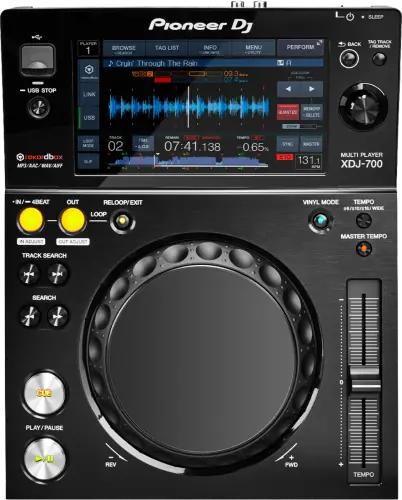
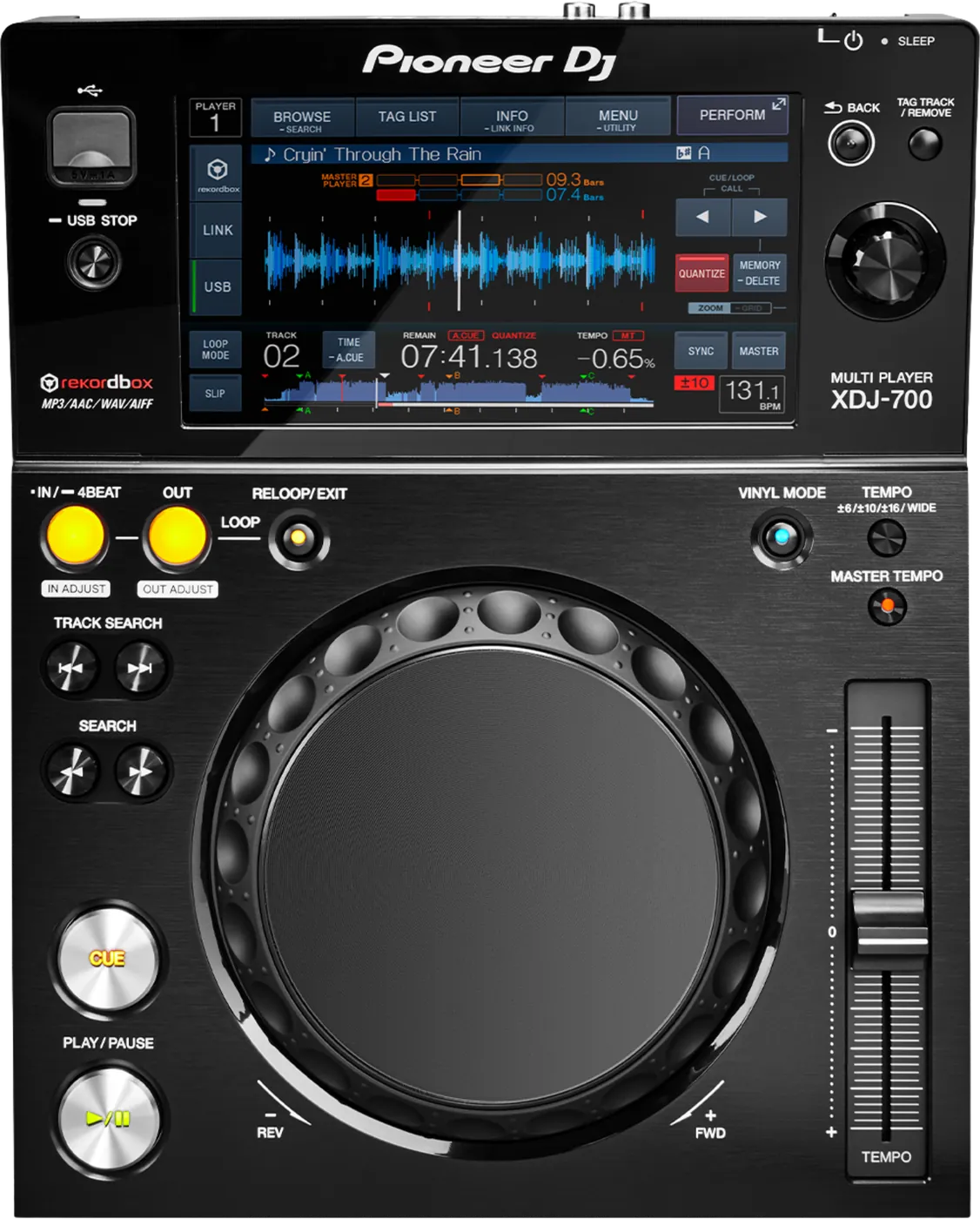
Booth briefing. The XDJ-700 is an AlphaTheta USB deck with no SD card slot, so it plays from a USB stick and a second stick is the backup you carry. It reads FAT16, FAT32 and HFS+, with no exFAT support, so a stick is formatted FAT32 before it plays here. Power Management is part of its firmware: from version 1.14 a deck left idle with the setting on powers itself off after 20 minutes, following EU Ecodesign rules, and the firmware floor for this page is 1.15. What that timer looks like during a long changeover, and what to do about it, is covered in the sections below.
When it goes wrong: The CDJ will not read the USB Playlists not showing How to format a USB for a CDJ
Fast Lane
The five things that decide your gig
The five things on the XDJ-700 that change what happens next, if you are reading this in the booth. All five are explained in full further down this page.
Three storage rules stack, and satisfying two of them still does not play.
File systems FAT16, FAT32, HFS+, media USB only, library Device Library.
No exFAT limits the drive. No card slot removes your in-deck backup. The library format means a OneLibrary export from a modern rekordbox will not browse. All three have to be right.
The deck turns itself off after 20 minutes, and looks dead.
From firmware 1.14, automatic power off happens after 20 minutes of no use when Power Management is enabled, to meet the EU Ecodesign Directive.
Twenty minutes is shorter than a lot of real gaps, and the DJ arriving for their slot has no reason to suspect a power setting. There is a SLEEP indicator if you know to look.
There is no card slot, so your backup lives in your bag or nowhere.
This player is USB only. The in-deck second medium that a CDJ-2000NXS gives you through its SD slot does not exist here.
Two identical FAT32 sticks with the same export on both is the whole difference between a drive failure being a thirty-second event and a set-ending one.
Two documented file faults look exactly like a corrupt track.
Both cured in 1.10: an AIFF at 24bit/48kHz stopped playing and could not be loaded to a deck, and certain WAV files produced digitally distorted white noise.
From where you are standing that looks like a bad file or a failing drive, and it is neither.
A big library can produce an empty browser on a healthy deck.
Documented and fixed in 1.11: categories and tracks were not shown in the browser screen when a database had many tracks.
It scales with your library, so the DJs most likely to meet it are the ones carrying the most music.
Compare
Playing on a different deck?
Pick the deck you are about to touch. This says what changes for the drive in your bag, and nothing else: the rest of what matters on that unit is on its own page.
If something goes wrong
The player will not read my drive
Short answer. Check the file system. The XDJ-700 reads FAT16, FAT32, HFS+ and that is all. No exFAT.
Why this happens. This is one of the tightest storage specifications of any player on this site, and exFAT is what a DJ formatting a large drive today would reasonably choose. Nothing is faulty.
Take the drive out properly first. The manual: "Do not remove the USB device or turn Off the power of the unit while the USB indicator is blinking. The management data in the unit may get deleted. Also, the USB device may become unreadable." The way out is "Press and hold the [USB STOP] button until the USB indicator stops blinking."
Fix it now. Borrow a FAT32 drive, or play from the other deck. Reformatting erases the drive, so it is not a mid-set move unless the music exists somewhere else too.
And if it is looping on its own and ignoring you. Emergency loop, not a crash: "DJ playback is restricted during emergency looping. To cancel emergency looping, load the next track."
Avoid it next time. FAT32 is the format that works in the widest range of booths including this one, so if your calendar includes old rooms, that is the answer rather than the technically best one.
It refuses to save another cue or loop point
Short answer. The XDJ-700 stores 10 cue or loop points per track on a USB drive and refuses the eleventh with CUE/LOOPPOINT FULL, which means delete some before you store more rather than change the drive. USB FULL is a different message with two separate causes in this manual: the drive is write-protected, or the drive has no free space. And points that were saved can stop appearing if the drive was pulled without being stopped properly or if the power was turned off, so the manual's instruction is to make sure the USB indicator has stopped blinking before you remove anything or cut the power.
Why this matters. Both messages look like a broken drive from where you are standing, and CUE/LOOPPOINT FULL is the one people misread, because it sounds like storage when it is a count.
Fix it now. Read the word on the display first. CUE/LOOPPOINT FULL means delete some points on that track. USB FULL means check the write-protect tab and the free space, in that order, because the tab is quicker to rule out.
Avoid it next time. Watch the USB indicator, not the clock. When it has stopped blinking the drive is safe to pull, and not before.
The deck is off and I did not turn it off
Short answer. Turn it back on. From XDJ-700 firmware 1.14, the automatic power off happens after 20 minutes of no use when Power Management is enabled. This is a deliberate behaviour change for EU Ecodesign compliance, not a fault.
Why this happens. Twenty minutes is shorter than a lot of real gaps: a support DJ's last stretch on the other deck, a long changeover, a soundcheck you walked away from, the hour before doors.
It is conditional, and that narrows the search. Off mode only arrives after 20 minutes when no USB device is connected, no PRO DJ LINK connection exists and no computer is on the rear USB terminal. A deck with your drive still in it did not do this, so if that is what you are looking at, look somewhere else.
The panel does tell you. There is a SLEEP indicator: "This lights when in the Off mode."
Fix it now. Touch the deck rather than the power switch: "When this unit is operated, the Off mode is canceled." Give it a moment and reload your track, and be aware that anything you had cued but not saved is gone.
Avoid it next time. On a deck you control, turn Power Management off. On one you do not, touch each deck during a long gap, or simply expect it and build the boot time into your handover rather than discovering it with thirty seconds left on the outgoing track.
One track will not load, or the noise is wrong
Short answer. Two documented XDJ-700 file faults, both cured in 1.10: an AIFF at 24bit/48kHz stopped playing and could not be loaded to a deck, and certain WAV files produced digitally distorted white noise.
Why this happens. The decoder meeting a file it cannot parse. From where you are standing it looks exactly like a corrupt track or a failing drive, which is what makes it expensive: you troubleshoot the drive while the fault is in the firmware.
Fix it now. Load a different track from the same drive. If that works, the drive is fine and the problem is that file on this firmware. Play something else.
Avoid it next time. On a deck below 1.10, avoid lossless AIFF at 24bit/48kHz and be wary of WAV from unusual sources. The same version also fixed some features of a newer CDJ-2000NXS2 or XDJ-1000MK2 being disabled over PRO DJ LINK, so in a mixed booth check this deck's version when the newer one is missing something.
The browser is empty, or my categories are missing
Short answer. Documented, and fixed in 1.11: information such as categories and tracks was not shown in the browser screen when a database had many tracks. Below that version, a large library can produce an empty browser on a deck that is otherwise fine.
Why this happens. It scales with your library, which means the DJs most likely to hit it are the ones who prepared the most. The drive is fine, the export is fine, and the player simply will not draw the list.
Fix it now. Browse by folder rather than through the library if the structure allows it, which loses cues and playlists but gets music playing. Otherwise use the other deck.
Avoid it next time. Get the deck to 1.15. If you cannot, take a smaller export to old XDJ-700 booths: the gig playlist rather than the whole library. Search was also unreliable below 1.12, so do not plan on searching your way out of it.
The touch screen responds in the wrong place
Short answer. A screen on an XDJ-700 that responds in the wrong place, or barely responds at all, is usually calibration drift rather than a dead digitiser. TOUCH DISPLAY CALIBRATION lives in the UTILITY screen. And there is a route in that does not need the deck to be usable: with the power off, hold the OUT button, marked OUT ADJUST, while switching the power on, and the calibration screen comes up on its own.
Why this matters. On a deck whose whole interface is the screen, a drifted digitiser reads as a dead unit. Knowing there is a power-on route in is the difference between a deck you can recover in the booth and a deck that goes back in the case.
Fix it now. Try UTILITY first if the screen still responds at all. If it does not, power off, hold OUT, and power on. Then run the calibration properly rather than tapping through it.
PRO DJ LINK will not come up
Short answer. When PRO DJ LINK will not come up on an XDJ-700, the manual gives four checks and none of them is the player. Player numbers first: set PLAYER No. to AUTO, or to a number nothing else on the network is using. Then whether the LAN cable is properly seated in the LINK terminal. Then whether the switching hub has power. Then whether something unnecessary is plugged into that hub, because the manual names an extra device on the switch as a cause on its own.
Why this matters. A booth network that half works burns time nobody has, and the instinct is to blame the deck that is showing nothing. All four causes are outside the player.
Fix it now. PLAYER No. to AUTO first, because a number collision is the quiet one. Then reseat the cable at both ends. Then the hub, its power and what else is on it.
My USB failed and there is no SD slot
Short answer. Correct, this player is USB only. There is no card slot, so the in-deck backup that a CDJ-2000NXS gives you through its SD slot does not exist here.
Why this matters more than it sounds. The advice on this site is to carry the same set on a second medium already sitting in the deck, because that is the fastest recovery in the room. On an XDJ-700 that recovery is only available if you brought a second USB stick, and most DJs did not.
Fix it now. Second stick if you have one. Otherwise the other deck, or a laptop if the booth has one connected. This is the moment the plan you made at home either exists or it does not.
Avoid it next time. Two identical sticks, both in your bag, for any booth that might be XDJ-700 based. It is the cheapest insurance in DJing and this player is the reason to actually do it.
What to watch for
Documented fixes, by firmware version
Short answer. The XDJ-700 has been updated more recently than the CDJ-900NXS: 1.15 arrived in November 2024. Every entry below is AlphaTheta's own wording, condensed, and the oldest of them is the one that matters most.
- 1.10
- Playback of an AIFF file at 24bit/48kHz stopped and tracks could not be loaded to a deck. Digitally distorted white noise on certain WAV files. Over PRO DJ LINK, some features of the CDJ-2000NXS2 or XDJ-1000MK2 were disabled. Problems in Control Mode. An active loop could activate a very short loop. Added MASTER PLAYER SELECT (AUTO) and multi-word search.
- 1.11
- Information such as categories and tracks was not shown in the browser screen when a database had many tracks. Search results did not appear when moving the cursor during SEARCH. Issues during playback and track selection.
- 1.12
- SEARCH worked incorrectly under certain conditions.
- 1.13
- Playback speed sometimes did not return to the BPM shown on screen with Sync enabled. A popping noise during a loop with QUANTIZE and MASTER TEMPO enabled. A HOT CUE started after jumping to the LOOP-IN point when changing loop beat length with QUANTIZE enabled.
- 1.15
- The USB audio function did not work in DJ Software Control mode.
One behaviour change, not a bug. Introduced in 1.14: following the EU Ecodesign Directive, the time before the unit automatically switches off was changed to 20 minutes when Power Management is on. A deck that turned itself off during a changeover is obeying that setting.
Do this. On a deck you control, sit at 1.15, updated between bookings and never before one.
Firmware downloads. Official AlphaTheta support page →
Full change history, PDF →
Broken link? Let us know and we will fix it.
E-8302 on this deck, and the two file codes
Short answer. E-8302 does not mean on the XDJ-700 what it means on a CDJ. Here it reads CANNOT PLAY TRACK and the manual's cause is that the track data on the USB drive cannot be read correctly, most likely a corrupt file, with the stated action being to try that track on another player that handles the same formats. On the CDJ generation the same number is PLAYER ERROR and points at the disc or the decoder. Same four characters, different diagnosis.
The other two. E-8304 and E-8305 on this deck are UNSUPPORTED FILE FORMAT, and the manual's action is one line: the format is wrong, replace the file with one in a proper format. That is a preparation answer rather than a booth one, so if it appears mid-set the move is to play something else and fix the export afterwards.
Fix it now. Take the code at its word on this deck. E-8302 means test that one file somewhere else, because the deck is telling you the data would not read. E-8304 and E-8305 mean the file was never in a format this player takes, so retrying changes nothing.
Two things that are not faults, and one that costs you
The screen. Small black or bright points on an XDJ-700 screen are inherent to liquid crystal displays and the manual says so outright. A screen that stays dark for a while after power-on in a cold room is the same story, and it reaches normal brightness on its own. And direct sunlight reflecting off the panel is not a failing backlight, it is sunlight, so block it rather than chase it.
After a static hit. Static electricity can put an XDJ-700 into a state that looks like hardware failure. The manual's own recovery is to turn the power off, wait one minute, then turn the power back on. The minute is not decoration, and it is the part a stressed crew cuts to five seconds.
And one that is not a fault but does cost you. The XDJ-700 keeps a setting only if you give it time to write. The manual's own instruction is to wait at least 10 seconds after changing settings before turning the power off, and a change made in the last seconds before somebody hits the switch is the one that will not be there next time.
Long tracks the screen will not draw
Short answer. The XDJ-700 stops drawing the scale for any track over 15 minutes, and it does not tell you why. The display simply comes up without it. If you play long-form recordings or DJ mixes as single files, that is the deck behaving as documented rather than a screen that has failed.
Why this matters. A missing scale on a long file reads as a corrupt track, and the reaction is to reload it, then reformat the drive, then blame the player. None of that changes anything.
Do this. If you need the scale, split long files into tracks at export time. If you are playing a long mix as one file, cue by ear and by time rather than by picture.
Compatibility
Software control, Link and mixed booths
Short answer. DJ Software Control mode is supported on the XDJ-700, and its USB audio function was broken until 1.15, which is worth knowing if you plan to use this deck as a controller rather than a player.
Do this. If your plan involves software control, confirm the deck is at 1.15 before the gig rather than discovering the audio path does not work. Library format is player-side: this deck needs Device Library, so a booth mixing it with a OneLibrary player needs a drive strategy rather than an assumption.
Features explained
Storage rules tighter than most players here
Short answer. File systems FAT16, FAT32, HFS+. Media USB only. Library format Device Library.
Why it matters. Three separate constraints stack here. No exFAT limits the drive. No card slot removes your in-deck backup. Device Library means a OneLibrary export from a modern rekordbox will not browse. A DJ who satisfies two of the three still does not play.
When professionals use it. One FAT32 stick with a Device Library export, plus an identical second stick. That combination works in this booth and in almost every other one.
Common mistakes. Assuming a compact modern-looking player has modern storage support. It does not.
Power Management and the 20-minute rule
Short answer. With Power Management on, the unit switches itself off after 20 minutes of no use. That timing came in with 1.14 to meet the EU Ecodesign Directive.
Why it matters. It converts a normal gap in a normal working day into a deck that appears dead, and the DJ arriving for their slot has no reason to suspect a power setting. The SLEEP indicator is the tell, and the timer only runs when nothing is plugged in. The same change reached the DJM-V10 and DJM-A9, so a booth can have several pieces doing it.
When professionals use it. Residents and technical managers turn it off, because the electricity saved is worth less than one confused handover. On a deck you do not own, treat it as a fact of the room.
Common mistakes. Assuming a powered-down deck is a broken deck and escalating to the venue. Losing unsaved cue points to it.
Worth knowing. And the manual attaches a cost to turning it off: power consumption may increase when POWER MANAGEMENT is set to NEVER. That is the trade a fixed install is making, stated by AlphaTheta rather than inferred here, and it is worth knowing before a venue sets every deck to NEVER and wonders about the bill.
Quantize, and why a reloop can feel late
Short answer. An XDJ-700 that seems to lag on a reloop or a reverse is usually quantize, not latency. With quantize on, playback starts from the nearest beat position at the moment you press, which is the whole point of the function and also why the response feels late. AlphaTheta's own line is that if you want the operation performed the instant the button is pressed, turn quantize off.
When professionals use it. Quantize on for anything where being in time matters more than being exact, which is most of a set. Quantize off for stabs, stutters and anything where the point is that it lands where your hand landed.
Professional tips
Carry two identical sticks for this booth
Short answer. Two FAT32 sticks, same Device Library export on both, both in the bag.
Why it matters. Most older players this site covers give you a second slot in the deck. This one and the XDJ-1000MK2 do not. This one does not, so the redundancy has to come from your bag or it does not exist. That is the whole difference between a drive failure being a thirty-second event and a set-ending one.
Do this. Export once, copy to two sticks, verify both by ejecting and browsing them rather than trusting the copy dialog. Label them so you know which one you have already tried.
Preventive maintenance
Keeping the deck reliable
Short answer. The single USB socket is the wear item, because every drive you ever play goes through it. Firmware to 1.15 between bookings.
Why it matters. With no card slot there is no second port to fall back on, so a worn USB socket is not an inconvenience on this player, it is the whole media path. A socket levered sideways for years becomes an intermittent fault that looks exactly like a bad stick.
Do this. Pull drives straight out by the connector, never by the cable and never at an angle. Blow the socket out rather than pushing dirt further in. Keep the unit covered between gigs.
Cleaning the touch display without ruining it
Short answer. The XDJ-700 touch display has a cleaning rule that rules out most of what is behind a bar. No organic solvents, no acids, no alkalis, which puts alcohol wipes and screen sprays out. The manual asks for a dry soft cloth, or a cloth dipped in neutral detergent and wrung out properly. A touch surface cleaned with the wrong thing loses its response before it loses its looks.
Why this matters. The screen is the whole interface on this deck. A jog wheel survives a wipe with the wrong thing; a touch surface does not, and the damage shows up as inaccurate touch long before it shows up as a mark.
Do this. Keep a dry microfibre cloth in the case and use it. For anything the cloth will not lift, neutral detergent on a cloth, wrung out until it is barely damp.
Firmware, drivers and manuals
Official downloads and documents
Go to AlphaTheta for the files themselves. We link their pages instead of hosting a copy, because a manual copied here is a snapshot of release day and theirs is the one that stays current.
Firmware downloads. Official Pioneer DJ firmware page →
Manuals. Official Pioneer DJ manual page →
Broken link? Let us know and we'll fix it.
Frequently asked questions
Quick answers
- Why did the deck switch itself off?
- Power Management, set to 20 minutes of no use from firmware 1.14 for EU Ecodesign compliance. Not a fault.
- Which file systems does it read?
- FAT16, FAT32, HFS+. No exFAT.
- Is there an SD card slot?
- No. USB only, so your backup has to be a second stick.
- What firmware should it be on?
- 1.15, from November 2024.
- Why is my browser empty?
- Below 1.11, categories and tracks were not shown when a database had many tracks. A big library is the trigger.
- Which library format?
- Device Library. Not OneLibrary.
- Can I use it as a controller?
- Yes, in DJ Software Control mode, and the USB audio function did not work below 1.15.
- Is search reliable?
- It was fixed twice, in 1.11 and 1.12. Below those, do not rely on it.
Related players
Commonly paired with
What you usually find beside it in working booths, from club, festival and rental installs rather than from a manufacturer document.
Pioneer DJ All brands Knowledge base FAQ and Fixes Dictionary
Playing soon and it is not working?
Start Emergency ModeKeep the Emergency Card
We will email you the printable PDF so it is on your phone before the next dark booth. Occasional notes that save gigs. No spam, unsubscribe in one click.
Registering is free and counts everywhere on Save My Gig. We send a confirmation email first. Your address is stored with Brevo, our email provider. Unsubscribe any time. Privacy
Sources: AlphaTheta's official XDJ-700 firmware page and its full change history PDF, read in full and checked 28 August 2026. Specifications theirs, priorities ours.