

CDJ-3000X, the field manual
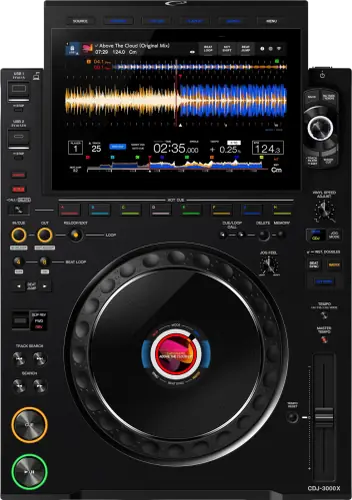
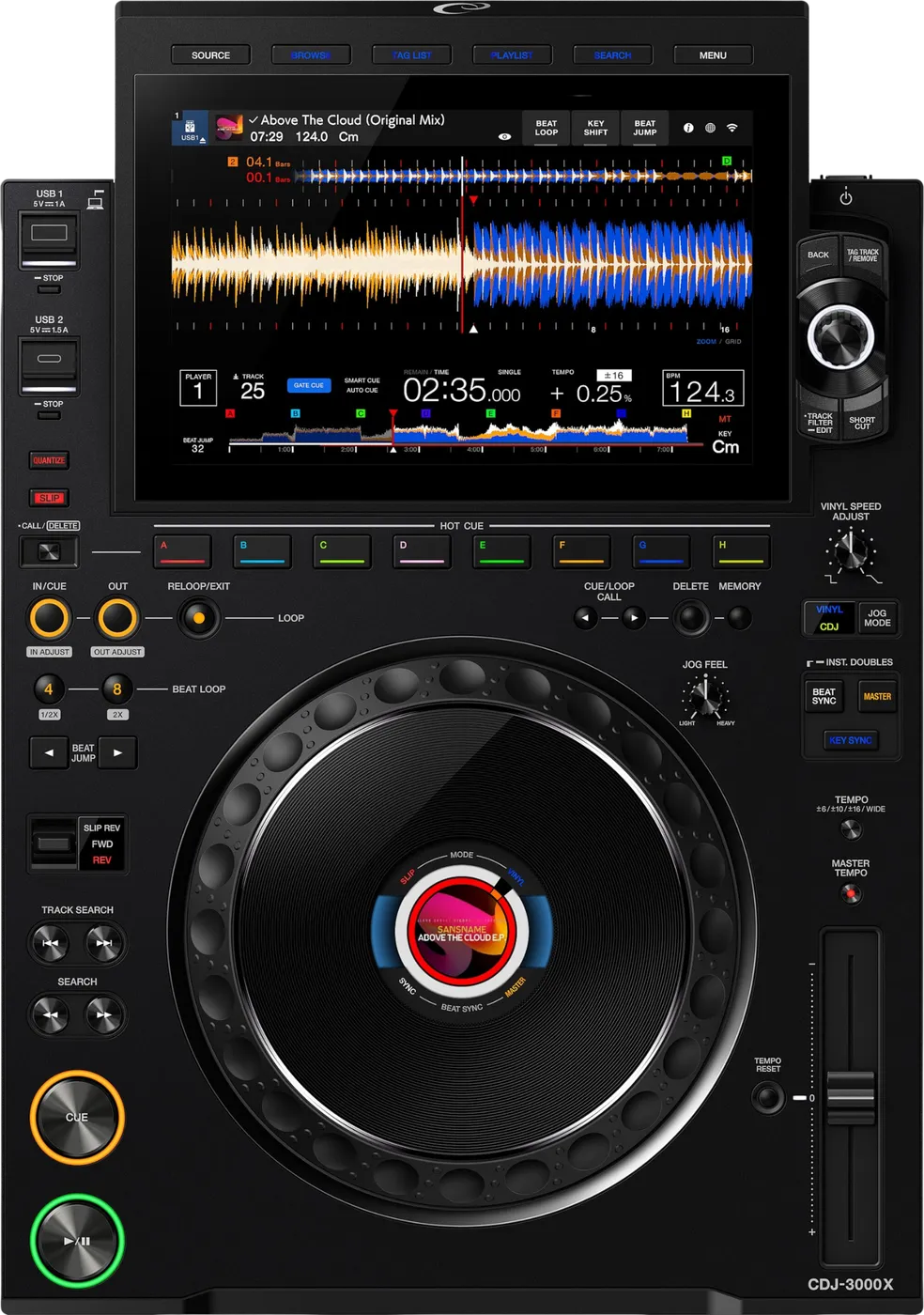
Booth briefing. The CDJ-3000X is AlphaTheta's newer player, sitting beside the CDJ-3000 in the range. It adds NFC login and drops the SD card slot, so tracks arrive on USB drives formatted FAT16, FAT32, exFAT or HFS+, never NTFS. It reads the OneLibrary format only, which rekordbox 7.2.13 or later writes on export, so one prepared stick covers the whole booth. PRO DJ LINK connects it to the older decks beside it.
When it goes wrong: The CDJ will not read the USB CDJ error E-8302 Playlists not showing
Fast Lane
The five things that decide your gig
The five things on the CDJ-3000X that change what happens next, if you are reading this in the booth. All five are explained in full further down this page.
It reads OneLibrary only. A Device Library drive shows no playlists.
There is no error and no warning. The drive mounts, the audio files are there, the playlists are not.
Most drives in circulation were exported for the Device Library generation, which is still most of the world's booths, so this is the surprise a working DJ is most likely to meet on this player.
There is no SD card slot, and only two ports take a drive.
Two ports take your stick, one USB-A and one USB-C. The third port is a second USB-C and it is for a laptop, not for your music. If your set lives on SD cards, this booth cannot read it at all.
Four drive formats read. NTFS does not.
Export from rekordbox 7.2.13 or later and one stick covers the whole booth.
That version writes OneLibrary and Device Library to the same drive, so the same stick opens on this deck and on the older ones beside it.
Make it your permanent export standard rather than a decision you take per gig, and run the one-time conversion on every drive you carry.
NFC login signs you in. It does not play music off your phone.
There is a touch area and an indicator on the front panel. Hold a phone running rekordbox for iOS or Android against it and you are into your cloud library.
What arrives after that comes down the venue's network, not off the handset. A booth with no working internet gets you a login and nothing to play, so it is a convenience, never the plan.
Compare
Playing on a different deck?
Pick the deck you are about to touch. This says what changes for the drive in your bag, and nothing else: the rest of what matters on that unit is on its own page.
If something goes wrong
USB mounts but playlists are missing
Short answer. The drive was almost certainly exported in Device Library format only, and the CDJ-3000X reads OneLibrary only. No error code, the stick mounts, the playlists simply are not there.
Why this happens. Most drives in circulation were exported for the Device Library generation (CDJ-3000, CDJ-2000NXS2), which is still most of the world's booths. This is the single most likely surprise a working DJ meets on this player.
Fix it now. Browse the drive itself: the manual documents that a storage device browsed without a readable rekordbox library shows its folder and track lists as a plain hierarchy, so the audio files can still be reachable. You lose cues and playlists, you keep the gig. With a laptop, re-export from rekordbox 7.2.13 or later, which writes OneLibrary and Device Library to the same drive once that drive has been converted: right-click OneLibrary on the device and choose Convert from Device Library, a one-time step per drive.
Avoid it next time. Make 7.2.13+ exports your permanent standard, not a per-gig decision, and run that conversion on every drive you gig with.
You arrived with an SD card
Short answer. There is no SD slot on the CDJ-3000X. If your music lives on SD cards, this booth cannot read them directly.
Why this happens. Storage on this unit is one USB-A and one USB-C, with a further USB-C for a computer, and the SD slot from earlier CDJ generations is gone. DJs who built an SD-based workflow on older decks meet this the hard way.
Fix it now. Borrow a USB stick, from another DJ, the booth drawer, or the promoter, and copy your music onto it with any available laptop; FAT32 the stick if the player refuses it. No laptop and no second drive is exactly the situation the emergency flow walks through.
Avoid it next time. Carry USB, not SD, as your primary.
Touchscreen frozen or unresponsive
Short answer. On the CDJ-3000X, do not cut the sound to fix a screen. If the track is still playing, keep mixing on the physical controls and treat the display as the problem, not the deck.
Why this happens. Any embedded touchscreen can lock up occasionally; there is no documented chronic freeze on this unit, and no documented behaviour for one either, so this page only tells you what not to do.
Fix it now. Finish the current track on the physical controls, shift new selections to another player, and restart the unit at a safe moment, never mid-track.
Avoid it next time. Never update firmware on gig day, and report a repeat-freezing unit to the venue or rental company with the firmware version from the utility menu.
The screen shows E-8304 or E-8305
On the CDJ-3000X this pair of codes is about one track rather than the drive, which is what separates it from the codes that stop a whole stick working.
E-8304 and E-8305 both mean UNSUPPORTED FILE FORMAT: the loaded file is in a format the player does not support. The fix is the file rather than the deck, and the supported format list in the Operating Instructions is what it has to match.
There is a full walkthrough for these two codes on this site: E-8304 and E-8305, in order.
Nothing from the internet is playing
On the CDJ-3000X the internet features are the ones that fail quietly in a venue, because nothing about the audio path depends on them. Wi-Fi, the cloud browser and the streaming services all fail here, and none of them touches the audio path.
For a player that will not join a wireless network, AlphaTheta ask you to check that the network name, the password and the encryption method on the deck match the router exactly, and then to treat it as a radio problem: move the deck and the access point closer together, and remove whatever is between them.
For rekordbox CloudDirectPlay showing no tracks, AlphaTheta give three causes and all three happen before the deck is involved. Either rekordbox has not finished synchronising with the cloud library, in which case the answer is to wait, or the tracks were never uploaded to Dropbox or Google Drive, in which case only what was uploaded can appear, or Dropbox or Google Drive is down or under maintenance, in which case nothing loads until the service is back. There is a fourth cause that is not about the cloud at all: tracks pulled from Dropbox or Google Drive are written temporarily onto the connected USB device, and AlphaTheta recommend at least 1 GB free on it for stable operation, so a nearly full stick can break cloud playback on a deck that is otherwise working.
Beatport Streaming and TIDAL fail the same way and are settled the same way: no service at all is the internet, a service that opens with an empty track list is the subscription.
What to watch for
Known issues, and what changes with the firmware
Short answer. The CDJ-3000X is a young unit and we have no verified, documented defect to report. This section was last checked against official sources on 30 August 2026.
What the firmware history shows instead is steady feature additions, which means a deck the venue has not updated may not do what you expect: introduced in 1.10, USB-HID control for Serato DJ Pro; introduced in 1.20, USB-HID for djay Pro; introduced in 1.40, Dark and Light display modes, firmware updates over the internet, and Wi-Fi Setting Duplication between units.
Do this. Check the firmware version on the unit before you rely on any of those. If you hit a genuine, repeatable fault on a specific firmware version, tell us what happened and we will verify it against official sources and document it here.
One caution about reading the firmware history itself. The change history document prints two entries under version 1.40, dated 8 January and 14 July 2026, while AlphaTheta publish a separate change history file that names the January release 1.31. Their firmware page listed one version, 1.40 of 14 July 2026, when this page was last checked. So a deck reporting 1.40 is the July build, and the change history is the document with the labelling problem rather than the deck.
One more thing the CDJ-3000X does that is not a fault.
One display behaviour that looks like a failing unit and is not: in a cold room the screen can stay dark for a while after power on and returns to normal brightness on its own, so an outdoor stage in winter is not a reason to power cycle the deck.
Compatibility
rekordbox, library format and PRO DJ LINK
Short answer. The CDJ-3000X is OneLibrary only. The Operating Instructions list FAT16, FAT32, exFAT and HFS+ as the file systems it reads, and state that NTFS is not supported. No SD slot: two ports take a drive, one USB-A and one USB-C, and a further USB-C connects a computer. PRO DJ LINK across generations, and USB-HID control for Serato DJ Pro (firmware 1.10+) and djay Pro (1.20+). Streaming is documented too: Beatport Streaming and TIDAL via StreamingDirectPlay, with Apple Music tracks added by firmware 1.31 of 8 January 2026.
Why it matters. The library format is the sharp edge; everything else about this deck coexists smoothly with the rest of the booth.
Do this. rekordbox 7.2.13 or later for every export; FAT32 remains the drive format that works on everything either way.
The unit is a Hardware Unlock device. AlphaTheta state that connecting a PC or Mac running rekordbox for Mac and Windows lets you use Performance mode, the DJ side of rekordbox, for free. rekordbox itself is not included with the player and is downloaded separately.
For Serato, AlphaTheta publish a connection guide covering this player, the CDJ-3000 and the CDJ-2000NXS2 together. It describes an interface giving high precision control of Serato DJ Pro without a control CD, and asks for the player’s firmware to be up to date and one USB cable per player to the computer.
Common mistakes. Converting a drive's library format without a fresh backup. Conversion rewrites the library on the drive, it can take a while on a big collection, and the manual notes a failed conversion turns CloudDirectPlay off. Convert onto a spare, not your only stick.
Features explained
NFC login, and what it does not do
Short answer. There is an NFC touch area and an indicator on the front of the unit. Hold an NFC-capable phone running rekordbox for iOS or Android against it and the player logs you in to rekordbox CloudDirectPlay.
Why it matters. It replaces typing a password on a deck in the dark with a phone against a panel. That is the whole of the feature, and it is worth knowing precisely because the name suggests more: it is a login, not a playback path. Your phone is the key, never the source.
Do this. Check the indicator first. The manual is explicit that you cannot log in while it is off; when it is off, or when you want to pick which player you are logging in to, use [Cloud Log In] on the [SOURCE] screen, choose the player, touch [LOG IN], and then read the tag. On rekordbox for iOS there is one more step the manual names: touch the notification on the phone to finish the login.
Common mistakes. Counting on it in a booth with no working internet. Everything it unlocks arrives over the venue's network, so a successful login in a dead room gets you a library you cannot hear. Carry the drive anyway. Keeping rekordbox for iOS or Android updated is the other half: the manual asks for an updated app before NFC login will work at all.
Professional tips
Working a booth that mixes this with older decks
Short answer. Treat the CDJ-3000X and everything older as two different library worlds sharing one Link chain, because that is exactly what they are.
Why it matters. Link happily syncs tempo across generations while each deck reads a different database from the same USB. The booth looks uniform; the format rules are not.
Do this. One export standard, rekordbox 7.2.13 or later, both formats on every stick, and the mixed booth becomes boring in the best way.
Common mistakes. Testing your drive only on the CDJ-3000X at soundcheck, then opening on the older deck at showtime.
Connections and setup
The rear panel, and everything that ships with it
The rear panel carries AUDIO OUT L and R for the supplied analog cable, a DIGITAL OUT for the supplied digital cable, a LINK port for the supplied LAN cable, a USB port for a PC or Mac and the AC inlet. There is no SD slot and no analog input: everything that plays comes in over USB, the network or the internet.
In the box: the player, a power cord, a digital audio cable, an analog audio cable, a LAN cable, the Quick Start Guide and the Precautions for Use.
The cables are the point. Every connection this player needs on day one is in the box, which is unusual, and it means an unboxed unit reaches a mixer, a network and a computer without a shopping trip.
PRO DJ LINK needs a LAN cable to a PRO DJ LINK compatible mixer and, for the computer half, a PC or Mac running rekordbox. AlphaTheta document two ways of feeding it: USB Export, which carries the library on a storage device, and rekordbox LINK Export, which streams it from the computer or a mobile device running rekordbox.
Plugging into a computer, and the step Windows cannot skip
Windows needs a driver before the cable goes in. AlphaTheta publish an exclusive ASIO driver for the Multi Player series and instruct that it is installed with the player powered off and the USB cable disconnected. macOS needs nothing: the driver software already in the operating system is used and no installation is required.
That is the asymmetry to plan around in a booth with two laptops in it. A Mac guest plugs in and works; a Windows guest who has never used this player needs an install and a restart before anything is heard.
Firmware, drivers and manuals
Official Downloads and Documents
Short answer. Go to AlphaTheta for the files themselves. We link their pages instead of hosting a copy, because a manual copied here is a snapshot of release day and theirs is the one that stays current.
Firmware downloads. Official AlphaTheta firmware page →
Manuals. Official AlphaTheta manual page →
Broken link? Let us know and we'll fix it.
Frequently asked questions
Quick answers
- Which drive formats does it read?
- FAT16, FAT32, exFAT and HFS+. Not NTFS.
- Can I use Device Library?
- No. OneLibrary only, so a stick exported for older decks mounts and shows nothing.
- Does it have an SD card slot?
- No. Storage is USB only, so bring a USB drive.
- Can I link with a CDJ-3000 or CDJ-2000NXS2?
- Yes, PRO DJ LINK works across generations. Whether playlists appear on each deck depends on which formats your USB carries, export with rekordbox 7.2.13+ and it carries both.
- Can I use it with Serato or djay?
- Yes, USB-HID control for Serato DJ Pro since firmware 1.10 and djay Pro since 1.20.
- Does it stream?
- Yes: Beatport Streaming and TIDAL via StreamingDirectPlay, with Apple Music tracks added by firmware 1.31 of 8 January 2026.
Commonly paired with
What you usually find beside it in working booths, from club, festival and rental installs rather than from a manufacturer document.
AlphaTheta All brands Knowledge base FAQ and Fixes Dictionary
Playing soon and it is not working?
Start Emergency ModeKeep the Emergency Card
We will email you the printable PDF so it is on your phone before the next dark booth. Occasional notes that save gigs. No spam, unsubscribe in one click.
Registering is free and counts everywhere on Save My Gig. We send a confirmation email first. Your address is stored with Brevo, our email provider. Unsubscribe any time. Privacy
Sources: the CDJ-3000X Operating Instructions (DRI1956-C) for the physical limits, the official CDJ-3000X firmware change history to 1.40 (14 July 2026) for every firmware version named above, and AlphaTheta's official support pages, all checked 30 August 2026. Specifications theirs, priorities ours.