

DJM-A9, the field manual
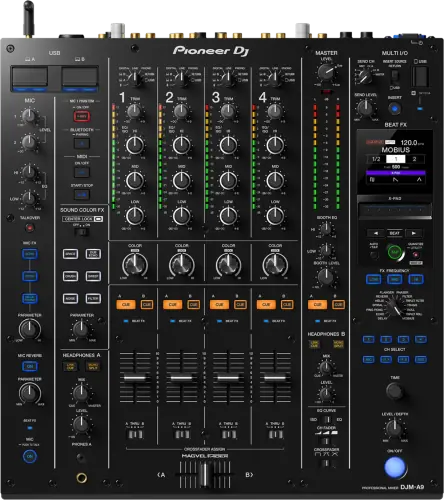
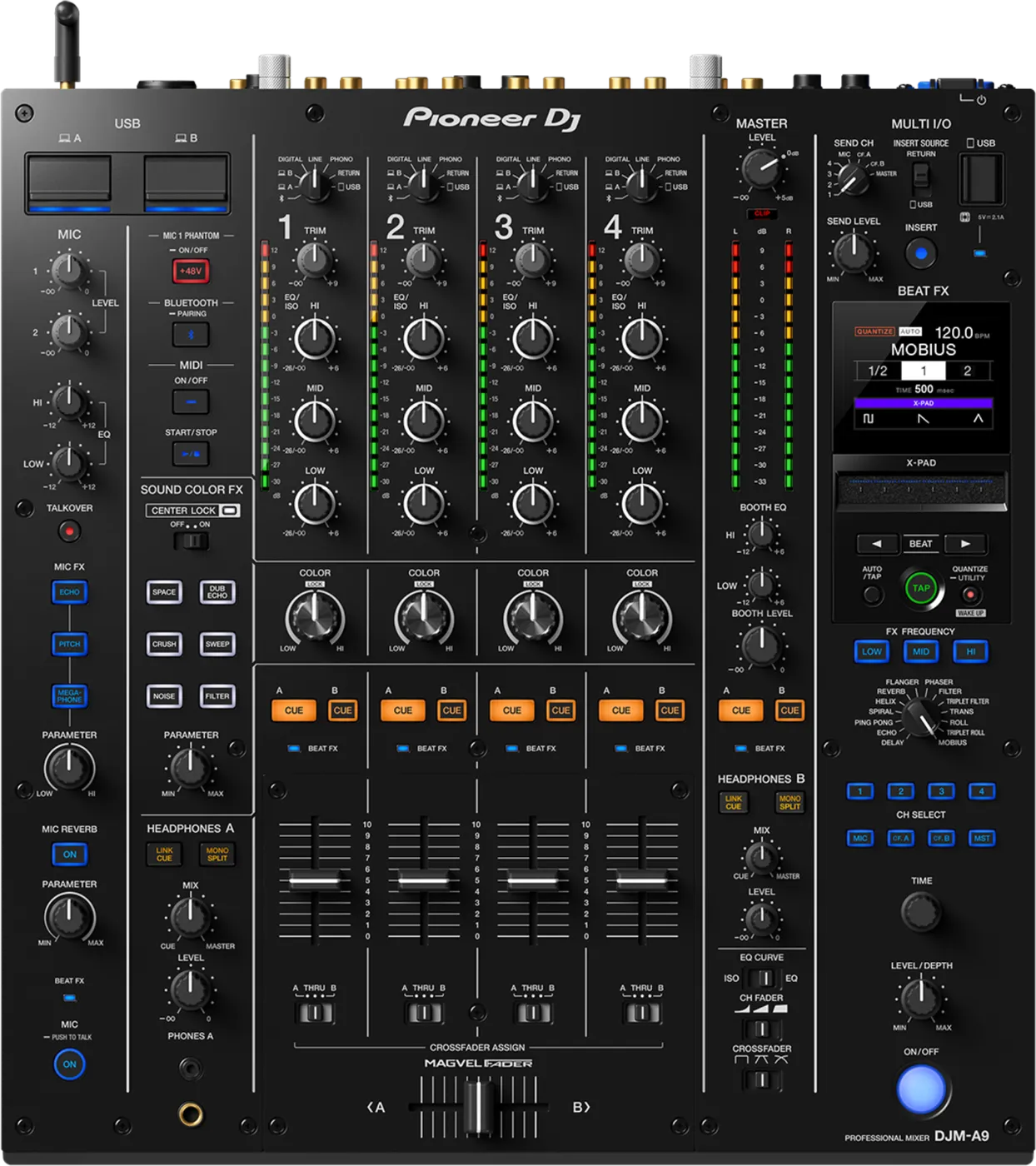
Booth briefing. The DJM-A9 is an AlphaTheta club mixer with PRO DJ LINK, so linked players and the mixer share one network, and it reads USB storage directly, including the fast UASP drives a prepared DJ carries, from firmware 1.07. It also carries built-in Bluetooth, which gives you an audio source with nothing else plugged in, a useful last resort. AlphaTheta publish and document its firmware, and the versions that matter, 1.07 and 1.11, are covered in the firmware section below, together with the emergency checks for a silent channel. Read the version off the unit before you rely on any of it.
When it goes wrong: No sound from the mixer PRO DJ LINK will not come up
Fast Lane
The five things that decide your gig
The five things on the DJM-A9 that change what happens next, if you are reading this in the booth. All five are explained in full further down this page.
A rare freeze under heavy PRO DJ LINK load, fixed in 1.11.
On this desk a frozen mixer is not folklore. AlphaTheta documented it and fixed it, so the version on the unit decides whether it can still happen.
A busy Link network is exactly the condition it needed, which is to say a full booth on a busy night.
Fast modern USB sticks were invisible to it until a firmware fix.
UASP-compatible drives, which is most quality sticks, were not recognised on early firmware while older sticks worked fine.
So the newer and better your drive, the more likely it was the one refused. Backwards, and documented.
Two laptops on the desk at once could kill the DVS phono input, until 1.02.
With a computer on each USB port, switching the input selector could break the DVS phono input on USB-B. An early, documented bug with a named fix.
It bites during a handover, which is the moment you have least time to diagnose anything.
Two independent headphone sections, so two DJs cue at once.
Separate level and mix controls on each. On single-output desks a back-to-back partner is sharing your cue or working blind.
Combined with two computer ports, the handover is a lane each rather than a negotiation.
It takes Bluetooth audio as a real input source.
A phone or laptop plays into the desk with no cable and no adapter, which is a genuine emergency route when a drive fails.
Worth testing at soundcheck rather than discovering the pairing behaviour with a room in front of you.
If something goes wrong
A channel has no signal
Short answer. Channel fader, crossfader assign, input selector, in that order, before suspecting the DJM-A9 itself.
Why this happens. Same as on any four-channel desk: the fader can be down, the crossfader assign can route the channel to the side you are not pushing, and the input selector can sit on a source that is not playing. On this desk there is one extra suspect: the Multi I/O section's channel selector, if an insert was left engaged on your channel by the previous DJ, the signal is detouring through gear that may not be returning it.
Fix it now. Fader up, assign checked, input selector matched to your source, then check the Multi I/O routing is not inserted on your channel. Still silent: move the source to another channel to isolate the strip.
Avoid it next time. A full routing pass before doors, including Multi I/O state, not just faders and trims.
A turntable sounds distorted, or TRIM does nothing
Short answer. Check what the turntable is sending before you touch anything on the DJM-A9. AlphaTheta give one symptom two ways of showing itself and one family of causes. If a turntable on the PHONO terminals sounds distorted, or the channel level indicator does not move at all when you turn TRIM, the signal reaching the mixer is line level and not phono level. Three things do that: a turntable with a built-in phono equalizer, which belongs on the LINE terminals instead; a turntable whose own PHONO/LINE switch is set to LINE; or an audio interface sitting between the turntable and the mixer that outputs line level, in which case the mixer input has to be LINE too.
Why this matters. The dead TRIM knob is the giveaway and it is the one people miss. A phono input expects a tiny signal and amplifies it enormously; feed it a line-level signal and TRIM has nothing left to do, which reads as a broken channel rather than a wrong socket.
Fix it now. Move the turntable to the LINE terminals and set the channel input to LINE. That is the whole fix when the deck has its own preamp, and it takes ten seconds.
Avoid it next time. Know whether your turntable has a built-in phono stage before the gig, and if it has a PHONO/LINE switch, know which way you leave it. A borrowed deck is the one that catches you.
Mixer frozen mid-set
Short answer. On the DJM-A9 that is not folklore: a rare freeze under heavy PRO DJ LINK network load was documented and fixed in firmware 1.11.
Why this happens. Booths running full Link chains (players, lighting, Stagehand) push exactly the network load the fix addressed. A desk still on older firmware can still do it.
Fix it now. Audio that is already routed usually keeps passing; do not power-cycle in a panic while sound is still coming out. If the desk is truly locked, a restart is the only path, time it to a track with a long runway, and warn the floor manager first.
Avoid it next time. Firmware 1.11 or later on any A9 you control, and report the version to the venue when a rental unit freezes.
A USB drive the mixer refuses to see
Short answer. If a modern, fast USB stick is invisible to the DJM-A9 while older sticks work, that was a documented bug: UASP-compatible drives were not recognized until firmware 1.07.
Why this happens. UASP is the faster protocol most quality drives ship with, exactly the drives a professional carries.
Fix it now. Try an older or cheaper stick for the mixer-side job, which is the firmware update itself, and get the desk updated to 1.07 or later after the gig.
Avoid it next time. Keep one plain, non-UASP stick in the bag for mixer duties; it is also the stick you can lend without pain.
The manufacturer’s own note on it. The note attached to that release is the part worth reading twice: to apply the update you have to use a non-UASP USB storage drive, and UASP drives work only afterwards. So the drive that exposes the fault is the drive that cannot carry the fix, and a DJ whose only fast stick is UASP has to borrow a slower one to get out of it.
The MULTI I/O effects chain does nothing
Short answer. Look at the DJM-A9 before you look at the cable. Five checks, and the cable is only one of them. Choose the channel to be treated with the CH SELECT button. Make sure an external effects unit is on the SEND and RETURN terminals properly, or that a mobile device is on the mobile device connection terminal with its FX application actually launched. Set the INSERT SOURCE selector switch correctly. And turn the INSERT button on. If sound does come back but distorted, AlphaTheta point at the external unit's own volume rather than anything on the mixer.
Why this matters. Four of the five are settings on the mixer and none of them announces itself. A correctly patched effector or a phone with the right app installed will sit there in silence until all five agree, and the natural instinct is to reseat cables that were never the problem.
Fix it now. CH SELECT, then the connection, then INSERT SOURCE, then INSERT on. If a channel has gone quiet rather than the effect being absent, take INSERT off first so the music comes back while you work.
Avoid it next time. Prove the chain passes signal at soundcheck, and if you are using a phone, launch the app before you go looking for the fault.
Wi-Fi or Bluetooth will not connect
Short answer. The DJM-A9 carries both radios, and AlphaTheta separate the failures rather than lumping them. For Wi-Fi, AlphaTheta separate three failures. WPS not working means checking the router actually supports WPS and using another method if it does not. Not joining an access point means the network name, the password and the encryption method on the mixer have to match the router exactly. And an access point that cannot be found at all is treated as a radio problem: close the distance, remove what is between them. For Bluetooth the answers are shorter: power both off and on and pair again, and for interrupted sound, distance and obstacles again.
Why this matters. Wireless on a club mixer is a convenience layer, and it is the layer most likely to fail in a room full of other transmitters. Knowing which of the three Wi-Fi failures you have saves you from re-entering a password that was never wrong.
Fix it now. Nothing here is worth a set. If the wireless will not come up, play from the wired inputs and sort it in the break.
Avoid it next time. Join the network and pair the phone at soundcheck, not when you need them.
DVS input dead after swapping laptops
Short answer. A documented early DJM-A9 bug that broke the DVS phono input on USB-B, fixed in firmware 1.02.
What actually triggers it, which is not what it looks like. Read the change history closely and the documented trigger is switching the input selector while a computer is connected to each of the two USB ports at once, not moving one laptop between them. Two machines attached at the same time is the condition; the control that sets it off is the input selector. That matters because avoiding the wrong thing is the same as not avoiding anything.
Fix it now. Re-select the input source for the channel, and if it stays dead, restart your DJ software. A desk on 1.02+ does not do this.
Avoid it next time. On a version below 1.02, the safe shape for a B2B DVS set is one computer connected at a time, handing the port over rather than both laptops living on the desk at once.
What to watch for
Documented fixes, by firmware version
Short answer. Three entries in the official DJM-A9 change history matter in the real world. Fixed in 1.11: the rare freeze under heavy PRO DJ LINK network load. Fixed in 1.07: UASP-compatible USB drives not recognized. Fixed in 1.02: the insert method intermittently disabling itself when switching the Multi I/O input selector, and the DVS phono input malfunction on USB-B after swapping computers across ports.
One behaviour change, not a bug: introduced in 1.05, power management follows the EU Ecodesign 20-minute timing. It is conditional rather than a plain timer: Off mode needs both no audio and no PRO DJ LINK connection, ships on, and is cancelled with the QUANTIZE/UTILITY (WAKE UP) button. So a booth with a live Link cable does not do this at all, and a standalone desk left up between soundcheck and doors does. The way back is a button, not the mains switch.
Do this. On an A9 you control, sit at 1.11 or later, updated between bookings.
Compatibility
Players, software and PRO DJ LINK
Short answer. The DJM-A9 does PRO DJ LINK across player generations, one USB-A port plus two USB-B/USB-C computer ports, Bluetooth audio in, Wi-Fi for Stagehand monitoring.
Why it matters. The mixer does not care which library format your USB carries, that is a player-side question. What it does care about is firmware when the Link chain is big and busy, see the freeze fixed in 1.11.
Do this. Confirm your DVS or software licence covers this desk before soundcheck, and check the firmware version when walking into an unfamiliar A9 booth.
Features explained
The Bluetooth input
Short answer. The desk accepts wireless audio from a phone or laptop as an input source, no cable, no adapter.
Why it matters. This site's emergency doctrine treats playing off a phone as the unnumbered last resort, mostly because nobody carries the right cable. On an A9 booth, the cable problem is gone: if every drive and every player has failed, a phone pairs straight into the desk and the room stays alive while you work the real fix.
When professionals use it. Warm-up and handover moments, and as the bridge that buys minutes in a genuine multi-failure gig.
Three conditions, and the first one can be missing before you arrive. Bluetooth needs the wireless antenna fitted, which the manual says to remove for transport, pairs one device at a time, and loses the first pairing when a second device is paired. The antenna is the one that turns this from a rescue into a dead end: a rental desk that travelled in a case may well have had it taken off, exactly as the manual instructs, and nobody put it back. If you are counting on this as your last resort, look at the rear panel at soundcheck rather than at the moment you need it.
Common mistakes. Treating it as a set medium rather than a bridge, forgetting to kill the phone's notification sounds before pairing it to a club system, and pairing a second phone during a handover, which unregisters the first one.
Two independent headphone outputs
Short answer. Two headphone sections with separate level and mix controls, so two DJs cue independently at the same time.
Why it matters. On single-output desks, B2B partners share one cue bus and fight over the mix knob. Here each side owns its own.
When professionals use it. Every back-to-back, and handovers where the incoming DJ pre-cues while the outgoing one still monitors.
Common mistakes. Diagnosing "dead headphones" on the output whose level knob a previous DJ zeroed; check both sections before blaming your cans.
Beat FX, including the three newer ones
Short answer. 14 Beat FX types, including Mobius, Triplet Filter and Triplet Roll, which did not exist on the DJM-900NXS2.
Why it matters. Beat-synced effects land musically without manual tapping, and Mobius in particular builds endless-riser tension out of any source.
When professionals use it. Transitions and builds, sparingly, the same discipline as on any FX desk.
Common mistakes. Same as every DJM: leaving an effect engaged after the mix, and trusting a wrong BPM read, confirm it before a beat-synced effect goes to the room.
Professional tips
The A9 handover routine
Short answer. The desk is built for clean handovers, two computer ports, two headphone sections, but only if both DJs claim their lane before the set, not during it.
Why it matters. The documented DVS port-swap bug (fixed in 1.02) happened exactly in hot-swap moments, and the Multi I/O insert state carries over between DJs silently.
Do this. Agree ports and headphone sections at soundcheck, and make Multi I/O state part of your takeover glance: trims, faders, assign, insert.
Common mistakes. Inheriting the previous DJ's insert routing without noticing until your channel sounds wrong.
Connections and setup
The digital output, and the setting that silences it
Short answer. If the digital output produces nothing, the SAMPLING RATE for DIGITAL MASTER OUT in the utility settings has to be one the connected equipment supports. AlphaTheta file this under troubleshooting rather than setup, which tells you how often it is met as a fault rather than as a decision. A digital cable carrying an unsupported rate carries silence, and looks exactly like a broken cable.
Reading it in the booth. A DJM-A9 feeding a house system digitally is a normal install, and this is the one output where a number in a menu and a severed cable produce identical symptoms. Check the setting first, because it is free and the cable run is not.
Preventive maintenance
Keeping the desk reliable
Short answer. Connector care over everything, and firmware current between bookings.
Why it matters. This desk's real documented issues were all firmware, fixed in updates; the hardware faults that remain are the universal ones, worn USB and RCA connectors from years of swaps.
Do this. Unplug by the connector, inspect cables before they go in the bag, keep the desk covered in transport, and hold firmware at 1.11+ with updates timed away from gigs.
Firmware, drivers and manuals
Official downloads and documents
Go to AlphaTheta for the files themselves. We link their pages instead of hosting a copy, because a manual copied here is a snapshot of release day and theirs is the one that stays current.
Manuals. Official Pioneer DJ manual page →
Broken link? Let us know and we'll fix it.
Frequently asked questions
Quick answers
- Does the library format (Device Library or OneLibrary) affect this mixer?
- No, only players read the USB library. The mixer receives audio and Link data.
- Can I play from a phone through it?
- Yes, over the built-in Bluetooth input, with conditions worth checking first: Bluetooth needs the wireless antenna fitted, which the manual says to remove for transport, pairs one device at a time, and loses the first pairing when a second device is paired. Treat it as a bridge, not a set medium.
- Can two DJs cue at the same time?
- Yes, two independent headphone sections with separate level and mix.
- Can I link it with CDJ-2000NXS2s or CDJ-3000s?
- Yes, PRO DJ LINK works across generations.
- Why does it refuse my fast USB stick?
- Firmware older than 1.07 did not recognise UASP drives. Update the desk, or use a plain stick.
Where this sits in the line
- Previous generation DJM-900NXS2
Related mixers
Pioneer DJ All brands Knowledge base FAQ and Fixes Dictionary
Playing soon and it is not working?
Start Emergency ModeKeep the Emergency Card
We will email you the printable PDF so it is on your phone before the next dark booth. Occasional notes that save gigs. No spam, unsubscribe in one click.
Registering is free and counts everywhere on Save My Gig. We send a confirmation email first. Your address is stored with Brevo, our email provider. Unsubscribe any time. Privacy
Sources: AlphaTheta's official DJM-A9 firmware change history and specification pages, checked 26 July 2026. Specifications theirs, priorities ours.