

RMX IGNITE, the field manual
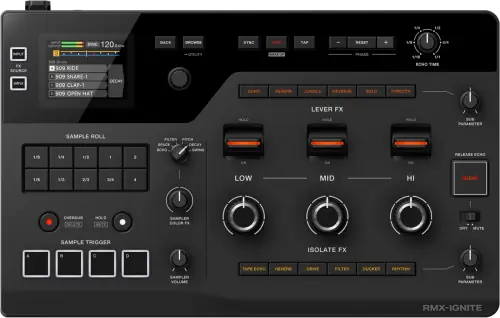
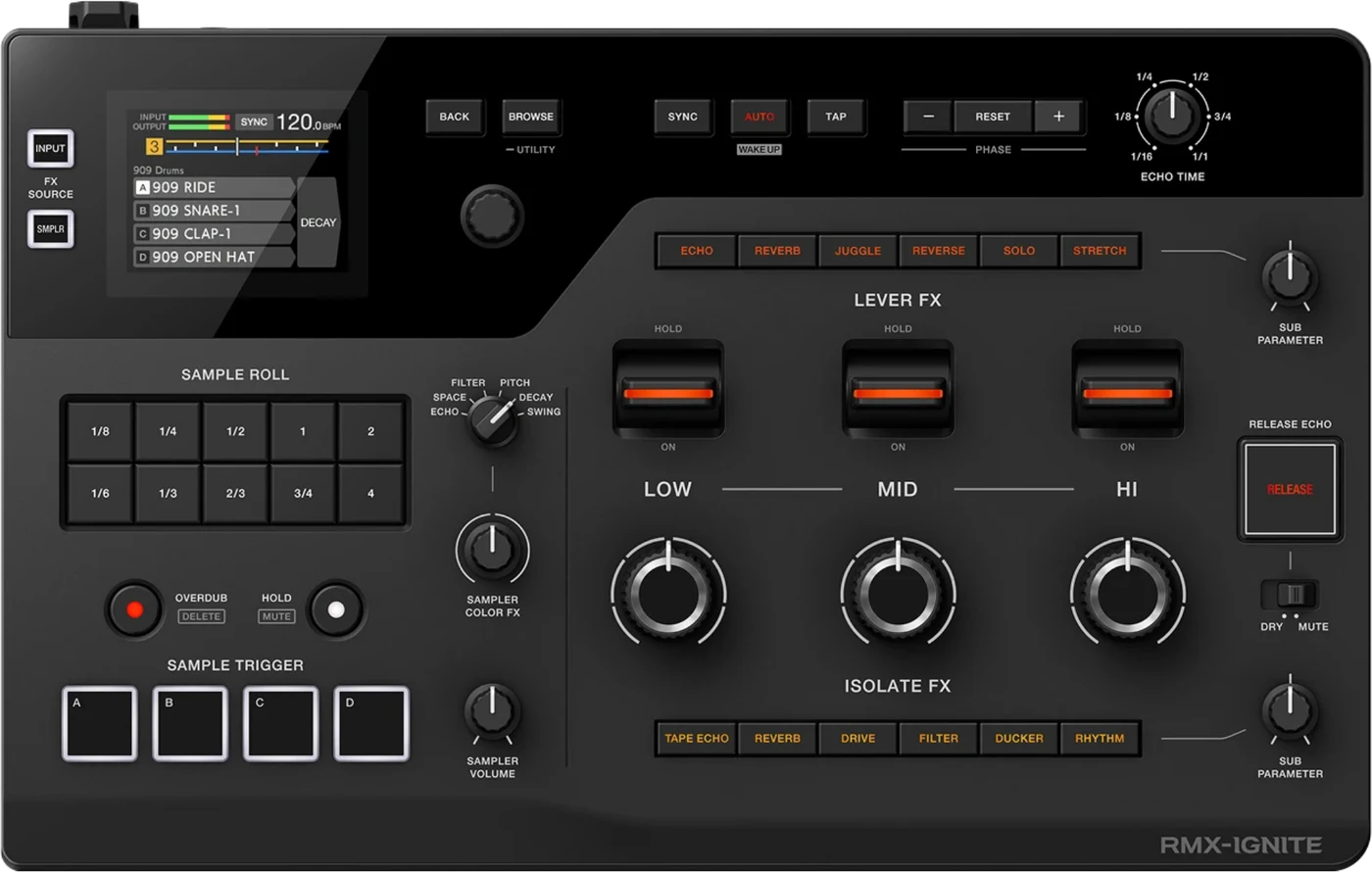
Booth briefing. The RMX-IGNITE is AlphaTheta's effector, and which of its four ways into a booth you get is decided before you arrive. One USB-C cable carries digital send and return into a DJM-A9 or DJM-V10, but only if that desk runs the firmware that added support. An analogue loop works with any mixer that has one, inline on the master out works everywhere, and it can also sit between a player and the mixer. On top of any of them, PRO DJ LINK over LAN brings BPM and grid from the players.
When it goes wrong: PRO DJ LINK will not come up
Fast Lane
The five things that decide your gig
The five things on the RMX IGNITE that change what happens next, if you are reading this in the booth. All five are explained in full further down this page.
There are four ways into a booth, and you do not choose which.
Digital MULTI I/O over one USB Type-C cable with a DJM-A9 or DJM-V10. An analogue send and return loop on quarter-inch TS jacks with any mixer that has one. Inline on the master out, between mixer and amplifier, on an RCA phone conversion cable. Or between a player and the mixer, AUDIO OUT to the unit to a LINE input.
All four are official and all four are different patches with different cables. Which one you get is decided by the booth you walk into.
The one-cable path depends on firmware in somebody else’s mixer.
RMX-IGNITE support arrived in the desks' own firmware on 15 January 2026, 1.19 for the DJM-A9 and 1.20 for the DJM-V10, the same day the effector was announced.
A desk sitting below its version has no idea what is on the other end of that USB Type-C cable. Check the desk before you suspect the cable or the unit.
Sync does not travel down the audio connection.
PRO DJ LINK here is a wired LAN feature, 100BASE-TX. The LAN terminal has to be cabled into the same network as the players before any BPM or beat grid arrives.
A perfectly patched effector with no LAN cable measures nothing from the players, and a booth switch with no free port is a real problem rather than a detail.
A loop switched in with the unit unplugged is a dead channel.
With the loop engaged, the desk sends the signal out and plays back whatever returns. If nothing returns, nothing plays.
That is a routing fact about any send and return loop, not a fault of this unit. The effector being powered off, a half-seated jack or a swapped send and return all sound identical.
Ask three questions before you pack one cable.
Which mixer is installed, what firmware is it on, and is there a free port on the Link switch.
Those three answers decide whether you pack one USB Type-C cable, a pair of jack cables, or an RCA phone conversion cable for the master chain. An effector you cannot patch is dead weight.
If something goes wrong
It will not power up, or the screen is blank
Short answer. Two different things look like a dead unit and neither is. If it does not power up at all, AlphaTheta ask you to check the AC adapter is connected correctly and to press the power switch on the rear, which is where it lives rather than on the top surface. If the screen shows nothing but the unit is on, the Power Management function has put it into Off mode, and the AUTO (WAKE UP) button is what brings it back.
Why this matters. The RMX IGNITE sits in a rack or on a shelf with its back to the wall, which is exactly where its power switch is. And a blank screen on a unit that is still passing audio reads as a half-dead machine when it is a sleeping one.
Fix it now. Press AUTO (WAKE UP) before you touch anything else, because if Power Management is what happened that is the entire fix and it costs one press. Then reach round the back for the switch, then the adapter.
Avoid it next time. Learn where the power switch is before the unit is racked, and know that AUTO doubles as the wake button so you are not hunting for it with a room waiting.
The jacks went silent when the USB cable went in
Short answer. This one is in the RMX IGNITE manual, and it catches people who patch both paths for safety. The single USB Type-C cable and the quarter-inch jacks are not additive, they are exclusive. AlphaTheta state that while audio is being input or output through the USB for MULTI I/O port, audio cannot be input or output through the INPUT and OUTPUT terminals, and their own troubleshooting repeats it: if the mixer is connected to MULTI I/O, sound does not come out of the jacks. Three utility settings go quiet with them, because ANALOG OUT TUNE, INPUT MONO/STEREO and OUTPUT MONO/STEREO are not reflected in the sound while that port is carrying the audio.
Why this matters. Patching both looks like belt and braces and it is the opposite. A DJ who cables the USB to the desk and leaves the jacks in as a backup has not built a backup, they have built a pair of dead sockets, and the failure only shows up when they try to fall back to them.
Fix it now. Unplug the MULTI I/O cable and the jacks come alive. That is the whole switch, and it is also why the analogue loop is a real fallback rather than a parallel path.
Avoid it next time. Decide which path you are on before the set and patch only that one. If you want the jacks as the emergency route, keep them coiled next to the unit rather than plugged into it, so the change is deliberate.
The DJM-A9 or DJM-V10 does not take it over the USB cable
Short answer. Check the desk's firmware before you suspect the cable or the unit. RMX-IGNITE support arrived in the desks' own firmware on 15 January 2026, 1.19 for the DJM-A9 and 1.20 for the DJM-V10, the same day the effector was announced. A desk sitting below its version has no idea what is on the other end of that USB Type-C cable.
Why this happens. The single-cable path is digital MULTI I/O, send and return both ways over one USB Type-C connection, and it is a negotiation between two pieces of firmware rather than a passive audio cable. The desk side of that negotiation did not exist until those releases. Any A9 or V10 installed before mid January 2026 and never updated since is exactly the desk you will meet in a booth.
Fix it now. Move to the analogue loop. The quarter-inch TS send and return jacks work with the same desks with no firmware requirement at all, so the set survives on a pair of jack cables. Do not update a venue's mixer firmware at the gig to solve this, gig day is a freeze on this site for a reason.
Avoid it next time. When you ask which mixer is installed, ask its firmware version in the same message. On a desk you control, update it between bookings and test the single-cable path at home before you rely on it in a room.
The sound is distorting
Short answer. AlphaTheta give distortion three checks and the main screen tells you which one you are in. First the rear CONNECTION switch, which has to match what is feeding the INPUT: CDJ for a player's line output, SEND/RETURN for a mixer's send, MST for a master signal. Then the screen: CLIP INPUT or CLIP IN/OUT means the source is too hot and the answer is to turn the input source down, while CLIP OUTPUT means the unit's own effect is what is clipping and the answer is to adjust the effect instead.
Why this matters. Distortion from an effector normally sends a DJ hunting through the desk, and here the RMX IGNITE tells you where the problem is if you look at it. The difference between the two clip readings is the difference between reaching for the source and reaching for the effect, and reaching for the wrong one makes it worse.
Fix it now. Read the main screen first, then act on what it says rather than on instinct. If nothing is clipping at all, the rear CONNECTION switch is in the wrong position for what is feeding the input, and that is a level mismatch rather than a level problem.
Avoid it next time. Set the CONNECTION switch as part of patching, not as a thing you discover, and check the input meter at soundcheck so you know what a clean level looks like on this unit.
The BPM is missing, wrong, or belongs to another player
Short answer. Three different tempo faults with three different answers. If no BPM or grid arrives at all, sync travels over the LAN and not over the audio cable, so the LINK terminal has to be cabled into the same 100BASE-TX network as the players. If AUTO measures nothing or measures wrongly, AlphaTheta ask you to bring the input level up until INPUT on the peak level meter lights close to yellow, and to use TAP for tracks whose tempo will not measure. And if the BPM being shown belongs to a different player than the one you are listening to, check that the player number is set correctly, and with the CONNECTION switch on CDJ either set AUTO REF. PLAYER to OFF in the utility settings or move the switch.
Why this matters. The RMX IGNITE times everything it does from a tempo, so a wrong tempo is not a cosmetic fault, it is every effect landing in the wrong place. The last case is the cruel one: the unit is confidently showing a number, it is just the number from a deck nobody is listening to.
Fix it now. If nothing is arriving, find a free port on the booth’s Link switch and cable in. If a number is there but wrong, hit TAP and carry on with your own timing while you sort the rest out. TAP always works and needs nothing from the network.
Avoid it next time. Put a LAN cable and a small switch in the bag next to the audio cables, add a free Link port to the questions you ask about the booth, and set the player numbers to match the mixer channels when you patch rather than afterwards.
A sample will not play, or will not stop
Short answer. The sampler has its own set of documented answers. A sample that will not stop is either a slot set to loop, where pressing the SAMPLE TRIGGER pad again stops it, or a SAMPLE ROLL button held on by the Hold function, where the HOLD/MUTE button turns Hold off. A sample assigned to a slot that will not play at all usually means the storage media it came from has been disconnected from the unit or the multi player, which unloads it. For a USB device the unit does not recognise, AlphaTheta ask for a direct connection rather than a hub, and name the file systems the unit supports: FAT16, FAT32, HFS+ and exFAT. A file longer than 16 seconds cannot be loaded even in a supported format, and the volume balance between samples cannot be set on the unit at all, only in RMX-IGNITE Sample Manager.
Why this matters. A sample that will not stop is louder than a sample that will not start, and both have answers that are a button rather than a repatch. The one worth carrying is the media rule: the RMX IGNITE does not keep a copy of what you loaded, so pulling the stick out of the player it came from takes the sample with it.
Fix it now. For a runaway sample, press the SAMPLE TRIGGER pad again, then HOLD/MUTE if it keeps going. For a silent one, check the storage media is still where it was when you loaded it.
Avoid it next time. Prepare the banks in Sample Manager, set the volume balance there because the unit cannot do it, keep every file inside 16 seconds, and leave the media connected for the whole set.
The mixer channel went quiet with the loop engaged
Short answer. A send and return loop that is switched in on the mixer while the external unit is unplugged, powered off or mispatched sounds exactly like a dead channel. This is a mixer-side routing fact about any loop, not a documented fault of this unit.
Why this happens. With the loop engaged, the desk sends the signal out and plays back whatever returns. If nothing returns, nothing plays. The effector's own power state, a half-seated jack, or send and return cables swapped at one end all produce the same silence, and the channel meter upstream of the loop can still move.
Fix it now. Disengage the loop on the mixer first, which restores the channel and buys you time. Then check power, then both jacks, then that send goes to input and output goes to return rather than the reverse.
Avoid it next time. Make engaging the loop the last step of patching, after the unit is powered and passing signal, and disengage it before you unpatch.
What to watch for
Firmware and known issues
Short answer. RMX IGNITE is a young unit, announced 15 January 2026, and its published record holds two entries. One of them is a real defect fix on the unit's headline path, so the version on the unit matters.
The record. Firmware 1.01, released the day the unit was announced, "Fixed issues when connected to mixers such as the DJM-A9 and DJM-V10", which is the digital MULTI I/O path this page opens with, and "such as" is AlphaTheta's own open-ended wording. Firmware 1.03, 17 February 2026, added a Utility item that shows the ECHO TIME knob setting on the screen, plus unspecified minor fixes.
What that means in a booth. A launch-day unit still on 1.00 carries a documented connection defect against the exact desks the single-cable path exists for. Updating past 1.01 is part of making the digital path dependable, alongside the desk-side firmware floor.
Do this. If you hit a genuine, repeatable fault on a specific firmware version, tell us what happened and we will verify it against official sources and document it here.
Compatibility
PRO DJ LINK, what it adds here
Short answer. A wired LAN connection, 100BASE-TX, that brings BPM and beat grid from the players into the effector, so RMX IGNITE beat-based effects and rolls run against the players' grid instead of a listening guess.
Why it matters. The RMX-1000 never had this. It measured or was tapped, for its whole service life. Grid-locked effects from the booth's own network is the single biggest operational difference between the two units, and it only exists when the LAN cable is in.
When professionals use it. Any booth with a Link network and a free port. The sync path is independent of the audio path, so it works the same whether the audio is digital, in a loop or inline.
Common mistakes. Assuming sync arrives with the audio cable, and assuming the booth switch has a free port without asking. Both are five-second questions before the gig and problems during it.
Features explained
3-Band FX: Lever FX, Isolate FX and Release Echo
Short answer. The effects work per frequency band, high, mid and low, each band with its own control. Lever FX are Echo, Reverb, Juggle, Reverse, Solo, Stretch. Isolate FX are Tape Echo, Reverb, Drive, Filter, Ducker, Rhythm. Release Echo, with Dry and Mute behaviours, handles the exit.
Why it matters. Band-split effects change what an effector does in a set. An echo on the high band leaves the kick untouched, a filter on the low band is a bassline tool rather than a whole-mix wash, and the exit is a designed move rather than a fader grab. The processing behind it is 96 kHz sampling, 32-bit converters, on the main screen.
When professionals use it. Isolate FX as the standing texture per band, Lever FX as the committed moment, Release Echo as the way out of both. Deciding the exit before the entry is the habit that separates an effect from an accident.
Common mistakes. Working all three bands at once from the start, which is the whole mix again and wastes the point of the split, and reaching for an effect before knowing how it will end.
The sample section, and loading your own sounds
Short answer. SAMPLE TRIGGER pads that play the sound assigned to each slot, SAMPLE ROLL buttons that roll it against the beat, Groove Roll when several are held, and Sampler Color FX to process the sample sound itself. Your own material loads as WAV or AIFF through the USB for SAMPLER port, managed with the RMX-IGNITE Sample Manager software for Mac and Windows, and a music file whose length exceeds 16 seconds cannot be loaded, even in a supported format.
Why it matters. The RMX-1000 generation loaded custom sounds from an SD card. Here the workflow is a USB-A stick and a desktop application, so preparing your sample set is home work, done before the gig, in the same spirit as preparing a music USB.
When professionals use it. Signature stabs, drops and tags prepared in Sample Manager, triggered from the pads, rolled against the grid once PRO DJ LINK is cabled so the patterns land in time.
Common mistakes. Arriving with samples that exist only on the stick. Keep the Sample Manager library on the laptop as the master copy and treat the stick as an export, like every other drive a DJ carries.
Professional tips
Ask three questions before you pack one cable
Short answer. Which mixer is installed, what firmware is it on, and is there a free port on the Link switch. The answers decide whether you pack one USB Type-C cable, a pair of jack cables, or an RCA phone conversion cable for the master chain.
Why it matters. All three connection paths work, but they are different patches with different cables, and the digital path adds a firmware condition on someone else's desk. An effector you cannot patch is dead weight, and the ten minutes this costs at booking time is the difference.
Do this. A DJM-A9 on 1.19 or a DJM-V10 on 1.20 or later means one USB Type-C cable. Any other desk with a send and return loop means jack cables. Neither means the inline route on the master out, which is also the patch that touches the house system, so clear it with whoever owns that signal chain first. Pack the LAN cable in every case.
Connections and setup
The four ways into a booth
Short answer. Four official audio paths, all from the manual's Connections chapter. Digital MULTI I/O over one USB Type-C cable with a DJM-A9 or DJM-V10. An analogue send and return loop on quarter-inch TS jacks with any mixer that has one. Inline on the master out, between the mixer and the amplifier, on an RCA phone conversion cable. Or between a multi player and the mixer. Whatever the patch, the rear CONNECTION switch matches the input level to the path: CDJ for a player’s line output, SEND/RETURN for a mixer’s send, MST for a master signal.
The digital path. One cable, send and return both ways, no analogue conversion in the loop. The DJM-A9 and DJM-V10 are the two desks documented for it, and it needs the desk firmware that added RMX-IGNITE support, 1.19 on the A9 and 1.20 on the V10, both released 15 January 2026. This is the path with a hidden condition on hardware you may not control, so it is the one to confirm in advance.
The analogue loop. quarter-inch TS send and return jacks, and it works with any desk that has a loop, which is what makes this unit bookable into rooms that will never contain an A9. No firmware condition on either side.
Inline on the master. The whole mix passes through the unit on its way to the amplifier, on an RCA phone conversion cable. It works in any booth at all, including desks with no loop, and it also means the whole set's audio depends on your unit and your cables, so it is the path to choose deliberately rather than by default. The manual adds one hard rule for these terminals: "Never connect devices capable of supplying phantom power to these terminals."
Between a player and the mixer. The unit sits between a multi player and the DJ mixer, from the player’s AUDIO OUT into the unit and on into a LINE input on the mixer, both legs on RCA phone conversion cables, with the CONNECTION switch on CDJ. That processes one player's signal before it ever reaches the desk, so it works on a mixer with no loop and leaves the rest of the desk untouched.
Common mistakes. Packing only the USB Type-C cable on the strength of "the booth has an A9", then meeting firmware 1.18. Carry the jack cables as well, they are the fallback that needs nobody's permission. And check the CONNECTION switch matches the patch: a wrong position is a level mismatch, which reads as distortion or a whisper.
The rear panel, socket by socket
What is back there. The rear panel carries the OUTPUT terminals on quarter-inch TS for a mixer's return, the INPUT terminals on quarter-inch TS for a mixer's send, the CONNECTION switch, the LINK terminal for PRO DJ LINK over a 100BASE-TX switching hub, a USB Type-A port for the sampler's storage, a USB Type-C port for MULTI I/O, a USB Type-C port for power and the power switch itself. Up to six multi players and one DJ mixer can sit on the Link network through a switching hub, and AlphaTheta ask that each player's number match the mixer channel its audio cable is on.
The one prohibition. AlphaTheta are explicit about the INPUT terminals: "Never connect devices capable of supplying phantom power to these terminals." On a unit that gets patched into whatever desk is installed, that is worth knowing before somebody hands you a cable from a channel with phantom on it.
The switch that decides everything else. the rear CONNECTION switch matches the input level to the path: CDJ for a player’s line output, SEND/RETURN for a mixer’s send, MST for a master signal Set it when you patch. A wrong position is not a broken unit, it is a level mismatch that sounds like one.
Preventive maintenance
Keeping it gig-ready
Short answer. Firmware between bookings, connector care on the small unit that travels, and a sample library that exists in more than one place.
What AlphaTheta ask for. AlphaTheta's own care instruction is short: wipe with a dry soft cloth, and do not use organic solvents, acids or alkalis. Two screen behaviours they document are not faults either. In cold places the display may be dark for a while after power on and returns to normal brightness by itself, and in direct sunlight the reflection makes it hard to read, which is a shading problem rather than a brightness one.
Why it matters. This is a 2.3 kg unit that lives in a bag, and its ports, USB Type-C, USB-A, quarter-inch jacks and LAN, are its entire usefulness. A bent connector on a mixer is a service call for the venue, the same bend on the unit you carry is your problem at every gig that follows.
Do this. Check the official pages between bookings, never on gig day. Pack and unpack by the connector, not the cable. Keep the Sample Manager library current on the laptop so a lost stick costs an export, not a sample set. And test the exact patch you plan to use, at home, before the booking that depends on it.
Firmware, drivers and manuals
Official downloads and documents
Go to AlphaTheta for the files themselves. We link their pages instead of hosting a copy, because a manual copied here is a snapshot of release day and theirs is the one that stays current.
One thing to know when you read their firmware page: it lists one version, the highest published. The change history document carries the earlier ones, and on the RMX IGNITE that is where the mixer connection fix of 15 January 2026 lives.
Firmware downloads. Official AlphaTheta firmware page →
Manuals. Official AlphaTheta manual page →
Broken link? Let us know and we'll fix it.
Frequently asked questions
Quick answers
- Do I need a DJM-A9 or DJM-V10 to use it?
- No. Those two desks get the single-cable digital path, USB Type-C MULTI I/O, provided the desk firmware is 1.19 (A9) or 1.20 (V10) or later. Any mixer with a send and return loop takes it in analogue on quarter-inch TS jacks, the inline route on the master out works with any setup at all, and it can also sit between a player and the mixer on RCA phone conversion cables.
- Does it sync to the players?
- Yes. PRO DJ LINK over wired LAN, 100BASE-TX, carries BPM and beat grid from the players. It needs a LAN cable into the booth's Link network, the audio connection alone carries no sync.
- Can I load my own samples?
- Yes. WAV and AIFF files, loaded through the USB for SAMPLER port and managed with the RMX-IGNITE Sample Manager software for Mac and Windows. Mind the ceiling: a music file whose length exceeds 16 seconds cannot be loaded, even in a supported format.
- Is it the successor to the RMX-1000?
- AlphaTheta's announcement puts it this way: "More than a decade after the launch of the RMX-1000... this completely renewed effector". That is the official framing, quoted, and this page adds no word to it that the announcement does not use.
- What effects does it have?
- 3-Band FX per high, mid and low band: Lever FX (Echo, Reverb, Juggle, Reverse, Solo, Stretch) and Isolate FX (Tape Echo, Reverb, Drive, Filter, Ducker, Rhythm), plus Release Echo with Dry and Mute, Sample Roll and Groove Roll, and Sampler Color FX.
- Are there known firmware bugs?
- One documented fix exists: 1.01 (15 January 2026) "Fixed issues when connected to mixers such as the DJM-A9 and DJM-V10." 1.03 (17 February 2026) added a Utility display for the ECHO TIME knob setting plus unspecified minor fixes. Checked 10 August 2026.
- How big is it?
- 340 x 213.3 x 72.8 mm and 2.3 kg, per the official spec page. It is carry-on gear, and the cables you pack around it are decided by the booth, see the four ways in above.
Where this sits in the line
- Previous generation RMX-1000
Commonly paired with
What you usually find beside it in working booths, from club, festival and rental installs rather than from a manufacturer document.
AlphaTheta All brands Knowledge base FAQ and Fixes Dictionary
Playing soon and it is not working?
Start Emergency ModeKeep the Emergency Card
We will email you the printable PDF so it is on your phone before the next dark booth. Occasional notes that save gigs. No spam, unsubscribe in one click.
Registering is free and counts everywhere on Save My Gig. We send a confirmation email first. Your address is stored with Brevo, our email provider. Unsubscribe any time. Privacy
Sources: AlphaTheta's official RMX IGNITE product page, launch announcement (15 January 2026), instruction manual and firmware update page, checked 10 August 2026. Specifications theirs, priorities ours.