

CDJ-3000, the field manual
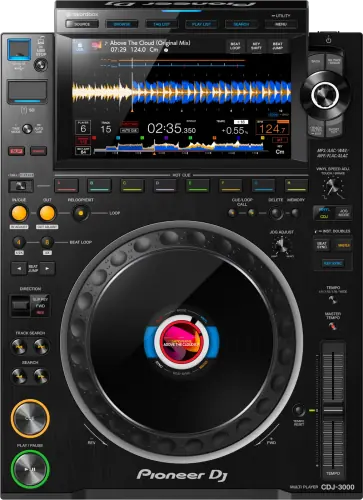
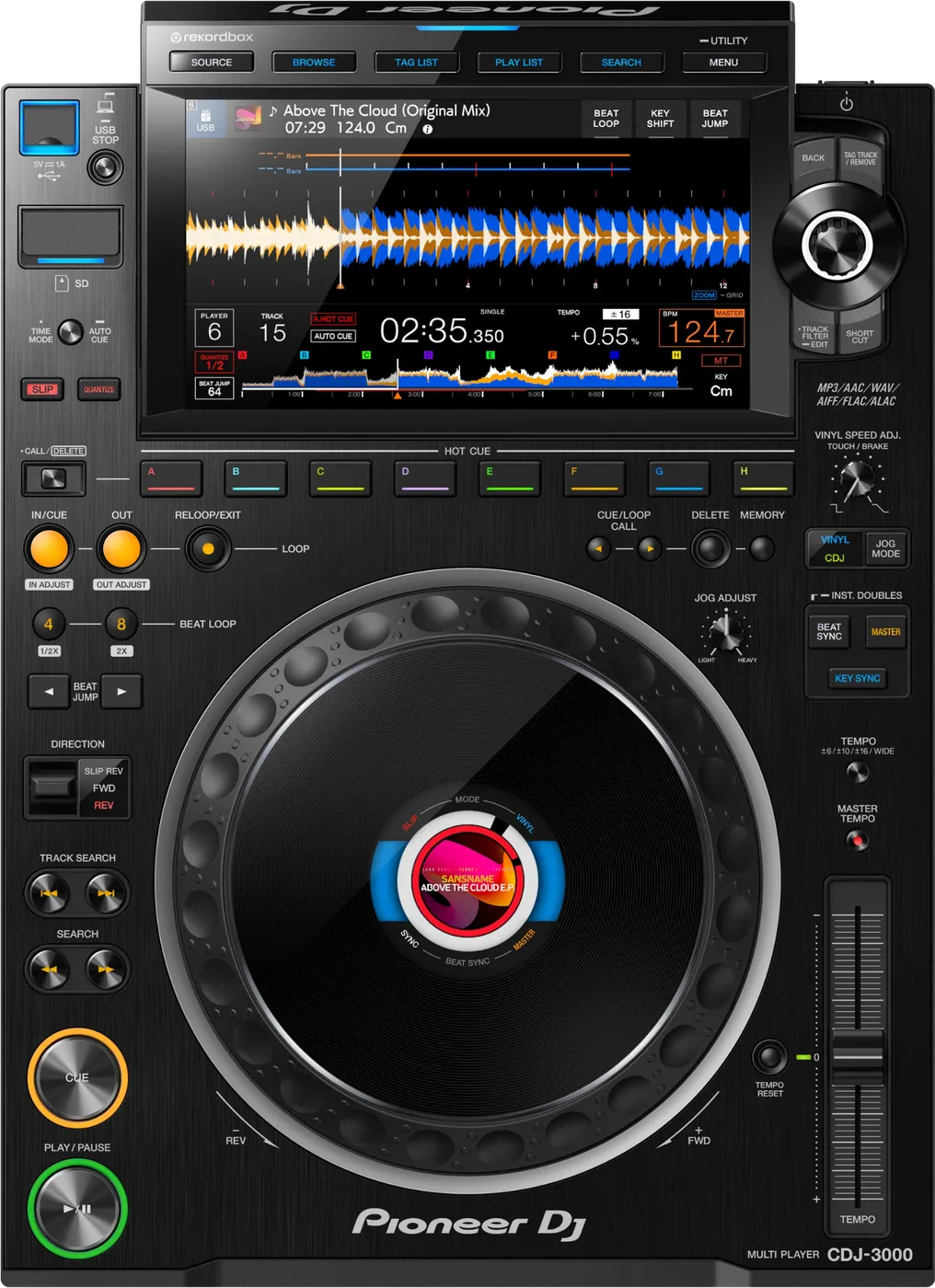
Booth briefing. The CDJ-3000 has been Pioneer DJ's high-end club standard since 2020, the player that came after the NXS2 generation. It reads Device Library exports, the same library format as the NXS2 generation, rather than OneLibrary. For media it reads exFAT as well as FAT32, so a FAT32 drive with an MBR scheme always works and a larger exFAT drive works too. Export from rekordbox 7.2.13 or later and the same stick serves both this deck and the OneLibrary generation of players.
When it goes wrong: The CDJ will not read the USB CDJ error E-8302 Playlists not showing
Fast Lane
The five things that decide your gig
The five things on the CDJ-3000 that change what happens next, if you are reading this in the booth. All five are explained in full further down this page.
It reads Device Library, not OneLibrary. That trips people daily.
A stick prepared only for a OneLibrary player, a CDJ-3000X, OPUS-QUAD or XDJ-AZ, shows no playlists here, with no error code.
The format split does not follow the age of the gear: this deck and the CDJ-3000X sit in the same booth and read different databases.
One firmware briefly made it a OneLibrary player, then was withdrawn.
Firmware 3.30 added OneLibrary support in 2025. Some DJs then found tracks or playlists not displaying when their USB had been exported from older rekordbox versions, AlphaTheta withdrew it, and the player officially went back to Device Library.
A venue unit still running that version reads OneLibrary. You cannot see which from the booth, which is why a dual-format export is the safe habit.
The no-audio, blackout and freeze stories are documented, not folklore.
Firmware 3.18 fixed occasional no-audio, display blackouts and system freezes on some units, and 3.19 fixed a rare dead screen on power-on.
A venue deck that has never been updated can still be running a version from before either fix.
An old unit can refuse to let you browse at all.
A documented bug where a Waiting popup could prevent you reaching the BROWSE screen, fixed in firmware 3.14.
The track already loaded keeps playing, so the recovery is to load your next tracks from the other player while this one is stuck.
Two identical-looking CDJ-3000s can behave differently.
It reads exFAT, though no published release note says which firmware added it. Six-player Link arrived at 2.03, and one version was withdrawn entirely. Venue decks sit anywhere on that timeline.
You cannot see any of it from the booth, so treat every venue deck as unknown firmware and carry a drive that works either way.
Compare
Playing on a different deck?
Pick the deck you are about to touch. This says what changes for the drive in your bag, and nothing else: the rest of what matters on that unit is on its own page.
If something goes wrong
USB mounts but playlists are missing
Short answer. The drive almost certainly carries the wrong database format for this deck. The CDJ-3000 reads Device Library, so a stick prepared only for a OneLibrary player (CDJ-3000X, OPUS-QUAD, XDJ-AZ) shows no playlists here, with no error code.
Why this happens. The format split does not follow the age of the gear: this deck and the CDJ-3000X sit in the same booth and read different formats. There is also a historical wrinkle, see the 3.30 story: during that firmware's short life, exports from older rekordbox versions could fail to display on this player.
Fix it now. Switch to FOLDER view and keep playing, the audio files are still on the drive. When there is a laptop, re-export from rekordbox 7.2.13 or later, which writes both formats to the same drive.
If the drive does not appear at all, it is a different problem. Three documented causes, none of them library format: the drive is NTFS, which this deck refuses outright; it is behind a hub, because the deck does not support USB hubs or external optical drives, so a drive behind a hub never appears no matter how it is formatted; or the tracks sit deeper than 8 folder levels, below which the manual says files cannot be played, so a deep Artist and Album tree loses its contents with no error at all.
Avoid it next time. Standardize every export on rekordbox 7.2.13 or later and the Device Library vs OneLibrary question stops existing for you.
Your cue points are missing, or it will not save another
Short answer. The manual sets a hard ceiling and names two ways the points vanish. A storage device holds up to 10 cue or loop points per track, and once ten are saved you delete one before you save another. Points already saved may fail to display if the device was not disconnected properly last time, or if the unit was switched off while the SD or USB indicator was still blinking. And a device that is write protected or out of free space will not accept a new point at all.
Why this matters. Cue points are the work you did before the gig, and the CDJ-3000 loses them for reasons that look like nothing at the time. Pulling the stick while the indicator is still blinking is a thing every DJ has done, and the cost lands a week later on a different deck.
Fix it now. If the points are gone, play from the waveform and set new ones as you go. If it refuses a new point, check the write-protect tab on an SD card first, then whether the track already has ten.
Avoid it next time. Eject the drive properly on the player and wait for the indicator to stop blinking before you pull it. Ten seconds at the end of a set is what everything you prepared is worth.
Player frozen, silent, or screen black
Short answer. On the CDJ-3000 these are not just booth folklore: AlphaTheta documented and fixed real cases. Firmware 3.18 fixed occasional no-audio, display blackouts and system freezes on some units, and 3.19 fixed a rare screen-dead-on-power-on issue.
Why this happens. A venue deck that has never been updated can still be running a version from before those fixes.
Before you restart anything, read the USB indicator. This is the one irreversible action in this whole page, and the manual is explicit: "Do not disconnect a USB device from the unit or turn the unit off while the USB device indicator is blinking. The unit’s management data may be deleted or the USB device may become unreadable." A blinking indicator means wait. Restarting a deck with your only drive in it, at the wrong second, is how a freeze becomes a lost library.
Fix it now. Move new track selection to the other player and keep the room going. Restart the affected unit at a safe moment, never mid-track and never while that indicator is blinking. If a unit shows these symptoms repeatedly, check its firmware version in the utility menu and tell the venue or rental company.
A black screen is not always a fault. The manual's own first answer for a dark display is auto standby, which ships on, and the screen saver, which starts after five minutes with no track loaded. Both end by using the unit. A deck brought in from a cold van can also start dim and come up to normal brightness on its own.
Avoid it next time. When you control the gear, keep firmware at 3.20 or later, updated away from gig day.
The touch screen ignores you, or responds in the wrong place
Short answer. A touch display that ignores you, responds poorly, or responds somewhere other than where you touched has one documented answer: the TOUCH DISPLAY CALIBRATION setting in the UTILITY menu. AlphaTheta also ask that the display be operated with a fingertip and not pressed hard, and never with a ball-point pen, a mechanical pencil or a sharp fingernail.
Why this matters. The CDJ-3000 puts browsing, Touch Preview and Touch Cue behind that screen, so a display that responds an inch from where you touched is not a cosmetic fault, it is a deck you cannot browse on. And it reads as a broken player rather than an uncalibrated one.
Fix it now. Run the calibration from the UTILITY menu. It takes a minute and it is the only documented answer. Browse from the rotary selector while you wait for a gap in the set to do it.
Avoid it next time. Keep pens and keys off the display, and use a fingertip rather than a nail. The manual names both, which usually means both have happened.
Hot cues, re-loop or reverse feel a beat late
Short answer. If a Hot Cue, a re-loop or the reverse lever does not fire the instant you hit it, the manual names Quantize. With Quantize on, the unit waits for the nearest beat position before acting, so a slight delay is the function working rather than the deck lagging. Turning Quantize off removes the delay and hands the timing back to you.
Why this matters. This is the one on the page most likely to be blamed on a tired CDJ-3000 in a busy booth. It is a setting, it is on by default in plenty of venues, and the DJ who does not know it spends a set fighting a deck that is doing exactly what it was told.
Fix it now. Turn Quantize off if you want your hands to decide the timing. Leave it on if you want the deck to catch the grid for you. Both are legitimate, but only one of them is what you meant.
Avoid it next time. Check Quantize as part of your first pass over any deck you did not set up, alongside the jog mode and the tempo range.
"Waiting" popup blocks the browse screen
Short answer. A documented CDJ-3000 bug, fixed in firmware 3.14: a Waiting popup could prevent you from reaching the BROWSE screen at all.
Why this happens. Units still running firmware older than 3.14 can still do this.
Fix it now. The track already loaded keeps playing. Load your next tracks from the other player while this one is stuck, and restart the affected unit at a safe moment.
Avoid it next time. Firmware 3.14 or later on gear you control.
PRO DJ LINK not connecting
Short answer. Cables and settings first, same as any Link chain. One documented case is specific to the CDJ-3000: PRO DJ LINK with the DJM-2000NXS was broken and fixed in firmware 3.20.
Why this happens. Link needs working Ethernet between every unit and, in mixed-generation booths, the oldest link partner can be the limiting factor.
Do not start with the cables. That is the advice everywhere including, until now, on this page, and the manual forbids it in the exact state a Link fault happens in: "Do not disconnect a LAN cable while sharing audio files between units in the Pro DJ LINK network." If you do have to pull one, there is an order: "Disconnect storage devices (SD, USB) before disconnecting LAN cables."
Fix it now. Start where the manual starts: the first documented check is the player number, set in PLAYER No. in the UTILITY settings, either to AUTO or to a number no other player is using. Two decks holding the same number is the documented first cause and it is invisible from the panel. One catch, and it is the reason people give up on this fix: "The setting cannot be changed when a storage device (SD, USB) is connected to the unit." Eject first, then change it. If the booth pairs CDJ-3000s with a DJM-2000NXS and Link will not come up, firmware 3.20 or later on the players is the documented cure.
The hub is the part nobody checks. Three or more players run through one, it is a single point of failure for the whole chain, and the manual specifies a switching hub of 1 Gbps or more, and either the supplied LAN cable or an STP (CAT5e shielded) cable. An unshielded patch cable out of your bag is not the specified part.
Avoid it next time. Know the real ceiling before you plan a b2b: "You can connect up to 6 multi players to a DJ mixer using a switching hub (up to 4 when including multi players released before 2020) if the DJ mixer has enough terminals." The exception is by model, not by year: any other model in the chain takes the whole booth down to four.
What to watch for
The withdrawn 3.30 firmware, what actually happened
Short answer. In October 2025, firmware 3.30 added OneLibrary support to the CDJ-3000. Some DJs then found tracks or playlists not displaying on the player when their USB had been exported from older rekordbox versions. AlphaTheta withdrew the firmware, and the CDJ-3000 officially went back to Device Library.
The part that matters most: in AlphaTheta's own words, no music or data was deleted by this. Libraries looked missing on the player; nothing was destroyed.
Why it happened. The Device Library to OneLibrary transition depended on which rekordbox version made the export, and older exports did not carry what the updated player expected.
What to do about it. If you meet a venue deck that got 3.30 before the withdrawal, treat it as a OneLibrary reader: an export from rekordbox 7.2.13 or later carries both formats and works either way. That single habit makes this whole story irrelevant to your gig.
The lesson it proves. This is why the site's rule is never update player firmware or rekordbox near a gig. The DJs bitten by 3.30 were bitten in the booth.
Firmware fixes worth knowing about
Short answer. Beyond the 3.30 story, four CDJ-3000 firmware thresholds matter in the real world. Fixed in 3.18: occasional no-audio, display blackouts and freezes on some units. Fixed in 3.19: a rare dead screen on power-on. Fixed in 3.14: the Waiting popup that could block browsing. Fixed in 1.09: Emergency Loop wrongly triggering during a Hot Cue pause.
One behaviour change to know, not a bug: introduced in firmware 3.16, power management follows the EU Ecodesign timing of 20 minutes. A deck that seems to have switched itself off between soundcheck and doors is likely doing exactly what that setting says. It is also conditional, which the internet never mentions: standby only arrives when no storage device is connected, no computer is connected to the rear USB port and the deck is not in a PRO DJ LINK network, and any use of the unit brings it back. So a deck left in a live Link network or with a drive in it does not stand by at all, and one that has needs touching, not rebooting.
One trap in the utility menu itself. Whatever you change in there, do not kill the power straight afterwards. The manual: "Wait for at least 10 seconds to turn the unit off after changing settings."
Do this. On gear you control, sit at 3.20 or later and update between bookings, never before one.
And it changed its name. The setting also changed its name at that version. AlphaTheta note that the energy-saving function, previously called Auto Standby or Auto Power-Off depending on the model, is now called Power Management. So the thing you are hunting in the utility menu is called one thing on an older deck and another on a newer one, and the manual printed before the change still says AUTO STANDBY.
Compatibility
rekordbox, library format and PRO DJ LINK
Short answer. Device Library. FAT32 always, and exFAT, though no published release note names the firmware that added it. PRO DJ LINK across AlphaTheta / Pioneer DJ generations (keep firmware fresh: the DJM-2000NXS link bug below was one of the rare exceptions), and up to six CDJ-3000 or DJS-1000 units since firmware 2.03.
Why it matters. Library format decides whether your playlists appear; Link compatibility decides whether decks share tempo and track data. They are independent questions, and this deck answers them differently than the CDJ-3000X one booth over.
What the deck will and will not read. The Operating Instructions state the file formats as "FAT16, FAT32, HFS+ (NTFS is not supported.)" So a Windows external drive left at its default is refused, silently, at any firmware. The deck also has an SD card slot the rest of the internet forgets, capped at 32 GB, so a 64 GB card will not work in it. And the deck does not support USB hubs or external optical drives, so a drive behind a hub never appears no matter how it is formatted.
Do this. FAT32 + MBR drives, exported from rekordbox 7.2.13 or later, and both questions are answered everywhere.
Features explained
Touch Preview
Short answer. Touch a track's waveform in the browse screen and hear that exact section in your headphones, without loading it to a deck.
Why it matters. Auditioning without occupying a player is the difference between checking an idea and committing a deck to it mid-set.
When professionals use it. Confirming the right remix or the right section of a long track before loading, especially back to back, where decks are scarce.
How it is actually routed. The preview does not come out of the player, it comes out of the mixer, so the preview is monitored through the mixer, so the mixer needs LINK CUE pressed, and the waveforms only appear in the track list once PREVIEW is touched on the browse screen.
Common mistakes. Reaching for the cue mix knob. A silent preview is almost always LINK CUE not pressed on the mixer, or PREVIEW not touched on the browse screen, and neither of those is on the player you are staring at.
Key Sync
Short answer. Key Sync matches the key of the track loaded on the sync master, not simply the track you can hear, using the key data rekordbox analysed. It does not simply transpose to that key: the key moves to whichever needs the least change out of the same key, the dominant, the subdominant, the relative, the relative of the dominant and the relative of the subdominant.
The two surprises. If the sync master is not the deck you think it is, the key you get is not the key you expected. And the manual's own reset is a button you may press for another reason entirely: "Press the [KEY SYNC] or [MASTER TEMPO] button to reset to the original key."
Why it matters. Harmonic clashes are the mixing error a crowd hears even when it cannot name it.
When professionals use it. Blending melodic material across keys that are one step apart, where a small shift makes an ugly blend clean.
Common mistakes. Relying on it with tracks that were never analysed in rekordbox: no key data, nothing to sync. The analysis travels with a proper export, one more reason exports beat drag-and-drop.
Professional tips
Treat every venue deck's firmware as unknown
Short answer. The CDJ-3000 has years of firmware history, including one withdrawn version, and venue decks sit anywhere on that timeline.
Why it matters. Two identical-looking CDJ-3000s can behave differently: one on old firmware still carrying the Waiting-popup bug, another that briefly ran 3.30 and reads OneLibrary. You cannot see any of that from the booth doorway.
Do this. Export with rekordbox 7.2.13 or later so the library question is covered on any firmware, and when a unit misbehaves, check its version in the utility menu before blaming your drive.
Common mistakes. Assuming the promoter's "brand new CDJ-3000s" means recent firmware. New out of the box does not mean updated.
Carry your own settings on the drive
Short answer. MY SETTINGS saves the unit's function settings to a storage device, and the manual names the reason plainly: so you can load them to a player instantly during DJ handovers. Your jog weight, your vinyl mode, your Auto Cue level and the rest arrive with your USB rather than being dialled in while somebody else's set is ending.
Why it matters. A changeover is the worst moment to be dialling in preferences on somebody else’s CDJ-3000, and the alternative is not remembering harder, it is a file. Every setting you argue with on a venue deck, the jog weight, the vinyl speed, Quantize, the tempo range, is in that file.
Do this. Set a player up the way you want it at home, save MY SETTINGS to the drive you gig with, and load it as the first thing you do at every booth. It costs seconds and it removes an entire category of surprise.
Connections and setup
Driving DJ software from the deck
Short answer. The unit will drive DJ software over MIDI or HID. Install the specified audio driver on the computer first if you want it to play audio from there, connect, press SOURCE and choose CONTROL MODE. For MIDI software the MIDI CHANNEL is set in the UTILITY menu, and HID software needs no channel set at all. Two limits are worth knowing before the gig: some buttons on the unit cannot control a DJ application, and control mode switches itself off the moment a track is loaded from anything other than the device it is talking to.
Reading it in the booth. The second limit is the one that bites. If you are running the CDJ-3000 as a controller and somebody loads a track from a USB stick into that same player, control mode ends and the deck stops driving your software. Decide before the set whether this player is a controller or a player, because it will not be both at once.
Preventive maintenance
Keeping a unit reliable
Short answer. Same discipline as every professional deck: safe ejects, connector care, and firmware updated between bookings rather than before one.
Why it matters. The 3.30 episode is the proof case for firmware timing, and USB plus Ethernet ports remain the wear points that cause the hardest-to-diagnose intermittent faults.
Do this. There is no eject button on this deck. The control is USB STOP, and it is a hold, not a press: press and hold the USB STOP button until the USB indicator stops blinking, then pull the device straight out. Handle Link cables by the connector, keep vents clear in transport, and check the firmware version when a unit comes back from rental.
What AlphaTheta ask for. AlphaTheta's own care line is a dry soft cloth, and no organic solvents, acids or alkalis. Three display behaviours they document are not faults: small black or bright points on the LCD are inherent to the panel, the display can be dark for a while after power on in a cold room and returns to normal by itself, and direct sunlight reflects off it so the fix is shade rather than brightness.
Firmware, drivers and manuals
Official downloads and documents
Go to AlphaTheta for the files themselves. We link their pages instead of hosting a copy, because a manual copied here is a snapshot of release day and theirs is the one that stays current.
One thing to know before you update. AlphaTheta answer the obvious question inside the change history for 3.22 itself. Their note on that release says the update does not include OneLibrary support, that loading libraries in Device Library format still works fine, and that you should feel free to update the firmware. So the version that follows the withdrawal is not a second attempt at it.
The 3.30 episode, in AlphaTheta's two notices. AlphaTheta's first notice, dated 4 November 2025, names the symptom and the release: users experienced playlists not being displayed after updating to CDJ-3000 firmware Ver.3.30, released on 21 October 2025. Its instruction at the time was to "temporarily downgrade to Ver.3.20 to ensure stable operation", with the update guide and Ver.3.20 offered for download from the support page. The follow-up notice, dated 7 January 2026, explains the cause as the transition from Device Library to OneLibrary, states that "tracks or playlists didn't display on the CDJ-3000 but, importantly, no music or data was deleted", and closes the episode: "For now, the CDJ-3000 has reverted to using the Device Library format, and no OneLibrary preparation is needed." It offers no rollback procedure, because none is needed once the player is on a later version. Where 3.30 stands today, and what to do if a club deck still shows it.
Manuals. Official Pioneer DJ manual page →
Broken link? Let us know and we'll fix it.
Frequently asked questions
Quick answers
- Can this player read exFAT?
- Yes. No published release note names the firmware that added it, so this page does not name one. FAT32 works on every firmware.
- Does it support OneLibrary?
- No. Firmware 3.30 briefly added it and was withdrawn; the player reads Device Library. A unit still running 3.30 reads OneLibrary, which is why dual-format exports are the safe habit.
- Can I link with a CDJ-2000NXS2 or a CDJ-3000X?
- Yes, PRO DJ LINK works across generations. Playlists showing up on each deck depends on your USB's library formats, not on Link.
- How many players can share one Link chain?
- Up to six units in total across CDJ-3000, CDJ-3000X and DJS-1000, with the CDJ-3000s on firmware 2.03 and the DJS-1000 on 1.20 or later, and the manual is specific about the exception: "You can connect up to 6 multi players to a DJ mixer using a switching hub (up to 4 when including multi players released before 2020) if the DJ mixer has enough terminals." So any other model in the chain takes the whole booth down to four.
- Will it read an NTFS drive?
- No. The Operating Instructions list the file formats as "FAT16, FAT32, HFS+ (NTFS is not supported.)" NTFS is the Windows default for a large external drive, so this catches people who never formatted the drive themselves.
- Does it have an SD card slot, and what fits?
- Yes, and the specification caps it at 32 GB. A 64 GB or larger card will not work.
- The deck will not load my next track. Is it broken?
- Check LOAD LOCK first: when LOAD LOCK is set to LOCK in the UTILITY settings, the deck will not load another track while one is playing, and the way out is to set it to UNLOCK or to pause playback first. It is a menu setting a previous DJ or the venue can have left on, and nothing on the panel shows it.
- What does E-8302 mean on this player?
- The player cannot read the track data, usually a corrupt export or wrong file system. Full fix.
Where this sits in the line
- Previous generation CDJ-2000NXS2
- Next generation CDJ-3000X
Related players
Commonly paired with
What you usually find beside it in working booths, from club, festival and rental installs rather than from a manufacturer document.
Pioneer DJ All brands Knowledge base FAQ and Fixes Dictionary
Playing soon and it is not working?
Start Emergency ModeKeep the Emergency Card
We will email you the printable PDF so it is on your phone before the next dark booth. Occasional notes that save gigs. No spam, unsubscribe in one click.
Registering is free and counts everywhere on Save My Gig. We send a confirmation email first. Your address is stored with Brevo, our email provider. Unsubscribe any time. Privacy
Sources: AlphaTheta's official CDJ-3000 firmware change history and the official firmware 3.30 notice, checked 28 August 2026. Specifications theirs, priorities ours.