

TRAKTOR PRO 4, the field manual
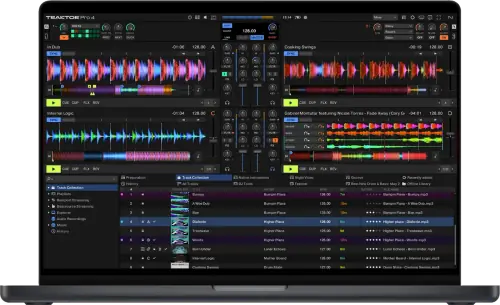
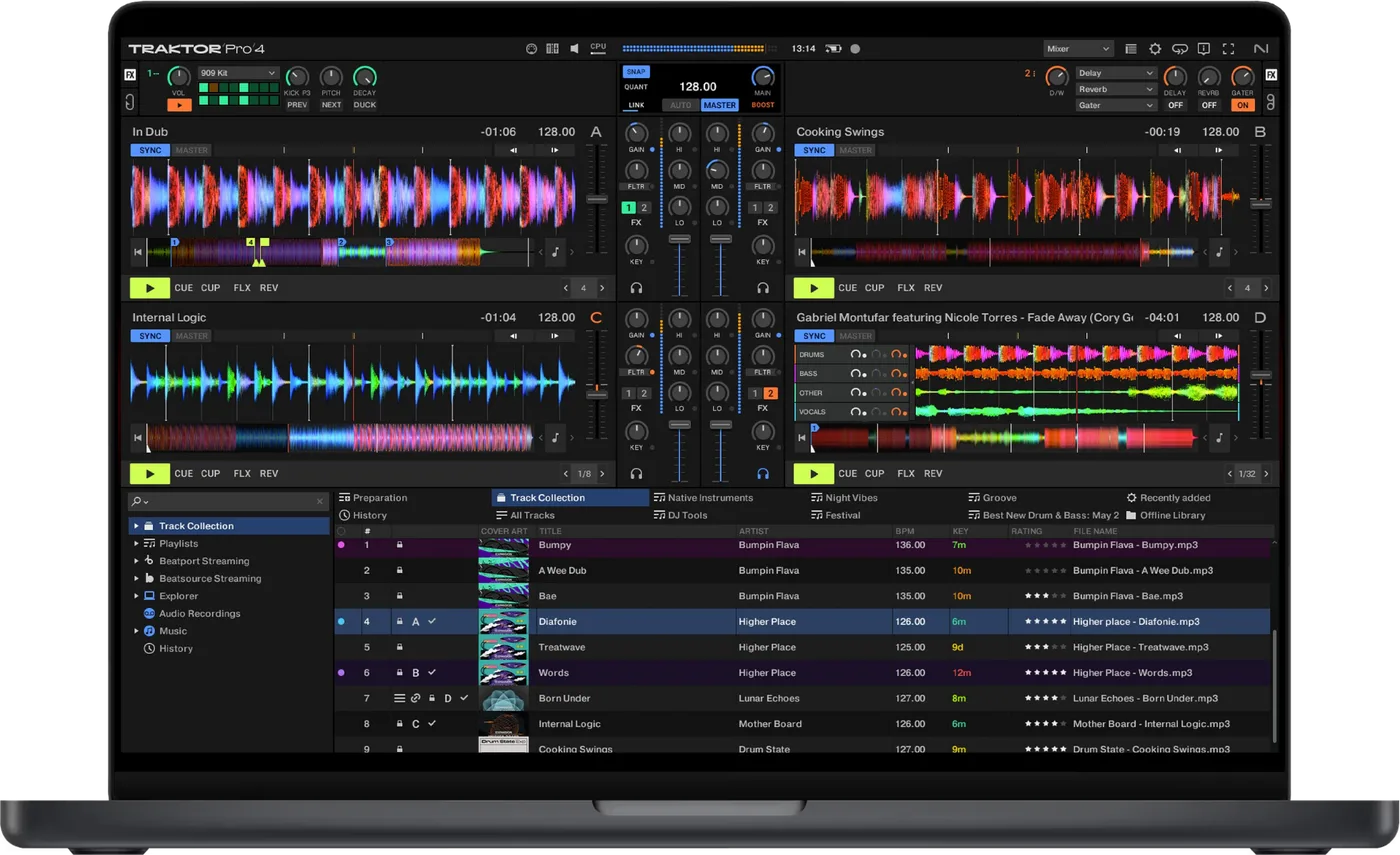
Booth briefing. TRAKTOR PRO 4 is Native Instruments' DJ software, and its Stems feature separates a track into stems, rendered in advance rather than live: NI publish the processing figure in the manual, and on a six minute track it is roughly two to four minutes per track before the stems are ready to use. Activation is online, as offline activation is no longer offered. Audio routing to the interface and controller you play through is held in the software's settings, and NI ship updates in numbered releases, 4.4.2 among them.
Understanding the unit
Stems: what "separation" actually costs you
Short answer. Stem separation in TRAKTOR is a pre-render, not a live process. NI’s manual states that "the separation into Stems takes between one and two thirds of the track’s playing time" depending on your processor. You start it per track from the Track Collection, by right-clicking on Windows or holding ctrl and clicking on a Mac, and choosing Generate Stems. NI add that you can trigger the separation even while the track is playing, and that a running separation can be cancelled from the status bar at any time. On a six minute track that is roughly two to four minutes of processing, per track, before you can use it.
Where the number lives. NI’s product page describes isolating drums, bass, instruments and vocals and never mentions the preparation time. The number is in the manual. That is the whole reason this section is first: the capability is real, and the thing you have to plan around is never printed next to it.
What it writes to your drive, and where. Generated stems do not land beside the track they came from. NI’s Stem Files Location setting names the directory Traktor writes them to and "By default, this directory is the Stems subfolder in your Traktor user folder", which you can point at another drive. They do not carry the track’s name either, and NI attach a warning to both facts: "Stem versions of your tracks are not stored using their original track’s file name but a hashed name serving the fast association to the original track. It is not recommended to load and play the stems from the folder defined here, because they would miss most of their associated metadata." So it is one entry in your Collection, two files on disk, and the second one is not where you would go looking for it.
The stem file that will not load. A bought Stem file will not go on a deck until it has been analysed, and NI say so twice. "Due to the large amount of data that must be read from a Stem file, Studio Stem files must be analyzed before loading them into a Stem Deck. You cannot load nor play Stem files before they have been analyzed", and in the collection chapter, "Stem files always need to be analyzed before loading them into a Deck." Stems that TRAKTOR generated for you are already analysed and load straight away. The file you bought on the way to the venue is the one that will not load.
The other one that will not load. A stem version stored on a drive that is not attached announces itself in the browser rather than at the deck. NI: the Stem Link symbol in the icon column "turns red", and "In that case the Stem file cannot be loaded, only the original track." Generated stems are allowed to live on a different drive from the tracks they belong to, which is exactly how a set arrives with half its stems missing.
What that means in practice. Stems are a preparation feature on this software. Deciding mid-set to pull the vocal out of a track you have not generated stems for is a decision to wait, and to give your processor a job while it is also playing audio.
What you can buy, and what there is no free version of
Short answer. There is no free TRAKTOR desktop tier. NI’s DJ software catalogue lists two products and both cost money. Pro 4 is sold as a one-time purchase, with a reduced update route for existing owners, and Traktor Play is a one-time purchase as well.
What Play is, and what NI do not say about it. Traktor Play is the streamlined two-deck version, against four decks in Pro. It carries a reduced form of the stem separation, one Pattern Player kit, and Beatport streaming. NI do not publish whether it supports timecode, Remix Decks, external mixer mode or mix recording, so a working DJ should read those as unanswered rather than as included.
How it is sold. It is a perpetual licence, not a subscription. The former Traktor Pro Plus subscription was discontinued and its features, Pattern Player and the Ozone Maximizer, moved into the base product. NI’s own wording on the subscription question is "for now, we’re canceling the subscription model for Traktor", and the hedge is theirs.
Features explained
The four deck types, and the one that is not a deck
Short answer. TRAKTOR PRO 4 gives you four virtual decks and each one can be a different kind of thing. A Track Deck is, in NI’s words, "the equivalent of a turntable or a CD player used to play back conventional tracks". A Stem Deck plays a Stem file and adds sub-mix controls for four slot volumes, four filters and four FX sends. A Remix Deck holds four sample slots for loops and one-shot samples, up to 64 samples in a set. And the fourth is not a deck at all: "The Live Input is not a Deck, but it allows you to include live audio from an external source in your mix", a turntable, a microphone or a synthesiser, and it carries no controls beyond the deck focus. Loading a Stem file switches the deck under it automatically, and holding Shift while you drag loads the plain track instead.
Hiding a deck is not the same as silencing it. Hiding decks C and D mutes them, with one exception NI print in the same sentence: "Show Deck C & D: Displays Decks C and D. If unchecked, Decks C and D are hidden and muted, except for Live Input flavor which will stay live even if Decks C and D are hidden." So a microphone or a turntable parked on a hidden deck is still going to the room while nothing on screen shows it.
Why this is the first thing to know. Almost every other behaviour on this page depends on which of the four a deck is. Hotcues, loops, stem controls and sample slots are not the same set of controls, and a deck that is refusing to do something is often a deck that is the wrong type for the thing you are asking of it.
Where your library lives, and what it will not play
Short answer. The TRAKTOR PRO 4 library is a folder on the machine and NI name it in the preferences. The Root Dir setting on the File Management page is "the path to your Track Collection/Playlists/Settings/History/Mappings files", with separate paths beside it for samples and for remix sets. The collection saves itself on the way out: "The Track Collection will be automatically saved each time when you close Traktor." So does a backup, into a Backup folder inside that same root folder, every time you change something and close the application. Import another Collection is the route back to one of those earlier copies.
The history of every set you play. Every set TRAKTOR PRO 4 plays writes itself down. The application keeps a History playlist while it runs, stores it to a file when it closes, and clears the one in the browser tree the next time it opens, so the stored copies stamped with date and time are the ones that survive. NI publish both locations: "Windows: My Documents\Native Instruments\Traktor\History" and "macOS: Users/~/Native Instruments/Traktor/History". That is where you go when a promoter asks what you played.
What it refuses to play. TRAKTOR PRO 4 plays MP3, M4A (AAC), WAV, AIFF, FLAC and OGG Vorbis, and NI print two flat refusals under that list. "DRM-protected music files cannot be played back in Traktor. This affects for example AAC-tracks bought in the iTunes store." And "WMA files are not supported in Traktor." Neither is a setting you can change, so both are worth catching at home rather than at a load-in.
Do this. Find the root folder on your own machine once, before you need it, and know that the backup beside it is what you reach for when a collection loses something. Both of those are much harder to work out for the first time at the gig itself.
Compatibility
The licence, the hardware, and the internet
How hardware unlock works here. Registering NI hardware grants the software: after you register a Traktor hardware serial, the Traktor Pro serial is added to your NI account permanently. It is a one-time grant to the account, not a check that runs while you play, so the licence does not depend on the controller being plugged in.
And the gap in it. NI publish no consolidated table of which controller grants which software tier. The current KONTROL S4 page states it includes full Traktor Pro 4. For any other controller you have to read that product’s own page, and for several older ones NI publish no clear statement at all. Third-party hardware is supported for CONTROL, never for licensing. NI document no third-party device that grants a Traktor licence.
Activation needs the internet, and there is no way around it. Offline activation no longer exists. NI state that "the possibility of activating Native Instruments products offline has been discontinued" and that all their products now require an online activation. Activation is tied to your machine. The EULA says the activation encodes information about essential system components, and that extensive changes to the device may require re-activating. Re-activation needs the internet.
What NI do not publish, and this list is the useful part:
- no statement that the software runs offline once activated
- no check-in period and no re-validation interval
- no grace period
- no statement of what happens if a licence check fails mid-set
How many computers. NI’s support article says the licence agreement allows installation on two computers. The licence agreement itself says three devices, provided the software is used regularly on only one. Both pages are live, and they disagree. This page reports both rather than picking the friendlier one.
Timecode, and the box with one record in it
Short answer. Timecode control media is sold separately and is not part of the software. NI sell control vinyl and control CDs as their own items.
The part that catches people at checkout. The control vinyl box contains ONE record. The manual’s own scratch setup calls for two vinyls or two CDs, so a two-deck timecode rig needs two boxes.
What you do not have to buy. There is no separate DVS entitlement to buy. Unlike some competitors there is no timecode SKU, no effects pack and no stems add-on: the licence covers one thing.
Operating systems, and two NI pages that disagree
What the specifications say. The specifications page lists macOS 13, 14 and 15, and Windows 11.
What a different NI page says. A separate NI compatibility statement dated 8 January 2026 supports macOS 26 Tahoe, with the caveat that your third-party devices must also be compatible with it.
So which is it. Those two pages do not agree. The specifications page does not mention macOS 26 Tahoe, or Apple M4 and M5 silicon, at all, and it is the page somebody checks before buying. Both are reported here because the disagreement is the finding, and a DJ on a recent Mac needs to know the reassurance exists somewhere other than the page they will look at.
What has been dropped. macOS 12 Monterey support was removed in 4.5.0. Windows 10 support was removed in 4.5.1, and this one has a sting in it: NI say the installer will not block the install, but stable operation is no longer guaranteed. So a Windows 10 machine still installs it and NI decline to stand behind the result.
Apple Silicon. NI’s compatibility matrix lists Traktor Pro 4 as running both under Rosetta 2 and natively on Apple Silicon.
Setting it up in a booth
Analysis and beat grids, and the jobs not to run live
Short answer. Analysis is the job TRAKTOR PRO 4 wants you to do before the gig, and NI say so in three separate places. Analysis "generates high CPU load". The parallel processing option "increases CPU load and should not be used in live situation". And of collection maintenance in general, "these maintenance processes can be time consuming, so we recommend to not perform these tasks during live situations". When analysis happens is itself a setting: on import, on load into a deck, or switched off entirely so you can run it by hand at home.
What a beat grid actually is here. TRAKTOR PRO 4 lays one grid marker per track and holds one tempo across the whole of it. NI: "Traktor’s Analyze function will automatically set a single Grid Marker with a constant tempo for the entire track. This gives reliable and very accurate results for the vast majority of tracks." Where that is wrong you add grid markers by hand and each one starts a new tempo zone after it, with one limit NI state outright: half-beats and in-between BPM values that would cause a phase skip are not allowed. Setting a BPM range that matches your genre on the Analyze Options page improves the automatic result. Deleting cue points does not disturb the grid underneath them.
The one control not to reach for on air. The metronome that helps you fix a grid is the one control here you must not reach for on air. NI: "In External Mixer mode only use the Audible Beat Tick when pre-listening tracks in your headphones because the tick will remain audible when playing the track on the main output." In internal mixer mode the tick stays on the headphone channel. In external mixer mode it goes out with the music.
The mixer, the effects, and what external mixing switches off
Short answer. TRAKTOR PRO 4 has a full mixer of its own, and not all of it survives the switch to a hardware one. Choosing external mixing switches off part of the software mixer and NI list exactly which part: "If Traktor is used in External Mixing mode, the channel faders, the crossfader, as well as Heaphone Cue controls are deactivated." The EQ and gain, the master volume and the Mixer FX can each be switched back on individually on the Mixer page of the preferences. Two effect routings also depend on this choice: send effects exist only in external mixing mode, and post-fader effects stop existing in it.
Cueing is hardware before it is a setting. Hearing the next track in headphones is a hardware requirement before it is a setting. NI: "For using the Cue function a multi-channel audio device is required." For the browser’s preview player they put the same requirement in outputs: "you need to have an audio interface with two independent stereo outputs, one for the Master Out and one for the Headphones CUE channel", one assigned as Output Master and one as Output Monitor. A single-output interface gives you a main mix and no way to hear what is coming.
The limiter, and what NI ask you to do with it. TRAKTOR PRO 4 puts a limiter on the main output and NI ask you to leave it there. They give its purpose as preventing the signal from clipping by reducing the dynamic range, then add the sentence and the answer together: "However, the Limiter in Traktor can be switched off. We do not recommend to switch off the Limiter." Auto gain, which levels the incoming signal from every deck so none of them dominates, is on by default and is turned off on the same preferences page if you would rather set gains yourself.
The effect units are half off when you install it. TRAKTOR PRO 4 ships with half its effect units switched off. NI: "By default there are only two FX Units activated - FX Unit 1 and FX Unit 2", and units 3 and 4 are enabled with the 4 FX Units option on the Effects page of the preferences, after which units 1 and 3 share a panel and units 2 and 4 share the other. Each unit runs in one of three modes, Single, Group or Pattern Player, and the last of those can only be chosen from the preferences rather than from the unit itself. Any unit can be assigned to every mixer channel at once.
How many Mixer FX there are, answered twice. How many Mixer FX exist is a question NI’s own manual answers twice, differently, in the same document. The tutorial says "In total Traktor provides you with eight Mixer FX of which you can pre-select four in the Preferences" and names Reverb, Dual Delay, Noise, Time Gater, Flanger, Barber Pole, Dotted Delay and Modern Krush. The preferences chapter says "Preselect one of seven available Mixer FX for each of the Mixer FX slots: Reverb, Dual Delay, Noise, Time Gater, Flanger, Shepard, and Barber Pole", naming one effect the other list does not carry and dropping two that it does. This page reports both rather than choosing. What is not in dispute: the Filter sits outside that pre-selection, it is what is selected when the software starts, and NI state that it "is not removable from the drop-down menu".
Building the timecode rig, and the order you switch it on
Short answer. TRAKTOR PRO 4 drives turntables and CD players through timecode, and the rig it needs is a specific list. A two deck timecode rig is a specific list in NI’s manual: two DJ turntables or two CD players, a scratch certified DJ mixer or a two channel mixer plus an audio interface with two inputs and two outputs, matching cables, and two control records or two control CDs. One condition sits under it and it decides which interface you can use: "If you cannot switch the output signal from PHONO to LINE on your DJ turntables, it is mandatory the audio interface has at least two integrated PHONO preamplifiers." Up to four decks can run on timecode at once.
Calibration happens to you rather than by you. Calibration in TRAKTOR PRO 4 is not a button you press. NI: "Traktor will automatically calibrate for timecode control as soon it receives the timecode signals for the first time", reading the position, the tempo and the signal quality, with the scopes on the decks as the place you watch it happen. Two circles and a filled signal meter mean it has the record, and a loaded track starts playing immediately. NI attach a reading to the tracking alert as well: red flashing while you move the record back and forth is normal, and red flashing during ordinary forward playback probably means dust under the needle.
What happens when the record runs out. Running off the end of the control medium does not stop the music, it takes your hand off it. On vinyl: "When reaching the end on the vinyl, Traktor will switch to Internal mode to avoid a sudden playback stop." On CD: "Traktor will switch to Internal mode when reaching the end of Track 2 on the control CD." The track carries on playing and the record no longer controls it, which is a surprise worth having at home first.
The switch-on order, and the one that does not exist. NI publish an order for powering up a timecode rig and a reason for it. Turn every volume control fully down first, to avoid speaker noises, then switch on in this order: the computer, then the turntables or CD players, then the DJ mixer, then the amplification system. The mixer goes to the outlet without being switched on until its turn comes. There is no matching power-down order anywhere in the manual, and no safe removal procedure for anything: that is an absence in the document rather than permission to do it in any order.
Headphones. NI attach one hearing precaution to the headphone connection and it is the only one in the manual. Before you put headphones on, always set the headphone volume control to minimum, then raise it slowly while music is playing until it reaches the level you want.
Recording, broadcasting, and what one streamed track switches off
Short answer. TRAKTOR PRO 4 records your set from its own master output, or from a physical input if you are mixing on a hardware desk, and the source is chosen on the Mix Recorder page before anything else. The file splits itself: you set a size and "When the maximum file size is reached, Traktor splits the actual file and seamlessly starts a new file for recording", with a CUT button to split one by hand at any point. NI cap that setting at 2048 MB. Recordings go to a directory you nominate and appear in the browser under Audio Recordings.
Broadcasting, and the platform limit. Broadcasting out of TRAKTOR PRO 4 needs a server you have already set up, and the software is only one half of that. NI: "You must have a server configured correctly and running before you can begin your broadcast." The protocol is Icecast and TRAKTOR carries the client rather than the server. NI then state the platform limit plainly: "Icecast works only on Windows and Linux." They recommend the machine running the server has at least 128 kb/s of upstream, shared between everybody listening, so a higher bit rate means fewer listeners on the same connection.
The restriction that catches recordings. One streamed track anywhere in the software switches three things off. NI: "Due to licensing restrictions, the following functions are unavailable when any LINK track is loaded onto any deck in Traktor", and the three are the mix recorder, loop capture into remix decks, and exporting playlists with their tracks to other locations and devices. A deck you loaded and forgot about is enough to stop your set recording. The offline library those tracks live in is capped as well: "You can store up to 1000 tracks from Beatport / Beatsource LINK locally on your device in your Offline Library folder. Please verify your plan as different plans have different Offline Library capacities."
The only paid tier gate in the manual. One paid tier gate appears anywhere in the TRAKTOR PRO 4 manual and it is not a feature of the software. Streaming from Beatport and Beatsource is the only thing NI condition on a subscription: "A paid subscription is required for these services", with a trial route for people who have not signed up yet. Nothing else in the manual, the Pattern Player and the Ozone Maximizer included, is described as needing a tier above the one you already have.
The preferences that matter in a booth
Short answer. Three TRAKTOR PRO 4 settings exist for the situation you are standing in rather than for taste. "Loading only into stopped Deck: Prevents loading into a playing Deck and therefore stops you from accidentally loading a track into the wrong Deck." Inline editing in the track list can be switched off, which NI describe as preventing unwanted changes "for example, during a live situation". And multi-core support carries a condition: "The function must be deactivated, when running a second real-time application on the same computer." Two more are worth a look before a gig: resetting all deck controls and resetting all mixer controls when a track loads. NI also note that running the consistency check at startup increases how long the software takes to open.
Two kinds of marker that need switching on. Two kinds of cue point in TRAKTOR PRO 4 do nothing at all until a preference is ticked, and neither says so at the deck. A load cue point only takes effect with the Initially cue to Load Marker option enabled in Preferences, Loading. Fade in and fade out markers, which trigger the next track automatically, only work with the Activate Fade In and Fade Out Markers option enabled in the same place. A track that will not jump to its load marker is usually a preference rather than a lost marker.
Why a tempo fader can look dead. A synced deck will not take a tempo change from its own fader. NI: "When a deck is synced to a Tempo Master, the tempo for the synced deck cannot be adjusted manually. This can only be changed by the Tempo Master." Which deck holds that role moves on its own while AUTO is on, and it can be restricted so that only decks that are actually audible in the master output are allowed to take it, which NI recommend for exactly the reason it sounds like.
How far key lock will actually go. Key lock has a working range and NI put a number on the point where it stops sounding right: "It is recommend that tracks are not transposed more than two semitones up or down. An offset of more than two semitones may result in bad sound quality." In the Scratch key lock mode key lock switches itself off below minus 30 per cent and above plus 50 per cent of playback speed, which NI describe as deliberate and as producing a more natural scratch sound rather than as a fault.
What to watch for
One update reset everybody's audio routing
Short answer. Updating to 4.4.2 RESET AUDIO ROUTING, and NI publish this as expected behaviour rather than a fault: the reworked audio device handling is not backward compatible with previous configurations. Sample rate, buffer size, output routing including mixing mode, monitor, master and record, input routing for every deck, and headphone assignments for third-party MIDI controllers all return to defaults.
Why this is worse than it sounds. If you update on the afternoon of a gig, an external-mixer setup you built once and never thought about again is gone, and you rebuild it by hand. An external-mixer configuration is exactly the sort of setting a DJ gets right once and never opens again, which means it is also the setting nobody remembers how to rebuild.
Do this. After any update, open the audio settings and check mixing mode, monitor, master and record routing before the first track, not after.
What NI carry as known issues
Blurry waveforms, then a crash. Blurry or frozen waveforms during playback, followed by a crash or an audio dropout. NI say this is often linked to laptops switching between internal and dedicated graphics, and that it is still being investigated. There is no fix.
Microphone inputs on third party controllers. On one third party controller NI support, the microphone inputs have to be configured by hand rather than working on connection, and NI carry it as a known issue with an article of its own. Check the microphone path on any controller that is not NI’s own before you rely on it in a room.
The regressions worth knowing about. Worth knowing if you are on an older 4.x: a crash during initialisation introduced in 4.4.0 stood for three releases before 4.5.0 fixed it, and stem generation could crash the application if the progress bar was drawn outside the window. Layout switching caused audible artefacts until 4.5.1.
Do this. Read your version number before you decide anything is your laptop's fault. Several of the worst behaviours in this line were introduced and then fixed within it.
If something goes wrong
Waveforms go blurry, then it crashes
Short answer. Blurry or frozen waveforms during playback, followed by a crash or an audio dropout. NI say this is often linked to laptops switching between internal and dedicated graphics, and that it is still being investigated. There is no fix.
Why it happens. A laptop with two graphics processors decides which one to use, and it can change its mind while you are playing. The software is drawing moving waveforms continuously, so it is the first thing to notice the switch.
Fix it now. Force the machine onto one graphics processor rather than letting it choose, and keep it on mains power, because power state is what usually triggers the switch.
Avoid it next time. Set that before a gig and leave it. NI have this open with no fix published, so this is management rather than repair.
It is asking me to activate again
Short answer. Activation is tied to your machine. The EULA says the activation encodes information about essential system components, and that extensive changes to the device may require re-activating. Re-activation needs the internet. A new drive, a replaced board or a rebuilt machine can be enough.
Why there is no offline route. Offline activation no longer exists. NI state that "the possibility of activating Native Instruments products offline has been discontinued" and that all their products now require an online activation. The workaround that used to exist for exactly this situation is gone.
Fix it now. Get the machine online, even on a phone hotspot, and activate. There is no other path.
Avoid it next time. Open the software after any hardware change to your DJ laptop, at home, while you still have a connection and time.
Professional tips
The habits that keep this boring
Treat stems as prep, not as a live move. The processing time is published and it is minutes per track.
Never update on the day of a booking. This version line has reset routing, shipped a window too wide for smaller laptop screens, and carried a launch crash across three releases.
Photograph your audio settings. Once, on a phone. It takes ten seconds and it is the difference between rebuilding a routing setup from memory and rebuilding it from a picture.
Take one streamed track off the decks before you record. One LINK track anywhere in the software disables the mix recorder, and nothing on the record button says so.
Buy two boxes of control vinyl, not one. A box has one record in it and a two-deck rig needs two.
Pin the graphics processor on a laptop. The one open, unfixed issue NI publish is triggered by the machine switching between them.
Preventive maintenance
Prepare before you travel, not at the venue
Generate stems at home, for the tracks you might want them on. The processing time is published and it is measured in minutes per track, so it is preparation work by definition. Anything you bought ready-made has to be analysed at home too, because it will not go on a deck until it has been.
Do not update on the day. One update in this version line reset every routing setting on every install, and NI published that as expected rather than as a fault. Update between bookings, then rebuild and test your routing while nothing depends on it.
Open the software on a working connection before you leave. Activation is online-only and machine-fingerprinted, and NI publish no statement that it keeps working offline afterwards. Finding out at a venue is the worst version of that.
Analyse at home, not in the room. Analysis is the job TRAKTOR PRO 4 wants you to do before the gig, and NI say so in three separate places. Analysis "generates high CPU load". The parallel processing option "increases CPU load and should not be used in live situation". And of collection maintenance in general, "these maintenance processes can be time consuming, so we recommend to not perform these tasks during live situations". When analysis happens is itself a setting: on import, on load into a deck, or switched off entirely so you can run it by hand at home.
If you stream, understand where it lives. Beatport and Beatsource streaming is a separate subscription, and Pro 4 includes only a two-month trial for new Beatport customers. Streamed tracks live in the Offline Library, renamed from Offline Locker in 4.0.0, and the manual states they cannot be moved or copied to other locations or devices.
Frequently asked questions
Quick answers
- Is stem separation real-time?
- No. Stem separation in TRAKTOR is a pre-render, not a live process. NI’s manual states that "the separation into Stems takes between one and two thirds of the track’s playing time" depending on your processor. You start it per track from the Track Collection, by right-clicking on Windows or holding ctrl and clicking on a Mac, and choosing Generate Stems. NI add that you can trigger the separation even while the track is playing, and that a running separation can be cancelled from the status bar at any time. On a six minute track that is roughly two to four minutes of processing, per track, before you can use it.
- Is there a free version?
- There is no free TRAKTOR desktop tier. NI’s DJ software catalogue lists two products and both cost money. Pro 4 is sold as a one-time purchase, with a reduced update route for existing owners, and Traktor Play is a one-time purchase as well.
- Can I run it with no internet?
- Activation needs a connection and there is no offline route. Offline activation no longer exists. NI state that "the possibility of activating Native Instruments products offline has been discontinued" and that all their products now require an online activation. Beyond that, NI publish no statement that the software keeps running offline once activated, no check-in period and no grace period, so this page cannot tell you and neither can they.
- Does my controller include the software?
- Registering NI hardware grants the software: after you register a Traktor hardware serial, the Traktor Pro serial is added to your NI account permanently. It is a one-time grant to the account, not a check that runs while you play, so the licence does not depend on the controller being plugged in. NI publish no consolidated table of which controller grants which software tier. The current KONTROL S4 page states it includes full Traktor Pro 4. For any other controller you have to read that product’s own page, and for several older ones NI publish no clear statement at all.
- How many computers can I install it on?
- NI’s support article says the licence agreement allows installation on two computers. The licence agreement itself says three devices, provided the software is used regularly on only one. Both pages are live, and they disagree.
- Is it a subscription?
- It is a perpetual licence, not a subscription. The former Traktor Pro Plus subscription was discontinued and its features, Pattern Player and the Ozone Maximizer, moved into the base product. NI’s own wording on the subscription question is "for now, we’re canceling the subscription model for Traktor", and the hedge is theirs.
- Do I need to buy anything extra for timecode?
- Timecode control media is sold separately and is not part of the software. NI sell control vinyl and control CDs as their own items. The control vinyl box contains ONE record. The manual’s own scratch setup calls for two vinyls or two CDs, so a two-deck timecode rig needs two boxes.
- Does it run on macOS 26 Tahoe?
- A separate NI compatibility statement dated 8 January 2026 supports macOS 26 Tahoe, with the caveat that your third-party devices must also be compatible with it. Those two pages do not agree. The specifications page does not mention macOS 26 Tahoe, or Apple M4 and M5 silicon, at all, and it is the page somebody checks before buying.
- Does it still work on Windows 10?
- Windows 10 support was removed in 4.5.1, and this one has a sting in it: NI say the installer will not block the install, but stable operation is no longer guaranteed. So a Windows 10 machine still installs it and NI decline to stand behind the result.
- Why did my audio routing disappear after an update?
- Updating to 4.4.2 RESET AUDIO ROUTING, and NI publish this as expected behaviour rather than a fault: the reworked audio device handling is not backward compatible with previous configurations. Sample rate, buffer size, output routing including mixing mode, monitor, master and record, input routing for every deck, and headphone assignments for third-party MIDI controllers all return to defaults.
- My waveforms go blurry and then it crashes.
- Blurry or frozen waveforms during playback, followed by a crash or an audio dropout. NI say this is often linked to laptops switching between internal and dedicated graphics, and that it is still being investigated. There is no fix.
- Does Traktor Play do timecode?
- Traktor Play is the streamlined two-deck version, against four decks in Pro. It carries a reduced form of the stem separation, one Pattern Player kit, and Beatport streaming. NI do not publish whether it supports timecode, Remix Decks, external mixer mode or mix recording, so a working DJ should read those as unanswered rather than as included.
- Why will my Stem file not load onto a deck?
- A bought Stem file will not go on a deck until it has been analysed, and NI say so twice. "Due to the large amount of data that must be read from a Stem file, Studio Stem files must be analyzed before loading them into a Stem Deck. You cannot load nor play Stem files before they have been analyzed", and in the collection chapter, "Stem files always need to be analyzed before loading them into a Deck." Stems that TRAKTOR generated for you are already analysed and load straight away. The file you bought on the way to the venue is the one that will not load. A stem version stored on a drive that is not attached announces itself in the browser rather than at the deck. NI: the Stem Link symbol in the icon column "turns red", and "In that case the Stem file cannot be loaded, only the original track." Generated stems are allowed to live on a different drive from the tracks they belong to, which is exactly how a set arrives with half its stems missing.
- Where does it put the stems it generates?
- Generated stems do not land beside the track they came from. NI’s Stem Files Location setting names the directory Traktor writes them to and "By default, this directory is the Stems subfolder in your Traktor user folder", which you can point at another drive. They do not carry the track’s name either, and NI attach a warning to both facts: "Stem versions of your tracks are not stored using their original track’s file name but a hashed name serving the fast association to the original track. It is not recommended to load and play the stems from the folder defined here, because they would miss most of their associated metadata." So it is one entry in your Collection, two files on disk, and the second one is not where you would go looking for it.
- Which files will it not play?
- TRAKTOR PRO 4 plays MP3, M4A (AAC), WAV, AIFF, FLAC and OGG Vorbis, and NI print two flat refusals under that list. "DRM-protected music files cannot be played back in Traktor. This affects for example AAC-tracks bought in the iTunes store." And "WMA files are not supported in Traktor." Neither is a setting you can change, so both are worth catching at home rather than at a load-in.
- Where is my collection actually stored?
- The TRAKTOR PRO 4 library is a folder on the machine and NI name it in the preferences. The Root Dir setting on the File Management page is "the path to your Track Collection/Playlists/Settings/History/Mappings files", with separate paths beside it for samples and for remix sets. The collection saves itself on the way out: "The Track Collection will be automatically saved each time when you close Traktor." So does a backup, into a Backup folder inside that same root folder, every time you change something and close the application. Import another Collection is the route back to one of those earlier copies.
- Where do I find what I played last night?
- Every set TRAKTOR PRO 4 plays writes itself down. The application keeps a History playlist while it runs, stores it to a file when it closes, and clears the one in the browser tree the next time it opens, so the stored copies stamped with date and time are the ones that survive. NI publish both locations: "Windows: My Documents\Native Instruments\Traktor\History" and "macOS: Users/~/Native Instruments/Traktor/History". That is where you go when a promoter asks what you played.
- Why is my recording not starting?
- One streamed track anywhere in the software switches three things off. NI: "Due to licensing restrictions, the following functions are unavailable when any LINK track is loaded onto any deck in Traktor", and the three are the mix recorder, loop capture into remix decks, and exporting playlists with their tracks to other locations and devices. A deck you loaded and forgot about is enough to stop your set recording. The offline library those tracks live in is capped as well: "You can store up to 1000 tracks from Beatport / Beatsource LINK locally on your device in your Offline Library folder. Please verify your plan as different plans have different Offline Library capacities."
- What does external mixer mode switch off?
- Choosing external mixing switches off part of the software mixer and NI list exactly which part: "If Traktor is used in External Mixing mode, the channel faders, the crossfader, as well as Heaphone Cue controls are deactivated." The EQ and gain, the master volume and the Mixer FX can each be switched back on individually on the Mixer page of the preferences. Two effect routings also depend on this choice: send effects exist only in external mixing mode, and post-fader effects stop existing in it.
- Why can I not hear the next track in my headphones?
- Hearing the next track in headphones is a hardware requirement before it is a setting. NI: "For using the Cue function a multi-channel audio device is required." For the browser’s preview player they put the same requirement in outputs: "you need to have an audio interface with two independent stereo outputs, one for the Master Out and one for the Headphones CUE channel", one assigned as Output Master and one as Output Monitor. A single-output interface gives you a main mix and no way to hear what is coming.
- Is there anything else I have to subscribe to?
- One paid tier gate appears anywhere in the TRAKTOR PRO 4 manual and it is not a feature of the software. Streaming from Beatport and Beatsource is the only thing NI condition on a subscription: "A paid subscription is required for these services", with a trial route for people who have not signed up yet. Nothing else in the manual, the Pattern Player and the Ozone Maximizer included, is described as needing a tier above the one you already have.
Keep the Emergency Card
We will email you the printable PDF so it is on your phone before the next dark booth. Occasional notes that save gigs. No spam, unsubscribe in one click.
Registering is free and counts everywhere on Save My Gig. We send a confirmation email first. Your address is stored with Brevo, our email provider. Unsubscribe any time. Privacy
Sources, all Native Instruments' own: the TRAKTOR PRO 4 product page, the specifications page, the manual, the licence page, the product FAQ, the changelog, the audio routing reset article, the blurry waveforms article, the offline activation notice, the hardware registration article, the macOS 26 Tahoe compatibility statement, the licence agreement and the scratch control setup guide, checked 11 August 2026. Specifications theirs, priorities ours.