

KONTROL S3, the field manual
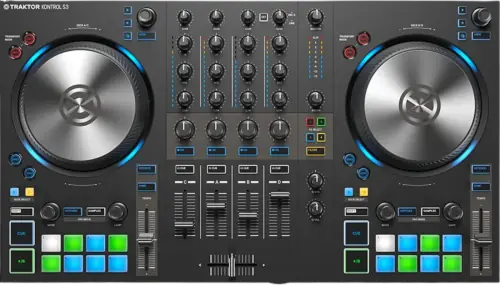
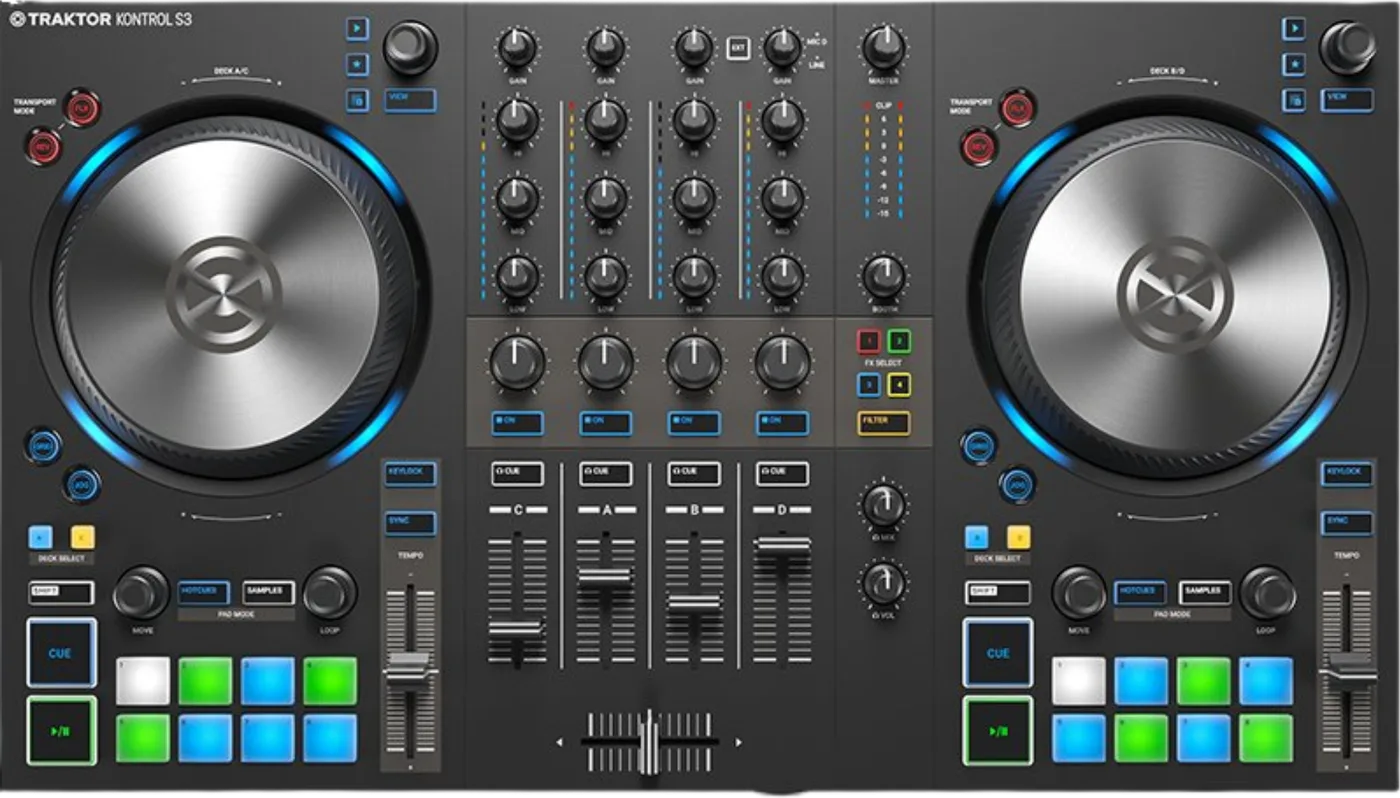
Booth briefing. The TRAKTOR KONTROL S3 is Native Instruments' controller for Traktor, and it works with the computer: no standalone mode is documented. Its inputs are one line input on RCA and one combo microphone socket; there is no phono input, so turntables are not part of its design. It runs on the USB cable alone or on the supplied power supply, and Native Instruments publish the headphone output level for each: 7.7 dBu on the supplied power and -16.5 dBu on USB alone, so the power supply is part of the normal cueing setup.
Fast Lane
The five things that decide your gig
The five things on the TRAKTOR KONTROL S3 that change what happens next, if you are reading this in the booth. All five are explained in full further down this page.
The power supply is what decides whether you can cue at all.
Their own specification table measures the difference. The headphone output into 32 ohms is 7.7 dBu on the 12 V supply and -16.5 dBu on USB power. That is the gap between cueing in a loud room and not cueing at all, so the brick is part of the kit and not an accessory.
It runs either way and Native Instruments recommend one of them: "While the S3 can be partially powered via USB, it is recommended to power it using the provided power supply."
There is no phono input, and nothing on the unit adds one.
There is no phono input on this controller. Native Instruments’ specification table has no phono row, their manual names no phono socket, and turntables appear in that manual only as an analogy for how the jog wheels behave. A deck cannot be plugged straight into an S3.
Native Instruments nowhere print the sentence "the S3 has no phono inputs". The claim above rests on a complete published input list that contains none, which is strong evidence of absence rather than a manufacturer denial, and it is stated that way on purpose.
No standalone mode is documented, so plan as though it needs the computer.
Native Instruments document no standalone mode for the S3. The word does not appear in their manual, on the product page or in the specification table, and unlike the S4 there is no FAQ page and no support article naming one. That is an absence of documentation, not proof that the line input cannot pass through, so if it matters to your set, test it before doors.
Plan the rig around a working laptop rather than around a fallback that has never been published. That is an absence of documentation rather than proof, so if it matters to your set, test it at home first.
It takes exactly two things in: one RCA line input and one combo mic socket.
Two, and their specification table names both: a line input on unbalanced RCA at +13 dBu, and a microphone input on a balanced XLR/TRS combo at -10 dBu. Their product page describes the RCA as the way to mix external audio and calls it an auxiliary input.
That is the whole input list, so anything else you were planning to plug in has to be summed somewhere else first.
Firmware exists. A version history does not.
No version list and no change history for that firmware could be reached, so this site names no version threshold for this controller.
So there is no way to know what a given version changed, and no way to argue that a venue unit is on a bad one. Update at home, with time to test.
If something goes wrong
Nothing is coming out
The unit lighting up proves power, nothing else. It says nothing about whether the software is routing audio to the S3. Check that the controller is the selected audio device first, then the deck assignment, then the channel fader, then the main level.
Headphones are quiet but the room is fine. That is the power symptom before it is anything else. Plug in the supplied adapter and listen again before you go looking for a fault.
The computer does not see it at all. The maker publish a troubleshooting guide that splits this into two different problems, the machine not detecting the hardware and the software not detecting hardware the machine can see, and they are not fixed the same way.
The jog wheels are behaving oddly
There is a support article for exactly this. The maker publish one covering the whole S series, the TRAKTOR KONTROL S3 included: playback that will not scratch when the wheel moves, a deck starting and stopping at random, playback that will not stop when the top plate is pressed, and a blinking LOAD button.
Check which mode the wheel is in first. Two buttons decide what a wheel does. The JOG button "Enables JOG mode (Jog Wheel mode) for the Jog Wheel", which is the playing mode where you "can manually hold playback, nudge and bend, and start scratching by touching and turning the Jog Wheel and the outer rim". The GRID button beside it "Enables GRID mode to manually correct the beatgrid for the current track using the Jog Wheel". The manual lists no turntable mode and no motor on this controller, so a wheel that is doing something strange is in one of those two modes rather than in a third.
Read it before you conclude the unit is broken. Most of what is in it is settings and calibration rather than hardware, and it is a five minute read against a courier and a wait.
What to watch for
Firmware exists. A version history does not.
Short answer. The TRAKTOR KONTROL S3 has firmware you can update and no public record of what any version changed. Firmware exists and is updatable by the owner: Native Instruments’ own troubleshooting guide sends iOS users to download and install the firmware update for the S3. No version list and no change history for that firmware could be reached, so this site names no version threshold for this controller.
What that means for you. There is no number this site can tell you to be at or above, because none is published to cite. Update from the maker's own downloads page at home, before a run of gigs, never in a booth.
Compatibility
Software, drivers and what the computer has to be
The licence comes with the box. With the TRAKTOR KONTROL S3 the maker include what they call the full version of Traktor Pro 4. No expiry and no time limit is stated on any of their pages, so none is claimed here.
Drivers. macOS uses Core Audio and needs nothing. Windows needs the maker's ASIO driver, which arrives with the software: their support article on finding it covers this controller and its two stablemates in one document. Their own supported driver list reads Core Audio, WASAPI, ASIO and DirectSound.
The computer. macOS 13, 14 or 15, or Windows 11, on an Intel Core i5 or an Apple M1, M2 or M3, with 4 GB of RAM, a 1280 by 800 display, USB 2.0 and 1 GB of free space.
Apple Silicon. No documented trap. M1, M2 and M3 are named in the requirements and this unit is listed as compatible in the maker's macOS 26 Tahoe statement.
No standalone mode is documented
Short answer. Native Instruments document no standalone mode for the S3. The word does not appear in their manual, on the product page or in the specification table, and unlike the S4 there is no FAQ page and no support article naming one. That is an absence of documentation, not proof that the line input cannot pass through, so if it matters to your set, test it before doors.
Read that as a planning fact, not a verdict. Plan the gig as though the computer is load bearing, because on the published evidence it is. If your set depends on passing an external source through this unit with the software closed, test it at home with the exact source you will use, and have an answer for what happens if it does not work.
Where the difference shows up. The four channel unit above this one in the same family does have a standalone mixer mode, documented by the maker, and it is the only reason the two units behave differently when a laptop dies mid-set.
There is no phono input, and nothing adds one
Short answer. There is no phono input on this controller. Native Instruments’ specification table has no phono row, their manual names no phono socket, and turntables appear in that manual only as an analogy for how the jog wheels behave. A deck cannot be plugged straight into an S3.
How firm that claim is, stated honestly. Native Instruments nowhere print the sentence "the S3 has no phono inputs". The claim above rests on a complete published input list that contains none, which is strong evidence of absence rather than a manufacturer denial, and it is stated that way on purpose.
Why it matters more here than it would elsewhere. This is a four channel controller with a proper mixer section, which is exactly the shape of thing a DJ assumes will take a deck. The unit above it in the same family takes two. If the gig has turntables in it, this is the wrong box, and finding that out at load-in is expensive.
What the line input is for. One unbalanced RCA pair at +13 dBu, described by the maker as the way to bring external audio into the mix. That accepts a line level source, which a turntable is not.
Features explained
Four channels, one revision, and a mixer without a phono stage
Short answer. A full four channel mixer section with three band EQ, full length faders, sixteen pads and two touch sensitive jog wheels, in front of a 24-bit interface with four outputs and two inputs.
One revision only. One revision only. Native Instruments ship the manual as TRAKTOR_KONTROL_S3_MK1_Manual_English_0120.pdf and no MK2 appears anywhere on their catalogue, their downloads page or their support site.
Two decks in front of you, four in the software. Two decks in front of you and four in the software. Native Instruments: "the left Deck on your S3 controls Decks A and C in the software. The right Deck on your S3 controls Decks B and D in the software." The DECK SELECT buttons move between them, so a deck that will not respond is often a deck you are not currently looking at.
It does not run at 96 kHz. The maker's own table gives the sample rates as 44kHz/48kHz, printed exactly like that. Both of its stablemates on this site run at 96 kHz and this one does not, which is the sharpest single difference between them on paper. The 44 is almost certainly the familiar rate with a digit missing, and it is their published figure, so it is quoted here as written rather than corrected into something they never said.
The pads and the jog wheels, mode by mode
The pads on the TRAKTOR KONTROL S3. Eight pads on each deck and two modes over them. HOTCUES stores and fires cue points and loops and is the default on Track Decks, SAMPLES drives the first four sample slots of a Remix Deck. The second one is conditional, which is why it sometimes looks dead: "The SAMPLES mode can only be enabled when the underlying Deck is configured as Remix Deck. Otherwise the SAMPLES button remains unlit."
The jog wheels. Two buttons decide what a wheel does. The JOG button "Enables JOG mode (Jog Wheel mode) for the Jog Wheel", which is the playing mode where you "can manually hold playback, nudge and bend, and start scratching by touching and turning the Jog Wheel and the outer rim". The GRID button beside it "Enables GRID mode to manually correct the beatgrid for the current track using the Jog Wheel". The manual lists no turntable mode and no motor on this controller, so a wheel that is doing something strange is in one of those two modes rather than in a third.
Why that matters at two in the morning. A wheel that scrubs the beatgrid instead of the track, or a pad row that will not light, is usually a mode rather than a fault. Both are one button away from normal, and both look like broken hardware if you do not know the button is there.
Professional tips
Before you travel
The brick travels with the controller, always. Tape it to the case if you have to. It is the difference between cueing and guessing.
Ask what is in the booth before you say yes to vinyl. If the gig involves decks, this unit cannot take them, and the answer is a separate phono preamplifier into the line input or a different controller. Neither is something you improvise at soundcheck.
Assume the computer is load bearing. No standalone mode is documented, so the laptop dying is the whole rig dying. Plan the fallback that assumption implies.
Where this sits against its own family. Native Instruments nowhere state that the S3 succeeds the S2. It is a four channel unit where the S2 MK3 is two plus one, both are still separately documented on their downloads page, and the support article that once compared the S2, S3 and S4 now returns a 404. So this site records no succession, and the S3 sits beside the S4 in the same generation rather than after anything.
Connections and setup
Every socket on it
Outputs. Main on balanced XLR at 18.7 dBu and on unbalanced RCA at +12.8 dBu, a booth output on balanced TRS at 18.7 dBu, and headphones in both 3.5 mm and 6.3 mm.
Inputs. Two. One line input on unbalanced RCA at +13 dBu, and one microphone input on a balanced XLR and TRS combo socket at -10 dBu. There is no third input and no phono.
How anything plugged into that line input reaches the mix. External audio does not appear in a channel by itself. Every mixer channel carries an EXT button and the manual gives it one job: "Switches the Mixer channel to insert the audio signal coming from the external audio source." That button is the whole documented route from the line input into the mix.
There is a dedicated iOS port. There is a dedicated iOS port. Native Instruments’ troubleshooting guide tells iPad users to connect "via the iOS port" using "the USB-A to Lightning cable that was provided by Apple", and the 2019 manual pairs the unit with Traktor Pro 3 and Traktor DJ 2.
And here is the caveat on it. Native Instruments publish nothing about what that iOS port connects to in the Traktor Pro 4 era. The instructions that exist were written for Traktor DJ 2. Treat the socket as undocumented today rather than as a working iPad rig.
The power supply decides whether you can cue
Short answer. Power the TRAKTOR KONTROL S3 from its supply whenever you can. It runs either way and Native Instruments recommend one of them: "While the S3 can be partially powered via USB, it is recommended to power it using the provided power supply."
And here is the number behind the recommendation. Their own specification table measures the difference. The headphone output into 32 ohms is 7.7 dBu on the 12 V supply and -16.5 dBu on USB power. That is the gap between cueing in a loud room and not cueing at all, so the brick is part of the kit and not an accessory.
Why this is the trap rather than a footnote. A controller that runs on USB feels like a controller that is fine on USB. It powers up, it lights up, the software sees it, the room hears music. The thing that quietly does not work is the one you only need when you are already mixing, in the loudest room you will stand in that day.
Safety
What the manual tells you to do, and in what order
The TRAKTOR KONTROL S3 has a published switch on order. Native Instruments publish an order for switching on and recommend you follow it. Turn the volume controls down to minimum first with the MASTER knob, the BOOTH knob and the VOL knob, then switch on the amplification system, then the computer, then the S3, and start Traktor last.
Hearing. The manual carries one hearing warning and it sits at the master level control: "To avoid damaging your ears, always set the connected speakers or power amplifier to a comfortable listening level."
Why the order is worth keeping. Levels down before anything is switched on is the part that protects the room and the people in it, and it is the step that gets skipped when you are late. The rest of the sequence just means the computer and the software meet a controller that is already awake.
Firmware, drivers and manuals
Official downloads and documents
Go to Native Instruments for the files themselves. We link their pages instead of hosting a copy, because a manual copied here is a snapshot of release day and theirs is the one that stays current.
Manuals. Official Native Instruments manual page →
Broken link? Let us know and we'll fix it.
Frequently asked questions
Quick answers
- Can I connect turntables to it?
- No. There is no phono input on this controller. Native Instruments' specification table has no phono row and their manual names no phono socket: the published inputs are a line input on RCA and a microphone input on a combo XLR/TRS. They nowhere print the sentence that the S3 has no phono inputs, so this rests on a complete published input list that contains none.
- Does it work without a computer?
- Native Instruments document no standalone mode for the S3. The word does not appear in their manual, on the product page or in the specification table.
- Does it need the power supply, or will USB do?
- It can be partially powered over USB, and Native Instruments recommend the supplied supply instead. Their own specification table measures the difference at the headphone output into 32 ohms: 7.7 dBu on the 12 V supply against -16.5 dBu on USB power.
- What is the iOS port for?
- There is a dedicated iOS port on the unit, and Native Instruments publish nothing about what it connects to in the Traktor Pro 4 era. The instructions that do exist were written for Traktor DJ 2.
Related all-in-ones
Commonly paired with
What you usually find beside it in working booths, from club, festival and rental installs rather than from a manufacturer document.
Native Instruments All brands Knowledge base FAQ and Fixes Dictionary
Playing soon and it is not working?
Start Emergency ModeKeep the Emergency Card
We will email you the printable PDF so it is on your phone before the next dark booth. Occasional notes that save gigs. No spam, unsubscribe in one click.
Registering is free and counts everywhere on Save My Gig. We send a confirmation email first. Your address is stored with Brevo, our email provider. Unsubscribe any time. Privacy
Sources: the maker's own product page, specification table, the user manual and their troubleshooting guide, checked 13 August 2026. Specifications theirs, priorities ours.