

DDJ-FLX4, the field manual
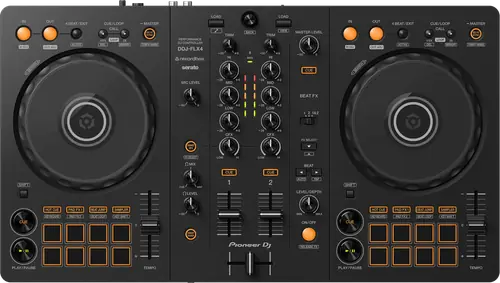
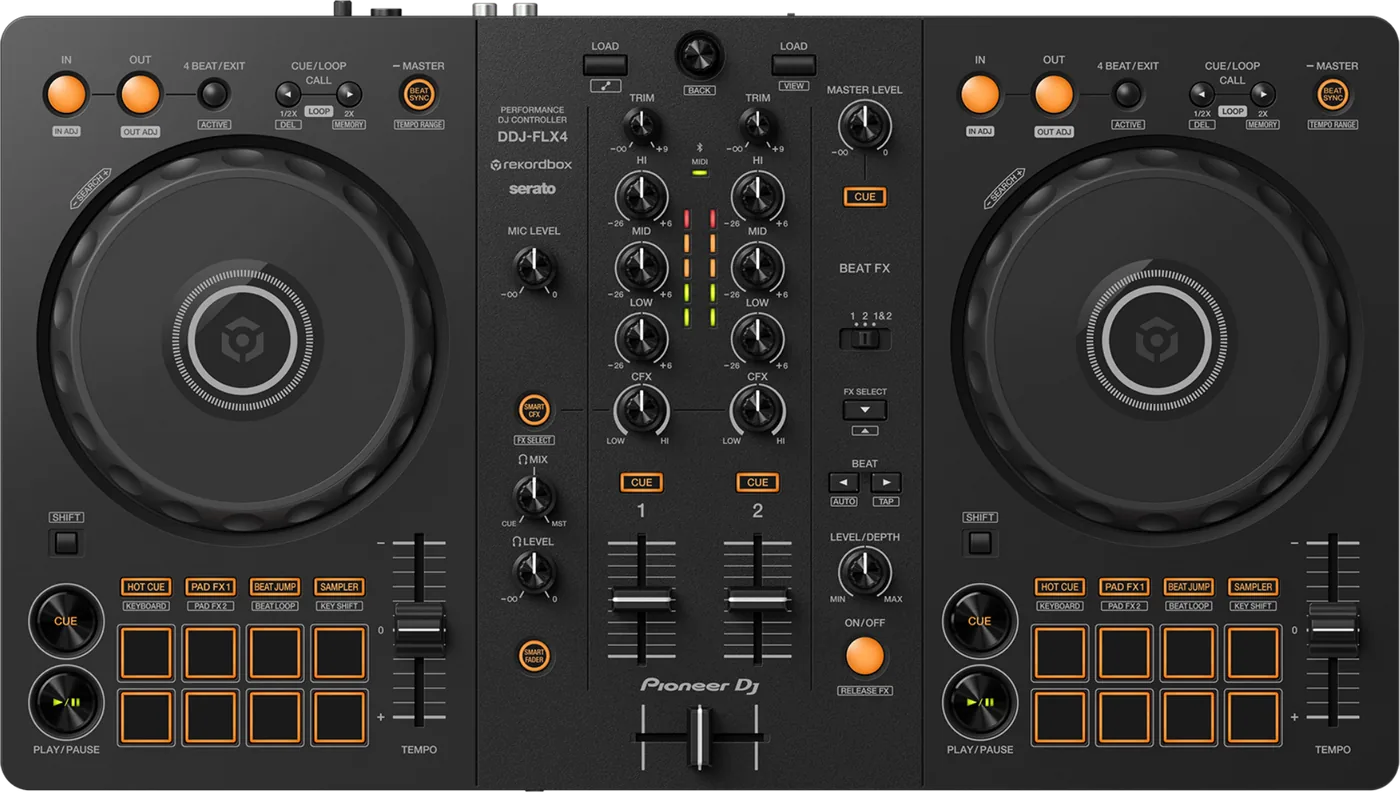
Booth briefing. The DDJ-FLX4 is a 2-channel Pioneer DJ controller, and the software is the point: it plays music through a host app on a computer or a phone rather than on its own, and it has no media slot and no line input. It connects to a phone over Bluetooth for control, with the audio carried separately, or to a computer by cable. A phone rig needs its own power supply as well as the cable, so plan the power before the gig rather than at it.
When it goes wrong: The computer cannot see the controller No sound from the controller
Fast Lane
The five things that decide your gig
The five things on the DDJ-FLX4 that change what happens next, if you are reading this in the booth. All five are explained in full further down this page.
Bluetooth carries control, not audio.
It connects your phone so you can control it. The sound does not travel over Bluetooth, which is the assumption that ruins a set.
If the plan was a wireless phone as your source, that plan does not work on this unit.
A phone rig needs its own power supply, not just a cable to the phone.
AlphaTheta's instruction for using this unit with a mobile device: "To power the unit, use a USB power adapter or mobile battery."
Bus power off one cable is documented for a PC or Mac only, and four listed conditions stop even that working.
Below 1.04 a modern iPhone may not be recognised at all.
A documented fault with a published fix. Firmware first if a phone is anywhere in the rig.
A separate fix, 1.04, covers Android.
rekordbox and Serato DJ Lite do not behave identically on it.
AlphaTheta state that every function on the unit can be controlled whether the host is rekordbox for Mac/Windows or Serato DJ Lite, and that the operation specifications may differ between the two applications.
Worth reading before you commit to learning on one of them, because the differences are specific rather than cosmetic.
No computer or phone, no music. There is no onboard playback.
No media slot, no playback engine, and no line, aux or phono input. The one audio input that is not a USB port is the microphone.
The manual documents a microphone path that does not run through the computer, and documents no way at all to play music without a host.
If something goes wrong
Powering it from a phone, a battery or a laptop
Short answer. The DDJ-FLX4 has two USB ports and they do different jobs. One is for the device, the other is power only, and the Precautions for Use say so on the socket itself: "The port marked with this symbol is a USB port for connecting a USB power adaptor (This is to power the unit only)." For a phone rig AlphaTheta are equally direct: "To power the unit, use a USB power adapter or mobile battery." Their connection procedure starts there, before the phone is touched: "Connect your USB power adapter or mobile battery to the unit’s USB port (for power supply) using a USB cable to turn the unit on."
The laptop case is the different one. With a computer as the host, one cable can do both jobs: "When connecting to a PC/Mac, you can use the unit with a single connection to your computer (USB bus power)." AlphaTheta then list four situations in which that will not work: the power supply capacity of the USB port on your PC/Mac is too low, your PC/Mac is connected with other devices, the impedance of the connected headphones is lower than 32 Ω, or a mono-jack plug is connected to the headphones output terminal. Two of those four are things you carry in your own bag rather than anything about the venue.
The unit tells you when the supply is short. There is a named symptom for it: "The [IN] button and [OUT] button on both decks flash and don’t work." The stated cause and remedy: "The supply capacity of the USB power adapter or mobile battery connected to the unit’s USB port (for power supply) may be insufficient. Use a device with DC 9V 3A." A cue that has gone quiet is the milder version of the same shortage, and it has the panel directly below this one.
Fix it now. Move the supply to the power port and make sure it is rated for what the unit asks. If the unit dies on its own part way through, the documented cause is the power bank: "Use a mobile battery which does not have a power-saving function. The maximum voltage is 24V or less and DC 9V 3A for the mobile battery. Use a USB cable certified to the appropriate standard." On a laptop, unplug the drives and the hubs before you blame the controller.
Avoid it next time. Pack the adapter or battery as part of the phone rig, not as a spare. And if the laptop is only there to feed the unit while your phone runs the show, there is one rule attached to that: "When using rekordbox for iOS/Android with the unit being powered via the USB port of your PC/Mac, do not start a DJ application on your PC/Mac."
The headphones have gone quiet
Short answer. Quiet headphones on a DDJ-FLX4 are a power symptom, not a headphone one, and the manual says so directly: when the supply from the USB port is insufficient, the unit limits the headphone volume itself. The remedy given is to disconnect devices you are not using for DJing so more power reaches the unit. So a cue mix you cannot hear over a room sends you to the power chain rather than to the headphone socket, and it is the same underlying shortage that makes the IN and OUT buttons flash.
Do this. Treat it as the same alarm as the flashing IN and OUT buttons and go to the supply: the dedicated power port, a rated adapter or battery, and everything you are not using for DJing off the same machine. Turning the cue knob further is the one move that will not help.
The controller is not recognised when you plug in a phone
Short answer. This is a documented fault with a published fix: the DDJ-FLX4 was not recognised when an iPhone 15 was connected by USB, and separately was not recognised with a certain type of Android device. Both were fixed in firmware 1.04, dated 7 December 2023.
Why this happens. A unit that shipped before December 2023 and has never been updated still carries it. It presents as the phone simply not seeing the controller at all, which reads like a dead cable or a dead unit rather than a firmware problem.
Fix it now. Rule the cable out first, since a charge-only cable produces the same symptom and is far more common. The published fix describes the fault in phone terms only, an iPhone 15 and a certain type of Android device, so at the gig a laptop host is worth trying, and so is a different handset.
Rule out the cable properly. The manual's test is specific rather than "known good": the supplied cable for a device with a USB Type-C port, a cable certified to the appropriate standard and 3 m or less for a USB Type-A port, and an Apple certified cable of 3 m or less for a Lightning terminal. On a computer, the recognition checklist adds two things people leave plugged in: "When using a USB hub, be sure it’s a product recommended by the manufacturer of your PC/Mac." and "Disconnect any external hard disk, keyboard, etc. Use the internal hard disk only." Other devices on the same machine also cancel bus power, so a hub full of drives breaks this unit in two ways at once.
Avoid it next time. Update to at least 1.04, and ideally to 1.07, before you build a set around playing from a phone.
The Mac will not see it, and macOS has two separate checks
Short answer. macOS gives you two separate checks for a DDJ-FLX4 the computer will not see, and they look at different halves of the same connection. First, in Apple's Audio MIDI Setup, open the Window menu, choose Show Audio Devices, and look for DDJ-FLX4 Audio Out. That confirms the audio side is present. Second, in the same utility's MIDI Window or MIDI Studio, select the DDJ-FLX4 icon and click Remove Device, then reconnect the cable so the entry rebuilds. The icon may read USB MIDI Device instead. A unit that appears in one list and not the other tells you which half has gone.
Before you get there. The cheaper checks come first: the cable the manual names rather than any cable, a different USB port, and the other USB devices unplugged. Keep the Audio MIDI Setup work for when those have all failed.
The one place Windows tells you it sees the unit
Short answer. The Windows equivalent of that check is one place: Device Manager, under Sound, video and game controllers, where DDJ-FLX4 should be listed. If it is not there, the computer is not seeing the unit at all and no amount of work inside the DJ software will change that.
Android output is distorted, or the headphones go silent
Short answer. The DDJ-FLX4 has a switch on the rear panel for exactly this, marked Android MONO/STEREO, and AlphaTheta describe when to move it: "Depending on the Android device, stereo sound may not output correctly. In some cases, the Master output sound may be distorted or sound may not output from the headphones. In that case, slide this switch to [MONO]."
Why this happens. It depends on the handset rather than on the unit, which is why the same controller behaves on one Android phone and not on another. The symptom is not subtle when it lands: a distorted master, or a monitor that has gone silent while the room still hears the track.
Fix it now. Slide the rear-panel switch to MONO. You are trading stereo for output that works, which is the right trade with a room waiting. The default position is STEREO, so on a rig that has been fine on other phones the switch is where you left it.
Avoid it next time. Test the actual handset you are taking, into actual speakers, with the monitor plugged in. An Android phone that has never been through this unit is an untested part of the rig, not a spare.
The microphone produces nothing, and one knob is on the back
Short answer. A microphone that produces nothing on a DDJ-FLX4 has two knobs to check and one of them is on the back. MIC LEVEL is on the mixer section where you would look. MIC ATT. is on the rear panel, and the manual names both in the same remedy. An attenuator set low on the back of a unit is invisible from the front, and it is where a previous owner leaves it after using a hot source.
The crossfader does nothing in Serato DJ Lite
Short answer. A DDJ-FLX4 crossfader that does nothing in Serato DJ Lite is usually the software rather than the hardware. Serato has a crossfader Disable setting, and the manual's remedy is simply to cancel it. Nothing on the unit reports that the fader has been switched out in software, so the fader moves and the sound does not, which reads exactly like a failed fader.
Beat FX switches off when you change channel
Short answer. Documented and fixed on the DDJ-FLX4. Beat FX turned off when the BEAT FX CH SELECT switch was used while Beat FX was on, with the controller connected to rekordbox for Mac and Windows. Fixed in 1.07, dated 4 September 2025.
Why this happens. It is recent, so a great many units in circulation still carry it. It only appears under rekordbox for Mac and Windows, and only when you move the effect between channels with the effect already running, which is exactly what you do mid-transition.
Fix it now. Turn Beat FX off before you move the CH SELECT switch, then turn it back on. It is one extra movement and it side-steps the fault completely.
Avoid it next time. Update to 1.07.
What to watch for
Documented fixes, by firmware version
What is in the record. AlphaTheta publish a consolidated change history for the DDJ-FLX4, so unlike the DDJ-400 and DDJ-800 the list below is complete from 1.02 onward rather than partial. Fixed in 1.07 (4 September 2025): Beat FX turned off when the BEAT FX CH SELECT switch was used with Beat FX already on, under rekordbox for Mac and Windows. Fixed in 1.06 (12 December 2024): the knob centre-position adjustment in Utility mode could fail even with the knobs centred. The change history calls that mode Utility mode; the instruction manual calls the same mode Utilities mode throughout, which is the word to search for. Added in 1.05 (21 May 2024): that knob centre-position adjustment feature. Fixed in 1.04 (7 December 2023): the unit was not recognised when an iPhone 15 was connected by USB, and not recognised with a certain type of Android device. Added in 1.03 (30 March 2023): support for Algoriddim's djay for iOS and Android. 1.02 (8 November 2022) fixed minor issues.
What is not in it. No crash, no freeze and no total audio dropout appears in the published history.
Do this. If you play from a phone, this is not an optional check. Anything below 1.04 can simply fail to be recognised by a modern handset, and the highest published version is 1.07.
Official documentation. Firmware change history, ver. 1.07 PDF →
Found an entry we have missed? Tell us and we will add it.
Compatibility
Does it work without a computer or phone
Short answer. The DDJ-FLX4 plays no music without a host. It has no media slot and no onboard playback engine, and no line, aux or phono input either: the specifications list a 1/4 inch TS microphone input, RCA master outputs, a 3.5 mm stereo mini headphones output and two USB Type-C ports, so the only audio input that is not a USB port is the microphone.
The microphone is the documented exception. With [Microphone Input] set to Low Latency Mode, AlphaTheta describe the mic path leaving the computer out of it: "Microphone sound can be output from the unit another way (i.e. not a PC/Mac)." What you give up on that path is listed too: the microphone EQ, the microphone effect, TALKOVER, FEEDBACK REDUCER and the master limiter are all shown as disabled when the sound is not routed via a PC/Mac. Nothing in the manual describes playing music with no host attached.
Why this happens. The decks, the library, the EQ and the effects all live in the host, whether that host is rekordbox for Mac and Windows, rekordbox for iOS/Android, Serato DJ Lite or Serato DJ Pro. The panel is a control surface for that software.
When professionals use it. Small rooms and warm-ups where a phone and a controller is the whole rig, and as a travel unit that fits in hand luggage.
Common mistakes. Turning up with the controller and a USB stick. That combination plays nothing. If the venue runs CDJs, prepare a drive for those players as well, which is a separate job.
Bluetooth does not carry the sound
Short answer. Bluetooth on the DDJ-FLX4 connects your phone for CONTROL only. The audio does not travel over it. Pioneer's sentence: "Sound does not output from the unit via Bluetooth. Instead, connect a cable from the mobile device to an audio output device before use."
Why this trips people. Every other Bluetooth device a DJ owns sends audio. Pairing succeeds, the decks respond, the waveforms move, so nothing suggests a problem until the moment you need sound in a room. Then the phone is playing to itself and the controller outputs nothing.
Fix it now. Run a cable out of the phone to your mixer or speakers. On a phone with no headphone socket that means a USB-C or Lightning to 3.5 mm adaptor, and if you also want to monitor, a split cable. AlphaTheta are specific about what that split takes away, in their own second connection example: "In this example, the master sound and the headphones monitor sound both play in mono." So monitoring over Bluetooth means a mono master. Those adaptors are not supplied. Get them before the gig, not on the day.
The microphone goes with it. A Bluetooth link also takes out the announcement channel, which AlphaTheta state plainly: "Microphone sound can’t be output from the [MASTER] output terminals or headphones output terminal on the unit when the Bluetooth connection is in use. When the USB connection is in use, sound can be output from the [MASTER] output terminals and headphones output terminal on the unit." If somebody is going to ask you for the mic during this gig, that alone decides the connection.
When to use Bluetooth at all. Pioneer point to one case: a mobile device with a Micro USB Type-B port, where they say to connect by Bluetooth rather than cable because they cannot guarantee proper operation over USB. Otherwise a USB cable to the phone is the simpler path, and either way the unit still needs its own supply: "To power the unit, use a USB power adapter or mobile battery."
Avoid it next time. Whichever way you connect, make sound through the controller into an actual speaker before you leave the house. Pairing is not a sound check.
Features explained
rekordbox or Serato, and which to learn on
Short answer. The unit unlocks rekordbox for Mac/Windows and Serato DJ Lite without a separate licence, and gained Algoriddim djay for iOS and Android in firmware 1.03. AlphaTheta's own statement on parity is precise: AlphaTheta state that every function on the unit can be controlled whether the host is rekordbox for Mac/Windows or Serato DJ Lite, and that the operation specifications may differ between the two applications.
What the manual lists. The supported hosts are rekordbox for Mac/Windows, rekordbox for iOS/Android, Serato DJ Lite, and Serato DJ Pro, which needs a paid licence. On a phone the manual's own host is rekordbox for iOS/Android, described like this: "By connecting a mobile device running rekordbox for iOS/Android to the unit via a USB cable or Bluetooth, you can perform with music files stored on the device or from a compatible streaming service."
Why it matters. Both halves of that sentence are load bearing. Every control does something under either host, so nothing on the panel is dead. But how a given control behaves can differ, so muscle memory built in one application does not transfer perfectly to the other.
When professionals use it. As a second controller that can walk into a Serato house or a rekordbox house without a licence conversation, and as a phone-based rig for small rooms.
Common mistakes. Learning a workflow in one host, switching to the other on the day of a gig, and discovering the difference in front of a room. Pick the host for the gig in advance and rehearse in that one.
Professional tips
Before you rely on one in a booth
Firmware first if a phone is in the rig. Anything below 1.04 can fail to be recognised by a modern iPhone or Android handset, and that failure looks exactly like broken hardware at the worst possible moment.
Choose the host before the gig, not at it. Both are unlocked, and AlphaTheta themselves say the operation specifications may differ between them. Rehearse in the one you will actually use.
Carry the cable the manual names. A charge-only cable produces the same symptom as the recognition fault, and the stated requirement is narrower than "a good cable": the supplied cable for a device with a USB Type-C port, a cable certified to the appropriate standard and 3 m or less for a USB Type-A port, and an Apple certified cable of 3 m or less for a Lightning terminal.
Check the headphones, not just the cue knob. There is a stated minimum: "Only use headphones with 32 Ω or more impedance. Headphones with impedance lower than 32 Ω won’t work with the unit." The same low impedance is one of the four conditions that cancels bus power, so borrowed earbuds can take the whole unit down rather than just the monitor.
The light show during a changeover is Demo mode. AlphaTheta describe it as normal behaviour: "In normal conditions, if you don’t use any features for a specified amount of time, the unit will enter Demo mode." The choices are off, 1 minute, 5 minutes or 10 minutes, with 10 minutes as the default, and getting out of it takes no menu: "When any knob or button on the unit is used during Demo mode, Demo mode is canceled." No auto power off and no standby timer are documented for this unit at all.
Work around Beat FX rather than fighting it. If the unit is below 1.07, switch the effect off before moving it between channels.
Connections and setup
Fader Start is in a different place on each host
Short answer. Fader Start lives in three different places on a DDJ-FLX4 depending on what is driving it, and the manual documents all three. With rekordbox for Mac or Windows it is a check box under Preferences, Controller, Mixer. With Serato DJ Lite it is on the unit itself, in Utilities mode. With rekordbox for iOS or Android it is under Settings and DDJ-FLX4 settings. All three also need a cue set first. So a fader start that worked last week and not today may simply be a different host, and looking in the place that worked before will not find it.
Firmware, drivers and manuals
Official downloads and documents
Go to AlphaTheta for the files themselves. We link their pages instead of hosting a copy, because a manual copied here is a snapshot of release day and theirs is the one that stays current.
Firmware downloads. Official Pioneer DJ firmware page →
Manuals. Official Pioneer DJ manual page →
Broken link? Let us know and we'll fix it.
Frequently asked questions
Quick answers
- What software does the DDJ-FLX4 work with?
- It unlocks rekordbox for Mac/Windows and Serato DJ Lite without a separate licence, and gained Algoriddim djay for iOS and Android in firmware 1.03. The manual's own supported list is rekordbox for Mac/Windows, rekordbox for iOS/Android, Serato DJ Lite, and Serato DJ Pro, which needs a paid licence, and of those the phone host it documents in full is rekordbox for iOS/Android: "By connecting a mobile device running rekordbox for iOS/Android to the unit via a USB cable or Bluetooth, you can perform with music files stored on the device or from a compatible streaming service."
- Do rekordbox and Serato DJ Lite behave identically on it?
- Not exactly. AlphaTheta state that every function on the unit can be controlled whether the host is rekordbox for Mac/Windows or Serato DJ Lite, and that the operation specifications may differ between the two applications.
- Will it play music on its own?
- No. It has no media slot, no onboard playback engine and no line, aux or phono input: the specifications list a 1/4 inch TS microphone input, RCA master outputs, a 3.5 mm stereo mini headphones output and two USB Type-C ports. The microphone is the only audio input that is not a USB port, and on that one path AlphaTheta do describe the sound leaving the unit without the computer: "Microphone sound can be output from the unit another way (i.e. not a PC/Mac)."
- Do I need a power supply if I only play from a phone?
- Yes, and it goes in its own port: "To power the unit, use a USB power adapter or mobile battery." The single-cable case is the computer one: "When connecting to a PC/Mac, you can use the unit with a single connection to your computer (USB bus power)."
- My Android phone sounds distorted or the monitor is silent. What now?
- Use the rear-panel Android MONO/STEREO switch: "Depending on the Android device, stereo sound may not output correctly. In some cases, the Master output sound may be distorted or sound may not output from the headphones. In that case, slide this switch to [MONO]."
- Does the microphone still work over Bluetooth?
- No: "Microphone sound can’t be output from the [MASTER] output terminals or headphones output terminal on the unit when the Bluetooth connection is in use. When the USB connection is in use, sound can be output from the [MASTER] output terminals and headphones output terminal on the unit."
- What headphones does it need?
- There is a stated floor: "Only use headphones with 32 Ω or more impedance. Headphones with impedance lower than 32 Ω won’t work with the unit."
- Why does it start a light show when I leave it alone?
- That is Demo mode: "In normal conditions, if you don’t use any features for a specified amount of time, the unit will enter Demo mode." The choices are off, 1 minute, 5 minutes or 10 minutes, with 10 minutes as the default, and "When any knob or button on the unit is used during Demo mode, Demo mode is canceled."
- Why will my iPhone not recognise it?
- If the firmware is below 1.04, that is a documented fault fixed in that release, which also covered certain Android devices. Rule out a charge-only cable first, since it looks the same.
- Can I use it with djay?
- Yes. Support for djay for iOS and Android was added in firmware 1.03.
- Can it link with club CDJs over PRO DJ LINK?
- No. It is a USB controller for a computer or phone and does not join a PRO DJ LINK network.
- What is the highest published firmware?
- 1.07, dated 4 September 2025. AlphaTheta publish a consolidated change history for this model covering 1.02 onward.
Where this sits in the line
- Previous generation DDJ-400
Related controllers
Pioneer DJ All brands Knowledge base FAQ and Fixes Dictionary
Playing soon and it is not working?
Start Emergency ModeKeep the Emergency Card
We will email you the printable PDF so it is on your phone before the next dark booth. Occasional notes that save gigs. No spam, unsubscribe in one click.
Registering is free and counts everywhere on Save My Gig. We send a confirmation email first. Your address is stored with Brevo, our email provider. Unsubscribe any time. Privacy
Sources: AlphaTheta's official DDJ-FLX4 firmware change history, ver. 1.07, the firmware page, Help Center, the FAQ on using rekordbox and Serato DJ Lite with this unit, Pioneer DJ's product page and the operating instructions, checked 24 August 2026. Specifications theirs, priorities ours.