

DDJ-400, the field manual
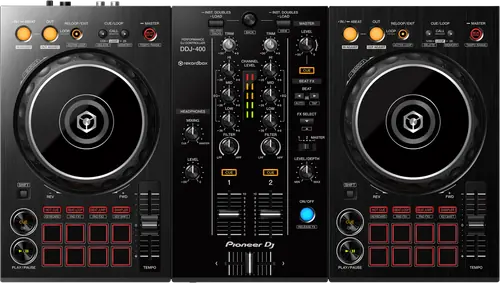
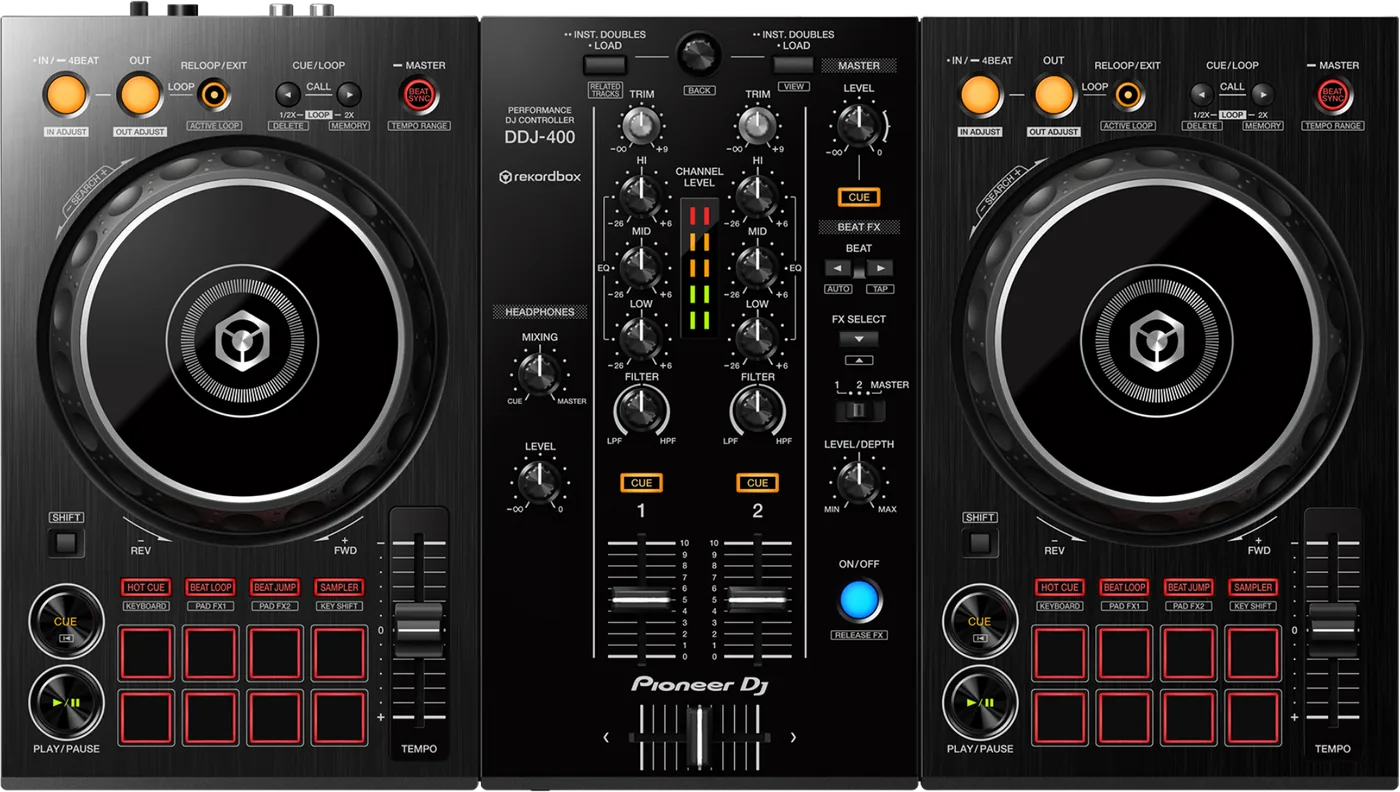
Booth briefing. This is a controller, not a standalone player: without a computer running rekordbox, the DDJ-400 makes no sound at all. There is no onboard playback engine behind the jog wheels and no USB slot to play music from. It is built around a club-style layout that mirrors the professional booth, with Beat FX, a per-channel FILTER knob and a mic input, so the hours you put in at home transfer to a club booth. There is no PRO DJ LINK here either.
When it goes wrong: The computer cannot see the controller No sound from the controller
Fast Lane
The five things that decide your gig
The five things on the DDJ-400 that change what happens next, if you are reading this in the booth. All five are explained in full further down this page.
No computer, no sound. Pack the laptop as part of the controller.
The DDJ-400 has no standalone playback and no media slot. A powered unit on its own is silent.
Open rekordbox on the machine you are actually bringing, before you leave, not at the venue.
Two controls decide what reaches your headphones, and beginners know one.
A cue you cannot hear is almost never a broken headphone jack on this unit.
It is the pair of controls between the track and your ears, and knowing both is the difference between panic and a five-second fix.
If the computer will not recognise it, take it off the hub first.
A USB hub heads AlphaTheta's own list of causes, and a laptop dock is a hub.
Install order matters too, and there is no dedicated driver to fight, so the fix is physical rather than a reinstall.
There is no PRO DJ LINK. It cannot join a booth of CDJs.
It is a USB controller for a computer, not a network device.
So it prepares you for club decks by layout, but it never becomes one of them.
One deck and no platter on screen is rekordbox in EXPORT mode.
The manual lists it as two separate symptoms with one answer: only one track deck displayed, and no platter on the track deck.
Click the area marked EXPORT at the upper left of the rekordbox screen, then select PERFORMANCE. Nothing on the unit reports the mode.
If something goes wrong
The controller is connected and there is no sound
Short answer. The DDJ-400 asks this question at the computer, not at the mixer. It has its own sound card, so the audio path runs from rekordbox on the computer, through the USB cable, out of the controller's own outputs. Any break in that chain is silence.
Why this happens. The usual causes are the computer's audio output pointing somewhere other than the DDJ-400, the USB cable not seated, rekordbox not authorised or not running, or the master output cabled from the wrong socket. One of those has a name and a documented default: "PC MASTER OUT is a function to output the master sound of rekordbox dj from the speaker of PC/Mac. By the default, PC MASTER OUT is set to on." So on a first connection at a venue the master comes out of the laptop rather than the booth, and the fix is a click in rekordbox rather than a cable.
The other half is power. The DDJ-400 runs on USB bus power alone, and AlphaTheta list four conditions in which that may not work: the USB port on the computer cannot supply enough, other devices are connected to that computer, the headphones are below 32 Ω, or a monaural jack is in the PHONES output. Their troubleshooting adds the one people skip in a booth: "Do not use your PC/Mac running on its battery. Supply power to the PC/Mac from an AC power supply."
Fix it now. Confirm rekordbox is running and shows the controller connected. Check the audio device in rekordbox's preferences: the device to select is [DDJ-400] on a Mac and [DDJ-400 WASAPI] on Windows. Reseat the USB cable at both ends, straight into the computer. Put the laptop on mains. Then check the master cabling and the house desk.
Avoid it next time. Open rekordbox and make sound through the controller before you leave the house, on the actual computer you are taking, and pack the cable that came in the box: "Before connecting to the device or changing the connection, disconnect the USB cable. Only use the USB cable included with this unit."
One deck, no platter, and a controller that does nothing
Short answer. A DDJ-400 whose deck section does nothing has one answer the manual gives twice, under two symptoms that look like different faults: only one track deck is displayed on the screen, and the platter is not displayed on the track deck. Both are rekordbox sitting in EXPORT mode, and the fix is the corner of the window: click the area marked EXPORT at the upper left of the screen, then select PERFORMANCE. The manual pairs it with a second check under the same symptoms, which is whether rekordbox dj has been activated at all. Neither is a hardware fault and neither is visible on the unit, which is why a controller in this state reads as broken.
Why this matters. Everything looks connected. The unit lights up, the computer sees it, and half the screen is missing. It reads as a driver fault and it is a mode selector in the corner of the window, which is why people spend an evening on cables before finding it.
The computer will not recognise the DDJ-400
Short answer. Order matters on the DDJ-400, and doing it in the wrong order is the usual cause. Pioneer's instruction is blunt: "Do not connect the unit to your PC until the installation has completed." Software first, cable second.
Why this happens. There is no dedicated driver here to fight over, and AlphaTheta say so: "This unit operates with the operating system’s standard driver." So the causes on their own list are physical, and a USB hub heads it: "USB hubs cannot be used. Connect the PC/Mac and this unit directly using the included USB cable." A laptop dock, a hub built into a monitor and a multi-port travel adapter are all hubs. Company on the bus is next: "When another USB audio device is connected to the PC/Mac at the same time, it may not operate or be recognized normally." After that comes the socket itself, and they suggest trying a different USB A port on the same machine.
The cable a modern laptop needs. This is a USB B unit shipped with a USB A cable, and AlphaTheta name the adapter as required rather than optional: "When using a PC/Mac with only the USB Type-C port, the USB Type-C female to USB-A male cable is required."
Fix it now. Unplug the controller and take it off any hub or dock, straight into the machine. Disconnect other USB audio devices and external drives. Finish the rekordbox installation, and on Windows do it logged in as an administrator, which the manual asks for explicitly. Close other programs first, then open rekordbox and plug the controller in. On a Mac that still will not see it, AlphaTheta give a specific repair: with the cable out, open Audio MIDI Setup, select the [DDJ-400] icon, click [Remove Device], then reconnect the unit and the icon comes back.
Avoid it next time. Do this at home on the actual machine you are taking to the gig, never in the booth. The same order applies on Mac: the manual gives the identical warning there.
Where the computer itself says whether it sees the unit
Short answer. When the DDJ-400 is not recognised, the manual sends you to the place the operating system itself reports what it can see, and it is a different place on each platform. On a Mac, start Apple’s Audio MIDI Setup, choose Window then Show Audio Devices on the menu bar, and check whether DDJ-400 Audio Out is displayed. On Windows, open Device Manager, then Sound, video and game controllers, and check whether DDJ-400 is displayed. There is a second Mac step for a sound setting that has gone wrong: with the USB cable disconnected, open MIDI Window or MIDI Studio in that same utility, select the DDJ-400 icon and click Remove Device, then reconnect the cable so the icon comes back. The icon may read USB MIDI Device instead. The list also asks you to quit other applications including screen savers and resident software, with a caution attached: “When quitting antivirus security software, before doing so, disable the Internet connection to ensure the security of your PC/Mac.”
Why you cannot hear the cue in your headphones
Short answer. On the DDJ-400 two controls decide what reaches your ears, and beginners usually only know one. The Headphone [CUE] button on a channel sends that channel to the headphones. The HEADPHONES MIXING knob then decides how much of it you hear against the master. If that knob is fully to the master side, you can press CUE all set and hear nothing but what the room hears.
Why this happens. Pioneer's own description of the knob is the giveaway: it "adjusts the monitor volume of the channel for which the Headphone [CUE] button is pressed, and the sound of the [MASTER] channel." It is a blend, not a volume. The manual's own setup routine puts it at centre, and any DJ who used the unit before you may have moved it.
Fix it now. Put HEADPHONES MIXING at centre, turn HEADPHONES LEVEL up from zero, then press the Headphone [CUE] button on the channel you want. There is also a separate Headphone CUE button marked MASTER, which sends the master mix to the headphones and is a common reason people think cueing is broken when it is simply monitoring the wrong thing.
Check the headphones themselves. Two documented causes sit in the hardware rather than on the panel. The first is impedance: "Connect the headphones of which impedance is 32 Ω or more. It is not supported with that impedance of the headphones is lower than 32 Ω." The second turns a quiet cue into a power symptom rather than a level one: "This unit restricts the sound volume from the headphones when the supply from the USB terminal is not enough." Low-impedance headphones are also on AlphaTheta's list of conditions under which the unit may not run on USB bus power at all.
Avoid it next time. Set the mixing knob to centre as part of your setup routine, the same way you zero a gain. It takes a second and removes the single most common reason a new DJ cannot beat match on this controller.
The jog wheel stops responding to your hand
Short answer. The DDJ-400 senses your hand electrically rather than mechanically, so a jog that ignores you is usually a surface problem and not a dead sensor: "An electrostatic system is used as the detection method in the jog wheel of this unit. Therefore, if the jog wheel is dirty or the user has hand cream on their hands, detection may not respond."
Fix it now. Dry wipe the jog wheel with a soft cloth. If it is properly dirty, AlphaTheta ask for a soft cloth immersed in a 5 to 1 or 6 to 1 solution of water and neutral detergent and wrung out well, then a dry cloth afterwards.
The second cause, which reads as a fault. If the jog works only while you are also touching some other metal part of the unit, AlphaTheta say another connected device may be affecting it, and ask you to review the connection environment, meaning where the unit is set up and how it is grounded.
Avoid it next time. Hand cream before a set is the one the manual names by itself. Wipe the wheels as part of packing down, not as an emergency in the booth.
Fader start does not start anything
Short answer. Fader Start on the DDJ-400 needs two things and neither of them is on the unit. First set a cue, because with no cue there is nothing for the fader to start. Then switch the function on, which lives in rekordbox: the Mixer tab of Preferences, then Controller, where the Fader Start check box has to be ticked. Both are asked for in the same troubleshooting entry, so a fader that starts nothing is almost always one of the two rather than a fader problem.
The sound keeps cutting
Short answer. Sound that cuts on a DDJ-400 has one adjustment in the manual and it is not on the unit: set an appropriate buffer size in rekordbox. The same value appears again under unstable operation, where a USB buffer size that is too small is listed as its own cause. A larger buffer costs latency and buys stability, which is a trade worth settling at home rather than in front of a room.
rekordbox keeps becoming unstable
Short answer. When rekordbox dj becomes unstable with a DDJ-400 attached, the manual gives a list rather than a single cause: update rekordbox, quit other applications to reduce the load, and if it continues, disable the wireless network and other wireless connections, the antivirus software, the screen saver and the low power mode. Then disconnect other USB devices, take out any hub, and try a different USB A port. The last item is the one that carries a second consequence on a bus-powered unit: “Is this unit connected to a laptop running on its battery? Supply power to the laptop from an AC power supply.” The manual explains why in its own words, and it is about the computer rather than the controller: depending on the laptop’s settings, low power mode may be set when the machine is on battery, automatically reducing the performance of the computer itself.
Do this. Set the laptop up the way you will arrive: on mains, wireless off, nothing else running, one USB device and no hub. Then leave it that way rather than turning things back on between soundcheck and doors.
The recording came back too quiet
Short answer. Recording that comes back silent or too quiet from a DDJ-400 session has one documented cause, and the control is in the software rather than on the unit: the recording level is low, and the adjustment is the recording control on the REC panel of rekordbox dj. Nothing on the controller reports the recording level, so a set that sounded right in the room can still record thin, and the only place to see it is the panel you were not looking at while playing.
The unit is behaving strangely
Short answer. The DDJ-400 has no power switch, so the recovery everyone means by turning it off and on is done at the cable: "If operation is not as usual or the unit is not turned on, disconnect the USB cable, wait for a while, and then connect the USB cable to turn on the unit."
Why this happens. AlphaTheta name the cause in both manuals: "This unit may not operate properly due to static electricity or other external influences." The Quick Start Guide is the more specific of the two, asking for the unit to be turned off, left for 1 minute, then turned on.
Fix it now. Pull the USB cable, wait a minute, reconnect it directly to the computer. On this unit that is the whole power cycle, and it is also what the troubleshooting page prescribes when an indicator is flashing and behaviour is odd.
Avoid it next time. Know the step before you need it. A DJ who does not know the cable is the power switch has no recovery move at all on this controller.
What to watch for
Documented fixes, by firmware version
What is in the record. Two entries. Firmware 1.03, dated 9 March 2021, whose contents AlphaTheta describe in full as "Minor issues" fixed, and 1.01 of 17 September 2019, which they file as an improvement rather than a fix: "Improved TEMPO slider stability." That is the entire published change record for this unit.
The gap, stated honestly. AlphaTheta publish a consolidated change history for this unit. 1.03 of 9 March 2021 is described in full as "Minor issues" fixed, and 1.01 of 17 September 2019 improved TEMPO slider stability. This page will not guess what the "minor issues" were. If you find an official dated page we have missed, tell us and it goes in.
What is not in it. No crash, no freeze, no audio dropout and no named defect appears anywhere in the published record for this model. A TEMPO slider that drifts is the one thing the record touches, and 1.01 is where it was addressed. That is a thin record rather than a clean bill of health, and the difference is worth holding on to.
Do this. Check the firmware version on any DDJ-400 you are relying on. The highest published version is 1.03, so one number answers the whole question.
Official documentation. Firmware, Help Center →
Found an entry we have missed? Tell us and we will add it.
The panel starts a light show on its own
Short answer. The DDJ-400 has no auto power off and no standby. What it has is a demo mode, and it arrives on a timer: "By default, demo mode starts when there is no operation for 10 minutes."
Why this happens. It is a factory setting rather than a fault, and it only runs when nothing has been touched. The way out is one touch: "When any knob or button on this unit is operated during the demo mode, the demo mode is canceled."
Fix it now. Move any knob or press any button. If you want the timer changed, it lives in utilities mode with four choices: off, 1 minute, 5 minutes or 10 minutes.
Avoid it next time. On a unit that sits between sets, set demo mode off in utilities before the gig rather than explaining a light show to a promoter mid-changeover.
Compatibility
Does it work without a laptop
Short answer. No. The DDJ-400 is a controller, not a standalone player: it needs a computer running rekordbox to make any sound at all. There is no USB slot to load music from and no onboard playback engine. Unplug the computer and the unit goes silent.
Why this happens. Every deck, waveform, EQ and effect you touch on the panel is software doing the work on the computer and sending audio back through the controller's own sound card. It ships with a rekordbox licence and is plug and play through its own built-in sound card; AlphaTheta also list Algoriddim djay support.
When professionals use it. A rig built around a laptop from the start, where the controller replaces the mixer and the players rather than sitting beside them.
It is not locked to rekordbox. The DDJ-400 changes role by itself depending on what is open: "When rekordbox is not running, the unit operates as a general MIDI controller." That does not give it a voice of its own, because the audio is still made on the computer, but it does mean another MIDI-capable application can drive the panel.
The licence key is a one-off. The unit ships with a rekordbox dj licence key card, and AlphaTheta are blunt about what that card is worth: "Please keep the license key because it cannot be provided again." The key also has a ceiling: "Activation with the license key is allowed for up to 2 PC/Mac with the same account." A second-hand DDJ-400 with no card, or a backup laptop that would be the third machine, cannot run the software this unit needs to make any sound.
Common mistakes. Arriving at a gig with a DDJ-400 and a USB stick and no computer. That combination cannot make sound. If the booth has CDJs and you brought the controller, you need either the laptop or a rekordbox export on a drive the house players can read, and those are two different preparations.
Can it link to club CDJs over PRO DJ LINK
Short answer. No. This is a USB controller for a computer, not a network device. It has no PRO DJ LINK and does not join a booth network of players.
Why this happens. PRO DJ LINK is a LAN between standalone players and a mixer, sharing a library and a clock. The DDJ-400 has no library of its own to share and no network port to share it over.
Fix it now. If a promoter is expecting you to link into house CDJs, that conversation belongs before you load the car. The practical answer at the gig is a rekordbox export on a drive the house players can read, played from their decks, with the controller left in the bag.
Avoid it next time. Ask what the booth actually has, and prepare for the booth rather than for the controller.
Will it prepare you for club CDJs
Short answer. The DDJ-400 is built around a club-style layout that mirrors the professional booth, with Beat FX, a per-channel FILTER knob and a mic input. 2 channels, 2 decks, performance pads, and a built-in sound card so it is plug and play with the supplied USB cable.
Why it matters. The control positions were chosen so that practice transfers. A DJ who has only ever played a DDJ-400 at home can sit at a club setup and find the EQ, the faders and the transport roughly where their hands expect them, which is the whole design argument for this unit.
When professionals use it. As a practice and preparation surface, as a travel controller when a venue cannot supply club gear, and as a spare that fits in a backpack. It weighs 2.1 kg.
What the colour control actually is. The per-channel knob above each EQ is a FILTER, and the Operating Instructions describe it in those terms: "Turns on the filter effect for each channel. When the knob is set to the center position, the original sound outputs." Worth knowing before you go looking on the panel for a select control that is not there.
Common mistakes. Reading "club-style layout" as "club-standard unit". The layout is a teaching aid, not a claim that the DDJ-400 behaves like a pair of CDJs and a DJM. It has no USB playback, no network and no standalone mode.
Features explained
Settings stored inside the unit
Short answer. The DDJ-400 keeps four settings in the unit itself rather than in rekordbox: master output in monaural or stereo, the master output peak limiter, the MIDI controller setting and the demo mode setting. They survive being unplugged and they travel with the box, so a controller somebody else configured arrives carrying their choices.
Why it matters. The one that ruins a set quietly is the master output, because the factory state is the one you assume: "By default, stereo sound is set." A unit somebody left in monaural sounds like a room problem or a cable problem, and no amount of checking either will explain it.
Fix it now. Disconnect the USB cable from the computer, then hold [SHIFT] and [PLAY/PAUSE] on the left deck while you plug it back in. That is utilities mode. While a change is being written, one line of the bottom left performance pads flashes, and AlphaTheta are firm about it: "Do not disconnect the USB cable from the unit while flashing."
Avoid it next time. Check the utilities settings on any DDJ-400 you did not configure yourself, the same way you would check a firmware version.
Professional tips
Before you rely on one in a booth
Pack the computer as part of the controller. The DDJ-400 makes no sound at all on its own. Open rekordbox on the machine you are actually taking and confirm it is authorised and that audio comes out of the controller, not the laptop speakers.
Prepare for the booth you are playing, not the one you own. If the venue has CDJs, a rekordbox export on a correctly prepared drive is what saves the gig, and that is a different job from packing the controller. Doing both takes one evening.
Read the firmware version once. The highest published version is 1.03 and the whole record runs to two entries, so the check takes seconds and there is little to weigh up.
Pack the cable that came in the box. The whole rig runs down one cable that also carries the audio and all of the power, and AlphaTheta are specific rather than boilerplate about which one: "Before connecting to the device or changing the connection, disconnect the USB cable. Only use the USB cable included with this unit." Take it off hubs and docks too.
Keep the licence key card somewhere that is not the gig bag. AlphaTheta will not reissue it: "Please keep the license key because it cannot be provided again."
Firmware, drivers and manuals
Official downloads and documents
Go to AlphaTheta for the files themselves. We link their pages instead of hosting a copy, because a manual copied here is a snapshot of release day and theirs is the one that stays current.
Firmware downloads. Official Pioneer DJ firmware page →
Manuals. Official Pioneer DJ manual page →
Broken link? Let us know and we'll fix it.
Frequently asked questions
Quick answers
- Will the DDJ-400 make sound on its own?
- No. It is a controller, not a standalone player. Without a computer running rekordbox it makes no sound at all, and it has no USB slot to play music from. There is no line, phono or AUX input on it either, so there is nothing to mix while the computer reboots.
- Can I plug a USB stick into it?
- No. There is no media slot for music. The USB port connects it to a computer.
- Can it link with club CDJs over PRO DJ LINK?
- No. It is a USB controller for a computer and does not join a PRO DJ LINK network.
- What software does it need?
- It ships with a rekordbox licence and is plug and play through its own built-in sound card; AlphaTheta also list Algoriddim djay support.
- How many channels and decks?
- 2 channels and 2 decks.
- What is the highest published firmware?
- 1.03, dated 9 March 2021, and AlphaTheta describe it in full as "Minor issues" fixed. It is the newer of the two entries in their change history for this unit.
- My laptop only has USB-C. What do I need?
- An adapter cable, and AlphaTheta name it rather than leaving it to you: "When using a PC/Mac with only the USB Type-C port, the USB Type-C female to USB-A male cable is required." Not a hub, and not a dock.
- The computer will not see it. Is it a driver?
- No, and there is no driver to install: "This unit operates with the operating system’s standard driver." AlphaTheta list a USB hub first instead: "USB hubs cannot be used. Connect the PC/Mac and this unit directly using the included USB cable."
- The panel started flashing patterns by itself.
- That is demo mode, not a fault: "By default, demo mode starts when there is no operation for 10 minutes." Touch any knob or button and it stops.
- What do I do if it behaves strangely?
- There is no power switch, so the power cycle is the cable: "If operation is not as usual or the unit is not turned on, disconnect the USB cable, wait for a while, and then connect the USB cable to turn on the unit."
- Are there known firmware bugs?
- No defect is named in the record. AlphaTheta publish a consolidated change history for this unit. 1.03 of 9 March 2021 is described in full as "Minor issues" fixed, and 1.01 of 17 September 2019 improved TEMPO slider stability. A thin record is not the same thing as a clean one, so check the version on any unit you are handed.
Where this sits in the line
- Next generation DDJ-FLX4
Related controllers
Pioneer DJ All brands Knowledge base FAQ and Fixes Dictionary
Playing soon and it is not working?
Start Emergency ModeKeep the Emergency Card
We will email you the printable PDF so it is on your phone before the next dark booth. Occasional notes that save gigs. No spam, unsubscribe in one click.
Registering is free and counts everywhere on Save My Gig. We send a confirmation email first. Your address is stored with Brevo, our email provider. Unsubscribe any time. Privacy
Sources: AlphaTheta's official DDJ-400 firmware page, Help Center, the instruction manual article, the official product page and the 2018 launch announcement, checked 24 August 2026. Specifications theirs, priorities ours.