

DJM-900NXS2, the field manual
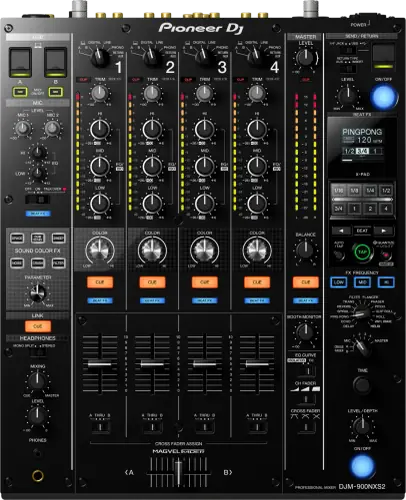
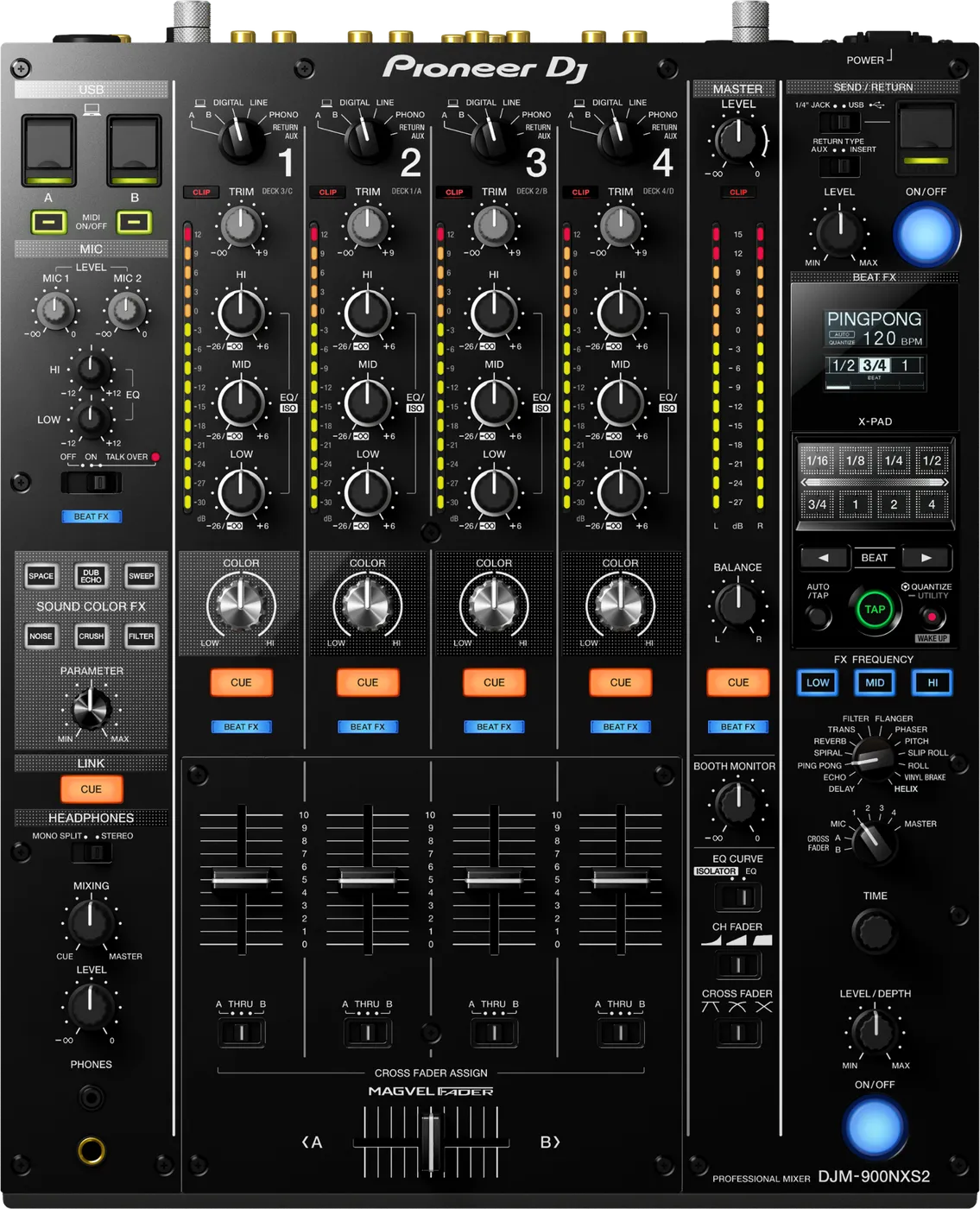
Booth briefing. The DJM-900NXS2 is Pioneer DJ's club mixer, the one you meet in a great many booths, so its layout is worth knowing before you arrive. It takes DIGITAL inputs alongside the analogue ones, carries SOUND COLOR FX and an effects section whose channel selector decides which channel the effect acts on, and puts out a DIGITAL MASTER OUT next to the analogue master. A RETURN path lets outboard gear sit in the signal chain. Two USB ports give a dual USB workflow, so two computers can attach and hand over. What it works with, the checks for a silent channel and its firmware history are covered below.
When it goes wrong: No sound from the mixer PRO DJ LINK will not come up
Fast Lane
The five things that decide your gig
The five things on the DJM-900NXS2 that change what happens next, if you are reading this in the booth. All five are explained in full further down this page.
2 USB Type-B ports, so two laptops stay plugged in.
The outgoing DJ does not unplug before the incoming one can prepare. The handover is a channel and a fader move, not a cable scramble.
There is also one USB Type-A for a mobile device, so three USB terminals in total, not two.
Fault fixes across 10 firmware versions, 8 of them audio.
On the most installed professional mixer in the world, that history is worth reading rather than assuming.
Audio faults are the ones that bite mid-set. Cosmetic ones you can live with until the next update.
The two effect systems are routed differently, and only one uses the selector.
The effect channel selector routes Beat FX and the send and return loop. It does nothing for Sound Color FX, which is applied per channel by that channel’s own COLOR knob.
So a dead Sound Color FX is a COLOR knob at centre, and a dead Beat FX is the selector, an unlit FX FREQUENCY band, or a cue that cannot monitor it at all.
The library format does not affect this mixer at all.
Device Library or OneLibrary only matters on the player side. The mixer receives audio and Link data and does not read your drive.
So a OneLibrary problem in the booth is never the mixer, however much it looks like one.
Clipping here is a gain problem far more often than an effect problem.
Set channel trim so the signal sits around unity on the meter before you touch an EQ or an effect.
Gain staged before the room, not during it, because during it you are solving the wrong thing in front of people.
If something goes wrong
A channel has no signal
Short answer. Before assuming a DJM-900NXS2 channel has failed, check the channel fader, the crossfader assignment, the input selector, and the send and return, in that order.
Why this happens. The channel fader can simply be down, the crossfader assign switch can have that channel routed to the opposite side you are pushing, or the input selector can be set to a source that is not actually playing (LINE instead of USB, for example).
Fix it now. Fader up is assumed. Check the crossfader assign switch (A / THRU / B) matches where your crossfader actually is. Confirm the input selector for that channel matches your source. If all three check out, move the source to a different channel to isolate whether the problem is the channel strip or upstream.
The one people forget: the send and return. This mixer has discrete SEND and RETURN terminals for an outboard effector, and a jack sitting in the return puts whatever is on the other end of that cable into the signal path. If that unit is switched off, on standby, in a bypass mode that does not pass audio, or simply not connected at the far end, nothing comes back. Nothing on the top panel hints at it, and a cable coiled behind an installed booth is the version of this that catches people. Pull the jack out of the return and the path restores itself.
Avoid it next time. Do a full gain and routing check on every channel before doors open, not after the first complaint from the booth, and treat the send and return as a patch you commit to rather than one you leave hanging.
The master is quiet and nothing on the panel explains it
Short answer. On the DJM-900NXS2, check the UTILITY screen before you touch the gain structure. The mixer has a MASTER OUT attenuator on the UTILITY screen, adjustable from 0 dB down to -12 dB, which a previous engineer can leave set and which shows nothing on the panel.
Why this happens. It is a menu setting, not a control. An installed desk carries whatever the last engineer left, and a mixer attenuated by 12 dB looks completely normal: the meters read correctly for what they are being sent, every knob is where you expect, and the room is just quiet. Pushing the master level to compensate is how you end up clipping to reach a normal volume.
Fix it now. Open UTILITY, find MASTER OUT ATT., and read the value before changing anything so you know what the venue chose. Zero is the factory setting. If the house engineer set it deliberately, ask before you move it, because it may be protecting an amplifier.
Avoid it next time. Read that setting at soundcheck on any desk you did not set up yourself. It costs ten seconds and it is invisible from the panel.
Faders behaving unexpectedly
Short answer. The DJM-900NXS2 crossfader is AlphaTheta's Magvel magnetic, contact-free design, so crossfader scratchiness is rare. Channel faders are conventional and do wear, but a mismatched fader curve setting is the more common cause of a channel that feels "wrong."
Why this happens. The channel fader and crossfader curve are both independently adjustable, a curve set for scratching feels completely different from one set for smooth blending, and a previous DJ may have left it set for their own style.
Fix it now. Check the fader curve selector switches on the channel strips and crossfader before your set, and reset them to your own preference rather than assuming the default.
Avoid it next time. If you are playing back-to-back, agree curve settings with the other DJ before the handover, not mid-set.
Effects not engaging
Short answer. On the DJM-900NXS2 the two effect systems fail for different reasons, so the first question is which one is dead, because the effect channel selector routes BEAT FX and SEND/RETURN only, never Sound Color FX.
If Sound Color FX is silent. The selector is not involved. Sound Color FX is applied per channel by turning that channel’s own COLOR knob, with no selector involved, and a knob at its centre position passes the sound through unchanged. The manual's own answer is one line: "Turn the [COLOR] control clockwise or counterclockwise."
If Beat FX is silent. Three things, in this order. The effect channel selector has to point at what you want affected, and it can also sit on MIC, on a crossfader side or on MASTER. The band buttons have to be lit for what you want affected, because the FX FREQUENCY buttons decide which of the low, mid and high bands the effect reaches, and a band whose button is unlit is not being affected at all. And check the level and depth control is not at zero.
The cue can lie to you here. The manual is explicit: with the effect channel selector on 1 to 4, the effect sound cannot be monitored even by pressing that channel’s CUE button, which affects Delay, Ping Pong, Echo, Spiral and Reverb. Auditioning one of those five in headphones before a transition gives you silence from a working effect, which is the most convincing way to conclude a mixer is broken when it is not.
Avoid it next time. Set the effect channel selector as part of your pre-set routine, the same moment you check gain and routing, and know that Sound Color FX lives entirely on the channel strip.
The external effects loop is silent
Short answer. Check the DJM-900NXS2 itself before you touch the cables. Four things have to agree before an external effects loop makes a sound here, and only one of them is a cable. The SEND/RETURN ON/OFF button has to be ON. The effect channel selector has to be pointing at the channel you want treated. The RETURN TYPE switch has to be set to AUX or INSERT to match how you are using the loop. And the SEND/RETURN selector has to match whether you are on the quarter-inch jacks or the mobile device terminal. If the returning sound is distorted rather than absent, AlphaTheta ask you to turn down the external unit's own output level rather than anything on the mixer.
Why this matters. This is the mixer an RMX or any other effector gets patched into, and the loop has more switches than most DJs expect. Three of the four are on the mixer and none of them announces itself, so a correctly cabled effector sits there doing nothing and the cables get blamed.
Fix it now. Work the four in order: ON/OFF, channel selector, RETURN TYPE, then the jack versus mobile selector. Take the loop out of circuit on the mixer first if a channel has gone quiet, so the music comes back while you check.
Avoid it next time. Patch the loop and prove it passes signal before you engage it in a set, and note which way the two selector switches were pointing when it worked.
Headphones or cue not working
Short answer. Check the cue/PFL button on the DJM-900NXS2 channel before assuming a hardware fault, cueing has to be switched on per channel.
Why this happens. Each channel has its own cue button; it is easy to be listening to the wrong channel entirely, especially when swapping decks quickly.
Fix it now. Press cue/PFL on the channel you actually want to hear, check the headphone level and mix (cue/master blend) knobs are not at zero, and try the other headphone jack if the mixer has more than one.
Avoid it next time. Set your headphone mix and level as part of your pre-set check, not after you have already started cueing the next track.
USB sound card not recognized by the computer
Short answer. With 2 USB Type-B ports built for DJ hand-offs, confirm which port your software is actually pointed at before assuming a fault.
Why this happens. DJ software has to be told which USB audio device to use, and with two ports available it is easy for the audio settings to still be pointed at the previous DJ's connection.
Fix it now. In your software's audio preferences, confirm the DJM-900NXS2 is selected as the input and output device, and that you are plugged into the port matching your channel assignment. Unplug and replug the USB cable directly, skip hubs.
Avoid it next time. Check your channel and USB port assignment as soon as you plug in, before you are relying on it live.
What to watch for
Firmware and known issues
Short answer. AlphaTheta document fault fixes across 10 versions of DJM-900NXS2 firmware, and 8 of them are audio faults rather than cosmetic ones. On a desk this widely installed, an un-updated unit is a real risk rather than a theoretical one. The full list is on the firmware matrix; the highest published version is 2.08. This section was last checked against official sources on 28 August 2026.
The ones most likely to reach the room. Audio dropouts with DIGITAL selected, fixed in 1.09. SOUND COLOR FX behaving incorrectly, fixed in 1.10. A clicking noise on the FILTER and a pop from DIGITAL MASTER OUT at power on, fixed in 1.20. Incorrect output when changing Beat FX or the FX channel, fixed in 2.00. A pop from the EQ or ISO knob with ISOLATOR selected, and a linked player's display freezing during HID control, fixed in 2.01. And PRO DJ LINK network faults, fixed in 1.07.
Recording specifically. DJM-REC recording or live streaming could stop part way through, fixed in 2.06, and iOS and iPadOS audio again in 2.08. Old venue firmware still bites recording.
No hardware defect notice. AlphaTheta have published no inspection or repair programme for this mixer, which is a different and better situation from the firmware list above.
Do this. If you hit a genuine, repeatable fault on a specific firmware version, tell us what happened and we will verify and document it properly, the same way this page documents the CDJ-2000NXS2's real firmware history.
The shape of this mixer’s history. Read this mixer's change history end to end and a pattern appears: most of what AlphaTheta fixed on it was a noise the room could hear. A clicking noise using the FILTER of SOUND COLOR FX and a pop from DIGITAL MASTER OUT, both fixed in 1.20. A small pop when turning the EQ/ISO knob with ISOLATOR selected as the EQ curve, and a CDJ display freezing over PRO DJ LINK while controlling software by HID, both in 2.01. A pop over USB audio on the FX send and return when switching FX assign in rekordbox with BEAT FX on, in 2.02. Switching noise when changing the USB output level and wrong audio output when changing Beat FX or FX channels, both in 2.00.
And two that changed the feel. Two versions changed how the crossfader itself feels. Version 2.01 made the cut lag value more precise at both edges of the crossfader, and 2.02 improved the cut lag length for a more responsive scratch performance. On a mixer bought partly for its crossfader, that is not a background fix.
Compatibility
Software and player compatibility
Short answer. The manual names rekordbox, and documents the Control Tone inputs and the FX SEND and RETURN paths as working "with supported software" without naming which. So this page names rekordbox and stops there: the mixer pairs with any PRO DJ LINK player, and library format (Device Library or OneLibrary) does not affect the mixer itself.
Why it matters. The mixer has one LINK terminal, so connecting more than one device needs a separate 100BASE-TX switching hub, which is not supplied. One player can go straight in; a booth with two or more needs a hub you brought or the venue owns, and through it the mixer carries up to 4 DJ players and 2 computers through that hub. The manual is specific about the cable too: "When connecting using a LAN cable, use an STP (CAT5e shielded) cable." And once files are moving across the network, it is blunt: "Do not disconnect the LAN cable when music files and/or information are being shared using PRO DJ LINK."
Do this. Confirm your DVS or DJ software licence supports this mixer's timecode/soundcard input before the gig, not at soundcheck.
Dual USB
Short answer. 2 USB Type-B ports built into the mixer, so two DJs (or one DJ and a backup laptop) can be plugged in and ready at the same time.
Why it matters. The outgoing DJ does not have to unplug before the incoming DJ can prepare, the handover is a channel and fader move, not a cable scramble.
When professionals use it. Any back-to-back set, and any gig where you want a laptop plugged in as backup while running from CDJs.
Common mistakes. Assuming the mixer auto-selects the right USB input, confirm your software's audio device and the channel input selector agree, see USB not recognized.
Features explained
Beat FX
Short answer. 14 effect types, and the beat effect selector switch chooses the effect type, while the X-PAD turns it on while touched and adjusts the parameter by where you touch. The manual is exact about the release behaviour: "When you release your finger from the [X-PAD], the effect turns off."
The band buttons decide what the effect reaches. On this mixer, the FX FREQUENCY buttons decide which of the low, mid and high bands the effect reaches, and a band whose button is unlit is not being affected at all. Three dark buttons is an effect that is on and inaudible.
Why it matters. Beat FX locks the effect's timing to the track's BPM automatically, so a delay or echo lands musically without manual tapping.
When professionals use it. A short echo out on the last bar before a mix, or a filter sweep to build tension into a drop.
Common mistakes. Leaving an effect engaged after the transition and forgetting it is still active, and trusting an incorrect BPM read instead of confirming it against the track.
Sound Color FX
Short answer. Six effects, Sweep, Filter, Crush, Dub Echo, Noise, Space, and Sound Color FX is applied per channel by turning that channel’s own COLOR knob, with no selector involved. One caveat the manual states plainly: "The same effect is set for [CH1] to [CH4]." You pick the type once for the whole mixer, then choose which channels hear it by which knobs you turn.
Why it matters. Because it lives on the channel strip itself, it is fast enough to use mid-mix without looking away from the crowd or the next track.
When professionals use it. Filter into a breakdown, or a touch of Space to open up a track before a big drop.
Common mistakes. Overusing Crush or Noise on a main room system, they read as dramatic on headphones and can sound harsh through a full PA.
Professional tips
Gain staging before the room, not during it
Short answer. Set channel trim so the signal sits around unity on the meter before you touch an effect or an EQ.
Why it matters. Clipping on this mixer is a gain problem far more often than an effects problem. Chasing distortion with EQ or FX adjustments while the actual cause is trim set too hot wastes time and rarely fixes it.
Do this. Set trim per channel while cueing, before the track is live in the room, so you are not adjusting gain in front of a crowd.
Common mistakes. Copying another DJ's trim setting without checking it, different tracks and different software output levels need different trim.
Connections and setup
The digital output, and the setting that silences it
Short answer. The digital master output has a sampling rate that has to suit the equipment on the other end. AlphaTheta put it in the troubleshooting rather than the setup chapter: if nothing comes out of the digital output, set DIGITAL MASTER OUT SAMPLING RATE on the UTILITY screen to match what the connected device accepts. A digital cable that carries the wrong rate carries nothing, and it looks exactly like a dead output.
Reading it in the booth. A DJM-900NXS2 feeding a house system digitally is a common install, and it is the one output where a wrong number in a menu produces exactly the same symptom as a broken cable. Check the setting before you chase the cable, because the cable is almost never the answer here.
The computer side, while you are in there. For a computer that does not see the mixer, or a USB indicator that is off or flashing, AlphaTheta's answer is the driver software: install it, and if it is already installed, reinstall it. For a computer whose sound will not come out of the mixer, the checks are the supplied cable directly between the two, this unit selected as the audio output device in the application, and the channel's input selector switched to USB.
Preventive maintenance
Keeping the desk reliable over years of bookings
Short answer. Cable and connector care matters more than fader care on this mixer, and the Magvel crossfader is contact-free by design.
Why it matters. RCA, USB and Ethernet connectors take the real wear over a touring life, loose or bent pins cause the intermittent faults that are hardest to diagnose live.
Do this. Inspect cables before they go in the bag, not just when a fault appears. Unplug by the connector, never by pulling the cable. Keep the desk covered during transport.
Avoid it next time. Do not coil cables tightly around connectors, that is where strain damage starts.
Firmware, drivers and manuals
Official downloads and documents
Go to AlphaTheta for the files themselves. We link their pages instead of hosting a copy, because a manual copied here is a snapshot of release day and theirs is the one that stays current.
Manuals. Official Pioneer DJ manual page →
Broken link? Let us know and we'll fix it.
Frequently asked questions
Quick answers
- Does the library format (Device Library or OneLibrary) affect the mixer?
- No, that only matters on the player side. The mixer just receives audio and Link data.
- Can I link with a mix of older and newer CDJs?
- Yes, but plan the wiring: the mixer has one LINK terminal, so two or more players need a separate 100BASE-TX switching hub, and through it the mixer carries up to 4 DJ players and 2 computers through that hub. The manual also asks for firmware 1.02 or later on a CDJ-2000nexus, and 4.0 or later on a CDJ-2000 or CDJ-900.
- Can I connect a CDJ-2000NXS2?
- Yes, this is the era-correct pairing.
- Does it support rekordbox DVS?
- Yes. The mixer carries per-channel Control Tone inputs and an FX SEND and RETURN path, and the manual describes those as working with supported software without naming other titles, so this page does not name any. Check your own software's compatibility list before the gig.
- How many computers can I plug in at once?
- Two, one per USB Type-B port, which is what makes the back-to-back handover possible. There is also a separate USB Type-A terminal, so the mixer has three USB terminals in total.
Where this sits in the line
- Previous generation DJM-900NXS
- Next generation DJM-A9
Related mixers
Commonly paired with
What you usually find beside it in working booths, from club, festival and rental installs rather than from a manufacturer document.
Pioneer DJ All brands Knowledge base FAQ and Fixes Dictionary
Playing soon and it is not working?
Start Emergency ModeKeep the Emergency Card
We will email you the printable PDF so it is on your phone before the next dark booth. Occasional notes that save gigs. No spam, unsubscribe in one click.
Registering is free and counts everywhere on Save My Gig. We send a confirmation email first. Your address is stored with Brevo, our email provider. Unsubscribe any time. Privacy
Sources: AlphaTheta / Pioneer DJ official specification and support pages, checked 28 August 2026. Specifications theirs, priorities ours.