

Xone:96, the field manual
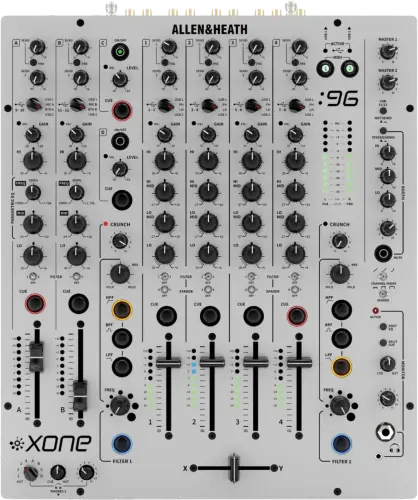
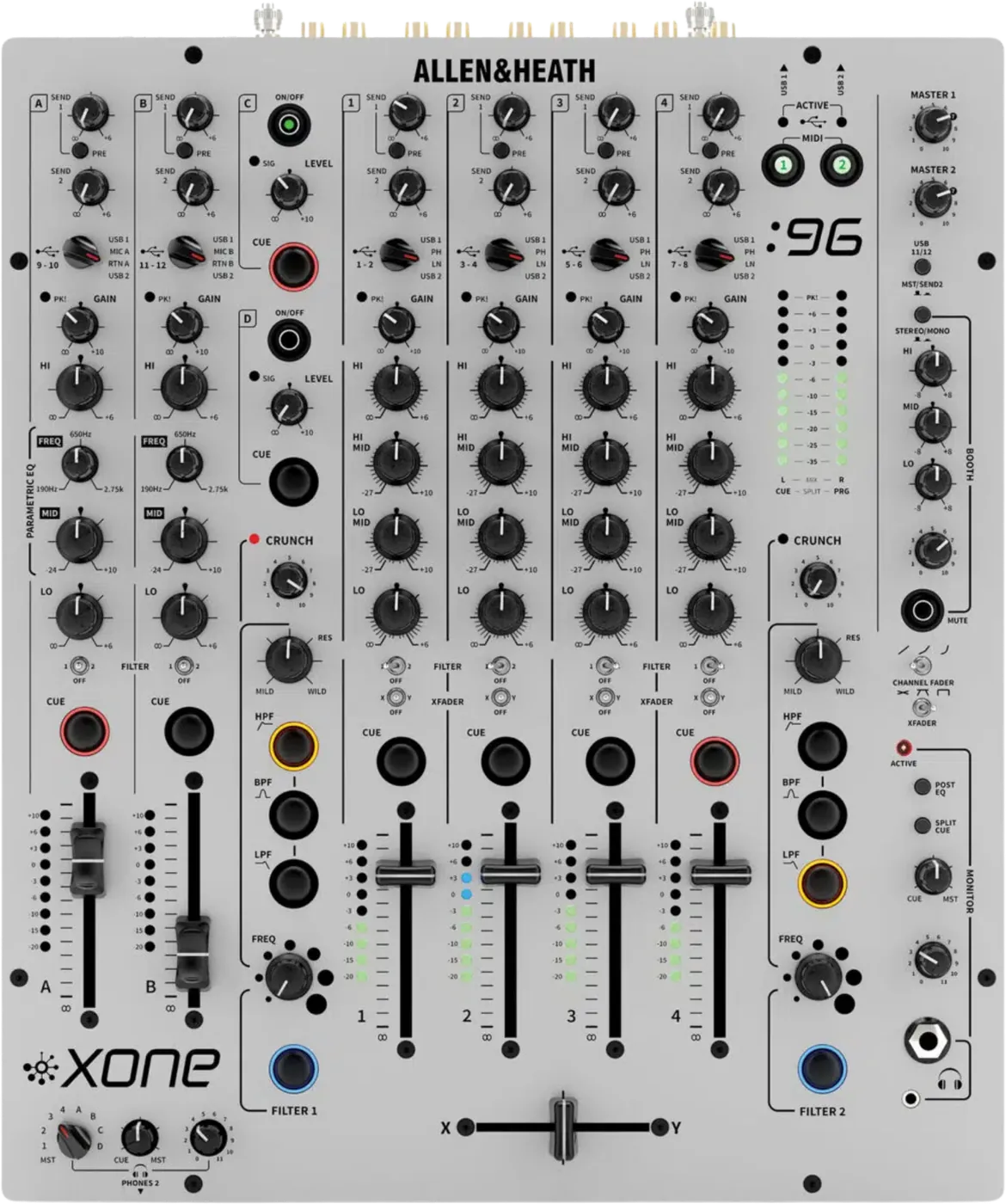
Booth briefing. The Xone:96 is Allen & Heath's 6 + 2 channel analogue club mixer with two independent audio interfaces built in, each 24 channel, 12 in and 12 out as 6 stereo pairs, selectable 16 or 32 bit from 44.1 kHz to 96 kHz. It carries filters as the Xone:92 does, without that mixer's two LFOs. The master section has an insert point on the master bus, two master outputs, MASTER 1 and MASTER 2, and meters that sit ahead of those two master levels. Mic routing to Booth and Record is set by internal jumpers.
When it goes wrong: No sound from the mixer
Fast Lane
The five things that decide your gig
The five things on the Xone:96 that change what happens next, if you are reading this in the booth. All five are explained in full further down this page.
A jack left in MASTER INSERT RETURN kills the master and the meters together.
The return socket breaks the through connection to the master bus when something is plugged into it, so a lead left behind by the last engineer takes the whole master out.
The meters die with it, which is the tell that separates this from the other silent-room fault below: here, nothing reads at all.
MASTER 1 and MASTER 2 do not move the meters, so a silent room can look perfectly healthy.
Allen & Heath state that master level adjustment does not affect the LR MIX meter display. A master control at zero therefore gives you a normal meter picture and a dead PA.
That is the mixer working as designed. Meters healthy and room silent points at the master controls; meters dead and room silent points at the insert return.
The mics reach neither Booth nor Record until internal jumpers say so.
Out of the box a mic is loud out front, inaudible to you in the booth, and missing from the recording. That is the clean feed working as designed.
Unlike the rear panel switches on some desks, this one is decided by internal jumpers, so it is not something you change in a booth on the day.
Timecode is decided by a rear panel switch on every music channel, not by anything on the top.
Each of the four music channels has an LN or PH switch on the back, and it sets what the soundcard is handed. Set it wrong and your software sees the wrong kind of signal no matter how correct the front panel looks.
Walk the rear panel before the desk goes into the booth, because once it is installed you cannot reach any of it.
Dynamic mics only. There is no phantom power on this mixer.
Allen & Heath are blunt about it: do not use high impedance or unbalanced mics, or condenser mics requiring phantom power.
A condenser that needs phantom is a problem you cannot solve at the desk. Bring a dynamic mic, or bring your own phantom supply ahead of the mixer.
If something goes wrong
The master output is dead and the meters are dead with it
Short answer. Look for a jack in the Xone:96's MASTER INSERT RETURN before you look at anything else. Allen & Heath's own wording, and it is worth reading twice: when 1/4" Jack connectors are terminated into the Master insert 'return' socket, this will break the thru connection to the master bus. If there is no signal to the send or the device is turned off or is not passing audio, there will be no signal present on the master bus and meters.
Why this happens. An insert is a deliberate break in the signal path, and the return socket is what closes it again. Put a jack in that socket and the master bus now runs through whatever is on the other end of the cable. If that box is switched off, on standby, in a bypass mode that does not pass audio, or simply not plugged in at the far end, nothing comes back. The meters read the master bus, so they go dark with it, and the mixer presents as a mixer that has died mid set. It has not. It is doing exactly what the manual says it does.
Fix it now. Pull the jack out of MASTER INSERT RETURN. The through connection restores itself and the master returns with the meters. If the outboard unit belongs in the chain, power it up and confirm it passes audio before you trust it with the master bus. The insert runs at -2 dBu in and out, and Allen & Heath advise setting the outboard unit to expect +4dB and making up the difference.
Avoid it next time. Treat the master insert as a patch you commit to, not one you leave hanging. If nothing is feeding the send, nothing should be plugged into the return, and a stray cable coiled behind a booth is the version of this that catches people.
The room is silent and the meters look healthy
Short answer. The Xone:96 has two documented ways for the meters to disagree with what the room hears, and this is the second one. Allen & Heath state that MASTER 1 and MASTER 2 adjustment does not affect the LR MIX meter display. So a master level control at zero gives you a perfectly normal meter picture and a silent PA, and that is the mixer working as designed.
Why this happens. The meters read the LR MIX bus, which sits before the two independent master level controls. That is the mirror image of the insert trap above, where the bus itself is broken and the meters go dark while everything you can see on the top panel is correct. Between them they cover both halves of the same question: meters moving and no sound, sound expected and no meters. A DJ who knows both checks the right thing first.
Fix it now. Read the meters, then decide. Healthy meters and a silent room: check MST 1 and MST 2 levels, and confirm which of the two master outputs the house system is actually on. Dead meters and a silent room: go to the master insert return. Once audio is back, set levels to Allen & Heath's own published target, between -6 and +6 with the average around 0, and the loudest peaks around +6, with channel gain set so the meter averages around 0 rather than by ear.
Avoid it next time. At soundcheck, note which master output feeds the house and leave the other one where you found it. Two master outputs with independent levels is a feature until somebody nudges the one that is live.
The mic is loud out front, absent from the booth and absent from the recording
Short answer. That is the Xone:96 working as designed, and on this model you cannot change it from the outside. Allen & Heath route the mics on a clean feed bus, and by default the mic inputs do not reach the BOOTH or RECORD outputs. On the Xone:92 a rear panel switch changes that. Here it is set by internal jumpers, and Allen & Heath's offer is in their own words: "If you would like assistance with the jumper configuration, please drop us a line."
Why this happens. A clean feed keeps an MC out of the set recording and out of the booth wedge, which is the right default for a club and the wrong one for the gig where you are recording a live show. The side effect in the room is exactly what it sounds like: the voice is loud out front, the DJ cannot hear it in the booth, and the recording comes back with the music and none of the talking. Nothing on the top panel hints at it. The mics also sit outside the master insert, so any outboard processing you have patched there never touches the microphone at all.
Fix it now. There is nothing on the panel to throw. Allen & Heath document no front panel switch, no rear panel switch and no software route for this, only the internal jumpers and their offer to help with them. So plan around it: if a voice has to be on the recording, capture the room another way, and tell whoever is holding the mic that they will not hear themselves in the booth.
Avoid it next time. If the mixer is yours and MCs are part of your work, settle the jumper configuration with Allen & Heath while there is no gig in the way. If the mixer belongs to the venue, ask what the jumpers are set to during soundcheck rather than discovering it during the set.
The crossfader does nothing on a channel
Short answer. Look at that Xone:96 channel's crossfader assign switch. The centre position takes the channel out of the crossfader entirely and sends it straight to the LR MIX, so the fader sweeps and nothing changes.
Why this happens. A centre or thru position means "always live, ignore the crossfader", which is genuinely useful and is also the same switch you use to put a channel on one side or the other. A previous DJ who wanted a channel permanently on has left it centred, and the next person reads a dead crossfader. The crossfader itself is a mini innoFADER, with a top panel curve switch and an internal cut-in calibration pot, so it is not the part that usually fails silently.
Fix it now. Set the assign switch to the side you want the channel on, then check the other channels while your hand is there rather than one at a time during the set. Confirm the crossfader is doing something on a channel you can actually hear before you trust it.
Avoid it next time. The crossfader assign row belongs in the same pre set pass as gain, filter assign and the rear panel, on every channel and not just the two you plan to open with.
The cue buttons behave differently from the ones you learned on
Short answer. The Xone:96 cue system has a mode, and it is not printed anywhere on the panel. Allen & Heath ship it auto cancelling by default, switchable to latching by holding all three filter type buttons on both filters. The two MIDI active buttons flash to confirm the change. A mixer in the mode you were not expecting is not a faulty mixer.
Why this happens. Auto cancelling means a new cue press drops the one before it, so you always monitor one source. Latching means cue selections stack, so you can hear two at once. Both are normal ways to work and DJs are strongly attached to whichever one they trained on. The mode is a held button combination rather than a switch, so nothing on the surface tells you which state the desk is in and a previous user can have changed it months ago.
Fix it now. If cues stack when you want one at a time, or drop when you want them to stack, press and hold all three filter type buttons on both filters, watch for the two MIDI active buttons to flash, and test the cue buttons again. There are two independent headphone systems on this mixer, so check the one you are actually listening on.
Avoid it next time. Test one cue button against another during soundcheck. It takes four seconds and it is the difference between a clean first transition and a confused one.
MIDI appears dead, and X:Link with it
Short answer. Check the Xone:96's MIDI 1 and MIDI 2 active switches. They are the usual cause, and they do more than they look like they do: they also gate X:Link data and clock passthrough, so a switch left off takes out a K series controller on the same port.
Why this happens. The mixer sends 31 controls as MIDI, so it is a control surface as well as a mixer, and Allen & Heath gate that per port rather than globally. Two more documented facts catch people here. The 5-pin DIN is an output only, so anything that needs to control the mixer arrives over USB and not on that socket. And the clock is passthrough only: the mixer does not generate one.
Fix it now. Turn on the MIDI active switch for the port you are using and retest. If you are waiting for the mixer to produce a tempo clock, stop waiting: generate it in software, send it over USB, and set any third party hardware to follow an external clock.
Avoid it next time. Put the MIDI active switches in the same pre set pass as the assign switches. Nothing on a controller tells you the mixer has stopped listening.
Timecode will not track, and the switch that decides it is on the back
Short answer. Each Xone:96 channel has a rear panel switch, LN or PH, and it sets what the soundcard sees. Set it wrong and your software is being handed the wrong kind of signal no matter what the top panel says.
Why this happens. The soundcard's first eight channels come straight from the stereo channel input connectors, so this rear panel switch is the first decision in the whole DVS chain, before gain, before EQ, before anything you can reach from the front. A turntable running timecode vinyl into a channel set to LN, or a line source into a channel set to PH, produces a signal the software cannot lock to, and the symptom reads as a licence problem or a calibration problem rather than a switch.
Fix it now. Match the switch to the source on every channel you are using for timecode, then calibrate in software. Allen & Heath publish no minimum software or firmware version for DVS, so there is no version requirement to chase if it still will not lock.
Avoid it next time. Walk the rear panel before the mixer goes into a booth. This switch, the master insert and the X:Link socket are all back there and all unreachable once the desk is boxed in.
Clicks in the audio stream at high sample rates
Short answer. The Xone:96 carries exactly one published known issue and this is it, logged by Allen & Heath as XONE96-26: "Audible interruptions in the audio stream, manifest as 'clicks', when running Ableton Live 9 at high sample rates (88.2 and 96KHz), with XONE:96 ASIO Buffer Size set to Auto and USB Streaming Mode set to Reliable."
Why this happens. Allen & Heath call it a local DAW software application issue rather than a fault in the mixer, so what has to change is the buffer arrangement on the computer and not anything on the desk. An automatic buffer size at 88.2 kHz or 96 kHz leaves the stream without a fixed margin, and the interruptions arrive in the room as clicks.
Fix it now. Their own resolution: in the XONE:96 Control Panel, under Buffer Settings, set the ASIO buffer size to a fixed value matched to the capacity of your computer's CPU, and where necessary adjust or reset the USB Streaming Mode option. The sizes available are 32, 64, 128, 256, 512, 1024, 2048, 4096 or 8192 samples.
Avoid it next time. Fix the buffer before the gig rather than during it, and if you intend to run at 88.2 kHz or 96 kHz, test at that rate on the machine you are actually bringing rather than at 44.1 kHz on a different one.
On Windows the audio plays or records on the wrong channel
Short answer. The Xone:96 hands Windows five stereo channels and defaults all of them to the first pair, so an application using WDM audio rather than ASIO plays into channel 1 and records from channel 1 whatever you had in mind. Allen & Heath state the default outright: playback and recording default is CH1.
Why this happens. The driver presents each soundcard channel to Windows as its own device, so choosing the mixer is not the same as choosing a channel. The mixer's top panel then has to agree with the choice, and that is the half people miss.
Fix it now. For playback, go to Start, Settings, System, Sound, Output, pick the output that matches the channel you want, and set that channel's source select switch on the top panel to the USB port you are on. Allen & Heath's worked example is playback through CH A: select Output A, then set the CH A source select switch to USB 1 or USB 2 to match. For recording, choose the device under Sound, Input, and their example for the main mix is to select Aux 2 / Main and set the top panel USB 11/12 switch up to MST.
Avoid it next time. Settle before the gig whether your software is running ASIO or WDM. On ASIO you pick channels inside the application and all twelve are there. On WDM you are picking one stereo pair at a time in the operating system, and the top panel has to follow it.
RTN C and RTN D will not EQ, will not filter and will not crossfade
Short answer. On the Xone:96, RTN C and RTN D have no EQ, no filter assign and no crossfader assign, and that is permanent. They give you level, on and off, and cue, straight into the mix, and they are mono unbalanced jacks.
Why this happens. They are auxiliary returns rather than channels, built for an effects unit coming back into the mix. That is why they are short of controls, and there is nothing to switch on.
Fix it now. If the source needs EQ, a filter or the crossfader, take it into one of the six main channels instead. All six of those route to either filter, and channels A and B are full channels with EQ, which RTN C and RTN D are not.
Avoid it next time. Plan the patch around it. Any source you intend to shape or cut belongs on a main channel from the start.
Hum and ground loops, the published procedure
Short answer. Hum on a Xone:96 is cured in the audio cabling and in the other equipment, never in this mixer's earth.
Why this happens. A loop is a second path to earth between two devices that are each already earthed properly. The mixer's earth is not the problem to remove, it is the protection to keep, so the loop has to be broken somewhere that is not a safety earth.
Fix it now. Allen & Heath give three routes. Use a ground lift switch on the OTHER equipment in the chain, where one is fitted. Lift the cable screens at one end so the audio cable is no longer a second earth path. Or, if the hum survives both, have the mains supply checked by a qualified electrician, which is the honest answer when the problem is the building rather than the rig.
Avoid it next time. Carry a ground loop isolator and a short unbalanced cable set. Both are cheaper and safer than the compromise somebody will otherwise suggest with a pair of pliers.
What to watch for
The mixer has firmware, and there is no version list to check it against
Short answer. The Xone:96 has firmware. Allen & Heath do not publish its history, so there is no version, no date and no change text for a DJ to check a desk against. Their own guide carries boilerplate saying firmware is updated regularly, no firmware download exists on their live site, and the old v1.0.2 audio firmware pages on allen-heath.com now return a not found error. Checked 7 August 2026.
Why we are wording it that carefully. The Xone:92 has no firmware at all, which is a completely different claim, and collapsing the two would be wrong on both mixers. Here the firmware exists and the paperwork does not. So this mixer has a firmware version and there is no way for you to find out what it is, which is a different situation from having no firmware at all.
What that means in a booth. There is nothing to compare a desk against and nothing to update before a gig, so treat the mixer's behaviour as the mixer's behaviour. If two Xone:96s in two venues behave differently in some documented respect, you have no published change list to explain it with, and the answer is Allen & Heath support rather than a release note.
Do this. Spend the time you would have spent checking a version on the rear panel and the assign switches instead. That is where this desk's surprises actually live.
The user guide has no troubleshooting section
Short answer. It does not have one. The user guide documents controls and connections, and there is no troubleshooting chapter, no symptom list and no fault table anywhere in it. A DJ holding the manual in a booth with a problem has nothing to work from.
Why we are saying it plainly. That is a checkable statement about a document rather than a dig at a mixer, and it is most of why this page exists. Every behaviour a DJ reads as a fault on this desk is in the guide somewhere, the insert return breaking the master bus, the master controls not moving the meters, the mics staying out of Record, but they are written as descriptions of controls rather than as answers to symptoms. Nobody reading a manual under pressure finds them that way.
What is published, and what is not. Allen & Heath do maintain support material for this mixer actively, and the articles linked from the sections above are theirs. What they do not publish is a service manual or a block diagram, so there is no technician level documentation to fall back on either. The one published symptom and fix for this mixer anywhere sits in the Windows driver release note, under Known Issues, and it is on this page above.
Do this. Keep the user guide for connector names and control layout, and use the emergency sections above for symptoms. If you hit a repeatable behaviour that is not covered here, tell us what happened and we will verify it against Allen & Heath's own documents before it goes on the page.
Official documents. Xone:96 user guide →
Xone:96 resources and downloads →
Dual soundcard routing →
MIDI implementation →
Broken link? Let us know and we'll fix it.
There is no specification document at all, so there are no numbers
Short answer. Allen & Heath publish no technical specification document for the Xone:96. Neither the product page nor the user guide carries a specifications table, so there is no published frequency response, no THD, no noise floor, no crosstalk figure, no input or output impedances, no headroom figure, no EQ range in decibels and no filter slope.
Why it matters. Those numbers are how you answer an argument about a room, and here you cannot. If a promoter, a system tech or a rental company asks what the mixer's headroom or output impedance is, the honest answer is that Allen & Heath have not said. The Xone:92 does have a technical specification sheet, so a DJ used to looking numbers up for that mixer will come here and find nothing, and that absence is the finding rather than a gap in our research.
Do this. Where a number matters, measure or test it in the room instead of quoting one. Sweep the filters before the room fills so you know where they bite, and set gain against the meters to Allen & Heath's published target rather than to a headroom figure that does not exist.
What we will not do. Fill it in. Numbers for this mixer circulate in places that are not Allen & Heath, and none of them are on this page. What is published here is 336mm wide, 410mm deep, 109mm high and 7 kg, 480mm wide, 535mm deep, 215mm high and 8.9 kg in the box, and one audio figure, the soundcard's digital line up of 0 dBu = -14 dBFS. That is the extent of it.
Compatibility
Computers, drivers and one version printed two ways
Short answer. On macOS the Xone:96 needs nothing installed. Allen & Heath's wording: "You do not need to install Device Drivers for use with macOS, or OS X platforms." On Windows you do need their driver.
What the Windows side actually needs. The driver release note names Windows 11 and Windows 10, with direct support closed for legacy Windows versions. Install it from an account with administrator access, which is their own instruction, and note that the installer can be run before the mixer is ever plugged in. When you do connect, power the mixer on and, in their words, wait a few moments for the PC to enumerate the mixer before opening your software application.
The light that tells you the port is live. Once the driver is in, the matching USB 1 or USB 2 ACTIVE indicator on the mixer lights blue when the mixer is powered on. Windows also gains a XONE:96 Control Panel, and that is where sample rate, bit depth, ASIO buffer size and USB streaming mode are set, not on the mixer.
The version is printed two ways, so we print both. For the same single download, Allen & Heath give v4.6.70 in the release note header and v4.67.0 in that same note’s own installer text. It is dated December 2021, and its release note is a single entry with no earlier versions listed, so there is no driver history to work back through either. We are not picking one of the two numbers, because both are theirs.
Why it matters in a booth. If you are checking a Windows machine against a version number before a gig, expect the number on the download page and the number in the release note to look like two different releases. They are one download. On a Mac, class compliant means the mixer appears as an audio device with no installer and no version to check at all.
Common mistakes. Hunting for a macOS driver that does not exist, and assuming a Windows driver mismatch explains a problem that is actually the LN and PH switches on the rear panel.
Timecode and DVS, in Allen & Heath's own two words
Short answer, and the two words matter. Allen & Heath say Traktor Scratch is CERTIFIED, naming Traktor Scratch Pro 3 and describing the mixer as carrying that certification out of the box. Separately they say the internal soundcards bring SUPPORT FOR DVS CONTROL to Traktor Pro, djay Pro, Virtual DJ Pro, rekordbox. Certification and support are not the same claim and we keep them apart because Allen & Heath do.
Serato is not documented. Allen & Heath do not mention it on the product page, in the user guide or in any of their Xone:96 support articles. So we say it is not documented rather than implying that it does or does not work. If Serato is how you play, treat it as something to test yourself, with nothing published to fall back on if it misbehaves.
The hardware side, which is where it actually goes wrong. The setting DVS depends on is the rear panel switch per channel, LN or PH, which sets what the soundcard sees. Allen & Heath state no minimum software or firmware version for DVS, so there is no version gate to satisfy and no version list to check.
Do this. Confirm your own licence and software before the gig, set the LN and PH switches to match your decks, and calibrate in the room. If your software is on the support list rather than the certified one, that is still Allen & Heath's own statement, just a weaker one.
Moving between this and the Xone:92
Short answer. Allen & Heath call the Xone:96 the follow-up to a genuine club classic, and say it takes the legendary soul of the acclaimed Xone:92 and redelivers it, enhanced, and that Xone:92 users will feel instantly at home with the Xone:96's layout. What they never say is that it replaces the Xone:92, and both mixers are sold side by side, so a venue running a 92 is not running an obsolete desk.
What you will look for and not find. The LFOs. The Xone:92 has 2 and this mixer has 0, so a filter movement you used to hand to an LFO is your hand or a controller here. Phono shorting plugs are the other one: documented on the 92, not part of this mixer's documentation or its box contents.
What is here that is not there. Two soundcards, where the 92 has none, which is why DVS is documented for this mixer and not for that one. X:Link, which makes this desk the hub of a Xone rig with the K series and has no equivalent on the 92. A second independent headphone cue system. CRUNCH on the filters. And two aux returns, RTN C and RTN D, with the documented limits described above.
What changes about how you troubleshoot. On the 92 the first question is the rear panel switches. Here it is still the rear panel, plus the master insert return, plus which of the four sources a channel is set to. And where the 92 has no firmware at all, this mixer has firmware with no published history, which is a different answer to the same question.
Features explained
The two soundcards, and the routing map that answers "why is nothing recording"
Short answer. This is the headline difference from the Xone:92, which has no soundcard at all. Allen & Heath's wording is that the mixer features two Hi-Speed USB connections, each with six stereo inputs and outputs, which is two independent interfaces, each 24 channel, 12 in and 12 out as 6 stereo pairs, selectable 16 or 32 bit and 44.1 kHz to 96 kHz.
The routing, which is the part that saves a set. Allen & Heath document what each USB channel is fed from. USB channels 1 to 8 come straight from the stereo channel input connectors, their routing table labelling every one of them "RIAA or LINE", so they carry the source before the channel strip touches it. Channels 9 and 10 carry send 1 exactly as you have left it, because the same table labels them "SEND 1 L (PRE or POST)" rather than fixing them post fade. Channels 11 and 12 carry either send 2 or the master, and the control that decides which is the top panel USB 11/12 switch, up for MST. So a recording that arrives silent, or that ignores every fader move you made, is usually a recording taken from the channels you did not mean, and the fix is in your software's input selection rather than on the mixer.
What the interface will run at. Sample rate is selectable at 44.1 kHz, 48 kHz, 88.2 kHz and 96 kHz, bit depth at 16 or 32 bit, and the buffer at 32, 64, 128, 256, 512, 1024, 2048, 4096 or 8192 samples. The digital line up is 0 dBu = -14 dBFS, which is the only audio figure Allen & Heath print for this mixer anywhere.
Why two of them. Allen & Heath say the two ports operate independently, avoiding hassles for DJs who use different platforms, operating systems, or projects. That is their claim about platforms and projects, and it is worth being exact about what it does not say.
What is not documented. Whether two separate computers can be connected to the two ports at the same time. Allen & Heath's only USB setup example shows one laptop on both ports, and their MIDI documentation mentions a "Partner mode" that they never define anywhere. So we say it is not documented rather than reading either answer into it. If your gig depends on a back to back handover between two laptops, test it yourself first.
The two filters, and CRUNCH
Short answer. 2 Xone:VCF sections, FILTER 1 and FILTER 2. The controls are CRUNCH, RES, the type selection between HPF, BPF, LPF, FREQ and an on and off switch, and that is the complete list. FREQ sets the cut off at the 3dB down point, 20 Hz to 20 kHz across the sweep.
Why it matters. Either filter takes any of the six main channels, post gain, post EQ and post fader, so either filter can take any channel and the assign happens after the channel strip has done its work. RES produces the Xone:VCF sound by feeding some of the filter output back into its input, and Allen & Heath label the control MILD to WILD. CRUNCH is the one that surprises people: it is harmonic distortion and Allen & Heath insert it BEFORE the filter, their wording being to turn it clockwise to add harmonic distortion into the pre-FILTER signal path. So CRUNCH changes what the filter is given to work with, which is why it sounds different from distortion added after a sweep.
There is no LFO on this mixer. Worth saying plainly, because the Xone:92 has 2 and a DJ moving between the two desks will go looking. Nothing in Allen & Heath's Xone:96 guide describes a low frequency oscillator, so filter movement here is your hand or a MIDI controller, not the mixer.
Common mistakes. Treating an off filter as a dead channel. Filter off passes the signal unaffected, so a channel routed to a filter that is switched off is not muted, it is simply dry. And expecting to filter a microphone: the mic clean feed bus bypasses filter routing, so mics cannot be filtered by default.
What the 6 + 2 actually gives you
Short answer. Allen & Heath call it a 6 + 2 channel analogue mixer with an interface, and unlike the Xone:92, where two of their own documents disagree about the count, that number is consistent everywhere. The layout is four stereo channels with 4-band EQ, two stereo channels with 3-band parametric EQ, and two auxiliary stereo returns.
What that means at the patch stage. Channels 1 to 4 select between USB 1, PHONO, LINE and USB 2, and carry an asymmetric four band EQ at 180Hz, 350Hz, 1.1kHz and 3kHz. Channels A and B select between USB 1, MIC, RTN and USB 2, and carry a three band EQ with a parametric mid sweeping 190Hz to 2.75kHz. The faders are 60mm stereo linear VCA faders and fully up is unity, so a channel fader at the top is not adding gain.
Why it matters. The source selector is the fastest thing to get wrong on this mixer, because a channel with the right cable in the right socket and the wrong source selected is silent and looks patched. It is also where the two soundcards meet the analogue side: USB 1 and USB 2 are selectable sources on every one of the six channels.
The signal path. Allen & Heath describe it as an analogue mixer with an interface, feeding what Allen & Heath call the analogue engine. They make no analogue summing claim for this model, so neither do we, even though they do make one for the Xone:92.
The two aux sends, and where they end up
Short answer. SND 1 switchable pre or post fader, SND 2 fixed post fader. That asymmetry is documented and it is not a setting you can change.
Why it matters. A pre fader send keeps feeding the effect after you pull the channel fader down, which is how a delay tail survives a cut. A post fader send dies with the fader, which is what you want when the send is feeding a room or a recording. SND 2 is fixed post fader, so if you need a tail that outlives the fader, it has to be on SND 1 with SND 1 switched to pre.
Where they go besides the sockets. Straight into the soundcards. Aux send 1 feeds USB channels 9 and 10 either pre or post fade, whichever way the send itself is switched, and USB channels 11 and 12 take either aux send 2 post fade or the master bus, decided by the top panel USB 11/12 switch, up for MST. So the sends are also how you get a specific feed into a computer without recording the master.
Common mistakes. Recording what you thought was an effects return and getting a post fader send instead, and expecting RTN C or RTN D to behave like a channel when the effect comes back.
The mic inputs, and what they will not take
Short answer. 2 mic inputs, MIC A and MIC B, on balanced XLR, each appearing as one of the four selectable sources on channels A and B. Dynamic microphones only. Allen & Heath's wording: "Do NOT use high impedance or unbalanced mics, or condenser mics requiring phantom power." There is no phantom power on this mixer.
Why it matters. A condenser mic that needs phantom power will not work here, and turning up with one is a problem you cannot solve at the desk. You need either a dynamic mic or your own phantom power supply ahead of the mixer.
What else is different about them. Two documented things, both covered above. The mics do not reach BOOTH or RECORD by default and only internal jumpers change that. And the mic clean feed bus sits outside both the filter routing and the master insert, so neither a Xone filter nor an outboard processor on the insert will ever touch a voice.
Common mistakes. Selecting MIC on channel A, hearing nothing, and moving the cable. Check the source selector and check that the mic is a dynamic one before you start swapping cables.
Headphones, cue and the meters
Short answer. 2 independent headphone cue systems, MONITOR as PHONES 1 and a second one as PHONES 2. Each has a full size TRS socket and a 3.5mm mini jack on the front, and there is a split cue mode.
Why it matters. Two independent systems is not two sockets on one circuit. A guest can cue on PHONES 2 while you stay on PHONES 1, so a back to back handover happens without either of you unplugging or sharing a cue selection. Split cue puts the cued source in one ear and the mix in the other, which is how you beatmatch on a loud stage where the monitor is fighting you.
The meters are the reference, with a caveat. Allen & Heath's own target is between -6 and +6 with the average around 0, and the loudest peaks around +6. The caveat is on this page twice already: the LR MIX meters do not follow the two master level controls, and a jack in the master insert return takes both the audio and the meters away. So the meters are the right thing to set gain against and the wrong thing to judge the room by.
Common mistakes. Assuming the cue buttons work the way they did on the last desk. The cue system has a mode and it is not marked on the panel.
MIDI, X:Link and the Xone ecosystem
Short answer. 31 controls on this mixer send MIDI. The 5-pin DIN socket is an output only, MIDI into the mixer arrives over USB, and the clock is passthrough only.
What passthrough only means. The mixer does not generate a tempo clock of its own. A clock has to be generated in software and sent over USB, and the mixer passes it on, which is why any third party hardware in the chain has to be set to follow an external clock. If you are used to a desk with a tap tempo that clocks the rig, this is not that desk.
X:Link. An RJ45 on Cat-5, and Allen & Heath's own proprietary MIDI and power protocol rather than a network. It is what makes this mixer the hub of a Xone rig with the K series controllers, and the Xone:92 has no equivalent of it. Read the safety section on it before you plug anything into that socket, because connecting third party gear to it may damage hardware.
Common mistakes. Assuming the MIDI 1 and MIDI 2 active switches only affect MIDI. They gate X:Link data and the clock passthrough as well, so a controller can go quiet for a reason that looks nothing like the switch that caused it.
Professional tips
Walk the rear panel before the desk goes in the booth
Short answer. More of this mixer's behaviour is decided behind it than in front of it, and once the desk is installed you cannot reach any of it.
What is back there. The per channel LN and PH switches that decide what the soundcard sees, and therefore whether DVS works. The master insert send and return, which is the one socket on this mixer that can silence the whole room. The X:Link RJ45, which must only ever see other Xone X:Link devices. A 3.5mm Audio Sync Out, which is a second record style output, pre master like the RCA RECORD output. And the outputs that decide which system gets which feed: MST 1 on balanced XLR and MST 2 on TRS, each with its own level control, plus a dedicated balanced BOOTH output with its own three band EQ and a stereo or mono switch, independent of the master.
Do this. Before the desk is boxed in, set the LN and PH switches for the sources you brought, confirm the master insert return is empty unless you are deliberately using it, confirm which master output the house system is on, and set the booth output and its EQ for the wedge you are actually going to hear.
Common mistakes. Discovering during a set that the booth has its own EQ, or that the recording has been coming off a pre master output throughout and has none of your master level moves on it.
The crossfader, and what is not published about it
Short answer. The crossfader is a mini innoFADER, with a top panel curve switch and an internal cut-in calibration pot, fitted as standard, and Allen & Heath write their calibration procedure around the fader coming out: it covers adjusting the cut-in point when new, or after replacing the standard Mini innoFADER. So it is a part that is meant to be changed. What they do not publish is a number for it.
Why it matters. A crossfader is the control most likely to wear out on any mixer that gets used hard. Allen & Heath do publish part numbers for this mixer, just not for the fader: the optional rack ear kit is kit X:96-RKX, holding rack ears AA11671 and M4 x 8 screws AB4836. There is no equivalent number for the crossfader in anything they publish, so you cannot order one by number and check the purchase against their own paperwork.
What the procedure actually involves. Opening the mixer. The calibration potentiometer is inside, on the right side, and reaching it means placing the mixer face down, removing two Torx screws holding the front panel to the base, removing six more holding the front panel to the top and chassis, and loosening two that hold the top panel sides. It needs a T8 Torx driver and a slotted screwdriver, and Allen & Heath say the process only needs to be carried out once. That makes it a bench job on a desk that is out of service, not something to start in a booth.
Do this. Their sequence, in short. Set the top panel XFADER curve switch, right, to FAST CUT. Route audio into one of the main stereo channels, set that channel's XFADE ASSIGN to X, move the crossfader hard over to Y, bring the channel fader up and monitor the LR MIX on headphones, MST or BOOTH. Turn the calibration pot clockwise until the signal only just cuts out, then check the crossfader travels 1mm or less back towards X before it cuts in again. Repeat the whole thing with XFADE ASSIGN on Y and the crossfader hard over to X, then run audio on two channels, one assigned each way, and try the curve switch options before you close the mixer up.
Common mistakes. Treating a mis calibrated cut as a worn fader, and expecting the adjustment to be somewhere on the top panel when it is a pot behind eight screws.
Preventive maintenance
Keeping it reliable over years of bookings
Short answer. Connectors, cables and the rear panel switches take the real wear, and there is no log and no version history to consult when something starts behaving oddly.
Why it matters. XLR, RCA, TRS and USB connectors are what a touring life abuses, and a bent pin or a tired USB socket produces the intermittent fault that is hardest to diagnose in a live room. With no published firmware history and no specification document, you have no numbers and no change list to compare a suspect desk against, so prevention is the whole strategy.
Do this. Inspect cables before they go in the bag rather than when a fault appears, unplug by the connector and never by the cable, keep both USB sockets clean and unstressed, and keep the desk covered in transport. It is 336mm wide, 410mm deep, 109mm high and 7 kg, so it is a two hand lift and a case worth buying. Allen & Heath list the box contents as the mixer, a safety sheet, a mains lead and spare knobs and buttons, and those spares are worth keeping rather than losing in a move.
If it lives in an install. Allen & Heath make rack ears for fixing the mixer permanently into a plinth or a custom rack, supplied as kit X:96-RKX, holding rack ears AA11671 and M4 x 8 screws AB4836 and fitted with those screws at a torque setting of 2N/M. Two lines in their fitting instructions matter even if somebody else does the work. Disconnect the power cable and any signal cables before the ears go on. And the ears fit in one orientation only, with the instruction to ensure the air vents are not obstructed, so a desk built into tight joinery needs those vents checked rather than assumed.
One thing not to carry across from the Xone:92. Phono shorting plugs. They are documented for the Xone:92 and they are not part of this mixer's documentation or its box contents, so do not go hunting for plugs that were never supplied with it.
Safety
Never lift the mains earth
Short answer. Allen & Heath's instruction, quoted because paraphrasing it would soften it: "DO NOT remove the earth connection from the console mains plug." Do not do it, and do not accept it as somebody else's fix for hum.
Why this matters. Lifting the earth is a common booth habit because it often does silence a ground loop, and it works by removing the protection that keeps the metal you are touching at a safe potential. This mixer sits between two hands, a microphone and, on most stages, a turntable. It is the one item on this page that is not about a set going wrong.
Do this. If you find a mixer on a lifted earth, a cut earth pin or a two pin adaptor, stop and tell the venue. Fix hum in the audio cabling instead, which is what Allen & Heath tell you to do and what the next section sets out.
X:Link can damage third party hardware
Short answer. The X:Link socket is an RJ45 and it is not a network port. Allen & Heath's warning, in full: "X:link is a unique A&H MIDI control and POE protocol, and should only be used with other Xone X:link-enabled devices. Connecting this protocol to any third-party device may damage your hardware."
Why this matters. It looks exactly like an Ethernet port, it takes exactly the same Cat-5 cable, and it carries power as well as data. So the mistake is an easy one to make in a dark booth with a patch lead in your hand, and the consequence Allen & Heath name is damaged hardware rather than a link that simply does not come up. This is the only warning on either of our Xone pages about physically damaging equipment.
Do this. Only ever connect X:Link to other Xone X:Link devices, which in practice means the K series controllers. Do not patch it into a switch, a router, another manufacturer's proprietary link network, a laptop or any other RJ45 socket in the booth, and label the cable if it lives in the install so the next person does not have to guess.
Firmware, drivers and manuals
Official downloads and documents
Go to Allen & Heath for the files themselves. We link their pages instead of hosting a copy, because a manual copied here is a snapshot of release day and theirs is the one that stays current.
Manuals. Official Allen & Heath manual page →
Broken link? Let us know and we'll fix it.
Frequently asked questions
Quick answers
- The master is dead. What do I check first?
- MASTER INSERT RETURN. A jack in that socket breaks the through connection to the master bus, and Allen & Heath say there will then be no signal on the master bus or the meters if the outboard device is off or not passing audio.
- Why is the PA silent when the meters look fine?
- Because the meters do not follow the master level controls. Allen & Heath state that MASTER 1 and MASTER 2 adjustment does not affect the LR MIX meter display.
- What firmware should it be on?
- There is no way to answer that. The mixer has firmware, Allen & Heath do not publish its history, and their old v1.0.2 audio firmware pages now return a not found error, so there is no version list to check a desk against.
- Why is the mic missing from my recording?
- By design. The mic inputs do not reach BOOTH or RECORD by default, and on this model only internal jumpers change it. Allen & Heath offer to help with the jumper configuration.
- Can I use a condenser mic?
- Not one that needs phantom power. There is none on this mixer, and Allen & Heath's instruction is not to use high impedance or unbalanced mics, or condensers requiring phantom power.
- Does it do Serato?
- Allen & Heath do not mention Serato anywhere for this mixer, so it is not documented. Traktor Scratch is certified, and they state support for DVS control with Traktor Pro, djay Pro, Virtual DJ Pro, rekordbox.
- Does it have LFOs like the Xone:92?
- No. 0 on this mixer. The Xone:92 has 2.
- Can I plug two laptops into the two USB ports?
- Not documented. Allen & Heath say the ports operate independently across platforms and projects, and their only setup example shows one laptop on both ports, so we do not read an answer into it.
- Do I need a driver?
- On macOS, no, it is class compliant. On Windows, yes, and Allen & Heath print the version of that one download as v4.6.70 in the release note header and v4.67.0 in that same note’s own installer text.
- Can I plug a network cable into the X:Link socket?
- No. It is a proprietary Allen & Heath MIDI and power protocol, and they warn that connecting it to any third-party device may damage your hardware.
- Can the crossfader be replaced?
- Yes. Allen & Heath's calibration procedure covers adjusting the cut-in point when new, or after replacing the standard Mini innoFADER, and the calibration pot is inside the mixer rather than on the panel. No part number for the fader is published.
- What will the soundcard run at?
- 44.1 kHz, 48 kHz, 88.2 kHz or 96 kHz, at 16 or 32 bit, with the digital line up at 0 dBu = -14 dBFS. Buffer size and USB streaming mode are set in the XONE:96 Control Panel on Windows.
- Where are the specifications?
- There are none. Allen & Heath publish no technical specification document for this mixer, so no frequency response, THD, noise floor, impedance, headroom, EQ range or filter slope figures exist.
- Did the Xone:96 replace the Xone:92?
- Allen & Heath never say that. They say it takes the soul of the Xone:92 and redelivers it, enhanced, and both mixers are sold side by side.
Where this sits in the line
- Previous generation Xone:92
Related mixers
Commonly paired with
What you usually find beside it in working booths, from club, festival and rental installs rather than from a manufacturer document.
Allen & Heath All brands Knowledge base FAQ and Fixes Dictionary
Playing soon and it is not working?
Start Emergency ModeKeep the Emergency Card
We will email you the printable PDF so it is on your phone before the next dark booth. Occasional notes that save gigs. No spam, unsubscribe in one click.
Registering is free and counts everywhere on Save My Gig. We send a confirmation email first. Your address is stored with Brevo, our email provider. Unsubscribe any time. Privacy
Sources: Allen & Heath's own Xone:96 product page, user guide, resources page, dual soundcard routing article, MIDI implementation document and support articles, checked 7 August 2026. Specifications theirs, priorities ours.