

Xone:92, the field manual
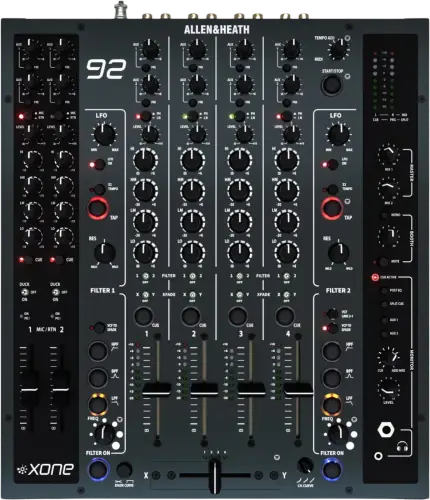
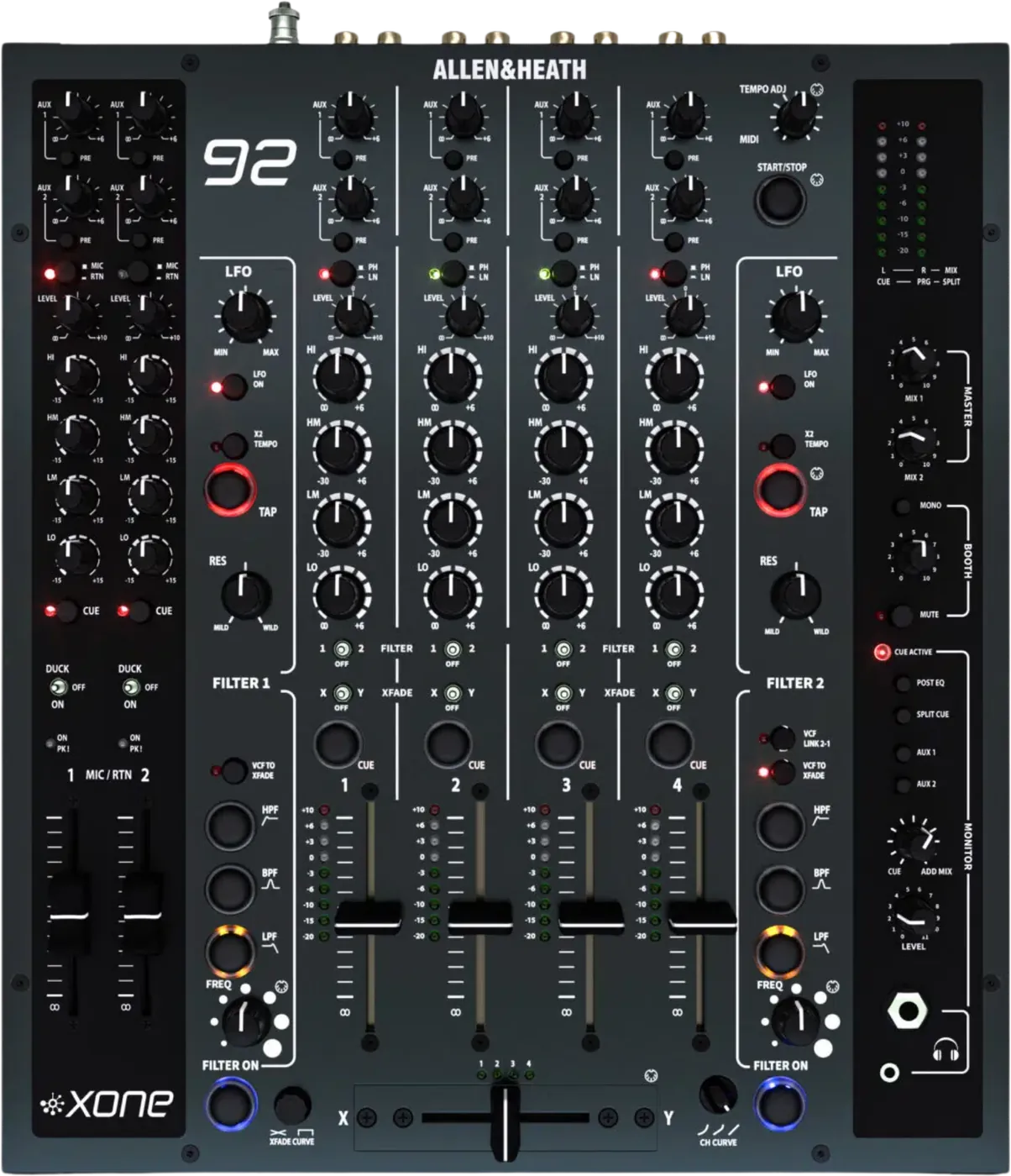
Booth briefing. The Xone:92 is Allen & Heath's analogue club mixer, described as 4 + 2 channels on the product page and 6 + 2 on the technical specification sheet. Its two stereo filters, one either side of the crossfader, are the reason it exists. There is no firmware, no drivers and no soundcard, so nothing on it is ever out of date. Mic routing to Booth and Record is set by a switch on the rear panel, and MIX 1 at full travel is unity gain rather than a boost.
When it goes wrong: No sound from the mixer
Fast Lane
The five things that decide your gig
The five things on the Xone:92 that change what happens next, if you are reading this in the booth. All five are explained in full further down this page.
A channel that will not crossfade is almost always the assign switch, not a fault.
Each music channel has a crossfader assign switch with three positions, and the middle one takes that channel out of the crossfader entirely.
Allen & Heath put it plainly: in the central position the music signal level is unaffected by the crossfader. Check the switch before you start suspecting the fader.
A filter that does nothing is the same trap, one switch over.
The filter assign switch has a centre position too, and it is dry. Allen & Heath: in the central position the music signal is not affected by the filter.
If both filters are dead everywhere, the desk may have been set up that way on purpose. Filter Disable and a maximum resonance limit are documented internal options, so a mixer that will not filter, or will not scream, can be working exactly as its installer intended.
The mics reach the room and nothing else, and on a Mk1 there is no switch to change it.
By default MIC 1 and MIC 2 do not route to the BOOTH or the RECORD outputs. That is the clean feed circuit working as designed, not a fault.
So a mic is loud out front, inaudible to you in the booth, and completely missing from the recording you thought you were making. Allen & Heath list the switches that change it as a Mk2 feature, on the rear panel, which you cannot reach once the desk is installed. On a Mk1 that switch is not there to throw at all, and the answer is a spare music channel instead.
MIX 1 wide open is unity. MIX 2 wide open is +10dB.
Allen & Heath put it in one line: "The MIX 1 maximum position represents unity (0dB) gain. The MIX 2 maximum position represents +10dB gain." So on MIX 1 there is no hidden boost at the top of the travel, and running it open is the normal position rather than a mistake.
MIX 2 is the one to watch, because its maximum adds 10dB. Meter zero on MIX 1 is +4dBu at the MIX 1 XLR outputs, which is what meter zero represents, and the specification's ceiling is +25dBu on MIX 1, the specification's maximum output level.
There is nothing on this mixer to update, and nothing on it that can be out of date.
No firmware, no drivers, no soundcard and no USB audio. The only digital connector is MIDI out only, one 5-pin DIN.
That cuts both ways and both halves are worth knowing: no version to check before a booking, and no fix ever coming for anything you do not like, because all of it is hardware.
If something goes wrong
The mic is completely dead, in the room and everywhere else
Short answer. The Xone:92 keeps a mic channel out of the mix until you tell it otherwise. Look at the DUCK / ON switch on that MIC / RTN channel, because its resting state is the central OFF position, where the channel input is not added to the mix outputs. The fader, the LEVEL control and the EQ all work, and none of them opens the channel on its own.
Why this happens. The switch has three positions and the middle one is where it sits when nobody has touched it, so an untouched channel is a closed channel. The dual colour LED beside it is the tell: Allen & Heath say it lights green to indicate that a channel is turned on, so a dark LED above a raised fader is the whole answer.
Fix it now. Push the switch down to ON, which latches, and check the LED goes green. If you want the mic only while you hold it, push it up to DUCK instead, which does not latch and pulls music channels 1 to 4 down by 15dB while you hold it. Then set the LEVEL control with cue rather than by ear, and back it off if the same LED flashes red.
Avoid it next time. Test a mic through that switch rather than through the fader during the pre set pass, and decide there whether the MC gets DUCK or ON.
A phono input sounds thin, or the level control has no boost left in it
Short answer. The Xone:92 can be reconfigured inside in ways nothing on the top panel reports. Two of those options sit on the input channel itself: RIAA Disable, which turns a phono input into a line input, and Input Gain Disable, which takes the +10dB off the top of the level control.
Why this happens. Both are jumper links, and Allen & Heath's own instruction is to park a removed jumper on one leg of the connector so it can be put back later, which is exactly how a desk carries the change quietly for years. A turntable plugged into a converted phono input has no RIAA curve behind it any more, so it arrives thin and quiet rather than silent, which reads as a cartridge problem.
Fix it now. Move the turntable to another channel and set that channel to PHONO. If all four behave the same way, it is a configured desk rather than a fault, and the venue's engineer is the person to ask. The level control tells the same story: if fully clockwise gives you no more than unity, the input gain jumpers are out.
Avoid it next time. Sweep all four channels on both PHONO and LINE during the pre set pass, so a reconfigured input is something you learn before the doors rather than during a transition.
The mic is loud out front, absent from the booth and absent from the recording
Short answer. That is the Xone:92 working as designed. Allen & Heath route the mic inputs through a clean feed circuit, and their wording is that by default MIC 1 and 2 do not route to the BOOTH or RECORD outputs. The switches that change it are on the rear panel.
Why this happens. A clean feed exists so an MC or a compere does not end up in the recording and does not feed back into the booth wedge. The side effect in a live room is exactly what it sounds like: the MC is loud in the room, the DJ cannot hear them in the booth, and the set recording comes back with the music and none of the voice. Nothing on the top panel tells you this is happening.
Fix it now. Go behind the mixer. The mic clean feed switches are on the rear panel, listed by Allen & Heath as a Mk2 feature, so reach them before the desk is boxed into a booth. If the mic must be in the recording, that switch is the only thing that puts it there. If the desk is a Mk1, or the switches are not reachable, take the mic into a spare music channel instead, which does feed Booth and Record like any other source.
Avoid it next time. Decide before the doors open whether the mic belongs in the booth and in the recording, then set the rear panel to match. It is a two minute job with the desk out and an impossible one with the desk in.
The crossfader does nothing
Short answer. Look at the crossfader assign switch on that Xone:92 channel. It has three positions and the middle one takes the channel out of the crossfader entirely. Allen & Heath put it plainly: in the central position the music signal level is unaffected by the crossfader.
Why this happens. On the mixers most DJs learn on, a centre or THRU position means "always on, ignore the crossfader", and that is what it means here too. The trap is that it is the same switch you use to assign a channel to side A or side B, so a previous DJ who wanted a channel permanently live has left it centred, and the next person sweeps the crossfader and hears nothing change.
Fix it now. Set the assign switch to the side you want the channel on, A or B, and check the other three channels while you are there. Then confirm the crossfader is actually doing something on a channel you can hear.
Avoid it next time. The crossfader assign row is part of the same pre set pass as gain and filter assign, on all four music channels, not just the two you plan to use.
A filter does nothing on a channel
Short answer. The Xone:92 filter assign switch has a centre position too, and it is dry. Allen & Heath's wording: in the central position the music signal is not affected by the filter.
Why this happens. Either filter can be assigned to any of the four stereo channels, so the assign switch decides whether the channel goes to filter 1, to filter 2, or to neither. Centre is neither. A DJ who dials frequency and resonance hard while the channel sits in the centre position hears a filter that appears to be broken, and the LED state on the filter itself gives no clue, because the filter is running fine and simply has nothing routed into it.
Fix it now. Move the channel's filter assign switch to the filter you are actually holding, then check the filter's own ON switch and its type selection, HPF, BPF or LPF. If it still does nothing on every channel, read the next section before you call it a fault.
Avoid it next time. Set filter assign per channel as part of the pre set pass, and know which of the two filters is yours before the transition, not during it.
The filters do nothing at all, or will not scream
Short answer. The Xone:92 can be modified internally. The options Allen & Heath document include Filter Disable and a Maximum Resonance Limit, so a Xone:92 that will not filter, or will not go wild, may have been set up that way on purpose rather than broken.
Why this happens. These are installer options, and they exist for venues: an install engineer who has heard one too many resonant sweeps at full tilt through an expensive system can cap the resonance, or take the filters out of the signal path altogether. Nothing on the top panel indicates it. The controls still move, the LEDs still light, and the sound does not change the way you expect.
Fix it now. Rule out the ordinary causes first, the channel's filter assign switch centred and the filter ON switch off. If every channel behaves the same way on both filters, treat it as a configured desk and ask the venue's engineer rather than working the controls harder. It is not a setting you can reach from the front.
Avoid it next time. If a venue's Xone is filtered down, you know for next time, and a filter led set built on a resonant sweep needs a plan B in that room.
The house system is clipping, or the master seems short of level
Short answer. Not from the Xone:92 master knob on MIX 1. Allen & Heath state it plainly: "The MIX 1 maximum position represents unity (0dB) gain. The MIX 2 maximum position represents +10dB gain." So MIX 1 fully clockwise is unity gain, not a boost past it. MIX 2 is different, and its maximum does add 10dB.
Why this happens. If the house system is clipping, the level arriving at it is the thing to look at rather than the master position. Meter zero on MIX 1 represents +4dBu at the MIX 1 XLR outputs, which is what meter zero represents, and the specification's maximum output is +25dBu on MIX 1, the specification's maximum output level, so a channel driven hard reaches the house long before the master knob is the culprit. Read the master meters knowing what zero means on each output: meter 0 is +4dBu at the MIX 1 XLR outputs and -2dBu at the MIX 2 line outputs. On MIX 2, the extra 10dB at maximum is a real gain stage and can be exactly the culprit.
Resonance is a named cause, and it is not on the master knob. Allen & Heath warn in the guide that high resonance settings can significantly boost the frequencies they select, and ask you to reduce the channel gain if that lights the red PK LEDs, because failure to do so may result in distortion or system overload. So if the clipping arrives with the filter, the gain is where to answer it: the filters, and what the guide says about resonance.
Fix it now. Work from the meters rather than the knob. Bring the channel gains down until the meters sit where you want them, leave MIX 1 open, and set the room's level from the house system rather than from the mixer. If you are on MIX 2, back it off from maximum first, because that is where the 10dB lives.
Avoid it next time. Settle the gain structure at soundcheck and leave the master where it lands. Loudness is the engineer's control, not yours.
A return will not crossfade
Short answer. The Xone:92 return inputs never pass through the crossfader, and they never will. Allen & Heath describe them as sources which do not need to route through the crossfader, which is a design decision rather than a limitation you can switch off.
Why this happens. The returns share their channels with the two mic inputs, as MIC / RTN 1 and 2, and those channels exist for effects units, a second room feed, an announcement source and anything else that should stay live regardless of where the crossfader is.
Fix it now. If the source has to be crossfaded, take it into one of the four stereo music channels on line instead, and assign that channel to a crossfader side. Leave the returns for what they are good at.
Avoid it next time. Plan the patch around it. Any source you intend to cut with the crossfader belongs on a music channel from the start.
Hum and ground loops, the published procedure
Short answer. Confirm hum on a Xone:92 is a ground loop by running the laptop on battery with its power supply unplugged. If the hum goes, it is a loop, and the cure belongs in the audio cabling.
Why this happens. A loop is a second path to earth between two devices that are each already earthed. The mixer's earth is not the problem to remove, it is the protection to keep.
Fix it now. Allen & Heath's procedure, in their order: test on battery to confirm the loop, keep unbalanced cables short, do not coil excess cable, they suggest a figure of eight system to avoid turning the cable into a transformer, keep audio and mains cabling apart and cross them at right angles, and if the hum survives all of that, isolate the ground in the audio cabling or fit a ground loop isolator. Turntables earth to the chassis earth terminal on the rear of the mixer, and the Mk2 ships a dual ground adaptor so two decks can be earthed independently.
Avoid it next time. Carry a ground loop isolator and a short unbalanced cable set. Both are cheaper than the compromise somebody will otherwise suggest with a pair of pliers.
What to watch for
Mk1, Mk2 and the Limited Edition
Short answer. Mk1 and Mk2, plus a Limited Edition run of 920 units for the twentieth anniversary. Allen & Heath document the Mk1 and the Mk2 as distinct mixers with different internals and different manual page numbers, so a Mk1 in a venue is not simply an older looking Mk2. Allen & Heath still list the Xone:92 in the Xone series and still publish its support documents, so both revisions are desks you will be handed rather than museum pieces.
The differences they list. It runs linear channel faders, with a global 3-position curve switch on the Mk2. On a Mk1, changing that curve needs a hardware modification inside the mixer instead. Rack ears shipped with the Mk1 and do not ship with the Mk2, where they are an accessory kit to order under part X:922-RK19/X, and the Limited Edition puts them back in the box. The Mk2 additions Allen & Heath list are the mini innoFADER Pro crossfader, a storm grey colourway, that fader curve switch, improved channel input level and source matching, refined VCF tapers, optimised RIAA preamps, a removable dual ground adaptor and the rear panel mic clean feed switches. The Mk2 also claims redesigned analogue soft switching, so hot switching a channel into a filter does not put audible artefacts on the master.
Two Mk1 facts that change what you do. The Mk1 shipped in two versions, a linear version with 60mm VCA faders and a rotary version with rotary VCA faders, so a Xone:92 with round knobs where the channel faders should be is a factory build and not somebody's modification. The Mk1 guide also carries a caution the Mk2 dropped once soft switching arrived: "To avoid audible clicks only route channels to the filters when the filter is OFF." They are different objects to lift and to fit, too. A Mk1 is 320mm wide, 87.6mm high, 358mm deep and 6 kg, against 320mm wide, 106mm high, 376mm deep and 7 kg for a Mk2.
Why it matters in a booth. Two of those changes are the difference between a fix you can perform and one you cannot: the fader curve, and the mic clean feed. If the mic has to reach the recording and the desk is a Mk1, the rear panel switch is not there to throw.
Common mistakes. Reading a Mk2 page number or a Mk2 rear panel diagram while standing at a Mk1. Check which one you have before you follow a diagram.
There is no firmware, and what that means both ways
Short answer. Allen & Heath publish no firmware, no drivers and no release notes for this mixer, and there is no USB audio to need any. The only digital connector on it is MIDI out only, one 5-pin DIN. So there is no version number on this mixer to check, and nothing on it that can be out of date. Checked 7 August 2026.
What that buys you. There is nothing to update before a gig, nothing that can be out of date, no release note to read, no installer to run, and no behaviour that quietly changes between one venue's desk and the next. A Xone:92 you learned on in 2010 behaves the same way today.
What it costs you. Nothing can be fixed in software either. If a routing decision on this mixer is not the one you would have made, that is the mixer, permanently: the mics stay out of Record until the rear panel switch is thrown, the assign centre positions stay as they are, and no update is coming to change any of it. Allen & Heath describe the signal path as 100% analogue circuitry and mix bus summing, and that cuts both ways.
Do this. Spend the time you would have spent checking a version on the rear panel and the assign switches instead. That is where this desk's surprises live.
The user guide has no troubleshooting section
Short answer. It does not have one. The Xone:92 user guide documents controls, connections and specifications, and there is no troubleshooting chapter, no symptom list and no fault table anywhere in it. A DJ holding the manual in a booth with a problem has nothing to work from.
Why we are saying it plainly. That is a checkable statement about a document rather than a complaint about a mixer, and it is most of why this page exists. The behaviours a DJ reads as faults on this desk, the mic missing from the recording, the dead crossfader, the dry filter, are all documented in the guide, just as descriptions of controls rather than as answers to symptoms. Nobody reading a manual under pressure finds them that way.
What is published, and what is not. Allen & Heath publish no service manual for this mixer. They do publish a block diagram, and for a technician or a curious owner that is the closest thing to service documentation available: it shows where every stage sits in the signal path, including which points the crossfader and the filters are inserted at.
Do this. Keep the user guide for connector pinouts and control names, and use the emergency sections above for symptoms. If you hit a repeatable behaviour that is not covered here, tell us what happened and we will verify it against Allen & Heath's own documents before it goes on the page.
Official documents. Mk2 user guide (PDF) →
Mk2 technical specification (PDF) →
Mk2 block diagram (PDF) →
Broken link? Let us know and we'll fix it.
Compatibility
What it works with, and what Allen & Heath do not document
Short answer. Anything with a line or phono level output, on any of the four stereo music channels, plus microphones and line returns on the two MIC / RTN channels. There is no soundcard, no USB audio and no drivers, so nothing about a computer's operating system version affects this mixer.
Digital vinyl systems. Allen & Heath do not document DVS or timecode for the Xone:92. No document of theirs for this model mentions timecode, Serato or Traktor, and there is no soundcard in it, so we say it is not documented rather than claiming it works or claiming it does not. DJs do run timecode through analogue mixers using a separate interface, and that arrangement is between you, your interface and your software, with nothing from Allen & Heath to lean on if it misbehaves. Whatever is published for the Xone:96 is a different mixer with a different signal path and does not transfer.
Do this. If you play on timecode, confirm your own interface and licence before the gig, and treat the mixer as four line inputs. If you play from players, this desk pairs with the era correct CD players below.
Common mistakes. Turning up expecting to plug a laptop straight into the mixer. The only cable between a computer and this mixer is an audio cable from your own interface.
Features explained
The two filters, and why the mixer exists
Short answer. Allen & Heath's own description: 2 stereo VCFs are provided, one either side of the crossfader. Each is switchable between HPF, BPF, LPF, has an ON and OFF switch, and carries its own frequency sweep and resonance. Either filter can be assigned to any of the four stereo channels.
How far it sweeps, and what it can be. The filters are state variable, which Allen & Heath explain means all three responses exist at once and the three illuminated switches decide which are active. Press two or three together and you get a notch from HPF plus LPF, and an all pass from all three together. They give the sweep range once, in the Mk1 user guide: a sweep from 30Hz to 20kHz, the one range Allen & Heath print, in the Mk1 user guide. Power the desk down and the type selection goes with it, because the last selected type is not saved and LPF is what comes back on power up.
Why it matters. This is the control the mixer is bought for. Each filter carries a resonance control labelled MILD to WILD, which feeds the filter output back to its input, and at the wild end Allen & Heath describe the result as resonant feedback boost, which is the sound people mean when they say a Xone filter. Because there are two of them and they sit either side of the crossfader, you can filter what is leaving and what is arriving as separate moves during one transition.
When professionals use it. Sweeping the outgoing track out through a high pass while the incoming one opens up underneath it, or holding a resonant band on a loop to build a breakdown without an effects unit anywhere in the chain.
Common mistakes. Leaving a channel's filter assign in the centre position and blaming the filter, and pushing resonance to the wild end on a large system, where the feedback boost is far louder than it sounds on headphones. Allen & Heath warn about that second one in the guide: high resonance settings can result in significant boost of selected frequencies, so reduce the channel gain if the levels light the red PK LEDs in the output meters, because failure to do so may result in distortion or system overload. They publish the sweep range but no slope and no resonance figure, so where it bites in a given room is still something to find before the room is full.
The two LFOs
Short answer. 2 independent low frequency oscillators modulate the filters, with tap tempo and an x2 speed setting.
Why it matters. An LFO moves a filter for you, in time, so a sweep can run under a track while both your hands are elsewhere. Tap tempo is what makes it musical on an analogue desk with no clock of its own coming in: you give it the tempo, it holds it.
When professionals use it. A slow pulse on a long blend, or the x2 setting to double the rate into a build without re tapping.
Common mistakes. Tapping the tempo once and trusting it across a tempo change, and leaving an LFO running on a channel after the transition, which reads to the room as a mix that will not settle. LFO 2's tap tempo also sends MIDI clock with start and stop, so a tap made for the filter can move anything you have slaved to the mixer.
Two switches beside them that most people never touch. VCF TO XFADER hands a filter to the crossfader, so the move becomes the crossfader sweeping the filter in place of the FREQ control. VCF LINK 2-1 gives you FILTER 2 taking its cut off frequency from the FREQ control of FILTER 1, which is how Allen & Heath describe joining a low pass on one channel to a high pass on another from a single knob.
Channel count, and two official answers
Short answer. Both of these are Allen & Heath's own numbers. Their product page calls it a 4 + 2 channel analogue mixer. Their technical specification sheet for the same mixer states channels 6 + 2. We publish both rather than choosing one, because both are official.
What is actually in front of you. The layout is four stereo music channels with switchable phono or line, plus two mic and return channels. Count the two mic and return channels as music channels and you get one number, count them separately and you get the other, which is the likeliest reason two documents from the same company disagree.
Why it matters. It decides what you can patch. Four stereo channels take turntables or line sources and go through the EQ, the filters and the crossfader. The mic and return channels, 2 of them, take a microphone on XLR or a line return, and they do not pass through the crossfader. There are also 2 aux sends, switchable pre or post fader and fed from all six channels.
The switch that decides whether a mic exists. Each MIC / RTN channel carries a three position DUCK / ON switch, and its resting state is the central OFF position, where the channel input is not added to the mix outputs. Held up to DUCK it does not latch and it drops music channels 1 to 4 by 15dB for as long as you hold it. Pushed down to ON it latches and ducks nothing. The music channels have no such switch, and their LEVEL control runs from minus infinity fully anticlockwise to unity at the centre detent and +10dBu fully clockwise.
Common mistakes. Reading 6 + 2 and planning six turntables, or reading 4 + 2 and not realising the return channels are full channels with their own faders.
MIDI out
Short answer. MIDI out only, one 5-pin DIN, and that is the only digital connection on the mixer. What it sends is control changes on CC12, CC13, CC92 and CC94, plus MIDI clock with start and stop, on MIDI channel 16 by default, with an internal switch to 15.
Where their own documents disagree. The hardware specification lists MIDI as assignable CC and note on and off. The MIDI implementation chart inside the same user guide marks note number, note on and note off as not used, and the MIDI control codes table on the facing pages lists only the four control changes and the clock. Plan for control change and clock, not for notes.
Why it matters. The mixer can drive software or hardware from its own controls without becoming a controller. The published assignments include FILTER 1 FREQ on CC12, FILTER 2 FREQ on CC13 and the crossfader on CC92, and LFO 2's tap tempo sends MIDI clocks along with start and stop.
When professionals use it. Sending the filter sweep or the crossfader position to a software instrument, or clocking an external machine from the tap tempo so the whole rig follows the same pulse.
Common mistakes. Expecting MIDI in. There is one DIN and it is an output, so anything you want to control the mixer with has nowhere to plug in. Expecting audio over that connector as well: there is no soundcard on this mixer at all.
Headphones, cue and the meters
Short answer. Two headphone sockets, one full size TRS and one mini jack, with a cue and mix blend and a split cue mode. For a Mk2 Allen & Heath recommend closed ear headphones rated 35 to 300 ohms. The Mk1 guide gives a different range for the same pair of sockets: 30 to 100 ohms, with 8 ohm headphones not recommended.
What cue is actually listening to. On the four music channels cue is pre EQ by default, so a channel you have EQ killed still sounds whole in the phones, and the POST EQ switch in the master section is the only thing that changes it. On the MIC / RTN channels cue is post EQ instead, so you hear the correction you are making. The booth feed has its own pair of controls next to those: a MONO switch and a MUTE switch, neither of which touches the headphones or the main outputs.
Why it matters. Split cue puts the cued source in one ear and the mix in the other, which is how you beatmatch on a loud stage where the wedge is fighting you. The blend control is the more common cause of a headphone problem than the socket is: fully to one side and you are hearing only the master, which sounds like a cue that has stopped working.
When professionals use it. Split cue on any stage where the monitor is unreliable, and the second socket for a guest or a back to back handover without unplugging.
Common mistakes. Judging level by ear alone. The meters are nine LED covering -20dBu to +10dBu, on the channels and on the master, and they are the reference to set gain against.
Professional tips
Walk the rear panel before the desk goes in the booth
Short answer. On this mixer more of the routing than you expect is decided behind it, and once the desk is installed you cannot reach any of it.
Why it matters. The mic clean feed switches that decide whether an MC reaches Booth and Record are on the rear panel. So are the phono and line inputs sharing sockets with shorting plugs in them, the chassis earth terminal every turntable needs, and the outputs that decide which system gets which feed: MIX 1 on balanced XLR, MIX 2, BOOTH and both aux sends on impedance balanced TRS, and RECORD on RCA. Their two documents disagree about those jacks. The user guides call MIX 2, BOOTH and the aux sends impedance balanced, the Mk2 specification sheet lists the same sockets as unbalanced. Wire them balanced and both documents are satisfied.
The one output worth understanding first. Before you promise anybody a recording, know what the RECORD socket is. Allen & Heath describe it as a Pre-Master level, post-Clean Feed, LR mix output unaffected by the main mix control, which is why the master knob cannot rescue a recording and why the mic clean feed switches decide whether a voice is on it.
Do this. Before the desk is boxed in, set the clean feed switches for the gig, confirm the shorting plugs are in phono inputs and nowhere else, earth the turntables to the chassis terminal, and confirm the house system is coming from the output you think it is.
Common mistakes. Discovering the clean feed switch exists during the set, when it is a hand's width from your fingers and a booth panel away.
The crossfader is a replaceable part, and that matters on a desk this long lived
Short answer. The crossfader is a mini innoFADER Pro, 45mm linear VCA, fitted as standard on the Mk2, fully assignable from each music channel and user replaceable. Allen & Heath's part number is AI11470, and their wording is that it can be easily accessed should replacement be required. On a Mk1 it is the Penny & Giles fader instead, part 002-719.
Why it matters. A mixer built around a filter design Allen & Heath say was first introduced on the Xone:62 outlives its own faders several times over. On a desk where the crossfader is not a serviceable part, wear ends the mixer's working life. Here it is a part number and an afternoon.
Do this. If the crossfader feels gritty or cuts unevenly, order AI11470 rather than working around it, and keep one in the flight case if the desk is yours and touring. Allen & Heath do not publish a lifespan or a cycle rating for it, so replacement is driven by feel rather than by a number. The Mk1 guide prints the whole job: a medium cross point screwdriver, the two outer screws on the crossfader plate and not the inner ones, lift the assembly clear, unplug the cable, plug in the new one and refit it with the cable facing the left side of the console. They call that a few minutes.
Common mistakes. Treating a worn crossfader as the end of the mixer, and assuming the channel faders cannot be changed at all. The specification describes them as 60mm VCA control individually replaceable, although no part number is published for them. Either way, plan on paying for it: Allen & Heath's warranty says "This warranty does not cover fader wear and tear."
Noise on an unused phono input, and the plug in the wrong socket
Short answer. The Xone:92 wants shorting plugs in the phono inputs it is not using, Allen & Heath part AL4396. When you pull one out to connect a turntable, put it somewhere safe. Their own warning: if removing shorting plugs to connect turntables, do not insert them into other RCA inputs or outputs, this results in very poor audio.
Why this happens. A phono input is a high gain stage expecting a cartridge, and an open one is an aerial. A shorting plug ties it quiet. The second half of the warning is the one that costs a set: a spare plug parked in a line input or, worse, an output, shorts a working signal, and the symptom reads as a dead channel or a ruined mix rather than as a plug in the wrong hole.
Fix it now. Count the shorting plugs against the phono inputs you are not using, and check that none of them has ended up in a line input, the record output or the mix outputs. This is documented as general guidance across the Xone series rather than as a Xone:92 specific note, so it applies to whichever Xone you are standing at.
Avoid it next time. Keep the pulled plugs in your bag or taped to the rear of the desk, never in another socket.
Preventive maintenance
Keeping an analogue desk reliable over years of bookings
Short answer. Connectors, cables and the phono shorting plugs take the real wear on this mixer. There is no software state to reset, so what you are protecting is entirely physical.
Why it matters. RCA and XLR connectors and the rear panel switches are what a touring life abuses, and a loose or bent pin causes the intermittent fault that is hardest to diagnose in a live room. Nothing about it will show up in a log, because there is no log.
Do this. Inspect cables before they go in the bag rather than when a fault appears, unplug by the connector and not the cable, keep the shorting plugs accounted for, and keep the desk covered in transport. Do not spray anything into a fader or a switch: Allen & Heath state that the faders, switches and potentiometers are lubricated for life, with electrical lubricants not recommended on them. The power supply is 100 to 240V, 30W, internal switch mode supply, with no voltage selector and no fuse change needed between supplies, so the same mixer travels between countries with nothing to set, and the fuse it does carry is rated T500mA L, 250V, 20mm. A Mk2 measures 320mm wide, 106mm high, 376mm deep and weighs 7 kg, a Mk1 measures 320mm wide, 87.6mm high, 358mm deep and weighs 6 kg, and each figure comes from that revision's own user guide, because the Mk2 specification sheet leaves dimensions out.
Avoid it next time. Do not coil cables tightly around connectors, which is where strain damage starts, and do not coil audio cable in a loop beside a mains run.
Safety
Never lift the mains earth
Short answer. Do not remove the earth from the mixer's mains plug, and do not accept a lifted earth as somebody else's fix for hum. Allen & Heath's own wording, quoted in full because paraphrasing it would soften it: "because the Xone mixer has a metal chassis, not plastic, it is essential that the mixer be grounded via the mains cable. Under no circumstances should you consider removing the green and yellow mains earth wire from the mains plug to the Xone, as if you do so, then should a fault develop in the mixer's power supply there is a risk that the chassis of the mixer could become live; a potentially lethal fault."
The same instruction is in the user guide. Under Earthing, Allen & Heath write: "Do not remove the earth connection from the console mains plug. The console chassis is connected to mains earth through the power cable to ensure your safety." So this is not one support article's opinion, it is in the document that ships with the mixer.
Why this matters. Lifting the earth is a common booth habit, because it does often silence a ground loop, and it works by removing the protection that keeps the metal you are touching at a safe potential. The mixer sits between two hands, a microphone and a turntable. This is the one item on this page that is not about a set going wrong.
Do this. If you find a Xone on a lifted earth, a cut earth pin or a two pin adaptor, stop and tell the venue. Fix hum in the audio cabling instead, which is what Allen & Heath tell you to do and what the next section sets out.
Firmware, drivers and manuals
Official downloads and documents
Go to Allen & Heath for the files themselves. We link their pages instead of hosting a copy, because a manual copied here is a snapshot of release day and theirs is the one that stays current.
Manuals. Official Allen & Heath manual page →
Broken link? Let us know and we'll fix it.
Frequently asked questions
Quick answers
- What firmware should it be on?
- The question does not apply. Allen & Heath publish no firmware, no drivers and no release notes for this mixer, and there is no USB audio to need any.
- Is it a four channel mixer or a six channel mixer?
- Allen & Heath say both. Their product page says 4 + 2, their technical specification sheet says 6 + 2. Physically: four stereo music channels with switchable phono or line, plus two mic and return channels.
- Why is the mic missing from my recording?
- By design. The mic inputs do not route to the BOOTH or RECORD outputs until the clean feed switches on the rear panel say otherwise.
- Does it do DVS?
- Allen & Heath do not document DVS or timecode for this mixer, and it has no soundcard. Anything that works does so through your own interface, with nothing published to fall back on.
- Can I use it as a soundcard for my laptop?
- No. There is no USB audio on this mixer. MIDI out only, one 5-pin DIN.
- Where is unity on the master?
- At maximum, on MIX 1. Allen & Heath: "The MIX 1 maximum position represents unity (0dB) gain. The MIX 2 maximum position represents +10dB gain." Meter zero is +4dBu at the MIX 1 XLR outputs, which is what meter zero represents and the specification's ceiling is +25dBu on MIX 1, the specification's maximum output level.
- My mic does nothing at all. Why?
- Look at the DUCK / ON switch on that channel. Its resting state is the central OFF position, where the channel input is not added to the mix outputs, so the fader and the LEVEL control cannot open it on their own.
- How far do the filters sweep?
- Allen & Heath give it once, in the Mk1 user guide: a sweep from 30Hz to 20kHz, the one range Allen & Heath print, in the Mk1 user guide. No slope and no resonance figure are published.
- Can I replace the crossfader myself?
- Yes. On a Mk2 it is a mini innoFADER Pro, 45mm linear VCA, Allen & Heath part AI11470, and they describe it as easily accessed should replacement be required. On a Mk1 it is the Penny & Giles part 002-719 and the guide prints the steps.
- Can the channel faders be replaced?
- The specification describes them as 60mm VCA control individually replaceable. No part number is published for them, and the warranty says "This warranty does not cover fader wear and tear."
- Is there a service manual?
- No. Allen & Heath publish a block diagram instead, which is the closest thing to service documentation available for this mixer.
- Can I lift the mains earth to kill a hum?
- No. Allen & Heath call it a potentially lethal fault risk on a metal chassis mixer. Isolate the ground in the audio cabling instead.
Where this sits in the line
- Next generation Xone:96
Related mixers
Commonly paired with
What you usually find beside it in working booths, from club, festival and rental installs rather than from a manufacturer document.
Allen & Heath All brands Knowledge base FAQ and Fixes Dictionary
Playing soon and it is not working?
Start Emergency ModeKeep the Emergency Card
We will email you the printable PDF so it is on your phone before the next dark booth. Occasional notes that save gigs. No spam, unsubscribe in one click.
Registering is free and counts everywhere on Save My Gig. We send a confirmation email first. Your address is stored with Brevo, our email provider. Unsubscribe any time. Privacy
Sources: Allen & Heath's own Xone:92 product page, Mk2 user guide, Mk2 technical specification, Mk2 block diagram and support articles, checked 7 August 2026. Specifications theirs, priorities ours.