

DJM-V10, the field manual
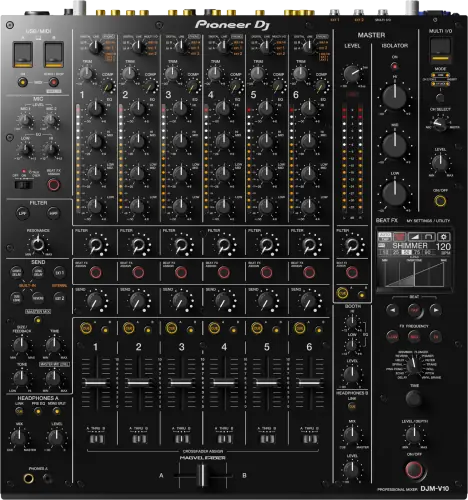
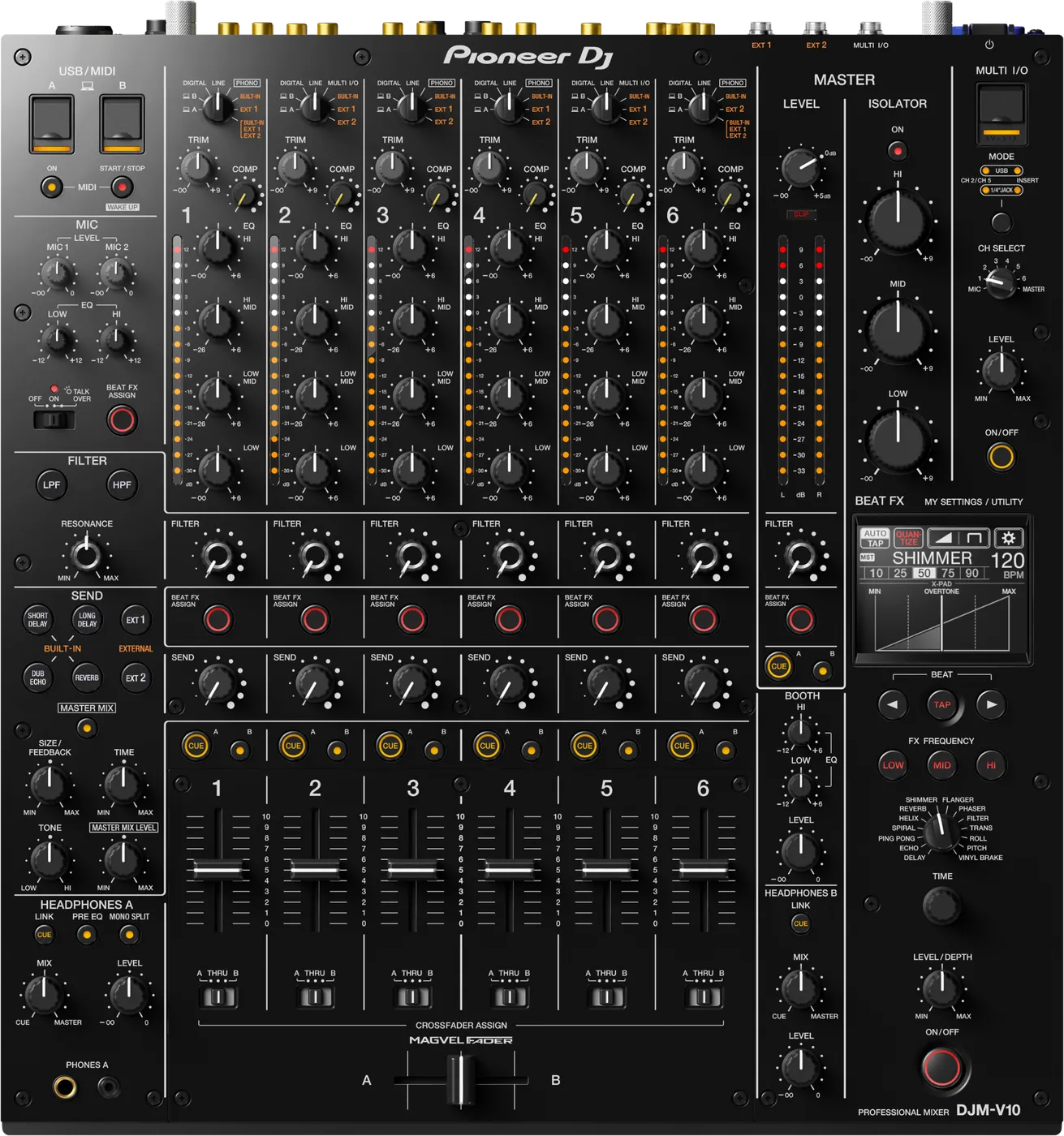
Booth briefing. The DJM-V10 is Pioneer DJ's six channel club mixer, a different desk from the 900 rather than a bigger one: 4-band EQ and a compressor on every channel, dual headphone outputs and an expanded send and return. For a DJ arriving from a 3-band desk the EQ layout is the first thing to learn, because the band you reach for sits in a different place. The V10-LF is the same mixer with no crossfader and 60 mm faders in place of 45 mm, a separate model rather than a variant of this one.
When it goes wrong: No sound from the mixer PRO DJ LINK will not come up
Fast Lane
The five things that decide your gig
The five things on the DJM-V10 that change what happens next, if you are reading this in the booth. All five are explained in full further down this page.
Four EQ bands per channel, not three. Your hands are wrong here.
Every other DJM taught you three. The knob positions shift, so the one you reach for without looking is not the one you meant.
Ninety seconds walking a single channel strip before doors is the whole fix.
Audio could cut out with CDJ-3000s on Link, until 1.12.
Documented and fixed. The CDJ-3000 pairing is the standard V10 booth, which is exactly where this one bit.
Read the version if the booth is a V10 and 3000s, because that is the combination it needed.
Fast modern USB sticks were invisible until 1.16.
UASP-compatible drives, most quality sticks, were not recognised. Same documented bug as the DJM-A9.
The better your drive, the likelier it was the one refused.
A channel could fail to take audio at all, fixed in 1.04.
Audio sometimes failing to input to a channel is in the official change history, not in forum folklore.
On a six-channel desk a dead channel is easy to blame on patching, which is what makes this one worth knowing.
A one-knob compressor on every channel.
It tightens a track and lifts its perceived loudness, which matters when a set crosses eras and masters that arrive at different levels.
Six channels means six of them, and six ways to arrive at a master that is louder than you planned.
If something goes wrong
A channel has no signal
Short answer. Same order as any desk, fader, assign, input selector, with two V10-specific suspects: the send/return routing and, on very old firmware, a documented bug where audio would sometimes fail to input to a channel, fixed in firmware 1.04.
Why this happens. Six channels means six input selectors that can each sit on the wrong source, and the send/return can detour a channel through external gear that is not returning signal.
Fix it now. Fader up, input selector matched, send/ return disengaged for your channel, then move the source to another channel to isolate. If a specific channel drops audio repeatedly on an old unit, check the firmware version: 1.04 was the documented cure for exactly that.
If the whole master is quiet rather than one channel, the answer is in the menu. UTILITY holds an ATT. setting for the MASTER1 and MASTER2 terminals, from 0 dB down to -12 dB, with 0 dB as the factory value, and it is the manual’s own listed cause of sound not outputting or the volume being low, alongside BOOTH ATT., BALANCE, MONO and the master isolator left at its minimum. None of that shows on the front panel, all of it survives a power cycle, and the manual puts a LOCK on the UTILITY screens so a venue can freeze whatever the last engineer left there.
Avoid it next time. A six-channel routing pass before doors takes ninety seconds and removes every one of these mid-set. On a desk you have not worked before, add one look at UTILITY to that pass.
The send effect is running and you cannot hear it
Short answer. Work out where the DJM-V10 is sending it before you touch the effects unit. The send effect can be running perfectly and be audible nowhere, and AlphaTheta separate the two ways that happens. If the send sound is not reaching the master, MASTER MIX has to be turned on with its button and the MASTER MIX LEVEL knob in the SEND section has to be set. If it is not reaching the channels, the channel's own input selector has to be set to BUILT-IN, EXT1, EXT2, or the combined BUILT-IN, EXT1, EXT2 position. And if the send does nothing at all, the SEND knob has to be set and the external unit has to be properly plugged into the EXT1 or EXT2 send and return terminals it is actually assigned to.
Why this matters. This desk has more routing than any other mixer on this site, and the send path can be correct at every point you can see while being switched out at one you cannot. The channel input selector is the cruel one: it is a control a DJ thinks of as choosing a source, and here it also decides whether the send effect reaches that channel at all.
Fix it now. Start at the end and work backwards: MASTER MIX on, MASTER MIX LEVEL up, then the channel input selector, then the SEND knob, then the cables. The room hears the first two immediately, so you know the moment you find it.
Avoid it next time. Set the routing at soundcheck and leave it. On a desk with two external loops plus MULTI I/O, the routing is the instrument as much as the knobs are.
The MULTI I/O loop does nothing
Short answer. Start at the DJM-V10 itself, not at the cable. The MULTI I/O loop is a separate path from EXT1 and EXT2, and it has its own five checks. Choose the channel with the CH SELECT switch. Turn MULTI I/O on with the ON/OFF button in that section. Make sure an external unit is properly on the MULTI I/O SEND and RETURN terminals, or that a mobile device is on the mobile device connection terminal with its FX application launched. And set the MODE selector button correctly. Distortion coming back rather than silence points at the external unit's own volume.
Why this matters. MULTI I/O is a third effects path, separate from EXT1 and EXT2, and a DJ who has already got a send loop working reasonably assumes this one behaves the same way. It does not: it has its own on switch, its own channel selector and a MODE button that none of the other paths have.
Fix it now. ON/OFF first, then CH SELECT, then MODE, then the connection. If you are running a phone as the effects unit, confirm the app is actually open before anything else.
Avoid it next time. Decide which of the three paths you are using and use only that one. Patching two at once on this desk is how a set becomes a routing puzzle.
BEAT FX does nothing on the channel you chose
Short answer. Check the frequency buttons on the DJM-V10. BEAT FX on this mixer needs two buttons lit, not one. The BEAT FX ASSIGN button has to be lit for the channel you want treated, and the FX FREQUENCY button has to be lit for the band, HI, MID or LOW, you want the effect applied to. A DJ who has only ever assigned the channel gets nothing and reasonably concludes the effects section is broken.
Why this matters. Every other mixer a DJ has used assigns an effect to a channel and that is the whole gesture. Here the band selection is a second, separate assignment, and a completely correct channel assignment with no band lit produces exactly the same silence as no assignment at all.
Fix it now. Press the FX FREQUENCY button for the band you want. If you want the effect across the whole signal, light all three.
Avoid it next time. Make the frequency buttons part of how you set up effects, not something you discover. On this desk they are half the assignment.
Audio cutting out with CDJ-3000s on Link
Short answer. A documented issue: potential audio cut-out when the V10 was connected to CDJ-3000s over the PRO DJ LINK network, fixed in firmware 1.12.
Why this happens. V10 plus CDJ-3000s is the standard pairing for this desk, which is exactly why the bug mattered enough to document and fix.
Fix it now, and not by pulling the network. The Instruction Manual carries the instruction flat, in the connections section, with no exception attached: "Do not disconnect a LAN cable when using PRO DJ LINK." Work the audio path instead. Move the affected deck to a channel that is passing signal, check the input selector for that channel, and if the room can stand a pause, power-cycle the mixer rather than unplugging the network while it is live. Then get the desk to 1.12 or later after the gig.
Avoid it next time. Check the firmware version on any V10 booth running CDJ-3000s; this fix shipped years ago, but rental and venue units miss updates for years.
A USB drive the mixer refuses to see
Short answer. UASP-compatible drives, most quality sticks, were not recognized by the V10 until firmware 1.16.
Why this happens. Same documented bug as on the DJM-A9, fixed the same day, and rental desks are routinely behind.
Fix it now. Use an older or plain stick for the mixer-side job, update the desk to 1.16+ later.
The update carries a condition printed beside it, and it is the obvious trap. AlphaTheta publish it with the fix itself: "Please use a non-UASP USB storage drive to apply this update." The drive the mixer cannot see is the drive most people reach for to carry the update, so the cure cannot be delivered by the thing that needs curing. Keep the plain stick for this job even after the desk is current.
Avoid it next time. One plain non-UASP stick in the bag for mixer duties.
What to watch for
Documented fixes, by firmware version
Short answer. Four real entries from the official change history. Fixed in 1.04: audio sometimes failing to input to a channel. Fixed in 1.07: incorrect MIDI output under certain operation. Fixed in 1.12: the potential audio cut-out with CDJ-3000s over PRO DJ LINK. Fixed in 1.16: UASP USB drives not recognized.
One behaviour change, not a bug: introduced in 1.13, power management follows the EU Ecodesign 20-minute timing. A desk that switched itself off during a long changeover is following that setting.
Do this. On a V10 you control, sit at 1.16 or later, updated between bookings, never before one.
Compatibility
Players, software and PRO DJ LINK
Short answer. PRO DJ LINK across player generations, with the CDJ-3000 pairing being the standard, and the one with a documented, fixed audio cut-out (firmware 1.12). How the library on your USB was prepared is mostly a player-side question, with one exception that lands on this desk: Quantize works from the grid information rekordbox writes during analysis, and the manual tells you to analyse the tracks beforehand. Play an unanalysed track and the mixer's own display alternates QUANTIZE and NO GRID, which is the V10 telling you it is not receiving that information.
Do this. On a V10-plus-3000s booth, one glance at the mixer firmware answers whether the known Link issue is even possible.
Features explained
The 4-band EQ, and the muscle-memory trap
Short answer. Every channel has four EQ bands instead of the three your hands learned on every other DJM.
Why it matters. The knob positions shift. A DJ who reaches for "the low" without looking grabs a different band than intended, live, on a big system. This is the single most common V10 mistake and it is purely spatial.
When professionals use it. The split low end (low and low-mid) is the reason this desk exists for long-blend styles: you can hold two basslines apart in a way 3-band EQs cannot.
Common mistakes. Not walking the strip before doors. Ninety seconds of touching every knob on one channel recalibrates your hands for the gig.
The per-channel compressor
Short answer. A one-knob compressor on every channel that tightens and lifts the perceived loudness of a track.
Why it matters. Sets built from different eras and masters arrive at wildly different loudness; the compressor evens the set out at the channel, before the EQ fight starts.
When professionals use it. Gently, on thin or old material that disappears next to modern masters.
Common mistakes. Using it as a loudness war button. Compressing everything hard flattens the dynamics the big system was hired to reproduce, and inherited compressor positions from the previous DJ count as routing state: check them at takeover.
Six channels, in practice
Short answer. Four players plus hardware, a hybrid live rig, or three DJs sharing a desk without repatching, that is what the two extra channels buy.
Why it matters. The V10 booth is usually a busier booth: more sources, more cables, more people, which is why routing discipline matters more here than on any 4-channel desk.
When professionals use it. Hybrid sets (players plus drum machine plus synth) and festival stages with overlapping changeovers.
Common mistakes. Assuming the channel layout of the previous act. Six channels means six chances the input selector is not where you expect.
Professional tips
Walk the desk before doors
Short answer. Ninety seconds, one channel strip, top to bottom, before the room fills: trim, four EQ bands, compressor, filter, fader, assign, send/return.
Why it matters. Every V10 horror story we hear starts with hands trained on a 3-band desk meeting this layout for the first time mid-set. The desk is not harder; it is different, and different is what kills you at 2am.
Do this. Make the walk part of your soundcheck ritual, and repeat the takeover glance at every handover: on this desk, inherited state includes compressor and send/return positions.
Connections and setup
The digital output, and the setting that silences it
Short answer. If the digital output produces no sound, the SAMPLING RATE for DIGITAL MASTER OUT in the UTILITY settings has to be one the connected equipment supports. It sits in the troubleshooting chapter rather than the setup chapter, which says how often it is met as a fault. An unsupported rate on a digital cable is silence that looks exactly like a broken cable.
Reading it in the booth. The DJM-V10 is an install desk, and an install is exactly where a digital feed gets set once and never questioned. When it goes silent, check the setting before anyone starts pulling a cable run out of a wall.
Preventive maintenance
Keeping the desk reliable
Short answer. Connector care, covered transport, and firmware current between bookings, the same trio as every desk, with more connectors to care about.
Why it matters. Six channels of inputs plus send/return means roughly double the cable connections of a 900-class desk, and every one is a future intermittent fault if strained.
Do this. Unplug by the connector, inspect before packing, keep it covered, and hold firmware at 1.16+.
Firmware, drivers and manuals
Official downloads and documents
Go to AlphaTheta for the files themselves. We link their pages instead of hosting a copy, because a manual copied here is a snapshot of release day and theirs is the one that stays current.
Manuals. Official Pioneer DJ manual page →
Broken link? Let us know and we'll fix it.
Frequently asked questions
Quick answers
- What is the DJM-V10-LF?
- The same mixer in a long-fader build. It has no crossfader, and removing it is what let AlphaTheta run 60 mm channel faders down the top plate where the V10 has 45 mm. The LF's fader curves are its own, drawn for the longer throw, so the same fader position is not the same level on the two desks. Every input, output and effect is identical, and everything on this page applies to both.
- Is it just a 6-channel DJM-900?
- No. 4-band EQ, per-channel compressor and the expanded send/return make it a different instrument; the fader layout is where the similarity ends.
- Does the library format on my USB affect it?
- Mostly player-side, with one exception on this mixer. Quantize needs the grid information rekordbox writes at analysis time, so an unanalysed track puts the V10's own display into NO GRID and Quantize stops working. The mixer also reads and writes MY SETTINGS to a USB drive.
- Can two DJs cue at once?
- Yes, dual headphone outputs.
- Can I link it with CDJ-3000s?
- Yes, the standard pairing. On mixer firmware older than 1.12, a documented audio cut-out existed on that Link connection, so check the version.
- Why does it refuse my fast USB stick?
- Firmware older than 1.16 did not recognise UASP drives. Update the desk, or use a plain stick.
Playing soon and it is not working?
Start Emergency ModeKeep the Emergency Card
We will email you the printable PDF so it is on your phone before the next dark booth. Occasional notes that save gigs. No spam, unsubscribe in one click.
Registering is free and counts everywhere on Save My Gig. We send a confirmation email first. Your address is stored with Brevo, our email provider. Unsubscribe any time. Privacy
Sources: AlphaTheta's official DJM-V10 firmware change history and product pages, checked 26 July 2026. Specifications theirs, priorities ours.