

DJM-900NXS, the field manual
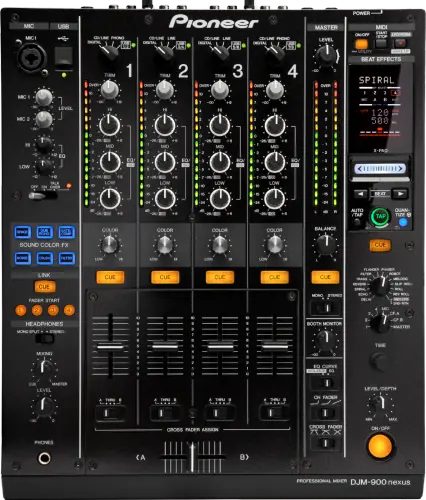
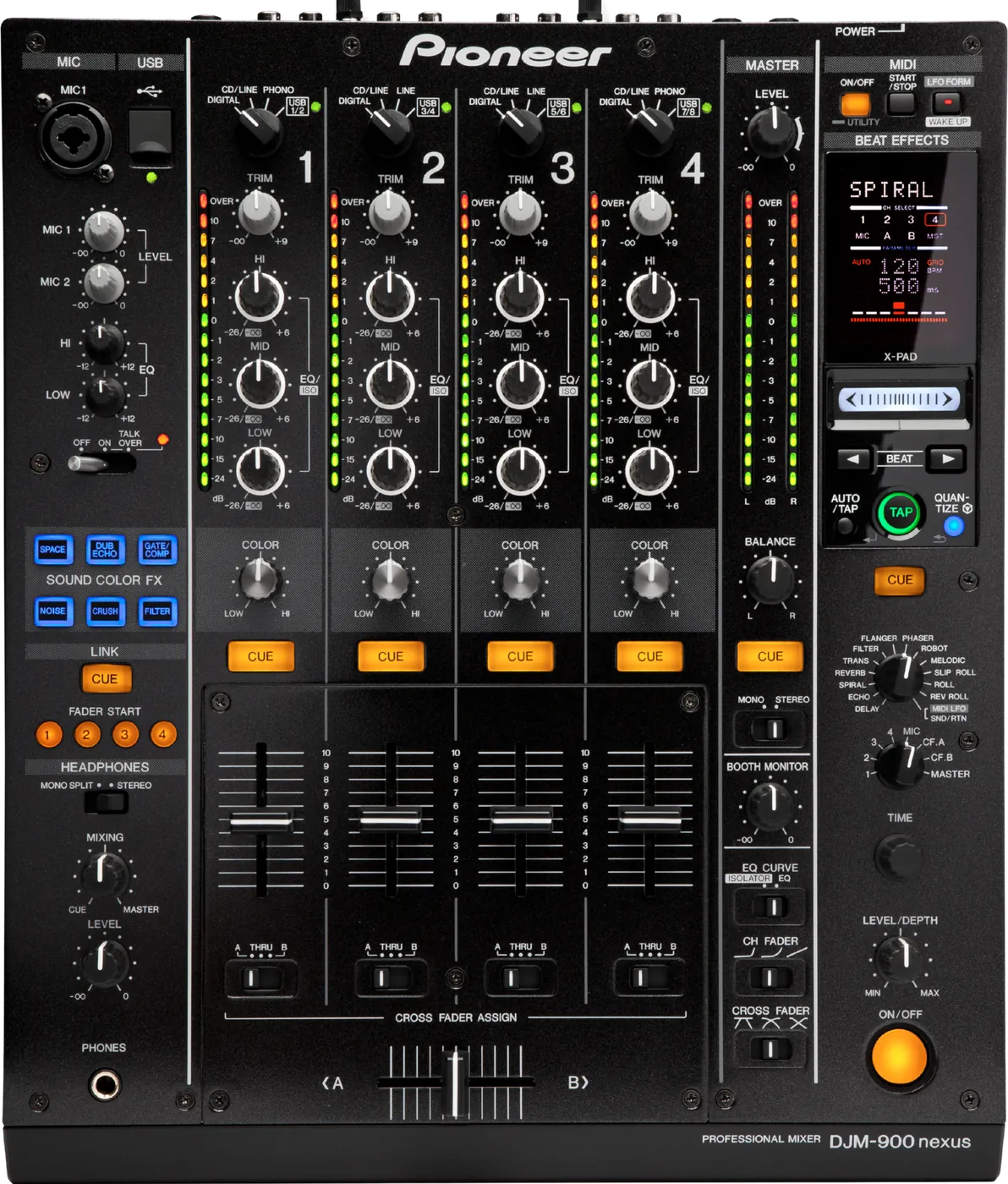
Booth briefing. Below firmware 1.28 this mixer is documented to shut itself down: AlphaTheta's own wording is "Fixed an infrequently-encountered issue where DJM-900NXS unexpectedly shuts down", and on a desk nobody has updated that is the master output going away mid-set. Standby can also refuse to cancel, so a mixer that slept between sets looks dead on the stand. Read the version off the unit before you play.
When it goes wrong: No sound from the mixer PRO DJ LINK will not come up
Fast Lane
The five things that decide your gig
The five things on the DJM-900NXS that change what happens next, if you are reading this in the booth. All five are explained in full further down this page.
1.32 is the last firmware, from November 2016.
Nothing has followed it. That is not a criticism, it is a planning fact: whatever is not in the change history is not coming.
So the question stops being "will this be fixed" and becomes "which version is this desk on, and what do I avoid".
Below 1.28, it can switch itself off mid-set.
AlphaTheta document it: an infrequently encountered issue where the mixer unexpectedly shut down. Published 26 November 2012.
Rare, documented, and the single worst thing on this list if it finds you.
If it looks dead on the stand, suspect standby before power.
It has an auto standby function, and the control that cancels it is the LFO FORM button, labelled WAKE UP.
A desk that will not wake is usually asleep, not broken, and the button that fixes it is not where you would look for it.
Cue a Beat FX and you may hear no effect. That is intended.
From 1.26 onward, pressing Beat FX CUE with MELODIC, ROLL, REV ROLL, SLIP ROLL selected outputs the original sound, not the effected one.
Documented behaviour, not a fault, and it reads exactly like a broken cue path when you meet it cold.
QUANTIZE silently does nothing on 4 of the Beat FX.
It arrives over PRO DJ LINK and locks Beat FX to the grid, except on those, where AlphaTheta state it cannot be used.
Nothing warns you. The GRID light reports the network, not your effect choice, so it stays lit while the effect runs unquantised.
If something goes wrong
The master is quiet, or silent, with every control looking correct
Short answer. The DJM-900NXS has a master attenuator in its menu, MASTER ATT., and it is the first question the Operating Instructions ask under "no sound or small sound": "Is [MASTER ATT.] set to [-6 dB], etc.?" It sets the attenuation of the MASTER1 and MASTER2 outputs, it offers -6 dB, -3 dB and 0 dB, and 0 dB is the factory setting.
Why this happens. Nothing on the front panel moves when MASTER ATT. is changed. The meters read the same, the master knob sits where you left it, and the room is simply 6 dB down from the first track to the last. Somebody setting up for a quiet restaurant service months ago is enough, because the setting survives power cycles and there is no indicator to contradict it. The same control is the manual's remedy for the opposite complaint: under "distorted sound" it says to set MASTER ATT. to -3 dB or -6 dB.
Fix it now. Rule out the ordinary causes first, which are the master level, the channel faders, the crossfader assign switches and the amp. Then go to USER SETUP, find MASTER ATT., and read what it says rather than assuming. AlphaTheta's own instruction is "At the [USER SETUP] screen, switch [MASTER ATT.]."
Avoid it next time. In a room you play often, check MASTER ATT. once at a soundcheck and note it, the same way you would note PKLIMIT. Both are menu settings that change how loud and how clean the desk is, both persist between visits, and neither of them shows on the panel.
A turntable sounds distorted and TRIM does nothing
Short answer. Distorted sound from a turntable on the DJM-900NXS comes with a second symptom that names the cause, and most people never connect the two: the channel level indicator does not change when you turn TRIM. On this desk the fix is a cable move rather than a switch. A turntable with a built-in phono equalizer is putting out line level, so it belongs on the CD/LINE or LINE terminals and not on PHONO, and if that turntable has its own PHONO/LINE selector then that one goes to PHONO. A computer audio interface sitting between the turntable and this mixer is line level too, so it also goes to CD/LINE or LINE.
Why this matters. A dead TRIM is normally read as a broken pot, which is a service booking. It is the same fault as the distortion, and the fix is which socket the cable is in.
The crossfader does nothing to one channel
Short answer. A crossfader on the DJM-900NXS that does nothing to a channel is usually assignment rather than failure, and this desk assigns per channel rather than with one curve switch. Each channel has a CROSS FADER ASSIGN switch with A, THRU and B, and THRU takes that channel out of the crossfader entirely. One channel on THRU and three on A or B looks like a broken fader on one strip and is a setting somebody left.
Fix it now. Look along the row of assign switches before you touch the fader. All four are visible at once and one of them will be sitting alone.
An effect section produces nothing
Short answer. Two DJM-900NXS effect sections have a selector that decides whether you hear anything, and neither of them says so. BEAT EFFECTS has a channel selector reading 1, 2, 3, 4, MIC, CF.A, CF.B and MASTER, and the effect only lands on the channel that switch is pointing at, so a beat effect applied to a silent channel is silence. SOUND COLOR FX needs its COLOR control moved off centre, because centre is neutral. Both are one movement and both look exactly like a dead effects section.
Do this. Before doors, point the Beat FX selector at each channel in turn and hear it land. Ten seconds in the light beats guessing in the dark.
Fader start is not starting the player
Short answer. Fader start on the DJM-900NXS needs four things and the fourth is the one that catches people. FADER START has to be ON in the USER SETUP screen. The player has to be on the LINK terminal by LAN cable. The audio cables have to be connected. And the player's own player number has to match the channel its audio cable is plugged into, so a deck on channel 2 has to be player 2. Get that last one wrong and everything looks connected while the wrong fader starts the wrong deck, or nothing starts at all.
Fix it now. Check the player numbers against the channel strips first, because it is the only one of the four that looks correct from every angle.
The digital output is silent
Short answer. Digital output silence on a DJM-900NXS is usually a sample rate mismatch rather than a dead socket. The Digital Master Out Sampling Rate lives in the CLUB SETUP screen and has to be set to what the receiving device actually accepts. A recorder or a processor that refuses a rate it cannot lock to gives you nothing at all, which reads as a broken cable.
The computer does not see the mixer
Short answer. A computer that does not see the DJM-900NXS, a USB indicator that is off or flashing, and computer audio that will not come out of the mixer are one fault with five checks. The driver software has to be installed, and the manual's own instruction if it already is, is to reinstall it. The USB cable has to be connected. The computer's audio output device has to be set to this mixer. And the channel's input selector has to be on the USB position, because a mixer receiving computer audio on a channel switched to PHONO is silent by design.
Fix it now. Input selector first, because it is free and it is on the front of the desk. Then the audio output device on the computer. Then reinstall the driver, which is the manual’s own instruction rather than a last resort.
An effect is noisy, silent or uneven in level
Short answer. Four documented DJM-900NXS effect faults, every one of them fixed in firmware. Some effects "do not work as expected when such effects are switched on" below 1.30. The volume of ROLL, REV ROLL and SLIP ROLL "is not always stable" below 1.26. Effect sound "is not always output when REV ROLL is enabled immediately after ROLL is enabled" below 1.26. And a slight noise while operating the X-PAD below 1.26.
Why this happens. These are firmware faults in the performance section, which is the part of the desk nobody tests before doors. The REV ROLL one in particular only appears when you chain it straight out of ROLL, which is exactly how a DJ would use it and not at all how anyone checks a mixer.
Fix it now. Change effect. If a roll is dropping level or arriving silent, another Beat FX will do the transition, and none of these faults touches the channel signal path.
Avoid it next time. Read the version, then rule those effects out for the gig rather than discovering which ones behave. On a desk you control, 1.32 clears all four at once. There is also a separate documented noise on the computer side: below 1.31, "a noise might be heard in the audio input and output from the USB port on some computers", which is a laptop-specific fault rather than an effects one.
The BPM on the mixer display is jumping around
Short answer. Documented, and the cause is on the other machine. Below 1.28, "the BPM values on the display may randomly fluctuate if SLIP function is used on CDJ-2000NXS or CDJ-900 which is linked to DJM-900NXS via PRO DJ LINK". The symptom is on the mixer, the trigger is a player.
Why this happens. It is the classic mixed-booth trap in reverse: the fault appears on the device you are looking at, caused by a feature being used on a device you are not. Nobody connects a jumping BPM readout on the desk with someone using SLIP on a deck.
Fix it now. Nothing in your audio is wrong. Tap the BPM in manually or set Beat FX by ear for the rest of that track, and do not trust the auto reading while SLIP is in use on a linked player.
Avoid it next time. 1.28 on the mixer clears it. In a booth that mixes generations, this is worth knowing before you rely on beat-synced effects sitting on top of another DJ's SLIP work.
The BPM will not read, or reads wrong
Short answer. A BPM the DJM-900NXS cannot measure, or one that is obviously wrong, is usually the input level rather than the track. The manual's target is the TRIM control set so the channel level indicator lights to about 0 dB on peaks. Some tracks cannot be measured at all, and for those the TAP button is the documented answer. And a measured BPM that differs from the number printed on the CD is not an error in either: the manual says the values may differ slightly because of the different measuring methods, and that there is no need to make any corrections.
The mixer switched itself off mid-set
Short answer. Documented, and fixed in 1.28, published 26 November 2012. AlphaTheta's wording is "Fixed an infrequently-encountered issue where DJM-900NXS unexpectedly shuts down". Below that version, the desk switching itself off is a known firmware fault rather than a mystery.
Why this happens. It is the worst place a fault can sit. Everything in the booth runs through the mixer, so when the mixer goes the room goes with it, and "infrequently-encountered" is exactly why nobody finds it at soundcheck. It is also not auto standby: standby is a state you wake from with a button, this is the unit powering down without warning.
Fix it now. Power it back on and let it boot. While it boots, the players keep playing into a dead desk, so decide where you are coming back in rather than reaching for faders blind. Then read the version as soon as you have a quiet moment, because it changes what you tell the venue afterwards.
Avoid it next time. On a desk you control, get it to 1.32 between bookings. On a desk you do not control, read the version at soundcheck, and if it is below 1.28 say so to whoever runs the room. This is the one item on this page a venue genuinely wants to hear about, because the fix is free and the failure takes the whole set down.
It looks dead on the stand and will not wake up
Short answer. Suspect standby before suspecting the power supply. The DJM-900NXS has an auto standby function, the control that cancels it is the LFO FORM (WAKE UP) button, and below 1.32 standby "sometimes could not be canceled when the [LFO FORM (WAKE UP)] button was pressed". That is AlphaTheta's own description of the fault it fixed.
Why this happens. A desk that sat through a long changeover, an overrunning support set or an abandoned soundcheck can put itself into standby, and on an older version the documented way back out is the thing that intermittently did not work. From the front it reads as a mixer that has died.
Fix it now. Press LFO FORM (WAKE UP). If nothing happens, the power switch is the fallback, and a restart costs you the master for as long as the boot takes, so do it before you need the desk rather than in the middle of a transition.
Avoid it next time. Get the desk to 1.32, which is the version that fixed this, and touch a control during long gaps. The timeout, the factory state and the way to switch it off are all in the Operating Instructions: the timer runs for 4 hours, the mixer is "shipped with the auto standby function turned on", and you set Auto Standby to OFF in the USER SETUP menu. And the condition that decides most booths: "That no PRO DJ LINK connections are made." A linked desk never gets there.
PRO DJ LINK is not coming up
Short answer. Suspect the hub before the DJM-900NXS. AlphaTheta's own instruction is "Use a 100Base-TX-compatible switching hub. Some switching hubs may not operate properly", which is a manufacturer saying out loud that the wrong hub is a supported way for this to fail. With a hub, up to 4 DJ players and 2 computers can be connected.
Why this happens. Link on this mixer is a LAN cable into the LINK terminal, and anything beyond a single connection goes through a hub that is usually whatever the venue had in a drawer. A hub that works perfectly for a printer is not necessarily one that carries this.
Fix it now. Audio does not need the network. Every player keeps playing through its own output with the Link cable out, so you lose LINK MONITOR, STATUS INFORMATION, QUANTIZE and FADER START and you do not lose the set. If the room has a second hub, swapping it is a faster test than reseating cables one by one.
Avoid it next time. If you tour with your own booth network, carry the hub you know works. In a venue you do not control, plan the set so that quantised effects and Link browsing are a bonus rather than a dependency.
What to watch for
Documented fixes, by firmware version
Short answer. Eight published entries, running from 1.20 in June 2011 to 1.32 in November 2016. 1.32 is both the floor and the ceiling, because nothing has followed it. Every entry below is AlphaTheta's own wording, condensed.
What this list is not. It is not the complete history of the product. Nothing below 1.20 is published anywhere we could read, and versions 1.22 to 1.25, 1.27 and 1.29 are not listed at all, so the record has holes in it and we are naming them rather than presenting a partial list as a full one.
- 1.32
- 15 November 2016. Standby mode sometimes could not be cancelled when the LFO FORM (WAKE UP) button was pressed.
- 1.31
- 27 February 2014. "A noise might be heard in the audio input and output from the USB port on some computers."
- 1.30
- 16 October 2013. Peak Limiter added, and enabled as default once the firmware is updated. Support for the KUVO service. Some effects did not work as expected when those effects were switched on.
- 1.28
- 26 November 2012. "An infrequently-encountered issue where DJM-900NXS unexpectedly shuts down." Also: "the BPM values on the display may randomly fluctuate if SLIP function is used on CDJ-2000NXS or CDJ-900 which is linked to DJM-900NXS via PRO DJ LINK."
- 1.26
- 19 November 2012. Support for OS X Mountain Lion 10.8.
- 1.21 to 1.26
- 26 June 2012, published as one combined block covering everything between those two versions. AUTO BPM accuracy improved. From this update, pressing Beat FX CUE with MELODIC, ROLL, REV ROLL, SLIP ROLL selected outputs the original sound without the effect, on or off. A slight noise while operating the X-PAD. "The volume level of ROLL, REV ROLL and SLIP ROLL is not always stable." "Effect sound is not always output when REV ROLL is enabled immediately after ROLL is enabled." SOUND COLOR FX button response time improved.
- 1.21
- 5 October 2011. MIDI timing clock accuracy.
- 1.20
- 28 June 2011. Changes to the sound of REVERB, TRANS, MELODIC, SLIP ROLL, DUB ECHO, GATE/COMP and FILTER. AlphaTheta's own text for this entry carries spelling errors, which is worth knowing if you go looking for these words in the PDF.
Has the firmware line ended. Read this as an observation rather than a promise. 1.32 is dated 15 November 2016 and it is still the download AlphaTheta offers, which is nearly ten years, and no end-of-support statement exists for this mixer. So "ended" is our inference from silence, not a documented fact, and silence has been wrong before: the CDJ-2000NXS received a firmware version in 2024, more than six years after the one before it. Plan on nothing more arriving, without treating that as settled.
One detail that makes the timeline more interesting than it looks. 1.32 shipped roughly ten months after the DJM-900NXS2 was announced, so the two mixers were supported side by side rather than one handing over to the other. AlphaTheta names no predecessor and no successor for this model.
Firmware downloads. Official AlphaTheta change history, PDF →
Official product page →
Broken link? Let us know and we will fix it.
I cued a Beat FX and heard no effect
Short answer. That is documented, intended DJM-900NXS behaviour, not a fault. From 1.26 onward, pressing the Beat FX CUE button with MELODIC, ROLL, REV ROLL, SLIP ROLL selected outputs the original sound with no effect on it, whether the effect is switched on or off.
Why this happens. AlphaTheta changed it deliberately in the update block that ends at 1.26 and wrote the change into the history, so a DJ auditioning one of those 4 in headphones and hearing a clean signal is hearing the mixer work as specified. It is a genuinely confusing design decision, and it costs people a soundcheck every time they meet it for the first time.
Fix it now. There is nothing to fix. Judge those 4 in the mix rather than in the cue, or bring the effect in with the depth control low and open it up once it is live.
There is a second, permanent reason, and no firmware touches it. The Operating Instructions list "effect sound cannot be monitored even when the [CUE] button for [BEAT EFFECTS] is pressed" as normal behaviour for ECHO, REVERB, ROLL, SLIP ROLL and REV ROLL, and give the reason: "The circuit that generates the echo for the [ECHO], [REVERB], [ROLL], [SLIP ROLL] and [REV ROLL] effect sounds is positioned after the effect circuit, so the effect sound cannot be monitored. This is not a malfunction." That is a circuit layout, not a version number, so ECHO and REVERB cue dry on every DJM-900NXS ever built, including one already on 1.32.
Avoid it next time. Learn the two lists. MELODIC, ROLL, REV ROLL, SLIP ROLL changed behaviour at 1.26; ECHO, REVERB, ROLL, SLIP ROLL and REV ROLL were never pre-listenable and never will be. Between them that is most of the long-tail effects, so build the habit of judging those in the mix rather than expecting the cue to preview them. On a mixer below 1.26 the cue behaved differently again, so a desk you know from one venue can behave differently in another.
The master sounds squashed on this mixer
Short answer. Look for PKLIMIT in the DJM-900NXS CLUB SETUP menu. Peak Limiter arrived in firmware 1.30 and AlphaTheta is explicit about the consequence: "By updating the firmware, Peak Limiter is enabled as default." Factory default is on, so an updated desk is limiting the master whether anyone chose that or not.
Why this happens. The limiter exists to alleviate "sudden, unpleasant digital clipping of the master output", so it is doing its job. Driven hot, though, it is audible as compression you did not dial in, and because it appeared in a firmware update rather than on the front panel, almost nobody knows it is there.
Fix it now. Fix the gain first. If the meters are living at the top, the limiter is the symptom and your trim is the cause. If the levels are sensible and the master still sounds pressed, PKLIMIT in CLUB SETUP is the setting, and it is a decision to make deliberately rather than a fault to clear.
Avoid it next time. In a venue you play often, find out what PKLIMIT is set to once and note it, because it survives between your visits and it changes how the desk responds to a hot channel.
Compatibility
Players and PRO DJ LINK
Short answer. The DJM-900NXS does PRO DJ LINK over LAN into its LINK terminal, with up to 4 DJ players and 2 computers when a switching hub is used. The 4 named Link functions on this mixer are LINK MONITOR, STATUS INFORMATION, QUANTIZE and FADER START, and the last of those catches people out: fader start runs over the network on this desk, not over a separate control cable, and it ships set to OFF. The manual's own answer to "can't fader start a DJ player" is "At the [USER SETUP] screen, set [FADER START] to [ON]."
The mixed-generation deduction, and it is ours not AlphaTheta's. In the QUANTIZE section the manual says "to use in combination with the CDJ-2000 or CDJ-900, first update the firmware to version 4.0 or later". That sentence does not say whose firmware. It cannot be the mixer's, which never went beyond 1.32, so our reading is that it means the player's firmware. We are labelling that as a deduction rather than dressing it up as a quotation, because AlphaTheta never says it.
Do this. The only other documented mixed-generation item is the BPM display fault fixed in 1.28, where SLIP on a linked CDJ-2000NXS or CDJ-900 scrambled the readout on this mixer. Beyond those two, nothing is documented about how this desk behaves with a CDJ-3000, a CDJ-2000NXS2 or any later player, so this page does not guess. Link is a LAN protocol and the audio path is analogue or digital audio, so plenty of these booths work fine, but "works fine in practice" is not the same claim as "documented" and we are not going to blur them.
DVS and software, with the conditions attached
Short answer. The DJM-900NXS takes all three DVS platforms, and every one of them carries a condition. rekordbox dvs needs the DVS Plus Pack. Serato DJ DVS is supported only with the Serato DJ Club Kit. TRAKTOR SCRATCH PRO 2 and SCRATCH DUO 2 are certified, and that certified operation requires mixer firmware 1.28 or later, which AlphaTheta writes as "1.280".
The word certified is doing real work there. AlphaTheta uses "certified" for TRAKTOR and "supported" for Serato DJ, and this page keeps that distinction rather than flattening both into one word.
One flat no. Serato SCRATCH LIVE is explicitly not supported. The product page's own words are "Doesn't support Serato SCRATCH LIVE". If that is your setup, this is a booking-stage problem, not a soundcheck one.
Common mistakes. Turning up with Serato DJ and no Club Kit. Turning up with TRAKTOR certified operation in the plan and a mixer below 1.28, which is the same version that fixed the unexpected shutdown, so it is a version worth checking for two reasons.
Drivers, and two different operating system lists
Short answer. The DJM-900NXS macOS driver was last updated on 18 May 2023, at version 4.0.2. The Windows driver was last updated on 9 December 2021, at version 1.810. Both are still published for a mixer whose own firmware stopped in 2016, which is worth noticing.
Two documented failures worth carrying. Below Windows driver 1.710, "DJ applications running on certain versions of Windows 10 did not detect Pioneer DJ equipment". Below macOS driver 4.0.0, the "audio driver software wasn't recognized properly after restarting a Mac running macOS Big Sur". A laptop that boots and then cannot see the mixer is not a mixer fault.
Where the record disagrees with itself. AlphaTheta's operating system support list claims support through macOS Tahoe 26, while the Mac driver article for this mixer is titled "for macOS Ventura". That is AlphaTheta's inconsistency and we are reporting it rather than resolving it. If your machine is newer than Ventura, test the driver at home before you rely on it in a booth.
Do this. Boot the laptop, connect the mixer and open your software at home, in the state you will arrive in, and reboot once with the mixer connected. Then pack.
MIDI and a sequencer that will not sync
Short answer. MIDI on the DJM-900NXS fails for four reasons the desk cannot show you. The sequencer's sync mode has to be Slave. A sequencer that does not support MIDI timing clocks cannot be synchronised at all, whatever you set. The MIDI channel has to be switched on with the MIDI ON/OFF button. And the unit's MIDI messages have to be assigned inside the DJ software, because the mixer sends them and the software decides what they mean.
Features explained
Beat FX, and why the count is 13 or 14
Short answer. Both numbers are right, and they reconcile: there are 13 effects inside the mixer, while the selector has 14 positions, because the extra one is SND/RTN (MIDI LFO), which routes to the SEND and RETURN terminals instead of to an internal effect. AlphaTheta's marketing counts the effects and the manual's table counts the selector.
Why it matters. If you have read 13 in one place and counted 14 on the desk, nothing is wrong with either the mixer or the documentation. It also tells you something useful about the design: the outboard loop is treated as one of the Beat FX rather than as a separate patch bay, so it lands on the same control surface as everything else.
When professionals use it. Beat FX locks timing to the BPM, so an echo or a roll lands musically. The X-PAD is the fast way in, and the SOUND COLOR FX button response was improved in the 1.21 to 1.26 block if you are comparing an old desk with a newer one.
Common mistakes. Trusting an auto BPM reading without checking it. Expecting to pre-listen every effect: 4 of them cue dry by design. Assuming QUANTIZE applies to all of them, which it does not.
Sound Color FX
Short answer. 6 effects on every channel, one knob each, no menu: FILTER, CRUSH, GATE/COMP, DUB ECHO, NOISE, SPACE.
Why it matters. They sit on the channel strip beside a 3-band EQ isolator, so they are fast enough to use mid-mix without looking away from the room or the next track.
When professionals use it. Filter into a breakdown, SPACE to open a track up before a drop, DUB ECHO to hand off the last bar of an outgoing record.
Common mistakes. Overusing CRUSH or NOISE on a big system, they read as dramatic in headphones and can be harsh through a full PA. Note also that the sound of several effects, including DUB ECHO and GATE/COMP, was changed in 1.20, so a very old desk does not sound identical to an updated one.
QUANTIZE, and where it silently does nothing
Short answer. QUANTIZE arrives over PRO DJ LINK and locks Beat FX to the grid, and it does not work on 4 of them. AlphaTheta: "The QUANTIZE function cannot be used when [REVERB], [ROBOT], [MELODIC] or [SND/RTN(MIDI LFO)] is selected." There is no error and no indicator, you simply get un-quantised effects.
The GRID light answers a different question, so do not read it as an all-clear. GRID on the main unit display reports whether beatgrid information is arriving from the player: AlphaTheta say "this lights when the QUANTIZE function can be used in combination with the DJ player. This flashes or remains off if the QUANTIZE function cannot be used." It says nothing about which effect you have selected, so with REVERB up and a healthy Link, GRID is lit and QUANTIZE still does nothing. Read GRID for the network, and the effect list for the exceptions.
Why GRID drops out on a desk that was fine at soundcheck. The information stops arriving for ordinary reasons, not faults. AlphaTheta: "Depending on the status of the DJ player (off air, scratching, reverse playing, etc.), it may not be possible to receive the GRID information." A flashing or dark GRID during a scratch routine is the mixer describing the player, not a broken booth.
Why it matters. A silent exception is worse than a refusal. You reach for a quantised REVERB, it lands where your finger landed rather than on the beat, and the obvious conclusion is that QUANTIZE is broken or that the Link is down. Neither is true. The 4 exceptions are REVERB, ROBOT, MELODIC, SND/RTN.
Do this. There is a second condition that catches people out: "Music files must be analyzed with rekordbox in advance in order to use the QUANTIZE function." An unanalysed track has no grid to quantise to, so QUANTIZE does nothing for reasons that have nothing to do with the mixer.
Common mistakes. Building a transition around a quantised effect that is on the exception list. Assuming a drive exported without analysis will behave the same as your own prepared library.
Peak Limiter, and why it is already on
Short answer. A master-output limiter added in firmware 1.30 to alleviate "sudden, unpleasant digital clipping of the master output". It lives in CLUB SETUP as PKLIMIT, and its factory default is on.
Why it matters. AlphaTheta states plainly that "by updating the firmware, Peak Limiter is enabled as default", so installing a firmware update changes how the desk sounds at the top of its range. That is unusual, and it is the reason an updated DJM-900NXS can sound different from the one you remember in the same booth.
When professionals use it. As a safety net in a room where you do not control every source, which is most rooms. It protects the PA and the audience from a sudden digital peak, and that is worth some headroom.
Common mistakes. Treating audible limiting as a fault and hunting through the effects section for it. Turning it off to get loudness back instead of fixing the gain that is driving it.
No drive goes into this mixer, and what that means
Short answer. There is no USB storage role on this mixer at all. The one USB terminal is for a computer, and firmware goes in from a computer over a LAN cable into the LINK port. No stick, no card, no music playback from media and no recording to media.
Why it matters, and this is the interesting part. Every other Pioneer unit in this reference makes you think about drive format, and several of them punish the wrong answer. Here the question does not exist. exFAT and NTFS are not unsupported on a DJM-900NXS, they are not applicable, because nothing is ever formatted for it. On a mixer with no USB storage role there is no drive-format decision to make at all, and this is one of them.
Do this. Recording is the analogue REC OUT, or over USB into a computer. If the plan for the gig involves capturing the set, that decision is made at the laptop or the recorder, not at the mixer.
Common mistakes. Arriving with a firmware update on a USB stick, which is how every other Pioneer unit is updated and is not how this one is. Expecting a recording to appear on media afterwards.
The built-in sound card, and a bit depth AlphaTheta states twice
Short answer. One USB terminal for a computer, and a built-in 4-in / 4-out stereo sound card at 96 kHz. The asymmetry is documented and worth knowing: the four sets of input come from a single computer, while the four sets of output can be chosen from channels 1 to 4, REC OUT, crossfader sides A and B, and the microphone.
Where the official record disagrees with itself. AlphaTheta publishes two different A/D figures for this mixer. The Operating Instructions describe a "24-bit high sound quality A/D converter and a 32-bit high sound quality D/A converter", and the product page says "a 32-bit A/D converter". We are not picking one. Both are official, they contradict each other, and the honest position is that AlphaTheta's own documents disagree about the A/D stage.
When professionals use it. The separately routable crossfader sides are the useful detail here, because they let a DVS or recording setup capture the two sides of the crossfader independently rather than only the summed master.
Common mistakes. Assuming a second computer can share the sound card. There is one USB terminal, and the input side is documented as coming from a single computer.
Inputs, outputs and the specifications nobody publishes
Short answer. 4 channels, a 3-band EQ isolator per channel, a crossfader with crossfader assign, 2 microphone inputs, MASTER1, MASTER2, a BOOTH output on TRS that takes balanced or unbalanced, REC OUT, and a coaxial DIGITAL IN. Discrete SEND and RETURN terminals for an outboard effector, and full MIDI controller capability.
One headphone output. AlphaTheta documents a single PHONES terminal, and this page is not going to imply a second one. The connector size, and whether a mini jack exists alongside it, are not recoverable from the documents we could read, so if you are packing an adaptor, pack both.
What is not published. AlphaTheta puts no specification table on the web for this model. Dimensions, weight, power consumption, frequency response, signal to noise ratio and distortion figures are not published in any page we could read, and the archive specification pages only point back into the Operating Instructions. So this page states none of them. If you need the dimensions for a flight case or a booth cutout, take them from the Operating Instructions rather than from any number on the internet, including ours.
Common mistakes. Sizing a booth from a spec sheet found on a retailer's listing. Assuming the DJM-900NXS2's measurements carry over, which is a different product.
Auto standby: 4 hours, on from the factory, and never in a linked booth
Short answer. The function exists, and there is a dedicated control to get out of it: the LFO FORM (WAKE UP) button, which AlphaTheta describes as "WAKE UP: Cancels the auto standby mode."
The three conditions, and all of them have to hold. The Operating Instructions set the timeout at 4 hours, and it only starts counting when no button or control has been operated, no audio signal of "-10 dB or greater" is arriving at any input, and, in AlphaTheta's own words, "That no PRO DJ LINK connections are made." That last one is the fact that decides your night: a mixer with a live PRO DJ LINK cable in it does not go to sleep at all, so this is a hazard for a standalone desk and a non-event for a wired booth.
The factory state, and how to change it. The mixer is "shipped with the auto standby function turned on", so a desk nobody has configured is a desk with the timer running. To switch it off, set Auto Standby to OFF in the USER SETUP menu: hold the ON/OFF (UTILITY) button for over one second to reach USER SETUP, where the setting reads AUTOSTB.
Do this. On a linked booth, ignore it. On a standalone mixer left up between a soundcheck and a late door, either switch AUTOSTB off or accept that after 4 untouched hours the desk will look dead, and know where the LFO FORM (WAKE UP) button is before you need it in the dark.
One firmware note. No version introduces or changes auto standby. 1.32 only fixes the case where cancelling it did not work.
A desk with no update waiting for it
Short answer. 1.32, from November 2016, is the version AlphaTheta offers, and nothing has followed it. That is not a criticism, it is a planning fact, and it changes the advice.
Why it matters. On a maintained product, an odd behaviour is worth reporting and waiting on. Here, either the fault is in the list on this page and an update cures it, or it is behaviour you plan around. Read it as an observation rather than a verdict: no end-of-support statement exists for this mixer, and AlphaTheta has broken long silences before, shipping a CDJ-2000NXS version in 2024 after more than six years. Plan on nothing arriving, while knowing it is not impossible.
When professionals use it. Plenty of working rooms still run these, and a DJM-900NXS at 1.32 is a dependable desk with a known set of edges. The risk is not the mixer, it is assuming a fix exists for something.
Common mistakes. Reading the 1.32 release date as the end of the product's life. It shipped roughly ten months after the DJM-900NXS2 was announced, so the two overlapped as supported products, and AlphaTheta names neither a predecessor nor a successor for this mixer.
The send and return loop, and the 14th selector position
Short answer. There are discrete SEND and RETURN terminals for an outboard effector, and the outboard loop is reachable from the Beat FX selector itself, as SND/RTN (MIDI LFO) in position 14.
Why it matters. It means an outboard box behaves like one of the mixer's own effects rather than like a patch you have to think about, which is a good reason to bring a favourite reverb or delay to a residency. It is also why the effect count reads as 13 in one place and 14 in another.
Do this. Test the loop before doors, with the outboard box set the way you will actually use it. And remember QUANTIZE does not apply to SND/RTN, so an outboard effect will not be beat-locked by the mixer.
Common mistakes. Building a set around a quantised outboard effect. Leaving the selector on SND/RTN with nothing patched in and then wondering why the Beat FX section does nothing.
The external effector loop, and the button it needs
Short answer. An external effector on the DJM-900NXS needs the BEAT EFFECTS ON/OFF button pressed to put SND/RTN into ON, not just cables in the SEND and RETURN terminals. And if the returning sound is distorted, the manual points at the external unit's own output level rather than at anything on the desk.
Professional tips
Read the version, then decide what you will not use
Short answer. Hold CUE in the BEAT EFFECT section and ON/OFF in the BEAT EFFECT section while you switch the power on, and the version appears on the display.
Why it matters. On this mixer the version is not trivia, it is a list of what can happen to you mid-set. Below 1.28 the desk can switch itself off. Below 1.32 it can refuse to come out of standby. Below 1.30 there is no Peak Limiter and there are effects that misbehave when switched on. Below 1.28 a linked player using SLIP can scramble the BPM readout.
Do this. Do it on arrival, in the same walk as checking routing and gain, and be specific with yourself about what you are giving up rather than hoping. If the desk is below 1.28, raise it with the venue: that one is worth a conversation.
Common mistakes. Reading the version and not writing it down. In a venue you play regularly, a note per booth is worth more than a note per gig.
Preventive maintenance
Keeping a desk this age reliable
Short answer. One firmware pass to 1.32, then it is connectors, cables and covers. There is no drive slot to keep clean and no media to fail.
Why it matters. A mixer that has been in a booth since the early 2010s has had a decade of cables levered in and out of it. Phono and line pairs, two microphone inputs, two masters, a booth output, a send and return loop, a coaxial digital input and a LAN port are all future intermittent faults if they get strained, and an intermittent input is the hardest thing on this page to diagnose during a set.
Do this. Unplug by the connector rather than the cable, make and break connections with the desk switched off, keep it covered between gigs, and write down the CLUB SETUP settings you rely on, PKLIMIT included, so a reset or a borrowed desk does not surprise you.
Avoid it next time. Do not coil cables tightly around their connectors, which is where strain damage starts, and do not leave the firmware update for gig day.
How the update goes in, over a LAN cable
Short answer. From a computer, over the network, not from a USB stick. AlphaTheta's instruction is to "connect the LAN cable to the LINK port on the rear panel", run the updater on the computer, and "do not remove power cable and/or LAN cable during the update".
Why it matters. This is the odd one out in the whole reference. Every other Pioneer unit here takes its firmware from a formatted stick, so a DJ or a technician who has done a dozen CDJ updates will arrive with the wrong thing and no LAN cable. There is no drive slot to put it in.
Do this. Allow time. Establishing the network can take about a minute, and AlphaTheta notes that if the Connect dialog keeps appearing for 30 seconds or longer, the network connection might not be established, which is a hub or a cable problem rather than a mixer problem. Do it between bookings, never on gig day, and leave the desk powered and cabled until the updater says it is finished.
Avoid it next time. Keep a known-good LAN cable and a hub you trust with the desk, because the update path and PRO DJ LINK depend on the same port and the same kind of hardware.
Firmware, drivers and manuals
Official downloads and documents
Go to AlphaTheta for the files themselves. We link their pages instead of hosting a copy, because a manual copied here is a snapshot of release day and theirs is the one that stays current.
Manuals. Official Pioneer DJ manual page →
Broken link? Let us know and we'll fix it.
Frequently asked questions
Quick answers
- What firmware should it be on?
- 1.32, published 15 November 2016. Nothing has followed it, so that is both the floor and the ceiling.
- Is it true that it can switch itself off?
- Below 1.28, yes, and it is AlphaTheta's own documented fault: "an infrequently-encountered issue where DJM-900NXS unexpectedly shuts down". At 1.28 or above it is fixed.
- Why did nothing happen when I pressed the wake button?
- Below 1.32, standby sometimes could not be cancelled with the LFO FORM (WAKE UP) button. That version fixed it.
- The master is quiet and everything on the panel looks right. What is left?
- MASTER ATT. in USER SETUP. It attenuates MASTER1 and MASTER2 by -6 dB or -3 dB, ships at 0 dB, and shows nothing on the front panel. The Operating Instructions ask it first under "no sound or small sound": "Is [MASTER ATT.] set to [-6 dB], etc.?"
- How long until it goes into standby, and can I turn that off?
- 4 hours, and only if nothing is touched, no signal above "-10 dB or greater" reaches an input, and no PRO DJ LINK connection is made. A cabled booth therefore never sleeps. The mixer is "shipped with the auto standby function turned on", and to stop it you set Auto Standby to OFF in the USER SETUP menu, where it is labelled AUTOSTB. The wake control is the LFO FORM (WAKE UP) button.
- Why do I hear no effect when I cue Beat FX?
- Because that is how it is meant to work with MELODIC, ROLL, REV ROLL, SLIP ROLL selected. From 1.26 onward those 4 cue dry whether the effect is on or off.
- Why does the master sound compressed?
- Peak Limiter, PKLIMIT in CLUB SETUP, added in 1.30 and on by default once the firmware is updated.
- Does QUANTIZE work on every Beat FX?
- No. It cannot be used with REVERB, ROBOT, MELODIC, SND/RTN, with no error shown, and it needs tracks analysed in rekordbox first.
- Is it 13 Beat FX or 14?
- Both. 13 effects inside the mixer, and a selector with 14 positions because the extra one is SND/RTN (MIDI LFO) for an outboard effector.
- Does it read exFAT?
- The question does not apply. No drive is ever inserted into this mixer, so exFAT and NTFS are not applicable rather than unsupported. Firmware goes in from a computer over a LAN cable.
- Can I record my set onto a USB stick in the mixer?
- No. Recording is the analogue REC OUT or over USB into a computer.
- Is the A/D converter 24-bit or 32-bit?
- AlphaTheta's own documents disagree. The Operating Instructions say 24-bit A/D with a 32-bit D/A, and the product page says 32-bit A/D. We publish both rather than choosing.
- How many headphone outputs are there?
- One documented PHONES terminal. The connector size is not recoverable from the documents we could read, so pack an adaptor.
- What are the dimensions and the weight?
- AlphaTheta publishes no specification table on the web for this model, so we do not state them. Take them from the Operating Instructions.
- Does it work with Serato?
- Serato DJ is supported for DVS with the Serato DJ Club Kit. Serato SCRATCH LIVE is explicitly not supported.
- Is TRAKTOR certified on it?
- Yes, TRAKTOR SCRATCH PRO 2 and SCRATCH DUO 2, and certified operation needs mixer firmware 1.28 or later.
- PRO DJ LINK will not come up. Is the mixer faulty?
- Maybe not. AlphaTheta says some switching hubs may not operate properly and asks for a 100Base-TX-compatible hub, so the hub is a documented suspect.
- Did the DJM-900NXS2 replace it?
- AlphaTheta names no successor and no predecessor for this mixer. Firmware 1.32 shipped roughly ten months after the NXS2 was announced, so the two were supported side by side.
- Will more firmware come?
- Nothing has been published since November 2016, so plan on the basis that it will not. There is no end-of-support statement, and AlphaTheta did ship a CDJ-2000NXS version in 2024 after more than six years, so it is not impossible.
- Are documents titled DJM-900nexus the same mixer?
- Yes. The Operating Instructions cover prints both names, "DJM-900NXS / DJM-900nexus", for one product.
Where this sits in the line
- Next generation DJM-900NXS2
Related mixers
Commonly paired with
What you usually find beside it in working booths, from club, festival and rental installs rather than from a manufacturer document.
Pioneer DJ All brands Knowledge base FAQ and Fixes Dictionary
Playing soon and it is not working?
Start Emergency ModeKeep the Emergency Card
We will email you the printable PDF so it is on your phone before the next dark booth. Occasional notes that save gigs. No spam, unsubscribe in one click.
Registering is free and counts everywhere on Save My Gig. We send a confirmation email first. Your address is stored with Brevo, our email provider. Unsubscribe any time. Privacy
Sources: AlphaTheta's official DJM-900NXS firmware change history, Operating Instructions, product page and the Peak Limiter document, checked 7 August 2026. Specifications theirs, priorities ours.