

XDJ-1000MK2, the field manual
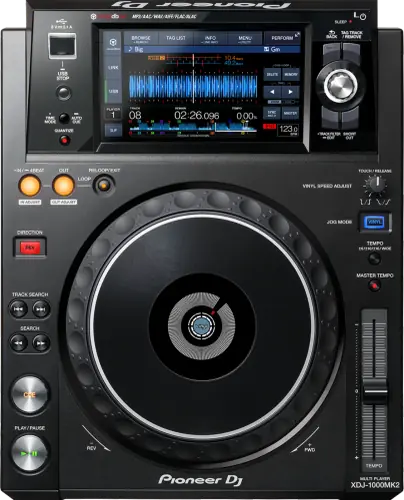
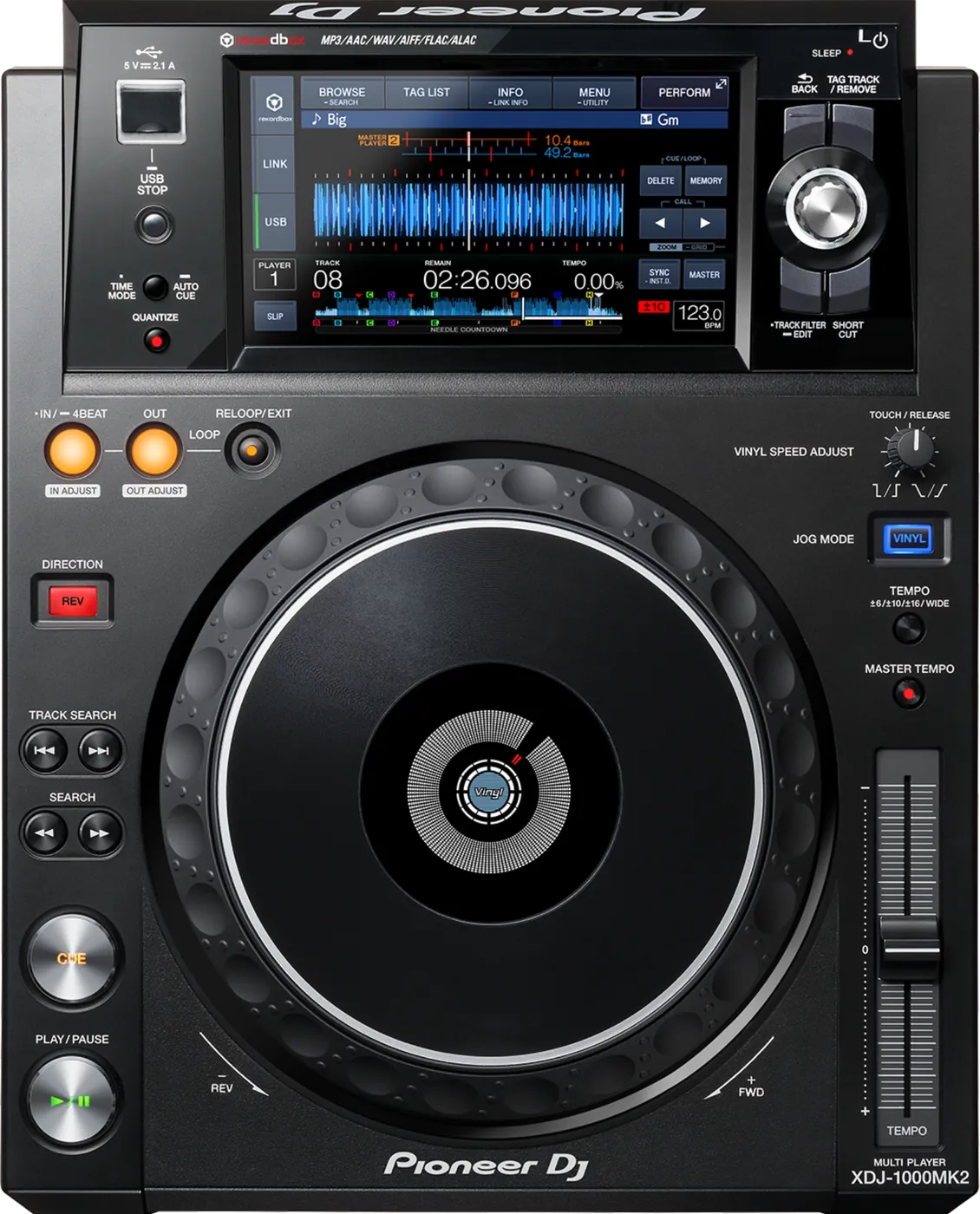
Booth briefing. The XDJ-1000MK2 is an AlphaTheta USB-only deck: it has no card slot, so everything it plays arrives on a USB drive and a second drive in your bag is the backup. The specification table in its own manual lists FAT16, FAT32 and HFS+, so an HFS+ drive straight off a Mac works here, while exFAT and NTFS are not supported and a drive in either format is reformatted before the gig. Power Management is a setting that ships switched on, and its behaviour is covered in the sections below. The highest published firmware version is 1.45.
When it goes wrong: The CDJ will not read the USB Playlists not showing How to format a USB for a CDJ
Fast Lane
The five things that decide your gig
The five things on the XDJ-1000MK2 that change what happens next, if you are reading this in the booth. All five are explained in full further down this page.
No exFAT and no NTFS. It reads FAT16, FAT32, HFS+.
USB only. No card slot, so the backup has to be in your bag.
Media is USB only, with no SD card slot and no disc drive, which removes the in-deck second slot a CDJ-2000NXS gives you.
Two identical FAT32 drives with the same export on both is the whole redundancy plan for this booth.
It powers itself off after 20 minutes, and ships that way.
The timer arrived with firmware 1.45 to meet the EU Ecodesign Directive, and it is enabled out of the box.
A deck that goes dark between soundcheck and doors has usually not failed, it has done what it was told.
It is a Device Library player, which decides whether your drive browses.
AlphaTheta's March 2026 notice puts this deck on the Device Library side of the split.
A drive exported for a OneLibrary unit can mount here and show nothing, which reads like a broken drive and is not one.
Below 1.20, the audio drops out in Control Mode.
AlphaTheta document it plainly, and it only bites when you are running the deck as a controller for software.
Read the version in UTILITY before you build a set around software control on a deck you do not own.
Compare
Playing on a different deck?
Pick the deck you are about to touch. This says what changes for the drive in your bag, and nothing else: the rest of what matters on that unit is on its own page.
If something goes wrong
The player will not read my drive
Short answer. Check the file system first. The XDJ-1000MK2 reads FAT16, FAT32, HFS+ and that is all. No exFAT, and NTFS is not supported. Then check two things a working drive can still fail on: only the first partition of a multi-partition drive can be used, and USB hubs cannot be used.
Why this happens. exFAT is what a DJ formatting a large drive today would reasonably choose, and this generation never got it. It is absent from AlphaTheta's exFAT hardware list, and the rekordbox release that introduced exFAT export names only the CDJ-3000, the XDJ-XZ and the XDJ-RX3. Nothing is faulty on either side.
Take the drive out properly first. The manual: "Do not remove the USB device or turn Off the power of the unit while the USB indicator is flashing. The management data in the unit may get deleted. Also, the USB device may become unreadable." The way out is "Press and hold the [USB STOP] button until the USB indicator stops blinking."
Fix it now. Borrow a FAT32 drive, or play from the other deck. Plug into the deck directly rather than through anything in the booth that multiplies sockets. Reformatting erases the drive, so it is not a mid-set move unless the music exists somewhere else too. A drive drawing too much power makes the USB indicator flash, which is the player telling you the drive is the problem.
Avoid it next time. One FAT32 partition, formatted at home. HFS+ is genuinely supported for playback, so a Mac DJ has a second option, with one caveat worth knowing: a firmware update specifically needs FAT or FAT32, not HFS+. AlphaTheta also notes that drives built around flash card readers may not operate at all.
It refuses to save another cue or loop point
Short answer. It is full, not broken. The XDJ-1000MK2 stores only 10 cue and loop points per track to a USB device. The next one is refused with [CUE/LOOP POINT FULL]. A separate message, [USB FULL], means the drive is write protected or out of space, and in that state points are silently not saved.
Why this happens. Both messages appear briefly in the middle of a set, which is the worst possible moment to read a screen, so what registers is that the deck ignored you. The player is reporting a storage limit in both cases.
Fix it now. Delete a point you are not using on that track and set the new one. If the message was [USB FULL], check the write protect switch on the drive first, then free space, and accept that until it is fixed nothing you set during the set is being kept.
Avoid it next time. Set your points in rekordbox, where the limit does not apply, and export. Leave real headroom on the drive. Points are also lost if the drive leaves the player without the stop procedure or the power is cut, so "make sure the USB indicator has stopped blinking before removing the USB device", and after changing settings wait at least ten seconds before powering off or the change goes with it.
Some of my music is not showing on the player
Short answer. Four documented XDJ-1000MK2 limits explain almost every version of this. Files in folders beyond the 8th layer cannot be played. Nothing past the 10,000th folder, or past the 10,000th file inside a single folder, is displayed. Only the first partition of the drive can be used. And library browsing needs library data on the drive, so without it you get folder browsing instead.
Why this happens. Every one of these scales with preparation, which means the DJ most likely to hit them is the one who organised the most. A deep folder tree built for a laptop puts the music below the layer the player will read, and a second partition is invisible rather than broken.
Fix it now. Browse by folder if the structure allows it, which loses your playlists and cues but gets music playing. If the missing tracks are deep in the tree, the copies you can reach are the ones nearer the top.
Avoid it next time. Flatten the structure, keep the gig material well inside 8 layers, one partition, and export Device Library data so the library browse works. Tracks with DRM will not play at all, whatever you do with the folders.
Nothing is on the screen and the deck looks dead
Short answer. On the XDJ-1000MK2, suspect the setting before the hardware. AlphaTheta's own troubleshooting entry reads "nothing is displayed. Is the Power Management function activated? This unit is shipped with the Power Management function set to on." The timing is 20 minutes of no use, introduced by firmware 1.45 for EU Ecodesign compliance, which also renamed the feature from Auto Standby and Auto Power-Off to Power Management.
Why this happens. That window is shorter than plenty of real gaps: a support DJ's long stretch on the other deck, a changeover that overran, a soundcheck you walked away from. It is also conditional, which narrows the search: Off mode only arrives after 20 minutes when no USB device is connected, no PRO DJ LINK connection exists and no computer is on the rear USB terminal. A deck with a drive still in it did not do this.
The panel does tell you. There is a SLEEP indicator: "This lights when in the Off mode." Check it before you assume the worst.
Fix it now. Touch the deck. "When this unit is operated, the Off mode is canceled." That is the documented way out, and it is not the power switch. Build the boot time into your handover, and expect anything cued but not saved to be gone.
Avoid it next time. On a deck you control, set UTILITY, then POWER MANAGEMENT, then NEVER. On a deck you do not control, touch each player during a long gap. What the timeout was before 1.45 is also not documented, so on an older version treat the timing as unknown rather than assuming you have longer.
PRO DJ LINK will not come up
Short answer. When PRO DJ LINK will not come up on an XDJ-1000MK2, the manual gives five checks and none of them is the player. Player numbers first: set PLAYER No. to AUTO, or to a number nothing else on the network is using. Then whether the LAN cable is properly seated in the LINK terminal. Then whether the switching hub has power. Then whether something unnecessary is plugged into that hub. And a fifth this deck adds: if the connection is by USB cable rather than LAN, the USB (LINK Export) driver has to be installed on the computer first.
Why this matters. A booth network that half works burns time nobody has, and the instinct is to blame the deck that is showing nothing. Every one of the five causes is outside the player.
Fix it now. PLAYER No. to AUTO first, because a number collision is the quiet one. Then reseat the cable at both ends. Then the hub, its power and what else is on it. If a laptop is in the chain over USB rather than LAN, the driver is the answer and no amount of cable swapping will find it.
The audio drops out when I use it as a controller
Short answer. Documented on the XDJ-1000MK2, and fixed in 1.20: audio dropouts in Control Mode. Read the deck's version in UTILITY before you build a set around software control on it.
Why this happens. Control Mode is the deck driving DJ software over USB rather than playing from a drive, so the audio path runs through the computer. A dropout there sounds exactly like a laptop problem, and a DJ spends the set chasing buffer settings while the fault is in the player's firmware. The same version also cleaned up issues using SLIP HOT CUE and unspecified problems during playback and track selection.
Fix it now. Play from a USB drive instead of through the software. That takes the reported fault out of your signal path immediately and costs you nothing but the features you were controlling.
Avoid it next time. Sit the deck at 1.45. rekordbox HID control needs 1.10 or later at minimum, macOS uses its own driver with nothing to install, and Windows needs AlphaTheta's audio driver 1.500 or later for audio output. Confirm all of that at home, not in the booth.
Tracks load slower than they did at the start of the set
Short answer. Documented on the XDJ-1000MK2, and fixed in 1.20: track loading time sometimes took longer when using the player for several hours. This is the one every working DJ recognises, because it appears in the fourth hour and not in the first.
Why this happens. It arrives gradually, so it reads as a tired drive or a hot booth rather than as a firmware fault. Two separate things make load time worse independently of it: the number of folders and files on the drive, and non-music files sitting on it. AlphaTheta's own instruction is blunt, "do not store files or folders other than music files on the USB device".
Fix it now. Load earlier and give the deck the seconds it is asking for, rather than dropping a track in with eight bars left. If the other deck has been on less time, load the tight changeovers there.
Avoid it next time. A version at or above 1.20 removes the documented fault. A drive carrying only music, in a shallow folder structure, removes the rest.
What to watch for
Documented fixes, by firmware version
Short answer. 1.45 is the highest version AlphaTheta has published for the XDJ-1000MK2. Every entry below is the manufacturer's own wording, condensed, and the oldest two are the ones a working DJ will recognise.
- 1.45
- Not a bug fix. Following the EU Ecodesign Directive, the time before the unit switches itself off became 20 minutes, and the feature was renamed from Auto Standby and Auto Power-Off to Power Management. Published August 2024.
- 1.42
- macOS Catalina 10.15 could not recognise the player as an audio device. Some Apple Lossless files would not play. KEY sort order differed in the PLAYLIST category.
- 1.41
- Inconsistencies when using the matching function.
- 1.30
- Added DDJ-XP1 support and ALL CLEAR in SEARCH. Fixed a popping noise during a loop with QUANTIZE and MASTER TEMPO enabled, and a HOT CUE starting after jumping to the LOOP-IN point when changing loop beat length with QUANTIZE enabled.
- 1.23
- Playback speed sometimes did not return to the BPM shown on screen when Sync is enabled.
- 1.22
- An emergency loop issue with certain MP3 files containing APE tag data. Wrong information when showing a PLAYLIST via shortcut after a SEARCH. Search results did not appear when moving the cursor during SEARCH.
- 1.20
- Audio dropouts in Control Mode. Track loading time sometimes took longer when using the player for several hours. BACKGROUND COLOR and WAVE FORM COLOR greyed out. Issues using SLIP HOT CUE. Unspecified issues during playback and track selection. Removing tracks from a tag list made quicker with REMOVE.
- 1.10
- Added rekordbox dj HID control, KUVO support and a more precise overview waveform. Fixed some tracks not playing on a CDJ-TOUR1 connected to this player.
Two gaps in that list, named rather than filled. One release in 2021 published nothing beyond "minor issues", so there is no detail to report from it. One release in early 2018 added BPM and KEY to the sort menu and user categories, comments to SEARCH, and fixed connection problems with rekordbox on iOS and with ShowKontrol. Neither adds a threshold worth planning around.
Do this. On a deck you control, sit at 1.45, updated between bookings and never before one. On a deck you do not control, read the version and treat the list above as what is still possible on that unit.
Firmware downloads. Official AlphaTheta support page →
Full change history, PDF →
Broken link? Let us know and we will fix it.
E-8302 on this deck, and the two file codes
Short answer. E-8302 does not mean on the XDJ-1000MK2 what it means on a CDJ. Here it reads CANNOT PLAY TRACK and the manual's cause is that the track data on the USB drive cannot be read correctly, most likely a corrupt file, with the stated action being to try that track on another player that handles the same formats. On the CDJ generation the same number is PLAYER ERROR and points at the disc or the decoder. Same four characters, different diagnosis, and the wrong one sends you looking at the wrong thing.
The other two. E-8304 and E-8305 on this deck are UNSUPPORTED FILE FORMAT, and the manual's action is a single line: the format is wrong, replace the file with one in a proper format. That is a preparation answer rather than a booth one, so if it appears mid-set the move is to play something else and fix the export afterwards.
Fix it now. Take the code at its word on this deck. E-8302 means test that one file somewhere else, on another player or on a computer, because the deck is telling you the data would not read. E-8304 and E-8305 mean the file was never in a format this player takes, so no amount of retrying changes the answer.
Avoid it next time. Export from rekordbox rather than dragging files onto a drive, and keep a second copy of anything irreplaceable in a format this deck lists.
Long tracks the screen will not draw
Short answer. The XDJ-1000MK2 stops drawing the enlarged waveform for any track over 60 minutes, and it stops drawing the scale for any track over 15 minutes. Neither is a fault and neither announces itself: the display simply comes up without the thing you were expecting. If you play long-form recordings, live sets or DJ mixes as single files, this is the deck telling you it will not draw them rather than the deck failing to.
Why this matters. A missing waveform on a long file reads as a corrupt track or a deck that has given up, and the reaction is to reload it, then reformat the drive, then blame the player. None of that changes anything, because the deck is behaving as documented.
Do this. If you need the waveform, split long files into tracks at export time. If you are playing a two hour mix as one file, expect the screen to be plainer and cue by ear and by time rather than by picture.
Three things it does that are not faults
The screen. Small black or bright points on an XDJ-1000MK2 screen are inherent to liquid crystal displays and the manual says so outright. A screen that stays dark for a while after power-on in a cold room is the same story, and it reaches normal brightness on its own. And direct sunlight reflecting off the panel is not a failing backlight, it is sunlight, so block it rather than chase it.
After a static hit. Static electricity can put an XDJ-1000MK2 into a state that looks like hardware failure. The manual's own recovery is to turn the power off, wait one minute, then turn the power back on. The minute is not decoration, and it is the part a stressed crew cuts to five seconds.
A cause from another era. And one cause the manual lists that sounds like it belongs to another decade: an XDJ-1000MK2 placed near a television can produce distorted or noisy sound. The remedy given is to turn the television off or to move the two apart. Screens in booths are normal now, so the entry has outlived the era it was written for.
The file systems live in the manual, not in a support article
Short answer. AlphaTheta publish no support centre article on the XDJ-1000MK2's file systems, and people searching for one conclude the answer is undocumented. It is documented. It is a specification table row in the Operating Instructions and again in the Quick Start Guide, in AlphaTheta's own words: supported file systems FAT16, FAT32 and HFS+ (NTFS is not supported.)
What that means in practice. The player reads FAT16, FAT32, HFS+. A working HFS+ drive from a Mac plays here, and treating this unit as FAT32 only leaves a working option on the table. There is still no exFAT on this model, and NTFS is never supported.
Where to look when a support article does not exist. The support centre is not the only place AlphaTheta document a fact. The manual counts, a specification table counts, a quick start guide counts, and for this player the specification table is the primary source this page cites.
The one nearby model that really is undocumented. The XDJ-RX2 has no published file system row that we have found anywhere, and the player compatibility table says so about that model alone. If you find the document, tell us and we will publish it.
Compatibility
Software control, Link and mixed booths
Short answer. The XDJ-1000MK2 does PRO DJ LINK over LAN, up to 4 players, 100Base-TX with Category 5e cables. A LAN hub is required for three or more players, or for two or more players plus a mixer. A DJM-2000NXS or DJM-2000 has that hub built in. With a DJM-900NXS2, DJM-900NXS or DJM-900SRT you have to prepare a separate LAN hub. The Wi-Fi route for rekordbox on a phone is also supported.
When Link will not come up. AlphaTheta's own order, and it is the right order: duplicate PLAYER No. first, so set PLAYER No. to AUTO or to a different number, then the LAN cable, then whether the switching hub actually has power, then whether something unnecessary is sitting on the hub.
Software control. rekordbox dj HID arrived in 1.10. USB-HID and MIDI run over the USB-B socket with no driver to install on macOS, and Windows wants AlphaTheta's audio driver 1.500 or later for audio output. TRAKTOR PRO 3 is supported from TRAKTOR 3.3.0 with firmware 1.42 or later, the same version that restored macOS Catalina audio device recognition. Timecode and DVS are not documented for this player in either direction, so if vinyl control is your plan, confirm it with the venue rather than with this page.
Mixed generations. One cross-model playback fault is documented, on a linked CDJ-TOUR1, fixed in 1.10. Nothing is published about features being disabled when this player is linked to a CDJ-3000 or a CDJ-3000X, so this page does not speculate about it. The live hazard in a mixed booth in 2026 is the library format, below.
Device Library and OneLibrary in the same booth
Short answer. The XDJ-1000MK2 is a Device Library player, and that is the split that decides whether your drive browses. AlphaTheta's own March 2026 notice puts it on the Device Library side and warns that "playlists and tracks in Device Library format will appear on products such as the CDJ-3000, but may not appear on OneLibrary compatible units like the CDJ-3000X".
Why it matters. A booth with this player next to a OneLibrary unit is two different drive expectations on one stage, and the failure is silent: the player mounts the drive and shows you less than you packed. AlphaTheta is clear about the one reassuring part, "your music files and playlists are never deleted from your USB", so a drive that browses short somewhere is not a drive that lost anything.
When professionals use it. Ask which players are in the booth at booking, then decide the export format once. If the room is genuinely mixed, two drives prepared for the two formats is the answer that always works, and it is cheaper than finding out during a changeover.
Common mistakes. Exporting for the newer unit and assuming the older one will cope. Converting a working Device Library drive the night before a gig with no second drive in the bag.
Features explained
Storage, media and library format
Short answer. File systems FAT16, FAT32, HFS+, no exFAT and no NTFS. Media is USB only, with no SD card slot and no disc drive. Library format is Device Library.
Why it matters. Three constraints stack. The file system limits which drive you can bring. No card slot removes the in-deck backup a CDJ-2000NXS or CDJ-900NXS gives you, so redundancy has to come out of your bag. Device Library means a OneLibrary export from a newer rekordbox will not browse here. A DJ who satisfies two of the three still does not play. Optical media and iPods are outside what this player accepts at all.
When professionals use it. One FAT32 drive with a Device Library export, and an identical second drive in the bag. That combination works in this booth and in almost every other room this site covers.
Common mistakes. Assuming a player with a 7 inch touch screen has modern storage support. It does not. Assuming HFS+ is also fine for a firmware update: that step specifically wants FAT or FAT32.
Power Management and the 20 minutes
Short answer. The unit switches itself off after 20 minutes, and it ships with that enabled. The timing arrived with firmware 1.45 to meet the EU Ecodesign Directive.
It is conditional, and the condition matters more than the timer. Off mode only arrives after 20 minutes when no USB device is connected, no PRO DJ LINK connection exists and no computer is on the rear USB terminal. So a deck with your drive still in it, or sitting on a live Link network, does not do this at all. The unit that goes dark is the one that was left empty after soundcheck.
Why it matters. AlphaTheta lists it in troubleshooting under a blank display, which tells you how often it is mistaken for a fault. The XDJ-700, the DJM-V10 and the DJM-A9 carry the same Ecodesign change, so one booth can have several pieces doing it on the same day.
When professionals use it. Residents and technical managers turn it off, at UTILITY, then POWER MANAGEMENT, then NEVER, because the power saved is worth less than one confused handover. On a deck you do not own, treat it as a fact of the room.
The panel does tell you, and there is a wake procedure. The unit has a SLEEP indicator, and the manual describes it in one sentence: "This lights when in the Off mode." Getting out of it is not a power cycle either: "When this unit is operated, the Off mode is canceled." Touch the deck.
Common mistakes. Escalating a powered down deck to the venue as a failure. Reaching for the power switch instead of the jog. Losing unsaved cue points to it.
What the silence since 1.45 does and does not mean
Short answer. 1.45 is the highest published version, it arrived in August 2024, and it was a regulatory change rather than a functional one. No further version has been published since. AlphaTheta has issued no end-of-support statement, so "the firmware line is finished" is an inference from silence rather than something the manufacturer has said, and this page will not dress it up as a fact.
Why it matters. The practical difference is what you do with an odd behaviour. On an actively updated model it is worth reporting and waiting on. Here, plan on the basis that whatever is not in the documented list is either normal behaviour or something to work around, while knowing it is not impossible for more to arrive: the CDJ-2000NXS received a version in 2024, more than six years after the one before it.
When professionals use it. Plenty of working rooms run these, and a player at 1.45 is a dependable deck. The risk is not the hardware, it is assuming a fix exists for something.
Common mistakes. Waiting on an update to plan around. Assuming exFAT support might arrive: it never has on this generation. AlphaTheta has also not flagged the player archived or discontinued, and it names no successor for it, so treat those claims with the same suspicion wherever you read them.
The published limits, in one place
Short answer. Most of what looks like a fault on this player is a documented limit. Reading them once at home is cheaper than meeting one at 1am.
- Folder depth
- Files in folders beyond the 8th layer cannot be played.
- How much it will list
- Nothing past the 10,000th folder, or past the 10,000th file within a single folder, is displayed.
- Points per track
- 10 cue and loop points can be stored to a drive, and 8 hot cues per track are available on the panel.
- Partitions and hubs
- Only the first partition can be used, and USB hubs cannot be used. Drives built around flash card readers may not operate.
- Quantize timing
- Quantize delays reloop and reverse to the next beat. AlphaTheta's own note: "if you want the operation to be performed the instant the button is pressed, turn the quantize function off."
- Long tracks and VBR
- No scale is drawn for tracks over 15 minutes. A VBR file can leave the remaining time display blank briefly. Auto cue gives up after 10 seconds of searching.
- HISTORY
- It only works when a USB device is loaded, so a set played from another deck's drive leaves no record here.
- Formats
- MP3, AAC, WAV, AIFF, Apple Lossless, and FLAC at 16 or 24 bit, 44.1 or 48 kHz. Files with DRM will not play.
- Outputs
- RCA analogue out, plus a coaxial digital output at 44.1 kHz, 24 or 16 bit.
What the deck gives you. A 7 inch full colour LCD touch screen with 18 languages, 8 hot cues per track, Slip mode, Beat Jump in 1, 2 or 4 beats, Quantize, and Beat Sync to a PRO DJ LINK sync master. AlphaTheta describes it as an upgrade of one of its most popular USB-only multiplayers, with the jog and the touch screen taken from the CDJ-2000NXS2.
Professional tips
Carry two identical drives for this booth
Short answer. Two FAT32 drives, the same Device Library export on both, both in the bag.
Why it matters. This player is USB only, with no SD card slot and no disc drive, so the in-deck backup that a CDJ-2000NXS gives you does not exist here. The redundancy either came with you or it does not exist, and that is the whole difference between a drive failure being a thirty second event and a set ending one.
Do this. Export once, copy to two drives, then verify both by ejecting and browsing them rather than trusting the copy dialog. Label them so you know which one you have already tried.
Prepare a drive this player likes
Short answer. One FAT32 partition, a Device Library export, a shallow folder tree, and music only.
Why it matters. Every documented cause of a slow or incomplete browse on this player is decided by how the drive was prepared: folder depth, file counts per folder, non-music files, and whether library data is present at all. None of it is fixable in the booth, and all of it is ten minutes at home.
Do this. Keep the gig material well inside 8 layers. Leave your photos, project files and installers off the drive, which is AlphaTheta's own instruction and not a preference. Set cue and loop points in rekordbox, where the 10 point storage limit does not get in your way. Keep a FAT or FAT32 drive available if you plan to update the firmware, because that step will not take HFS+.
Preventive maintenance
Keeping the deck reliable
Short answer. The USB socket and the touch screen are the wear items, and both have a documented procedure attached. Firmware to 1.45 between bookings.
Why it matters. With no card slot, the single USB socket is the entire media path, so a socket levered sideways for years becomes an intermittent fault that looks exactly like a bad drive. The screen is the browser, the waveform and the settings, so a display that mis-registers a touch takes all three with it.
Do this. Pull drives straight out by the connector, after the USB indicator has stopped blinking, never at an angle. Give settings changes at least ten seconds before you cut the power. If the touch screen stops registering accurately, the calibration screen is reachable even from a powered off deck: hold OUT, marked OUT ADJUST, while switching the power on, and you get TOUCH DISPLAY CALIBRATION. A drive that makes the USB indicator flash is drawing too much current, so stop using it rather than retrying it.
Cleaning the touch display without ruining it
Short answer. The XDJ-1000MK2 touch display has a cleaning rule that rules out most of what is behind a bar. No organic solvents, no acids, no alkalis, which puts alcohol wipes and screen sprays out. The manual asks for a dry soft cloth, or a cloth dipped in neutral detergent and wrung out properly. A touch surface cleaned with the wrong thing loses its response before it loses its looks.
Why this matters. The screen is the whole interface on this deck. A jog wheel survives a wipe with the wrong thing; a capacitive surface does not, and the damage shows up as inaccurate touch long before it shows up as a mark.
Do this. Keep a dry microfibre cloth in the case and use it. For anything the cloth will not lift, neutral detergent on a cloth, wrung out until it is barely damp.
Firmware, drivers and manuals
Official downloads and documents
Go to AlphaTheta for the files themselves. We link their pages instead of hosting a copy, because a manual copied here is a snapshot of release day and theirs is the one that stays current.
Firmware downloads. Official Pioneer DJ firmware page →
Manuals. Official Pioneer DJ manual page →
Broken link? Let us know and we'll fix it.
Frequently asked questions
Quick answers
- Which file systems does it read?
- FAT16, FAT32, HFS+, from the specification table of its own Operating Instructions. No exFAT, and NTFS is not supported. A firmware update needs FAT or FAT32 rather than HFS+.
- Is there an SD card slot?
- No. It is USB only, with no SD card slot and no disc drive, so your backup has to be a second drive you brought.
- Why did the screen go blank?
- Most often Power Management, which ships enabled and switches the unit off after 20 minutes of no use from firmware 1.45. AlphaTheta lists it under a blank display in troubleshooting.
- How is it woken again?
- By using the deck, not by the power switch. AlphaTheta: "When this unit is operated, the Off mode is canceled." Allow the boot time in a handover, and expect anything cued but not saved to be gone.
- Why will it not save another cue point?
- 10 cue and loop points per track is the storage limit. The next one is refused with [CUE/LOOP POINT FULL].
- Why is some music missing from the browser?
- Usually folder depth, since files beyond the 8th layer cannot be played, or a second partition, since only the first can be used.
- What firmware should it be on?
- 1.45, from August 2024. 1.20 is the threshold that matters most, for Control Mode dropouts and long session load times.
- Which library format?
- Device Library. Not OneLibrary.
- Does it support DVS or timecode vinyl?
- Not documented either way, so this site does not claim it in either direction. Confirm with the venue if timecode is your plan.
- Can I use a USB hub or a card reader?
- No. Hubs cannot be used, and drives built around flash card readers may not operate.
- Is it discontinued, and what replaces it?
- AlphaTheta has not flagged it archived, and it names no successor. The original XDJ-1000 sits on the archive path, this one does not.
Related players
Commonly paired with
What you usually find beside it in working booths, from club, festival and rental installs rather than from a manufacturer document.
Pioneer DJ All brands Knowledge base FAQ and Fixes Dictionary
Playing soon and it is not working?
Start Emergency ModeKeep the Emergency Card
We will email you the printable PDF so it is on your phone before the next dark booth. Occasional notes that save gigs. No spam, unsubscribe in one click.
Registering is free and counts everywhere on Save My Gig. We send a confirmation email first. Your address is stored with Brevo, our email provider. Unsubscribe any time. Privacy
Sources: AlphaTheta's official XDJ-1000MK2 firmware page, its full change history PDF and its Operating Instructions, whose specification table is where the file systems above come from, all read in full and checked 7 August 2026. Specifications theirs, priorities ours.