

OPUS-QUAD, the field manual
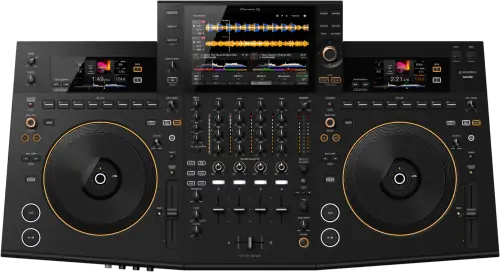
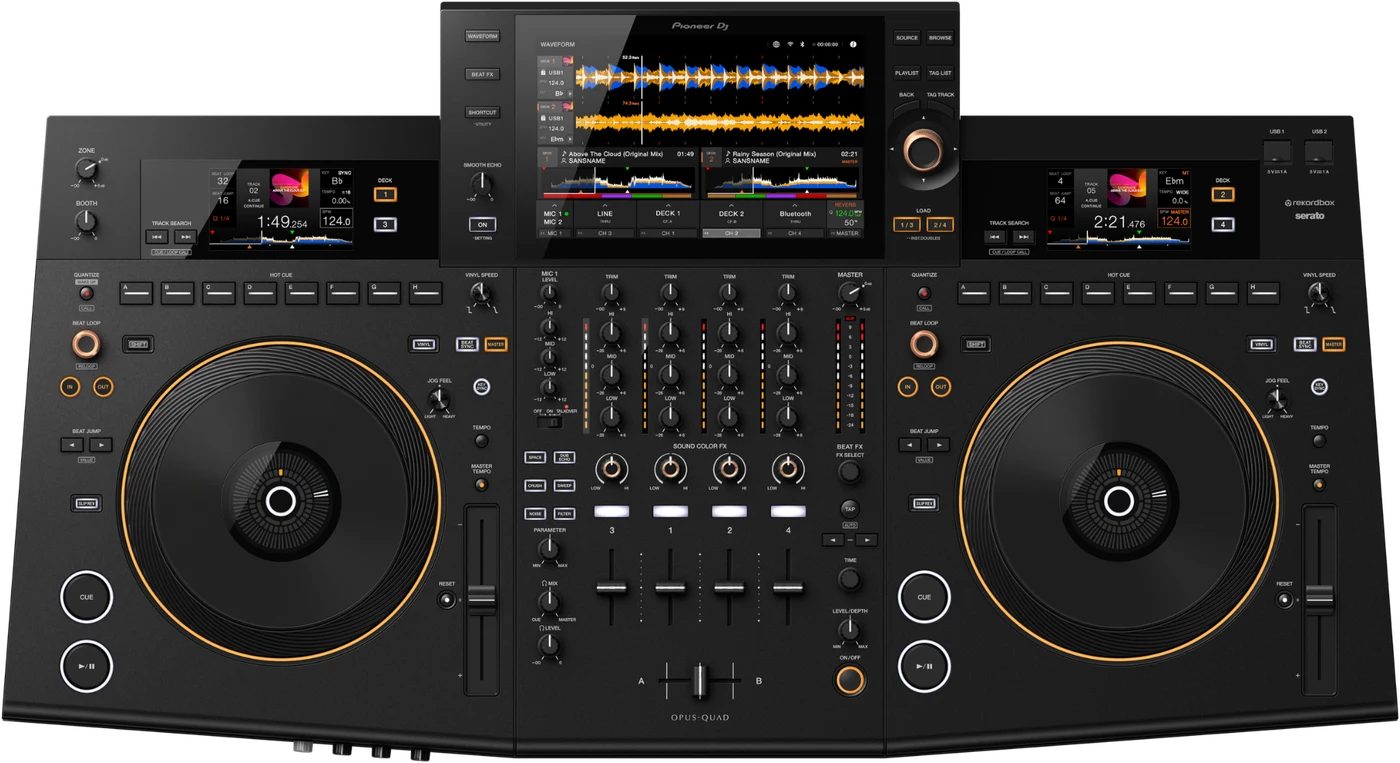
Booth briefing. The OPUS-QUAD is an AlphaTheta unit that plays from USB drives formatted FAT16, FAT32, exFAT or HFS+, and it can prepare a drive on its own, writing the Device Library Plus format, which is its own export format rather than the one a CDJ browses, so drives meant for other players are prepared on another machine. Its Link terminal connects to one computer running rekordbox, not to other players, so it works as a self-contained system alongside a booth rather than joining a player network. Its firmware history, including version 1.22, is covered in the firmware section below.
When it goes wrong: The CDJ will not read the USB Playlists not showing How to format a USB for a CDJ
Fast Lane
The five things that decide your gig
The five things on the OPUS-QUAD that change what happens next, if you are reading this in the booth. All five are explained in full further down this page.
A USB prepared on this unit will not play anywhere else.
Its own export format is Device Library Plus, and a drive written in it does not browse on a CDJ.
Prepare every gig drive somewhere other than this machine, or the booth you move to next sees a drive with nothing on it.
No audio, screen blackouts and freezes on some units, fixed in 1.22.
Occasional no audio output, display blackouts and system freezes. Documented by AlphaTheta on 5 December 2024, with a published fix.
This is the row people look for, and it is the reason to read the version before the doors rather than after.
It reads exFAT: FAT16, FAT32, exFAT, HFS+, and NTFS is not supported.
Its PRO DJ LINK is for a computer, not for other players.
AlphaTheta describe the LINK terminal as "Connect to a LAN terminal on a PC/Mac running rekordbox." and document PRO DJ LINK here for USB Export and rekordbox LINK EXPORT. No connection to another player appears anywhere in their documentation.
So it does not share a library or a clock with house CDJs. It is a self-contained booth, which is the design, not a limitation somebody forgot to fix.
It can put itself into Off mode, and four conditions decide whether it ever does.
Off mode needs all four of these at once: no audio signal is input to the unit, the unit is not connected in the PRO DJ LINK network, no storage device is connected on a USB port, and no PC/Mac is connected via the USB port on the rear. A gig stick left in a top port keeps the unit awake indefinitely.
Firmware 1.12 made the timer 20 minutes and renamed the function, citing EU Ecodesign. Back from Off mode: "Press the [QUANTIZE] button on deck 1/3 to exit Off mode."
Compare
Playing on a different deck?
Pick the deck you are about to touch. This says what changes for the drive in your bag, and nothing else: the rest of what matters on that unit is on its own page.
If something goes wrong
No audio, the screen blacks out, or the unit freezes
Short answer. Firmware 1.22 fixed occasional no audio output, display screen blackouts and system freezes on some units. Before you blame the unit, the drive or yourself, read the firmware version in the settings: on anything below 1.22 this is a documented fault with a published fix.
Rule out the screen saver first. The OPUS-QUAD ships with its screen saver on, and it starts after 5 minutes with no track loaded, or after 100 minutes during pause, during cue standby or after playback reaches the end of a track. Using the unit cancels it. Soundcheck and the walk-up to doors are both stretches with no track loaded, so a dark screen while everything else behaves is the factory default and not the fault above.
Why this matters. On a separate CDJ and mixer a single failure takes one deck out. On an all-in-one the decks, the mixer and the screen share one unit, so the same fault presents as the entire booth going silent or dark at once, which reads as catastrophic and is a known, fixed issue.
Fix it now. Update the firmware to the highest published version, currently 1.32. Before you power-cycle anything, get the drives out properly with [USB STOP] on the [SOURCE] screen: AlphaTheta warn that turning the unit off with a USB device connected may delete the unit's management data or leave the device unreadable, so the reflex fix for a freeze is also the way a library dies. Mid-set on an un-updated unit there is no setting that works around it, so if a unit is failing this way the reliable move is different hardware, and since the OPUS-QUAD does not link to other players there is none to lean on: the fallback is whatever else the venue can put on the table.
Avoid it next time. Check the firmware version on any OPUS-QUAD you are handed as part of setup, the same way you would check the master level, and update your own before it teaches you this section from the stage.
A track will not play and a code is on the screen
Short answer. Three codes and two meanings. E-8302 is CANNOT PLAY TRACK: the unit cannot read the audio file from the storage device, the file is probably corrupted, and AlphaTheta ask you to check whether it plays on another player that supports the same formats. E-8304 and E-8305 are both UNSUPPORTED FILE FORMAT: the file itself is in a format this unit does not play, and the answer is to load one it does. Neither code is about the drive.
Why this matters. An OPUS-QUAD throwing a code mid-set looks like the drive failing, and that is the conclusion that makes a DJ pull a working stick out of a working player. All three of these point at a file.
Fix it now. Load the next track. If a whole folder throws the same code, that folder reached the drive in a format this unit does not play, so use your second drive and sort the export afterwards.
Avoid it next time. Export from rekordbox rather than dragging files onto the drive, and let the export finish before you eject. A part-written file is a corrupted file.
A USB prepared on the OPUS-QUAD will not play anywhere else
Short answer. The OPUS-QUAD's own export format is Device Library Plus, and AlphaTheta's official FAQ states that devices exported with Device Library Plus can only be used with the OPUS-QUAD. A drive carrying only that format has nothing on it a CDJ, an XDJ or any other player can read. For any other equipment, export the drive as Device Library, or from rekordbox 7.2.13 or later, which writes both library formats at once.
Why this happens. Most library traps on this site run the other way, an old export refused by a new unit. This one runs forward: the format this unit itself writes is the one nothing else reads. There are three formats to keep straight. Device Library is what CDJs and the older XDJs read. Device Library Plus is the OPUS-QUAD's own format, and it stops at this unit. OneLibrary is the successor format, and since October 2025 the OPUS-QUAD is in the OneLibrary group alongside the CDJ-3000X, XDJ-AZ and OMNIS-DUO, which is what finally lines its drives up with the rest of the current generation.
What this unit does with an unprepared drive. "If you browse a storage device (USB) that doesn’t contain a rekordbox library on the [BROWSE] screen, the folder and track lists are displayed in a hierarchical structure." So on the OPUS-QUAD itself a drive in the wrong format is not a dead drive: the audio still plays, without cues, beatgrids or search, which is a much better thing to know in the booth than nothing at all.
Fix it now. If you have a laptop with a current rekordbox, re-export the drive and both formats are written, so the same stick works here and on the players in the next room. With no laptop, the fastest route is a drive somebody else exported from a recent rekordbox rather than one prepared on the OPUS-QUAD itself.
Avoid it next time. Treat the OPUS-QUAD as a place to play drives, not the place to prepare them. Export from rekordbox 7.2.13 or later as a habit and one drive covers this unit, the OneLibrary group and the Device Library players in the same set.
CloudDirectPlay is showing nothing
Short answer. AlphaTheta name four separate reasons CloudDirectPlay shows nothing, and none of them is the unit. The library has not finished synchronising between rekordbox and the cloud, so the browse screen is waiting rather than empty. The tracks were never actually uploaded to Dropbox, and only uploaded tracks appear. Dropbox itself is down or under maintenance, which they point you at status.dropbox.com to check. Or the USB drive is too full: tracks pulled from the cloud are saved temporarily onto the drive, and they recommend at least 1 GB free for it.
Why this matters. The last of those four is the one nobody predicts. Cloud playback on the OPUS-QUAD is not drive-free: it writes what it pulls onto the USB stick as it goes, so a nearly full drive breaks the cloud as effectively as no internet does. And two of the other three are back at a computer you do not have with you.
Fix it now. Play from the drive and stop debugging a cloud in a booth. If the stick is the problem, the tracks you already have on it are unaffected.
Avoid it next time. Let rekordbox finish synchronising before you leave, confirm the tracks are uploaded rather than merely added, and gig with a drive that has real room on it rather than one filled to the brim.
Wi-Fi or Bluetooth will not connect
Short answer. The OPUS-QUAD carries both radios and AlphaTheta give each failure its own answer. For an access point the unit will not join, check that the network name, the password and the security type on the unit match the router exactly. For an access point it cannot find at all, treat it as a radio problem and close the distance or remove what is between them. For Bluetooth that will not pair, power both off and on and pair again. And AlphaTheta document the two radios interfering with each other: the answer is to turn Wi-Fi off, or set Wi-Fi Frequency in the UTILITY settings to the 5 GHz option they mark as recommended.
Why this matters. The interference note is the one worth carrying, because it is the only one that explains a connection that worked yesterday and does not today. Both radios share the same crowded band, and a venue is full of it.
Fix it now. If Wi-Fi is only carrying a library you already have on the drive, turn it off. That is one setting and it removes the interference completely.
Avoid it next time. Set Wi-Fi Frequency to the 5 GHz option before the gig, and join the network at soundcheck rather than when you need it.
It loops on its own, or LOAD does nothing
Short answer. The OPUS-QUAD has two documented behaviours that read as faults and are not. "The unit automatically plays a Beat Loop if it can’t start playing the next track when the end of the current track is reached. You can’t DJ during Emergency Loop playback. Load a track to cancel the Emergency Loop." And on the load side: "You can’t load another track while a track is playing when [Load Lock] is set to [Lock] in the Utility settings."
Fix it now. Loading a track is what cancels an Emergency Loop. The loop controls, the play button and the CUE button will not, because the unit is not taking performance input while it runs, so the reflex of stabbing at BEAT LOOP is the one that wastes the seconds you have. If LOAD is doing nothing on a playing deck, set [Load Lock] to [Unlock] on the UTILITY screen, which appears when you press and hold the [SHORTCUT] button, or pause the deck and load again.
Why this matters. Emergency Loop exists so a failed load does not become silence, and it is a safety net you can walk into without recognising it. It is not applied when the file has been cached, and playback continues with the restriction, so it is not a net under everything. Load Lock is a Utility setting the previous DJ or a venue tech may have left on, and on a playing deck it looks exactly like a dead button or a bad drive.
What to watch for
Firmware, and what each version fixed
The fixes that matter. On the OPUS-QUAD, firmware 1.22 fixed occasional no audio output, display blackouts and system freezes on some units, the row people look for, and the same release added StreamingDirectPlay for Beatport Streaming and TIDAL, CloudDirectPlay support for Google Drive, an Information Jump function and an Edit Rating function. Firmware 1.30 added StreamingDirectPlay for Apple Music and the ability to eject a loaded track from the WAVEFORM screen, which is the release a DJ reading only the top of the list would miss. Firmware 1.12 fixed issues when using the exFAT file system and a separate fault where the unit was occasionally unable to connect to the internet via the LAN cable, and it changed the automatic switch-off time to 20 minutes. Firmware 1.10 fixed filter settings not being canceled when switching Playlist Banks and some M4A files not playing, and the same release added Serato DJ Pro support and a larger keyword text size in the Search function. Firmware 1.32 fixed artwork sometimes not displayed on the deck displays. Highest published version is 1.32.
Reading it in the booth. The full model to version table lives on the firmware reference, so you can read the version off the unit and see which documented faults are still live on it.
The unit switched itself off
Short answer. The OPUS-QUAD ships with Power Management set to 20min, and it enters what AlphaTheta call Off mode after 20 minutes, but only when all four of these hold at once: no audio signal is input to the unit, the unit is not connected in the PRO DJ LINK network, no storage device is connected on a USB port, and no PC/Mac is connected via the USB port on the rear. A unit that went dark with nothing plugged in and nothing playing has obeyed that setting rather than failed.
Why this matters. The four conditions are what decide whether the timer ever runs, and the most common changeover state stops it dead: a gig stick left in a top port, a laptop on the rear USB port or a live line into the mixer section each keep the unit awake indefinitely. The DJ who does meet Off mode is the one who pulled the drive at the end of a warm-up set and walked away. Firmware 1.12 is where the timer became 20 minutes and where the function took its current name: "The name of the energy-saving function, (previously called Auto Standby or Auto Power-Off, depending on the model), has now been changed to Power Management." A unit on older firmware did the same thing under the older name, so a self-switching unit is not proof that somebody updated it.
Fix it now. "Press the [QUANTIZE] button on deck 1/3 to exit Off mode." Nothing in AlphaTheta's part names gives this unit a front panel standby lamp, so there is no light to read and the button press is the whole gesture: reaching for the mains switch is the reflex to resist. The setting itself lives on the UTILITY screen, which appears when you press and hold the [SHORTCUT] button, where a short press of the same button opens the different SHORTCUT screen.
Compatibility
What it works with, and what it never joins
Library and software. rekordbox with Hardware Unlock and CloudDirectPlay, Serato DJ Pro since firmware 1.10, and standalone playback from USB storage. Read the drive advice in the emergency section before preparing anything on the unit itself.
The Link question. The OPUS-QUAD has a LINK terminal, and AlphaTheta document it for a PC/Mac running rekordbox rather than for other players. Nothing published describes it joining a Link network of CDJs: no shared drives across players, no beat information between them, no linked player to fall back on. In a room that runs on linked players, the OPUS-QUAD connects the way any external source does, audio outputs into a spare mixer channel, with the ZONE pair available as a second balanced feed, and its four decks stay its own. Plan the booth around one of the two models, not a blend.
An exFAT drive misbehaves, or the internet connection drops
Short answer. The OPUS-QUAD had two separate faults fixed in firmware 1.12: issues when using the exFAT file system, and a fault where it was occasionally unable to connect to the internet via the LAN cable. A large exFAT drive acting up on this unit is a firmware question before it is a drive question.
If it is Wi-Fi and not the LAN cable. That firmware fix was the wired LAN, and it does nothing for a wireless drop. The remedy AlphaTheta document for the wireless case is interference: Bluetooth and wireless LAN in use at the same time can interfere, and the documented move is to turn Wi-Fi off, or set [Wi-Fi Frequency] in the UTILITY settings to [5GHz (Recommended)], which is also the factory value. That matters on a unit whose Bluetooth input you may be using for a guest phone at the same time as CloudDirectPlay.
Why this matters. exFAT is the format a large modern drive ships with, and this unit reads it. A DJ who formatted a drive correctly and still watches it misbehave will suspect the drive, when on pre-1.12 firmware the unit was the problem.
Fix it now. Update the firmware, then retest the drive before reformatting anything. If the unit cannot be updated in the moment, a FAT32 stick with the same crates is the workaround that does not depend on the fixed code.
Features explained
What the OPUS-QUAD is, and how it is laid out
The shape of it. Four channels, four decks and a 10.1-inch touch screen, announced 7 March 2023 at the top of the all-in-one range of that year. It plays standalone from USB storage with no computer, and it has Wi-Fi and Bluetooth built in.
Software. It unlocks rekordbox for free over USB under Hardware Unlock, and it runs Serato DJ Pro, with Serato support added in firmware 1.10. AlphaTheta attach Hardware Unlock to rekordbox alone: their Serato section says only that Serato DJ Pro is not included with the unit and is downloaded from Serato, so check your own Serato licence rather than assuming the hardware carries it.
Playing from the cloud, and from a streaming service. Both routes need a USB device in the unit, which is the part the phrase "cloud libraries over the network" hides. CloudDirectPlay needs a USB device authenticated in rekordbox on a computer first, and AlphaTheta recommend 1 GB or more of free space on it because tracks are cached there. StreamingDirectPlay arrived in firmware 1.22 with Beatport Streaming and TIDAL, and firmware 1.30 added Apple Music. TIDAL is not a direct login on the unit: it comes through that same CloudDirectPlay authentication device. An internet speed of 20 Mbps or higher is recommended for loading tracks, Track Search does not work on tracks loaded this way, and you cannot record from a streaming service.
What its Link terminal is for. The specification table lists a LINK terminal (PRO DJ LINK), and AlphaTheta document it for one thing: "Connect to a LAN terminal on a PC/Mac running rekordbox." The PRO DJ LINK section covers USB Export and rekordbox LINK EXPORT and nothing else, and no connection to another player is documented anywhere. So it links to a computer, not to a booth. That is a design decision to know at booking time, not a defect: the OPUS-QUAD is built to be the whole booth by itself.
Professional tips
Turning up to a booth built around one
Prepare every drive somewhere other than this unit. Its own export format is Device Library Plus, and AlphaTheta's FAQ states that a device exported that way can only be used with the OPUS-QUAD. Export from rekordbox 7.2.13 or later at home and the same stick plays here and on the players in the next room, which is the version of the gig you want to be holding.
Pack the set on a USB stick even if your habit is an SD card. The ports on this unit: three USB Type-A ports, printed USB 1 and USB 2 on the top panel and USB 3 on the rear, plus a USB Type-C port for a computer, and no SD card slot. A DJ who arrives with the library on a card has nowhere to put it, and a reader is not a plan either: AlphaTheta's own line is that USB devices with a flash card reader may not work properly with this unit. This is a bag decision, and it costs nothing to make at home.
Read the firmware version before you trust a large exFAT drive. exFAT file system issues were fixed in 1.12, and exFAT is the format a large drive ships with, so on an older unit a correctly prepared drive can still misbehave and send you hunting for a drive fault that is not there. The same check covers 1.22, which fixed the no audio, blackout and freeze set.
Decide what the Power Management setting should be while the room is still empty. The unit ships on 20min, and Off mode needs all four of these at once: no audio signal is input to the unit, the unit is not connected in the PRO DJ LINK network, no storage device is connected on a USB port, and no PC/Mac is connected via the USB port on the rear. That is why a stick left in a top port keeps it awake through a dinner service or a long speech, and why the unit that does go dark is usually the one somebody tidied up at the end of a set.
Check what CH 3 and CH 4 are set to before the PA is live. The unit can remember the input selector position for those channels, and AlphaTheta's warning on it is blunt: "If the setting is saved when [PHONO] is selected, sound may be output at a high volume depending on the signal input to the unit when it is turned on." The quick start guide repeats the same warning about the LINE/PHONO terminals in every language it prints. A line level source into a channel remembered on PHONO is the one genuinely dangerous default on this unit, and it fires the moment somebody flips the mains on.
If you are asked to record, rename the files before you leave. The unit records the MASTER 1 and MASTER 2 output to a WAV file on a USB device, named REC and a three digit number, and because it has no clock the recording time and date are not registered on the drive. Two gigs on one drive are indistinguishable afterwards. Recording is also unavailable when [Bluetooth] is selected with the input selector, you cannot record from a streaming service at all, and 1 GB of free space holds roughly 90 minutes.
Ask what else the venue can put on the table. With 4 decks and 4 channels in one chassis, a single fault takes the whole booth, and since AlphaTheta document no connection to another player there is no linked player to fall back on. The only way this unit shares a booth with CDJs is as an audio source into a spare mixer channel, so find out at setup whether that channel exists.
Connections and setup
Storage and ports
The ports. There are three USB Type-A ports, printed USB 1 and USB 2 on the top panel and USB 3 on the rear, plus a USB Type-C port for a computer, and no SD card slot. The numbers printed on the chassis are positions in a series of three and not USB generations, so the rear port is not a faster port: it is the third one. A DJ arriving with an SD card, which older CDJ generations accept, has nowhere to put it here.
Taking a drive out. "Do not disconnect a USB device from the unit without using [USB STOP] and do not turn the unit off when a USB device is connected, otherwise the unit’s management data may be deleted or the USB device may become unreadable." The control is a touch on the screen and not a button: press [SOURCE], select the device, touch [USB STOP], and pull it out at a straight angle once it has disappeared from the list.
What the ports will not take. The OPUS-QUAD does not support USB hubs, or optical disc devices such as external DVD and CD drives, so three ports is three ports. Devices with a flash card reader may not work properly. On a drive with more than one partition only the first is used, unless one of them holds a rekordbox library, in which case that one is used instead. If a device draws too much current the unit stops power and communication to it; disconnect it, and AlphaTheta are explicit that you should not use that device with the unit again.
The other output pair. The rear panel also carries ZONE terminals, a second balanced XLR output fed by a channel you pick in [Zone Assign] on the SHORTCUT screen, which is what covers a terrace or a green room from the same unit. Know what it ignores before you use it: with CH 3 or CH 4 assigned it outputs regardless of the fader position, and with MASTER assigned it outputs regardless of the MASTER knob position, so pulling the booth down does not silence the other room. Both XLR pairs are balanced output only, and the manual says not to connect MASTER 1 to a terminal that can supply phantom power.
The habit to bring. Your own prepared drive on a top port is the version of the gig you control. Remember the library trap above cuts both ways: what this unit exports, only this unit reads.
Preventive maintenance
Keeping it gig-ready
What AlphaTheta ask for. The touch screen is to be worked with a fingertip and not pressed hard, and never with a hard sharp object: AlphaTheta name a ballpoint pen, a mechanical pencil and a sharp fingernail. The rest of the unit is a dry soft cloth, and no organic solvents, acids or alkalis. Three display behaviours they document are not faults: small black or bright points are inherent to the panel, a cold room can leave the display dark for a while after power on, and direct sunlight reflects off it so the answer is shade.
Why it matters. Everything you do on an OPUS-QUAD you do through that screen, so the surface is not cosmetic. The objects they name are the ones that end up on a booth shelf: a pen, a pencil, a fingernail in a hurry. And solvent is what lives behind most bars.
Do this. Keep a dry cloth in the bag, use a fingertip, and check firmware between bookings rather than on gig day.
Firmware, drivers and manuals
Official downloads and documents
Go to AlphaTheta for the files themselves. We link their pages instead of hosting a copy, because a manual copied here is a snapshot of release day and theirs is the one that stays current.
Manuals. Official Pioneer DJ manual page →
Broken link? Let us know and we'll fix it.
Frequently asked questions
Can I link it with CDJs?
No. The OPUS-QUAD has a LINK terminal, but AlphaTheta document it for a PC/Mac running rekordbox, and document no connection to another player. Nothing published has it joining a Link network with CDJs, sharing drives with them or exchanging beat information over a LAN. The only way it shares a booth with CDJs is as an audio source, its outputs into a spare channel on the house mixer.
Will a USB from my OPUS-QUAD work on a CDJ?
Only if the drive was exported as Device Library or OneLibrary. A drive exported in the OPUS-QUAD's own Device Library Plus format can only be used with the OPUS-QUAD, which is AlphaTheta's own FAQ wording, so nothing else will read it. Export from rekordbox 7.2.13 or later and both formats are written, so one drive covers this unit and the players.
Does it run Serato?
Yes. Serato DJ Pro support was added in firmware 1.10, and a unit still on earlier firmware needs an update before Serato will see it. Do not read that as a Serato licence: AlphaTheta call this unit a Hardware Unlock device for rekordbox, and their Serato section says only that the software is not included with the unit and is downloaded from Serato. Check what your own Serato account covers before you plan a set around a borrowed unit.
Keep the Emergency Card
We will email you the printable PDF so it is on your phone before the next dark booth. Occasional notes that save gigs. No spam, unsubscribe in one click.
Registering is free and counts everywhere on Save My Gig. We send a confirmation email first. Your address is stored with Brevo, our email provider. Unsubscribe any time. Privacy
Sources: AlphaTheta's own OPUS-QUAD Operating Instructions, document DRI1795D, the firmware change history they publish for this unit, the OPUS-QUAD product page, their announcement of 7 March 2023, their support article on Device Library Plus and their OneLibrary notice of October 2025, checked 29 August 2026. Specifications theirs, priorities ours.