

XDJ-XZ, the field manual
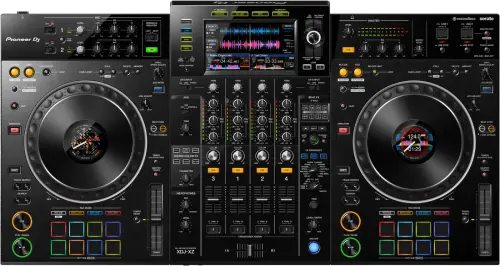
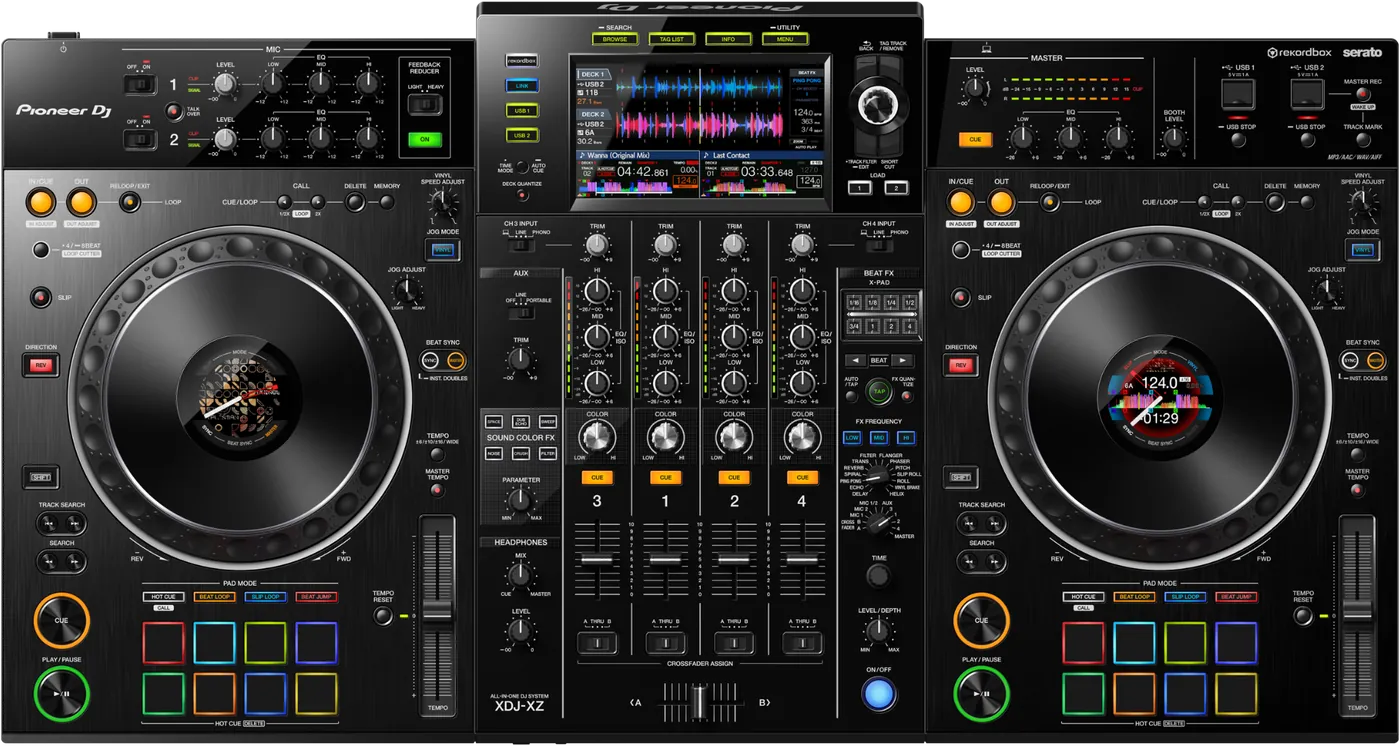
Booth briefing. The XDJ-XZ is Pioneer DJ's four channel all-in-one with 2 onboard decks, and channels 3 and 4 taking LINE, PHONO, or the computer on the USB Type-B port, so turntables, CDJs and a laptop all reach the mixer. It reads FAT, FAT32, exFAT and HFS+ drives, never NTFS, on the original Device Library format. MASTER REC records to a drive in the USB2 slot, a drive is released by holding [USB STOP] for 2 seconds before it comes out, and the highest published firmware is 1.26.
When it goes wrong: The CDJ will not read the USB Playlists not showing How to format a USB for a CDJ
Fast Lane
The five things that decide your gig
The five things on the XDJ-XZ that change what happens next, if you are reading this in the booth. All five are explained in full further down this page.
It reads exFAT: FAT, FAT32, exFAT, HFS+, and NTFS is not supported.
A modern large drive works here, which is not true of the XDJ-RX or RX2 and is the difference people assume the other way round.
It reads the original Device Library, the same generation as the CDJ-3000, so a mixed booth browses.
MASTER REC (WAKE UP) writes to USB2 only.
A drive in the other slot records nothing, which is the rule that catches most people.
The published capacity figure is 90 minutes per gigabyte, and the only split is the one you make yourself with TRACK MARK.
No sound from the SEND output, fixed in 1.10.
Before you read the version, check the switch: the SEND carries the channel chosen with the BEAT FX channel selector switch and nothing else.
The same release added Serato DJ Pro support, so 1.10 is the floor for that too.
PRO DJ LINK misbehaved with jog and beat sync, fixed in 1.22.
Check the version, and check the port: the network takes 2 DJ players and the three LAN sockets are not interchangeable.
Linked players behaving oddly is a documented firmware condition here, not necessarily a cabling problem.
Linked players misbehave, or the jog and beat sync feel wrong
It powers down on standby after 4 hours, not minutes.
Five conditions have to hold at once: no button or knob is touched, no audio is coming in, no PRO DJ LINK connection is made, no USB device is in a top panel Type-A slot, and no computer is on the rear Type-B port.
A dark unit that is asleep rather than dead shows it, because the tell is the MASTER REC (WAKE UP) button lit in red.
Compare
Playing on a different deck?
Pick the deck you are about to touch. This says what changes for the drive in your bag, and nothing else: the rest of what matters on that unit is on its own page.
If something goes wrong
The unit will not read my drive
Short answer. The XDJ-XZ reads FAT, FAT32, exFAT, HFS+ and NTFS is not supported, so check the format first. exFAT works here, so a large drive is fine. Firmware updates specifically need FAT or FAT32, not exFAT and not HFS+.
Why this happens. NTFS is the Windows default for large drives and is refused across this range. On macOS the GUID Partition Map is not supported, and a Mac Extended case-sensitive volume may not read reliably. Firmware 1.23 improved HFS+ reading, so a Mac formatted drive behaves better from that version onward than it did before it. Format is not the only cause, though: the manual also refuses optical disc devices such as external DVD or CD drives, USB hubs, and iPods, and adds a caveat about the adapter people reach for when a unit has no card slot: "USB devices equipped with flash card readers may not operate properly when connected to this unit."
Fix it now. Borrow a FAT32 or exFAT drive, or play from the other deck while you sort it. Plug into the unit directly, never through a hub. If the drive is HFS+ and the unit is on old firmware, that combination alone can be the problem, so try a FAT32 stick before concluding the drive is dead. If the USB indicator is flashing on its own, that is the over-current warning rather than a dead drive, and the documented recovery is to remove the drive, and if the unit does not go back to normal, to switch it off and on again. After that: "Avoid re-using the USB device for which an excess current has been detected."
When the drive mounts but the library does not. A partitioned drive is the usual answer, and the rule is exact: "If multiple partitions are set on the USB device, only the first partition can be used. (When rekordbox library information is present, the partition containing the rekordbox library information has priority.)" Music sitting on a second partition is invisible, and the priority clause is why the same drive sometimes works and sometimes does not.
What you see on screen. A corrupted file gives E-8302, and a format the unit does not support gives E-8304, E-8305, which is the code behind most drives that mount and then refuse to play. If a track stops being playable mid-set, the deck does not simply stop: "When a track can't be played any longer, a 4-beat loop is set automatically to keep the sound going." That looks like a crash, and it is not, but there is exactly one way out: "The operation is restricted during emergency loop. To cancel emergency loop, load the next track."
Avoid it next time. One exFAT or FAT32 partition, exported from rekordbox at home, plus a small FAT32 stick kept aside for firmware updates. Always release a drive by holding [USB STOP] for 2 seconds before pulling it, because the manual is explicit about what pulling it early costs: "Do not disconnect the USB device or turn off the unit while the USB indicator is lit or flashing. Doing so could delete the management data of this unit and damage the USB device, resulting in unreadable data." If the unit is behaving strangely after a static hit rather than a drive fault, the published recovery is turning off the power, disconnecting the power cord, connecting the power cable again, and then turning the power back on.
A track will not play and a code is on the screen
Short answer. Three codes cover almost everything the XDJ-XZ will refuse. E-8302 is CANNOT PLAY TRACK: the track data on the storage device could not be read correctly, and AlphaTheta ask you to check whether the same track plays on another player that supports the same formats, because the likely answer is a corrupted file. E-8304 and E-8305 are both UNSUPPORTED FILE FORMAT, which is not about the drive at all: the file is in a format this unit does not play, and the fix is to load music in a supported format.
Why this matters. The XDJ-XZ throws these mid-set and they look like the drive dying, which is the one conclusion that makes a DJ pull a working stick out of a working player. Two of the three are about the file and one is about the file too. None of them is the unit.
Fix it now. Load the next track. If everything from one folder throws the same code, that folder went onto the drive in a format this unit does not play, so use your other drive and fix the export later.
Avoid it next time. Export from rekordbox rather than dragging files onto a drive, and let the export finish before you eject. A part-written file is a corrupted file.
Linked players misbehave, or the jog and beat sync feel wrong
Short answer. The XDJ-XZ had documented faults in exactly these three places below firmware 1.22, which fixed PRO DJ LINK not working properly together with jog wheel inconsistency and beat sync faults. Check the version before you rewire the booth.
Check the port before the cable. The three LAN sockets have fixed roles: LINK (EXTENSION) is for the computer running rekordbox, and the two LINK (CH3/CH4) sockets are for Pioneer DJ players. A laptop in a player socket, or a player in the extension socket, is a wiring fault that presents as a network fault. The network takes 2 DJ players, so a third one is not a configuration problem to solve.
Fix it now. Read the version off the unit and update to the highest published version, currently 1.26. Use the shielded LAN cable supplied with the connecting device on the player sockets, and leave the cable alone while files or information are being shared. If you cannot update during the gig, run the linked players independently rather than fighting sync, and treat the XZ as a standalone unit for this gig.
Avoid it next time. Make the firmware version part of your arrival check on an unfamiliar XZ. 6 of the seven published versions carry a fix list rather than only features, so an old unit is measurably worse, not just older.
No sound from the SEND output
Short answer. The XDJ-XZ sends only one thing out of that terminal, which is the channel chosen with the BEAT FX channel selector switch, so the switch position is the first thing to look at. On early firmware there was also a documented fault where no sound came out of the SEND output terminal at all, fixed in 1.10, the first update this unit received.
Why this matters. If you patch an outboard effector into SEND and get nothing, the instinct is to suspect the cable or the effects unit, and the two documented causes are neither. A selector pointed at a channel that is not playing sends silence, and a unit that has never been updated had a silent send whatever the switch was doing.
Fix it now. Turn the BEAT FX channel selector to the channel you actually want to feed, and confirm that channel is making sound. Then check the version, and if it is below 1.10, update. After both of those, the cable and the outboard unit are worth checking, in that order.
Worth knowing. There is no RETURN terminal on this unit, so the effector's output has to come back on a spare LINE or AUX input rather than into a loop, and that is a cable decision made at load-in. The XDJ-AZ, the model that replaced this one, has no SEND at all, so if an outboard effector is part of your setup this is the unit that feeds it.
What to watch for
Firmware, and what each version fixed
The fixes that matter. 1.10 fixed no sound from the SEND output, and added Serato DJ Pro and FLAC playback. 1.12 fixed played tracks being shown incorrectly on the XDJ-XZ screen when using rekordbox in Performance mode. 1.22 fixed PRO DJ LINK not working properly, jog wheel inconsistency and beat sync faults, and improved main display image quality and loop in and out adjustment in rekordbox Performance mode. 1.23 fixed sync lost after scratching in Slip mode and some WAV files not playing, and improved HFS+ reading. 1.24 fixed faults using Beat FX. 1.25 is published as minor issues only. 1.26 fixed faults with Master Tempo on. Highest published version is 1.26.
Reading it in the booth. The full model to version table lives on the firmware reference, so you can read the version off the unit and see which documented faults are still live on it.
What is not published. The published history starts at 1.10 and the version list jumps from 1.12 to 1.22, and nothing published says what the numbers in between were, so this page does not guess. No version of this unit's firmware was withdrawn as far as any published document shows.
The unit switched itself off
Short answer. The XDJ-XZ has an auto standby function that is on from the factory and sleeps the unit after 4 hours, but only while five conditions all hold: no button or knob is touched, no audio is coming in, no PRO DJ LINK connection is made, no USB device is in a top panel Type-A slot, and no computer is on the rear Type-B port. In the utility menu the setting is ON or OFF, with no timer to choose.
Why this matters. A changeover or a soundcheck does not reach it, and neither does a booth with a stick in the slot, a laptop on the back or a LINK cable connected, so a dark unit in a working booth is usually something else. Where it does bite is a room left completely alone for 4 hours with nothing plugged in.
Fix it now. Look at the front panel first, because the tell is the MASTER REC (WAKE UP) button lit in red. If it is, press that same MASTER REC (WAKE UP) button and standby is cancelled, with no need to touch the power switch at all.
Avoid it next time. To turn the function off, open the utility screen, which you reach when you press MENU (UTILITY) for one second or more, and set AUTO STANDBY to OFF. Then leave the unit alone for 10 seconds and switch it off with its own power switch, because the manual says settings changed and then cut short by the power going off are not saved.
Compatibility
Which library it reads, and mixed booths
Short answer. The XDJ-XZ reads the original Device Library, the same generation as the CDJ-3000 and the CDJ-2000NXS2. It does not read OneLibrary, which the later generation uses.
What that means in a mixed booth. Export from a current rekordbox and it writes both library formats to the drive, so one stick plays here and on a OneLibrary unit. A drive written only in the newer format will not give this unit a library it can read.
Linking players. PRO DJ LINK runs over a CAT5e LAN cable, with a drive in any linked unit browsable from the others, so a dead drive of your own does not end the set if another unit has one in it. The documented ceiling is 2 DJ players, and the sockets have fixed roles: LINK (EXTENSION) is for the computer running rekordbox, and the two LINK (CH3/CH4) sockets are for Pioneer DJ players. Once files or information are being shared, the cable stays in.
What the drive itself has to look like. Folders go 8 levels deep and no further, and anything past the 10 000th folder or file inside a single folder is not displayed, which is what a partly visible library usually is. On mount time the manual is blunt: "Don't store files or folders other than music files on the USB device."
DVS. rekordbox dvs and Serato timecode, licences separate, using the LINE and PHONO channels with turntables.
The recording is missing, in the wrong place, or cut short
Short answer. The XDJ-XZ records the MASTER output as a WAV file, and MASTER REC writes only to a drive in the USB2 slot, so a drive in the other slot records nothing. Capacity is published by drive size rather than by time: roughly 90 minutes per gigabyte. Files are named REC***.WAV, where *** is a three digit number.
Why this matters. A stick with an hour of space on it does not hold a four hour set, and nothing on the unit warns you at the point the space runs out. There is no automatic split either, so if you want the guest slot or the changeover to land as its own file, you have to mark it while it is happening.
Fix it now. Put the recording drive in the USB2 slot before you start, on a stick with room for the whole set at 90 minutes per gigabyte. Press TRACK MARK at a boundary you want to find later and the file divides right at that point, with recording continuing into a new one. For level, the manual gives one instruction: "Adjust the [MASTER LEVEL] knob so that the master level indicator lights around [0 dB] at the peak level."
Avoid it next time. Decide which slot is the record slot and which is the music slot, and keep it consistent across gigs so it stops being a decision. Release the drive with [USB STOP] held for 2 seconds when the set is over, because the recording is only safely closed once the unit has let go of it.
Features explained
What it is, and how the four channels are used
The shape of it. 4 mixer channels with 2 onboard decks. Channels 1 and 2 are the decks. Channels 3 and 4 have an input selector switch with three positions, taking LINE, PHONO, or the computer on the USB Type-B port, which is what makes this unit fit a booth that also has turntables or a pair of CDJs.
Software. It runs standalone from a drive, and supports rekordbox in export and link modes. Serato DJ Pro was added in firmware 1.10, and the manual describes how it connects: "Serato DJ Pro is plug and play with this unit." The same release added FLAC playback, so a FLAC library needs a unit on 1.10 or higher. It supports DVS through both rekordbox and Serato, licences separate.
The layout argument. Pioneer DJ built it so playing on it feels like using CDJs beside a DJM rather than like using a controller, which is why a DJ who only ever plays CDJs can walk up to one and work.
The reference numbers
The published figures. 4 channels, 2 onboard decks. 878 mm wide, 466 mm deep, 118 mm high, weight 13.0 kg. The two USB Type-A slots are rated 5 V / 1 A. Announced November 2019. Model names: XDJ-XZ in black, the XDJ-XZ-N in gold, and the XDJ-XZ-W in white.
Lineage. AlphaTheta describe the XDJ-AZ as this unit's successor and call this one its predecessor in their own words. Both are covered here, and the differences that matter in a booth are the library generation and the SEND output, which the XZ has and the AZ does not.
Professional tips
Working an XZ that lives in the venue
Decide which slot is the record slot before the drives go in. MASTER REC writes only to a drive in the USB2 slot, so a set you thought you were recording to the other one is not being recorded at all. Size the stick from the published figure of 90 minutes per gigabyte rather than hoping, and press TRACK MARK at any boundary you will want to find again, because nothing splits the file for you.
Check the version before you promise Serato or an outboard effector. Both depend on the same update: Serato DJ Pro support was added in 1.10, and no sound came out of the SEND terminal before that version. The highest published version is 1.26, and a booth unit nobody has updated does neither, which from where you are standing looks like a bad cable or a licence problem.
Export so the drive carries both library formats. This unit reads the original Device Library and does not read OneLibrary, and the unit in the next booth may be the other way round. Exporting from 7.2.13 or later writes both, which leaves you with one stick that plays on either and removes a guess you would otherwise be making at load-in.
Plan channels 3 and 4 before you get there. There are 4 mixer channels and only 2 onboard decks, and the input selector on the other two takes LINE, PHONO, or the computer on the USB Type-B port. That third position is how a laptop's extra decks reach the mixer at all, which is worth knowing before you decide the driver is broken, and the LINE and PHONO positions are how a guest plugs in without touching your decks, but only if somebody brought the cables for it.
Never pull a stick out of a working unit. Hold [USB STOP] for 2 seconds and wait for the indicator to go out first, because a quick tap does nothing and the manual says what a hurried swap costs: "Do not disconnect the USB device or turn off the unit while the USB indicator is lit or flashing. Doing so could delete the management data of this unit and damage the USB device, resulting in unreadable data." The same warning covers switching the unit off with a drive still active, which is what a venue killing the power strip at the end does.
Change a utility setting, then give it a moment. If you turn AUTO STANDBY off on a house unit, the setting only sticks if the unit stays on for 10 seconds afterwards and is then switched off with its own power switch. A closing routine that cuts the power straight after loses the change, and nobody finds out until the next time somebody leaves the booth idle for 4 hours.
Connections and setup
Connections, and recording
Inputs. 2 mic inputs on XLR or TRS, 2 PHONO and 2 LINE inputs on RCA, plus an AUX input.
Outputs. Balanced XLR and RCA master, a TRS booth, two headphone jacks, and a SEND output on a TS jack for an outboard effector. There is no RETURN terminal, so the wet signal has to come back on a spare LINE or AUX input rather than into a loop. The published terminal list has 3 LAN sockets for PRO DJ LINK, and they are not interchangeable: LINK (EXTENSION) is for the computer running rekordbox, and the two LINK (CH3/CH4) sockets are for Pioneer DJ players.
Computer. Two top-loading USB Type-A ports for drives and one USB Type-B to a laptop. Both platforms need the same thing, which is a dedicated driver that has to be installed on Windows and on macOS before the unit is connected, and the manual warns that connecting first can throw an error instead. Connect the laptop straight to the unit, because optical disc devices such as external DVD or CD drives, USB hubs, and iPods are all listed as unsupported.
Recording. To a drive in the USB2 slot only, as WAV, at roughly 90 minutes per gigabyte. Press TRACK MARK while recording to start a new file at that point. See the known issue below, because the slot rule surprises people.
Preventive maintenance
Keeping it gig-ready
Cleaning the touch display. The touch display has its own cleaning rule and it is not the one for the rest of the unit. AlphaTheta ask for no organic solvents, no acids and no alkalis on that surface, and allow either a soft dry cloth or a cloth dampened with neutral detergent and squeezed out properly.
Why it matters. The XDJ-XZ browses through that display, so a surface that has been cleaned with the wrong thing is a unit you cannot search on. Solvents are what live behind most bars, and one wipe is permanent.
Do this. Keep a dry cloth in the bag and use it. If the screen genuinely needs more than that, neutral detergent on a properly squeezed cloth is the only wet option AlphaTheta allow. And check firmware between bookings rather than on gig day.
Firmware, drivers and manuals
Official downloads and documents
Go to AlphaTheta for the files themselves. We link their pages instead of hosting a copy, because a manual copied here is a snapshot of release day and theirs is the one that stays current.
One document class decides more than the others on this model: the file systems this unit accepts are settled by AlphaTheta’s maintained FAQ rather than by the manual, and that is the link this page cites for them.
Manuals. Official Pioneer DJ manual page →
Broken link? Let us know and we'll fix it.
Frequently asked questions
Quick answers
- Does it read exFAT?
- Yes. FAT, FAT32, exFAT and HFS+ are all supported. NTFS is not.
- Can I connect CDJs to it?
- Yes, up to 2 Pioneer DJ players, on the two LINK (CH3/CH4) sockets with CAT5e cable. The third port, LINK (EXTENSION), is for a computer running rekordbox rather than for a player.
- Does it run Serato?
- Yes, plug and play, from firmware 1.10.
- Can I use a USB hub, or a drive with more than one partition?
- Neither reliably. Pioneer list USB hubs as unsupported along with optical drives and iPods, and where a drive has multiple partitions only the first one can be used.
- How long can it record, and where does the file go?
- Recording goes to the USB2 slot at roughly 90 minutes per gigabyte, as WAV files named REC followed by a three digit number. TRACK MARK splits the recording as it runs.
- Why does it switch itself off?
- A 4 hour standby, and it only triggers when every one of its conditions is met: no button or knob touched, no audio coming in, no PRO DJ LINK connection, no USB device in a top panel slot and no computer on the rear Type-B port. The setting is ON or OFF with no timer to choose. MASTER REC (WAKE UP) lights red and wakes it.
Commonly paired with
What you usually find beside it in working booths, from club, festival and rental installs rather than from a manufacturer document.
Pioneer DJ All brands Knowledge base FAQ and Fixes Dictionary
Keep the Emergency Card
We will email you the printable PDF so it is on your phone before the next dark booth. Occasional notes that save gigs. No spam, unsubscribe in one click.
Registering is free and counts everywhere on Save My Gig. We send a confirmation email first. Your address is stored with Brevo, our email provider. Unsubscribe any time. Privacy
Sources: AlphaTheta's own XDJ-XZ Operating Instructions, document DRI1625B, the XDJ-XZ quick start manual DRH1643D, their firmware page and the change history published beside it, their support article on the file systems this unit reads, their customer notice of 18 March 2026 about USB devices, the XDJ-XZ product page and the 2019 announcement, checked 8 August 2026. Specifications theirs, priorities ours.