

XDJ-RX2, the field manual
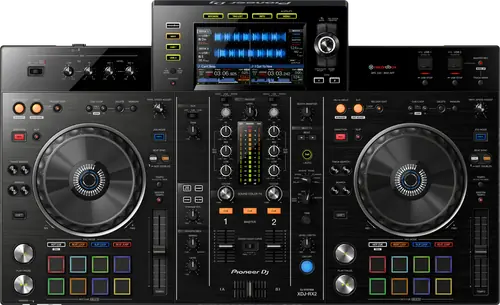
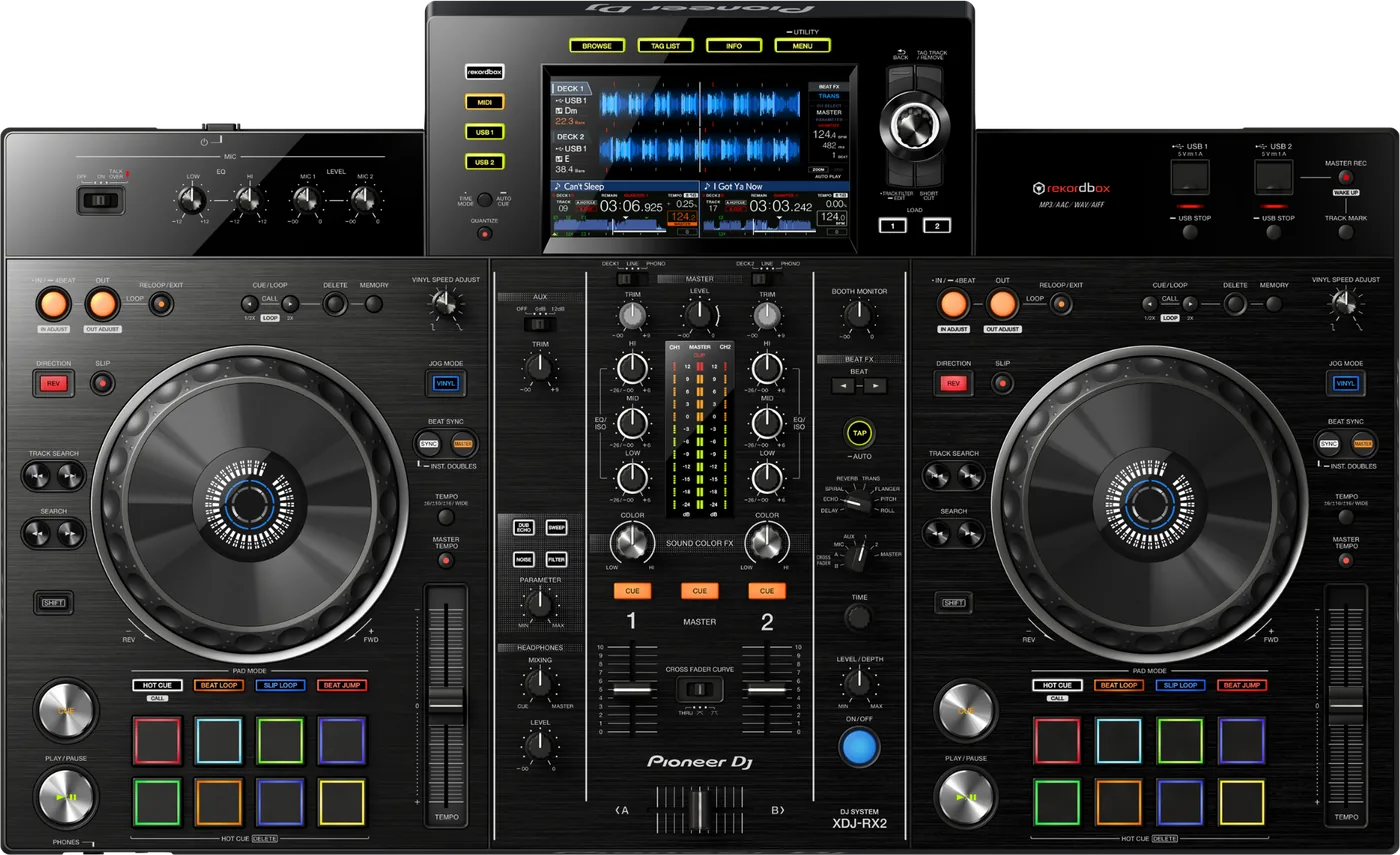
Booth briefing. The XDJ-RX2 is a 2-channel AlphaTheta all-in-one that plays from a USB drive with no computer attached, with a touch display on the top panel. Its Operating Instructions list FAT16, FAT32 and HFS+ as the drive formats it reads, with NTFS not supported and exFAT not read, so a drive over 32GB, which usually arrives formatted exFAT, is reformatted to FAT32 before it plays here. It is the standalone answer in its part of the range, with no laptop in the chain. The touch display notes, the AlphaTheta support articles for it and the drive preparation steps are covered in the sections below.
When it goes wrong: The CDJ will not read the USB Playlists not showing How to format a USB for a CDJ
Fast Lane
The five things that decide your gig
The five things on the XDJ-RX2 that change what happens next, if you are reading this in the booth. All five are explained in full further down this page.
No exFAT. It reads FAT16, FAT32, HFS+, and NTFS is refused too.
The touch display is this unit's documented weak point.
AlphaTheta maintain four separate support articles about it. Four articles about one screen tells you where this model's failures cluster.
Worth knowing before you plan a set around touch browsing on a unit you do not own.
Firmware 1.43 fixed WAV files that would not play.
Dated 11 April 2024 and the highest published release. It is a playback fault, so it hits mid-set rather than during preparation.
Read the version in UTILITY if your library leans on WAV.
A Device Library export is what makes the drive browse.
The player reads a database rekordbox wrote in Export mode. Missing or written for a newer library and the drive mounts showing nothing.
A drive that mounts but lists no playlists is a library problem, not a format problem, and the two get confused constantly.
It plays standalone: 2 channels, 2 decks, no computer.
Put a correctly prepared drive in and it plays with nothing else attached.
That independence is the point, and it means every mistake has to be caught before you leave the house.
Compare
Playing on a different deck?
Pick the deck you are about to touch. This says what changes for the drive in your bag, and nothing else: the rest of what matters on that unit is on its own page.
If something goes wrong
The unit will not read your USB drive
Short answer. On the XDJ-RX2, suspect the format first. It reads FAT16, FAT32, HFS+ and nothing else. A drive that is exFAT or NTFS will be refused however healthy it is.
Why this happens. Drives over 32GB usually ship exFAT, and a Mac that erased the volume instead of the device leaves a GPT scheme behind. Both look completely normal on a computer.
Take the drive out properly before you move it. The instinct is to pull it straight into the other slot, and the manual says what that costs: "Do not disconnect the USB device or turn off this unit while the USB indicator is lit or flashing. Doing so could delete the management data of this unit and damage the USB device, resulting in unreadable data." The procedure: "Press the [USB STOP] button for over 2 seconds."
Fix it now. Then try the other USB slot and another drive, since that separates a drive problem from a unit problem in seconds. If you have a laptop, check the format: anything other than FAT32, FAT16 or HFS+ is your answer. Recover the music off the drive before you reformat anything, never after.
Two causes that are not the format. "Do not use a USB hub." And if the drive is HFS+ and the unit is below firmware 1.35, the missing library is a documented fault of that combination rather than of your export.
If the unit looks dead rather than fussy. The front panel does tell you, on this model: "When auto standby is functioning, the [MASTER REC (WAKE UP)] button is lit in red." Standby is not instant either, because standby arrives after four hours only when no control has been touched, the channel level indicator is dark, playback is stopped, no PRO DJ LINK connection exists, no USB device is in the top panel slot and no computer is connected. That same button wakes it.
And if it is looping on its own and ignoring you. Emergency loop, not a crash: "DJ playback is restricted during emergency looping. To cancel emergency looping, load the next track."
Avoid it next time. Format FAT32 with an MBR scheme and carry two identical drives.
The unit looks dead but one button is red
Short answer. A dark XDJ-RX2 with one red button is asleep, not dead. AlphaTheta document that when auto standby has kicked in the MASTER REC (WAKE UP) button is lit in red, and that button is the way back. The unit ships with auto standby ON, so this is the factory behaviour rather than something somebody changed, and AUTO STANDBY on the MENU (UTILITY) screen is where you set it to OFF.
Why this matters. Twenty minutes of nothing happening is a changeover, a soundcheck break, or the hour before doors. A DJ who arrives to a dark unit starts checking the mains, and the answer is one button that is already telling them.
Fix it now. Press MASTER REC. If the red light is on, that is all it takes.
Avoid it next time. Decide the setting at soundcheck rather than rediscovering it. It ships on, so unless somebody has changed it on the unit in front of you, it is on.
A turntable sounds distorted, or TRIM does nothing
Short answer. On the XDJ-RX2 this is one cause with two symptoms, and the second is the one people misread. A turntable on the PHONO terminals that sounds distorted, or a channel level indicator that does not change at all when you turn TRIM, means line level is arriving at a phono input. Three things do it: a turntable with a built-in phono equalizer, which belongs on the LINE terminals; a turntable whose own LINE/PHONO switch is set to LINE; or a computer audio interface between the two that outputs line level, which also belongs on LINE.
Why this matters. The dead TRIM is the giveaway and it is the one people miss. A phono input expects a tiny signal and amplifies it hugely; give it line level and TRIM has nothing left to do. That reads as a broken channel, so the cable gets moved to the other channel and found broken there too.
Fix it now. Move the turntable to the LINE terminals and set that channel to LINE. Ten seconds.
Avoid it next time. Know whether your deck has its own phono stage before the gig. A borrowed turntable is the one that catches you.
The touch display is this unit's documented weak point
Short answer. AlphaTheta maintain four separate support articles about the XDJ-RX2 touch display. That is unusual, and it tells you where this unit's failures cluster. The article titles, verbatim:
- There is no response when the touch display is touched.
- Does the touch display support multi-touch?
- A different position on the touch display from the position I touch responds. I calibrated the touch display, but this did not fix the problem.
- When two places (buttons) on the touch display are touched, a location that was not touched sometimes responds.
Why this matters. Three of those four are about the display responding in the wrong place or not at all, and one of them states plainly that calibration did not resolve it. On a unit where browsing, loading and most of the library live behind the screen, a display that mis-registers your touch is an operational fault, not a cosmetic one.
Fix it now. We are not going to paraphrase AlphaTheta's procedures here. Read their articles for this unit directly, linked below, and follow the manufacturer's own steps. In the booth, the practical fallback is the physical controls: the rotary selector, the load buttons and the transport all work without the screen, so you can keep a set running by browsing on the encoder.
Avoid it next time. Test the screen across its whole surface at soundcheck rather than only where you happen to tap, and know the encoder-only workflow before you need it.
Official documentation. XDJ-RX2 support, Help Center →
What to watch for
Documented fixes, by firmware version
What is in the record. Fixed in firmware 1.43, dated 11 April 2024, the highest published release: some WAV files would not play on the XDJ-RX2. Other minor bugs were fixed in the same release.
Why that one matters. It is a playback failure on a format DJs use specifically because they trust it. A file that plays everywhere else and refuses here, on a unit below 1.43, is a known fault rather than a corrupt file, and it is worth ruling out before you start deleting music.
The rest of the record. Thirteen releases are documented, and these are the ones with booth consequence:
- 1.38, February 2020
- Certain AIFF files did not play properly, and Beat SYNC misbehaved when a CUE was triggered or a track was paused.
- 1.37, June 2019
- A MEMORY LOOP could not be called with the CUE/LOOP CALL button, and the KEY sort order in the PLAYLIST category differed from every other category.
- 1.35, March 2019
- The rekordbox database was missing on some HFS+ formatted USB devices. Also: an intermittent TEMPO SLIDER centre position fault, and intermittent audio skipping on a track recorded through USB REC.
- 1.34, December 2018
- The HEADPHONES MONO SPLIT and STEREO setting was not saved across a power cycle, and MASTER TEMPO did not work directly after scratching.
- 1.32, June 2018
- Track ratings set on deck 2 were saved on deck 1.
The HFS+ one changes what you should do. This page lists HFS+ among the file systems the unit reads, and it is. But below firmware 1.35 the documented fault is the rekordbox database going missing on some HFS+ drives specifically. That presents as a failed export, and re-exporting to the same card fixes nothing. On an old unit, the format is the suspect.
Do this. Note the firmware version on any XDJ-RX2 you are handed, and get your own to 1.43. The firmware update itself needs a drive formatted FAT or FAT32, which is AlphaTheta's own requirement in the update guide.
Official documentation. Firmware, Help Center →
Update procedure. Firmware update guide →
Found an entry we have missed? Tell us and we will add it.
An empty waveform is not always a broken file
Short answer. The XDJ-RX2 documents two display limits and neither is a fault. The scale is not shown for a track longer than 15 minutes, and the enlarged waveform is not shown for a track longer than 60 minutes. Anyone playing long-form mixes meets both and reads an empty waveform as a broken file. Separately, a track recorded in VBR can take a moment before the playing address appears in the remaining time display, and the browse category will not appear at all if the drive carries no rekordbox library information or if the drive is write-protected.
Why this matters. Both limits land on exactly the material a DJ is most likely to be nervous about: a recorded mix, a long live edit, an album side. Reading a missing waveform as a corrupted file is how a perfectly good track gets abandoned in front of a room.
Do this. Load it and listen. If the audio plays, the file is fine and the display is doing what it is documented to do.
Compatibility
Which drives it will read, and the exFAT trap
Short answer. The Operating Instructions list the supported file systems as FAT16, FAT32, HFS+, and state that NTFS is not supported. There is no exFAT on this unit.
Why this happens. exFAT support arrived on AlphaTheta players later than this unit. It matters more than it sounds, because most drives larger than 32GB are formatted exFAT at the factory, so a brand new drive of a sensible size is refused straight out of the packet. FAT32 with an MBR partition scheme is the format that works here and in almost every other booth.
Two further limits from the same spec table. Only the first partition of a multi-partition drive can be used, and files buried deeper than 8 folder levels cannot be played. Beyond 10,000 folders or files inside a single folder, the rest are not displayed.
Common mistakes. Erasing the volume rather than the device on a Mac, which leaves the drive on a GPT scheme, and assuming a drive that works in a newer player will work here. It is the older unit that sets the format.
How to export from rekordbox so it will play
Short answer. A Device Library export, written by rekordbox in Export mode onto a drive in one of the file systems above.
Why this happens. The player reads a database the software wrote. If that database is missing, written for a newer library format, or damaged, the unit can mount the drive and still show you nothing useful.
Fix it now. If the playlists are missing but the tracks are there, the export is the suspect rather than the drive.
Avoid it next time. Export fresh for the gig rather than copying an older database onto a clean drive, and carry a second identical drive.
Features explained
It plays without a computer, and what that requires
Short answer. The XDJ-RX2 is a 2-channel all-in-one with 2 decks and a touch display. Put a correctly prepared USB drive in it and it plays with no computer attached at all.
Why it matters. That independence is the whole point of the unit, and it moves the preparation earlier: everything that would have been fixable on a laptop in the booth has to be right on the drive before you arrive.
When professionals use it. Small and medium rooms that own one unit instead of a pair of players and a mixer, and touring setups where the venue cannot be relied on.
Common mistakes. Preparing the drive the way you would for a modern player. This unit is from 2017 and its file system support reflects that, which is the next section and the one that actually ends sets.
Professional tips
Before you rely on one in a booth
Format for this unit, not for the most modern one you own. No exFAT here. FAT32 with MBR is the format that works on the XDJ-RX2 and on essentially everything else you will meet, so there is no reason to carry anything else on a gig drive.
Put the music in the first partition and keep the folders shallow. Only the first partition is read and nothing deeper than 8 levels will play. Both limits are silent until the moment a track will not load.
If a WAV refuses to play, check the firmware before you blame the file. That is a documented fault fixed in 1.43. Take a spare drive with the same set as MP3 or AIFF and you have a way out either way.
Learn to browse without the screen. The touch display is the documented weak point on this model. Knowing the rotary selector workflow turns a broken screen from the end of the gig into an inconvenience.
Bring a drive formatted FAT or FAT32 if you plan to update it. That is AlphaTheta's stated requirement for the firmware update itself, separate from what the unit plays.
Firmware, drivers and manuals
Official downloads and documents
Go to AlphaTheta for the files themselves. We link their pages instead of hosting a copy, because a manual copied here is a snapshot of release day and theirs is the one that stays current.
Manuals. Official Pioneer DJ manual page →
Broken link? Let us know and we'll fix it.
Frequently asked questions
Quick answers
- Does the XDJ-RX2 read exFAT?
- No. Its Operating Instructions list FAT16, FAT32, HFS+ and state that NTFS is not supported. Format FAT32 with an MBR scheme.
- Does it need a computer?
- No. It is a standalone all-in-one and plays from a USB drive on its own.
- Can it use a multi-partition drive?
- Only the first partition can be used.
- How deep can my folders go?
- Files deeper than 8 folder levels cannot be played, and beyond 10,000 folders or files within a single folder the rest are not displayed.
- Why will some of my WAV files not play?
- Some WAV files would not play on this unit, and that was fixed in firmware 1.43. Check the version before assuming the file is corrupt.
- What format does the firmware update drive need?
- FAT or FAT32, per AlphaTheta's own update guide.
- Is the touch display a known problem?
- AlphaTheta publish four separate support articles about this unit's touch display, covering no response, wrong-position response, calibration not resolving it, and one location responding when two are touched. Read their articles for the procedures.
- What is the highest published firmware?
- 1.43, dated 11 April 2024.
Playing soon and it is not working?
Start Emergency ModeKeep the Emergency Card
We will email you the printable PDF so it is on your phone before the next dark booth. Occasional notes that save gigs. No spam, unsubscribe in one click.
Registering is free and counts everywhere on Save My Gig. We send a confirmation email first. Your address is stored with Brevo, our email provider. Unsubscribe any time. Privacy
Sources: the XDJ-RX2 Operating Instructions (DRI1479A) on Pioneer DJ's documentation host for the supported file systems, folder limits and the first-partition rule, AlphaTheta's firmware page and firmware update guide, the XDJ-RX2 support hub where the four touch display articles are published, checked 24 August 2026. Specifications theirs, priorities ours.