

CDJ-1500X, the field manual
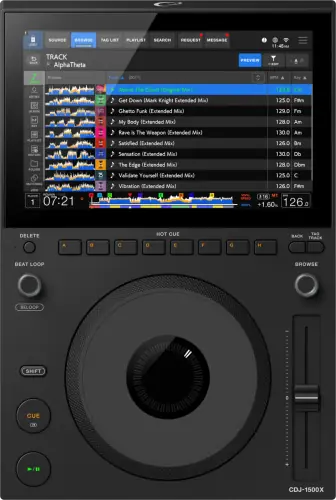
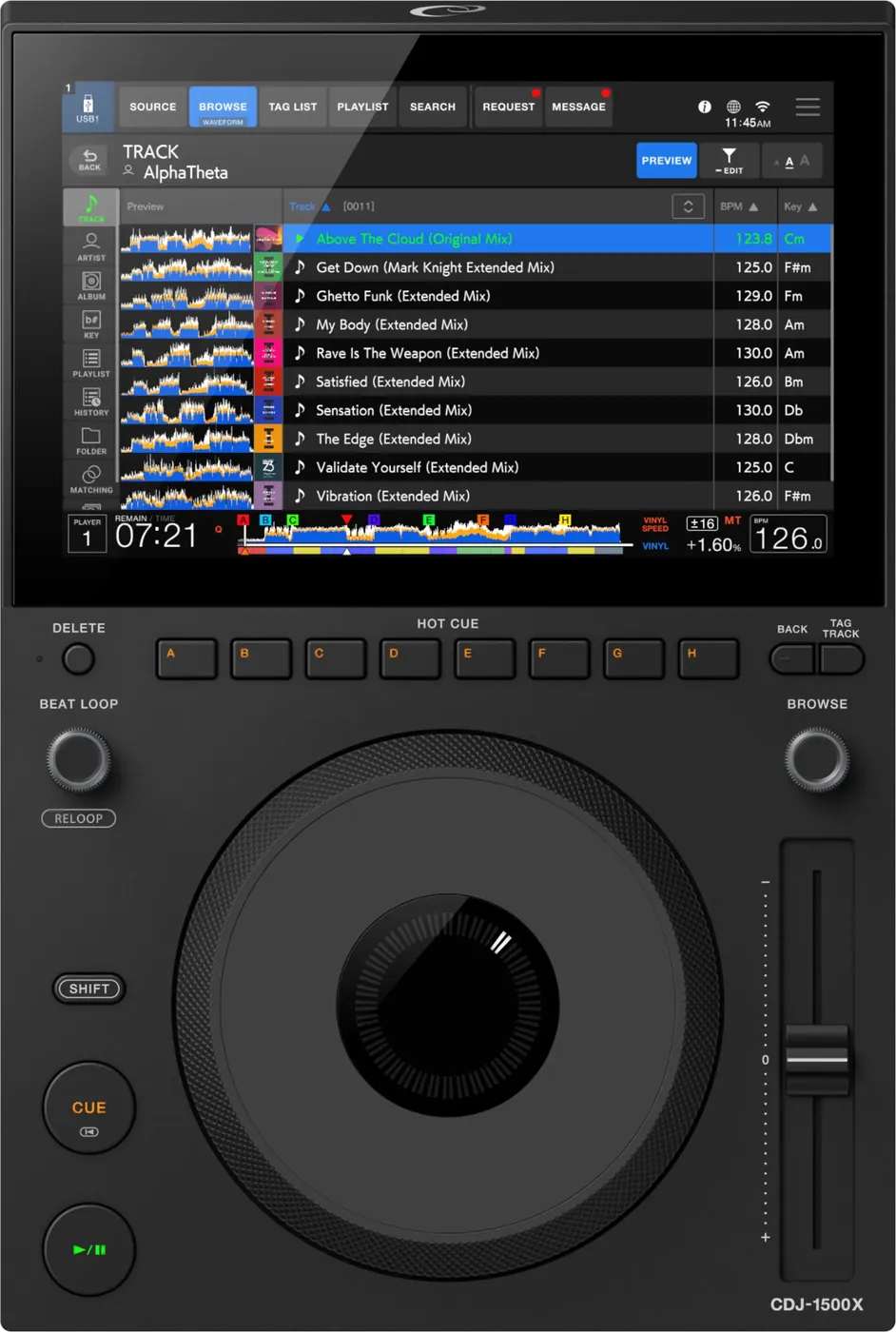
Booth briefing. The CDJ-1500X is AlphaTheta's compact player, and it follows the same library rules as the bigger players in the range. It reads a OneLibrary export from rekordbox 7.2.16 or later, takes storage on two of its three USB sockets, and does not read NTFS drives. Audio leaves on analog outputs only, power comes from an external AC adapter rather than a mains lead, and it links with up to 4 units in a booth. Serato and djay run over it from firmware 1.10 onward, so it covers a laptop set as well as a stick.
When it goes wrong: The CDJ will not read the USB Playlists not showing How to format a USB for a CDJ
Fast Lane
The five things that decide your gig
The five things on the CDJ-1500X that change what happens next, if you are reading this in the booth. All five are explained in full further down this page.
It refuses NTFS, and NTFS is what Windows gives you by default.
OneLibrary only. A drive that works on a CDJ-3000 can browse nothing here.
Export from rekordbox 7.2.16 or later. An older Device Library export has to be converted before this player can browse it, and there is no in-booth conversion.
The drive is fine and the audio files are fine. What the player cannot use is the database written alongside them.
Three USB sockets, and only two of them take a drive.
USB Type-A x1 (storage), USB Type-C x2 (storage x1, PC connection x1). Both storage ports are on the front, and the third USB-C socket, on the back, is for a laptop.
Pick the wrong one and nothing happens: no error, no message, because from the player’s point of view you have not connected a drive at all.
Link caps at 4 players.
Up to 4 units can be connected when using a switching hub. An all-CDJ-3000 rig links six.
On a four-deck set, or a stage with overlapping changeovers, that ceiling is a planning constraint rather than a detail, and it is better to know it now than during a handover.
Cloud and streaming ride the venue’s Wi-Fi.
Built-in Wi-Fi gives you your cloud rekordbox library and streaming from Apple Music, Beatport Streaming, Tidal. Both put the venue’s network in your critical path.
Booth Wi-Fi is frequently the least maintained equipment in the building. Treat it as the track you did not plan for, never as the plan, and carry the drive.
Compare
Playing on a different deck?
Pick the deck you are about to touch. This says what changes for the drive in your bag, and nothing else: the rest of what matters on that unit is on its own page.
If something goes wrong
The player will not read my USB drive
Short answer. Check the file system before anything else. The CDJ-1500X reads FAT16, FAT32, exFAT, HFS+. NTFS is not supported, and NTFS is what Windows gives you by default when you format a drive.
Why this happens. A drive formatted NTFS mounts perfectly on the laptop that made it, so nothing looks wrong until the player is asked to read it. The drive is not faulty and the files are not corrupt. The player simply does not speak that format.
Fix it now. Borrow a drive that is already exFAT or FAT32 and export to it, or play from the other deck while you re-export. Reformatting erases the drive, so it is not a mid-set move unless you have the music somewhere else as well.
Avoid it next time. Format to exFAT or FAT32 deliberately, once, and check it rather than assuming. A drive that has worked in every booth for a year is not proof: it is proof about the players you happened to meet.
The drive mounts but my library will not browse
Short answer. The CDJ-1500X is a OneLibrary player. An older Device Library export has to be converted with rekordbox 7.2.16 or later before this player can browse it.
Why this happens. The drive itself is fine and the audio files are fine. What the player cannot use is the database written alongside them. This is exactly the trap for a DJ whose drive works every weekend on a CDJ-2000NXS2 or a CDJ-3000: those read the older format, and this one wants the newer one.
Fix it now. There is no in-booth conversion. If the folder structure is intact you can often still load tracks by browsing the drive as folders rather than through the library, which loses your cues and playlists but gets music playing. Otherwise use the other deck.
Avoid it next time. Export from rekordbox 7.2.16 or later and confirm the export completed rather than assuming a sync finished. If you play mixed booths, know which of your drives is in which format.
Nothing happens when I plug the drive in
Short answer. You are probably in the computer port on the back. The CDJ-1500X has USB Type-A x1 (storage), USB Type-C x2 (storage x1, PC connection x1), and both storage ports are on the front panel, USB1 in Type-C and USB2 in Type-A.
Why this happens. The two ports that take a drive are on the front panel, and the third USB-C socket is on the rear, where AlphaTheta's manual says to connect a PC or Mac. A USB-C drive fits the rear socket perfectly and does nothing. Nothing is broken and no error appears, because from the player's point of view you have not connected a drive at all.
Fix it now. Go to the front of the player. USB1 takes a Type-C drive, USB2 takes a Type-A drive. Do not use the socket on the back.
Avoid it next time. Look at the front panel in soundcheck, in the light, so you know both storage ports are there and the back one is not for you.
The screen shows E-8302, E-8304 or E-8305
On the CDJ-1500X these codes are about one track rather than the whole drive, which is what separates them from a stick the player will not read at all.
E-8302 means CANNOT PLAY TRACK: the player cannot read the file, which usually means the file itself is damaged, and AlphaTheta suggest testing it on another player that supports the same formats. E-8304 and E-8305 both mean UNSUPPORTED FILE FORMAT, which is about the format rather than the drive. Either way the fix is the file, not the deck.
Nothing from the internet is playing
On the CDJ-1500X the internet features fail quietly in a venue, because nothing on the audio path depends on them. Wi-Fi, the cloud browser and the streaming services all fail here.
Short answer. Switch to the drive. Anything the CDJ-1500X pulls over rekordbox CloudDirectPlay or a streaming service depends on the venue's network, and the venue's network is not yours to fix at 1am.
Why this happens. Booth Wi-Fi competes with a room full of phones, sits behind whatever the venue's contract allows, and is frequently the single least maintained piece of equipment in the building. None of that is a fault in the player.
Fix it now. Play from the USB drive you brought. This is the entire reason to still bring one.
Avoid it next time. Treat cloud access as a convenience for finding a track you did not plan for, never as the way your set is delivered. A local copy of the set on a drive that this player can read costs nothing and removes the venue from your signal path.
For a player that will not join a wireless network, AlphaTheta ask you to check that the network name, the password and the encryption method on the deck match the router exactly, and then to treat it as a radio problem: move the deck and the access point closer together, and take out whatever is between them.
For rekordbox CloudDirectPlay showing no tracks, AlphaTheta give three causes and all three happen before the deck is involved: rekordbox has not finished synchronising with the cloud library, or the tracks were never uploaded to Dropbox or Google Drive, or one of those services is down or under maintenance. There is a fourth cause that is not about the cloud at all: cloud tracks are written temporarily onto the connected USB drive, and AlphaTheta recommend at least 1 GB free on it, so a nearly full stick can break cloud playback on a deck that is otherwise fine.
For a streaming service, AlphaTheta separate the two symptoms the same way: no service at all is the internet connection, and a service that opens with an empty track list is the subscription.
What to watch for
The firmware version decides whether Serato and djay work at all
On the CDJ-1500X there is no documented defect to report, and one documented threshold that matters more than any defect would.
One firmware release exists and it is the one that matters: version 1.10 added compatibility with Serato DJ Pro and djay Pro. A deck still on the shipping firmware does neither, so on an unfamiliar unit the version screen is the first thing to check before you plan a laptop set. Two official AlphaTheta sources date that release differently, the change history document printing July 2026 and their firmware page listing 2 August 2026, so treat the version number as the reliable part and the date as the part their documents disagree about.
Compatibility
Players, mixers, software and PRO DJ LINK
Short answer. Up to 4 units can be connected when using a switching hub, over the LAN port or the built-in wireless. Software the CDJ-1500X runs: rekordbox (Hardware Unlock), djay Pro, Serato DJ Pro.
The number to remember is 4. An all-CDJ-3000 rig links six players. This one caps at 4. If you are planning a four-deck set, or a stage with overlapping changeovers, that ceiling is a planning constraint rather than a detail, and it is better to know it now than during a handover.
Do this. On a mixed booth, confirm what the other decks are before you assume Link will carry everything. Library format is a player-side question, so a booth with both this and a CDJ-2000NXS2 needs a drive strategy, not an assumption.
Short answer. File systems: FAT16, FAT32, exFAT, HFS+. Audio: MP3, AAC, WAV, AIFF, Apple Lossless, FLAC.
Why it matters. The file system decides whether the drive is readable at all. The audio format decides whether an individual track loads. Those are two different failures and DJs routinely mix them up while troubleshooting, which sends them looking in the wrong place.
When professionals use it. exFAT for drives over 32GB and for large single files, FAT32 when you need the widest compatibility with older players in unknown booths. FLAC and Apple Lossless are supported here, which was not true across older generations, so a lossless library is viable if the whole booth is modern.
Common mistakes. Assuming NTFS is fine because the laptop reads it. Assuming a lossless library will load on every deck in a mixed booth.
Features explained
CloudDirectPlay, streaming and NFC login
Short answer. Built-in Wi-Fi gives you your cloud rekordbox library and streaming from Apple Music, Beatport Streaming, Tidal. Tapping your phone to the deck logs you in and loads your settings.
Why it matters. The genuine win is the track you did not plan for: a request, a read of the room, something you own but did not export. That used to mean no. The genuine cost is that both features put the venue's network in your critical path.
When professionals use it. As a second option alongside a drive, not instead of one. For finding the unexpected track, not for delivering the planned set.
Common mistakes. Arriving without a drive because the library is in the cloud. Assuming the venue has usable Wi-Fi in the booth specifically, which is often a different answer from whether the bar has Wi-Fi.
The compact format, in practice
Short answer. 252.1 x 374.7 x 116.5 mm and 3.6 kg, with a 10.1-inch capacitive full-color touchscreen and 8 hot cue buttons.
Why it matters. Small booths are the norm, not the exception, and a player that fits changes what a venue can install. It also means the layout is tighter than a CDJ-3000, so controls you find by feel are not where your hands expect.
When professionals use it. Bars, small clubs, mobile rigs and any booth where the DJ table was designed for two turntables.
Common mistakes. Treating the tighter layout as identical to a 3000. Walk the deck before doors, the same as you would a strange mixer.
Professional tips
Bring a drive this player can definitely read
Short answer. One drive, exFAT or FAT32, exported from rekordbox 7.2.16 or later, tested in a player before the gig and not only on the laptop.
Why it matters. Both of this player's most likely refusals, the file system and the library format, are decided at home and cannot be fixed in the booth. Ten minutes at your desk removes both.
Do this. Export, then eject and plug the drive back in and browse it, so you are checking the finished artifact rather than the software's opinion of it. If you can borrow ten minutes on a real player, better again.
Connections and setup
The rear panel, the adapter, and what ships with it
The CDJ-1500X is powered and wired differently from the players it sits beside, and both differences show up in a booth.
The rear panel carries AUDIO OUT L and R for the supplied analog cable, a LINK port for the supplied LAN cable, a USB port for a PC or Mac, a Kensington security slot, a cord hook, and a USB port that takes the power. There is no digital output, so everything this deck sends to a mixer goes down the analog pair.
It does not take a mains lead. Power arrives through a USB port from a supplied AC adapter, and AlphaTheta print handling rules for that one cable: never use the adapter if its connector is bent or broken, insert it straight, keep sweat and water off the connector, and leave no load on the cable by placing the unit and the adapter at the same level. On a compact deck that travels, the adapter is the part that goes missing or gets damaged, and without it the player does not turn on at all.
In the box: the player, the AC adapter and power cord, an analog audio cable, a LAN cable, the Quick Start Guide and the Precautions for Use. No digital cable, because there is no digital output to use one with.
Plugging into a computer, and what Serato and djay ask for
On the CDJ-1500X a laptop is a rear panel job, and Windows has a step it cannot skip.
A PC or Mac connects to the USB port on the rear panel, and Windows wants the dedicated audio driver installed first. AlphaTheta ask for the unit switched off and the USB cable disconnected during that install, all other applications closed, and admin rights on the machine, and they note that a half finished install has to be started again from the beginning.
For Serato DJ Pro and for djay Pro, AlphaTheta publish a connection guide each and both open with the same two conditions: the player firmware up to date, and one USB cable per player to the computer. Both guides describe an interface giving high precision control without a control CD.
Firmware, drivers and manuals
Official downloads and documents
Go to AlphaTheta for the files themselves. We link their pages instead of hosting a copy, because a manual copied here is a snapshot of release day and theirs is the one that stays current.
Firmware downloads. Official AlphaTheta firmware page →
Manuals. Official AlphaTheta manual page →
Broken link? Let us know and we'll fix it.
Frequently asked questions
Quick answers
- Will it read an NTFS drive?
- No. AlphaTheta states NTFS is not supported. Use exFAT or FAT32.
- Which file systems does it read?
- FAT16, FAT32, exFAT, HFS+.
- Do I need a specific rekordbox version?
- Yes, 7.2.16 or later, because this is a OneLibrary player. An older Device Library export needs converting first.
- Why does my drive work on a CDJ-2000NXS2 and not on this?
- Almost always the library format. The older players read Device Library, this one wants OneLibrary.
- How many players can I link?
- 4 using a switching hub.
- Is there an SD card slot?
- No. USB only, and only two of the three sockets take storage.
- Does it play FLAC?
- Yes. MP3, AAC, WAV, AIFF, Apple Lossless, FLAC.
- Can I play a whole set from the cloud?
- Technically yes, and we would not. It puts the venue's Wi-Fi in your signal path. Bring a drive.
- Are there known firmware bugs?
- None published. The player was announced 2 July 2026 and AlphaTheta has not released a change history yet.
Playing soon and it is not working?
Start Emergency ModeKeep the Emergency Card
We will email you the printable PDF so it is on your phone before the next dark booth. Occasional notes that save gigs. No spam, unsubscribe in one click.
Registering is free and counts everywhere on Save My Gig. We send a confirmation email first. Your address is stored with Brevo, our email provider. Unsubscribe any time. Privacy
Sources: AlphaTheta's official CDJ-1500X product page and launch announcement, checked 7 August 2026. Specifications theirs, priorities ours.