

DJM-V5, the field manual
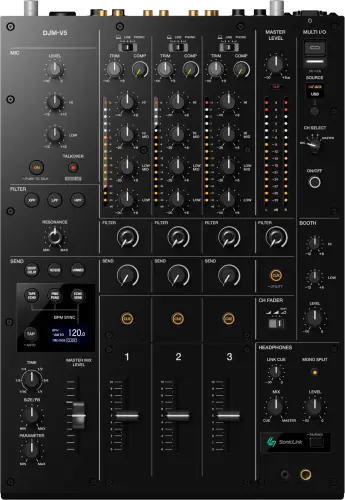
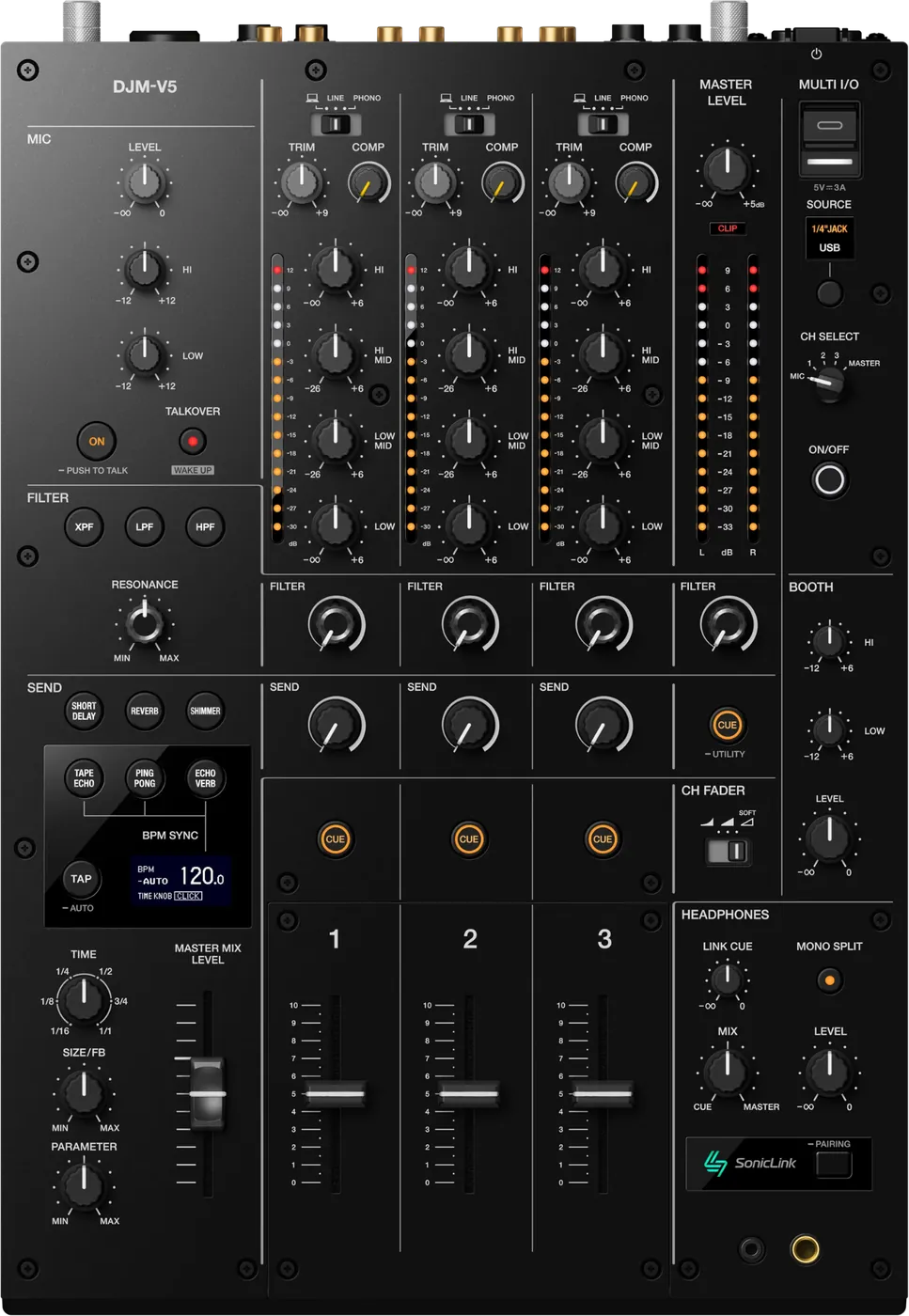
Booth briefing. The DJM-V5 is AlphaTheta's 3 channel club mixer, built for blending rather than cutting: there is no crossfader. It runs at 96 kHz, carries a send and return, and has SonicLink wireless monitoring built in. PRO DJ LINK connects up to 3 players, so it sits at the centre of a booth of up to three decks. A laptop connects as well, with a driver on Windows and none needed on a Mac.
When it goes wrong: No sound from the mixer PRO DJ LINK will not come up
Fast Lane
The five things that decide your gig
The five things on the DJM-V5 that change what happens next, if you are reading this in the booth. All five are explained in full further down this page.
There is no crossfader, and nothing is broken.
The DJM-V5 is built without one. Verified in AlphaTheta's own instruction manual, which documents the channel faders and their three curve settings and contains no crossfader or fader assign anywhere.
If your set depends on cuts or scratching, this is the one thing you cannot solve at the gig. Ask what desk is installed before you accept the booking.
3 channels, and the channel faders are the whole instrument.
Two players plus a microphone fits. Two players plus a drum machine fits. Three players plus anything else does not, and there is no fourth strip to fall back on.
On a four channel desk you can absorb a surprise source. Here you cannot.
PRO DJ LINK caps at 3 players.
Up to 3 multi players and up to 2 computers via a switching hub.
A four-deck plan does not fit this desk, so confirm the player count when you plan the rig rather than when you are patching it.
The send and return loop is an extra way to lose a channel.
Send and return is SEND x1, RETURN x1 (1/4" TS). With the loop in the path, external gear that is powered down or mispatched returns nothing, and nothing is exactly what the channel plays.
It sounds identical to a dead channel, so when a channel goes silent take send and return out of the path before you suspect the desk.
SonicLink takes the cable off your head, and adds a battery.
A transmitter built into the mixer for low latency wireless monitoring, so headphone cues arrive without a cable running to your head.
The cable is one of the few things in a booth that physically tethers you and a common cause of a player getting yanked. Removing it is a real improvement, and it moves your monitoring onto a radio link. Keep a wired pair in the bag.
If something goes wrong
There is no crossfader on this desk
Short answer. Correct, and nothing is broken or removed. The DJM-V5 is built without one. Verified in AlphaTheta's own instruction manual, which documents the channel faders and their three curve settings and contains no crossfader or fader assign anywhere.
Why this happens. This desk belongs to the long-blend family, the same thinking as the DJM-V10-LF. The design assumes you mix with channel faders, EQ and filters rather than with cuts. It is a deliberate choice about how the mixer is played, not a cost saving.
Fix it now. There is no in-booth fix, so adapt the set. Use the channel fader curve selector to steepen the curve on the channels you are working, which gets you closer to a fast cut than a gentle curve will. Filters and EQ kills carry the transitions a crossfader would have. If your set genuinely cannot survive without cutting, and a second mixer exists in the building, that conversation happens before your first track, not during your third.
Avoid it next time. Ask which mixer is installed when you take the booking. This is the single most useful question a cut-dependent DJ can ask a promoter, and almost nobody asks it.
A channel has no signal
Short answer. The usual order, with one extra suspect on the DJM-V5: the send and return loop. Fader up, input selector matched to the source, trim set, then take send and return out of the path.
Why this happens. The inputs are PHONO x3 (RCA), LINE x3 (RCA), MIC x1 (XLR / 1/4" TRS), so a channel can be sitting on phono while you feed it a line source, or the reverse. The SEND x1, RETURN x1 (1/4" TS) loop can also route a channel out to external gear that is not returning anything, which sounds exactly like a dead channel.
Fix it now. Move the source to a different channel. If it plays, the fault is in the channel strip or its routing. If it stays silent, the fault is upstream of the mixer, in the player or the cable.
Avoid it next time. One routing pass before doors, every channel, including the send and return state you inherited from the previous DJ.
For no sound or a level that is too low, AlphaTheta ask you to check the input selector switches first, then every cable, then to wipe dust off the terminals and plugs before reconnecting, and finally to look at the ATT setting under MASTER OUT in the utility settings. The selector switch is the one that catches people, because a channel set to the wrong input is silent and looks exactly like a dead channel.
The sound is distorting
On the DJM-V5 distortion is a level decision with two controls and a setting behind them.
For a distorted master, set the MASTER LEVEL knob so the level indicator peaks around 0 dB and, if it still distorts, move ATT under MASTER OUT to somewhere between minus 3 and minus 12 dB. For a distorted channel, the TRIM knob is the control, aimed at the same 0 dB peak on the channel indicator.
MULTI I/O, and the phone it will not take
On the DJM-V5 the effects loop doubles as a phone input, with one hard limit.
MULTI I/O takes an external effects unit on the SEND and RETURN terminals, or a mobile device on the USB port in that section, and there is one hard limit worth knowing before you promise anyone an effects send: the unit supports mobile devices with a USB Type-C port and does not support devices on Lightning connections. The USB connection indicator lights for a compatible device and blinks for an incompatible one, so a blinking light is the answer rather than a fault.
Wireless monitoring has gone silent
Short answer. Go back to wired headphones. The DJM-V5 has a wired headphone output, in two connector sizes, and it does not depend on anything being paired.
Why this happens. SonicLink is a transmitter built into the mixer, so monitoring becomes a radio link with a battery at the other end. A radio link in a crowded room, next to every phone in the venue, has failure modes a cable does not have, and a receiver has a charge level.
Fix it now. Plug in. Cue the next track wired, then deal with the wireless between tracks rather than during a blend.
Avoid it next time. Carry wired headphones even when you plan to work wireless, and charge the receiver as part of your pack down rather than your setup. A monitoring path that can run out of battery is a monitoring path that needs a fallback in the bag.
The mixer is not seeing the players on Link
Short answer. Check how many devices are on the network before you check anything else. The DJM-V5 supports Up to 3 multi players and up to 2 computers via a switching hub.
Why this happens. A booth built for four decks exceeds what this mixer will carry on Link, and the symptom is not an error message, it is a device that simply never appears. The mixer is working exactly as specified.
Fix it now. Reduce the device count to within the limit by disconnecting the extra device at the hub, not by pulling cables from gear that is in use: the manual's own precaution is "Do not disconnect a LAN cable when using PRO DJ LINK." Audio itself does not need the network, so whatever is already playing keeps playing while you sort the count out between tracks.
Avoid it next time. Count the devices when you plan the rig, not when the third player fails to show up. A switching hub does not raise the ceiling.
What to watch for
Documented fixes, by firmware version
Short answer. The DJM-V5's highest published firmware is 1.10, and the change history lists no set-ending bug. Version 1.08 added support for the RMX-IGNITE and fixed unspecified minor bugs, and version 1.10 added djay Pro support for Mac and Windows.
Why it matters. Both entries are feature additions, so the version on the desk decides what the desk can do rather than whether it survives the night. A booth planning an RMX-IGNITE or a djay Pro set needs the matching version; everyone else loses nothing on an older one.
What to do. Note the version on any desk you play, and check the official support page before a show that matters.
Official documentation. AlphaTheta product page →
Instruction manual, PDF →
Found a change history we have missed? Tell us and we will add it.
Compatibility
Players, software and PRO DJ LINK
Short answer. Up to 3 multi players and up to 2 computers via a switching hub. Software, per the manual and the firmware history: rekordbox (Mac/Windows), rekordbox (iOS/Android), djay Pro (Mac/Windows), and rekordbox for Mac or Windows carries the DVS support. djay Pro support arrived with firmware 1.10, so an older unit needs an update first.
DJM-REC works with this mixer. It is on AlphaTheta's official compatibility list, so recording a set or streaming from a phone is available without extra hardware. Mind the connector: the mixer takes a mobile device that has a USB Type-C port; the unit does not support mobile devices that use Lightning connections.
Do this. Confirm the player count against 3 when you plan the rig. Library format on a USB drive is a player-side question and never touches the mixer, so a mixed booth needs a drive strategy independent of this desk.
Features explained
Three channels, in practice
Short answer. 3 channels, and with no crossfader the channel faders are the whole instrument.
Why it matters. Two players plus a microphone fits. Two players plus a drum machine fits. Three players plus anything else does not, and there is no fourth strip to fall back on. On a four channel desk you can absorb a surprise source; here you cannot.
When professionals use it. Long blends, where holding two or three elements against each other with faders, EQ and filters is the point. This is the same design thinking as the V10-LF, which also drops the crossfader.
Common mistakes. Planning a hybrid set with more sources than the desk has strips, then discovering it at load in. Count your sources against three before you pack.
SonicLink wireless monitoring
Short answer. A transmitter built into the mixer for low latency wireless monitoring, so headphone cues can arrive without a cable running to your head.
Why it matters. The cable to your headphones is one of the few things in a booth that physically tethers you, and it is a common cause of a player getting yanked. Removing it is a real improvement, and it moves your monitoring onto a radio link with a battery.
When professionals use it. Where movement matters, and where a spare wired pair is in the bag as the fallback.
Common mistakes. Treating it as the only monitoring path. Arriving with a receiver that was not charged since the last gig.
MULTI I/O, send and return, and the sound
Short answer. USB Type-C x2 (MULTI I/O x1, PC/Mac x1). Send and return is SEND x1, RETURN x1 (1/4" TS). Conversion is 96 kHz, with 32-bit on the channel and return input A/D and on the master, booth, rec and send D/A, 24-bit on everything else.
Why it matters. MULTI I/O is an effect insert, replacing the original sound of one selected channel with the effect sound from the external device. The manual is precise about the method: INSERT method: Replaces the original sound with the effect sound from an external device. So a phone on the USB port is not a source joining the desk, it is an effects processor, running an FX application, inserted on one channel. The SOURCE button selects a mobile device running an FX application on the USB port, or an external effects unit on the 1/4 inch send and return jacks, selected one at a time with the SOURCE button, and the CH SELECT switch picks the channel. One source, one channel, at a time.
When professionals use it. Outboard effects on a resident rig through the 1/4 inch jacks, or a mobile FX application on the USB port. Connect a mobile device that has a USB Type-C port; the unit does not support mobile devices that use Lightning connections.
Common mistakes. Expecting MULTI I/O to bring a phone in as a playback source, and troubleshooting an insert that has switched itself off: the manual notes that MULTI I/O turns off automatically when the unit isn’t connected with an external effects unit.
Professional tips
Ask which mixer is installed
Short answer. One question to the promoter or the technical manager, before you accept: which mixer, and how many players.
Why it matters. Every other surprise in a booth can be worked around in soundcheck. A missing crossfader and a 3 player Link ceiling cannot. Both are answered by one message weeks in advance, and almost no DJ sends it.
Do this. Add the mixer model to whatever you already ask for. If the answer is a V5 and you cut, plan a fader and filter set, or bring your own solution, and decide that at home.
Connections and setup
The rear panel, and what must never go where
The DJM-V5 puts a full club rear panel on a three channel desk, and one rule on it is not a preference.
The rear panel runs, left to right: the power button and a signal GND terminal for a turntable earth wire, MULTI I/O RETURN on quarter inch TS, PHONO on RCA for moving magnet cartridges only, LINE on RCA for players, a MIC terminal that takes XLR or quarter inch TRS, the AC inlet, MULTI I/O SEND on quarter inch TS, REC OUT on RCA, MASTER on balanced XLR, BOOTH, the LINK terminal and a USB port for a computer. AlphaTheta are explicit that line level must never go into the PHONO terminals.
Plugging in a computer, and the half Windows has to install
On the DJM-V5 the computer setup is asymmetric, and a Windows guest at soundcheck is the one who finds out.
AlphaTheta split the computer software by platform. Install the dedicated software on Windows and you get both the Setting Utility and the audio driver; on a Mac only the Setting Utility installs, because the operating system supplies the audio driver. They also state that operation is not guaranteed when multiple units are connected to one computer, which is worth knowing before a two mixer stage plan.
Firmware, drivers and manuals
Official downloads and documents
Go to AlphaTheta for the files themselves. We link their pages instead of hosting a copy, because a manual copied here is a snapshot of release day and theirs is the one that stays current.
Firmware downloads. Official AlphaTheta firmware page →
Manuals. Official AlphaTheta manual page →
Broken link? Let us know and we'll fix it.
Frequently asked questions
Quick answers
- Does the DJM-V5 have a crossfader?
- No. AlphaTheta's instruction manual documents the channel faders and their curve settings and contains no crossfader or fader assign.
- Can I scratch on it?
- Not in the usual sense, because there is no crossfader. If cutting is central to your set, ask which mixer is installed before you accept the booking.
- How many channels?
- 3.
- How many players can I link?
- Up to 3 multi players and up to 2 computers via a switching hub.
- Is it a smaller DJM-A9?
- No. Different channel count, no crossfader, and SonicLink wireless monitoring built in. It is a long-blend desk rather than a reduced 4-channel one.
- What is SonicLink?
- Built-in wireless monitoring, so headphone cues can arrive without a cable. Keep a wired pair as the fallback.
- What software works with it?
- rekordbox (Mac/Windows), rekordbox (iOS/Android), djay Pro (Mac/Windows), with DVS through rekordbox for Mac/Windows. Serato is not documented for this mixer.
- Can I record with DJM-REC?
- Yes, it is on AlphaTheta’s official DJM-REC compatibility list.
- Are there known firmware bugs?
- Nothing set-ending is listed. The change history holds 1.08, RMX-IGNITE support plus minor bug fixes, and 1.10, djay Pro support.
Related mixers
AlphaTheta All brands Knowledge base FAQ and Fixes Dictionary
Playing soon and it is not working?
Start Emergency ModeKeep the Emergency Card
We will email you the printable PDF so it is on your phone before the next dark booth. Occasional notes that save gigs. No spam, unsubscribe in one click.
Registering is free and counts everywhere on Save My Gig. We send a confirmation email first. Your address is stored with Brevo, our email provider. Unsubscribe any time. Privacy
Sources: AlphaTheta's official DJM-V5 product page and instruction manual, checked 7 August 2026. Specifications theirs, priorities ours.