

DDJ-FLX6, the field manual
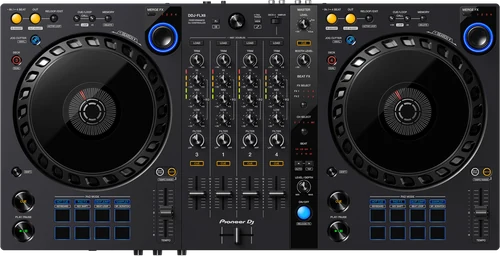
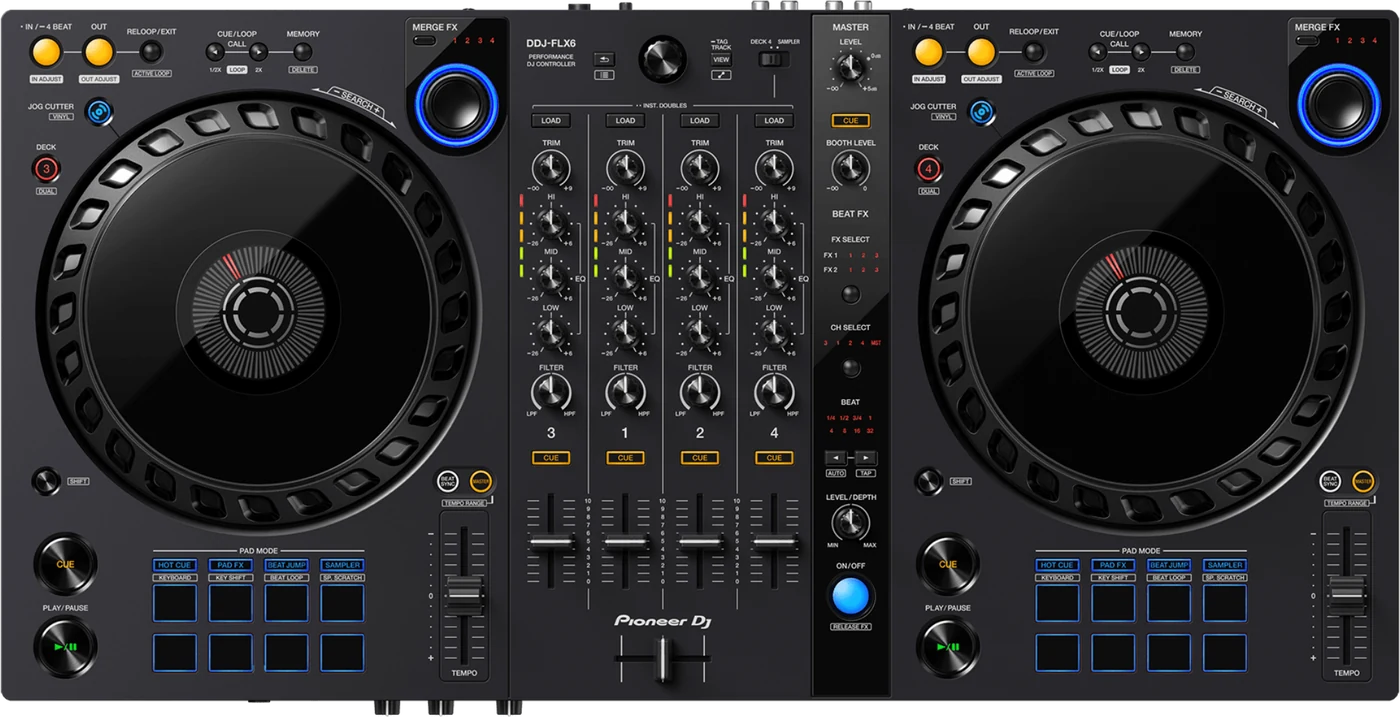
Booth briefing. The DDJ-FLX6 is a 4 channel Pioneer DJ controller that plays through software on a computer, and it takes all of its power from that one USB cable, with no AC adapter in the design. Master and booth outputs are both RCA pin jacks. Deck 4 shares its section with the sampler, selected by the DECK4/SAMPLER switch. Because it is bus powered, the computer it plugs into is both its host and its power supply, which keeps the rig to a single cable.
When it goes wrong: The computer cannot see the controller No sound from the controller
Fast Lane
The five things that decide your gig
The five things on the DDJ-FLX6 that change what happens next, if you are reading this in the booth. All five are explained in full further down this page.
It runs on USB bus power, and four documented things stop that working.
There is no AC adapter. The manual names the conditions: the computer port cannot supply enough power, the computer has other devices connected, the headphones are under 32 ohms, or a mono jack is in the PHONES socket.
Two of those are in your own bag. A controller that will not power up because of the headphones plugged into it is not a guess anyone makes at a gig.
Deck 4 can go silent because of a switch, not a fault.
The DECK4/SAMPLER selector decides whether channel 4 carries deck 4 or the sampler. Set to SAMPLER, deck 4 cannot be heard on that channel.
The manual’s own answer to "sound doesn’t output from deck 4" is to move that switch back. Check it before you check anything else.
Master and booth are RCA. There is no XLR on this unit.
Four decks, two deck sections, one computer.
On this controller, two physical deck sections drive four decks: the left side controls decks 1 and 3, the right side controls decks 2 and 4.
There is a single USB Type-B port, so one computer at a time and no back-to-back changeover on the unit.
A controller that does nothing is usually rekordbox in EXPORT mode.
The unit cannot control rekordbox, the platter is missing from the deck, and the settings the manual describes are nowhere on screen. Those are one fault with one answer.
Click EXPORT at the top-left corner of the rekordbox screen to switch to PERFORMANCE mode. Nothing on the unit reports the mode, which is why this reads as dead hardware.
If something goes wrong
The DDJ-FLX6 will not power up
Short answer. On the DDJ-FLX6, power arrives over USB bus power from a single connection to the PC or Mac, and there is no AC adapter, and the manual names four conditions where bus power will not carry it: the USB port on the computer cannot supply enough power, the computer has other devices connected, the headphones are under 32 ohms, or a mono jack is in the PHONES socket.
Why this happens. Two of those four are things you brought with you rather than anything about the venue. The headphone rule is exact: "Only connect headphones with 32 Ω or more impedance. Headphones with impedance lower than 32 Ω won’t work with the unit." A mono jack in the PHONES socket does the same thing, which catches anyone using a mono adapter for a single-ear cue.
Fix it now, in the order the manual asks for. Take the USB cable out before you move anything else, because that is the instruction the Connections chapter opens with: "Disconnect the USB cable before connecting different devices or changing connections." With the cable out, swap to headphones you know are 32 ohms or more, check the plug is stereo rather than mono, and take every other USB device off the laptop. Then put the supplied cable back into a port on the machine itself: "A USB hub can’t be used with the unit." If the laptop is on battery saving, put it on mains, because that is where the port current comes from.
Avoid it next time. Know your headphone impedance before you rely on them with this unit, keep the supplied cable with the controller rather than in a drawer, and do not plan on a hub in the chain.
The headphones have gone quiet
Short answer. The DDJ-FLX6 turns its own headphone volume down when the USB supply is short, and the manual says so in those words: "When the power supply from the USB port is insufficient, the unit limits the volume of headphones. Disconnect devices you’re not using for DJing to direct more power to the unit." It is a power symptom wearing the costume of a level problem.
Why this happens. Everything on this unit runs off one cable, and headphones are what the unit gives up first when the current is not there. The impedance rule sits beside it and produces the same silence for a different reason: "Only connect headphones with 32 Ω or more impedance. Headphones with impedance lower than 32 Ω won’t work with the unit."
Fix it now. Turn the HEADPHONES LEVEL knob down before you change anything, so the volume cannot jump back at your ears when the supply recovers. Then pull every USB device you are not using for this gig, put the laptop on mains, and use a port on the machine rather than a hub.
Avoid it next time. Treat the laptop's USB ports as part of the audio chain rather than as somewhere to park a dongle, and know the impedance of the headphones you play on before they are the only pair in the bag.
Deck 4 has gone silent
Short answer. On the DDJ-FLX6, check the DECK4/SAMPLER switch before anything else: a DECK4/SAMPLER selector switch decides whether channel 4 carries deck 4 or the sampler, and deck 4 cannot be heard on channel 4 while it is set to SAMPLER. The manual's own troubleshooting answer is one line: "Set the [DECK4/SAMPLER] selector switch to [DECK4]."
Why this happens. Channel 4 is shared. The switch decides whether it carries the fourth deck or the sampler, and it is a small control on a busy top panel that is easy to move without noticing. Nothing is broken and nothing is misconfigured in software, so every other check you run will come back clean.
Fix it now. Move the switch to DECK4. If the sound returns, that was the whole fault. Do it before you touch the fader, the trim, the cable or the software, because those are the four places a DJ looks first and none of them is the cause.
Avoid it next time. Make the switch position part of how you set the unit up, the same way you check a crossfader assign. If you use the sampler on channel 4 deliberately, know that deck 4 is unavailable there while you do.
The controller does nothing in rekordbox
Short answer. A DDJ-FLX6 that does nothing in rekordbox is usually rekordbox sitting in the wrong mode rather than a fault in the unit. The manual groups three symptoms under one answer: the unit cannot control rekordbox, the platter is not displayed on the deck, and the settings the manual describes are not displayed at all. The remedy is one click: “Click [EXPORT] at the top-left corner of the rekordbox screen to switch to [PERFORMANCE] mode.” EXPORT is the library and preparation mode, and it looks like a perfectly healthy application, which is why this reads as a dead controller instead of a mode.
Why this matters. Everything looks connected. The unit lights up, the computer sees it, and the deck on screen refuses to respond. It reads as a driver fault or a dead controller and it is a mode selector in the corner of the window.
The computer does not see the controller
Short answer. When a PC or Mac does not see the DDJ-FLX6, the manual gives a list to work through before anything else: connect the supplied USB cable correctly, take any USB hub out, quit other open applications including screen savers and antivirus software, disconnect any other USB device, and try a different USB Type A port on the machine. One of those steps carries its own caution and it is worth reading before you act on it: “When quitting antivirus security software, before doing so, disable the internet connection to ensure the security of your PC/Mac.”
Fix it now. Cable and hub first, because they cost nothing. Then the other USB devices and a different port. Leave the antivirus step for after those, and take the internet down before you quit it, which is what the manual asks for rather than a suggestion of ours.
Where the computer itself says whether it sees the unit
Short answer. After the cheap checks, the DDJ-FLX6 manual sends you to the place the operating system itself says whether it can see the unit, and it is a different place on each platform. On a Mac, open Apple’s Audio MIDI Setup and, in the manual’s own words, “check that the [Windows] on the menu bar > [Show Audio Devices] > [DDJ-FLX6 Audio Out] is displayed.” There is a second Mac step for when the sound setting itself is wrong: with the USB cable out, open MIDI Window or MIDI Studio in the same utility, select the DDJ-FLX6 icon, click Remove Device, then reconnect the cable so the icon rebuilds. The icon may read USB MIDI Device instead. On Windows it is one place: Device Manager, under Sound, video and game controllers, where DDJ-FLX6 should be listed. If the unit is not there, the computer is not seeing it at all and no amount of work inside the DJ software will change that.
Fader Start does not start anything
Short answer. Fader Start on the DDJ-FLX6 needs two things, and the second one lives somewhere different depending on the host. First, set a cue, because with no cue there is nothing for the fader to start. Then switch the feature on. Under rekordbox it is a check box, in Preferences, Controller, Mixer. Under Serato DJ Pro it is not in the software at all: it is on the unit, in Utilities mode. So a fader start that worked on one host and does nothing on the other is not broken, it is unset, and looking in the place that worked before will not find it.
rekordbox or Serato keeps becoming unstable
Short answer. When rekordbox or Serato DJ Pro keeps becoming unstable with a DDJ-FLX6 attached, the manual gives the same list for both hosts: update the application, quit everything else, and if it continues, disable the wireless network and other wireless connections, the antivirus software, the screen saver and low-power mode. Then disconnect any other USB device and take the USB hub out. The last item is the one that matters most on this particular unit: “If you’re using battery power for your laptop, connect the laptop to an AC power supply.” The DDJ-FLX6 draws its power from the same port, so a laptop on battery is an instability cause and a bus-power cause at the same time.
Do this. Set the laptop up the way you will arrive: on mains, wireless off, nothing else running, one USB device and no hub. Then leave it that way rather than turning things back on between soundcheck and doors.
The sound is distorted or it keeps cutting
Short answer. The DDJ-FLX6 manual treats distorted sound and interrupted sound as the same adjustment, and it is not on the unit. For distortion, once the level knobs and the cable are ruled out, it says to change the buffer size for your DJ software. For sound that cuts while the software is running it names the place: set the buffer size in Preferences, then Audio, in rekordbox. A larger buffer costs latency and buys stability, which is a trade worth making at home rather than in front of a room.
No BPM, no beatgrid, and SYNC will not work
Short answer. A DDJ-FLX6 that will not sync, will not loop, or shows a beatgrid in the wrong place is nearly always analysis rather than hardware. The manual’s answers all live in the software. For a BPM that never appears, mark Set Auto BPM in the offline player setting and analyse the track again. For a BPM that shows with no grid, which is the same condition that stops Slicer and Skip mode working, mark both Set Auto BPM and Set Beat Grid / BPM and analyse again. For a grid that is simply misaligned, change the BPM analysis range and analyse again, or set the grid by hand. Serato DJ Pro adds a live route: hold SHIFT and tap the channel’s headphone CUE button in time with the track to set that deck’s tempo. That one has a tail worth knowing about, because tapping opens Beat Grid Editor on the deck section on screen, and the normal deck display comes back by clicking Edit Grid.
Serato library faults that are settings
Short answer. Several Serato DJ Pro faults on the DDJ-FLX6 are library settings rather than anything on the unit. Tracks missing from the library means either nothing has been imported or you are looking at a crate or subcrate that holds none. iTunes tracks missing has its own switch: activate Show iTunes Library in the Library + Display tab of the SETUP menu, and if it is already on, turn it off and on again. Music files you cannot edit have a third: deactivate Protect Library in that same tab. If the virtual deck is missing entirely and you are looking at the offline player, that is the connection rather than the library, so check the supplied USB cable is connected correctly and update Serato DJ Pro.
An indicator is flashing and nothing responds
Short answer. The DDJ-FLX6 has a documented answer for this and it is not a repair: "If the unit behaves unusually or doesn’t turn on, disconnect the USB cable, wait a while, then reconnect the USB cable to turn on the unit." The flashing indicator is a described symptom, not something the unit leaves you to guess at.
Why this happens. One cause is named outright: "The unit may not work properly if it’s subjected to static electricity or other external influences. In this case, turn the unit off and on again to restore proper operation." A dry room, a carpet and a hand arriving on a metal knob is the whole mechanism.
Fix it now. Pull the USB cable, wait, and put it back. That is also the only way this unit is switched off at all: "Disconnect the USB cable to turn off the unit." There is no power button to hold and no reset combination to find.
Avoid it next time. Nothing prevents static, so the useful preparation is knowing that the cable is the power switch and that a cycle takes seconds. Do it between tracks rather than in the middle of one.
What to watch for
Documented fixes, by firmware version
What is in the record. AlphaTheta do publish a change history for this unit, filed under DDJ-FLX6-GT/DDJ-FLX6, and it is short. Added in 1.11 (15 November 2022): support for TRAKTOR PRO 3 by Native Instruments and VirtualDJ by Atomix. Fixed in 1.12 (6 June 2023): an issue when using TRAKTOR PRO 3. The highest published version is 1.12.
What is not in it. No crash, no freeze, no audio dropout and no recognition fault appears anywhere in that record. Everything published for this unit concerns host applications its own manual never mentions.
Do this. If you play on TRAKTOR PRO 3 or VirtualDJ, the version on the unit decides whether the controller works at all, and below 1.11 it does not. If you play on rekordbox or Serato DJ Pro, nothing in the published record changes what you do.
Official documentation. Firmware change history, ver. 1.12 PDF →
Found an entry we have missed? Tell us and we will add it.
Recording stops when the controller is unplugged
Short answer. Recording in rekordbox on a DDJ-FLX6 is tied to the unit being plugged in. The manual states it as a fault with a licence answer: without one of the relevant subscription plans you cannot record while the unit is disconnected, and the remedy is to connect the unit or another Hardware Unlock device, or to take out one of those plans. Hardware Unlock is the same mechanism that gives this controller Performance mode with no paid plan, so the recording limit is that arrangement seen from the other side. It bites after the gig rather than during it: the recording you meant to trim on the train is a recording you cannot make once the controller is back in its case.
Demo mode starts on its own
Short answer. The DDJ-FLX6 runs a Demo mode that starts by itself when the unit is left untouched: "In normal conditions, if you don’t use any features for a specified amount of time, the unit will enter Demo mode." Nothing powers down, nothing is lost, and the unit has not gone to sleep.
The delay is a setting, not a fixed timer. The choice is a short list: Demo mode can be switched off, or set to start after 1, 5 or 10 minutes without use, and 10 minutes is the default. So a unit that lights up after ten minutes of a support act and a unit that never does are both behaving as configured.
Getting out of it takes one touch. The manual is specific: "When any knob or button on the unit is used during Demo mode, Demo mode is canceled." There is no menu to escape and no combination to remember.
Turning it off for good. Utilities mode is where the setting lives, and it is reached with the DJ application closed: unplug the USB cable, hold SHIFT and PLAY/PAUSE on the left deck, then plug the cable back in. Changes save themselves, with one warning worth respecting: "If you disconnect the USB cable while the pads are flashing, settings may not be saved."
Compatibility
No computer, no sound
Short answer. The DDJ-FLX6 takes its power from the computer and from nothing else: "Power is supplied via USB bus power. You can use the unit with a single connection to your PC/Mac." There is no AC adapter and no second power input, so with nothing on the far end of the USB cable the unit is not running at all. It has no media slot and no onboard playback either, and no mixer section that keeps working on its own.
There is nowhere else to plug a source in. The rear panel is short and complete: MASTER output, BOOTH output, a MIC input, one USB port and a Kensington security slot, with no line or phono input anywhere. A second player, a phone or a friend's laptop has no way into this unit, which is what separates it from the models on this site whose mixer sections stay alive without a host.
The microphone is the one path the DJ software does not process. Its level is set by two hardware knobs, its routing to the booth is a setting stored on the unit itself, and the manual states the limit from the software side: "You can’t affect the microphone sound input to the unit using rekordbox." What these documents never state is whether microphone audio still reaches the MASTER output while no DJ application is running, so this page does not claim that it does.
Fix it now. There is no fix in the booth. If the laptop is dead, the set is over unless the venue has a player. That is the reason to ask what else is installed before you accept a booking where you are bringing the only playback device in the room.
TRAKTOR and VirtualDJ are not in the manual
Short answer. The DDJ-FLX6 supports more host applications than its own manual describes, because the extra ones arrived by firmware after the manual was written. The instruction manual covers rekordbox and Serato DJ Pro only. AlphaTheta’s published change history adds two more: firmware 1.11, dated 15 November 2022, states “Support added for TRAKTOR PRO 3 DJ software by Native Instruments, and VirtualDJ DJ software by Atomix.” Firmware 1.12, dated 6 June 2023, then “Fixed an issue when using TRAKTOR PRO 3.” So a unit below 1.11 has no TRAKTOR or VirtualDJ support at all, the manual in the box will never mention either, and AlphaTheta publish separate setup articles for those hosts rather than covering them in the manual.
Do this. Read the version off the unit before you plan a set around either application, and use AlphaTheta’s own setup article for that host rather than the manual, which does not cover it.
rekordbox, Serato, and the vouchers in the box
Short answer. Both hosts are covered: rekordbox for Mac/Windows in Performance mode by Hardware Unlock, with no paid subscription needed, and Serato DJ Pro, which the unit unlocks.
The vouchers are the part people lose. The box ships a Serato Pitch’n Time DJ voucher and a Serato FX Pack voucher, and the manual is blunt about the risk: "The voucher codes needed to activate functions can’t be reissued. Keep them in a safe place to be sure you don’t lose them." Photograph them the day the unit arrives, before the box goes in a cupboard.
What MERGE FX is. MERGE FX with four types, selected on the unit and behaving differently under rekordbox and Serato DJ Pro. Under rekordbox the knob turns the selected effect on and off and turning it changes the effect; under Serato DJ Pro pressing it again changes the effect instead. Same control, two behaviours, so muscle memory does not transfer cleanly between hosts.
MERGE FX has a licence condition on Serato DJ Pro. The manual states it before it explains the feature: "If FX Pack is not activated, you can’t use Merge FX. Before using Merge FX, be sure to activate FX Pack." That is the FX Pack voucher from the box, so a lost voucher and a dead MERGE FX knob are the same fault. The troubleshooting answer is one line: "Activate your FX Pack license."
One rekordbox preference can stop a deck. Turning MERGE FX off runs Release FX first, and if the preference that stops the operating deck after MERGE FX finishes is selected, playback halts on that deck once the effect is canceled. A deck that halts on its own at the end of an effect is a setting, not a fault, and it is the kind of setting people meet live rather than at home.
Install the software before you plug the unit in. Both installers open with the same instruction: "Do not connect the unit to your Mac until installation is complete." The same line appears for Windows and for both hosts, and connecting first is the move almost everyone makes.
Common mistakes. Assuming the MERGE FX knob does the same thing on a friend's rig running the other software.
Features explained
Four decks from two deck sections
Short answer. The DDJ-FLX6 has 4 decks and 4 channels, and two physical deck sections drive four decks: the left side controls decks 1 and 3, the right side controls decks 2 and 4. A DECK SELECT button switches which deck a side is driving, and holding SHIFT while pressing it turns Dual Deck mode on and off.
Why it matters. The jog wheels, pads and tempo faders are shared between two decks each, so what is under your hands depends on a button press rather than on position. A deck that appears to ignore you is often a deck you are not currently driving.
When professionals use it. Layering a third or fourth element on a two-hand surface, where the mixer strip stays available for all four while the deck controls swap.
Common mistakes. Reaching for a jog wheel to nudge a track that lives on the other deck of that pair, and hearing nothing change.
The microphone path, and what the software cannot do to it
Short answer. The DDJ-FLX6 has one microphone input, and two separate knobs decide what comes out of it: a MIC ATT. knob on the rear sets the gain for the microphone you are using before the set, and the MIC LEVEL knob on the front is the one to work while DJing. When a connected microphone cannot be heard, the manual's whole answer names both of them: "Set the [MIC ATT.] knob and [MIC LEVEL] knob to the correct positions."
The DJ software does not own this path. Three limits are stated plainly. "You can’t affect the microphone sound input to the unit using rekordbox." "Sound input from the [MIC] input terminal can’t be output from the speaker(s) of your PC/Mac even if PC Master Out is turned on." And in the recording pages of both host chapters: "You can’t record sound from the [MIC] input terminal."
Why it matters. A set recorded in rekordbox or Serato DJ Pro comes back with none of what was said over it. Every announcement, every shout-out and the whole spoken layer of this gig exists in the room and nowhere else, and nobody discovers that until they open the file.
The booth feed carries the microphone unless you stop it. The routing is a setting rather than a wire: the microphone sound comes out of the booth channel by default, and Utilities mode or the rekordbox controller preferences can stop it. That is worth knowing before the booth monitor ends up pointing at wherever the MC is standing.
Do this. Set the rear knob once with the microphone you actually use, then leave it alone and work the front knob during the set. If the recording matters, take the microphone into whatever is recording the room rather than expecting the host software to catch it.
Professional tips
Working one into a room
Settle the output question at booking time. This unit is RCA out and most house systems are not. Ask what the input expects, then bring the conversion yourself. It costs one message and it removes the single most likely reason you cannot be plugged in.
Carry the supplied USB cable, and a spare. Power and audio both live on that one cable, so it is the highest-consequence item in the bag. A charge-only cable produces a unit that looks dead for no visible reason.
Photograph the Serato vouchers before you file the box. "The voucher codes needed to activate functions can’t be reissued. Keep them in a safe place to be sure you don’t lose them." A photo costs nothing and the codes cannot be recovered any other way.
Turn Vinyl mode on before you reach for JOG CUTTER. The manual's entire troubleshooting answer for a Jog Cutter that does nothing is one line: "To use Jog Cutter, turn Vinyl mode on." It is the same answer in the rekordbox chapter and the Serato DJ Pro chapter.
Know the DECK4/SAMPLER switch exists. It is thirty seconds of reading that saves a set, and it is the fault on this unit that looks most like a broken deck.
Connections and setup
The outputs, and what a club expects
Short answer. MASTER x1 (RCA), with no XLR output on the unit. BOOTH x1 (RCA). Inputs are MIC x1 (1/4" TRS jack), and headphones get PHONES, one 1/4" stereo jack and one 3.5 mm stereo mini jack. Conversion is 44.1 kHz sampling, 24-bit A/D and D/A converters.
Why it matters. A club system usually expects balanced XLR at its input, and this unit has none. An unbalanced RCA run is more exposed to hum and interference over distance, which is a thing you discover in a room rather than at home.
Do this. Ask what the house system takes before you accept the booking, and carry the conversion you need rather than hoping the venue has it. One microphone input also means one microphone, so a second MC is a question for the venue's own mixer.
Check the laptop's own socket as well. The unit's port is USB Type-B, and the manual names the case that catches modern machines: "If your PC/Mac has only a USB Type-C port, you’ll need to use a USB Type-C male to USB Type-A female cable." That is a bag item, not a venue problem, and it is invisible until the day you own a laptop with two ports and neither of them fits.
Firmware, drivers and manuals
Official downloads and documents
Go to AlphaTheta for the files themselves. We link their pages instead of hosting a copy, because a manual copied here is a snapshot of release day and theirs is the one that stays current.
Firmware downloads. Official Pioneer DJ firmware page →
Manuals. Official Pioneer DJ manual page →
Broken link? Let us know and we'll fix it.
Frequently asked questions
Quick answers
- What is the difference between the DDJ-FLX6 and the GT version?
- This page cannot answer that from a source yet. The instruction manual and quick start guide for this unit are filed under a GT designation, and neither document ever defines it or describes a second version. Rather than repeat what circulates, the answer here stays open until Pioneer DJ state the difference. Tell us if you have an official statement and it will be read and added.
- Does the DDJ-FLX6 work without a computer?
- No, and the reason is power before it is playback: the unit is fed entirely over the USB cable, with no AC adapter and no second power input. It also has no media slot, no onboard playback and no line input, so there is nothing to play and nothing to pass through. The microphone is the one signal the DJ software never processes, but the documents do not say whether it still reaches MASTER with no application running, so this page does not claim it does.
- Does the DDJ-FLX6 have line inputs?
- No. The rear panel carries MASTER output, BOOTH output, a MIC input, one USB port and a Kensington security slot, with no line or phono input anywhere.
- Will my recording include the microphone?
- No, in either host. The manual says it twice, once per chapter: "You can’t record sound from the [MIC] input terminal." Record the room separately if the spoken parts matter.
- The unit started a light show on its own. Is it broken?
- No, that is Demo mode: "In normal conditions, if you don’t use any features for a specified amount of time, the unit will enter Demo mode." Any knob or button cancels it, and the delay is a setting: Demo mode can be switched off, or set to start after 1, 5 or 10 minutes without use, and 10 minutes is the default.
- Why are the headphones suddenly quiet?
- That is usually the power supply rather than a level. The manual says: "When the power supply from the USB port is insufficient, the unit limits the volume of headphones. Disconnect devices you’re not using for DJing to direct more power to the unit."
- Why does the MERGE FX knob do nothing in Serato DJ Pro?
- The FX Pack voucher has probably not been activated. The manual is explicit: "If FX Pack is not activated, you can’t use Merge FX. Before using Merge FX, be sure to activate FX Pack."
- Does it need a power adapter?
- No, and there is not one: power arrives over USB bus power from a single connection to the PC or Mac, and there is no AC adapter. That is also why it can fail to power up, because the USB port on the computer cannot supply enough power, the computer has other devices connected, the headphones are under 32 ohms, or a mono jack is in the PHONES socket.
- Why is there no sound on deck 4?
- Check the DECK4/SAMPLER switch first, because a DECK4/SAMPLER selector switch decides whether channel 4 carries deck 4 or the sampler, and deck 4 cannot be heard on channel 4 while it is set to SAMPLER. The manual's answer is "Set the [DECK4/SAMPLER] selector switch to [DECK4]."
- Can I use any headphones with it?
- No. "Only connect headphones with 32 Ω or more impedance. Headphones with impedance lower than 32 Ω won’t work with the unit." A mono jack in the PHONES socket can also stop the unit running on bus power.
- Does it have XLR outputs?
- No. MASTER x1 (RCA), with no XLR output on the unit, and BOOTH x1 (RCA). Plan the conversion into a club system before the gig.
- Do I need a rekordbox subscription?
- No. rekordbox runs in Performance mode by Hardware Unlock when the unit is connected, and the unit also unlocks Serato DJ Pro.
- How many computers can I connect?
- One. USB Type-B x1, so one computer at a time and no back-to-back changeover.
- How big is it?
- 676.0 x 345.7 x 68.7 mm (26.6" x 13.6" x 2.7"), 3.8 kg (8.4 lbs).
Playing soon and it is not working?
Start Emergency ModeKeep the Emergency Card
We will email you the printable PDF so it is on your phone before the next dark booth. Occasional notes that save gigs. No spam, unsubscribe in one click.
Registering is free and counts everywhere on Save My Gig. We send a confirmation email first. Your address is stored with Brevo, our email provider. Unsubscribe any time. Privacy
Sources: Pioneer DJ's official DDJ-FLX6 product page, the instruction manual (DRI1673B), read in full alongside the quick start guide (DRH1607A), and AlphaTheta's published firmware change history for the DDJ-FLX6-GT/DDJ-FLX6, ver. 1.12, checked 9 September 2026. Specifications theirs, priorities ours.