

DDJ-GRV6, the field manual
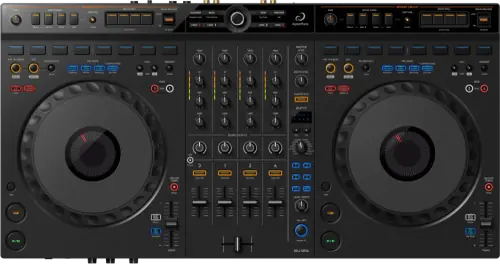
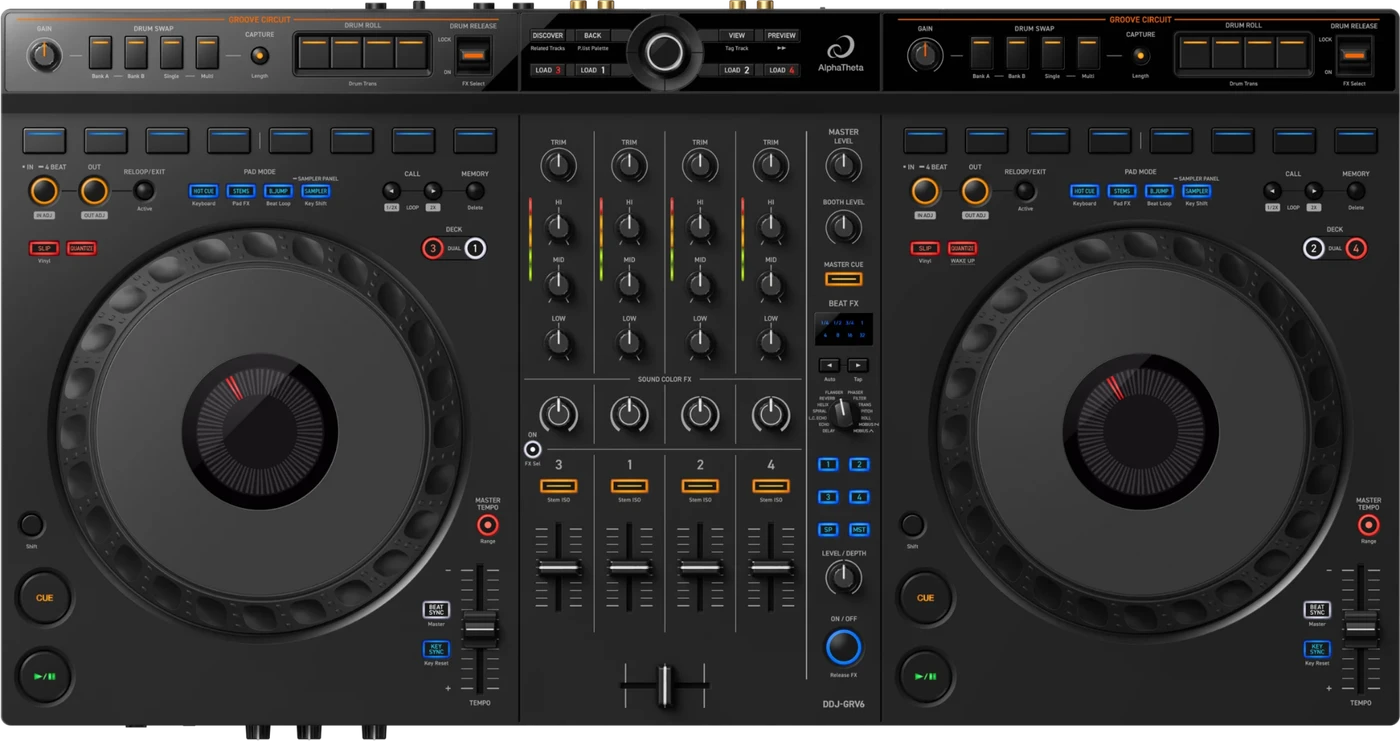
Booth briefing. The DDJ-GRV6 is AlphaTheta's entry-tier 4-channel controller, not an all-in-one: on its own it is silent, and it needs a computer, or a phone or tablet running the rekordbox mobile app, before any sound reaches the room. Eight performance pads sit above each jog wheel, a layout AlphaTheta describe as inherited from CDJ and DJM setups. Groove Circuit adds live drum remixing. Only one firmware update is published so far.
When it goes wrong: The computer cannot see the controller No sound from the controller
Fast Lane
The five things that decide your gig
The five things on the DDJ-GRV6 that change what happens next, if you are reading this in the booth. All five are explained in full further down this page.
On its own it is silent. It is a controller, not a player.
The DDJ-GRV6 has no playback engine. Nothing plays until a computer, or a phone or tablet running the rekordbox mobile app, is connected and running DJ software.
A DJ who has spent time on a CDJ expects a unit to make sound as soon as a track is loaded. This one cannot, and that is normal rather than a fault. It decides what has to be in the bag.
There is no PRO DJ LINK, and there never was.
It is a MIDI and USB controller. It does not join a PRO DJ LINK network with CDJs or a networked mixer, and it was never built to.
There is no network port and no link protocol to a CDJ or a DJM, so nothing about the unit is broken by the absence. It simply was not part of the design.
Groove Circuit is a drum-remix section, not an effect.
Drum swap, roll and trans effects, release FX and capture, for reshaping a track's drum pattern in the moment rather than only mixing between tracks.
On a controller at this tier a dedicated drum-remix section is not a given, and it is the thing this unit is bought for.
The pads and jogs are placed like a CDJ-3000 booth.
The jog wheels are 206 mm, the same size as the CDJ-3000's, eight pads sit above each one, and Beat FX is carried over from the DJM-A9.
A DJ moving between this controller and a club's CDJ-3000 rig is reaching for things in the same place, which is exactly what AlphaTheta means by the layout being inherited.
One firmware update exists, and it is the one djay needs.
Since the 8 October 2024 announcement the whole published record is 1.02, released 13 May 2025, which added support for Algoriddim djay on Android. No documented defect fix exists for this controller yet.
So if djay for Android will not connect, check the firmware version first. A unit still on what it shipped with does not have that mapping.
If something goes wrong
The controller is powered on and doing nothing
Short answer. That is normal, not a fault. The DDJ-GRV6 is a controller, not an all-in-one player, and it has no playback engine of its own. Nothing plays until a computer, or a phone or tablet running the rekordbox mobile app, is connected and running DJ software.
Why this happens. A DJ who has spent time on a CDJ or an all-in-one expects a unit to make sound as soon as a track is loaded onto it. This unit cannot: it is a control surface and a USB audio interface, and the software on the other end of the cable is doing the actual playing. Software is rekordbox (desktop; mobile limited to channels 1 and 2), Serato DJ Pro, and Algoriddim djay added by firmware.
Fix it now. Check which USB-C port the cable is in: , so a host in the wrong one does nothing. Then confirm the DJ software is open and that a track is loaded and playing in the software itself, not just selected on the controller. On a phone or tablet the other port is not optional, because AlphaTheta state: "" Remember too that the rekordbox mobile app only carries playback on channels 1 and 2.
Avoid it next time. Pack the laptop, or a phone or tablet with the software already installed and updated, as part of the kit, the same as you would a power cable. A GRV6 with nothing behind it is a very well made brick.
Lights are flashing and the controls do nothing
Short answer. A DDJ-GRV6 flashing at you is usually telling you about power, not about a fault. Two flashing patterns on this unit both mean the same thing, and neither means a broken controller. If the IN and OUT buttons on both decks flash and do nothing, AlphaTheta say the supply capacity of the USB power adapter or mobile battery on the power port may be insufficient, and ask for a device rated DC 9V 3A. If the red channel level indicators on channels 1 to 4 flash and do nothing, the supply from the connected computer may be insufficient: on a USB Type-C connection they ask that the computer itself be on mains power, and on a USB Type-A connection they ask for the power adapter or mobile battery on the unit's own power port instead.
Why this matters. Buttons that light up but refuse to work read as a dead controller, and the instinct is to swap the unit or the software. Neither is the problem. This is the one machine on the page where the cable you did not think about, the one going to the wall, decides whether the surface responds at all.
Fix it now. Put the unit on its own power: a supply rated DC 9V 3A into the power port, not just the cable to the laptop. If the laptop is the only source you have, get the laptop onto mains and unplug every other USB device from it.
Avoid it next time. Travel with the power supply, and read its rating rather than assuming a phone charger will do. A supply that runs a phone is not a supply that runs a four channel controller.
The controller switched itself off
Short answer. AlphaTheta document two separate reasons a DDJ-GRV6 switches itself off. A mobile battery with a power-saving function will cut the supply, so they ask for one without that function, at 24V maximum and DC 9V 3A. And with the Power Management function set to Enable, the unit enters Off mode by itself after 20 minutes with no audio signal reaching it.
Why this matters. Twenty minutes with no audio is a changeover, a soundcheck break, or the hour before doors. The unit is not failing when it does this, it is doing what the setting says, but a controller that is off when you come back to it costs you the first minute of your set either way.
Fix it now. Power cycle it and check the Power Management setting. If you are running from a mobile battery, change the battery rather than the controller: a power-saving function on the battery will keep doing this whatever you do on the unit.
Avoid it next time. Decide the Power Management setting at home, not in the booth, and keep something feeding audio into it during a long changeover if you have left the function enabled.
Your computer does not see the controller
Short answer. The DDJ-GRV6 talks to everything through USB, so when the computer does not list it, nothing else on this page can work. AlphaTheta's own list for a computer that does not see the unit runs through the ordinary things first: the supplied cable seated properly, a different USB port, no external drives or keyboards in the way, screen savers and antivirus software quit, and any USB hub being one the computer's own maker recommends. The specific one worth knowing is for Mac, where they ask you to disconnect the cable, open Audio MIDI Setup, show the MIDI window, select the DDJ-GRV6 icon and Remove Device, then reconnect the cable so the icon comes back. On Windows the equivalent check is that DDJ-GRV6 appears under Device Manager, in sound, video and game controllers.
Why this matters. This is the fault that looks worst and is fixed most often. The controller is lit, the software is open, and the two are not introduced. The Mac remove-device step is the one nobody guesses, because it means deleting the device to get the device back.
Fix it now. Cable first, then port, then the hub if there is one, then the remove-device step on Mac or the Device Manager check on Windows. Work down that order rather than restarting everything at once, so you know which one it was.
Avoid it next time. Carry the supplied cable rather than the nearest one, and set the laptop up the way you will gig with it at least once before the gig, including whatever hub is going to be in the chain.
The sound from your Android device is not right
Short answer. Turn the DDJ-GRV6 around. There is a physical Android MONO/STEREO switch on the rear panel, and it ships set to MONO. AlphaTheta state that after selecting STEREO the output sound may not be normal, and that the answer in that case is to select MONO. It is a switch, not a menu, so a DJ who never turns the unit around will never find it.
Why this matters. Every other audio problem on a controller sends you into software, and this one does not. A DJ hearing something wrong from an Android phone will check the app, the cable and the levels for twenty minutes before it occurs to them that a switch on the back is doing it.
Fix it now. If the switch is on STEREO and the output is not right, move it to MONO. That is the manufacturer’s own answer and there is nothing further to configure.
Avoid it next time. Set the switch before the phone goes in the bag, and know which position you left it in. It is a physical setting that survives every reboot, so it is either right or it is wrong for the whole gig.
djay for Android will not connect or is missing controller support
Short answer. Check the DDJ-GRV6 firmware version first. Support for Algoriddim djay on Android was added in firmware 1.02, released 13 May 2025. A controller still on the firmware it shipped with does not have that mapping.
Why this happens. The GRV6 launched supporting rekordbox and Serato DJ Pro, and djay for Android arrived later as a feature added by firmware, not something the hardware always had. A unit that has never been updated since it left the box will not recognise djay at all.
Fix it now. Check the firmware version on the unit and, if it is below 1.02, update it before relying on djay for Android at a gig. There is nothing to fix on the phone side if the controller itself is on old firmware.
Avoid it next time. If djay for Android is part of your setup, confirm the firmware version the week of the show, not at the door. A controller borrowed from a venue or another DJ may be on whatever firmware it arrived with.
What to watch for
The one published firmware update, read honestly
Short answer. Since the 8 October 2024 announcement, only one firmware update is published for the DDJ-GRV6: 1.02, released 13 May 2025, which added support for Algoriddim djay on Android. No documented defect fix exists for this controller yet.
What this means in a booth. On most of this site's older models, a strange behaviour sends you to a change history full of specific, fixed faults. Here the record is one line long and it is a feature addition, not a repair. If a GRV6 behaves strangely, the honest first move is to check cabling, the software connection and the settings on the unit itself, not to go hunting for a bug fix that has not been published.
What is not in it, and this is worth knowing. No crash, no freeze, no dropout and no repaired fault appears anywhere in the published history, checked 10 August 2026. That is not the same as saying nothing has ever gone wrong with a unit in the field, only that nothing of that kind has been documented by AlphaTheta.
Do this. Confirm the firmware version on any GRV6 you plan to rely on for djay for Android, since that is the one feature this history gates. Otherwise the firmware version on this controller has little to tell you.
You cannot find the performance pads
Short answer. Look above the jog wheel, not below it. The DDJ-GRV6 pad layout is eight performance pads per deck, above the jog wheels, as on the CDJ-3000, which is a different position from cheaper controllers that put the pad grid underneath the jog wheel.
Why this happens. AlphaTheta describes this layout as inherited from CDJ and DJM setups, and it is deliberate: it puts the eight pads per deck where a DJ who has played a CDJ-3000 already expects them. A DJ coming from a different, cheaper controller reaches for the wrong spot on the first track.
Fix it now. Take the thirty seconds at soundcheck to place your hand where the pads actually are, above each jog wheel, rather than assuming the layout of the last controller you played.
Avoid it next time. Note the pad position as part of your first pass over any unfamiliar controller, the same way you would check where the cue and play buttons sit on a CDJ you have not played before.
Compatibility
What this controller needs to make sound
Short answer. A computer, or a phone or tablet running DJ software. The GRV6 has 4 channels and control over 4 decks, with Dual Deck mode available, but none of it makes a sound without software driving it. Software support is rekordbox (desktop; mobile limited to channels 1 and 2), Serato DJ Pro, and Algoriddim djay added by firmware.
Why it matters. This is the difference between a controller and an all-in-one player, and it decides what has to be in the bag. There are USB Type-C x2 on the back and they do different jobs: . Outputs are Master 1 on a 1/4 inch TRS jack, Master 2 on RCA, Booth on RCA, and headphones on both 1/4 inch and 3.5 mm.
When professionals use it. As the software side of a laptop rig, with rekordbox desktop or Serato DJ Pro doing the actual playback and the controller doing the physical work, or as a compact, phone-driven setup through the rekordbox mobile app when a full laptop rig is not practical.
Common mistakes. Relying on a phone alone for a four-deck set. The rekordbox mobile app carries playback on channels 1 and 2 only, so channels 3 and 4 need a computer, or a second device, behind them to make sound.
There is no PRO DJ LINK on this controller
Short answer. The DDJ-GRV6 is a MIDI and USB controller, not a PRO DJ LINK device. It does not join a PRO DJ LINK network with CDJs or a networked mixer, and it was never built to.
Why this happens. Everything this unit does happens through USB, between the controller and the software running on your computer, phone or tablet. There is no network port and no link protocol to a CDJ or a DJM mixer, so nothing about the unit is broken by its absence, it simply was not part of the design.
Fix it now. If a venue expects the booth to link with house CDJs, that is not something this controller does. Plan the set around USB and the laptop or mobile device instead.
Features explained
Groove Circuit, live drum remixing
Short answer. Groove Circuit is a set of live drum-remix tools built into the controller: drum swap, roll and trans effects, release FX and capture, for reshaping a track's drum pattern in the moment rather than only mixing between tracks.
Why it matters. On a controller at this tier, a dedicated drum-remix section is not a given. Groove Circuit puts a genuinely production-flavoured tool set, swapping and rolling the drum pattern, capturing a groove, releasing out of an effect cleanly, under an entry-tier controller's hands rather than reserving it for higher-tier gear.
When professionals use it. Building energy into a drop with roll and trans effects, swapping in a different drum feel for a section, and capturing a pattern worth returning to later in the set.
Common mistakes. Reaching for Groove Circuit mid-transition without having rehearsed the release side of it. Like any effect that reshapes the beat, the way out of it matters as much as the way in.
Eight pads per deck, jog wheels and Beat FX
Short answer. The pad layout is eight performance pads per deck, above the jog wheels, as on the CDJ-3000. The jog wheels are 206 mm, the same size as the CDJ-3000's, and a Smart Rotary Selector handles browsing. Beat FX is carried over from the DJM-A9 mixer.
Why it matters. Matching the CDJ-3000's pad position and jog wheel size means a DJ moving between this controller and a club's CDJ-3000 setup is reaching for things in the same place, which is exactly what AlphaTheta means by describing the layout as inherited from CDJ and DJM setups. Carrying Beat FX over from a club-standard mixer puts a familiar effects set on entry-tier gear.
When professionals use it. Treating soundcheck on a new GRV6 the same as soundcheck on an unfamiliar CDJ and DJM setup, a quick pass to confirm hands land where memory expects them to, rather than assuming every controller is laid out the same way.
Common mistakes. Assuming the pad grid sits below the jog wheel because that is where it sits on a cheaper controller. On this unit it does not.
Professional tips
Decisions to make before you pack it
Decide what is driving it before the controller goes in the bag. Software is rekordbox (desktop; mobile limited to channels 1 and 2), Serato DJ Pro, and Algoriddim djay added by firmware, and the mobile route carries playback on channels 1 and 2 only. If the set needs all 4 channels, a computer travels with it, and a phone is a second device rather than a substitute for one.
Put your hands above the jog wheels on the first pass. The pad layout is eight performance pads per deck, above the jog wheels, as on the CDJ-3000, which is not where a cheaper controller puts them, and the jog wheels are 206 mm, the same size as the CDJ-3000's. Thirty seconds spent placing your hands where the pads actually are costs less than finding out on the first track.
Confirm the firmware the week of the show if djay for Android is part of the plan. Support for it arrived in 1.02, released 13 May 2025, so a unit that has never been updated does not recognise djay at all. A controller borrowed from a venue or another DJ is on whatever firmware it arrived with.
Rehearse the way out of Groove Circuit, not just the way in. The drum swap, the roll and trans effects and the release FX all reshape the beat, and anything that reshapes the beat is judged on how it ends. Work the release out at home so that reaching for it mid-transition is a decision rather than an experiment.
Settle the house CDJ question before you arrive. This is a MIDI and USB controller with no network port and no link protocol to a CDJ or a DJM mixer, so it does not join a PRO DJ LINK network. If the venue expects the booth to link with house players, the set has to be planned around USB and your own laptop or mobile device instead.
Connections and setup
The two panels, and the rules that bite
What is on the back. The DDJ-GRV6 puts every connection except the headphones on its rear panel. The rear panel carries a Kensington slot, a USB port for power, a USB port for the device connection, the Android MONO/STEREO switch, BOOTH outputs on RCA, MASTER 2 outputs on RCA, MASTER 1 outputs on 1/4 inch TRS, a MIC ATT. knob and a MIC input on 1/4 inch TRS that takes a phone plug only. The cabling rules are specific: the power port wants a product supporting USB Power Delivery over a USB Type-C cable and will not work through a hub, the device port takes the supplied cable to a USB Type-C computer, a certified cable of 3 m or less to a USB Type-A computer, and an Apple certified cable of 3 m or less to a device with a Lightning terminal.
The output rule. MASTER 1 on 1/4 inch TRS is to be used as a balanced output. AlphaTheta state that connecting those terminals to an unbalanced input may lower sound quality or produce unwanted noise, and that MASTER 2 on RCA is the terminal for an unbalanced input. BOOTH is RCA and unbalanced too, so the monitor feed and the RCA house feed have their own sockets and MASTER 1 does not need to be adapted down to reach either.
The headphone rule. The headphone outputs take a 1/4 inch stereo jack or a 3.5 mm stereo mini jack, and they carry a floor: AlphaTheta state that only headphones of 32 ohms or more impedance should be used, and that headphones below 32 ohms will not work with the unit. That is a hardware limit with no setting behind it, so the pair in the bag either clears it or does not.
Reading it in the booth. Two of these are things you cannot fix once the room is full. A pair of headphones under the impedance floor will not start working, and MASTER 1 adapted down to RCA will keep sounding the way it sounds. Both are settled at soundcheck or not at all.
Firmware, drivers and manuals
Official downloads and documents
Go to AlphaTheta for the files themselves. We link their pages instead of hosting a copy, because a manual copied here is a snapshot of release day and theirs is the one that stays current.
Firmware downloads. Official AlphaTheta firmware page →
Manuals. Official AlphaTheta manual page →
Broken link? Let us know and we'll fix it.
Frequently asked questions
Quick answers
- Can the DDJ-GRV6 play music by itself?
- No. It is a controller with no standalone playback engine, and it needs a computer, or a phone or tablet running the rekordbox mobile app, connected and running DJ software before any sound reaches the room.
- What software does it work with?
- rekordbox (desktop; mobile limited to channels 1 and 2), Serato DJ Pro, and Algoriddim djay added by firmware.
- Does it have PRO DJ LINK?
- No. It is a MIDI and USB controller and does not join a PRO DJ LINK network with CDJs or a networked mixer.
- What crossfader does it have?
- AlphaTheta's official materials do not name a crossfader type for this model, so this page does not either.
- What is Groove Circuit?
- A live drum-remix section: drum swap, roll and trans effects, release FX and capture, for reshaping a track's drum pattern in the moment.
- How many channels and decks?
- 4 channels, with control over 4 decks and Dual Deck mode available.
- Where are the performance pads?
- eight performance pads per deck, above the jog wheels, as on the CDJ-3000, not below the jog wheel as on some cheaper controllers.
- Are there known firmware bugs?
- None are documented. Only one firmware update is published, 1.02 from 13 May 2025, which added Algoriddim djay support for Android as a feature, not a fix. No documented defect fix exists for this controller.
- What are the outputs?
- Master 1 on a 1/4 inch TRS jack, Master 2 on RCA, Booth on RCA, and headphones on both 1/4 inch and 3.5 mm. The host connects over USB-C, and note that .
- When was it announced?
- 8 October 2024, as AlphaTheta's entry-tier 4-channel controller.
Playing soon and it is not working?
Start Emergency ModeKeep the Emergency Card
We will email you the printable PDF so it is on your phone before the next dark booth. Occasional notes that save gigs. No spam, unsubscribe in one click.
Registering is free and counts everywhere on Save My Gig. We send a confirmation email first. Your address is stored with Brevo, our email provider. Unsubscribe any time. Privacy
Sources: AlphaTheta's official DDJ-GRV6 product page, the 8 October 2024 launch announcement, the official manual and the firmware update and history page, checked 10 August 2026. Specifications theirs, priorities ours.