

DDJ-REV7, the field manual
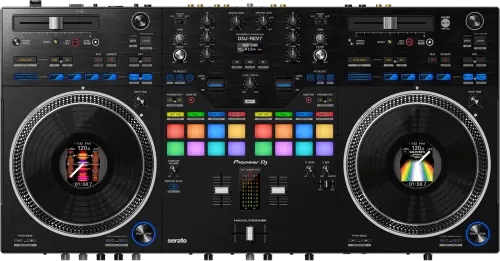
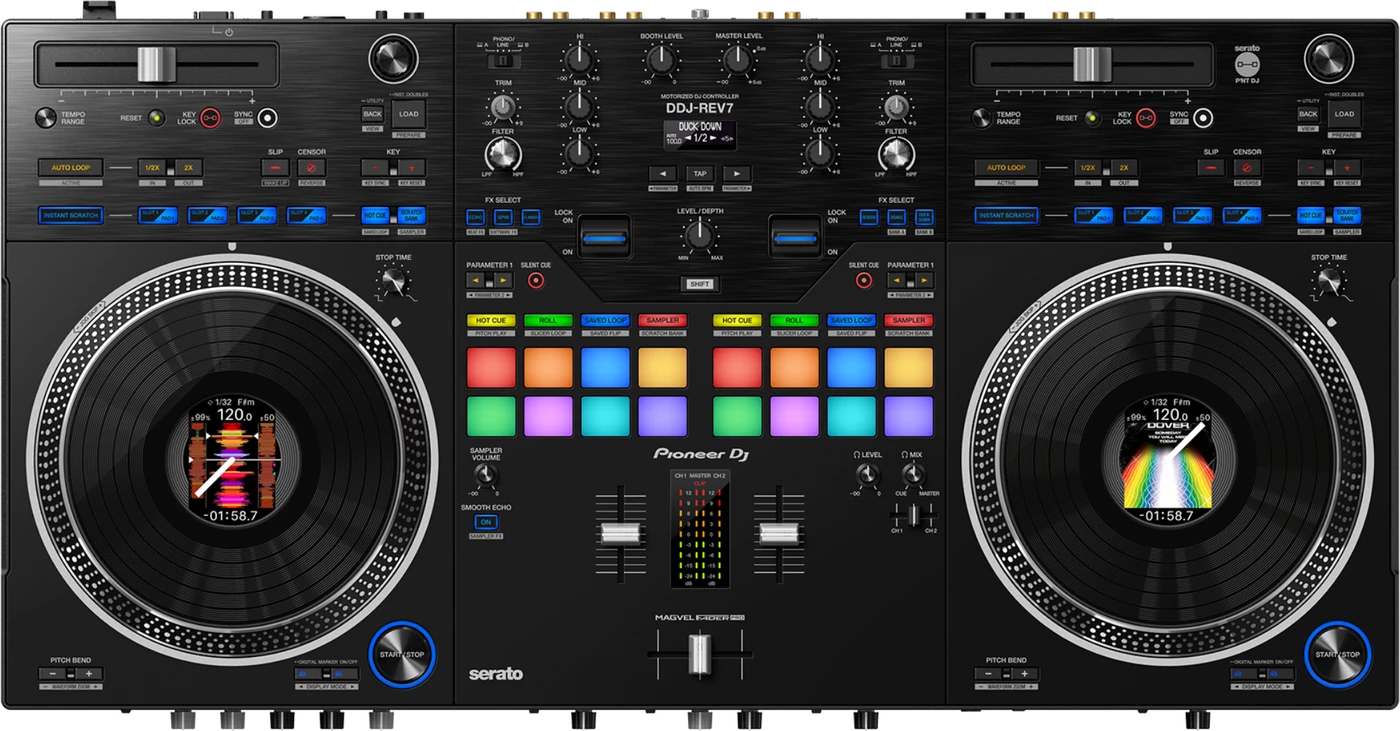
Booth briefing. The DDJ-REV7 is AlphaTheta's battle style controller with motorised platters, built for Serato DJ Pro and, from firmware 2.01, for rekordbox as well. It has no onboard playback and no storage of its own, so its decks play through the computer it is plugged into. Its mixer section is documented to mix the external inputs with no PC or Mac attached, so a turntable into a channel still carries a room. No Serato licence purchase is required with this unit.
When it goes wrong: The computer cannot see the controller No sound from the controller
Fast Lane
The five things that decide your gig
The five things on the DDJ-REV7 that change what happens next, if you are reading this in the booth. All five are explained in full further down this page.
Powered on and silent is expected. It has no onboard playback.
The decks cannot make sound without a computer, whatever the motorised platters suggest. The mixer can.
Two external inputs and the mics work with no PC or Mac attached, so a turntable into a channel is your fallback when a laptop dies.
The jog platter misbehaved at high speed, fixed in 1.02.
Released 31 March 2022. A documented problem operating the platter at high speed, which is precisely what a scratch DJ does with it.
On the unit whose whole selling point is the motorised platter, that is the version to read.
rekordbox support arrived by firmware, from 2.01.
Serato DJ Pro at launch, with a Pitch ’n Time DJ Expansion Pack voucher; rekordbox support added by firmware
So which software a given unit supports depends on its version, not on the box.
Two master outputs, two headphone outputs, two line or phono inputs.
A frozen jog display and a dead tempo slider are one Utility setting.
The manual groups three symptoms under it: the On Jog Display indicator not rotating, the indicator rotating but out of sync with the Serato virtual deck, and the TEMPO slider dying after a deck switch.
Set MIDI MODE to AUTO in the Utility settings. Nothing on the panel says it is set to anything else.
If something goes wrong
The controller powers on but there is no sound
Check Off mode first, because it looks identical. Off mode arrives after 20 minutes without use, meaning no audio signal above -24 dB reaching the unit, and it ships switched on. There is a lit tell: "The [SLIP/(WAKE UP)] button lights up in Off mode." And the way out is that same button, not the power switch: "Press the [SLIP/(WAKE UP)] button on the left deck to exit Off mode."
Then the decks. Silence from them with no computer attached is expected, not a fault. The DDJ-REV7 has no onboard playback: the decks need a computer running Serato DJ Pro at launch, with a Pitch ’n Time DJ Expansion Pack voucher; rekordbox support added by firmware.
But the mixer is not silent, and this is the part that saves a night. "If you connect a DJ player or turntable to the external input terminals on the unit, you can mix the sounds of the external inputs without using a PC/Mac." So a DJ player or a turntable into CH1 or CH2 carries the room with the laptop out of the picture entirely, and the mics work the same way.
Why this gets confused. DJs coming from an all-in-one deck, or a CDJ pair, expect a unit like this to play a track on its own from a USB drive. That part it cannot do: there is no media slot in the signal path, and the pads and jogs exist to control software running somewhere else.
Fix it now. Confirm a laptop is connected over USB Type-B x2, that Serato DJ Pro (or rekordbox on 2.01 or above) is open and sees the hardware, and that its own output is routed to the controller and not to the laptop speakers.
Avoid it next time. Treat this like any other controller booth check: laptop charged, software open, driver installed, before doors, not after the mic is live.
The jog display froze and the tempo slider died
Short answer. The DDJ-REV7 has one Utility setting that produces three symptoms, and the manual groups all three under it. The On Jog Display operation indicator does not rotate during playback. Or it rotates, but does not sync with the virtual deck in Serato DJ Pro. Or the TEMPO slider stops working once you switch the deck. The single answer to all three is on the unit rather than in the software: set MIDI MODE to AUTO in the Utility settings. Nothing on the panel announces that MIDI MODE is set to anything else, so a jog display frozen mid-set reads as a failed screen and a dead tempo slider reads as a failed fader, when both are one menu item.
Do this. Check MIDI MODE before you conclude anything is broken, because it is the cheapest check on the unit and it answers three different-looking faults at once. Then learn where it lives, since the Utility settings are not somewhere you want to be reading a manual for the first time with a room waiting.
The jog platter misbehaves when you spin it fast
Short answer. This is a documented, fixed DDJ-REV7 fault: a problem operating the jog platter at high speed, fixed in firmware 1.02, released 31 March 2022, less than three months after the unit launched.
Why this happens. The jog wheels are motorized, which is unusual for a controller and part of what a scratch DJ is paying for, so a defect in how the motor responds at speed lands exactly where it hurts most: fast scratch and spin moves, mid-set, under a room's worth of attention. A unit still on launch firmware, version 1.00 or 1.01, is the one that carries this.
Fix it now. The firmware fault itself cannot be repaired live, so favour slower, controlled moves for the rest of the set and check the version the moment it ends. But if the platter is not turning at all, that is a different problem with a documented fix: set the input selector switch to A or B, then press the START/STOP button.
Avoid it next time. Update to 1.02 or above before any set that leans on fast scratch or spin work. The highest published firmware is 2.01.
The computer does not see the controller
Short answer. When a PC or Mac does not see the DDJ-REV7, the manual gives a list to work through in order: connect the supplied USB cable properly, take out any USB hub and connect the device directly, disconnect any other USB device on the computer, and on Windows install the dedicated audio driver software properly. Then close every application including screen savers and resident software, with the caution attached to that step: when you close anti-virus software, disconnect from the internet to keep the machine safe. Windows has one more, which is to uninstall ASIO drivers other than this unit's. The confirmation step is the useful one, because it tells you the answer rather than asking you to guess: check that the unit is recognised by the computer and that the firmware version of the unit is displayed in Setting Utility.
The sound cuts, and the buffer is in two different places
Short answer. Buffer size on the DDJ-REV7 lives in two different places depending on the platform, and the manual says so twice, once for interrupted playback and once for sound that is missing, quiet or distorted. On a Mac, set the buffer size, meaning latency, in the DJ software you are using. On Windows it is not in the DJ software at all: it is in Setting Utility, the same utility that reports the unit's firmware version. So a Windows DJ hunting for a buffer control inside Serato DJ Pro is looking in the wrong application, and that is where the time goes.
The microphone produces nothing
Short answer. A microphone that produces nothing on a DDJ-REV7 has one documented answer and it is a three-position switch rather than a level: set the OFF, ON, TALKOVER selector switch properly. OFF is a real position on that switch, so a microphone can be correctly connected, correctly gained and completely silent because the switch beside it is where the last user left it.
The sampler is not in the headphones
Short answer. A sampler you cannot hear in the headphones on a DDJ-REV7 has two causes and only one of them is on the unit. The knob is the SAMPLER VOLUME control. The other is in the software: set Sampler Player Output Select to A in Serato DJ Pro. With that set anywhere else the sampler plays to the room and never reaches the cue, which is the worst way to find out, since the sampler is exactly the thing you want to audition before it lands.
Serato DJ Pro keeps becoming unstable
Short answer. When Serato DJ Pro becomes unstable with a DDJ-REV7 attached, the manual gives a list rather than a single cause: update Serato DJ Pro, close every other application, and if it is still unstable, disable the wireless connection, the anti-virus software, the screen saver and power saving mode. Disconnect any other USB device from the computer, and take the USB hub out, because a hub cannot be used with this unit at all. The item people skip is the last one: if you are using a laptop on battery power, connect it to AC power. The caution about closing anti-virus software applies here too, which is to disconnect from the internet first.
Do this. Set the laptop up the way you will arrive: on mains, wireless off, nothing else running, one USB device and no hub. Then leave it that way rather than turning things back on between soundcheck and doors.
No BPM, no beatgrid, and Sync will not work
Short answer. A DDJ-REV7 that will not sync, will not auto loop, or shows a beatgrid in the wrong place is analysis rather than hardware, and the manual splits it into three cases. For a BPM that never appears, which also stops Sync and Auto Loop, mark the Set Auto BPM check box in the offline player setting and analyse the tracks. For a BPM that shows with no beatgrid, which is the same condition that stops Slicer Loop and Jog Skip working, mark both Set Auto BPM and Set Beatgrid and analyse again. For a grid that is simply inaccurate, change the BPM analysis range and analyse again, or set the beatgrid and BPM by hand.
Serato library faults that are settings
Short answer. Several Serato DJ Pro faults on the DDJ-REV7 are library settings rather than anything on the unit. Tracks missing from the library means either nothing has been imported or you are looking at a crate or subcrate that holds none. iTunes tracks missing has its own switch: mark the Show iTunes Library check box on the Library + Display tab of the SETUP menu, and if it is already marked, unmark it and mark it again. Audio files you cannot edit have a third: Protect Library is enabled on that same tab, so disable it. If the virtual deck is missing entirely and the offline player is showing, that is the connection rather than the library, so check the supplied USB cable and update Serato DJ Pro.
The indicators blink and the unit is behaving strangely
Short answer. When the DDJ-REV7's indicators blink and the unit is behaving strangely, the recovery is a power cycle done at the adapter rather than at the switch: pull the AC adapter cable out of the DC jack, wait, then connect it again. This unit is mains powered with a power button on the rear, unlike the bus-powered controllers in the range, so the cable that carries the audio is not the one that carries the power. The manual also draws the line for you: if that does not resolve it, request a repair. That is a stated boundary rather than a suggestion, and it is where troubleshooting on this unit stops.
What to watch for
Documented fixes, by firmware version
What is in the record. On the DDJ-REV7, fixed in 1.02, released 31 March 2022: a problem operating the jog platter at high speed. Version 1.03, released 15 September 2022, carries an official note that reads only "minor issues have been fixed", with no specific symptom stated anywhere in the published record, so this page does not invent one. Version 2.01, released 14 March 2024, added rekordbox support, a feature addition rather than a fix, and "improved Serato Stems support" in the same wording AlphaTheta uses, also without a stated prior symptom.
The gap between versions. The jump from 1.03 to 2.01 with nothing published in between is as released, not a gap this page is filling in.
What is not in it, and this is worth knowing. No crash, no freeze and no full audio dropout appears anywhere in the published history. The one specific, named defect is the jog high-speed fault, fixed in the unit's third month on sale.
Do this. Note the firmware version on any unit you play. The highest published firmware is 2.01, and it is also the version that added rekordbox support, so a rekordbox DJ needs exactly that or above.
Official documentation. Firmware change history, PDF →
Found an entry we have missed? Tell us and we will add it.
What the jog displays do that is not a fault
Short answer. The On Jog Display screens on a DDJ-REV7 do things AlphaTheta describe as normal, and knowing which is which saves a service call. Small black or shining points on the LCD are inherent to LCD displays and are not a malfunction. A display that looks dark for a while after power on in a cold room is expected, and normal brightness returns by itself. A screen that is hard to read in direct sunlight is reflecting rather than failing, and the answer is to block the light. Cleaning is a dry soft cloth, with no organic solvents, acids or alkalis, which rules out most of what is behind a bar.
Compatibility
Software and no standalone playback
Short answer. Serato DJ Pro at launch, with a Pitch ’n Time DJ Expansion Pack voucher; rekordbox support added by firmware. From firmware 2.01, rekordbox is supported too. Either way, a computer is required for the decks: this controller has no onboard playback of its own. The mixer is a separate answer, and a more useful one: "If you connect a DJ player or turntable to the external input terminals on the unit, you can mix the sounds of the external inputs without using a PC/Mac." The mic and AUX paths bypass the computer too.
Why it matters. The mixer section is laid out like a DJM-S mixer with the tempo sliders turned horizontal at the top of each deck in a battle configuration, and the performance pads and Lever FX paddles sit in the mixer section rather than under the jogs, matching DJM-S-series placement. All of that is control surface for software running on a laptop, 2 channels and USB Type-B x2, not a self-contained deck.
When professionals use it. A scratch DJ running Serato DJ Pro with the included Pitch 'n Time DJ Expansion Pack voucher, or a rekordbox DJ on 2.01 or above who wants the DJM-S layout without owning a separate mixer.
You do not need to buy a Serato licence for this. A first launch can show a BUY/ACTIVATE panel, and the manual is explicit about it: "You don’t need to activate the software or buy the license when you use the DDJ-REV7." The expansion packs such as DVS are the exception and are bought separately. Install it, open it once at home, and do not spend anything on the strength of that screen.
Common mistakes. Packing the controller and forgetting the laptop, or arriving with a laptop where the software has never been opened once. Neither shows up until the room is waiting.
Features explained
The motorized jog wheels explained
Short answer. 7-inch motorized jog wheels with On Jog Display, rated for the same rotational stability as a 12-inch turntable. That rotational stability claim comes from AlphaTheta's own launch announcement, not a guess this page is making, and it applies to the 7-inch jog wheels themselves, each with a 3.5 inch On Jog Display LCD screen built in.
Why it matters. Most DJ controllers use non-motorized jog wheels, which feel and behave differently under the hand from a real turntable platter, and that gap is exactly what scratch DJs notice first. Motorizing the jog wheel closes part of that gap, without turning the DDJ-REV7 into anything other than a standard USB/MIDI controller: there is still no onboard media playback, and the "12-inch turntable" comparison is about rotational stability, not a platter you could put a record on.
When professionals use it. Anyone treating this as a scratch-style controller, playing off the jog feel the way they would on a DJM-S mixer plus PLX turntable setup, which is the exact layout AlphaTheta built the DDJ-REV7 to.
Common mistakes. Assuming "motorized jog wheel" means the unit can spin up and play audio on its own like a turntable. It cannot. Its decks are still a controller’s: no computer, no deck sound, motorized jog or not. The mixer is the exception.
Professional tips
Getting one ready for a scratch set
Check the firmware version before you plan a rekordbox set on it. Support for rekordbox arrived in 2.01, against a highest published firmware of 2.01. A unit below the first of those is a Serato DJ Pro unit whatever your library is prepared in, so this one number decides which laptop and which library you take.
Update the unit before a set built on fast scratch work. A problem operating the jog platter at high speed was fixed in 1.02, released 31 March 2022, so a unit still on 1.00 or 1.01 carries it. It lands on exactly the fast scratch and spin moves that the motorized jog wheels are there for.
Open the software once on the machine you are actually taking. The decks have no onboard playback: they need a computer running Serato DJ Pro at launch, with a Pitch ’n Time DJ Expansion Pack voucher; rekordbox support added by firmware. You do not need to buy a licence for it, whatever the first-launch screen suggests, but the Pitch 'n Time DJ Expansion Pack is a voucher rather than something already sitting in the software, and an unopened voucher stays invisible until the room is waiting.
Plug into the computer directly. The manual says it three times: "You can’t use a USB hub. Connect the USB device directly to the unit."
Plug both laptops in before the first one starts. The unit has USB Type-B x2, so two computers connect at once and a back-to-back handover becomes a software switch instead of a cable change with a track playing.
Match the input selector to what is actually plugged in. The LINE/PHONO inputs take a turntable or a line source beside the two laptops, and a source with its own phono preamp fed into a PHONO-selected input distorts. Set that while you are patching, before anything is going to the speakers.
Connections and setup
Inputs, outputs and connecting it up
Short answer. DDJ-REV7 outputs: MASTER x2 (one XLR, one RCA), BOOTH x1 (1/4 inch TRS), PHONES x2. Inputs: LINE/PHONO x2 (RCA), MIC x2 (one XLR, one 1/4 inch TRS), AUX x1 (RCA). Two USB Type-B ports let two computers connect at once.
Why it matters. The LINE/PHONO inputs mean a turntable or an external line source can sit alongside the two connected laptops in the same booth, and MIC and AUX inputs cover an MC or a backup source without needing an outboard mixer.
When professionals use it. A back-to-back set where each DJ's laptop is already plugged into its own USB port, so handover is a software switch, not a cable change.
Common mistakes. Plugging a source with a built-in phono preamp into a PHONO-selected input, which distorts. Match the input selector to what is actually connected.
Firmware, drivers and manuals
Official downloads and documents
Go to AlphaTheta for the files themselves. We link their pages instead of hosting a copy, because a manual copied here is a snapshot of release day and theirs is the one that stays current.
Firmware downloads. Official Pioneer DJ firmware page →
Manuals. Official Pioneer DJ manual page →
Broken link? Let us know and we'll fix it.
Frequently asked questions
Quick answers
- Is the DDJ-REV7 an all-in-one player?
- No. It is a controller with no onboard playback and no storage of its own, so its decks cannot make sound without a computer running Serato DJ Pro at launch, with a Pitch ’n Time DJ Expansion Pack voucher; rekordbox support added by firmware, or rekordbox from firmware 2.01. Its mixer is the exception. AlphaTheta: "If you connect a DJ player or turntable to the external input terminals on the unit, you can mix the sounds of the external inputs without using a PC/Mac."
- Can it link to CDJs with PRO DJ LINK?
- No. There is no PRO DJ LINK on this unit, it is a MIDI/USB controller, not a network player. It connects to a computer, not to other players over a network.
- Are the jog wheels really motorized?
- Yes. 7-inch motorized jog wheels with On Jog Display, rated for the same rotational stability as a 12-inch turntable. That is AlphaTheta's own official wording, not a guess, and it describes the jog wheels only, not a full turntable platter or standalone playback.
- What crossfader does it use?
- The MAGVEL FADER PRO, described as highly robust with customizable settings for scratch performance.
- Does it work with rekordbox?
- Yes, from firmware 2.01 onwards. At launch it was built for Serato DJ Pro at launch, with a Pitch ’n Time DJ Expansion Pack voucher; rekordbox support added by firmware.
- Are there known firmware bugs?
- One documented, specific defect: a problem operating the jog platter at high speed, fixed in 1.02. Version 1.03's official note says only "minor issues have been fixed" with no symptom stated, and 2.01 mentions "improved Serato Stems support" without describing a prior fault. The highest published firmware is 2.01.
Playing soon and it is not working?
Start Emergency ModeKeep the Emergency Card
We will email you the printable PDF so it is on your phone before the next dark booth. Occasional notes that save gigs. No spam, unsubscribe in one click.
Registering is free and counts everywhere on Save My Gig. We send a confirmation email first. Your address is stored with Brevo, our email provider. Unsubscribe any time. Privacy
Sources: AlphaTheta's official DDJ-REV7 firmware change history, the official product page, the 13 January 2022 launch announcement and the official manual, checked 10 August 2026. Specifications theirs, priorities ours.