

RANE ONE MKII, the field manual
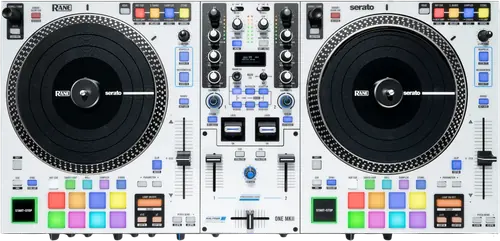
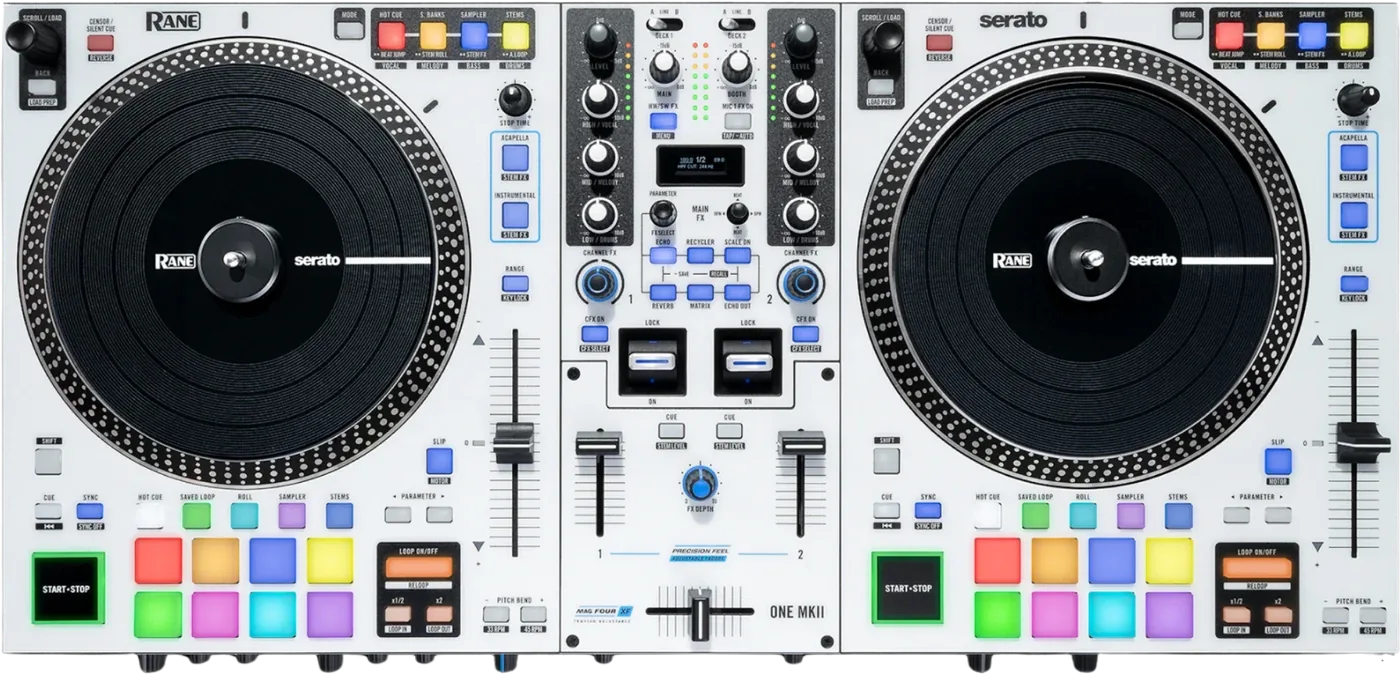
Booth briefing. The RANE ONE MKII is the second generation of RANE's motorised Serato controller, with internal effects on an HW/SW button and a MAG FOUR crossfader. Each deck talks to Serato over USB: with its source set to USB the deck sends MIDI and controls the software, and the Line position takes that deck out of software control. RANE publish the list of what changed from the original ONE as a support article, ten differences in all, so that article is the generation comparison.
When it goes wrong: The computer cannot see the controller No sound from the controller
Fast Lane
The five things that decide your gig
The five things on the RANE ONE MKII that change what happens next, if you are reading this in the booth. All five are explained in full further down this page.
What changed between the generations is a support article, not a page in either manual.
RANE publish the comparison as a support article rather than in either manual. The ONE MKII user guide never mentions the original ONE at all.
RANE list the changes as: internal FX added alongside software FX, where the ONE had software FX only; Precision Feel channel faders with adjustable tension, where the ONE had standard channel faders; a dedicated Stems pad mode with dedicated Acapella and Instrumental buttons and Stem Level EQ, where the ONE needed an existing Serato pad mode bypassed; a secondary pad area reaching eight pad modes, where the ONE had a touch strip; a Silent Cue option on the Censor and Reverse button; a dedicated sampler volume knob, where the ONE used Shift plus Beat; Channel FX with filter, filter roll, noise and flanger, where the ONE had a standard high pass and low pass filter per channel; microphone 1 FX on the mic inputs; and a different weight, 24.56 lbs against 23.55.
Firmware 1.2.0.2 admits four faults an older unit still has.
The 1.2.0.2 release note names four faults, and every one of them is a fault a DJ on earlier firmware still has. Audio output on iOS could become bit-crushed or degraded on prolonged use, and iOS is not mentioned anywhere in the manual. Crossfader cut-in performance was improved, which is the core battle specification, so two units on different firmware do not cut in alike. Stop Time did not correctly affect platter speed when the Stop button was engaged, meaning the brake control did not do what the manual says it does. And USB disconnect detection failed when the opposite port stayed connected, which is exactly the two-laptop changeover case.
If you have not updated, all four are still in front of you, and the guide carries no update procedure to get off them.
The manual and its own device menu disagree about whether the main meters are pre or post the Main knob.
The manual and its own device menu disagree about what the main meters show. The body says the main meters are pre the Main Level knob; the device menu prints MAIN METER, SIGNAL OUTPUT, default POST MAIN. One document, opposite answers, about whether pulling the main down moves your meters.
It matters the moment you set your gains against a meter and then pull the main down, because only one of those two answers keeps the meter honest.
A deck on Line stops sending MIDI, the same as on the original ONE.
As on the original ONE, RANE state that a deck’s controls send MIDI only when its deck source selector is set to USB A or B. A deck switched to Line goes dead to Serato.
Nothing on the panel indicates it. If half the surface has stopped responding, check the deck source knob before you check anything else.
Roll sizes rewrite your next auto loop length, and it is a one line note.
A one line note carries a real consequence: roll sizes will affect loop sizes in the software, and loop based on the last roll size. Fire a 1/16 roll and your next auto loop is a 1/16.
It is printed as a note rather than as a warning, and it is the reason an auto loop can arrive at a length you did not choose.
If something goes wrong
The Channel FX knob does nothing
On the RANE ONE MKII a Channel FX knob that does nothing is usually a button that has not been pressed.
RANE answer the unresponsive Channel FX knob directly: Channel FX have to be enabled on each deck before they do anything, using the CFX ON button.
It is per deck, so one channel working and the other not is the expected result of pressing CFX ON once.
The Sampler is silent on a fresh install
On the RANE ONE MKII a silent sampler on a new install is a routing setting rather than a dead bank of pads.
RANE note that on first launch of Serato DJ Pro 3.3.3 it may be necessary to route the Serato Sampler to the AUX option, if that is not already the default.
This one only bites once, on the first launch, which is exactly when a DJ is least inclined to go looking in a routing menu.
What to watch for
The OLED inverts itself, and that is normal
Firmware 1.2.0.2, and the four faults its release note admits
The ONE MKII has published firmware, and the release note is the most useful document RANE give this machine. RANE publish firmware 1.2.0.2, dated 16 December 2025, and its New Features section reads N/A. The user guide contains no update procedure at all: no updater name, no key combination, no boot mode and no download page. The device menu does carry a firmware screen, which lists a separate motor firmware line and a separate magnetic fader firmware line alongside the main version.
The 1.2.0.2 release note names four faults, and every one of them is a fault a DJ on earlier firmware still has. Audio output on iOS could become bit-crushed or degraded on prolonged use, and iOS is not mentioned anywhere in the manual. Crossfader cut-in performance was improved, which is the core battle specification, so two units on different firmware do not cut in alike. Stop Time did not correctly affect platter speed when the Stop button was engaged, meaning the brake control did not do what the manual says it does. And USB disconnect detection failed when the opposite port stayed connected, which is exactly the two-laptop changeover case.
The guide gives you no way to check which version you are on other than that menu screen, and no way to change it. Both of those belong in a manual, and neither is in this one.
What RANE say changed, published where the manual is not
The ONE MKII is a second generation machine whose own user guide never says so. RANE publish the comparison as a support article rather than in either manual. The ONE MKII user guide never mentions the original ONE at all.
RANE list the changes as: internal FX added alongside software FX, where the ONE had software FX only; Precision Feel channel faders with adjustable tension, where the ONE had standard channel faders; a dedicated Stems pad mode with dedicated Acapella and Instrumental buttons and Stem Level EQ, where the ONE needed an existing Serato pad mode bypassed; a secondary pad area reaching eight pad modes, where the ONE had a touch strip; a Silent Cue option on the Censor and Reverse button; a dedicated sampler volume knob, where the ONE used Shift plus Beat; Channel FX with filter, filter roll, noise and flanger, where the ONE had a standard high pass and low pass filter per channel; microphone 1 FX on the mic inputs; and a different weight, 24.56 lbs against 23.55.
That is RANE's list, quoted from RANE's article, and it is the only comparison of the two generations on this page. Anything a reader wants beyond those ten points has to come from RANE, because the document in the box does not carry the subject at all.
What the manual does not answer
On the RANE ONE MKII the published record stops well short of the panel. The guide contains no troubleshooting section.
None of the four user guides states what the product is. There is no sentence in any of them calling the unit a controller, a mixer, a standalone system or anything else, and each opens with the identical thank-you paragraph instead. Whatever a reader wants to know about the category of machine in front of them has to come from somewhere other than the manual in the box.
None of these guides contains safety or warranty text. All four delegate it to a separate Safety and Warranty pamphlet, which means the document a DJ actually keeps is not the one carrying the warnings.
RANE publish a real support knowledge base, with per-model FAQ articles, a downloads finder and Serato-specific setup articles. On several points it is more use than the manual, and where this site quotes it, it says so.
Compatibility
What it runs, and the version number inside the condition
RANE’s support FAQ states the ONE MKII unlocks Serato DJ Pro with no licence for as long as it is connected AND the computer is running Serato DJ Pro 3.3.3 or higher. The version is part of the condition, not a footnote to it.
RANE name the software they support beyond Serato: Virtual DJ on Mac and Windows, and Algoriddim djay Pro on Mac, Windows and iOS. Both need a Pro licence bought separately.
That version condition is the one to carry in your head. A unit that unlocks nothing on a laptop running older Serato is behaving exactly as documented.
Stems, and the four ways in
RANE list four hardware routes to Serato stems on this unit: the performance pads, the dedicated Acapella and Instrumental buttons, the secondary pad area, and Stem Level, which remaps the EQ knobs to High for vocals, Mid for melody and bass and Low for drums. Stem Level is held on Shift plus the channel CUE button and left the same way.
Two computers, and the case you already own
Two USB B ports are for two computers at once, which RANE describe as back to back play rather than as a spare socket.
RANE state the ONE MKII has the same dimensions as the original ONE, so any case made for the ONE fits it.
Does the RANE ONE MKII work without a computer?
The ONE MKII is asked this more than anything else about it, and the answer is not in the document. The guide never says whether the ONE MKII passes audio with no computer connected. It never uses the words standalone or without a computer, and the setup procedure requires a computer. There is a Line position on the deck source switch, the microphones are routed directly into the program mix, the effects are called hardware effects, and RANE state that the internal filter applies to Line sources regardless of the assigned channel FX. All four point one way and none of them settles it.
This site will not answer it either way until RANE do. Four pieces of evidence pointing the same direction are still not a statement, and a booth is the wrong place to discover that an inference was wrong.
Features explained
The effects, and the button that chooses which set you are on
Effects on the ONE MKII come in two sets, and one button decides which of them your knobs are driving. RANE’s support FAQ puts the internal effects count at 29, including Reverb and Echo alongside Fader Tone, Choppa and Mute. The HW/SW button toggles between the internal hardware effects and Serato’s software effects.
The count comes from the support FAQ rather than from the guide, which is worth knowing if you are trying to match a number on a forum to a number on your machine.
The platters, the two named speeds and the slip washers
The ONE MKII puts the motor speed on a Shift layer, which is a thing you can hit by accident. Holding Shift and pressing Pitch Bend minus sets the motor to 33 RPM, and Shift plus Pitch Bend plus sets it to 45. The original ONE guide never mentions a platter speed at all. 78 RPM is not mentioned here either.
Four washers are supplied for adjusting slip friction. RANE say that placing one to four of them over the spindle underneath the slipmat raises the Control Disc, and the more you raise it the more spinback you get.
RANE print the same caution on all three motorised units: the platter itself should not be held in position for sustained periods while powered to rotate. They do not define sustained. Holding a platter against the motor is ordinary practice for cutting and for holding a cue, so this is the manufacturer advising against a technique the machine is sold for.
The crossfader, and the answer the support site gives instead
The crossfader is the part of the ONE MKII a battle player will wear out first, so what the documents say about servicing it matters. The specification table calls it a MAG FOUR tension-adjustable crossfader. The manual tells you to set the tension by removing the fader plate and adjusting the set screw, clockwise to tighten.
RANE’s support FAQ answers what the manual does not: the MagFour crossfader is user replaceable, and the fader plate comes off so tension can be adjusted directly on the fader. The manual gives no replacement procedure and no part number.
DeoxIT Fader Lube is in the box and the manual never says how to apply it, where, or how often.
The channel faders, the contour curves and the cut-in scale
Tension adjustment on the ONE MKII is not limited to the crossfader, and neither is the shortage of numbers describing it. Precision Feel tension adjustable channel faders, with a shared contour and a shared reverse control rather than one per deck. The channel fader tension screw is described as magnetic; the crossfader entry does not use that word.
The channel fader contour knob is logarithmic to the left, linear at centre and exponential to the right, and RANE describe each in words. The crossfader contour runs smooth fade to sharp cut, with the centre described as a typical club setting.
Crossfader cut-in is adjustable in the device menu, left and right independently, on a 0 to 10 scale defaulting to 3. RANE give that scale no unit: not millimetres, not degrees of travel, and they never say which end is the tighter cut.
The pads, and the note that rewrites your next loop
One line in the ONE MKII guide decides how long your next automatic loop will be, and it is printed as a note. A one line note carries a real consequence: roll sizes will affect loop sizes in the software, and loop based on the last roll size. Fire a 1/16 roll and your next auto loop is a 1/16.
So the roll you fired two bars ago is still setting the length of the loop you are about to drop, with nothing on the pads to show it.
The deck source knob, and what it decides
As on the original ONE, RANE state that a deck’s controls send MIDI only when its deck source selector is set to USB A or B. A deck switched to Line goes dead to Serato.
On the ONE, the ONE MKII and the FOUR, RANE state that a deck’s controls will send MIDI information only when its deck source selector is set to USB A or B. Switch a deck to Line and every control on that deck stops talking to the software, with nothing on the panel to say why.
The specification tables in all three Serato units head the deck inputs "CD/Phono" and measure dynamic range from a "CD Input", while every panel and every body reference calls the same socket Deck Phono/Line In and the switch Line/Phono. There is no control or connector called CD on any of these machines. It is older RANE mixer wording that survived into the tables.
The meters, and which of the two answers to use
The ONE MKII documentation gives two answers about what the main meters are showing you, and they are in the same document. The manual and its own device menu disagree about what the main meters show. The body says the main meters are pre the Main Level knob; the device menu prints MAIN METER, SIGNAL OUTPUT, default POST MAIN. One document, opposite answers, about whether pulling the main down moves your meters.
Until RANE settle it, treat the meters as a guide and set your gain by ear as well as by eye, because the two readings differ by exactly however far the Main knob is down.
All three Serato units print the same specification row, "32-bit, Floating Pont, Double precision". Pont is RANE’s typo for Point, and 32-bit floating point is single precision rather than double, so the row contradicts itself as printed. This site reproduces it rather than quietly correcting it.
Professional tips
Your FX layout lives in the unit, if you save it
FX settings are stored in the unit rather than in the software. Holding one of the six FX buttons for three seconds saves them, and the display reads FX SAVED.
Worth doing before a residency rather than after one. The saved layout comes back on a unit that has been power cycled by somebody else.
Set the platter feel with hardware, not with the software
The platter feel is set on the hardware: a LOW and HIGH torque switch on the rear panel, and four control disc washers, one or two of which go under the slipmat to increase backspin. RANE also document fitting your own 7 inch records to the Quick Release adapter, which needs three 6 mm holes drilled.
Connections and setup
Assembling the platters, and locking the Control Disc
Short answer. The RANE ONE MKII arrives with its platters off, and the assembly steps double as the answer to two things that read as faults later. Each platter seats by aligning the pins in the bottom of the platter with the holes in the ONE MKII's motor and pressing down firmly, and RANE ask you to check that it rotates uniformly and does not wobble excessively. A platter that wobbles is a platter that is not seated, not a bent one. Then the slipmat, then the Control Disc over the spindle with the Quick Release Adapter on top. The disc does not simply drop on: pinch the top of the spindle while slowly rotating the disc until you hear it click, and it is locked when the groove in the spindle lines up directly opposite the button on the side of the Quick Release Adapter. So a Control Disc that slips under the hand has usually never clicked, and the lock has a visual check that takes one second. The washers go in during this step, under the slipmat, which is the only moment they are easy to fit.
The order RANE print for switching it on
Short answer. The RANE ONE MKII has an order for coming up and RANE print it as numbered steps rather than as advice. Put the unit on a flat, stable surface. With the power switched OFF, plug the included power cable into the ONE MKII first, and only then into the wall. Power the unit on with its own switch. Then connect USB to the computer, or to a powered hub connected to the computer. Then open the DJ software. Two details in that sequence are the ones people reverse: the cable goes into the unit before the outlet, and the software opens last rather than first. RANE also specify a POWERED hub, which rules out the bus-powered dongle most laptops travel with, and on this unit that matters twice over because the USB disconnect handling was one of the things firmware 1.2.0.2 had to fix.
Firmware, drivers and manuals
Official downloads and documents
Go to RANE for the files themselves. We link their pages instead of hosting a copy, because a manual copied here is a snapshot of release day and theirs is the one that stays current.
Manuals. Official RANE manual page →
Broken link? Let us know and we'll fix it.
Frequently asked questions
What is it, and why does the manual not say?
RANE’s product page calls it a motorised DJ controller for Serato DJ Pro with turntable-style platters. The user guide itself contains no product-class sentence, exactly as the original ONE’s guide does not.
So the answer to what the ONE MKII is comes off a marketing page, and the document that ships with the machine does not contain it.
Do you need a Serato licence, and where do the drivers come from?
The ONE MKII answer to this comes from RANE's support FAQ and not from the guide. RANE’s support FAQ states the controller is Serato DJ Pro enabled with no licence required when connected, and that the Mac and Windows drivers are bundled with Serato DJ Pro. The manual states none of that; it only tells you to install the version Serato publish for download.
What comes in the box?
RANE’s support FAQ lists the ONE MKII, an IEC power cable, a USB B to C cable, two black felt slipmats, four control disc washers, DeoxIT fader lube, a setup card, a Serato Pitch N Time expansion voucher, a SoundSwitch download card, a sticker sheet, a quickstart guide and a separate Safety and Warranty manual.
Two items on that list are worth flagging. The four washers are the slip friction adjustment described above, and the fader lube is the one the manual never explains.
Playing soon and it is not working?
Emergency Mode walks you through the checks in order, and it works with no signal once you have opened it.
Start Emergency ModeKeep the Emergency Card
We will email you the printable PDF so it is on your phone before the next dark booth. Occasional notes that save gigs. No spam, unsubscribe in one click.
Registering is free and counts everywhere on Save My Gig. We send a confirmation email first. Your address is stored with Brevo, our email provider. Unsubscribe any time. Privacy