

RANE FOUR, the field manual
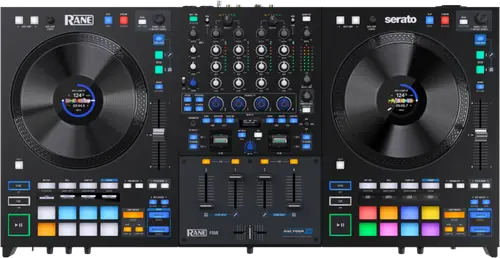
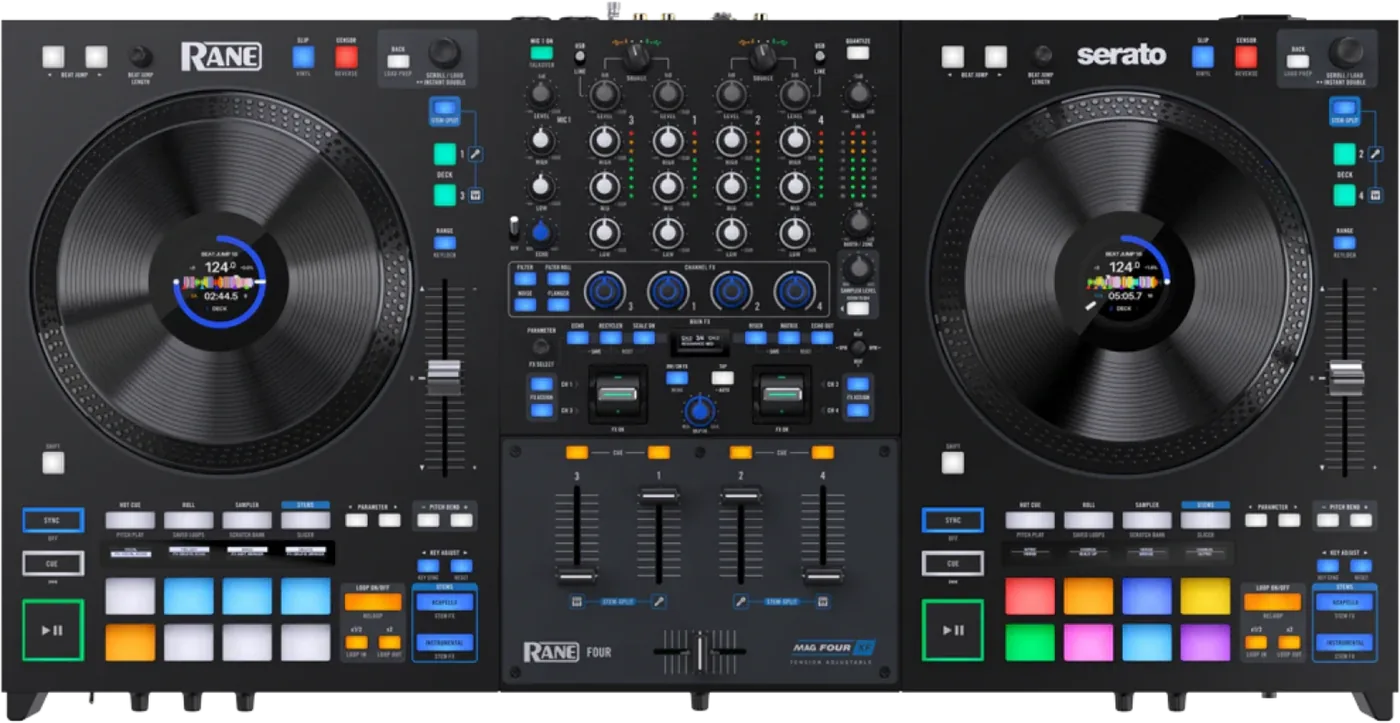
Booth briefing. The RANE FOUR is RANE's four deck Serato controller. It runs four Serato decks across two platters: decks 1 and 3 on the left, 2 and 4 on the right, with a deck layer button on each side choosing which one is live on that platter. All four channel strips stay independent, so four decks can be mixed at once even though only two are under your hands. Stem-Split, the line and phono inputs and the sampler are each assigned to fixed decks rather than following the deck in focus.
When it goes wrong: The computer cannot see the controller No sound from the controller
Fast Lane
The five things that decide your gig
The five things on the RANE FOUR that change what happens next, if you are reading this in the booth. All five are explained in full further down this page.
A firmware update puts every device and FX setting back to factory.
A firmware update resets every device and FX setting to its factory value. RANE state this only in the 1.4.0.1 and 1.3.0.10 entries, never in the user guide, and never repeat it in the later entries. So a DJ updating from a recent version is not told that their cut-in, their FX assignments and their menu settings are about to go.
Write your cut-in, your FX assignments and your menu settings down before you update, because nothing in the box tells you they are about to go.
Decks 1 and 3 share the left platter, 2 and 4 the right.
Decks 1 and 3 live on the left deck, decks 2 and 4 on the right, and a deck layer button selects which is active. The jog display shows the active deck as 1/3 or 2/4.
The guide never says what happens to a playing deck 3 when the left side is switched back to deck 1: whether it keeps playing, whether the platter still drives it, or what the jog display shows for the layer that is not in focus. None of that is documented.
A deck on Line stops talking to Serato, and deck control stops working.
As on the ONE and the ONE MKII, a deck’s controls send MIDI only when its deck source is USB A or B. RANE add that on Line, deck control will no longer be in effect and audio is mixed internally to the cue and main outputs.
Nothing on the panel indicates it. If a channel has gone quiet to the software while still passing audio, check that deck source knob before anything else.
Stems, the line inputs and the sampler are nailed to fixed decks.
Three things are nailed to particular decks. Stem-Split always puts the acapella on decks 1 and 2 and the instrumental on decks 3 and 4, whatever deck is in focus. External line and phono audio is routed to channels 3 and 4 only. And the sampler can be routed to channel 4 only, which is also one of the two line input channels.
None of the three follows the deck in focus, so the deck layer button does not move them and planning around them is part of planning the set.
The guide never says the platters are motorised, and hides the setting the jog wheel depends on.
The user guide never says the platters are motorised. There is no motor, no torque figure and no start or stop time anywhere in it, yet the jog wheel section depends on a platter touch setting being turned off and never says where that setting lives. Platter touch appears in the firmware release history instead, added in 1.4.0.1.
So the one control that decides how the jog wheel behaves is documented in a release note rather than in the book that came with the machine.
If something goes wrong
It will not connect to Serato
RANE publish a dedicated article for a FOUR that will not connect to Serato. They name four causes to work through in order: a computer below the system requirements, an out of date Serato DJ Pro, missing or out of date drivers, and out of date firmware on the FOUR. On the first of those they are specific that Celeron and Pentium processors are not supported.
Work the four in that order rather than reinstalling everything at once. Three of them are fixed from a browser and the fourth is fixed from the unit.
The crossfader is not cutting a channel
RANE publish an article for a crossfader that is not cutting a channel, and the cause is the assignment switches on the front of the unit rather than the fader. Each channel switches to L for the left of the crossfader, R for the right, or THRU, in which the crossfader has no effect on that channel at all. RANE give decks 1 and 3 to the left and decks 2 and 4 to the right as the standard arrangement, and say it is user adjustable.
A channel left on THRU behaves exactly like a broken crossfader and is not one. On a four deck unit the switches are also the fastest way to change what the fader does between two songs.
The Channel FX do nothing to the turntable
On the RANE FOUR an effect that reaches a software deck and not a turntable is documented behaviour.
RANE state that Serato Channel FX apply to software decks but not to external sources. With a channel set to Line the Channel FX do nothing to that source, although the Filter still works on it.
Documented behaviour rather than a fault, and the filter is the part that still reaches an external source. Worth knowing before you build a transition around an effect that will not arrive.
What to watch for
The OLED screens invert themselves, and that is normal
The RANE FOUR does something on its screens that looks like a fault and is not.
RANE state the pad mode and FX OLED displays invert after two minutes of inactivity to prevent burn in, and invert back after two more. It is intentional.
The firmware history says more than the manual does
On the RANE FOUR the release notes are the fuller document, and they are the only place two things a working DJ needs are written down. RANE publish a five version release history: 1.7.0.8 of 10 June 2024, 1.6.0.2 of 19 October 2023, 1.5.0.2 of 24 May 2023, and 1.4.0.1 and 1.3.0.10 both dated 28 March 2023. Nothing before 1.3.0.10 is documented. The user guide itself contains no firmware update procedure at all.
A firmware update resets every device and FX setting to its factory value. RANE state this only in the 1.4.0.1 and 1.3.0.10 entries, never in the user guide, and never repeat it in the later entries. So a DJ updating from a recent version is not told that their cut-in, their FX assignments and their menu settings are about to go.
The faults the release notes admit are the ones an older unit still has. Version 1.8.0.18 fixed the platter failing to register touch when the unit is powered on with a hand already resting on it, the Shift button latching, Play and Pause triggering issues, button debounce across the whole surface, LED flicker during startup, Serato DJ beat sync breaking when internal effects are switched, hardware and software FX button sync with Serato DJ, and Shift plus an FX button causing unintended beat division changes. Version 1.7.0.8 alone fixed main output clipping when the main knob is attenuating, the crossfader minimum cut-in, pitch slider detent, linearity and resolution, USB MIDI buffering on slow hosts with Apple M1 named specifically, button latching, pad attack and debounce, and the OLED screen saver timeout. Version 1.6.0.2 fixed an EQ phasing issue with microphones. Versions 1.5.0.2 and 1.4.0.1 both improved jog wheel display communication.
Version 1.8.0.18 added six named features rather than only fixes: a jog touch sensitivity setting with Low, Med, High and Very High; a long press option for the Key Adjust buttons, which RANE say "helps prevent inadvertent key changes when pitch bending"; the ability to save the same effect with different parameters to more than one FX button; a Reverb effect on Microphone 1 with Room Size, Predelay and Depth, selectable against Echo; Echo rate on Microphone 1 now following the selected deck BPM at a fixed half beat divisor; and an ACAP/INST FX menu option that swaps the primary and secondary functions of the Acapella and Instrumental buttons.
And one default moved. Version 1.8.0.18 changed the Mic to Booth option to default ON. On a unit somebody else updated, the booth output now carries the microphone unless that has been turned back off, which is a different room to the one you soundchecked.
Read that list as a description of an un-updated machine rather than as history. Every fault named there is one an un-updated FOUR still has, and two units on different firmware do not behave alike.
What the manual does not answer
On the RANE FOUR the published record stops well short of the panel. The guide contains no troubleshooting section.
None of the four user guides states what the product is. There is no sentence in any of them calling the unit a controller, a mixer, a standalone system or anything else, and each opens with the identical thank-you paragraph instead. Whatever a reader wants to know about the category of machine in front of them has to come from somewhere other than the manual in the box.
None of these guides contains safety or warranty text. All four delegate it to a separate Safety and Warranty pamphlet, which means the document a DJ actually keeps is not the one carrying the warnings.
RANE publish a real support knowledge base, with per-model FAQ articles, a downloads finder and Serato-specific setup articles. On several points it is more use than the manual, and where this site quotes it, it says so.
Compatibility
What software it runs, and what each one costs you
RANE’s support FAQ states the FOUR is Serato DJ Pro enabled and needs no Serato licence for as long as it is connected, that drivers ship bundled with Serato DJ Pro and are also on the RANE downloads page, and that the firmware may need updating before it will run.
Beyond Serato, RANE state the FOUR is compatible with Virtual DJ, which needs a Pro licence, and with Algoriddim djay Pro version 5.2 and higher on Mac and Windows. They state iOS is not supported at this time.
The iOS line is worth reading twice. A four deck controller that does not support the tablet workflow is a planning fact, not a detail.
It needs a driver, on a Mac as well as on Windows
Short answer. The RANE FOUR is not a plug-and-play class-compliant device, and RANE state it as a flat requirement rather than a recommendation: driver installation is required to connect the FOUR with macOS or Windows computers. Both platforms, not just Windows. That is worth knowing in advance because a DJ arriving with a borrowed or freshly wiped laptop has a download to do before the unit will talk to anything, and RANE point at their own downloads page for it rather than at the operating system. It also puts a missing or out-of-date driver among the named causes when the unit will not connect to Serato at all.
DVS, and the plugin the guide never mentions
RANE answer the DVS question their own guide never raises. The two rear stereo RCA inputs for decks 3 and 4 are switchable between phono and line for turntables, CD and media players or line level sources, and with the DVS plugin bought from Serato those two decks can be controlled with Serato control vinyl or control CDs.
So the answer is yes, on two of the four decks, and it costs something. The manual never gets as far as the question, which is why this page carries RANE’s support answer instead.
Stems, and which deck holds which half
RANE state stems are included free with Serato DJ Pro as of version 3.0, that the feature works by real time processing so any track loaded to a deck can be separated, and that the FOUR carries a dedicated Stem-Split pad mode plus dedicated Acapella and Instrumental buttons. In Stem-Split the track is instant doubled across layers, with decks 1 and 2 always the vocal stems and decks 3 and 4 always the instrumental.
Does the RANE FOUR work without a computer?
The honest answer for the RANE FOUR is that its own guide does not settle it. The guide never states whether the FOUR passes audio with no computer. The one piece of evidence is that on Line, RANE say the input signals are routed to channels 3 and 4 to be digitally mixed and audio will be mixed internally to the cue and main output signals. That establishes internal mixing of line sources; it is not a standalone claim and this site does not make one from it.
This site will not answer it either way until RANE do. What can be said is what the machine has: no media slot and no on board library, so there is nothing on the unit to play a music file from.
Features explained
Four decks on two platters, and what each side shares
The RANE FOUR puts four software decks on a surface with two platters, so the question is never whether something is shared but what. Decks 1 and 3 live on the left deck, decks 2 and 4 on the right, and a deck layer button selects which is active. The jog display shows the active deck as 1/3 or 2/4.
One platter, one jog display, one pitch fader, one set of transport controls and one set of eight pads serve two software decks each. RANE specify the pads as eight per deck with nine modes each, and the pads are eight per PHYSICAL side rather than per software deck.
All four channel strips are independent and simultaneous: each has its own deck source knob, USB or Line selector, audio level, three band EQ, channel FX knob and cue. So four decks can be mixed at once even though only two of them have a platter under them at any moment.
The guide never says what happens to a playing deck 3 when the left side is switched back to deck 1: whether it keeps playing, whether the platter still drives it, or what the jog display shows for the layer that is not in focus. None of that is documented.
The deck source knob, and the condition attached to it
As on the ONE and the ONE MKII, a deck’s controls send MIDI only when its deck source is USB A or B. RANE add that on Line, deck control will no longer be in effect and audio is mixed internally to the cue and main outputs.
On the ONE, the ONE MKII and the FOUR, RANE state that a deck’s controls will send MIDI information only when its deck source selector is set to USB A or B. Switch a deck to Line and every control on that deck stops talking to the software, with nothing on the panel to say why.
Deck source is chosen per deck between USB A and USB B, which RANE describe as allowing handoffs from one computer to another. The guide does not say whether both computers can run Serato at the same time, nor how many audio channels each port carries.
Three things that do not follow the deck in focus
Three things are nailed to particular decks. Stem-Split always puts the acapella on decks 1 and 2 and the instrumental on decks 3 and 4, whatever deck is in focus. External line and phono audio is routed to channels 3 and 4 only. And the sampler can be routed to channel 4 only, which is also one of the two line input channels.
The deck layer button moves your hands between decks. It does not move any of those three, so on the RANE FOUR the sampler and the external inputs have to be planned around rather than switched to.
Stem Level mode is entered with Shift plus channel cue, and that is documented only in the firmware release notes. The user guide describes the three EQ knobs changing function when Stem Level mode is active without ever saying how to activate it.
The platters, and the setting the jog wheel section depends on
The user guide never says the platters are motorised. There is no motor, no torque figure and no start or stop time anywhere in it, yet the jog wheel section depends on a platter touch setting being turned off and never says where that setting lives. Platter touch appears in the firmware release history instead, added in 1.4.0.1.
So on the RANE FOUR a reader who follows the jog wheel instructions in the guide is sent to look for a control the guide never locates, and the document that does describe it is a release note published separately.
The specification table, and why the panel wins
The specification table prints the XLR main outputs block twice, lists booth outputs on XLR that exist nowhere on the panel while the connector list gives two 6.3 mm booth outputs, measures dynamic range from a CD Input that is not a named input on this machine, prints a row reading simply Line, and counts the pads as sixteen at eight per deck on a four deck unit. Treat the table as approximate and the panel as authoritative.
The table claims nine 128 by 32 monochrome OLED displays while the body of the same guide names three. Two jog displays are separately specified as 320 by 240 colour LCDs.
The specification tables in all three Serato units head the deck inputs "CD/Phono" and measure dynamic range from a "CD Input", while every panel and every body reference calls the same socket Deck Phono/Line In and the switch Line/Phono. There is no control or connector called CD on any of these machines. It is older RANE mixer wording that survived into the tables.
All three Serato units print the same specification row, "32-bit, Floating Pont, Double precision". Pont is RANE’s typo for Point, and 32-bit floating point is single precision rather than double, so the row contradicts itself as printed. This site reproduces it rather than quietly correcting it.
Professional tips
The FX you assign stay assigned
FX assignments are stored in the unit. Holding one of the six FX buttons while turning the Parameter and FX Select encoder changes the effect, pushing the encoder confirms it, and RANE state the values are stored directly to the FOUR and recalled each time it is power cycled.
The fader plate comes off, and that is by design
The fader plate can be removed so the MAG 4 crossfader tension can be adjusted and the fader serviced or replaced.
Set the tension you want at home. It is a documented service operation on this unit rather than something that voids anything.
Connections and setup
The order RANE print for switching the rig on and off
Short answer. The RANE FOUR has a documented order for coming up and going down, and it covers the whole rig rather than just the unit. With the power switched off, plug the included power cable into the FOUR first, and only then into the wall. Connect the input sources and the output devices. Then power things on in RANE's stated order: input sources first, the FOUR second, output devices last. Ending the session runs the same list backwards, output devices off first, then the FOUR, then the input sources. Outputs last on and first off is the part that protects the speakers, because it means nothing downstream is live while anything upstream is settling. USB goes in after all of that, into the computer or into a powered hub, and the DJ software opens last.
Phono inputs, and a DVS answer the guide does not give
The guide contains no mention of DVS or control vinyl at all, despite documented RIAA phono inputs on channels 3 and 4. RANE answer it on their support site instead, and this page carries that answer under Compatibility.
Two of the RANE FOUR's channels take a turntable and the guide never connects that to timecode, so there is no calibration step, no control vinyl named and no statement of how many DVS decks are supported. Anyone planning a timecode setup on this unit is working from somewhere other than the manual.
Firmware, drivers and manuals
Official downloads and documents
Go to RANE for the files themselves. We link their pages instead of hosting a copy, because a manual copied here is a snapshot of release day and theirs is the one that stays current.
Manuals. Official RANE manual page →
Broken link? Let us know and we'll fix it.
Frequently asked questions
What is it, and why does the manual not say?
RANE’s product page calls it a professional 4-channel DJ controller for Serato DJ Pro. The user guide contains no product-class sentence: the four deck nature has to be inferred from control descriptions such as the deck layer section.
What comes in the box?
The FOUR, two 2 m USB 2.0 cables, a region specific IEC power cable, DeoxIT fader lube, a quickstart guide, a Serato Pitch N Time expansion voucher, a sticker sheet and a separate Safety and Warranty pamphlet.
Playing soon and it is not working?
Emergency Mode walks you through the checks in order, and it works with no signal once you have opened it.
Start Emergency ModeKeep the Emergency Card
We will email you the printable PDF so it is on your phone before the next dark booth. Occasional notes that save gigs. No spam, unsubscribe in one click.
Registering is free and counts everywhere on Save My Gig. We send a confirmation email first. Your address is stored with Brevo, our email provider. Unsubscribe any time. Privacy