

DDJ-FLX10, the field manual
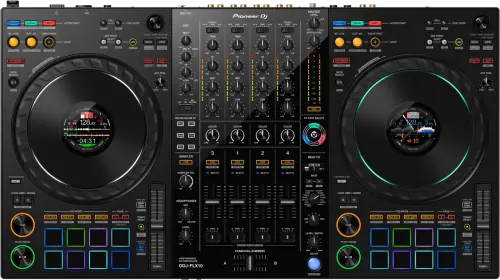
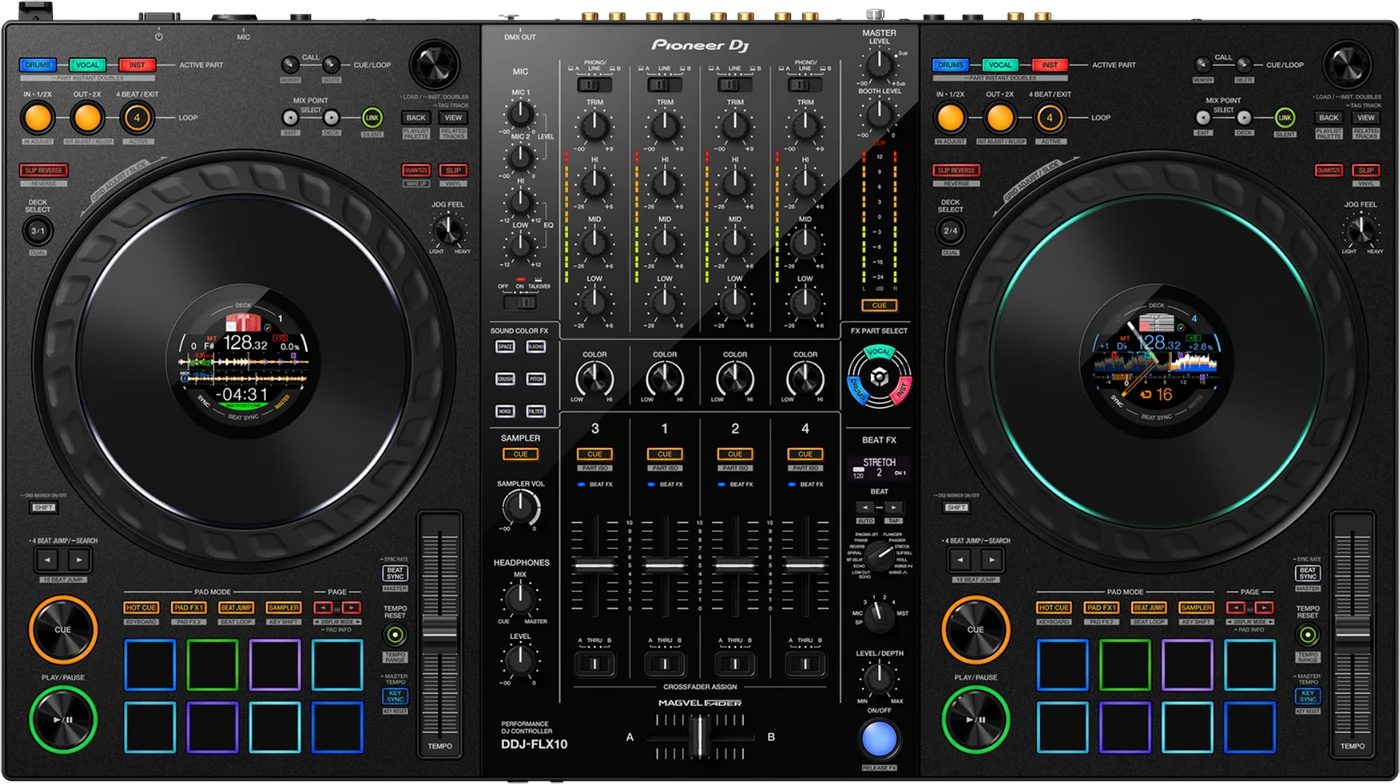
Booth briefing. This is a computer controller, not an all-in-one. The DDJ-FLX10's decks have no standalone playback: they need a laptop running rekordbox or Serato DJ Pro, and djay Pro joined the list in firmware 1.14. The 4-channel mixer is the exception, and it is the one worth remembering: AlphaTheta document it working with nothing connected, so four line inputs and the mics still carry a room if your laptop dies. The one documented defect, Track Separation swapping the wrong part under the EQ knob, was fixed in 1.12. It is AlphaTheta's top four-channel controller, with a STEMS section and a DMX output.
When it goes wrong: The computer cannot see the controller No sound from the controller
Fast Lane
The five things that decide your gig
The five things on the DDJ-FLX10 that change what happens next, if you are reading this in the booth. All five are explained in full further down this page.
Silent decks mean no laptop. The mixer still works without one.
The decks have no standalone playback, so check for the computer first. But the four external inputs and the mics do not need it.
That is your fallback if a laptop dies mid-set: a CDJ or a turntable into a line input carries the room while you reboot.
Track Separation adjusted the wrong part with the EQ knob, until 1.12.
A documented, fixed defect in Part ISO. If STEMS work is the reason you chose this unit, that version is the one that matters.
Check the controller firmware and the rekordbox version in the same sitting, because they have to agree.
Track Separation is adjusting the wrong part with the EQ knob
STEMS and Track Separation are the reason this unit exists.
A dedicated control section, 4 channels and 4 decks, with an evolved 4-sensor MAGVEL FADER.
Separating a track live is the feature people buy it for, and it is also the feature with the documented defect above.
djay Pro arrived by firmware, from 1.14.
rekordbox and Serato DJ Pro natively; Algoriddim djay Pro added by firmware
So which software a unit supports depends on the version it is running, not on the box it came in.
Software compatibility: rekordbox, Serato DJ Pro and djay Pro
It has a DMX output. Only the PRIME 4 G2 also has one here.
Lighting can be driven from the controller itself, alongside multicolor jog rings and a 4-mode jog display.
Worth knowing before a small gig where you are also the lighting department.
If something goes wrong
The controller does nothing in rekordbox
Short answer. A DDJ-FLX10 that controls nothing in rekordbox is usually not broken and not badly connected. It is rekordbox sitting in EXPORT mode. The manual groups three symptoms under one cause: rekordbox cannot be controlled by the unit, the platter is not shown on the deck, and settings the manual describes are not there at all. The fix is one click on EXPORT at the top left of the rekordbox window, which switches it to PERFORMANCE mode. Nothing about the controller reports this, and a DJ who has only ever opened rekordbox to prepare a drive has never needed the other mode.
Why this matters. Everything looks connected. The unit lights up, the computer sees it, and not one control does anything. It reads as a driver fault or a dead controller and it is a mode selector in the corner of the window.
The computer does not see the controller
Short answer. A DDJ-FLX10 a computer will not see has six documented checks and half of them are on the laptop rather than the cable. Use the supplied USB cable, connected properly. If a hub is in the chain it has to be one the computer's own manufacturer recommends. Disconnect any other USB device. Install the dedicated audio driver and the Setting Utility, and if they are already installed, install them again. Quit other applications, and the manual names screen savers and antivirus software specifically, with its own caution to disconnect from the internet before you disable antivirus. And on Windows, uninstall any ASIO drivers belonging to other products, because an unrelated one can take the path this unit needs.
Fix it now. Cable and hub first, because they are free. Then the other USB devices. Then reinstall the driver and the Setting Utility, which is the manual’s own instruction rather than a last resort. Leave the ASIO cleanup for when the first four have failed.
The controller is powered on but there is no sound
Check mains power first. This unit is not bus powered. The manual: "Be sure to use the AC adapter supplied with the unit." There is a DC IN socket and a power switch on the rear, and a controller with a dead adapter looks identical to one with a software problem.
Then check for a laptop. The DDJ-FLX10 is a controller, not an all-in-one: the decks have no standalone playback, so with no computer attached and no software running, silence from the decks is expected behaviour rather than a fault.
But the mixer is not dead, and this is the part that saves gigs. The manual is explicit: "The “4-channel mixer” of the unit can be used to mix input sound without it passing through your PC/Mac. You can use the following mixer features even when not connected to a PC/Mac." There are four sets of external inputs for multi players and turntables, plus two microphone inputs, all of which work with no computer attached. So if your laptop has just died in front of a full room, you are not finished: plug a CDJ, a turntable or a phone into a line input and the unit works as a mixer while you reboot.
Why this happens. A DJ used to an all-in-one like the OPUS-QUAD or the OMNIS-DUO can reach for the DDJ-FLX10 expecting the same thing, press play on a deck and get nothing, because those units need no computer and this one does for its decks. The audio engine for the decks lives in rekordbox or Serato DJ Pro on the laptop, and USB-C is how the two talk.
Fix it now. Connect a laptop over USB-C, open rekordbox or Serato DJ Pro, and confirm the software shows the DDJ-FLX10 as its connected hardware before you touch a channel fader. If the software does not see it, the manual's own list is the driver first: install or reinstall it, disconnect other USB devices, quit antivirus software, and use the supplied cable rather than a longer one. Swapping in a random cable is a cause of this, not a test for it.
If it went quiet on its own after a gap. That is Off mode, not a failure. Off mode arrives after 20 minutes only when no button or knob has been touched and no audio signal of -24 dB or greater is reaching any input, so a unit with music going into an input does not do it. The panel tells you: "The [QUANTIZE] button on the left deck lights up in Off mode." And the way back is not the power switch: "Press the [QUANTIZE] button on the left deck to cancel Off mode."
Avoid it next time. Before doors, boot the laptop, open the software and confirm audio moves through the controller, rather than trusting the unit's own power light. A lit controller with no software running behind it will always be silent.
The microphone produces nothing
Short answer. A microphone that produces nothing on a DDJ-FLX10 is usually the three-position switch rather than the mic. MIC OFF, ON and TALKOVER is one control with an off position, and OFF is where a previous user leaves it after their own set. TALKOVER is not off: it passes the mic and ducks the music underneath it.
The sampler is not in the headphones
Short answer. A DDJ-FLX10 sampler you cannot hear in the headphones has two causes and the second one is invisible from the panel. The SAMPLER VOL knob has to be up. And in Serato DJ Pro, Sample Player Output Select has to be set to A, because with it set anywhere else the sampler never reaches the path the headphones are listening to.
Fader start does not start anything
Short answer. Fader start on a DDJ-FLX10 needs two things and neither is on the controller. A cue has to be set on the track, and the Fader Start check box has to be marked in rekordbox under Preferences, Controller and the Mixer tab. So a fader that starts nothing is a software preference, and every fader on the unit behaves the same way until that box is ticked.
rekordbox or Serato keeps becoming unstable
Short answer. AlphaTheta gives the same six-item list for rekordbox becoming unstable and for Serato DJ Pro becoming unstable on a DDJ-FLX10, which tells you the cause is usually the computer rather than either program. Update the software. Quit everything else. Disable wireless connections, antivirus, the screen saver and any low-power mode. Disconnect other USB devices. Use a hub only if the computer's manufacturer recommends that hub. And the one people ignore: if the laptop is running on battery, put it on mains power.
Do this. Set the laptop up the way you will arrive: on mains, wireless off, nothing else running, one USB device. Then leave it that way rather than turning things back on between soundcheck and doors.
The sound is interrupted, and where the buffer lives
Short answer. Interrupted audio on a DDJ-FLX10 is a buffer setting, and where that setting lives depends on the operating system rather than on the software. On a Mac you change it inside the DJ software, in rekordbox under Preferences and Audio, or in Serato's own latency control. On Windows you change it in the Setting Utility that came with the driver, not in the DJ software at all. Looking in the wrong place is why this one gets given up on.
Serato library faults that are settings
Short answer. Four Serato DJ Pro library faults on the DDJ-FLX10 are settings rather than damage. Tracks missing from the library means they were never imported, or the crate you are looking at is empty. iTunes tracks missing means Show iTunes Library in the Library and Display tab, and if it is already on, the documented move is to turn it off and on again. A track name you cannot edit means Protect Library is on in the same tab. And a virtual deck that shows the offline player instead means the supplied USB cable is not connected properly, or Serato needs updating.
Track Separation is adjusting the wrong part with the EQ knob
Short answer. This is a documented, fixed DDJ-FLX10 defect. Firmware 1.12 fixed Part ISO mode: changing the Track Separation layout in rekordbox now correctly swaps the part the EQ knob adjusts, which earlier firmware got wrong.
Why this happens. Before 1.12, a layout change in rekordbox's Track Separation panel did not line up with which stem the hardware EQ knob was actually touching, so turning the knob for vocals could pull the drums instead. That is exactly the kind of mismatch a DJ notices mid-mix and blames on their own hands.
Fix it now. If the wrong part is moving, do not keep chasing the correct knob assignment mid-set. Update to 1.12 or above, which also needs rekordbox 6.7.1 or newer on the laptop side for the fix to take effect.
Avoid it next time. Check the controller's firmware version and the rekordbox version together before a set that leans on STEMS or Track Separation. The fix needs both sides current, hardware firmware and rekordbox, not just one.
A lighting fixture does nothing
Short answer. The DMX output on a DDJ-FLX10 works in one mode and one mode only, and the manual says so outright: it is for use with rekordbox Lighting mode. A fixture that does nothing is then a chain to walk rather than a dead socket. Check the fixture's own channel setting and the cable, then check that the fixture is mapped to that channel in the FIXTURE LIBRARY screen of rekordbox's LIGHTING mode. And the manual adds a tell: if the mapped item shows itself as No Assign in the pull-down on the right, rekordbox may not support that fixture, and changing No Assign to another setting sometimes works anyway.
What to watch for
Documented fixes, by firmware version
What is in the record. The launch firmware the DDJ-FLX10 shipped with in the box added Serato DJ Pro compatibility, enabled Utilities-mode settings adjustment and fixed an irregular startup behaviour after power-on, so none of that is a fix a reader in the field would ever need to chase, it arrived on day one. Fixed in 1.12: Track Separation layout changes in rekordbox swapped the wrong part when adjusted by the EQ knob, the one genuine defect in the published history. 1.13 changed the automatic power-off to 20 minutes with Power Management on, renamed from Auto Standby, for EU compliance, which is a behaviour change rather than a bug fix. 1.14 added Algoriddim djay Pro support, a feature addition rather than a fix.
What is not in it, and this is worth knowing. No crash, no freeze and no jog wheel or pad fault appears anywhere in the published history against the DDJ-FLX10. The one hardware-facing defect on record is the Part ISO swap, and it has had a published fix since 1.12.
Do this. Note the firmware version on any DDJ-FLX10 you play, and note the rekordbox version alongside it if the set leans on STEMS, since the Part ISO fix needs rekordbox 6.7.1 or newer as well. The highest published firmware is 1.14.
Official documentation. Firmware change history, PDF →
Found an entry we have missed? Tell us and we will add it.
Compatibility
Software compatibility: rekordbox, Serato DJ Pro and djay Pro
Short answer. rekordbox and Serato DJ Pro natively; Algoriddim djay Pro added by firmware A laptop running one of these, connected over USB-C, is required for the decks: they have no standalone playback. The mixer section is separate, and works without any of it.
Why it matters. Native rekordbox and Serato DJ Pro support at launch covers the two software ecosystems most touring and club DJs already carry, so a working laptop library in either package drops straight onto this hardware with no conversion step. Algoriddim djay Pro support arrived later, in firmware 1.14, so a DDJ-FLX10 still on older firmware will not see it as a supported controller yet.
When professionals use it. Switching between rekordbox and Serato DJ Pro libraries on the same hardware for different residencies or clients, without owning two controllers.
Common mistakes. Assuming djay Pro support has always been there. It has not: check the firmware is at 1.14 or above before promising a djay Pro set on this hardware.
Features explained
STEMS, Track Separation and the crossfader
Short answer. The DDJ-FLX10 carries a dedicated STEMS and Track Separation control section, 4 channels across 4 decks, and an evolved 4-sensor MAGVEL FADER, an upgrade over the 2-sensor MAGVEL FADER on the older DDJ-1000.
Why it matters. A dedicated control section for Track Separation means isolating a vocal, a drum part or an instrument stem is a hardware knob, not a menu dive, and the 4-sensor crossfader is a meaningfully finer read on position than the 2-sensor design it replaces. Together they are the reason this sits above the DDJ-1000 in AlphaTheta's controller range rather than beside it.
When professionals use it. Pulling a vocal or an instrumental out of a track live with Track Separation, and leaning on the finer crossfader resolution for scratch or fast cut work where the older 2-sensor design was the limiting factor.
Common mistakes. Adjusting Track Separation layout in rekordbox and assuming the EQ knob will follow correctly on any firmware below 1.12. It will not, on that firmware, and that mismatch is the one documented defect on this unit.
Jog rings, the jog display and DMX OUT
Short answer. The DDJ-FLX10 was the first Pioneer DJ controller with multicolor jog rings. Each jog wheel also carries a 4-mode Expanded On Jog Display, including a 3-band waveform and Mix Point Link, and there are 8 RGB-backlit performance pads per side. A DMX OUT connection, a 3-pin XLR, drives lighting control through rekordbox.
Why it matters. The waveform on the jog wheel itself means less time looking up at a laptop screen mid-mix, and Mix Point Link keeps that in-jog view tied to the point you are actually mixing from. DMX OUT means a rekordbox setup can drive room lighting directly from the booth, without a separate lighting controller in the signal chain.
When professionals use it. Reading the 3-band waveform on the jog wheel during a blind cue in a dark booth, and wiring DMX OUT into house lighting on a rig where rekordbox is already controlling the show.
Common mistakes. Expecting DMX OUT to work without rekordbox driving it. The port is for lighting control through rekordbox specifically, not a generic always-on DMX feed.
Professional tips
What to settle before doors
Check the controller firmware and the rekordbox version in the same sitting. The Part ISO fix landed in 1.12 and it needs rekordbox 6.7.1 or newer on the laptop as well, so a set that leans on STEMS or Track Separation depends on both sides being right. One side updated is the version of this that still puts the wrong stem under the EQ knob.
Confirm the version before you promise a djay Pro set. Software support is rekordbox and Serato DJ Pro natively; Algoriddim djay Pro added by firmware, and the djay Pro side arrived in 1.14. Below that the software does not see this as a supported controller, and the highest published firmware is 1.14, so there is nothing to wait for.
Know which USB-C port is which before you plug in. There are USB Type-C x2 and they are not interchangeable: one USB-C port takes the PC, Mac, iOS or Android device, the other is power in only. A laptop in the wrong one is a controller that lights up and never appears in rekordbox, which reads as a dead cable. And if you are running it from a phone or a tablet, the manual is direct: "When using the unit with a mobile device, use a USB power adapter or mobile battery to power the unit."
Expect the 20 minute power-off and plan the gap around it. From firmware 1.13 the automatic power-off happens after 20 minutes with Power Management on, renamed from Auto Standby, for EU compliance. A long soundcheck gap or a slow changeover is enough to reach it, so treat a dark controller as expected behaviour and check your levels on the way back up.
Do not treat DMX OUT as a spare audio output. It is a 3-pin XLR that drives lighting through rekordbox, separate from MASTER, BOOTH and PHONES, and it is not a generic always-on DMX feed either. If the room's lighting is coming off this controller, rekordbox is what drives it, so that gets built in rekordbox rather than patched at the desk.
Connections and setup
Connecting it in the booth
Short answer. On the DDJ-FLX10 there are USB Type-C x2, and one USB-C port takes the PC, Mac, iOS or Android device, the other is power in only. Inputs: there are four sets of external inputs for multi players and turntables, plus two microphone inputs, all of which work with no computer attached. Outputs: MASTER, on XLR and RCA, BOOTH, on TRS, and PHONES, on TRS and 3.5mm. DMX OUT, a 3-pin XLR, is separate from the audio outputs and drives lighting through rekordbox.
Why it matters. The second USB-C port is not a second computer connection, so a plan built on leaving the next DJ's laptop connected on it does not survive contact with the booth. The MASTER, BOOTH and PHONES split does match a standard club patch rather than forcing an adapter.
When professionals use it. Patching MIC in over XLR for announcements without going through a separate mixer, and running a CDJ or a turntable into the external inputs so the mixer keeps working if the laptop goes down.
Common mistakes. Looking for a network connection to other players. There is none: this is a MIDI and USB controller for a computer, not a PRO DJ LINK device, so it does not join a network of CDJs the way a player does.
Firmware, drivers and manuals
Official downloads and documents
Go to AlphaTheta for the files themselves. We link their pages instead of hosting a copy, because a manual copied here is a snapshot of release day and theirs is the one that stays current.
Manuals. Official Pioneer DJ manual page →
Broken link? Let us know and we'll fix it.
Frequently asked questions
Quick answers
- Does the DDJ-FLX10 work without a computer?
- Partly, and the part that works is the part you need in an emergency. The decks do not: no standalone playback, so they need a laptop running rekordbox or Serato DJ Pro. The mixer does. AlphaTheta: "The “4-channel mixer” of the unit can be used to mix input sound without it passing through your PC/Mac. You can use the following mixer features even when not connected to a PC/Mac." There are four sets of external inputs for multi players and turntables, plus two microphone inputs, all of which work with no computer attached. That is still different from an all-in-one like the OPUS-QUAD or OMNIS-DUO, which plays its own music with no computer at all.
- Is it bus powered?
- No. "Be sure to use the AC adapter supplied with the unit." There is a DC IN socket and a rear power switch, so mains is the first thing to check when the unit seems dead.
- Can it link with CDJs over PRO DJ LINK?
- No. It connects to a computer over USB-C, not to other players over a network, so there is no PRO DJ LINK on this unit. It is a MIDI and USB controller, not a networked player.
- What software does it support?
- rekordbox and Serato DJ Pro natively; Algoriddim djay Pro added by firmware
- How many channels does it have?
- 4 channels and 4 decks, with a dedicated STEMS and Track Separation control section.
- Are there known firmware bugs?
- One documented defect: Track Separation swapped the wrong part under the EQ knob, fixed in firmware 1.12, which also needs rekordbox 6.7.1 or newer. No crash, freeze or hardware fault beyond that appears in the published history.
- Why did it switch itself off?
- Power Management. From firmware 1.13 the automatic power-off happens after 20 minutes with Power Management on, renamed from Auto Standby, for EU compliance. Power it back on and check your levels.
- What is the crossfader like?
- An evolved 4-sensor MAGVEL FADER, an upgrade over the 2-sensor MAGVEL FADER on the older DDJ-1000.
- What does DMX OUT do?
- It drives lighting control through rekordbox over a 3-pin XLR connection, separate from the audio outputs.
Playing soon and it is not working?
Start Emergency ModeKeep the Emergency Card
We will email you the printable PDF so it is on your phone before the next dark booth. Occasional notes that save gigs. No spam, unsubscribe in one click.
Registering is free and counts everywhere on Save My Gig. We send a confirmation email first. Your address is stored with Brevo, our email provider. Unsubscribe any time. Privacy
Sources: AlphaTheta's official DDJ-FLX10 firmware change history, the official product page, the March 2023 launch announcement and the official manual, checked 10 August 2026. Specifications theirs, priorities ours.