

DDJ-1000, the field manual
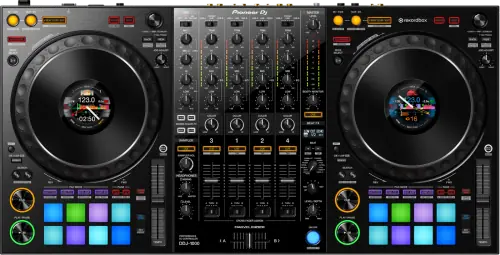
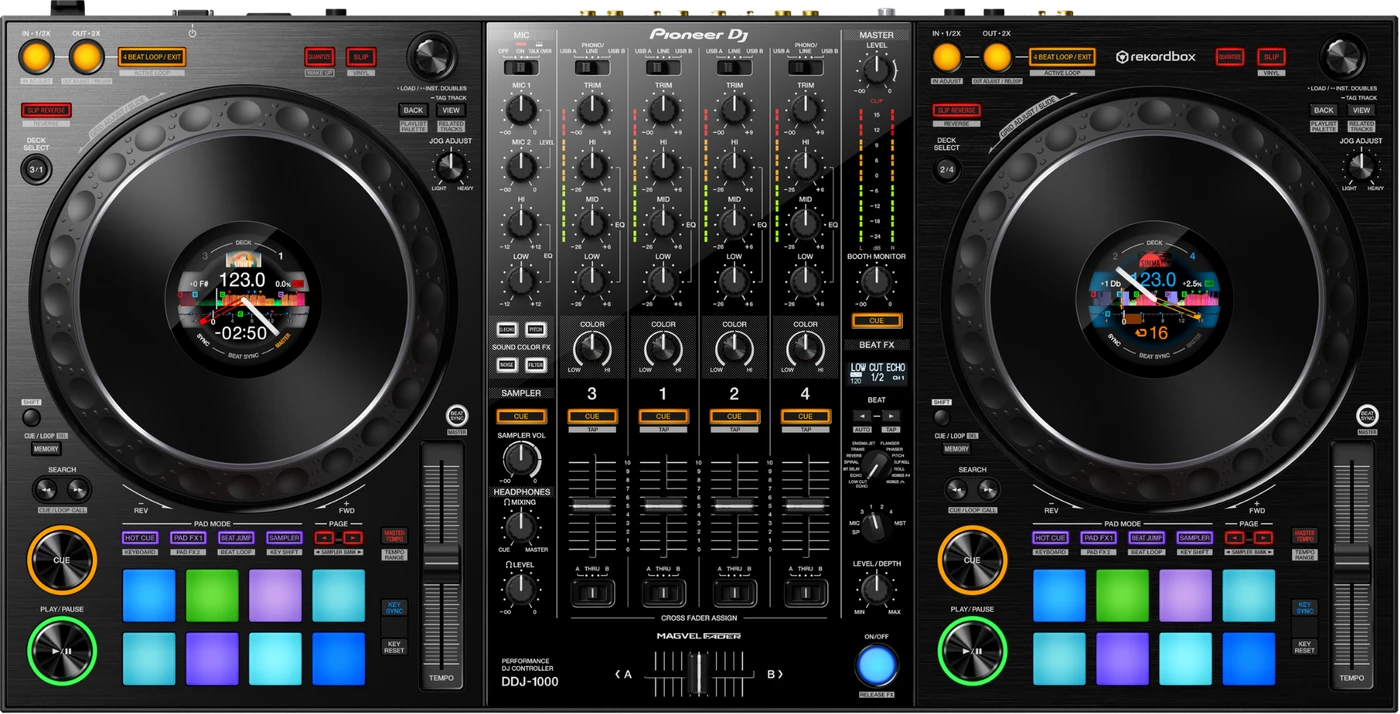
Booth briefing. This is a 2018 controller, not an all-in-one: without a laptop running rekordbox the DDJ-1000's decks make no sound. Its mixer is the exception and works with none attached. Pioneer built its channel and crossfader layout to match the CDJ-2000NXS2 and DJM-900NXS2, so practice at home transfers to a club booth. It is archived on AlphaTheta's site now, and there is no PRO DJ LINK: it talks to a computer over USB, not to players over a network.
When it goes wrong: The computer cannot see the controller No sound from the controller
Fast Lane
The five things that decide your gig
The five things on the DDJ-1000 that change what happens next, if you are reading this in the booth. All five are explained in full further down this page.
The decks make no sound without a laptop. The mixer still does.
There is no standalone playback and no drive slot, so with no computer running rekordbox the decks are silent and that is correct behaviour.
The mixer is the exception, and it is the one to remember: the external inputs work with no computer attached, so a CDJ or a turntable carries the room if the laptop dies.
The jog waveform vanished and the pads turned purple, fixed in 1.12.
The most striking documented fault on this unit, and it has a published fix rather than a forum theory.
It looks like the unit is dying. It is a firmware version.
Below 1.06 the crossfader position does not match rekordbox.
Documented on 19 February 2019: the hardware crossfader position did not align correctly with the software.
You hear it before you see it, and mid-set is a bad time to start doubting your own hands.
The layout follows the club standard on purpose.
Pioneer's own description is that its controls follow the same layout as the CDJ-2000NXS2 and DJM-900NXS2.
So the hours you put in at home transfer to a booth you have never stood in, which is the entire argument for this unit.
It is archived, not discontinued in the sense that matters to you.
AlphaTheta moved the product page under an archive path. It is still a real and widely owned unit you will meet in booths.
Archived means no new firmware is likely, so read the version and treat what is on it as final.
If something goes wrong
One deck, no platter, and a controller that does nothing
Short answer. A DDJ-1000 that shows only one track deck, or no platter on the deck, is usually rekordbox rather than the controller. The manual gives two causes for that pair of symptoms. The first is rekordbox sitting in EXPORT mode, fixed by clicking the EXPORT area at the top left of the screen and choosing PERFORMANCE. The second is rekordbox dj never having been activated, fixed by entering the license key that came with the unit under Preferences and License. Both leave a controller that lights up, connects and does nothing.
Fix it now. Look at the top left of the rekordbox window first, because it is one glance. If it already says PERFORMANCE, the licence is the other half of the answer.
The Mac will not recognise it, and Apple has the fix
Short answer. There is a macOS repair for a DDJ-1000 the computer will not recognise that nobody finds without being told. Disconnect the USB cable, open Audio MIDI Setup, which is Apple's own utility, and look at the MIDI Window or MIDI Studio. Select the DDJ-1000 icon and click Remove Device. The manual adds that the icon may read USB MIDI Device instead, in which case remove that. Reconnect the USB cable and the DDJ-1000 icon comes back, rebuilt. It looks like you are deleting the thing you are trying to fix, which is why people do not try it.
Why this matters. A stale MIDI device entry on a Mac survives reboots and reinstalls, so the usual escalation of unplug, restart, reinstall the driver never touches it. This is the step that does.
The jog light stops turning during playback
Short answer. Here is a DDJ-1000 symptom nobody would trace on their own. If the jog dial illumination does not turn during playback but does turn while you scratch, the USB buffer size is too small. Raising it fixes the lighting. The connection between a visual behaviour and an audio buffer setting is not one a DJ would ever guess, and the illumination is often the first sign that the buffer is marginal for the rest of the set too.
The TEMPO slider dies when you switch decks on SYNC
Short answer. A DDJ-1000 TEMPO slider that stops working when you switch decks during BEAT SYNC is a utility mode setting, not a fault. The unit can be set to be forcefully operated as a general MIDI controller, and in that state it stops behaving as a rekordbox-aware device in exactly this way. Check utility mode and turn that off if you are using rekordbox.
The sampler is not in the headphones
Short answer. A DDJ-1000 sampler you cannot hear in the headphones has two causes, and the first one is a button rather than a knob. SAMPLER CUE has to be pressed to turn the sampler deck's monitor on. Then the SAMPLER VOL control has to be up rather than sitting fully counterclockwise. Neither is visible as a problem from the panel.
The microphone produces nothing
Short answer. A microphone that produces nothing on a DDJ-1000 is usually the OFF, ON, TALK OVER selector rather than the mic. There is more than one of these switches on this unit, the manual refers to them in the plural, and OFF is where a previous user leaves the one they were not using. TALK OVER is not off: it passes the mic and ducks the music underneath it.
An indicator is flashing and it is behaving strangely
Short answer. The DDJ-1000 has a documented recovery for the state where an indicator flashes and the unit behaves strangely, and it has a stop condition attached. Disconnect the AC adapter, wait at least one minute, then reconnect it. The minute is stated. And the manual is clear about what to do if that does not work: disconnect the adapter and request repair rather than repeating the cycle.
The crossfader position on the hardware does not match rekordbox mid-set
Short answer. This is a documented fault with a published fix: the crossfader position did not align correctly between the hardware and rekordbox dj, fixed in firmware 1.06.
Why this happens. The fix shipped in February 2019, and this is a 2018 unit, so anything from that first year of production that has never been updated can still show it. What you see is the crossfader's physical position and the software's read of that position disagreeing, which reads as a mixing fault when it is actually a firmware fault.
Fix it now. There is no on-the-night workaround that fixes the underlying disagreement: sweep the crossfader fully to each end to re-establish a known position, and mix conservatively around it for the rest of the set. Flag the unit for a firmware check afterwards.
Avoid it next time. Check the firmware version on any DDJ-1000 you are about to play. Anything below 1.06 carries this fault.
The jog wheel waveform vanished and the pads turned purple
Short answer. This is the most striking documented fault on this unit, and it has a published fix: the jog wheel waveform disappeared and the performance pads turned purple, fixed in firmware 1.12, the last official release found.
Why this happens. The fix shipped in February 2021, three years into this unit's life, so any DDJ-1000 that was updated once early on and never touched again can still carry it. The symptom is alarming precisely because it looks like a display or hardware failure rather than a firmware bug: a jog wheel with no waveform on it and pads sitting in the wrong colour tell you nothing useful mid-set.
Fix it now. Nothing in the booth repairs it on the gig. Keep mixing on beat count and by ear rather than trusting the jog display, and treat the pad colours as unreliable until the unit is updated.
Avoid it next time. Get any DDJ-1000 you own or rely on to firmware 1.12, the highest published version, before it goes back in the bag.
What to watch for
Documented fixes, by firmware version
What is in the record. Fixed in 1.06 (19 February 2019): the crossfader position did not align correctly between the hardware and rekordbox dj. Fixed in 1.07 (24 October 2019): a performance issue in Spiral FX. Fixed in the same 1.07 release: a Fader Start accuracy issue. Fixed in 1.12 (25 February 2021, the last official release found): the jog wheel waveform disappeared and the performance pads turned purple.
The earlier releases, from the same document.
- 1.05, June 2018
- An error when pressing SHIFT and using the jog wheel. The same fault had been addressed once already in 1.04 three months earlier, which is worth knowing if you are on the first of the two.
- 1.03, January 2018
- The jog display flashed for a moment at power on. The channel level indicator lit incorrectly with NOISE in Sound Color FX, and stopped altogether if the unit was disconnected during playback. BEAT FX could not be turned on or off under some conditions.
What is not in it. No crash, no freeze and no total audio dropout appears anywhere in the published record for this unit. The worst confirmed entries are a crossfader alignment disagreement, two lower-severity performance fixes bundled together, and a display fault that looked worse than it was.
Do this. Note the firmware version on any DDJ-1000 you are handed. The highest published firmware is 1.12, and this unit is archived on AlphaTheta's official site, so a firmware check before the show matters more here than on a model still receiving updates.
Official documentation. Firmware history, Help Center →
Found an entry we have missed? Tell us and we will add it.
What the screen does that is not a fault
Short answer. Small black or bright points on a DDJ-1000 screen are inherent to liquid crystal displays and the manual says so outright. A screen that stays dark for a while after power-on in a cold room is the same story, and it reaches normal brightness on its own. And direct sunlight reflecting off it is not a failing backlight, it is sunlight, so block it rather than chase it.
Compatibility
Does it work without a laptop
Short answer. The decks do not. The mixer does, and that distinction is worth more than any other fact on this page.
The decks. The DDJ-1000 is a controller, not a standalone player: there is no onboard playback engine behind the jog wheels, so with no computer running rekordbox the decks are silent.
The mixer. AlphaTheta's own words: "The 4-channel mixer of this unit can be used to mix input sound without passing through a computer." There are four sets of external inputs for multi players and turntables, plus the microphone inputs, all of which work with no computer attached. If your laptop dies mid-set, you have not lost the room: plug a CDJ, a turntable or a phone into a line input and keep the music going while you deal with the computer.
Why this happens. This unit ships with a bundled rekordbox dj licence, and every deck, waveform, EQ and effect you touch on the hardware is rekordbox's software doing the work, sent back to the controller over USB Type-B x2. VirtualDJ 2021 support was added later, but the requirement is the same either way: a running computer, not the controller alone.
When professionals use it. A rig built around a laptop from the start, where the controller replaces a mixer and a pair of players rather than sitting alongside them.
Common mistakes. Treating this as an all-in-one unit the way an XDJ or CDJ is: it plays no music of its own. And the opposite mistake, which costs more: assuming that a dead laptop means a dead unit and packing up, when the mixer in front of you still works.
ASIO on Windows, and the order that matters
Short answer. On Windows the order matters when setting the ASIO driver for a DDJ-1000. The manual's remedy for sound interrupted after the ASIO driver is set is to set the driver BEFORE launching rekordbox, not while it is running. And separately, ASIO drivers belonging to other products should be uninstalled, with the manual pointing you at that driver's own maker for how.
Features explained
The club layout and the MAGVEL FADER crossfader
Short answer. Pioneer's own description of this unit is that its controls follow the same layout as the CDJ-2000NXS2 and DJM-900NXS2. The crossfader is a 2-sensor MAGVEL FADER, and AlphaTheta states its architecture is inherited from the DJM-S9's MAGVEL FADER PRO, rated for 10 million or more movements. 4-channel, 4-deck, full-size jog wheels with customizable-colour LCD centre displays, 16 backlit multicolour performance pads, 14 Beat FX, 4 Sound Color FX, Jog Feeling Adjust and Key Shift.
Why it matters. A DJ who has only played club CDJ and DJM decks can sit down at a DDJ-1000 and find the crossfader, the EQ and the layout in the same places, because that was the design brief at launch in January 2018: a controller built to feel like the club standard of its day.
When professionals use it. Practising at home on a layout that matches the booth, or touring with one controller instead of a mixer and players when the venue cannot supply club gear.
Common mistakes. Expecting the crossfader curve or feel to be identical to a standalone DJM-900NXS2 desk. AlphaTheta states the architecture is inherited, not that the two units are the same part.
Professional tips
Before you rely on one in a booth
Read the firmware version before you agree to play on it, and bring the laptop to do it. This is the one check on this page you cannot do at the unit alone: "The firmware version is not displayed when this unit is not connected to the computer or when this unit and computer are not properly communicating." It is read from the driver utility on a connected computer, so it is a soundcheck job rather than a doorway glance. Anything below 1.06 carries the crossfader alignment fault, and anything below 1.12 carries the vanishing jog waveform and the purple pads. Both were closed by the same release, which is also the highest published firmware at 1.12, so one number answers the whole question. This unit is archived on AlphaTheta's official site, which is exactly why the check matters more here than on a model still receiving updates.
Plug into the computer directly. The manual says it plainly and repeats it four times: "Do not use a USB hub." A booth hub between the controller and the laptop is a documented way to make this unit behave badly.
Pack the computer as part of the controller. The DDJ-1000's decks make no sound on their own. It ships with a bundled rekordbox dj licence; VirtualDJ 2021 support added later, and every deck, EQ and effect you touch on the panel is that software doing the work, so open it and confirm it is authorised on the machine you are actually taking.
Sweep the crossfader to both ends at soundcheck. It re-establishes a known position, and it tells you in one movement whether the hardware and rekordbox dj agree about where the fader is sitting. If they disagree, that is the documented alignment fault fixed in 1.06 rather than anything your hands are doing.
Plan a handover around the two USB ports, not a network. This unit carries USB Type-B x2 and no PRO DJ LINK: it talks to a computer over USB and does not join a network of players. If a promoter is expecting you to link into house CDJs, that conversation is cheaper before you load the car than in the booth.
Practise on it as the club layout it was built to copy. Pioneer built the control positions to match the CDJ-2000NXS2 and DJM-900NXS2, so hours spent at home transfer to a booth running that gear. Hold the crossfader loosely in that comparison: it is a 2-sensor MAGVEL FADER, architecture inherited from the DJM-S9’s MAGVEL FADER PRO, and an inherited architecture is not the same thing as the same part, so expect the feel to be close rather than identical.
Connections and setup
No USB hub, and it is stricter than its own family
Short answer. USB hubs cannot be used with the DDJ-1000, and the manual says so flatly rather than with conditions. The computer and this unit connect directly with the included USB cable. That is stricter than the DDJ-FLX10, whose manual allows a hub if the computer's own manufacturer recommends it, so a hub that is fine on one of these controllers is not a supported connection on the other.
Do this. Count the ports on the laptop you actually tour with before you rely on this controller with it. A machine with one port and a dongle habit is the one this rule bites.
Firmware, drivers and manuals
Official downloads and documents
Go to AlphaTheta for the files themselves. We link their pages instead of hosting a copy, because a manual copied here is a snapshot of release day and theirs is the one that stays current.
Manuals. Official Pioneer DJ manual page →
Broken link? Let us know and we'll fix it.
Frequently asked questions
Quick answers
- Is the DDJ-1000 still a current product?
- No. It is archived on AlphaTheta's official site. It is still a real, widely owned unit you will meet in booths, but it is not a current product.
- Will it make sound on its own?
- Its decks will not: it is a controller, not an all-in-one player, so without a laptop or desktop running rekordbox they stay silent. Its mixer will. AlphaTheta: "The 4-channel mixer of this unit can be used to mix input sound without passing through a computer." So four sets of external inputs for multi players and turntables, plus the microphone inputs, all of which work with no computer attached.
- Can it link with CDJs over PRO DJ LINK?
- No. This is a MIDI/USB controller for a computer, not a network device. It does not join a PRO DJ LINK network.
- What software does it need?
- It ships with a bundled rekordbox dj licence. VirtualDJ 2021 support was added later, so it also works with VirtualDJ if you license that separately.
- How many channels and decks?
- 4 channels, 4 decks, with full-size jog wheels carrying customizable-colour LCD centre displays and 16 backlit multicolour performance pads per unit.
- What crossfader is in it?
- 2-sensor MAGVEL FADER, architecture inherited from the DJM-S9’s MAGVEL FADER PRO, rated for 10 million or more movements.
- Are there known firmware bugs?
- Yes, and each documented one has a published fix: the crossfader misalignment in 1.06, a Spiral FX performance issue in 1.07, a Fader Start accuracy issue in the same release, and the jog waveform / purple pad fault in 1.12. Versions 1.08 through 1.11 are not documented on any official dated page found. No crash, freeze or total audio dropout is anywhere in the published record.
Playing soon and it is not working?
Start Emergency ModeKeep the Emergency Card
We will email you the printable PDF so it is on your phone before the next dark booth. Occasional notes that save gigs. No spam, unsubscribe in one click.
Registering is free and counts everywhere on Save My Gig. We send a confirmation email first. Your address is stored with Brevo, our email provider. Unsubscribe any time. Privacy
Sources: AlphaTheta's official DDJ-1000 firmware history, Help Center, the official product page (now archived), the January 2018 launch announcement and the quick start manual, checked 10 August 2026. Specifications theirs, priorities ours.