

DJM-S9, the field manual
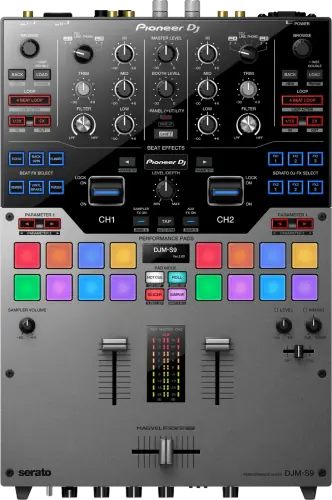
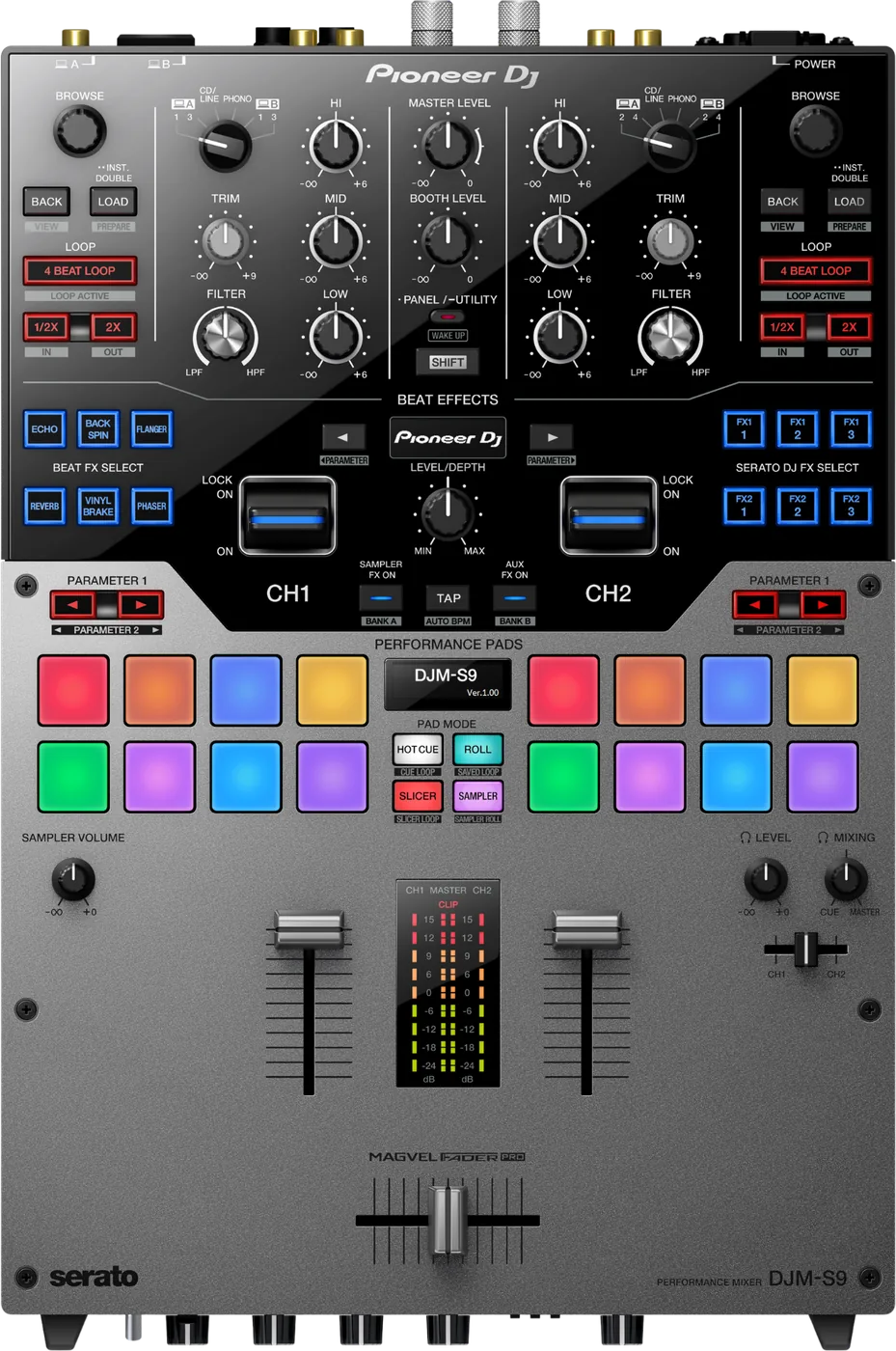
Booth briefing. The DJM-S9 is a two-channel battle desk built around one control: the input select switch above each channel, with six positions covering two computers, two decks each, the rear phono and the CD-LINE input. Two USB-B ports mean two laptops attach at once and the changeover is a flick of that switch. Serato DVS is a separate unlock here rather than included.
When it goes wrong: No sound from the mixer
Fast Lane
The five things that decide your gig
The five things on the DJM-S9 that change what happens next, if you are reading this in the booth. All five are explained in full further down this page.
A silent channel is nearly always the input select switch.
a six-position input select per channel: USB-A Deck 1/3, [CD/LINE], PHONO, USB-B Deck 1/3, and the Deck 2/4 equivalents on channel 2, so four of the six positions are a computer
Four of those six positions are a computer and only two are not. If every position is silent, the next control is on the back: "Set the [MASTER ATT] level selector switch to [0 dB]."
Two USB Type-B computer ports, labelled USB-A and USB-B on the input select, so two laptops stay connected at once and four decks are addressable
The manual frames the input select switch as the changeover control: a Serato DJ user can smoothly take over from another without unplugging anything.
Two things the box does not do for you: "Only one USB cable is included with this unit. To connect two units, use a cable conforming to USB 2.0 standards." And there is no shortcut around that: "A USB hub cannot be used."
Serato DVS is a separate purchase here, unlike the desks after it.
Serato DJ Pro is unlocked free. Serato DVS is listed as a separate unlock, which is the split that surprises people who know the newer desks.
A first launch also shows a screen that looks like a locked mixer and is not: "The [BUY/ACTIVATE] icon may appear on the right side of the screen that is displayed when Serato DJ is launched the first time, but there is no need to activate or purchase a license for those using DJM-S9."
If the DVS control signal is wrong, power cycle the mixer.
Serato publish this as a known issue: after installing the driver, the DVS control signal is not received correctly until the mixer is power-cycled.
Check one thing before that. If no calibration deck is on screen, the expansion pack is switched off: "When CALIBRATION DECK is not displayed, click the [Expansion Packs] tab. Then, from the list, select [Vinyl/CDJ Control] and tick the [Enable Vinyl/CDJ control] check box."
On a used one, test the crossfader properly and take your time.
Crossfader failure is reported repeatedly across DJ forums from 2016 to 2025, sometimes early in a unit’s life. AlphaTheta has published no defect acknowledgement and their support responses point at fader calibration and dealer exchange. Treat it as something to test on a used unit, not as a stated fault.
The crossfader on this unit uses the magnetic position detection method. Do not place the unit close to a magnet or devices that generate a strong magnetic field. It may result in malfunction.
If something goes wrong
A channel is silent, or the pads do nothing
Check the input select switch first, every time. A silent channel on the DJM-S9 is a switch pointed at an input with nothing on it far more often than it is a fault. Four of its six positions are a computer and two are not, so there are plenty of ways to be pointed at silence.
Why this happens. The switch is above the channel and it is easy to knock while reaching for a gain, and the previous DJ left it wherever their setup needed it. Nothing lights up to tell you the channel is listening to a CD/LINE input with no player attached, although a connected computer can read it back: the settings utility on a connected computer reports the status of this unit’s [INPUT SELECT] switches on its [MIXER INPUT] tab.
Fix it now. Walk the switch through its positions with the channel fader up and the gain sensible, and listen. If you find your source, you are done. If every position is silent on both channels, the problem is downstream of the switch and the manual names the control that does it: "Set the [MASTER ATT] level selector switch to [0 dB]." MASTER ATT lives on the rear panel, it pulls both master outputs down together, and it presents as a quiet room rather than a quiet channel.
If it is the microphone that is silent. That input has a level selector of its own on the rear: "Set the MIC input level selector switch to [MIC]." Left on LINE, a microphone is close to inaudible. Left on MIC, a line source into that same input distorts, so the switch explains both complaints depending on which way it is wrong.
If a pad mode does nothing rather than a channel. The slicer function cannot be used with tracks for which no beatgrid is set. A track that has never been analysed gives you eight dead pads in Slicer and working pads in every other mode, which is a library problem wearing a hardware costume. And with no computer connected at all the pads are not dead either: While in FX TRIGGER mode, BEAT FX can be applied by using the performance pad even if a computer is not connected to the unit.
If the desk is behaving strangely rather than quietly. This unit may not operate properly due to static electricity or other external influences. In such cases, normal operation may be restored by unplugging the power cord then plugging it back in. That is the manual's own move, printed above its troubleshooting table, and it is worth one attempt before anything gets unplugged from anywhere else.
Avoid it next time. Set both switches deliberately during your line check, the same way you set a gain, and look at them again after anyone else touches the desk. Check MASTER ATT once, at the start, because nobody thinks to look at the back of a mixer twice.
DVS is connected but the control signal is wrong
Look at the software before you touch the DJM-S9. If there is no calibration deck on screen there is nothing reading a control signal at all, and the manual gives the three clicks that fix it: When CALIBRATION DECK is not displayed, click the [Expansion Packs] tab. Then, from the list, select [Vinyl/CDJ Control] and tick the [Enable Vinyl/CDJ control] check box.
Then set the audio source to match the rig. The manual fixes this per setup: TURNTABLES for control vinyl on the phono inputs, CDJS for control CDs on the CD/LINE inputs, and CUSTOM when one channel is a turntable and the other is a player. Choosing the wrong one gives a signal that is present and wrong rather than absent, which is the harder fault to read.
Then power cycle the mixer. On the DJM-S9 that is the published cure, not a superstition. Serato publish this as a known issue: after installing the driver, the DVS control signal is not received correctly until the mixer is power-cycled.
Why this happens. The driver install changes how the computer and the mixer talk to each other, and the mixer does not pick that up until it restarts. Nothing on screen says so, so the symptom is a scope full of nonsense on a rig you just set up correctly, which reads as bad cartridges or a dead phono input.
Fix it now. Power the mixer off, wait, power it back on, and check the scope again before you change anything else. Do this before you start swapping needles or cables, and if you do reach for a cable, kill the power first: "Be sure to turn off the power and unplug the power cord from the power outlet whenever making or changing connections."
Avoid it next time. Make the power cycle part of the driver install rather than a troubleshooting step. Install, restart the mixer, then test, always in that order.
An effect is clearly on, and the headphones say nothing
Four Beat FX cannot be cued on the DJM-S9, and that is the design. "The creation processing of the [ECHO], [REVERB], [DELAY] and [SPIRAL] effect sounds is performed after the crossfader processing so that the effect sounds cannot be monitored. It is not a malfunction."
Why this happens. Those four are built after the crossfader in the signal path, and the headphone cue is taken before it. There is nothing for the cue to pick up, so the DJ hears a dry channel while the room hears the effect. The lever is lit, the LEVEL and DEPTH control moves something, and the monitor stays clean, which is exactly what a broken headphone path also looks like.
Do this instead. Rehearse those four on the master rather than in the cue. Set the beat value and the depth with the effect audible in the room at a moment you can afford, or learn them at home, because the desk will never let you preview them. The other eleven Beat FX cue normally, so a quick check with one of those tells you the headphone path is fine.
The ten-hour auto standby, and what cancels it
Short answer. The DJM-S9 can switch itself to standby, and it is not a plain timer: "When [AUTO STANDBY] is set to [ON], the unit automatically enters the standby mode if 10 hours elapses with all of the following conditions met. That none of this unit’s buttons or controls are operated. That no audio signals of -10 dB or greater are input to this unit’s input terminals."
Read the two conditions together. Both have to hold for the whole ten hours. A desk being played does not qualify, and neither does a desk with audio running through it above -10 dB, so this does not reach into a set. What it reaches is the long idle: a desk left powered after load-in, an install left up between events, a shop demo unit.
Waking it, and turning it off. If the [PANEL/UTILITY] button is pressed, the standby mode is canceled. This unit is shipped with the auto standby function turned on. So the setting is on unless somebody changed it, and AUTO STANDBY in the utilities mode is where it changes. Hold PANEL/UTILITY for over a second to get there.
What to watch for
What the firmware record covers, and where it stops
What is in the record. Firmware 1.05 set the DJM-S9 cut-in lag to 1 mm when the mixer is not connected to a computer. 1.07 fixed performance pads not illuminating correctly on Windows, audio being cut at the start of the AUX input, and the master mix out being recorded incorrectly on the USB-B computer with two computers connected. 1.08 added rekordbox dj 5.0 support and fixed a false "Please connect SeratoDJ" error. 1.09 fixed a firmware update error on macOS Catalina.
The record is published per platform, and the two halves do not match. For the final version, the macOS history for 1.09 records the Catalina update fix and improved stability, while the Windows history for the same version records improved stability only. So a Windows DJ reading only the Windows document sees a stability release and nothing else, which is accurate for them and not the whole picture of what that version changed.
Where it stops. Nothing has been published since November 2019, which is a closed record rather than an open one. The highest published version is 1.09. There is no update waiting for you, which also means there is no update coming to fix anything.
Do this. Read the version off any desk you are handed. On a mixer this age the useful question is not whether an update exists but whether somebody ever applied the ones that do.
Buying one second-hand: what to test
Test the crossfader properly, and take your time over it. It is the part of a used DJM-S9 that tells you the most. Crossfader failure is reported repeatedly across DJ forums from 2016 to 2025, sometimes early in a unit’s life. AlphaTheta has published no defect acknowledgement and their support responses point at fader calibration and dealer exchange. Treat it as something to test on a used unit, not as a stated fault.
How to test it. Run the fader slowly across its whole travel with a tone playing, listening for the audio dropping out or cutting in unevenly at any point rather than only at the ends. Then do it fast, thirty or forty times. Then set Feeling Adjust to both extremes and repeat. A fader that behaves at one tension and not another is telling you something.
Check what is near the desk before you blame the fader. The crossfader on this unit uses the magnetic position detection method. Do not place the unit close to a magnet or devices that generate a strong magnetic field. It may result in malfunction. A magnetic phone mount, a small speaker or a tool bag with magnets in it, sitting where the seller keeps the unit, is a documented cause and a free fix.
Ask about the bumpers. Two spare hardnesses live inside the panel of every DJM-S9: "Fader bumper A and Fader bumper B are included inside of the panel of this product." A unit that has been opened may have lost them, or may be running a bumper that is not the one it left the factory with, which changes how the fader feels before you have judged anything about its condition.
Test the rest while you are there. Every position of both input select switches, with a source on each. Move the sources with the power off, because that is what the manual asks for: "Be sure to turn off the power and unplug the power cord from the power outlet whenever making or changing connections." Then both USB-B ports, not just the one nearest the cable. All eight pads in every mode. The mic input and the talkover. The AUX input, which is not on the input select switch and so is easy to leave untested.
What this page is not saying. It is not saying the crossfader is defective. AlphaTheta has never acknowledged a defect and there is no published rate. It is saying that this is the part people report, so this is the part to spend ten minutes on.
Compatibility
What Serato unlocks, and what it does not
Short answer. On the DJM-S9: Serato DJ Pro is unlocked free. Serato DVS is listed as a separate unlock, which is the split that surprises people who know the newer desks.
Why it surprises people. On the desks that came after this one, a DJ connects the mixer and DVS is simply there. Here the mixer unlocks the software and the timecode capability is its own purchase. Somebody who has only played newer hardware can arrive with control vinyl, a working mixer and no DVS, which looks like a fault and is a licence.
The screen that looks like a locked mixer. On a first launch, Serato shows a button that reads as a demand rather than an offer, and the manual heads it off in a footnote: "The [BUY/ACTIVATE] icon may appear on the right side of the screen that is displayed when Serato DJ is launched the first time, but there is no need to activate or purchase a license for those using DJM-S9." The instruction underneath it is to click [Online] and use the unit as it is.
DVS has a switch in the software, and it is off. When CALIBRATION DECK is not displayed, click the [Expansion Packs] tab. Then, from the list, select [Vinyl/CDJ Control] and tick the [Enable Vinyl/CDJ control] check box. No calibration deck means nothing is reading a control signal yet, whatever the turntables are doing. Then set the audio source to match the rig: TURNTABLES for analogue players, CDJS for players, CUSTOM when a rig mixes the two.
Stems. On the Serato Stems hardware list, through pad-mode replacement, despite being a 2015 design.
Drivers. macOS driver v4.0.1.1 covers Catalina through Sonoma, with a separate v1.2.0 for Mojave. Windows driver v1.110 covers 10 and 11.
The two-computer changeover
Short answer. The DJM-S9 is built for it. Two USB Type-B computer ports, labelled USB-A and USB-B on the input select, so two laptops stay connected at once and four decks are addressable. The manual frames the input select switch as the changeover control: a Serato DJ user can smoothly take over from another without unplugging anything.
Why this desk is good at it. The handover is a switch position, not a cable. Both laptops stay plugged in, both stay running, and the swap happens in the time it takes to move a lever. That is the behaviour a back-to-back needs and it is the reason this mixer stayed in rotation long after it was archived.
Bring the second cable. One is supplied and two are needed: "Only one USB cable is included with this unit. To connect two units, use a cable conforming to USB 2.0 standards." The obvious workaround is ruled out in the same paragraph of the manual: "A USB hub cannot be used." Both computers go straight into the mixer, so that is two cables in the bag, agreed between two DJs before either of them is in the booth.
The split desk is a reduced desk, and this is the part nobody mentions. Some operations of the unit are restricted when two computers are connected to the unit. Specifically: FX BANK cannot be loaded. The effect type cannot be changed even if the [BROWSE] control is turned while the [BEAT FX SELECT] button is pressed. The BEAT FX effect is reset to the default setting. There is an exit from all of that: The restrictions are not applied when [USB-A] is selected by both [INPUT SELECT] switches of [CH1] and [CH2], or when [USB-B] is selected by both. In other words the restrictions bite exactly when a genuine back-to-back is happening, one DJ per port, and they lift the moment both channels point at the same computer.
Two more settings go quiet in that state. The crossfader cut-in adjustment is one: "This setting is disabled and the default setting is applied when two computers are connected to this unit and [CD/LINE] or [PHONO] is selected by the [INPUT SELECT] switches of [CH1] and [CH2]." So does the AUX effect path: "The effect of Serato DJ FX is not applied to AUX when separate computers are selected by the [INPUT SELECT] switches of [CH1] and [CH2]." A scratch DJ whose cut-in silently returns to the shipped value mid-handover has not broken anything, and the desk will not tell them that.
The detail that catches people. Before firmware 1.07, the master mix out was recorded incorrectly on the USB-B computer when two computers were connected. If you record your sets and you share the desk, that is the version to be above.
Features explained
The input select switch, and what each position listens to
Short answer. a six-position input select per channel: USB-A Deck 1/3, [CD/LINE], PHONO, USB-B Deck 1/3, and the Deck 2/4 equivalents on channel 2, so four of the six positions are a computer. The channel is listening to exactly one of those at a time, and nothing about the panel tells you which unless you read the switch.
Why it is the first thing to learn. Almost every confusing moment on this mixer resolves to the position of that switch. A silent channel, pads that do nothing, a turntable that will not come through, the wrong laptop being heard: all of them are the same control pointed somewhere other than where you assumed. It is a well-designed switch and it is also the single point everything routes through.
The panel around it. The desk addresses 4 decks across its 2 channels, and the pairing is fixed rather than chosen: Deck 1 and Deck 3 arrive on channel 1, Deck 2 and Deck 4 on channel 2. one mic input with a rear-panel MIC and LINE level selector, level, HI and LOW EQ, echo, and talkover attenuation selectable at 6, 12, 18 or 24 dB, routable to booth. On the effects side, 15 Beat FX in the mixer, alongside the two FX units Serato DJ provides, and four pad modes: Hot Cue, Roll, Slicer and Sampler.
One input is not on the switch at all. The AUX input on the rear has its own AUX LEVEL control on the front panel and no position on either input select switch. A sampler, a phone or a second mixer patched there will never appear however many times the switch is walked, because the switch was never in that signal path.
The position is readable, just not on the desk. Nothing on the DJM-S9 panel reports which source a channel is listening to. A connected computer does: the settings utility on a connected computer reports the status of this unit’s [INPUT SELECT] switches on its [MIXER INPUT] tab. That is the one way to settle an argument about the switch without touching it.
MAGVEL FADER PRO and the Feeling Adjust dial
Short answer. MAGVEL FADER PRO with a Feeling Adjust dial for operating load, plus curve, reverse and an adjustable cut-in lag. The weight of the fader is a control on the desk rather than a workshop job.
Why it matters. On a battle mixer the fader is the instrument, and every scratch DJ has a different tolerance for how much resistance they want under the hand. A shared or rented desk can be made to feel like your own in seconds instead of being fought for an hour. Cut-in lag is the other half of that: it decides how far the fader travels before sound appears, and the default is not sacred.
There is a second adjustment, and it is physical. The fader runs against a bumper under the aluminium panel, and the DJM-S9 ships with three hardnesses of it: bumper A is hard, bumper B is soft, and bumper C, the one fitted at the factory, is rather hard. Only bumper C is fitted. The other two travel inside the unit rather than in an accessory bag, which is why most owners never learn they own them: "Fader bumper A and Fader bumper B are included inside of the panel of this product."
What the swap involves, stated plainly. "Note that the part replacement of this unit should be done on your responsibility." Seven controls come off, six screws come out, the aluminium panel lifts, the bumper changes, and then there is a step people skip: "After the bumper is replaced, adjust the ranges that do not output sound on both edges of the crossfader." Skipping it leaves the cut-in wrong for the new bumper, which feels like a broken fader.
What is not here. AlphaTheta describe no user-replaceable fader cartridge for this mixer. The bumper is the part described as replaceable. The fader assembly is not, so plan around the bumper and not around a cartridge swap.
Keep magnets away from it. The crossfader on this unit uses the magnetic position detection method. Do not place the unit close to a magnet or devices that generate a strong magnetic field. It may result in malfunction. A magnetic phone mount or a speaker set on the desk is the one crossfader malfunction cause with a published source behind it.
It is a working mixer with no computer attached
Short answer. The DJM-S9 mixes turntables, players and a microphone on its own, and the manual says so directly: "The 2-channel mixer of this unit can mix the sound of the external input without a computer. The mixer functions described below operate even if the unit is not connected to a computer."
Why this is worth knowing before you need it. A laptop that will not boot ten minutes before a set is not the end of the gig on this desk. Put the input select switches on PHONO or CD/LINE and the two channels, the isolator, the filter, the crossfader, the microphone and the AUX input all keep working. The DJ before you may also have been running it this way, which is why an inherited S9 can be making sound with nothing plugged into either USB port.
The pads still do something, too. While in FX TRIGGER mode, BEAT FX can be applied by using the performance pad even if a computer is not connected to the unit. Set the input select to CD/LINE or PHONO, confirm Beat FX is the selected effect side, and each pad fires the effect at its own beat fraction. That is a real performance tool on a desk with no computer on it.
The one thing you lose. The fader start function (move the channel fader or crossfader while pressing the [SHIFT] button) cannot be used for the external input. So a fader-start routine has to wait for the computer, and everything else does not.
Professional tips
Before you play on one
Set Feeling Adjust and the cut-in lag on arrival. Both are panel controls and both were left wherever the last DJ wanted them. Two minutes here is the difference between the desk feeling like an instrument and feeling like an obstacle.
Agree the changeover out loud, and bring a cable. Two laptops means two USB-B ports and two cables, because only one is supplied and the alternative is ruled out: "A USB hub cannot be used." Agree which port is whose before either DJ touches a switch, and agree that during a true one-port-each split the effects section is reduced, which is documented rather than a fault: Some operations of the unit are restricted when two computers are connected to the unit.
Set the input select switches during the line check. Both of them, deliberately, and note that the AUX input is not one of the positions. If a channel has to stay empty, the phono short-circuit pin plugs are the manufacturer's answer to the noise that comes with that: "To connect a device to the [PHONO] terminals, remove the short-circuit pin plug inserted in the terminals. Insert this short-circuit pin plug into the [PHONO] terminals when nothing is connected to them to cut external noise."
If you need DVS, confirm the unlock, not the cable. On this desk the timecode capability is bought separately, so check it is on the account you are actually using rather than assuming the mixer provides it.
Check the standby setting on an install you did not build. If the [PANEL/UTILITY] button is pressed, the standby mode is canceled. This unit is shipped with the auto standby function turned on. Ten idle hours with nothing above -10 dB reaching the inputs will put a permanently racked DJM-S9 into standby between events, and PANEL/UTILITY is what brings it back.
Do not expect an update to fix anything. The firmware record closed in November 2019. Whatever this desk does today is what it will do.
Connections and setup
The rear-panel rules that cost money to break
Patch the DJM-S9 with the power off. The manual is not soft about it: "Be sure to turn off the power and unplug the power cord from the power outlet whenever making or changing connections." The power cord goes on last, after everything else is joined up. That is the order for the line check and it is the order for testing a desk you are thinking of buying.
The phono sockets ship blocked, on purpose. "To connect a device to the [PHONO] terminals, remove the short-circuit pin plug inserted in the terminals. Insert this short-circuit pin plug into the [PHONO] terminals when nothing is connected to them to cut external noise." So an RCA that will not go into a phono input on an inherited desk is a fitted pin plug, not a damaged jack, and putting the plugs back when the turntables leave is the documented way to keep that channel quiet. Keep them where a child cannot reach them, which is a warning the manual prints in capitals.
Phono means phono. Do not connect to a DJ player or other line level device. A player with its own phono stage sounds distorted here, and the tell is that the channel level indicator barely responds to the TRIM control. The fix is a socket, not a knob: "Connect the analog player with built-in phono equalizer to the [CD/LINE] terminals." If that player has a PHONO and LINE selector of its own, switch it to PHONO instead.
MASTER 1 is balanced only, and it is an XLR in a world full of phantom power. "Be sure to use the [MASTER 1] terminals only for a balanced output. For connection with an unbalanced input (such as RCA), use the [MASTER 2] terminals." And the line that has saved output stages before now: "Do not connect the terminal that can supply phantom power to the [MASTER 1] terminal." The manual adds one more, which sounds absurd until the night it happens: take care not to insert another unit's power cord into the MASTER 1 terminal.
The BOOTH output breaks the balanced rule, in your favour
Short answer. The BOOTH output on the DJM-S9 is the exception to the balanced rule that governs the rest of the desk, and it is worth knowing because it goes the friendly way. The manual describes it as compatible with balanced or unbalanced output on a TRS connector, so a booth monitor with an unbalanced input is not the mistake here that it would be on the DJM-S11 or the DJM-750MK2, where BOOTH is balanced only. MASTER 1 is still balanced only on this desk, and MASTER 2 is still the unbalanced output, so the exception applies to the booth send and to nothing else.
Why this matters. Balanced rules travel between models in people’s heads, and this is the one that does not. A tech who has learned the DJM-S11 rule will refuse a perfectly good booth cable here, or worse, will assume the same latitude exists on a desk where it does not.
Firmware, drivers and manuals
Official downloads and documents
Go to AlphaTheta for the files themselves. We link their pages instead of hosting a copy, because a manual copied here is a snapshot of release day and theirs is the one that stays current.
Firmware downloads. Official Pioneer DJ firmware page →
Manuals. Official Pioneer DJ manual page →
Broken link? Let us know and we'll fix it.
Frequently asked questions
Quick answers
- Can two laptops be connected for a back-to-back?
- Yes. Two USB Type-B computer ports, labelled USB-A and USB-B on the input select, so two laptops stay connected at once and four decks are addressable. The manual frames the input select switch as the changeover control: a Serato DJ user can smoothly take over from another without unplugging anything.
- Is Serato DVS included?
- No. Serato DJ Pro is unlocked free. Serato DVS is listed as a separate unlock, which is the split that surprises people who know the newer desks.
- Is the DJM-S9 discontinued?
- AlphaTheta has moved the product page under an archive path, which is their own taxonomy for a legacy product, and has published no end-of-life notice. So: archived, and no statement beyond that.
- Is there a newer firmware than 1.09?
- No. Nothing has been published since November 2019, which is a closed record rather than an open one.
- Does it support Serato Stems?
- On the Serato Stems hardware list, through pad-mode replacement, despite being a 2015 design.
- My pads do nothing. Is the mixer broken?
- Check the input select switch above that channel first. Four of its six positions are a computer and two are not, so a channel on CD/LINE or PHONO has no software for the pads to drive. In Slicer there is a second cause: The slicer function cannot be used with tracks for which no beatgrid is set.
- Does it work with no laptop connected?
- Yes. The 2-channel mixer of this unit can mix the sound of the external input without a computer. The mixer functions described below operate even if the unit is not connected to a computer. The exception: The fader start function (move the channel fader or crossfader while pressing the [SHIFT] button) cannot be used for the external input.
- Can I run both laptops through a USB hub?
- No. A USB hub cannot be used. And only one cable is supplied: Only one USB cable is included with this unit. To connect two units, use a cable conforming to USB 2.0 standards.
- I switched to a back-to-back and the effects changed.
- Some operations of the unit are restricted when two computers are connected to the unit. FX BANK cannot be loaded. The effect type cannot be changed even if the [BROWSE] control is turned while the [BEAT FX SELECT] button is pressed. The BEAT FX effect is reset to the default setting. The restrictions are not applied when [USB-A] is selected by both [INPUT SELECT] switches of [CH1] and [CH2], or when [USB-B] is selected by both.
- I cannot hear echo or reverb in the headphones.
- The creation processing of the [ECHO], [REVERB], [DELAY] and [SPIRAL] effect sounds is performed after the crossfader processing so that the effect sounds cannot be monitored. It is not a malfunction.
- It switched itself off while it sat idle.
- When [AUTO STANDBY] is set to [ON], the unit automatically enters the standby mode if 10 hours elapses with all of the following conditions met. That none of this unit’s buttons or controls are operated. That no audio signals of -10 dB or greater are input to this unit’s input terminals. If the [PANEL/UTILITY] button is pressed, the standby mode is canceled. This unit is shipped with the auto standby function turned on.
- An RCA plug will not go into the phono input.
- To connect a device to the [PHONO] terminals, remove the short-circuit pin plug inserted in the terminals. Insert this short-circuit pin plug into the [PHONO] terminals when nothing is connected to them to cut external noise.
- I installed the driver and DVS will not track.
- Serato publish this as a known issue: after installing the driver, the DVS control signal is not received correctly until the mixer is power-cycled. Before that, check the software side: When CALIBRATION DECK is not displayed, click the [Expansion Packs] tab. Then, from the list, select [Vinyl/CDJ Control] and tick the [Enable Vinyl/CDJ control] check box.
- Can I replace the crossfader myself?
- AlphaTheta describe no user-replaceable fader cartridge for this mixer. The bumper it runs against is replaceable, and two spare hardnesses ship inside the unit: Fader bumper A and Fader bumper B are included inside of the panel of this product. Note that the part replacement of this unit should be done on your responsibility.
Commonly paired with
What you usually find beside it in working booths, from club, festival and rental installs rather than from a manufacturer document.
Pioneer DJ All brands Knowledge base FAQ and Fixes Dictionary
Playing soon and it is not working?
Start Emergency ModeKeep the Emergency Card
We will email you the printable PDF so it is on your phone before the next dark booth. Occasional notes that save gigs. No spam, unsubscribe in one click.
Registering is free and counts everywhere on Save My Gig. We send a confirmation email first. Your address is stored with Brevo, our email provider. Unsubscribe any time. Privacy
Sources: the DJM-S9 Operating Instructions (DRI1310A) and Quick Start Guides (DRH1334A, DRH1336B) for every panel, connection, standby, crossfader and troubleshooting statement on this page, AlphaTheta's archived DJM-S9 product page, the firmware change history, and Serato's known-issue article for the power cycle after a driver install, checked 28 August 2026. Specifications theirs, priorities ours.