

DJM-S11, the field manual
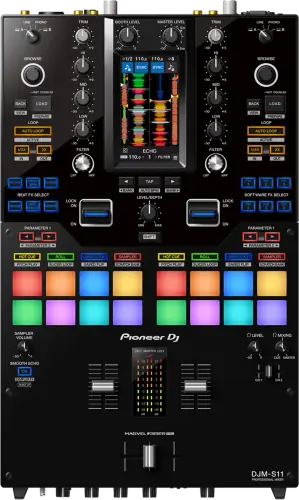
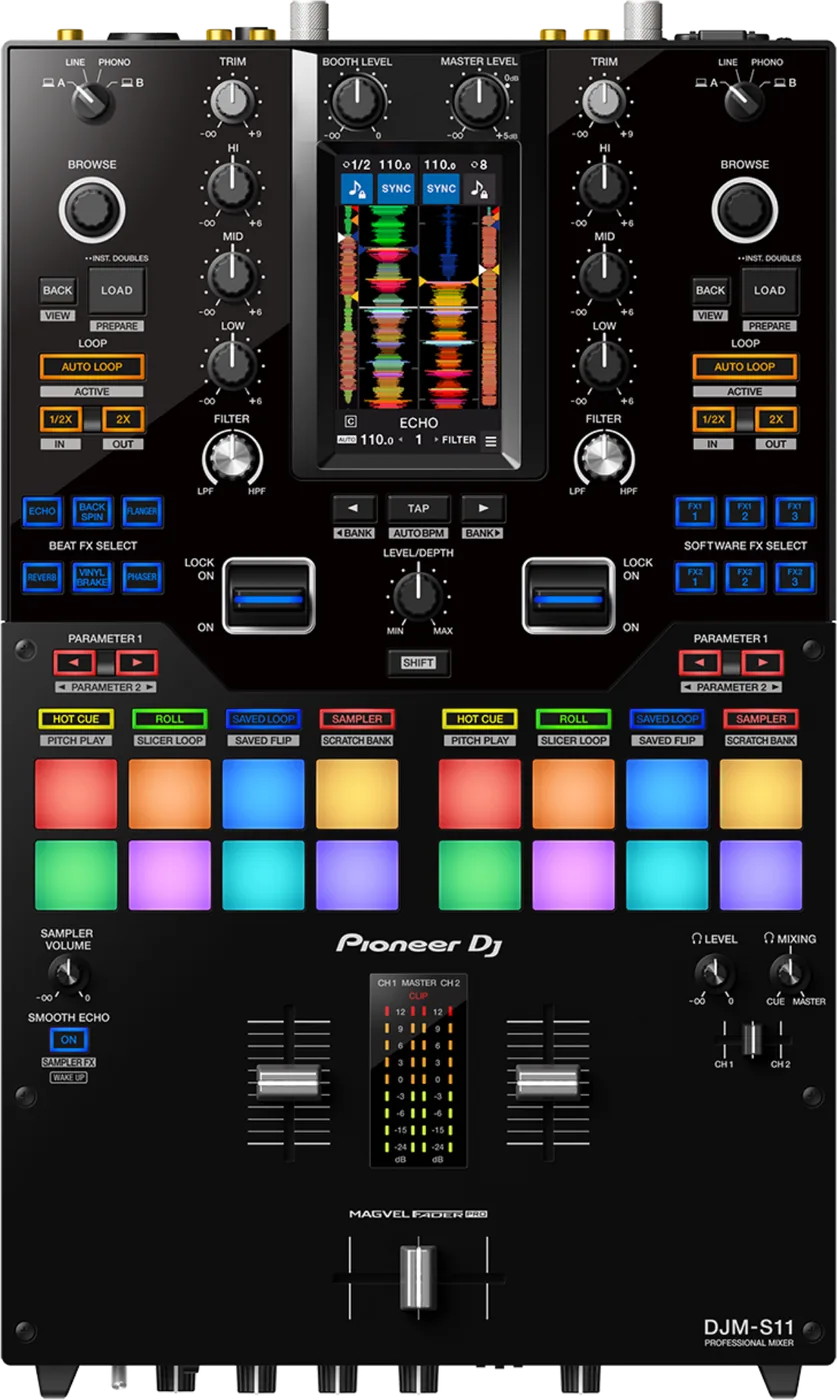
Booth briefing. The DJM-S11 is an AlphaTheta DJ mixer built to run with DJ software over USB, and its front panel is a 4.3-inch colour touch screen that shows what the connected software feeds it. Its analogue inputs and outputs are real hardware, so turntables, players and a microphone pass through it with or without a computer, while the library and the screen content live on the laptop. The USB Type-A ports are a hub for controllers rather than for storage, and control vinyl is not in the box, so you bring your own for DVS. The setup order and what to carry are covered below.
When it goes wrong: No sound from the mixer
Fast Lane
The five things that decide your gig
The five things on the DJM-S11 that change what happens next, if you are reading this in the booth. All five are explained in full further down this page.
The screen shows nothing without a computer attached.
Everything the 4.3-inch colour touch screen displays, the library, the waveforms and the browsing, comes from the laptop. The analogue path is real hardware and passes audio regardless.
A lit screen with no library is not a broken mixer, it is a missing computer.
The USB Type-A ports are a controller hub, not storage.
AlphaTheta are explicit about the [CDJ/CONTROLLER] terminals, and it is worth quoting rather than paraphrasing: "Do not connect storage devices (e.g. USB drives/hard disks, etc.) to the [CDJ/CONTROLLER] terminals. Note that, if you turn the input selector switches, devices are forcibly disconnected from any PC/Mac connected to the unit and data on the devices may break."
The cable to the computer carries its own rule, stated twice in the manual: "Use a USB cable for the connection. Do not use a USB hub."
Emoji at the start of a crate or track name could stop the mixer, until 1.02.
A desk using emoji at the beginning of crate, song or artist names occasionally stopped working. Documented, with a published fix.
It is the kind of fault nobody guesses, because the suspect is your library naming and not the hardware.
It switches itself off, and the power switch is not what brings it back.
Power Management is on from the factory: "When [POWER MANAGEMENT] is set to [ON], the unit enters Off mode after 20 minutes without being used (when no audio signal is input to the channels on the unit)."
The way out is one specific button: "Press the [SMOOTH ECHO ON] button to exit Power Management Off mode."
FEELING ADJUST is a knob, so it is wherever the last DJ left it.
The crossfader is an enhanced MAGVEL FADER PRO, with a FEELING ADJUST knob for crossfader weight.
Set it before the first transition rather than discovering the fader weight during one.
If something goes wrong
A channel is silent, or a control does nothing
Short answer. The DJM-S11 has five documented ways to look broken while working exactly as specified, and all five are checks you can make in under a minute. Start with the back panel, then the Utility, then the FX section.
A dead turntable channel. The PHONO sockets ship with short-circuit pin plugs in them, and the manual is direct about it: "Remove the short-circuit pin plugs from the terminals when connecting devices. When you are not using the terminals, attach the short-circuit pin plugs to cut out external noises." A plug left in is silence that looks like a failed input or a failed cartridge. The matching rule going the other way is: "Do not input line-level signals to the terminals."
A crossfader that does nothing. There is a Utility setting whose whole job is to take it out of circuit: "Sets whether or not the crossfader is in use. Set to [ON] when you don’t want to use the crossfader." Check it before you decide the fader has failed, especially on a desk you did not set up.
A menu that will not change. On this desk the Utility SETTINGS LOCK menu decides whether the MIC and MIXER menus are locked, and its factory setting is LOCK. So a DJ who cannot alter mic talkover, the mic limiter, the isolator behaviour or the master attenuation is looking at a lock, not a fault.
An EQ that kills more than expected. By default the HI, MID and LOW knobs are set to ISO from the factory, which cuts a band all the way to silence and boosts to +6 dB, while switching a channel to EQ in the Utility limits the cut to -26 dB. On a shared desk that is the difference between a filter sweep and a hole in the mix.
A channel fader that stops setting level. Two Beat FX take the fader over. The manual footnote reads: "You cannot adjust the volume with the channel fader when the effect is turned on." It applies to FADER PITCH and FADER SYNTH.
The screen is on but there is no library and no waveform
Short answer. Look for the computer. Everything the DJM-S11's 4.3-inch colour touch screen shows, the library, the waveforms and the deck information, is fed to it by DJ software over USB. With nothing connected there is no library for it to display, and that is not a fault. The analogue half is not guesswork either: the manual specifies a three-position input selector on each channel: a USB position for a computer connected to one of the USB ports, LINE for a multi player or other line-level device, and PHONO for a turntable.
Why this happens. This mixer sits in a confusing middle. Its analogue side is genuinely hardware: turntables, players and a mic go into it and audio comes out of it, and that path does not care what is on the screen. So a DJ can hear sound, see a lit screen with nothing useful on it, and reasonably conclude the unit is broken. AlphaTheta nowhere publish a statement that this mixer works without a computer, and this page is not going to invent one. What is documented is the software side: a Hardware Unlock device for rekordbox Performance mode and free plug and play use of Serato DJ Pro, both of which need a computer connected.
Fix it now. If you only need to mix, mix. Patch the decks and the mic into the analogue inputs and work the mixer as a mixer. If you need the screen, connect a computer and open the software: this desk has USB Type-B x2 so two computers can be connected for a back-to-back changeover, plus USB Type-A x2 as a built-in hub, so check you are on the port the input selector is actually pointing at before you assume the cable is dead.
The setting that follows the laptop. One line in the manual explains a lot of apparent hardware amnesia: "If a PC/Mac is connected to the unit when you change the settings, the changed settings are saved to the PC/Mac. The saved settings are applied to the unit the next time the PC/Mac is connected." So a borrowed computer brings its own copy of the desk's settings with it.
Avoid it next time. Decide before the gig which of the two ways you are working. A purely analogue set on this mixer is fine and needs nothing else in the room. A set that leans on the screen, on Scratch Bank or on pad modes is a laptop set, and the laptop is not optional for it.
The waveform disappeared, or the screen stopped responding
Short answer. Both of those are documented DJM-S11 faults and both have published fixes. The waveform display disappearing, in rare cases, when the input selector switch was changed while connected to a computer was fixed in 1.05. An unresponsive LCD display with two computers connected was fixed in 1.03, along with the detailed waveform being drawn incorrectly on a short track.
Why this happens. Both faults sit on the same seam: the screen is driven by software on a connected computer, and the input selector switch decides which source, and therefore which computer, the channel is listening to. Throwing that switch is the moment the display has to re-establish what it is showing, which is exactly when the old firmware could lose it. The two-computer case is the one that bites at a changeover, because that is the only time two laptops are attached.
Fix it now. Check the firmware version. If the desk is below 1.05 you are carrying known display behaviour and updating is the fix, not a repair. At the gig, stop moving the input selector switch mid-track and hand over on the crossfader instead.
Two documented behaviours that are not faults. With two computers attached, some crossfader settings stop applying. On the cut lag: "When two computers (PC/Mac) are connected to the unit and the input selector switches for CH 1 and CH 2 are set to [LINE] or [PHONO], this setting is invalid (the default setting is applied)." Crossfader smoothing is forced to NONE in the same way when the two input selectors point at different computers, or at LINE or PHONO.
Avoid it next time. Update before a back-to-back specifically, and pack the second cable, because "One USB cable is included with the unit. To connect two devices to the unit, use an additional cable that conforms to USB 2.0 standards." A solo set never puts two computers on this mixer, so a desk that has behaved perfectly for a year can fail the first time you share it.
The mixer stopped working while I was browsing crates
Short answer. Look at the names in your library before you look at the DJM-S11. A desk using emoji at the beginning of crate names, song names or artist names occasionally stopped working, and that was fixed in 1.02.
Why this happens. It is a library problem wearing a hardware problem's clothes. The mixer is rendering your crate and track names on its own screen, and on early firmware a leading emoji in one of those names was enough to stop it. DJs name crates with symbols all the time, so this reaches a real library far more easily than it sounds, and the failure lands mid-set at the moment you scroll onto the offending crate.
Fix it now. If it happens live, get out of that crate and load from a different one, then power cycle if the desk is unresponsive. Afterwards, rename any crate, track or artist that starts with an emoji, and update the firmware so the cause is gone rather than avoided.
Avoid it next time. Keep leading characters alphanumeric in the library you actually gig with. It takes a minute and it removes a whole class of display failure on hardware that draws your names on its own screen.
My effects are not recalled when I connect it to a Mac
Short answer. This one is not mixer firmware, and that is the reason it wastes people's time. A separate DJM-S11 Setting Utility update, ver. 1.0.2 of 28 March 2024, fixed FX not being recalled automatically when the mixer was connected to a Mac. That is computer-side software rather than mixer firmware, which matters because the symptom looks like a hardware fault.
Why this happens. The desk keeps settings that a computer-side utility writes to it, so a fault in that utility shows up as the hardware forgetting your setup. A DJ then checks the mixer's firmware version, finds it up to date, and starts suspecting the unit. The version that matters here is on the laptop, not on the desk.
Fix it now. Check the Setting Utility version on the computer as well as the firmware version on the mixer. If the utility is older than the release above, that is the thing to update. Meanwhile, set the FX you need by hand at the start of the set rather than trusting recall.
Avoid it next time. Treat this desk as two pieces of software, not one: firmware on the mixer, and the Setting Utility on every computer you connect. Checking only the first is how a fixed problem stays in the booth.
It switched itself off during a break
Short answer. The DJM-S11 can take itself into an Off mode on its own, and that is a setting rather than a fault: "When [POWER MANAGEMENT] is set to [ON], the unit enters Off mode after 20 minutes without being used (when no audio signal is input to the channels on the unit)." The way back out is not the power switch: "Press the [SMOOTH ECHO ON] button to exit Power Management Off mode."
Why this happens. Power Management is on when the desk leaves the factory, and from 1.05 the timer is 20 minutes for EU Ecodesign. The condition is the part that gets missed: it counts a period with no audio signal reaching the channels, so a soundcheck that stops for a meeting, a support act using a different mixer, or a changeover that runs long are all it takes. Sound was never the thing keeping it awake in the DJ's mind, so the shutdown looks random.
Fix it now. Press the [SMOOTH ECHO ON] button. That is the documented exit, and reaching for the power switch instead puts the desk through a full restart you did not need. Then check your levels before you push a fader up.
Avoid it next time. If the gig has long silent gaps, turn the function off in the Utility: "Set [POWER MANAGEMENT] to [OFF] if you don’t need to use the Power Management function." The trade is stated in the same place, that power consumption may increase with it off, which is a reasonable trade in a booth and a poor one in storage.
There is no fault table for this mixer
Short answer. There is no fault table for the DJM-S11, and that is worth knowing before you go looking for one. The manual's entire troubleshooting section is three lines: check the devices connected to it, turn the unit off and on, and if it continues, read the precautions and consult service. Everything else that would sit in a fault table on an older desk is on the Pioneer DJ FAQ instead. So on this mixer the power cycle is not a last resort, it is the documented first move.
What to do with that. Take it at face value in the booth. Check what is plugged in, then power cycle, and only then start hunting. On an older desk that order would be wrong; here it is the manufacturer’s own sequence.
What to watch for
Documented fixes, by firmware version
What is in the record. Fixed in 1.02: a mixer using emoji at the beginning of crate names, song names or artist names occasionally stopped working, and the REVERB and SMOOTH ECHO effects could not be applied at the same time. Fixed in 1.03: an unresponsive LCD display when 2 computers are connected, and a detailed waveform drawn incorrectly when playing a short track. Fixed in 1.05: in rare cases the waveform display disappeared when the input selector switch was changed while connected to a computer. That same release, 1.05, also moved the automatic power-off to 20 minutes for EU Ecodesign, which is a behaviour change rather than a bug fix.
What arrived in 1.04. The release nobody quotes added three things a working DJ would notice: Mono Split and Cue Fader Reverse, both reached by touching the headphones icon on the Menu screen, Dual Deck mode for deck 3/4 toggled by holding [SHIFT] and [BACK] together, and Touch FX preset values saved when the unit is turned off and on. Before that release the Touch FX presets did not survive a power cycle, so a desk on older firmware forgetting them is behaving as built.
What sits outside the firmware history. A separate DJM-S11 Setting Utility update, ver. 1.0.2 of 28 March 2024, fixed FX not being recalled automatically when the mixer was connected to a Mac. That is computer-side software rather than mixer firmware, which matters because the symptom looks like a hardware fault.
What the published record does not cover. Versions 1.00 and 1.01 are not in the official change history. That is a gap in the document rather than a statement that nothing changed, and this page does not fill it with guesses.
Do this. The highest published firmware is 1.05. Read the version off any desk you are handed and note the Setting Utility version on the computer beside it, because the two fail differently and only one of them is on the mixer.
Official documentation. Firmware change history, PDF →
Found an entry we have missed? Tell us and we will add it.
What the screen does that is not a fault
Short answer. Small black or bright points on a DJM-S11 screen are inherent to LCD displays and the manual says so outright. A screen that stays dark for a while after power-on in a cold room is the same story, and it reaches normal brightness on its own. And direct sunlight reflecting off it is not a failing backlight, it is sunlight, so block it rather than chase it.
Compatibility
Software, DVS and what is not in the box
Short answer. On the DJM-S11: a Hardware Unlock device for rekordbox Performance mode and free plug and play use of Serato DJ Pro, both of which need a computer connected. And the part that catches people on day one: Control vinyl is not in the box. It has to be bought separately, or the control signal downloaded from the Serato DJ Pro or rekordbox website and saved to a USB storage device for a multi player.
Why it matters. A mixer sold into a turntable setup looks like a complete DVS solution in a product photo, and it is not. The control signal has to come from somewhere, and the manual names the second route: "You can download the control signals from the Serato DJ Pro or rekordbox website. Save them to a USB storage device to use them with this unit." That is a player route rather than a turntable one, so a vinyl rig still needs the pressing. Working that out on the afternoon of the gig is the classic version of this mistake.
What it means for the computer. Both software routes need a computer connected. Being a Hardware Unlock device for rekordbox Performance mode means the desk itself authorises the software, so there is no separate licence to carry, and Serato DJ Pro is plug and play with nothing to activate. Neither of those removes the laptop from the chain.
The voucher in the box. A Serato DJ Pro Expansion Pack voucher ships with the unit, and AlphaTheta are blunt about what happens if it goes missing: "The voucher code needed to activate the expansion pack can’t be reissued. Keep it in a safe place to be sure you don’t lose it."
Common mistakes. Arriving with timecode records that belong to somebody else's rig and no backup, and assuming the desk will show a library because it has a screen. It will not, without the software running.
The USB Type-A ports are a controller hub, not storage
Short answer. The two USB Type-A sockets are the [CDJ/CONTROLLER] terminals, and AlphaTheta are explicit about what does not belong in them: "Do not connect storage devices (e.g. USB drives/hard disks, etc.) to the [CDJ/CONTROLLER] terminals. Note that, if you turn the input selector switches, devices are forcibly disconnected from any PC/Mac connected to the unit and data on the devices may break."
The rule that runs the other way. The link between the mixer and the computer must not go through a hub of your own. The manual states it twice, once for the input connections and once for the CDJ/controller connections: "Use a USB cable for the connection. Do not use a USB hub." And on cables, "One USB cable is included with the unit. To connect two devices to the unit, use an additional cable that conforms to USB 2.0 standards."
Why it matters. The warning is not about the ports being weak, it is about what the input selector switch does. That switch re-routes which computer the desk is attached to, and anything hanging off the built-in hub gets cut off from that computer the instant it moves. A controller does not care. A drive being written to at that moment very much does, and the documented consequence is corrupted data.
When professionals use it. Hanging a small controller or a pad unit off the hub so one cable runs to the laptop instead of three, which is the job the ports exist for.
Common mistakes. Using the terminals as a convenient place for the drive holding your set, then throwing the input selector at a changeover. That is the exact sequence the warning describes. The other one is arriving for a back-to-back with a single USB cable, because only one is in the box.
Features explained
The crossfader, and the FEELING ADJUST knob
Short answer. The crossfader is an enhanced MAGVEL FADER PRO, with a FEELING ADJUST knob for crossfader weight. The weight of the fader is a control on the desk, not a workshop job.
Why it matters. On a battle mixer the fader is the instrument, and every scratch DJ has a different tolerance for how much resistance they want under the hand. Being able to set that from the panel means a shared or rented desk can be made to feel like your own in seconds, instead of being something you fight for an hour.
When professionals use it. First thing on arrival at a desk you did not set up, alongside checking the cut lag, so the first transition is not the one where you discover the fader feels wrong.
Common mistakes. Leaving it wherever the last DJ put it and then blaming your own hands for a set that will not cut cleanly. Set it deliberately, the same way you would set a gain.
The effects and the performance pads
Short answer. 22 Beat FX, 15 carried over from the DJM-S9 and 7 new including Fader Pitch and Helix, plus Smooth Echo with six selectable triggers including the crossfader and the channel fader. On the pad side: 8 enlarged performance pads, Combo Pad mode pairing two of Hot Cue, Roll, Saved Loop and Sampler across the top and bottom four pads, and Scratch Bank for Serato DJ Pro.
Why it matters. Smooth Echo is not one trigger but a choice of six triggers: CROSSFADER, CH FADER, HOT CUE, GATE CUE, SILENT CUE and LOAD. The fader ones are worth understanding before you use them live, because the effect fires on the movement of the control itself rather than on a separate button press. That is a different mental model from a conventional effects unit and it changes what a fader cut does mid-set.
What Combo Pad mode actually does. The manual is precise, and the precision matters: "If you press a Pad mode button while pressing another Pad mode button, you can use two Pad modes at the same time (the supported modes are Hot Cue, Roll, Saved Loop and Sampler modes)." "The Pad mode of the button you press first is assigned to the top four Performance Pads and the Pad mode of the button you press next is assigned to the bottom four Performance Pads." So it is two modes and eight pads split down the middle, and Scratch Bank is not one of the four you can pair.
How many effects at once. The published limit is "You can use up to 7 effects at the same time by selecting an internal effect (one of the Beat FX) and multiple software FX (up to 6 effects)."
When professionals use it. Riding a fader-assigned Smooth Echo through a transition rather than reaching for an FX section, and pairing Hot Cue on the top four pads with Roll on the bottom four during a routine.
Common mistakes. On firmware below 1.02, expecting REVERB and SMOOTH ECHO to layer. They could not be applied together, and that is a documented, fixed fault rather than an intended limit.
The one that looks like a broken fader. Two of the Beat FX carry a footnote in the manual: "You cannot adjust the volume with the channel fader when the effect is turned on." It applies to FADER PITCH and FADER SYNTH, so a channel fader that has stopped setting level is a clue to look at what is selected in the FX section.
Deck control. The desk addresses 4 decks across its 2 channels, so the deck count and the channel count are deliberately not the same number here.
Professional tips
Setting up on one you did not bring
Set FEELING ADJUST before the first transition. The crossfader weight is a knob on the panel, so it is sitting exactly where the last DJ left it. It takes seconds and it decides whether the fader feels like your own or like something you are fighting.
Sort the control vinyl yourself, in advance. It is not in the box on this mixer. Either you own a pressing or you take the players route, because "You can download the control signals from the Serato DJ Pro or rekordbox website. Save them to a USB storage device to use them with this unit." The afternoon of the gig is the classic moment to discover which one you are on.
Keep your set drive off the [CDJ/CONTROLLER] terminals. Those two USB Type-A sockets are there for compatible players and controllers. Moving the input selector switch with storage attached forcibly disconnects it from the computer, and AlphaTheta document broken data as the consequence. The cable to the laptop has its own rule: "Use a USB cable for the connection. Do not use a USB hub."
Respect what the XLR master outputs will not tolerate. The manual gives two prohibitions for [MASTER 1]: "Do not connect a power cord from another product to the terminals. Do not connect to a terminal that can supply phantom power." It is worth reading twice at a venue where the desk is patched into somebody else's stage box.
Decide which of the two mixers you are working. Analogue in, analogue out, and the desk needs nothing from a computer. The moment your set leans on the 4.3-inch colour touch screen, on Scratch Bank or on pad modes, the laptop is load-bearing, because everything the screen shows arrives over USB from the software.
Before a back-to-back, check two versions in two places. An unresponsive LCD with two computers connected was fixed in 1.03 and the waveform vanishing on an input selector change in 1.05, both on the mixer. FX recall on a Mac is the Setting Utility on the laptop instead, and only a shared set puts two computers on this desk at once.
Connections and setup
MASTER 1, MASTER 2, BOOTH, and which one your system wants
Short answer. MASTER 1 and BOOTH on the DJM-S11 are balanced outputs only, and the manual gives the same consequence for both: connecting them to unbalanced inputs, including through an XLR to RCA conversion cable or adapter, results in unwanted noise and poor sound quality. It also names the alternative rather than leaving you to work it out. MASTER 2 is the unbalanced output. So a hum on a small system is usually the wrong pair of sockets rather than a grounding problem, and a booth monitor humming on a long TRS run is the same fault on the other output.
Do this. Decide which master output you are on at load-in, not after the first hum. XLR into a balanced input is MASTER 1; anything RCA is MASTER 2; and the booth run wants a real balanced input at the far end.
Preventive maintenance
Cleaning it, and what not to touch the screen with
Short answer. The DJM-S11 cleaning rule is one line and it rules out most of what is behind a bar: wipe with a dry soft cloth, and use no organic solvents, acids or alkalis. That puts alcohol wipes, screen sprays and most surface cleaners out, on a desk whose whole top surface is control panel and touch screen.
And the screen itself. The DJM-S11 touch screen carries handling rules that read like fussiness until you have replaced one. Use a fingertip. Do not press with excessive force. And do not operate it with anything hard and pointed, which the manual spells out as a ballpoint pen, a mechanical pencil or a sharp fingernail. A booth is exactly where a pen ends up being the nearest thing to hand.
Do this. Keep a dry microfibre cloth in the case and use nothing else on this desk. If something needs more than a dry cloth, it needs the venue’s cleaning to happen before the mixer arrives rather than on it.
Firmware, drivers and manuals
Official downloads and documents
Go to AlphaTheta for the files themselves. We link their pages instead of hosting a copy, because a manual copied here is a snapshot of release day and theirs is the one that stays current.
Manuals. Official Pioneer DJ manual page →
Broken link? Let us know and we'll fix it.
Frequently asked questions
Quick answers
- Does the DJM-S11 work without a computer?
- The honest answer is split. The analogue inputs and outputs are real hardware, so turntables, players and a mic pass through it and audio comes out. But AlphaTheta publish no statement that the mixer works without a computer, and everything the screen does is fed by DJ software over USB, so with nothing connected there is no library to display.
- Is control vinyl included?
- Control vinyl is not in the box. It has to be bought separately, or the control signal downloaded from the Serato DJ Pro or rekordbox website and saved to a USB storage device for a multi player.
- Can I plug a hard drive into the USB Type-A ports?
- No. The manual is explicit: "Do not connect storage devices (e.g. USB drives/hard disks, etc.) to the [CDJ/CONTROLLER] terminals. Note that, if you turn the input selector switches, devices are forcibly disconnected from any PC/Mac connected to the unit and data on the devices may break." Those two sockets are the [CDJ/CONTROLLER] terminals and they are there for compatible multi players and controllers.
- Can I connect the mixer to my computer through a USB hub?
- No. The manual states it twice: "Use a USB cable for the connection. Do not use a USB hub."
- Can two laptops be connected for a back-to-back?
- Yes. USB Type-B x2 so two computers can be connected for a back-to-back changeover, plus USB Type-A x2 as a built-in hub. Bring the second cable, because "One USB cable is included with the unit. To connect two devices to the unit, use an additional cable that conforms to USB 2.0 standards." An unresponsive LCD display with two computers connected is documented and was fixed in 1.03, so update before a shared set.
- How many pad modes can Combo Pad mode run at once?
- Two, not four. "If you press a Pad mode button while pressing another Pad mode button, you can use two Pad modes at the same time (the supported modes are Hot Cue, Roll, Saved Loop and Sampler modes)." And the pads split: "The Pad mode of the button you press first is assigned to the top four Performance Pads and the Pad mode of the button you press next is assigned to the bottom four Performance Pads."
- What software does it need?
- a Hardware Unlock device for rekordbox Performance mode and free plug and play use of Serato DJ Pro, both of which need a computer connected.
- How is the DJM-S11-SE different?
- The DJM-S11-SE is presented by AlphaTheta purely as a cosmetic variant, inheriting style elements from the DJM-909. No official statement gives it any functional or specification difference, and it shares this firmware and manual.
- The screen went blank when I moved the input selector. Is it faulty?
- Probably not. In rare cases the waveform display disappeared when the input selector switch was changed while connected to a computer, and that was fixed in 1.05.
- My effects are not recalled on a Mac. Is that a firmware bug?
- No, it is computer-side software. A separate DJM-S11 Setting Utility update, ver. 1.0.2 of 28 March 2024, fixed FX not being recalled automatically when the mixer was connected to a Mac. That is computer-side software rather than mixer firmware, which matters because the symptom looks like a hardware fault.
- Why did it switch itself off?
- Power Management, which is on from the factory and set to 20 minutes from firmware 1.05 for EU Ecodesign. It is conditional, not a plain timer: "When [POWER MANAGEMENT] is set to [ON], the unit enters Off mode after 20 minutes without being used (when no audio signal is input to the channels on the unit)." To bring it back, "Press the [SMOOTH ECHO ON] button to exit Power Management Off mode." To stop it happening, "Set [POWER MANAGEMENT] to [OFF] if you don’t need to use the Power Management function."
- My turntable channel is silent. What do I check first?
- The short-circuit pin plugs in the PHONO sockets: "Remove the short-circuit pin plugs from the terminals when connecting devices. When you are not using the terminals, attach the short-circuit pin plugs to cut out external noises." And do not feed those sockets the wrong signal: "Do not input line-level signals to the terminals."
- How much does it weigh?
- 5.2 kg, which is a desk you carry to a gig rather than one you install and leave.
Where this sits in the line
- Previous generation DJM-S9
Related mixers
Commonly paired with
What you usually find beside it in working booths, from club, festival and rental installs rather than from a manufacturer document.
Pioneer DJ All brands Knowledge base FAQ and Fixes Dictionary
Playing soon and it is not working?
Start Emergency ModeKeep the Emergency Card
We will email you the printable PDF so it is on your phone before the next dark booth. Occasional notes that save gigs. No spam, unsubscribe in one click.
Registering is free and counts everywhere on Save My Gig. We send a confirmation email first. Your address is stored with Brevo, our email provider. Unsubscribe any time. Privacy
Sources: AlphaTheta's official DJM-S11 product page, the October 2020 launch announcement, the firmware change history and the owner's manual, checked 10 August 2026. Specifications theirs, priorities ours.