

PLX-CRSS12, the field manual
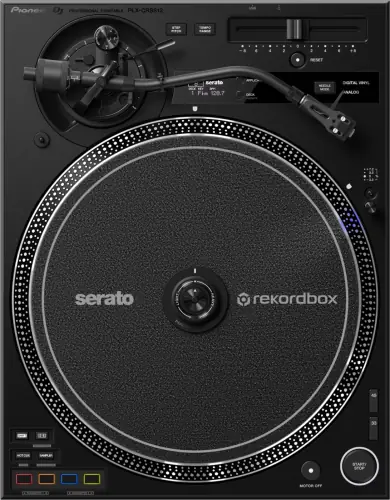
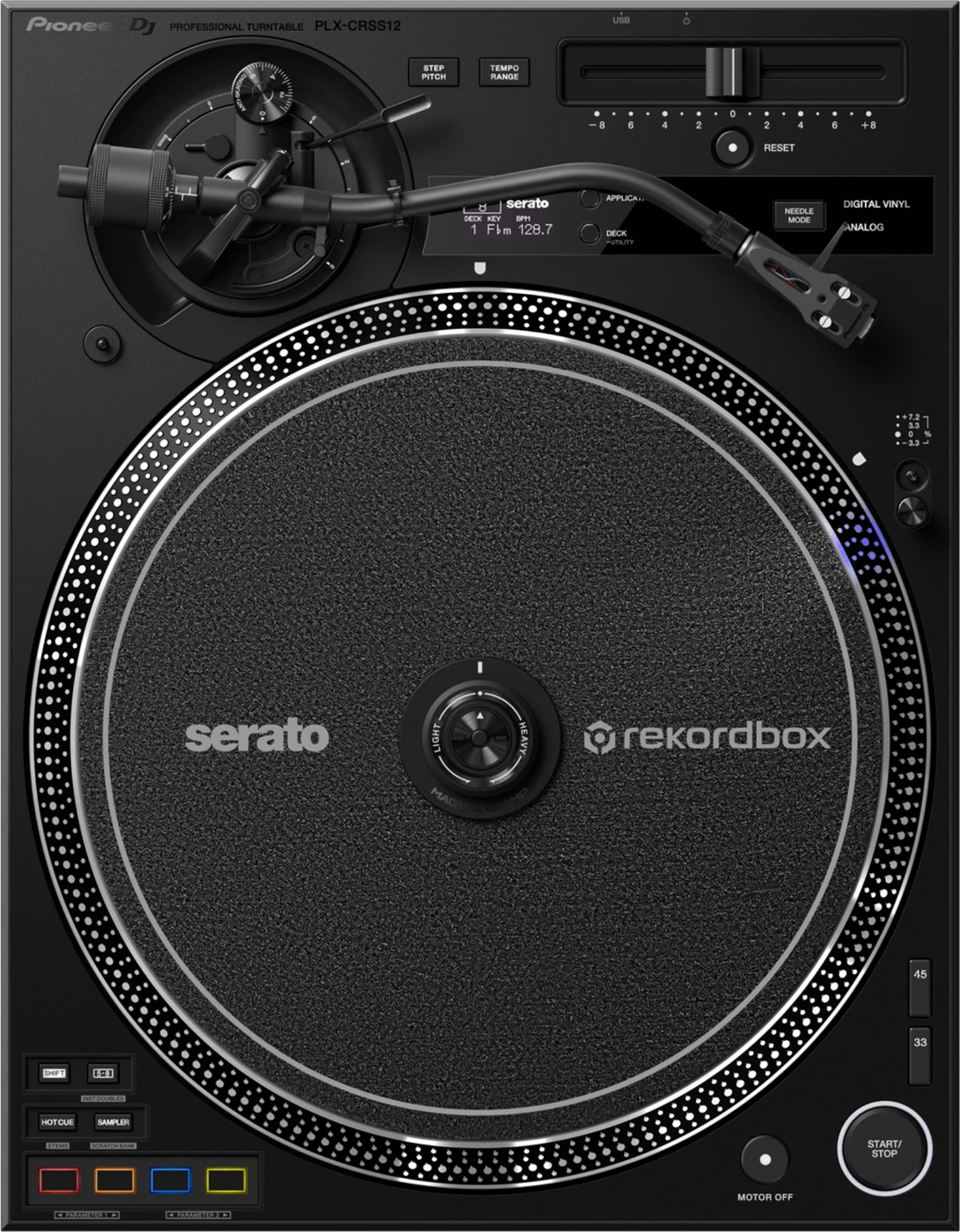
Booth briefing. The PLX-CRSS12 is a digital-analog hybrid: servo-type direct drive, 3-phase brushless DC motor, with MAGVEL CLAMP mounted on the spindle; any 12-inch vinyl record works as the control disk, no special timecode pressing required. It runs natively with Serato DJ Pro and rekordbox, each with native performance-pad mappings. No cartridge is included, only a headshell, so bring one before the first gig.
When it goes wrong: A turntable that hums
Fast Lane
The five things that decide your gig
The five things on the PLX-CRSS12 that change what happens next, if you are reading this in the booth. All five are explained in full further down this page.
MAGVEL CLAMP means any 12-inch record is your control disk.
Control is read by MAGVEL CLAMP mounted on the spindle; any 12-inch vinyl record works as the control disk, no special timecode pressing required.
No timecode pressing to carry, and nothing to replace when it wears. That is the whole argument for this deck.
No cartridge in the box. It arrives incomplete on purpose.
A turntable with no cartridge makes no sound, and the choice is deliberately left to you.
Bring one, or confirm what is fitted, before you plan a set on decks you do not own.
Torque is switchable: adjustable High / Mid / Low: 0.45 N·m or more / 0.32 N·m / 0.2 N·m.
Torque is set under TORQUE ADJUST in the Utility menu, MID from the factory, with LOW and HIGH the other two values. Braking is a separate control: a three-position brake adjusting switch on the front panel, published as Max 3.5 seconds, Mid 1.0 seconds, Min 0.5 seconds or less.
Both were left wherever the last DJ wanted them, which is worth two seconds before your first scratch.
It runs Serato DJ Pro and rekordbox, each with native performance-pad mappings, but not on equal licensing terms.
For rekordbox the unit is a Hardware Unlock device, so Performance mode runs on a connected PC/Mac without a separate license. Serato DJ Pro is meant to be used with Serato DJ Pro hardware, and a separate license may be needed depending on that hardware.
Which one the venue has installed decides how much of the deck you actually get, and what you have to sort out before you get it.
Standby behaviour changed in firmware 1.10.
A deck found dark is a version question before it is a fault, and the button that brings it back out of Off mode is MOTOR OFF.
The highest published version is 1.10, so there is little history to read here.
If something goes wrong
The software says there is no control signal, or DVS keeps dropping out
Short answer. The PLX-CRSS12 has a mode button that must be in the right position before any of this works, and AlphaTheta's own first step is that button rather than the record: press NEEDLE MODE to set Digital Vinyl mode. The full documented sequence is REL mode in the DJ software, then NEEDLE MODE for Digital Vinyl mode, then APPLICATION to select the program. Only after that is it worth checking the USB-C cable at both ends and the software's device selection.
Why this happens. A conventional DVS setup reads a timecode tone cut into the grooves with a stylus, so a worn or damaged timecode record is a real and common cause of dropouts. This deck does not work that way: the sensing happens through the clamp and platter mechanism, which is why AlphaTheta can state plainly that any 12-inch vinyl record works as a control disk with no special pressing at all. So the usual timecode-record failure mode mostly does not apply here, and a dropout points elsewhere, most often the USB connection or the software's device selection rather than the record on the platter.
Fix it now. Work AlphaTheta's list in its own order. Press NEEDLE MODE to set Digital Vinyl mode, then press APPLICATION to select the program you are actually running. Check the clamp is installed correctly and pressed firmly onto the spindle. Take out any thick rubber mat sitting between the platter and the clamp, which the manual names specifically. Look at the back of the clamp and at the hole in the centre of that back, and remove any metal or debris stuck there. Only then reseat the USB Type-C cable at both ends and confirm the software has this deck selected for that channel. A different standard 12-inch record is the last thing to try, since none of them are special here.
Avoid it next time. Confirm the software is set up for this deck before doors, not after the first mix. Because any 12-inch record works as the control disk, you are never carrying a fragile, irreplaceable timecode pressing in your record bag, which is one less thing that can end a set on its own.
One channel has gone silent and the other one is fine
Short answer. Because no cartridge ships with the PLX-CRSS12, the cartridge and its wiring belong to you, and they are the first place to look. Work backwards along the signal: the headshell wires, then the cartridge itself, then the phono lead. All three are mechanical and none of them are anywhere on the top panel.
Why this happens. The headshell wires are the thinnest connection in the whole chain and they get worked every time a cartridge or headshell is changed. A wire that has pulled off its pin, or a cartridge that has lost one coil, silences exactly one channel and leaves the other perfect. This is true of any turntable with a removable headshell, and it is worth remembering here specifically because AlphaTheta does not include a cartridge, so every unit in the field is carrying somebody's own choice of wiring.
Turn the amplifier off before you touch the headshell. This is the one step the manual makes non-negotiable and the one most people skip in a hurry: "Turn off the amplifier before attaching or detaching the headshell, or the speakers may be damaged." Pulling a live headshell in front of a rig is how a two-minute diagnostic turns into a blown driver.
Fix it now. With the amplifier off, swap in a spare headshell if you have one, which tests the wires and the cartridge in one move. Wipe dust and dirt off the terminals and plugs before reconnecting them, and confirm the headshell is seated with its locking nut tightened while it is held horizontal. If the fault follows the headshell, it is the wires or the cartridge. If it stays with the deck, check the phono lead at the RCA PHONO output and try a different channel on the mixer to separate a deck fault from a mixer fault.
Avoid it next time. Carry a second headshell, already wired and balanced, as your single most useful spare for a vinyl set on any deck without a fixed cartridge.
A low hum or buzz under everything
Short answer. A low-pitched hum or buzz under playback on a PLX-CRSS12 has two documented causes and neither is inside the deck. The first is what the connection cords are lying next to: keep them as far as possible from fluorescent lamps and from the power cords of other equipment. The second is the earth path: check the ground wire of the unit is connected correctly, which on a DJ mixer means the SIGNAL GND terminal rather than any convenient screw. A phono cartridge puts out a tiny signal that a phono stage then lifts enormously, so anything the cable picks up on the way gets lifted with it. That is why a hum that appears when you move the deck, or when the venue turns the lights on, is a wiring geometry problem rather than a fault.
Do this. Land the ground wire on the mixer’s SIGNAL GND first, because it costs nothing. Then walk the phono cable and move it off anything carrying mains. A hum that changes as you move the cable has told you which of the two it is.
Left and right are arriving swapped
Short answer. Left and right arriving swapped on a PLX-CRSS12 has two places to look and one of them is inside the headshell. The manual asks you to check that the left and right connections of each device are not reversed, and then, separately, that the audio cables AND the lead wires of the headshell are connected correctly. Those lead wires are colour coded and there are four of them, so a headshell rewired in a hurry, or bought secondhand, can swap the channels with everything else in the booth perfectly correct. Nothing on the deck reports it, and it sounds like a mixer fault until you solo one channel.
The needle jumps every time the bass drops
Short answer. The PLX-CRSS12 skips for the two reasons any turntable does, and nine times out of ten the first one is the room rather than the deck. A stylus in a groove is a microphone, and it cannot tell the difference between vibration coming up through the booth and vibration cut into the record. The second is arm setup, and AlphaTheta publishes an exact order for that.
Why this happens. Below a certain frequency, a turntable that is resonating with the room starts moving together with the stylus, and the stylus climbs out of the groove. That is acoustic feedback, and the giveaway is that it happens on the loud parts and stops the moment you pull the fader down. A deck that is not level, or a counterweight that has crept, adds a constant sideways pull on top of it, which is why an unlevel deck skips in one direction rather than randomly.
Fix it now. Get the deck off whatever is resonating, and move it away from the front of a bass bin if you can. Level it by turning the insulators underneath, which is exactly what they are for. Then look at the stylus tip: if it is dirty, take the headshell off with the amplifier down and clear it with a soft brush. Then reset the arm in AlphaTheta's order rather than guessing.
The balance and anti skating order. Set the anti skating dial to 0 first, lower the lifter lever, and turn the balance weight until the arm balances in a level position. Only then align 0 on the stylus pressure ring with the centre line on the rear shaft and dial in the pressure your cartridge maker specifies, inside 0 g to 4.0 g, with one scale mark equal to 0.1 g. Last, turn the anti skating dial to that same stylus pressure value, which is the number it is calibrated against. Raising tracking force to stop a skip is the last resort, not the first.
Arm height matters as much. Arm height adjustment gives 6 mm of travel, with dial scale 0 to 6 matching cartridge heights of 19 mm to 25 mm, so the dial number is your cartridge's own height in millimetres minus 19. Release the height adjustment lock, lower the stylus onto the record, turn the height adjustment dial until the arm is level with the record, and lock it again. AlphaTheta says plainly to set arm height and anti skating according to how you scratch, to keep the stylus from skipping.
Avoid it next time. This is judgement from working booths rather than an AlphaTheta specification, and it is worth saying plainly: a booth with the turntables bolted to the same structure as the bass cabinets will always fight you, and no arm setup fixes a structural problem.
The stylus will not sit down on the record
Short answer. A stylus that will not sit down on the record on a PLX-CRSS12 is a balance weight that has not been set, and the manual gives two steps rather than one. Set the stylus pressure correctly, meaning set the balance weight to the stylus pressure value the cartridge itself calls for, since no cartridge ships with this deck and the right number belongs to whatever you fitted. Before that, adjust by turning the balance weight until the tone arm becomes horizontal, which is the zero point everything else is measured from. Skip the horizontal step and the number on the dial means nothing.
The arm stops halfway through the record
Short answer. An arm that stops partway through a record and will not move on a PLX-CRSS12 has two causes in the manual and neither is the deck. Check the record is not warped or scratched, because a lifted section or a damaged groove wall will stall an arm as surely as it will make one jump. Then remove any obstacles around the arm, which in a working booth means a record sleeve, a cable, a drink or the dust cover itself sitting where the arm needs to travel. It reads as a seized bearing, and it usually is not.
The output is far too quiet, or far too loud
Short answer. Output that is far too quiet or far too loud on a PLX-CRSS12 is a matching problem between the cartridge and what it is plugged into: check the amplifier connection is appropriate for the cartridge type, meaning its output, and connect the connection cable correctly. Because AlphaTheta ship no cartridge with this deck, the output level is entirely your choice, and a low-output cartridge into a stage expecting a high-output one gives a thin, quiet channel that no amount of TRIM rescues cleanly. The reverse is worse, because it distorts rather than disappears.
The platter feels too heavy or too light
Short answer. Rotation that feels wrong with the MAGVEL CLAMP installed on a PLX-CRSS12 is adjustable, and the manual treats too heavy and too light as the same entry read in two directions. In both cases the first check is that the clamp is installed correctly. After that it is the dial: if it is set towards HEAVY and the platter feels too heavy, turn it towards LIGHT, and if it is set towards LIGHT and the platter feels too light, turn it towards HEAVY. So a deck that feels wrong under the hand at the gig is usually carrying the last person's preference rather than a fault, and it is a dial rather than a service visit.
Torque, start-up and pitch feeling different from what you expect
Short answer. The PLX-CRSS12 carries several settings that change how the platter feels and none of them are faults, so check them before you blame the deck. Starting torque is adjustable High / Mid / Low: 0.45 N·m or more / 0.32 N·m / 0.2 N·m, and the difference between High and Low is large enough to change how a record catches under your hand on every single start.
Why this happens. A DJ arriving from a deck with one fixed torque setting has muscle memory calibrated to one feel. Both settings here are readable, just not from the top panel while the deck is idle. Torque is set under TORQUE ADJUST in the Utility menu, MID from the factory, with LOW and HIGH the other two values, so it appears on the OLED display once you hold DECK/UTILITY. Braking is a three-position brake adjusting switch on the front panel, so its position can be read without opening a menu at all, and its three settings are published as Max 3.5 seconds, Mid 1.0 seconds, Min 0.5 seconds or less. A deck that starts sluggishly or brakes in a way that surprises you is usually a deck somebody else left on a different setting, not a fault.
Fix it now. Set torque and brake where you want them at the start of your setup, and remember start-up itself is fast on any setting: 0.3 seconds to reach 33⅓ rpm. For pitch, look at the RESET indicator before you blame the fader. While RESET is lit the standard rpm is held regardless of where the tempo slider sits, so a slider that appears to do nothing is usually a lit indicator rather than a broken fader. Press RESET to turn it off, then confirm which range you are in, because the step size differs: 0.016 % at ±8, 0.032 % at ±16 and 0.1 % at ±50. This deck runs ±8%, ±16%, ±50%, at 33⅓ and 45 rpm.
Two more controls that surprise people. STEP PITCH changes what the tempo slider does: with it off the rotation speed changes continuously, with it on it changes in semitone steps and the OLED shows the key the slider has landed on. AlphaTheta notes that the displayed key is a rough estimate rather than the key actually playing, and that both key and BPM appear only while a PC or Mac is connected over USB. MOTOR OFF is the other one: it turns the motor off and lets the platter run down naturally instead of braking it, and pressing START/STOP afterwards starts it turning again.
Avoid it next time. Make torque, brake and pitch range part of your setup check on any deck you did not personally configure, the same way you would check a mixer's gain before a set.
What to watch for
Documented fixes, by firmware version
What is in the record. Only one version is published for this deck: 1.10, from 11 July 2024. It changed the automatic power-off timing to 20 minutes, renamed the setting from Auto Standby to Power Management, and brought the deck into line with EU Ecodesign rules. That is a behaviour and policy change, not a bug fix.
What is not in it, and this is worth knowing. No defect fix is documented for this deck at all. No crash, no dropped channel, no DVS fault and no platter or jog issue appears anywhere in the published history. For AlphaTheta's first turntable with a real firmware record, one that opens with a compliance change rather than a repair is a genuinely reassuring one.
Do this. The highest published firmware is 1.10. If a deck you are handed still auto-powers-off on the old Auto Standby timing rather than the 20 minute Power Management behaviour, it predates 1.10 and is due an update, not a repair.
The 20 minutes is conditional, not a fixed timer. The setting is POWER MANAGEMENT in the Utility menu, ON from the factory, putting the unit into Off mode after 20 minutes without being used, and able to be switched OFF. Turning it off is a legitimate move for a deck that will sit idle through a long changeover, and AlphaTheta's only caveat is that power consumption may increase with it off. A deck already gone dark is not dead: press the MOTOR OFF button to exit Off mode.
Official documentation. AlphaTheta's PLX-CRSS12 firmware article →
Found an entry we have missed? Tell us and we will add it.
Compatibility
Serato DJ Pro, rekordbox, and what the mixer needs
Short answer. The PLX-CRSS12 runs natively with Serato DJ Pro and rekordbox, each with native performance-pad mappings, and the mixer's requirement is the ordinary one for any turntable: a phono input, because a cartridge output needs both gain and RIAA equalisation that a line input does not provide.
Why it matters. Each certified program ships its own performance-pad mapping for this deck rather than a generic one, covering functions like Hot Cue, Sampler, Scratch Bank, Track Separation, Pad FX and Beat Jump. That is a real integration, not just DVS control layered on top of a plain turntable.
The licensing is not the same for both. For rekordbox the unit is a Hardware Unlock device, so Performance mode runs on a connected PC/Mac without a separate license. Serato DJ Pro is meant to be used with Serato DJ Pro hardware, and a separate license may be needed depending on that hardware, which is AlphaTheta's own wording and is worth reading before you assume the deck by itself unlocks it. Anything else you run is a generic MIDI controller: the manual says a PC or Mac with MIDI software connected over USB can control DJ software other than Serato DJ Pro and rekordbox, without the native pad layouts, and that some buttons will not carry over.
What is on the back. The rear panel carries RCA PHONO output (gold-plated), a SIGNAL GND terminal for the turntable ground wire, USB Type-C for DJ software and performance-pad data, Kensington security slot. The USB Type-C connection is what carries both the DJ software communication and the performance-pad data, so it is worth checking first if pad functions are not responding, before assuming a fault in the deck itself. There is one routing rule worth knowing: connect the unit directly to the PC/Mac if the DJ mixer has no USB hub function, meaning no USB A port, rather than assuming every mixer in the chain can pass it through.
The ground wire is not optional. The supplied audio cable carries a ground wire and the rear SIGNAL GND terminal exists to take it. AlphaTheta is blunt about skipping it: "Be sure to connect the ground wire, or you'll hear power supply hum." Land the audio cable and the ground wire on the mixer's PHONO inputs, and note the other warning alongside it, that a mixer with no PHONO input terminals at all cannot give you sufficient volume or sound quality.
Common mistakes. Plugging the phono output into a line input, which produces a thin, quiet signal with no bass and reads as a broken deck when it is a routing mistake. And forgetting that a cartridge is not among the items included: only a headshell ships in the box.
Features explained
MAGVEL CLAMP, and why no special vinyl is needed
Short answer. Control is read by MAGVEL CLAMP mounted on the spindle; any 12-inch vinyl record works as the control disk, no special timecode pressing required. The manual puts it in one line, "You can use any 12-inch vinyl record as a control disk", and that is the fact that separates this deck from a normal DVS turntable setup.
Why it matters. A conventional DVS rig reads a timecode tone with a stylus, so the record doing the reading has to be a specific pressing, and that pressing wears and can be damaged like any other record. MAGVEL CLAMP sits on the spindle and senses through the clamp and platter mechanism instead, which is why any standard 12-inch record on the platter works as the control disk. Nothing about the software chain changes: you still need Serato DJ Pro and rekordbox, each with native performance-pad mappings on the laptop, this only changes what has to be on the platter.
What it is not. It is not a claim that this deck needs no software at all, and it is not a claim that any DVS turntable on the market works this way. It also replaces the tone arm rather than working beside it: the documented sequence is REL mode in the DJ software, then NEEDLE MODE for Digital Vinyl mode, then APPLICATION to select the program, and step one of that is REL mode, so absolute needle-drop positioning is not what magnetic mode is for.
Setting the clamp itself. The clamp carries its own rotation-torque adjustment for the control disk, separate from the motor torque setting: turn it towards HEAVY for more rotation torque and towards LIGHT for less. Press the top of it firmly down onto the spindle, because AlphaTheta warns that if it is not pressed in firmly "it may affect the performance of the HEAVY setting". Keep dust, metal objects and iron powder off the back of it, and take out any thick rubber mat sitting between the platter and the clamp.
The magnet is real. There is a magnet inside the clamp. AlphaTheta's warning is to keep it away from people wearing medical devices such as cardiac pacemakers, and away from watches, magnetic cards and precision instruments. In a booth that means the clamp does not get left loose on top of your cards or your phone.
Common mistakes. Assuming a timecode record from another rig is required here. It is not, and bringing one is not wrong, it is simply unnecessary: a plain 12-inch pressing does the same job.
What AlphaTheta publishes, and what it does not
The published figures. Drive servo-type direct drive, 3-phase brushless dc motor. Torque adjustable High / Mid / Low: 0.45 N·m or more / 0.32 N·m / 0.2 N·m. Pitch range ±8%, ±16%, ±50%, at 33⅓ and 45 rpm. Start-up 0.3 seconds to reach 33⅓ rpm. Weight 12.2 kg. Connections RCA PHONO output (gold-plated), a SIGNAL GND terminal for the turntable ground wire, USB Type-C for DJ software and performance-pad data, Kensington security slot. Announced 1 August 2023.
DVS control. Control is read by MAGVEL CLAMP mounted on the spindle; any 12-inch vinyl record works as the control disk, no special timecode pressing required. The two programs the APPLICATION button selects between are Serato DJ Pro and rekordbox, each with native performance-pad mappings.
What ships in the box, and what does not. A headshell is included. A cartridge is not, so it is a separate purchase and a separate line in your setup budget before the first gig.
Braking is a switch, and it is published. Braking is set by a three-position brake adjusting switch on the front panel, which the manual describes as setting how long the turntable takes to stop after you press START/STOP, and the three brake times are published: Max 3.5 seconds, Mid 1.0 seconds, Min 0.5 seconds or less. Torque is not a switch but a menu value: set under TORQUE ADJUST in the Utility menu, MID from the factory, with LOW and HIGH the other two values.
The tone arm numbers. Arm geometry is 230 mm effective length, 15 mm overhang, tracking error within 3 degrees, with the stylus tip set 54 mm from the tone arm attachment part. Stylus pressure runs 0 g to 4.0 g, with one scale mark equal to 0.1 g. Arm height adjustment gives 6 mm of travel, with dial scale 0 to 6 matching cartridge heights of 19 mm to 25 mm. Whatever cartridge you fit has to sit inside 2.5 g to 12 g including mounting screws and nuts: 2.5 g to 5.5 g with the shell weight, 5 g to 9 g with the balance weight alone, 8.5 g to 12 g with the sub weight.
Pitch resolution. The three ranges do not move the same amount per step: 0.016 % at ±8, 0.032 % at ±16 and 0.1 % at ±50.
Power Management. The energy-saving setting is POWER MANAGEMENT in the Utility menu, ON from the factory, putting the unit into Off mode after 20 minutes without being used, and able to be switched OFF, and MOTOR OFF is the button that brings the unit back out of Off mode.
Firmware. The highest published firmware is 1.10, and its only entry is the Power Management compliance change covered above.
Professional tips
Setting one up in a booth
Leave the timecode pressing at home and bring a plain record. Control is read by MAGVEL CLAMP mounted on the spindle; any 12-inch vinyl record works as the control disk, no special timecode pressing required, so a standard 12-inch is the control disk here and there is no fragile, irreplaceable pressing to protect in the bag.
Set torque and brake at the start of your setup, not during the first mix. Torque is adjustable High / Mid / Low: 0.45 N·m or more / 0.32 N·m / 0.2 N·m and lives in the Utility menu behind a held DECK/UTILITY button; braking is a three-position brake adjusting switch on the front panel, published as Max 3.5 seconds, Mid 1.0 seconds, Min 0.5 seconds or less. A deck you were handed is on whatever the last person chose.
Reach for the USB-C before you blame the deck when pads stop answering. That one cable carries the DJ software communication and the performance-pad data together, so a seating problem takes out the pads and the control signal at the same time and looks like a hardware fault.
Confirm the pad mapping in the program you are actually running. This deck runs natively with Serato DJ Pro and rekordbox, each with native performance-pad mappings, and each of them ships its own layout for Hot Cue, Sampler, Scratch Bank, Track Separation, Pad FX and Beat Jump. Switching program switches what the pads under your fingers do.
Treat an old auto power-off timing as a version, not a fault. The only published firmware for this deck is 1.10, and its single entry moved the automatic power-off to 20 minutes and renamed the setting from Auto Standby to Power Management. A deck still behaving the old way predates it.
Give it 5 cm of air behind and to each side. That is AlphaTheta's ventilation figure, and it is the first thing lost in a tight booth where the deck ends up hard against a back wall. Keep it on a flat surface away from external vibration and as far from the speakers as the booth allows.
Preventive maintenance
Cleaning it, and the one thing not to do while a record plays
Short answer. Cleaning a PLX-CRSS12 has one instruction with real consequences and it is about timing rather than product: do not wipe the dust cover during playback, because static electricity can build up and pull the tone arm against the cover. Everything else is ordinary. A dry soft cloth normally; for heavy dirt a soft cloth soaked in neutral detergent diluted five or six times with water and wrung out well, then a dry cloth. No alcohol, thinner, benzine or insecticide, which lift the printing and the coating. Avoid leaving rubber or vinyl products in prolonged contact with the cabinet.
Looking after the MAGVEL CLAMP
Short answer. The MAGVEL CLAMP has its own care instructions on a PLX-CRSS12 and they explain a failure that looks like a broken sensor. There is an adhesive sheet on the back of the clamp: if it loses adhesiveness, wash it with water, taking care not to let water get inside the clamp. Then check there is no metal object attached to that back, and remove anything that is. Since the clamp is what reads control on this deck, a sheet that has stopped gripping or a stray piece of metal on the back produces a control signal that comes and goes, which reads as a software or cable problem and is neither.
Moving it without the original packaging
Short answer. Moving a PLX-CRSS12 any real distance without its original packaging has a documented procedure, and every step of it is about the parts that are not fixed down. Take the platter off, which is six screws. Take the headshell and the balance weight off the tone arm. Fix the arm with the arm clamper and tape it so it cannot move. Then wrap the unit in a blanket or soft paper so the cabinet is not damaged. A platter left screwed on and an arm left loose is how a deck arrives bent, and none of those four steps needs a tool you do not already have in the bag.
Safety
Amplifier off before every headshell change
Short answer. Turn the amplifier off before attaching or detaching the headshell, or the speakers may be damaged. That is the manual's instruction rather than a suggestion, it opens the cleaning section, and it is the step people skip in a hurry. A cartridge swap in front of a live rig sends a full-scale thump through the phono stage and into the drivers, so a two-minute diagnostic becomes a blown driver. It costs five seconds and it applies every time, including the time you are only checking something.
Firmware, drivers and manuals
Official downloads and documents
Go to AlphaTheta for the files themselves. We link their pages instead of hosting a copy, because a manual copied here is a snapshot of release day and theirs is the one that stays current.
Firmware downloads. Official Pioneer DJ firmware page →
Manuals. Official Pioneer DJ manual page →
Broken link? Let us know and we'll fix it.
Frequently asked questions
Quick answers
- Do I need special timecode vinyl?
- No. The MAGVEL CLAMP mounts on the spindle and any 12-inch vinyl record works as the control disk, so no timecode pressing is required.
- Does it come with a cartridge?
- No. A cartridge and stylus have to be bought and fitted separately.
- Do I need a Serato or rekordbox licence?
- It differs by software. AlphaTheta describe it as meant to be used with Serato DJ Pro hardware, and say a separate licence may be needed depending on that hardware. For rekordbox it is a Hardware Unlock device, so Performance mode runs on a connected computer without a separate licence.
- Why does it switch itself off?
- POWER MANAGEMENT in the Utility menu, which is on from the factory and puts the unit into Off mode after 20 minutes without being used. It can be switched off. Firmware 1.10 changed this behaviour.
Related turntables
Pioneer DJ All brands Knowledge base FAQ and Fixes Dictionary
Keep the Emergency Card
We will email you the printable PDF so it is on your phone before the next dark booth. Occasional notes that save gigs. No spam, unsubscribe in one click.
Registering is free and counts everywhere on Save My Gig. We send a confirmation email first. Your address is stored with Brevo, our email provider. Unsubscribe any time. Privacy
Sources: AlphaTheta's official PLX-CRSS12 product page, the 1 August 2023 launch announcement, the Help Center firmware article and the owner's manual, checked 10 August 2026. Specifications theirs, priorities ours.