

TWELVE MKII, the field manual
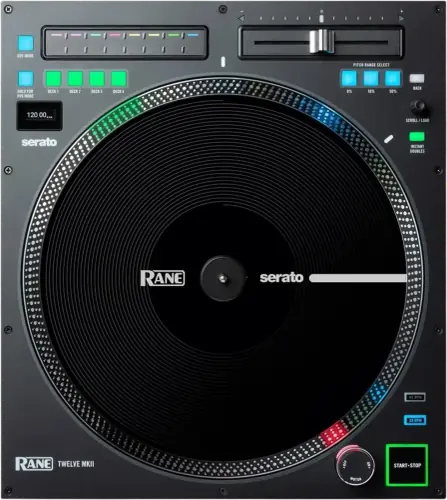
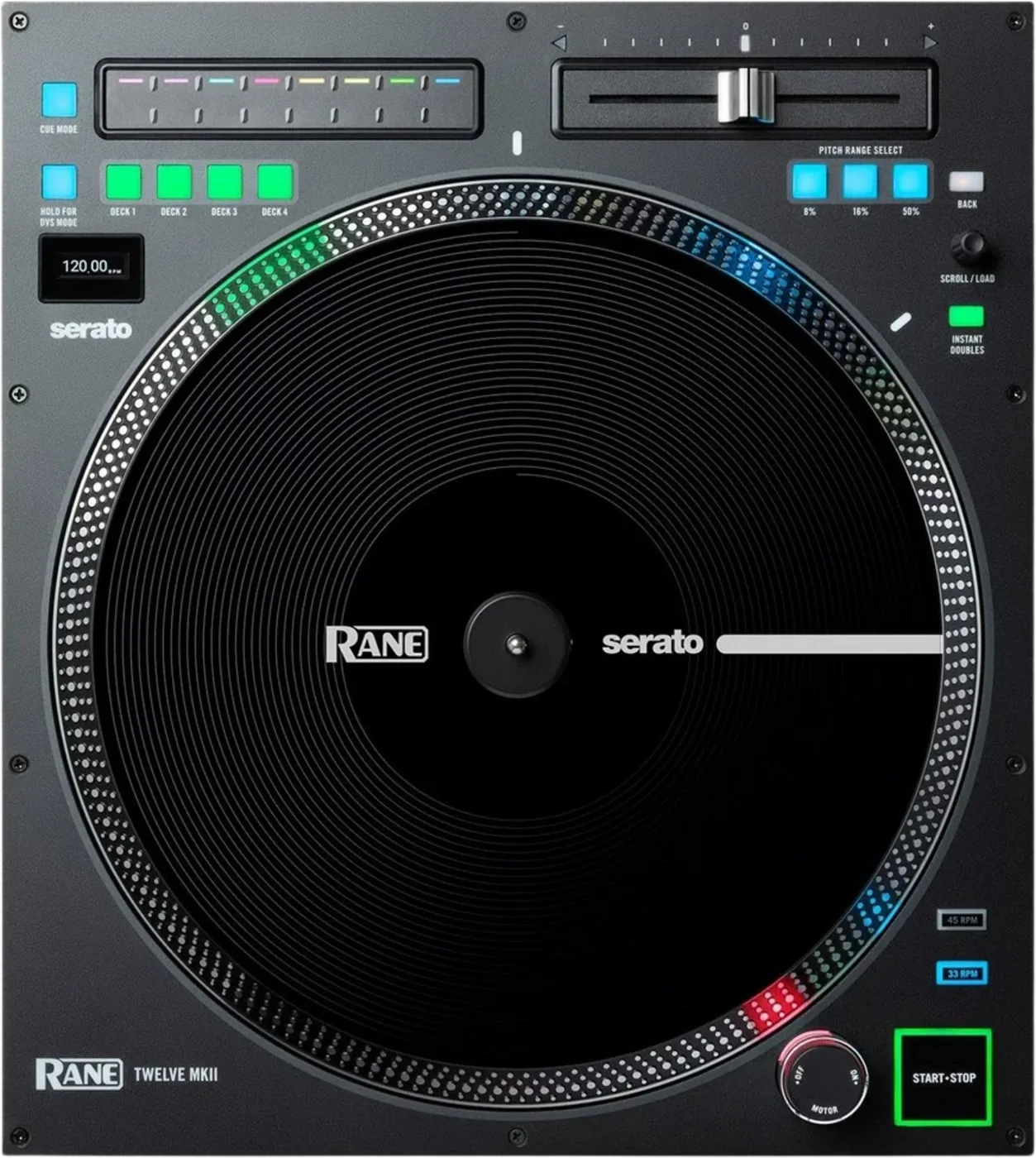
Booth briefing. The TWELVE MKII looks like a turntable and is not one. No tonearm, no cartridge, nowhere to put a record: the platter is a motor and the disc on top moves the playhead in your software. Three things decide your gig on it. RANE say it requires a supported Serato DJ Pro interface, controller, mixer or compatible Serato Club Kit solution, so it unlocks nothing on its own. Their instruction is that the platter should not be held in position for sustained periods while powered to rotate. And the RCA output sends timecode, never audio.
When it goes wrong: A turntable that hums
Fast Lane
The five things that decide your gig
The five things on the TWELVE MKII that change what happens next, if you are reading this in the booth. All five are explained in full further down this page.
It unlocks nothing on its own, so it is a Serato deck or it is a paperweight.
RANE classify the TWELVE MKII as a Serato accessory. It carries no Serato licence, so it cannot run Serato by itself.
Their guide requires a supported Serato DJ Pro interface, controller, mixer or compatible Serato Club Kit solution in the chain. Settle which one that is before you carry a deck to a booth.
The platter must not be held in position for sustained periods while it is powered to rotate.
That is RANE's own instruction, word for word, and it is about the motor rather than about your technique.
Everything a scratch DJ does to a real platter is fine here. Holding a driven platter still, for seconds at a time, is the thing to unlearn.
A platter running backwards is almost always the RCA cables swapped.
In DVS mode, red and white the wrong way round reverses the direction the software reads.
Check the cabling before you check the unit, the mode or the software. It is the first thing to rule out and the quickest.
It looks like a turntable and it is not one.
No tonearm, no cartridge and nowhere to put a record. The 13.1 inch platter is a motor, under a full-size 12 inch control disc, and the touch strip sits where the tone arm would be.
That is the good news in a booth: no needle to skip, no record to wear out and no cartridge to knock out of alignment.
It has two modes, and changing them is a button hold, not a menu.
Hold the DVS Mode button until it flashes, then press it once per step to cycle.
Worth knowing before you need it, because there is nothing on the surface that tells you which mode the last user left it in.
If something goes wrong
The platter is running backwards
Short answer. In DVS mode a TWELVE MKII platter that runs backwards is almost always the red and white RCA cables swapped. Check the cabling before you check anything else.
The other cause. An unstable surface. The deck reads its own motion, so a booth table that flexes under a heavy hand can be enough.
The USB connection keeps dropping
Documented fix. Cycle the TWELVE MKII's DVS Mode button back to Serato USB and wait three seconds for the OLED to go dark before doing anything else. RANE publish this as the recovery step.
Then the cable. RANE's preference is a direct USB-B to USB-C run rather than an adapter. A hub is not forbidden: their guide names "a powered hub connected to the computer" as a supported connection, so if a hub is what the booth has, make sure it is a powered one.
What to watch for
The deck mode and the Serato mode have to agree
The RANE TWELVE MKII has two modes and Serato has two matching settings, and they have to agree.
In USB mode the deck connects to a computer, a powered USB hub or a compatible mixer, and RANE name the SEVENTY and the SEVENTY-TWO MKII as those mixers. The LCD must read Serato USB, and RANE state the Serato DJ Pro virtual decks have to be set to Internal.
In DVS mode the RCA outputs on the underside go to a Serato enabled mixer or a DVS capable controller, because RANE state the deck emits a Serato control tone from those RCA connections. The LCD must read Serato DVS and the Serato virtual decks have to be set to Relative.
Internal for USB, Relative for DVS. A platter that turns and moves nothing is almost always these two set to different things, and the only place the deck states its side of it is the LCD.
The touch strip jumps through the track instead of firing hot cues
The RANE TWELVE MKII comes up in Needle Drop every time it is switched on, whatever the last user was doing. Nothing carries over.
So if you power the deck on, touch the strip expecting a hot cue and the track jumps to that position instead, the deck is behaving exactly as designed. One press of the Cue Mode button moves it to Hot Cue.
The button is also the readout. Dimly lit is Needle Drop, brightly lit is Hot Cue, so the mode can be checked at a glance before the first touch rather than found out on the floor.
This one costs a rented or house deck more than a deck you own, because the reflex of the last person who used it is not stored anywhere.
A two channel mixer only reaches two decks
The RANE TWELVE MKII can be set to deck 3 or deck 4 on a mixer that cannot reach them.
Deck assignment uses the Deck 1 to 4 buttons, and RANE state a two channel mixer reaches decks 1 and 2 only.
Compatibility
It unlocks nothing on its own
Short answer. RANE classify the TWELVE MKII as a Serato accessory. It carries no Serato licence, so it cannot run Serato by itself. Their guide states the requirement in one sentence: the deck "requires a supported Serato DJ Pro interface, controller, mixer, or compatible Serato Club Kit solution to control Serato DJ Pro".
The scenario this catches. A DJ turns up with two TWELVEs, a laptop and a house mixer that is not Serato-enabled, and nothing works. Not a fault, not a cable, not a driver. The rig is simply incomplete, and no amount of troubleshooting in the booth will complete it.
The software it controls is named, and it is only one. Every operating instruction in the guide is written for Serato DJ Pro, and the RCA output is described as sending timecode to "a compatible mixer or other DVS-enabled device". A player that is not DVS-enabled and not Serato-enabled has nothing this deck can say to it, and RANE document no mode, adapter or mapping that changes that.
How many, and how you assign them. Up to four on one Serato DJ Pro-enabled device, limited by channel count, so a two-channel mixer supports two. Power each deck on, press the Deck Select button for the deck you want, and hold a Deck Select button for two seconds to release a deck so another unit can take it.
Features explained
What you are actually standing at
Short answer. The TWELVE MKII is a motorised control surface with a 13.1 inch platter under a full-size 12 inch control disc, built to feel like a deck. The only thing that leaves its RCA output is timecode: RANE describe those jacks as sending "the internal timecode signals to the input of a compatible mixer or other DVS-enabled device". There is no needle to skip, no record to wear out and no cartridge to knock out of alignment.
Why that changes what can go wrong. Every failure a turntable has, this does not have. The failures it does have are a mode set wrongly, a cable in the wrong socket and a mixer that has not unlocked the software. All three are fixable in seconds once you know which one you are looking at.
What is on the panel. 33 and 45 RPM, pitch ranges of plus or minus 8, 16 and 50 per cent, deck select for up to four decks, a DVS mode button with an OLED under it, a Start/Stop button, instant doubles, a scroll and load knob, and a touch strip that replaces the tone arm.
Start/Stop tells you the state of the track. RANE document its ring: dim when the power is on and no track is playing, bright when a track is playing, and flashing red when the track is near its end. That last one is the only end-of-track warning on the deck itself.
The motor dial is not the power switch. Turning the dial at the top of the strobe light off stops the platter while "the unit will remain powered on, allowing for wind down effects". The strobe lights the speed dots round the platter edge: still dots mean the phase of the rotation is constant, drifting dots mean it is not.
Torque is a switch, not a menu. In the bottom panel recess there is a Motor Torque switch. High gives the heavier, stronger feel of modern turntables; low is lighter and more graceful, the feel of a classic one. The specification behind it is 5.0 kgf/cm starting torque on high and 3.2 kgf/cm on low, with a starting time under 0.4 seconds.
The touch strip, and its two modes
Short answer. The TWELVE MKII puts a pressure sensitive strip where a tone arm would be, and the Cue Mode button decides which of two jobs it is doing. Dimly lit is Needle Drop, brightly lit is Hot Cue.
Needle Drop, and it is the default at power-on. The length of the strip represents the length of the whole track. Put a finger on a point to jump there, and the white LEDs along the strip show where the playhead is. This is the mode the deck comes up in every time it is switched on, whatever the last user was doing.
Hot Cue. Press an unlit section at the point you want and it lights and stores a hot cue there, in a colour the software chooses. Press a lit section while the track plays to jump back to it. To delete one, hold the Cue Mode button and press the section.
Why the default matters in a booth. The deck forgets the mode at every power cycle, and that has its own section: the touch strip jumps through the track instead of firing hot cues.
The two modes, and how to change them
Short answer. Hold the DVS Mode button until it flashes, then press it once per step to cycle.
Serato USB, internal. Pure MIDI over USB. The virtual deck reads INT. Nothing goes down the RCA cables. This is the simplest setup and the one that survives the most cabling mistakes.
Serato DVS, relative. The deck sends its internal timecode out of the RCAs into a phono input, and the virtual deck reads REL. RANE's wording for the mode is that it "will send DVS audio signal through the Audio Out (RCA) ports to control the platter", and that the software should be set to Relative Mode.
Reading the mode back. Hold the DVS Mode button until it flashes, tap to cycle the timecode options shown on the OLED, then wait three seconds to confirm. The OLED goes dark shortly after. A quick tap on the same button brings the active mode back on screen, which is how you find out what the last user left it in.
Connect both cables anyway. RANE do not call this a third mode, and this page used to. Their guide recommends connecting the Audio Out RCA ports for DVS platter control and USB for MIDI controls such as Browse, Load and Hot Cues, so one cable set does the platter and the other does the buttons.
Professional tips
Worth knowing before the gig
Ask what the mixer is, not what the decks are. Two TWELVEs tell you nothing about whether you can play. The mixer decides.
There is no reverse control on the panel. RANE's manual documents none, so do not go looking for it mid-set.
Learn the mode cycle with your eyes shut. Hold until it flashes, press to step. It is the one control you will need in a hurry and it is not labelled with its own dedicated button per mode.
Spinback is adjustable, and it is a stack of washers. RANE ship four spacers. Put one to four of them over the spindle, under the slipmat, and the higher the Control Disc sits the looser the feel and the more spinback you get. Nothing in software changes this.
The disc comes off without tools. Hold the button on the side of the Quick Release Adapter and lift. Putting it back, pinch the top of the spindle and rotate the disc slowly until it clicks: it is locked when the groove in the spindle lines up directly opposite that button. Worth doing once at home rather than for the first time on a changeover.
Connections and setup
Calibrating the pitch fader
Check the Takeover LEDs before you assume it needs calibrating. The TWELVE MKII has a documented reason for the fader and the software disagreeing, and it is not a fault. RANE: "When you select another Deck with the Deck Select buttons, the position of the Twelve MKII's Pitch Fader may not match the Pitch setting for that Deck in the software. Slowly move the Pitch Fader in the direction indicated by the Takeover LED arrow until it turns off." Follow the arrow and the fader has control again.
The three ranges are buttons. Plus or minus 8, 16 and 50 per cent, one button each, and the lit one is the range you are on. Changing deck does not change the range you are looking at.
The calibration sequence, and it differs from the original TWELVE. Hold 8% and 16% together at power-up until Test Mode appears. Move the fader hard left, then hard right, then back to centre. Press 8% and 50% together to confirm.
When you need it. When zero on the fader is not zero in the software and the Takeover LEDs are already off. Worth doing at home on a deck you own, and worth knowing exists on a deck you have just been handed.
Preventive maintenance
Do not hold the platter
RANE's own instruction. The platter should not be held in position for sustained periods while it is powered to rotate.
Why this is worth saying out loud. Holding a platter is a completely normal thing to do on a real turntable. You do it every time you set a cue by ear. Here you are stalling a motor, so the habit every vinyl DJ has is the one to unlearn on this deck.
Check the platter before you trust it. RANE's assembly step is a test as well as an instruction: align the pins in the bottom of the platter with the holes in the motor, press it down firmly, and then "check to make sure that it rotates uniformly and does not wobble excessively". A platter that wobbles was seated badly, and that is a five second fix before a set rather than a mystery during one.
Cabling. RANE recommend a direct USB-B to USB-C cable rather than an adapter, and warn about ground loops and venue extension leads. Both of those are booth conditions, not home conditions, so a rig that has been faultless for a year can misbehave the first time it is plugged into an unfamiliar wall.
Safety
Powering it up and down
The TWELVE MKII has an order for the power cable, and RANE state it twice. "While the power is switched off, plug the included power cable into Twelve MKII first, then plug the cable into a power outlet." Deck first, wall second, and the switch off while you do it. It is a standard IEC cable into the bottom panel recess.
Stopping the platter is not powering down. The motor dial and the Start/Stop button both stop the platter with the unit still live. The power switch in the bottom panel recess is the one that turns it off.
Read the Safety and Warranty Manual before using it. That is RANE's own first setup instruction, and it is a separate printed book from the user guide, so it travels with the box rather than with the deck.
Firmware, drivers and manuals
Official downloads and documents
Go to RANE for the files themselves. We link their pages instead of hosting a copy, because a manual copied here is a snapshot of release day and theirs is the one that stays current.
Manuals. Official RANE manual page →
Broken link? Let us know and we'll fix it.
Frequently asked questions
What do I connect it to?
RANE document three ways to run the deck. Over USB as a MIDI controller, over RCA as a DVS control tone source, or both at once, taking the performance controls over USB and the platter over DVS.
In USB mode the deck connects to a computer, a powered USB hub or a compatible mixer, and RANE name the SEVENTY and the SEVENTY-TWO MKII as those mixers. The LCD must read Serato USB, and RANE state the Serato DJ Pro virtual decks have to be set to Internal.
How do I set it up for DVS?
How do I change the mode, and where does it say which one I am in?
The mode is changed by pressing and holding the DVS mode button until it flashes, then single pressing it to cycle. The LCD is the only place the current mode is written.
Can I use it with a mixer that is not a RANE?
Related turntables
Commonly paired with
What you usually find beside it in working booths, from club, festival and rental installs rather than from a manufacturer document.
Keep the Emergency Card
We will email you the printable PDF so it is on your phone before the next dark booth. Occasional notes that save gigs. No spam, unsubscribe in one click.
Registering is free and counts everywhere on Save My Gig. We send a confirmation email first. Your address is stored with Brevo, our email provider. Unsubscribe any time. Privacy
Sources: RANE's own Twelve MKII User Guide, Manual Version v1.1, including the Technical Specifications in its English Appendix, checked 11 August 2026. Specifications theirs, priorities ours.