

SEVENTY-TWO MKII, the field manual
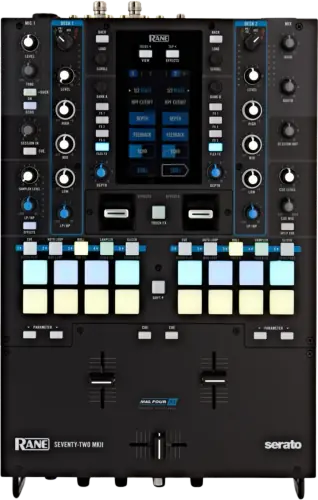
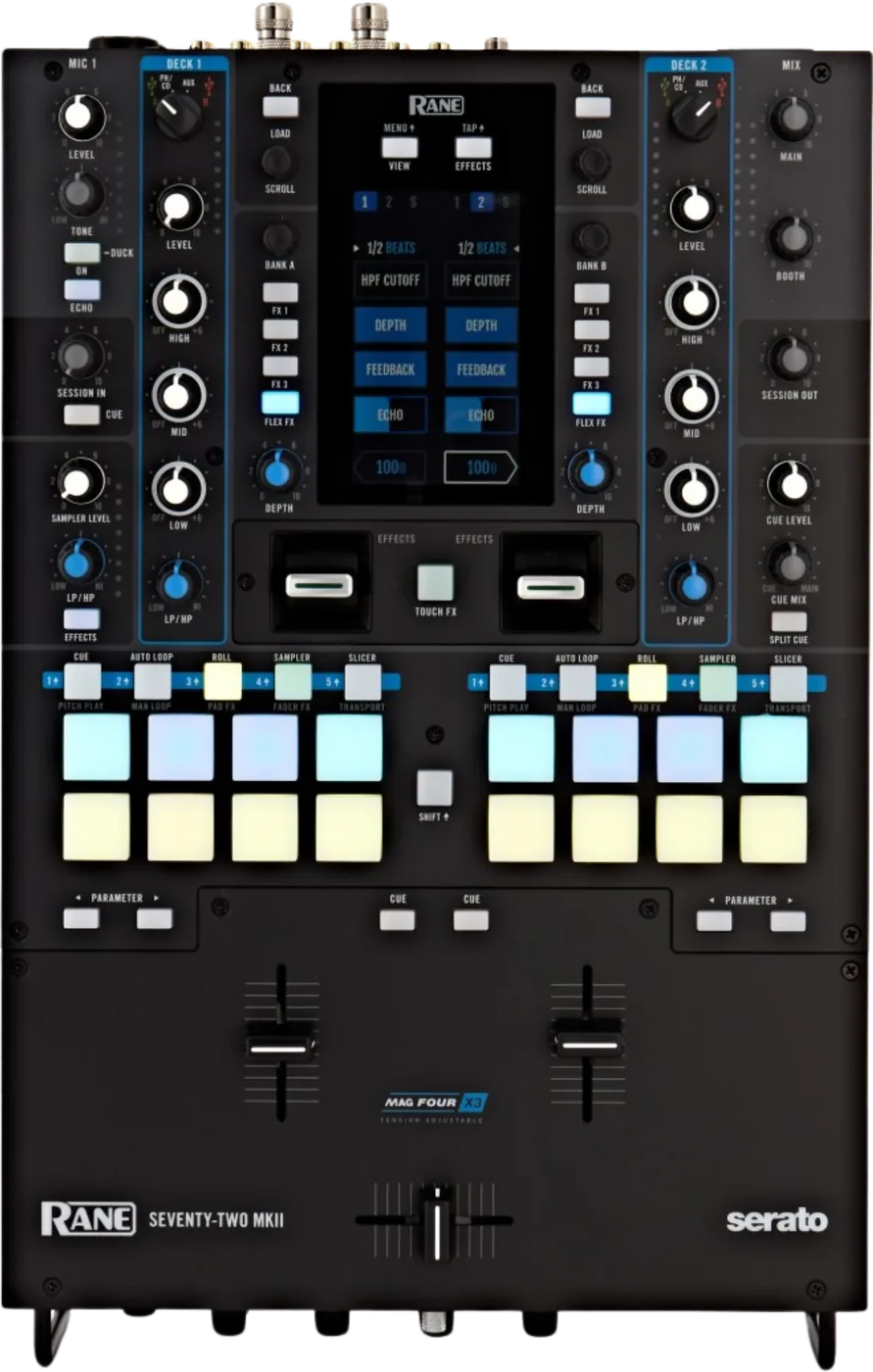
Booth briefing. Two channels on the SEVENTY-TWO MKII, a 4.3 inch touchscreen and the whole desk built around one control you must find first: the Deck Source knob on each channel, which decides whether that channel is listening to USB A, USB B, the rear phono or line input, or Aux. Those last two are why it still mixes with no computer attached, and RANE say what the screen does then: it powers on in Effects View. A changeover is manual, you turn each channel from one computer to the other. It unlocks Serato DJ Pro and DVS on connection with no code, and the box carries a Pitch 'n Time download card. Flip has to be bought.
When it goes wrong: No sound from the mixer
Fast Lane
The five things that decide your gig
The five things on the SEVENTY-TWO MKII that change what happens next, if you are reading this in the booth. All five are explained in full further down this page.
Deck Source is the control everything else depends on. Find it first.
One knob per channel, four positions: USB A, USB B, PH/CD and Aux, with a rear switch deciding whether PH/CD is phono or line.
Set it wrong and the channel is silent, or loud and distorted, and neither of those is a fault. Check it before you check anything else, every time.
It mixes with no computer connected, and the screen tells you when there is none.
It unlocks Serato DJ Pro and DVS, and the box carries a Pitch 'n Time card.
DJ Pro and DVS unlock on connection with no code, and the control records and control CDs DVS needs are in the box. Pitch 'n Time is not a hardware unlock, but RANE list a download card with a serial number in the box contents. Flip has to be bought.
A DJ who assumes a top-of-range mixer unlocks everything finds the feature they planned a routine around greyed out, and finds it at the worst possible moment.
The changeover is manual, and RANE forbid one thing on those ports.
Two USB-B ports take two computers, and two USB-A ports take TWELVE decks or MIDI gear. No USB drives on the type-A ports.
Handing over means turning each channel's Deck Source from USB A to USB B by hand. Agree who turns which knob before the next DJ is standing there.
Crossfader tension is a front-panel knob. Channel fader tension is not.
The crossfader has a Tension knob you can reach at any time. The channel faders have tension screws under the faceplate.
RANE begin that procedure by having you power the mixer off and disconnect it from the mains, so it is a job for before the doors open, never between two records.
If something goes wrong
A channel is silent, or the pads do nothing
Check Deck Source first, every time. A silent channel on the SEVENTY-TWO MKII is a source knob pointed at an input with nothing on it far more often than it is a fault. Pads doing nothing means the source is not USB A or USB B, because MIDI only travels on those.
Then the rear switch. PH/CD is phono or line depending on a switch on the back. Turntables into a line setting are almost inaudible; line sources into phono are distorted and far too loud.
Then the sensitivity, if the level is only nearly right. Phono 1/2 Sensitivity sits in Main Menu > Mixer Settings > Deck Settings, and RANE's instruction for it is one line: set Phono Sensitivity to the settings recommended by your cartridge's manufacturer.
A hum or a buzz has its own answer. RANE join the symptom to the cause: if you experience a low hum or buzz, this could mean that your turntables are not grounded. The ground wire goes to the terminals beside the PH/CD inputs, and RANE add that some turntables have a grounding wire built into the RCA connection, in which case nothing needs to be connected to the grounding terminal.
And two controls really do reach silence. All EQ controls are full-kill, and RANE say the filters are full-kill by default, with the cutoff frequencies changed in Main Menu > Mixer Settings > Filter Setup under Low Pass Min and High Pass Max.
The Windows driver installer stops and disappears
RANE publish a Windows driver failure that names the ONE, the SEVENTY-TWO and the SEVENTY-TWO MKII together. The installer reaches the Microsoft Visual C++ Redistributable step and stops there, with the installer window appearing only briefly. RANE put it down to conflicting C++ redistributables already on the machine, and the documented fix is to uninstall the Microsoft Visual C++ 2012 Redistributable in both its x64 and x86 forms and run the driver installer again, which reinstalls them.
The fader cuts in the wrong place, and that is calibration
Short answer. A MAG FOUR fader on the SEVENTY-TWO MKII that is not cutting where it should has a documented software remedy before it has a hardware one: RANE added a fader calibration reset to the RANE control application in firmware 1.3. That is a different thing from the tension adjustment on the fader itself, and it is in a different place, so a fader that cuts late or early rather than feeling wrong is a calibration question and not a tension one. Knowing both exist, and which one answers which complaint, is the difference between an adjustment and an assumption that the fader is worn out.
What to watch for
An external deck tells the effects nothing about its tempo
RANE publish one article covering the SEVENTY-TWO and the SEVENTY-TWO MKII together, and it answers what happens to beat tempo effects on a turntable or CD player. An external source tells the mixer nothing about its tempo, so the rate has to be set by hand: hold Shift and press the Effects and Tap button repeatedly at the tempo you want, per channel.
So a beat tempo effect on a turntable channel is only as right as your last tap. It is set per channel, which means the two sides can disagree without anything on the panel saying so.
Firmware, and what RANE have actually changed
Short answer. RANE ask you to check dj.rane.com for available firmware updates on the SEVENTY-TWO MKII, especially after you update your software, because a firmware update may address new software features. RANE document no version page in the mixer's own Main Menu, so the installed version is what the updater reports.
There is a published history, and it is worth reading. RANE publish the change history as release notes by version rather than by date. The entry headed SEVENTY-TWO + MKII Version 1.6 adds the ability to access the Serato DJ Pro Scratch Bank feature. Version 1.5.5 corrected software FX routing for the Serato DJ Pro sampler, and 1.5.3 added the ability to install a MAG FOUR fader, sold separately, expanded DVS input to the Aux and Phono/Line input as a menu setting, and put Silent Cue, Instant Doubles and Sync on the parameter buttons in Hot Cue mode.
Do it before the gig, never at it. An update is a computer, a cable and a mixer that is out of service while it runs. The Main Menu also carries a Factory Reset, reached by swiping up, which is worth knowing exists and worth not pressing on a borrowed mixer.
The older release note, and the screen freeze it names
Short answer. The published release notes for the SEVENTY-TWO MKII go back further than the entries usually quoted, and the older one names the fault most worth knowing. Version 1.3 addressed a potential issue where the waveform screen might freeze, which on a mixer whose screen is how you read the track is a mid-set failure rather than a cosmetic one. The same entry improved pad response time and overall performance, improved BPM alignment between the SEVENTY-TWO and Serato, added a track end warning on the waveform screen, added Serato Post Fader FX support, and added a fader calibration reset in the RANE control application. Read that list as a description of an un-updated mixer rather than as history: every one of those is something a unit below 1.3 still does. The 1.5.3 entry carries a separate note of its own, that the firmware updater was made compatible with macOS Catalina, which is a reminder that the updater is a program with its own operating system requirements and not part of the mixer.
Compatibility
What it unlocks, and what it does not
Unlocked automatically, no code. The SEVENTY-TWO MKII unlocks Serato DJ Pro and Serato DVS on connection. RANE list two Serato NoiseMap control vinyl records and two Serato NoiseMap control CDs in the SEVENTY-TWO MKII's box contents, which is what a DVS setup needs, and switching a deck to Relative Mode with Shift and Pad 5 in Transport mode is what lets you resume control of playback with control vinyl or control CDs.
Pitch Play needs an expansion, and the box has the card. Pitch Play needs the Serato Pitch 'n Time DJ Expansion Pack installed, and RANE list a Serato Pitch 'n Time download card with a serial number in the SEVENTY-TWO MKII's box contents.
Flip is the one that is not in the box. Flip is the expansion RANE do not put in the box. They write that if you have purchased the Serato Flip Expansion Pack you reach the Flip control by holding Shift and pressing Sampler / Fader FX, and that if you have not purchased it the same slot is available as a Custom Pad mode instead. A DJ who assumes a top-of-range mixer unlocks everything will find the feature they planned a routine around is greyed out.
Drivers. RANE ask every owner to register the mixer and download the Rane Control Panel, and they scope the driver inside it: Windows users only, the Rane Control Panel contains drivers required for Windows. There is a documented Windows install failure caused by conflicting Visual C++ 2012 redistributables; removing those and re-running the installer is the published fix. On macOS 15 Sequoia you need Control Panel 1.1.2 or later with Serato DJ Pro 3.2.3 or later.
What it does with no computer connected
Short answer. The SEVENTY-TWO MKII makes sound with no computer attached. A channel set to PH/CD or Aux plays whatever is wired to that deck's rear input, the Session In signal is sent directly to the program mix, and both mic signals are split and routed directly to the stereo program mix and cue channel. The computer is what the USB A and USB B deck positions, the performance pads and the MIDI they send depend on.
The screen tells you which state you are in. Startup View in the Main Menu chooses what the touchscreen opens on, Waveform, Library or Effects, and RANE attach a condition to it: connection to Serato is required to power on in Waveform or Library View, and if it is not connected to Serato the SEVENTY-TWO MKII will power on in Effects View.
Why this is the one to be sure of. A touchscreen makes a mixer look like it must be running something, and this one gets described as if the computer were part of the audio path. It is not. If a laptop drops out mid-set, the channels pointed at PH/CD or Aux keep playing and both microphones keep working. What goes with the computer is the software decks, the pads, the MIDI they send, and the waveform and library views on the screen.
Handing over to the next DJ
Short answer. Two USB-B ports for two computers, plus two USB-A ports for TWELVE decks or MIDI gear. The changeover is manual: turn each channel's Deck Source from USB A to USB B.
There is no automatic handover. Nothing detects the second computer and switches for you. That is not a shortcoming, it is a design decision that keeps the mixer predictable, but it does mean the transition is a thing you perform rather than a thing that happens.
The prohibition on those ports. RANE print one prohibition on the Twelve and Controller USB ports, and it is tied to the Deck Source knob: do not connect USB drives to these ports, because switching the Deck Source knob will force eject the drive from the connected computer, which could damage the contents and should be avoided.
The detail that catches people. In Library View the touchscreen shows the Serato library of the connected computer, and RANE say which one it picks when there are two: if the SEVENTY-TWO MKII is connected to two computers, the one to which both decks were last assigned will be shown. If the screen is showing somebody else's crates, that is the source knobs telling you where they are pointed.
If a TWELVE is in the chain. Entering Transport pad mode puts the software into Internal Mode by itself, and RANE add the condition that matters in a DVS booth: if you are using a Twelve controller with the SEVENTY-TWO MKII, the software will always be in Internal Mode.
Features explained
Deck Source, the control everything depends on
Short answer. Each channel has one Deck Source knob with four positions: USB A or USB B, meaning a track playing on that layer in the software, PH/CD, meaning a device connected to the Deck PH/CD In on the rear panel, and Aux, meaning a device connected to the Deck Aux In. Set it wrong and the channel is silent, or loud and distorted, and neither is a fault.
The trap for MIDI. RANE state the limit in one line: a deck's controls will send MIDI information only when its deck source selector is set to USB A or B. If you are wondering why your pads do nothing, look at the source knob before you look at anything else.
The rear switch that goes with it. The rear PH/CD selector has to match the box you plugged in. RANE say to set it to PH for phono-level turntables, to provide the additional amplification needed for phono-level signals, and to CD for a line-level device such as a line-level turntable, CD player or sampler.
The two mics are not equal. Mic 1 is on the top panel with level, tone, echo and an On/Duck button, and holding that button for 2 seconds activates ducking, which reduces the volume level of all other inputs by 10 dB, with the echo feedback, the ducking threshold and the hold time set under Main Menu > Mixer Settings > Mic 1 Setup. Mic 2 is on the front panel with level, tone and on or off only. If you need effects on a guest MC, they go on mic 1.
What those inputs accept. Mic Inputs 1 and 2 are mono XLR and quarter-inch jacks whose signals are split and routed directly to the stereo program mix and cue channel, and each has a rear Line/Mic selector that must be set to Mic for a microphone and to Line for a line-level device such as a keyboard or sampler. RANE name no phantom power for either input.
The touchscreen, and what each view gives you
Short answer. The touchscreen is a full-colour capacitive multi-touch display, 4.3 inches on the diagonal. View/Menu toggles Waveform and Library views, Effects/Tap opens Effects View, and in Waveform view you can scrub the overview with a finger, pinch two fingers to zoom in on the large waveform and spread them to zoom out.
The touch pad is not a knob. On the Touch FX screen, sliding on the Y axis applies a high pass upward or a low pass downward, and sliding on the X axis changes the Time parameter of any active Flex FX. Letting go deactivates the filter and returns the FX timing to its previous setting. RANE note the exception: for the Beat Breaker and Reverb Flex FX the parameter shown is not time but pattern number and decay percentage.
What the screen is actually for. It means you can browse and see waveforms without turning your head to a computer, which matters when the computer is behind you on a shelf in a booth designed by somebody who does not DJ. It is a second window onto Serato, not a replacement for it, and not a condition of the mixer working.
The effects chain, and where it can be sent
Short answer. Each of the two banks holds up to three software effects plus the internal Flex FX, up to eight effects in all, and they are applied in sequence, FX1 then FX2 then FX3 then Flex FX. By default the banks are routed to Deck 1 and Deck 2, and the blue 1, 2 and S icons at the top of the touchscreen change that, the sampler included. Both banks can be routed to the same deck.
Learn the order at home. The chain runs in sequence, so the same three effects in a different order are a different sound, and a bank routed somewhere you did not expect is the commonest reason an effect appears to do nothing. Both banks can be pointed at the same deck, which is useful and is also how a DJ ends up with eight effects on one channel by accident.
The MAG FOUR faders, and the two different tension adjustments
Short answer. RANE fit three MAG FOUR tension-adjustable faders, two channel or line faders and one crossfader, and they describe the SEVENTY-TWO MKII's channel faders as contactless MAG FOUR faders with adjustable tension.
What sits on the front panel. The front panel carries the Contour control for the crossfader curve, turned left for a smooth fade and right for a sharp cut with the centre a typical setting for club performances, a Tension knob that loosens or tightens how the crossfader feels, a Fader Reverse switch that flips a fader's polarity, and a Deck Swap switch.
The channel faders are a different job entirely. The channel faders have no external tension control. RANE's procedure is to make sure the unit is powered off and disconnected from a power source, remove the fader caps, unscrew the faceplate at the bottom of the top panel where the faders are, and turn the tension screw on each MAG FOUR fader with a screwdriver. That is a workbench job with the mixer out of the rig, not something to attempt during a set.
The switch that makes the faders feel wrong. A Deck Swap switch on the front panel swaps the left and right channel faders as controlled by the SEVENTY-TWO MKII, and Off is the conventional deck configuration. If the channel faders feel like they belong to the other decks, that switch is the first thing to look at.
The setting that decides how a cut feels. Cut-In Adjust in the Main Menu controls the amount of dead space between a fader's closed and open positions. You select the fader you want to adjust, move that fader to the position you want, and press Set to store the setting.
Calibration is not on the mixer. Fader calibration is not on the mixer. With the SEVENTY-TWO MKII powered on and connected by USB, the Rane Control Panel does it under File > Fader Calibration, and the same panel saves and loads the mixer's settings as an .r72 file so one configuration can travel between situations.
Professional tips
Before you play on one
Set the crossfader tension at the front panel, any time you like. That knob is reachable while the mixer is running, so there is no reason to live with somebody else's feel on the crossfader.
Do the channel faders at home, or not at all. Their tension screws are under the faceplate and RANE want the mixer powered off and unplugged first, so it is a bench job you plan, not something you attempt in a booth with a set running.
Agree the changeover out loud. Because it is manual, the handover works best when both DJs know which USB port is whose before either of them touches a knob.
Check the Deck Swap switch on an unfamiliar unit. If the channel faders feel like they are on the wrong decks, that switch is the first thing to look at and it is on the front panel where a previous DJ could have left it.
If you rely on Pitch Play, bring the licence. The mixer does not unlock it, but a new one ships with a download card for it, so check the box before you buy the licence again.
Connections and setup
Connecting it, the footswitch, and the order to power it up in
Short answer. RANE give the order in both directions. Starting a session, turn on input sources, then the SEVENTY-TWO MKII, then output devices; ending a session, turn off output devices, then the SEVENTY-TWO MKII, then input sources. They restate it at the power switch: power on the SEVENTY-TWO MKII only after you have connected all of your input devices and before you power on your amplifiers and loudspeakers, and power off your amplifiers and loudspeakers before powering off the mixer.
Why the order is not fussiness. It is the sequence that keeps a switch-on thump out of the loudspeakers, and it is the one part of a setup a stand-in engineer will get wrong if nobody says it out loud. The same order run backwards is how the night ends.
The connector nobody looks for. The front panel has a quarter-inch Footswitch input, and RANE specify what it takes: a three-switch footswitch with passive-contact closure. Main Menu > Footswitch assigns each of the three to MIDI, to FX 1 or FX 2 Latch, to FX 1 or FX 2 Moment, or to Tap.
Firmware, drivers and manuals
Official downloads and documents
Go to RANE for the files themselves. We link their pages instead of hosting a copy, because a manual copied here is a snapshot of release day and theirs is the one that stays current.
Manuals. Official RANE manual page →
Broken link? Let us know and we'll fix it.
Frequently asked questions
Quick answers
- Does it make sound with no computer attached?
- Yes. A channel set to PH/CD or Aux plays whatever is wired to that deck's rear input, so the mixer works as a mixer on its own.
- What comes in the box for DVS, and what does not?
- Two Serato NoiseMap control vinyl records and two control CDs, plus a Serato Pitch 'n Time DJ download card with a serial number. Flip is the expansion RANE do not include: it has to be bought separately before the Flip control appears.
- Is there a Mac driver?
- The driver inside the Rane Control Panel is scoped to Windows users only. RANE ask every owner to register the mixer and download the Control Panel regardless.
- How do I adjust the channel fader tension?
- Not from outside. The channel faders have no external tension control on this mixer. RANE's procedure is to make sure the unit is powered off and disconnected from power, then remove the fader plate.
- Can I plug a USB drive into the Twelve or Controller ports?
- No. RANE print a prohibition on those two ports specifically, and it is tied to the Deck Source knob rather than to the drive.
Commonly paired with
What you usually find beside it in working booths, from club, festival and rental installs rather than from a manufacturer document.
Keep the Emergency Card
We will email you the printable PDF so it is on your phone before the next dark booth. Occasional notes that save gigs. No spam, unsubscribe in one click.
Registering is free and counts everywhere on Save My Gig. We send a confirmation email first. Your address is stored with Brevo, our email provider. Unsubscribe any time. Privacy
Sources: RANE's own Seventy-Two MKII User Guide v1.4 and the firmware release notes history they publish, the entry headed SEVENTY-TWO + MKII Version 1.6 included, checked 31 August 2026. Specifications theirs, priorities ours.