

DDJ-800, the field manual
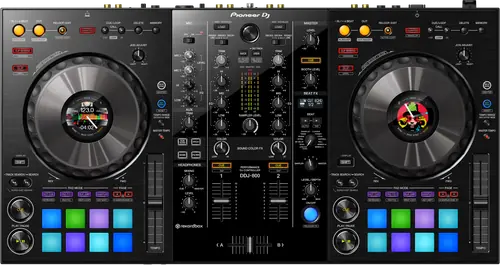
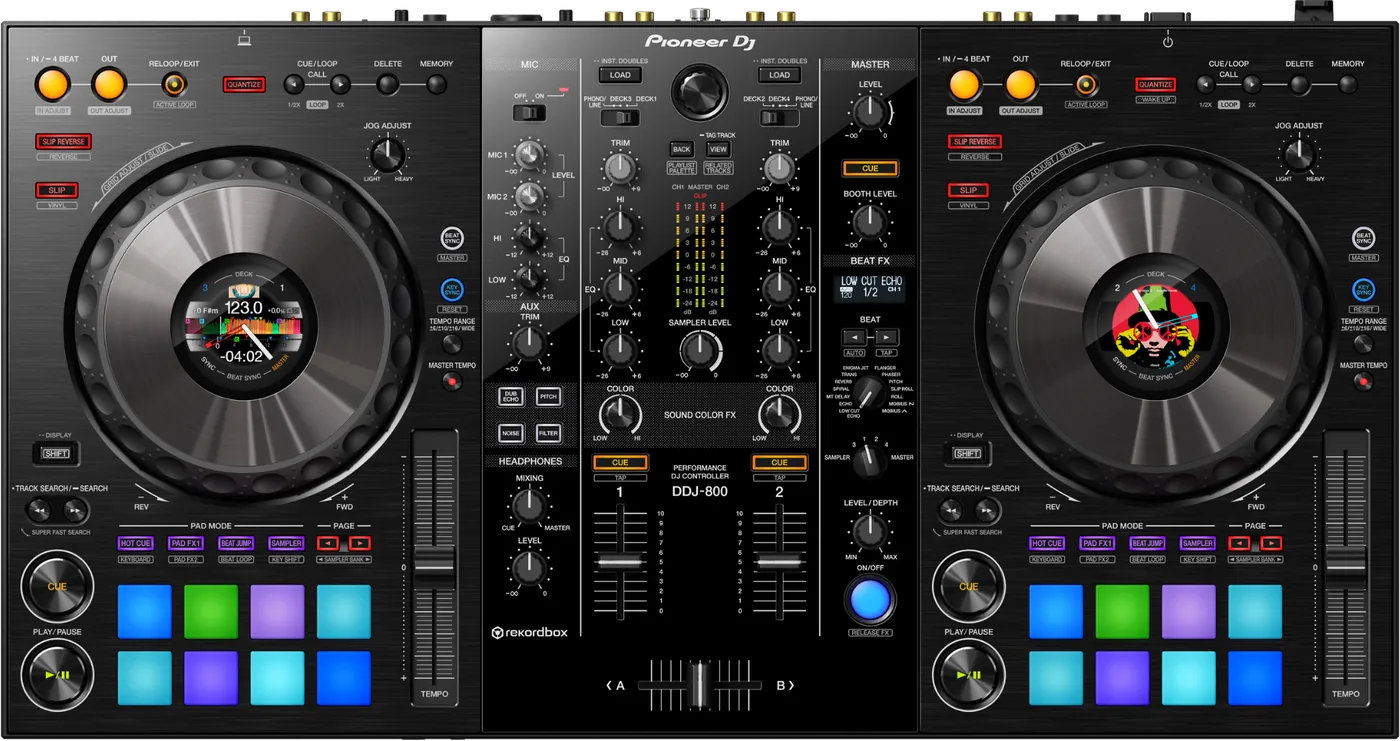
Booth briefing. The jog displays do not make this a standalone deck: the DDJ-800 is a 2-channel controller whose decks need a computer running rekordbox. Its mixer does not: AlphaTheta document the two external inputs, the AUX and the microphones working with no PC or Mac attached, which is the fallback worth knowing before a laptop dies rather than after. One documented defect matters and it only appears away from rekordbox: firmware 1.02 fixed MIDI messages failing to update those jog displays under other MIDI software. There is no PRO DJ LINK.
When it goes wrong: The computer cannot see the controller No sound from the controller
Fast Lane
The five things that decide your gig
The five things on the DDJ-800 that change what happens next, if you are reading this in the booth. All five are explained in full further down this page.
No laptop, no decks. The mixer still works without one.
There is no onboard playback and no drive slot, so the decks need the computer. The two external inputs, the AUX and the mics do not.
That is your fallback if a laptop dies mid-set: a CDJ or a turntable into a channel keeps the room going.
Under Serato, VirtualDJ or Traktor the jog displays could freeze, until 1.02.
The one named defect on this unit only appears under MIDI-compatible software, not under rekordbox.
So if your host is not rekordbox, the firmware version is the first thing to read.
The jog displays stopped updating in Serato, VirtualDJ or Traktor
Fader Start accuracy was improved in the same release, 1.02.
Firing late or not quite where you expect is a documented behaviour below that version rather than your timing.
Both fixes arrived together, so one update settles both.
The jog wheels carry the information, not a central screen.
It has Color On Jog Displays, carrying BPM, waveform, playback position, Hot Cues and Loop points on the wheel itself
The data sits where your hands already are, which is the design argument for this unit over a bigger one.
2-channel mixer mode or 4-channel mixer mode, switchable on the unit
Two mic inputs and 4 decks on 2 channels, at 4.7 kg.
That is 1.3 kg lighter than the DDJ-1000, which is the whole reason people choose it for travel.
If something goes wrong
One deck, no platter, and a controller that does nothing
Short answer. A DDJ-800 that shows only one track deck, or no platter on the deck, is rekordbox sitting in EXPORT mode rather than a fault in the controller. Click the EXPORT area at the top left of the rekordbox screen and choose PERFORMANCE. Note that this is the only cause the DDJ-800 manual gives for those symptoms, where the DDJ-1000 manual gives two and adds an unactivated licence, so on this unit the mode selector is the whole answer.
Why this matters. Everything looks connected. The unit lights up, the computer sees it, and the software shows half a setup. It reads as a driver fault and it is a mode selector in the corner of the window.
The Mac will not recognise it, and Apple has the fix
Short answer. There is a macOS repair for a DDJ-800 the computer will not recognise that nobody finds without being told. Disconnect the USB cable, open Audio MIDI Setup, which is Apple's own utility, and look at the MIDI Window or MIDI Studio. Select the DDJ-800 icon and click Remove Device. The manual adds that the icon may read USB MIDI Device instead, in which case remove that. Reconnect the USB cable and the DDJ-800 icon comes back, rebuilt. A stale MIDI device entry survives reboots and driver reinstalls, so the usual escalation never touches it.
Before you get there. The manual’s earlier checks are cheaper: a different USB port, other USB devices unplugged, other applications quit including the screen saver, and on Windows any unrelated ASIO drivers uninstalled. Work through those first and keep the Audio MIDI Setup step for when they have all failed.
The INFO and ARTWORK screens are missing from the jogs
Short answer. When the INFO and ARTWORK screens go missing from the DDJ-800's jog dial displays, the manual gives two causes and neither is the display. The USB buffer size may be too small, so raise it. Or the unit may be set in utility mode to be forcefully operated as a general MIDI controller, in which case it has stopped behaving as a rekordbox-aware device. The DDJ-1000 has the same pair of causes producing a different jog symptom, its illumination not turning during playback, so the cause travels between the two models and the symptom does not.
The jog displays stopped updating in Serato, VirtualDJ or Traktor
Short answer. This is a documented DDJ-800 fault with a published fix. Under MIDI-compatible software other than rekordbox, MIDI messages failed to update on the Jog Dial Displays. Fixed in firmware 1.02.
Why this happens. The displays are driven by MIDI messages from the host application. rekordbox was never affected, so the fault only ever showed up for people running something else, and those are the people least likely to be reading a rekordbox firmware notice. A unit that has never been updated still carries it.
Fix it now. Nothing in the booth repairs it at the gig. Work from the software's own waveforms on screen and treat the jog displays as decoration until the unit is updated. The audio path is not affected, only the displays.
Avoid it next time. Get the unit to firmware 1.02 before it goes back in the bag, especially if your host is not rekordbox.
The sampler is not in the headphones
Short answer. A DDJ-800 sampler you cannot hear in the headphones has one documented cause and it is a knob: the SAMPLER LEVEL control turned fully counterclockwise. Note the name. The DDJ-1000 calls the same control SAMPLER VOL and adds a SAMPLER CUE button that also has to be pressed, so the two units differ in both the label and the number of things that can be wrong.
The microphone produces nothing
Short answer. A microphone that produces nothing on a DDJ-800 is usually the MIC ON, OFF selector rather than the mic. Two positions, and OFF is where a previous user leaves it. Worth knowing if you move between this and the DDJ-1000: that unit's switch is a three-position OFF, ON, TALK OVER, so the ducking behaviour you may be expecting does not exist here.
Fader Start is firing late or not quite where you expect
Short answer. Fader Start accuracy on the DDJ-800 was improved in the same firmware release, 1.02. If the unit is older than that, the behaviour you are fighting has a published fix.
Why this happens. Fader Start triggers playback from the fader's position, so the unit has to agree with the software about exactly where that fader is. Before the fix that agreement was less accurate than it should have been.
Fix it now. Turn Fader Start off for the rest of the set and start the deck by hand. It is one less thing firing at a moment you did not choose.
Avoid it next time. Update to 1.02, then re-enable it and test at soundcheck rather than mid-set.
An indicator is flashing and it is behaving strangely
Short answer. The DDJ-800 has a documented recovery for the state where an indicator flashes and the unit behaves strangely, and it has a stop condition attached. Disconnect the AC adapter, wait at least one minute, then reconnect it. The minute is stated. And the manual is clear about what to do if that does not work: disconnect the adapter and request repair rather than repeating the cycle.
What to watch for
Documented fixes, by firmware version
What is in the record. The DDJ-800 record is two releases long. Fixed in firmware 1.02, dated 27 May 2021: when the unit was used with MIDI-compatible software other than rekordbox, MIDI messages failed to update on the Jog Dial Displays. The same release improved Fader Start accuracy and closes with other minor issues fixed. Before it, 1.01 of 25 April 2019 fixed being unable to use rekordbox dvs with Control Vinyl.
The gap, stated honestly. AlphaTheta publish two firmware releases for this unit. 1.02 of 27 May 2021, and 1.01 of 25 April 2019, which fixed rekordbox dvs being unusable with Control Vinyl. This page will not guess at releases it cannot find documented.
What is not in it. No crash, no freeze and no total audio dropout appears in the published record for this unit.
If you run DVS. The 1.01 entry is the one that matters to you. On firmware older than that, rekordbox dvs could not be used with Control Vinyl at all.
Do this. The highest published version is 1.02, so one number answers it. That matters most if you run anything other than rekordbox on this controller.
Official documentation. Firmware, Help Center →
Found an entry we have missed? Tell us and we will add it.
What the screens do that is not a fault
Short answer. The DDJ-800 manual describes what is normal on its screens in more detail than most, and it is worth reading before you decide a display is failing. It expects a small number of defective pixels, meaning black dots or constantly lit red, blue or green dots, and it expects colour and brightness unevenness depending on the angle you look from. Both are stated as characteristics of LCD displays rather than an indication of failure. A screen that stays dark for a while after power-on in a cold room reaches normal brightness on its own, and sunlight reflecting off the panel is sunlight.
Compatibility
Does it work without a laptop
Short answer. The decks do not. The mixer does, and that is the distinction worth carrying out of this page.
The decks. It is designed for rekordbox dj and a controller, not an all-in-one: there is no onboard playback engine and no media slot, so the decks, the waveforms and the effects are all the computer's work.
The mixer. AlphaTheta's own words: "The audio of these devices can be output from the unit via a PC/Mac or output from the unit not via a PC/Mac." In practice that means two sets of external inputs for a multi player or turntable, plus AUX and the microphones, and with no computer attached the trim, EQ, channel faders, crossfader, headphone cue and level meters all keep working. If your laptop dies mid-set you have not lost the room: a CDJ or a turntable into a channel keeps the music going while you deal with it.
The switch nobody mentions. Each channel has an input selector, and it is the manual's own first check for both a silent external device and no sound at all. Look for the input selector switches on each channel, marked PHONO/LINE, DECK3, DECK1 on one side and DECK2, DECK4, PHONO/LINE on the other.
When professionals use it. A laptop rig where the controller stands in for both the mixer and the players.
Common mistakes. Assuming the jog displays imply standalone playback: they do not, on this unit or on the DDJ-1000. And the costlier one, packing up when the laptop dies, on a unit whose mixer is still working.
ASIO on Windows, and the order that matters
Short answer. On Windows the order matters when setting the ASIO driver for a DDJ-800. The manual's remedy for sound interrupted after the ASIO driver is set is to set the driver BEFORE launching rekordbox, not while it is running. Separately, ASIO drivers belonging to other products should be uninstalled, and the manual points you at that driver's own maker for how.
Features explained
Do the jog displays work without a laptop
Short answer. The DDJ-800 carries Color On Jog Displays, carrying BPM, waveform, playback position, Hot Cues and Loop points on the wheel itself. The information is on the wheel, where your hands already are, instead of on a laptop screen off to one side.
Why it matters. It is the feature that lets you work with your eyes on the deck rather than the screen, which is the habit that transfers to a club booth. It also carries 16 back-lit rubber performance pads.
When professionals use it. Touring light. It is 1.3 kg lighter than the DDJ-1000 by AlphaTheta's own comparison, and that difference is the reason a lot of people chose it.
Common mistakes. Reading the displays as evidence of a standalone player. They are drawn by the software on the computer and sent to the wheel. No computer, no display and no sound.
Professional tips
Before you rely on one in a booth
If your host is not rekordbox, check the firmware first. The one named defect on this unit only appears under other MIDI software, and it is fixed in 1.02, which is also the highest published version at 1.02.
Pack the computer as part of the controller. The jog displays are convincing and they are still drawn by software on the computer. Without it there is no sound at all.
Test Fader Start at soundcheck or turn it off. Its accuracy was a documented fix in the same release. A feature that starts a deck for you deserves one deliberate test before a room hears it.
Carry a spare USB cable. One cable carries the control data and the audio. It is the failure you can actually pack a spare for.
Connections and setup
No USB hub, said twice
Short answer. A USB hub cannot be used with the DDJ-800. The manual states it flatly and repeats it in two separate places in the fault table, once for a unit the computer will not recognise and again for rekordbox becoming unstable. The PC or Mac and this unit connect directly with the included USB cable. That is the same rule as the DDJ-1000 and stricter than the DDJ-FLX10, whose manual allows a hub the computer's own manufacturer recommends.
Do this. Count the ports on the laptop you actually tour with before you rely on this controller with it. A machine with one port and a dongle habit is the one this rule bites.
Firmware, drivers and manuals
Official downloads and documents
Go to AlphaTheta for the files themselves. We link their pages instead of hosting a copy, because a manual copied here is a snapshot of release day and theirs is the one that stays current.
Firmware downloads. Official Pioneer DJ firmware page →
Manuals. Official Pioneer DJ manual page →
Broken link? Let us know and we'll fix it.
Frequently asked questions
Quick answers
- Will the DDJ-800 make sound on its own?
- Its decks will not: it is a controller with no onboard playback and no media slot, so those need a computer running rekordbox. Its mixer will. AlphaTheta: "The audio of these devices can be output from the unit via a PC/Mac or output from the unit not via a PC/Mac." So two sets of external inputs for a multi player or turntable, plus AUX and the microphones, and with no computer attached the trim, EQ, channel faders, crossfader, headphone cue and level meters all keep working.
- It powered down on its own while it sat idle.
- Auto standby, which is enabled by default: standby arrives after four hours when no control has been touched and no audio signal of -24 dB or greater is reaching an input. The way back is one button, not the rear switch: "If the [QUANTIZE] button of the right side deck is pressed, the standby state is canceled."
- Do the jog displays mean it is standalone?
- No. They are Color On Jog Displays, carrying BPM, waveform, playback position, Hot Cues and Loop points on the wheel itself, drawn by the software on the computer and sent to the wheel.
- Can it link with club CDJs over PRO DJ LINK?
- No. It is a USB controller for a computer and does not join a PRO DJ LINK network.
- How does it compare with the DDJ-1000?
- It is the 2-channel unit in the same family, and AlphaTheta's own comparison is that it is 1.3 kg lighter.
- Why did my jog displays stop updating?
- If your host is MIDI software other than rekordbox, that is a documented fault fixed in firmware 1.02. The audio is unaffected; only the displays stop.
- What is the highest published firmware?
- 1.02, dated 27 May 2021. AlphaTheta publish two firmware releases for this unit. 1.02 of 27 May 2021, and 1.01 of 25 April 2019, which fixed rekordbox dvs being unusable with Control Vinyl.
Playing soon and it is not working?
Start Emergency ModeKeep the Emergency Card
We will email you the printable PDF so it is on your phone before the next dark booth. Occasional notes that save gigs. No spam, unsubscribe in one click.
Registering is free and counts everywhere on Save My Gig. We send a confirmation email first. Your address is stored with Brevo, our email provider. Unsubscribe any time. Privacy
Sources: AlphaTheta's official DDJ-800 firmware page, Help Center, Pioneer DJ's product page, the specifications addendum and the 2019 launch announcement, checked 24 August 2026. Specifications theirs, priorities ours.