

RANE ONE, the field manual
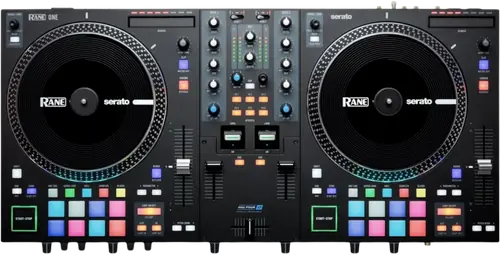
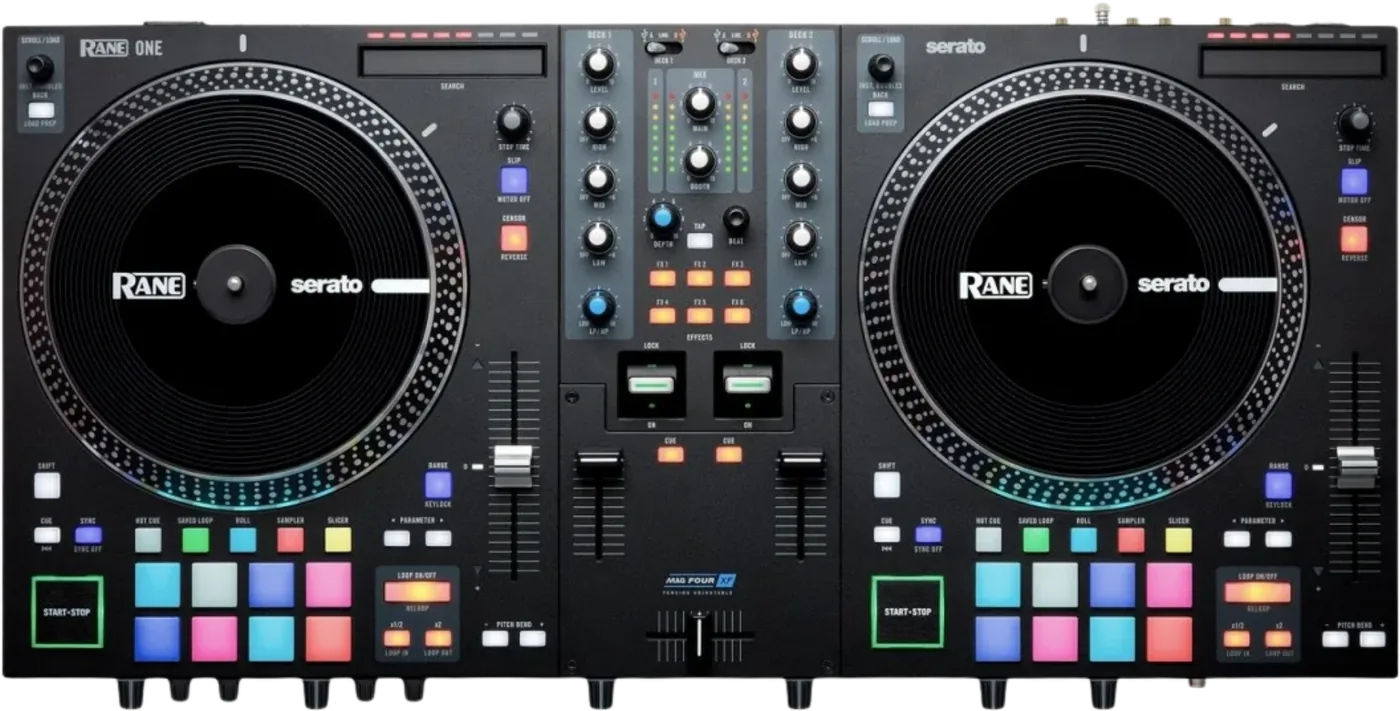
Booth briefing. The RANE ONE is RANE's motorised Serato controller: two direct drive platters, a MAG FOUR crossfader and a torque switch that changes the feel of both decks at once. Each deck has a source selector; on USB A or USB B the deck sends MIDI and drives Serato, and on Line it does not. For DVS, turntables connect to the phono inputs while the deck source stays on USB. Shift plus Slip stops that platter's motor while the track keeps playing.
When it goes wrong: The computer cannot see the controller No sound from the controller
Fast Lane
The five things that decide your gig
The five things on the RANE ONE that change what happens next, if you are reading this in the booth. All five are explained in full further down this page.
A deck on Line is dead to Serato. Pads, platter, everything.
RANE state it plainly: a deck’s controls will send MIDI information only when its deck source selector is set to USB A or B. Set that deck to Line and the pads, the platter and the loop buttons all stop reaching the software.
Nothing on the panel indicates it. If half the unit has stopped responding, check the deck source knob before you check anything else.
For DVS, plug into phono and leave the source on USB.
For DVS, RANE tell you to connect the turntables to the phono input and then set the Deck Source selector to USB A or B rather than to Line. That single sentence is the entire DVS coverage of the manual.
The guide never names a control vinyl or CD, never gives a calibration step and never says how many DVS decks are supported. On the question of what has to be bought, it is RANE’s support FAQ and not the guide that answers.
Shift plus Slip stops the platter and the track keeps running.
Holding Shift and pressing Slip turns that platter’s motor on or off, and RANE state that this will not affect the track’s playback. So a missed Shift release stops the disc under your hand while the audio keeps running.
Slip is a button you hit mid-set. A missed Shift release leaves the disc under your hand and the audio telling you two different things, with nothing changed on screen.
If you learned the pads from the Spanish or French pages, every loop is one step short.
The Spanish and French editions print every Auto Loop pad size at half the value the English, Italian and German editions give. English runs 1/4 Beat to 32 Beats across the eight pads; Spanish runs 1/8 Pulso to 16 Pulsos. Same product, same manual version, two different pad maps. Three editions against two, so the English is the majority reading.
The Spanish edition says Shift plus Loop In and Shift plus Loop Out halve and double the length of the current TRACK. English, French, Italian and German all say the current LOOP. The Spanish describes a function that does not exist in place of one that does.
Both microphones bypass the mixer, and mic 2 costs you the Aux input.
Both microphones bypass the mixer. RANE state the mic signal is routed directly to the program mix and cue mix, so there is no channel fader, no three band EQ and no cue button on either. The only mic controls are a level knob and one tone knob on the front edge.
Microphone 2 and the Aux input share one three position switch, so a laptop or a phone on Aux means you have exactly one microphone available.
If something goes wrong
The Windows driver installer stops and disappears
RANE publish a Windows driver failure that names the ONE, the SEVENTY-TWO and the SEVENTY-TWO MKII together. The installer reaches the Microsoft Visual C++ Redistributable step and stops there, with the installer window appearing only briefly. RANE put it down to conflicting C++ redistributables already on the machine, and the documented fix is to uninstall the Microsoft Visual C++ 2012 Redistributable in both its x64 and x86 forms and run the driver installer again, which reinstalls them.
The ONE is one of the three units RANE name in that article, so this is documented behaviour on this machine rather than a general Windows story. It is also the failure most likely to happen the first time a borrowed unit meets a laptop.
The headphone CUE MIX knob is changing the wrong thing
On the RANE ONE this one is a software fault rather than a hardware one, and it has a version number attached.
RANE record a fault where the headphone CUE MIX control adjusted CUE LEVEL instead, and state it was resolved as of Serato DJ Pro version 2.5.12.
Check the Serato version before you look at the hardware. A unit that behaves this way is not faulty, it is running software from before the fix.
What to watch for
Five language editions that disagree, and which one to follow
The Spanish and French editions print every Auto Loop pad size at half the value the English, Italian and German editions give. English runs 1/4 Beat to 32 Beats across the eight pads; Spanish runs 1/8 Pulso to 16 Pulsos. Same product, same manual version, two different pad maps. Three editions against two, so the English is the majority reading.
The Spanish edition says Shift plus Loop In and Shift plus Loop Out halve and double the length of the current TRACK. English, French, Italian and German all say the current LOOP. The Spanish describes a function that does not exist in place of one that does.
The Spanish edition never documents Reverse. It describes the Shift layer of the Censor button as Censor a second time. Censor is momentary and snaps back; Reverse latches and does not, so a Spanish reader lets go and the track keeps running backwards.
Twelve places where the English and the Spanish of this same manual differ, including the halved loop sizes, the track-versus-loop error, the missing Reverse, a Saved Loop section that is a copy of the Auto Loop section, mic jacks printed as TS rather than TRS, and two sentences ending in "respectively" whose two halves are in the opposite order from the English. Where the editions disagree, the English is the one to follow.
What the manual does not answer
On the RANE ONE the published record stops well short of the panel. The guide contains no troubleshooting section.
None of the four user guides states what the product is. There is no sentence in any of them calling the unit a controller, a mixer, a standalone system or anything else, and each opens with the identical thank-you paragraph instead. Whatever a reader wants to know about the category of machine in front of them has to come from somewhere other than the manual in the box.
None of these guides contains safety or warranty text. All four delegate it to a separate Safety and Warranty pamphlet, which means the document a DJ actually keeps is not the one carrying the warnings.
All three Serato units print the same specification row, "32-bit, Floating Pont, Double precision". Pont is RANE’s typo for Point, and 32-bit floating point is single precision rather than double, so the row contradicts itself as printed. This site reproduces it rather than quietly correcting it.
RANE publish a real support knowledge base, with per-model FAQ articles, a downloads finder and Serato-specific setup articles. On several points it is more use than the manual, and where this site quotes it, it says so.
There is no firmware section, and one download you are told to get anyway
The RANE ONE is the only one of these four machines whose guide never uses the word at all. The word firmware does not appear anywhere in this guide, in any of its five languages. There is no update procedure, no version number and no serial number condition. RANE do require a separate Rane Control Panel download and the guide never says what it does. Which systems need it is answered in RANE’s support FAQ instead, and this page carries that answer under Compatibility.
The ONE MKII does publish firmware, and its release note admits four faults. If you are choosing between the two generations, that difference is worth knowing.
Compatibility
What it needs on the computer, and where that is written
RANE’s support FAQ, not the guide, gives the minimum: Serato DJ Pro 2.4.4 or higher, on macOS High Sierra 10.13 or Windows 10 or higher.
The same FAQ answers what the guide leaves open about the Rane Control Panel download. RANE state the ONE is fully class compliant on macOS and needs no driver there, and that it does require drivers on Windows, published on the RANE downloads page.
The guide gives none of this. Every line above comes from the support FAQ, which is the document to read before a Windows machine goes to a gig with this unit.
What Serato gives you, and what it does not
The ONE is Serato DJ Pro enabled: RANE state it unlocks Serato DJ Pro automatically while it is connected, with no separate licence to buy. Pitch ’n Time is not included and is a paid Serato expansion.
RANE’s FAQ answers the question the guide leaves hanging. They state the ONE is compatible with and can host turntables for DVS control using the CD/Phono RCA deck inputs, and that Serato DVS control requires the DVS expansion pack from Serato, sold separately.
So two different things can be missing on the same unit. The software runs because the ONE is plugged in, and timecode still will not, because that is a separate purchase from Serato rather than anything on the deck.
What it does with no computer attached
RANE answer the standalone question in their FAQ even though the guide never does. They state the ONE needs a laptop running Serato for full use of its features, and that it works as a standalone mixer with functional EQ and filters using the line and phono inputs.
That is the answer the guide never gives, and it is a narrower answer than a simple yes. The mixer half of the machine works on its own. The deck half has nothing on board to play, so the line and phono inputs are the whole of it.
On pairing it with RANE’s own turntables, RANE see no practical benefit in adding TWELVE controllers to a two channel unit that already has two motorised platters. They do describe using a TWELVE MKII through the RCA deck inputs as a DVS controller.
Does the RANE ONE work without a computer?
The guide never says whether the ONE makes a sound with no computer connected. It never uses the words standalone or without a computer. There is a Line position on the deck source switch and the microphones are routed straight into the program mix, both of which point one way, but the document never confirms it and the setup procedure ends by telling you to open Serato DJ Pro.
RANE answer the standalone question in their FAQ even though the guide never does. They state the ONE needs a laptop running Serato for full use of its features, and that it works as a standalone mixer with functional EQ and filters using the line and phono inputs.
So the answer exists, it is just not in the box. What the machine has narrows it further: no media slot, no screen and no library, so there is nothing on board to play a music file from and the line and phono inputs are the whole of the standalone case.
Features explained
The deck source knob, and the position it does not have
RANE state it plainly: a deck’s controls will send MIDI information only when its deck source selector is set to USB A or B. Set that deck to Line and the pads, the platter and the loop buttons all stop reaching the software.
The rear panel section tells you to set the deck source knob to Phono/Line. The Deck Source knob has no such position: the top panel section lists USB A, USB B and Line. The contradiction is in all five language editions, so switching languages does not resolve it. The position you want is Line.
On the ONE, the ONE MKII and the FOUR, RANE state that a deck’s controls will send MIDI information only when its deck source selector is set to USB A or B. Switch a deck to Line and every control on that deck stops talking to the software, with nothing on the panel to say why.
The platters, the shared torque switch and the motor kill
A high torque direct drive aluminium platter per deck, turned by the motor, carrying speed position dots. The Control Disc on top is 7.2 inches, or 18.2 cm.
One rear panel switch sets the torque of BOTH platters. RANE describe the high setting as the heavier, stronger feel of modern turntables and the lower as lighter and more graceful, the feel of a classic turntable. One switch, two platters, so you cannot set them differently.
No torque figure appears anywhere in the guide, in any unit, in any of its five languages. Nor does any platter speed: the words 33, 45 and RPM do not occur in the document, and no speed selector is described.
Holding Shift and pressing Slip turns that platter’s motor on or off, and RANE state that this will not affect the track’s playback. So a missed Shift release stops the disc under your hand while the audio keeps running.
A Stop Time control sets the rate at which the platter slows to a complete stop, which RANE call the brake time. No range, no units and no default position are given.
RANE print the same caution on all three motorised units: the platter itself should not be held in position for sustained periods while powered to rotate. They do not define sustained. Holding a platter against the motor is ordinary practice for cutting and for holding a cue, so this is the manufacturer advising against a technique the machine is sold for.
The pads, and two Serato settings that change what they do
Two Serato settings change what the hardware does. Disabling Show Beat Jump Controls in the Serato setup menu is what gives you eight loop rolls at once rather than four. And Slicer needs a beatgrid on the track, and drops out on its own if you load another track or enable Grid Edit Mode.
Pitch Play needs the Serato Pitch N Time expansion, which the guide calls two different things on two different pages and describes as not included.
The crossfader, named once and explained nowhere
The specification table calls it a MAG FOUR tension-adjustable crossfader with independent contour and reverse controls. That row is the only place in the entire document where the words MAG FOUR or tension appear.
The guide identifies no tension control, gives no cut-in figure, no numeric curve values and no part number, and the only user replaceable part it documents on a battle unit is the Control Disc. The adjustment and the replacement procedures do exist, published by RANE in their support FAQ rather than in the document that came in the box.
The Control Disc can be user replaced by moving the Quick Release Adapter onto your own modified disc. RANE specify that the replacement must have three 6 mm holes and that the supplied disc should be used as the reference.
DVS, in the one sentence RANE give it
For DVS, RANE tell you to connect the turntables to the phono input and then set the Deck Source selector to USB A or B rather than to Line. That single sentence is the entire DVS coverage of the manual.
The guide never names a control vinyl or CD, never gives a calibration step and never says how many DVS decks are supported. On the question of what has to be bought, it is RANE’s support FAQ and not the guide that answers.
The intuitive move, turntable into the phono socket and the source knob to Line, gives you a control tone in the mix instead of timecode control, and per the note above it also stops that deck talking to the software.
The microphones, and the level they are specified for
Both microphones bypass the mixer. RANE state the mic signal is routed directly to the program mix and cue mix, so there is no channel fader, no three band EQ and no cue button on either. The only mic controls are a level knob and one tone knob on the front edge.
Microphone 2 and the Aux input share one three position switch, so a laptop or a phone on Aux means you have exactly one microphone available.
The rear panel invites you to connect microphones OR line-level devices to the mic inputs. The specification table gives those same inputs a maximum input of 110 mV, which is a microphone figure rather than a line one. The same paragraph offers the alternative itself: if you prefer a stereo line input, the Aux In may be used, and the Aux is specified at 4 Vrms.
The specification table describes the mic inputs as Mic/Line switchable. No such switch is described on the top, front or rear panel anywhere in the guide.
Professional tips
Set the crossfader up yourself, before the gig
The FAQ documents what the guide names once and never explains. The MAG 4 crossfader is user replaceable, reached by removing the small top plate covering the fader section, and its tension is adjusted by hand using the adjustment screw on the fader itself.
On a battle unit that is a pre-gig job, not a repair. Nothing in the box tells you the panel comes off, so a fader that feels wrong tends to get lived with for months.
The touch strip is for finding a region, not for scrubbing
RANE describe the track jumping when the touch strip is used as expected behaviour rather than a fault, and put it down to the strip’s high sensitivity. Their stated intended use is to reach a general region of the track with the strip and then fine tune the position with the platter.
Read that as technique rather than as an apology for the part. The strip gets you to the right eight bars and the platter puts you on the beat, and a DJ who tries to do both jobs with the strip will keep landing somewhere unintended.
Connections and setup
Assembling the platters, and locking the Control Disc
Short answer. The RANE ONE arrives with its platters off, and the assembly steps are also the answer to two things that read as faults later. The platters go on by aligning the pins in the bottom of the platter with the holes in the ONE's motor and pressing down firmly, and RANE ask you to check that it rotates uniformly and does not wobble excessively. A platter that wobbles is a platter that is not seated, not a bent one. Then the slipmat, then the Control Disc over the spindle with the Quick Release Adapter on top. The disc does not simply drop on: pinch the top of the spindle while slowly rotating the disc until you hear it click, and it is locked when the groove in the spindle lines up directly opposite the button on the side of the Quick Release Adapter. So a Control Disc that slips under the hand has usually never clicked, and there is a visual check for it that takes one second.
The order RANE print for switching it on
Short answer. The RANE ONE has an order for coming up and RANE print it as numbered steps rather than as advice. Put the unit on a flat, stable surface. With the power switched OFF, plug the included power cable into the ONE first, and only then into the wall. Power the unit on with its own switch. Then connect the USB cable to the computer, or to a powered hub connected to the computer. Then open the DJ software. Two details in that sequence are the ones people reverse: the cable goes into the unit before the outlet, and the software opens last rather than first. RANE also say the hub has to be a powered one, which rules out the bus-powered dongle most laptops travel with.
What goes in, what comes out, and what the guide never prints
Two mono microphone inputs on combo XLR and 6.3 mm TRS, a stereo Aux on RCA, two deck inputs on RCA switchable between phono and line, and a phono ground terminal.
Main on XLR, Booth on XLR, Master on RCA, and headphones on both 6.3 mm and 3.5 mm. Main and Booth are given a maximum output of 8 Vrms, Master 4 Vrms.
The guide never says whether the XLR outputs are balanced, gives no output impedance for anything, prints frequency response as the single word Flat with no range and no tolerance, and names no level control at all for the Master RCA output.
The specification tables in all three Serato units head the deck inputs "CD/Phono" and measure dynamic range from a "CD Input", while every panel and every body reference calls the same socket Deck Phono/Line In and the switch Line/Phono. There is no control or connector called CD on any of these machines. It is older RANE mixer wording that survived into the tables.
Firmware, drivers and manuals
Official downloads and documents
Go to RANE for the files themselves. We link their pages instead of hosting a copy, because a manual copied here is a snapshot of release day and theirs is the one that stays current.
Manuals. Official RANE manual page →
Broken link? Let us know and we'll fix it.
Frequently asked questions
What is it, and why does the manual not say?
RANE’s product page calls it a professional motorised DJ controller for Serato DJ Pro. The user guide itself never says what the product is: it contains no product-class sentence at all, and the only classifying words in the whole document are the contents-page line "Powered by Serato DJ Pro".
How big is it, and what does it draw?
What comes in the box?
The ONE, a power cable, a USB cable, a software download card, the user guide and a separate Safety and Warranty manual.
Playing soon and it is not working?
Emergency Mode walks you through the checks in order, and it works with no signal once you have opened it.
Start Emergency ModeKeep the Emergency Card
We will email you the printable PDF so it is on your phone before the next dark booth. Occasional notes that save gigs. No spam, unsubscribe in one click.
Registering is free and counts everywhere on Save My Gig. We send a confirmation email first. Your address is stored with Brevo, our email provider. Unsubscribe any time. Privacy