

MixTrack Pro FX, the field manual
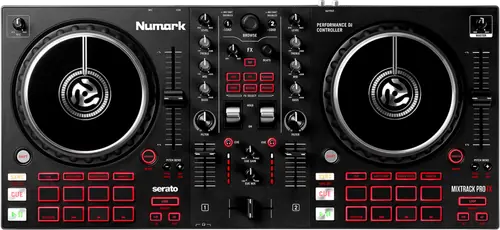
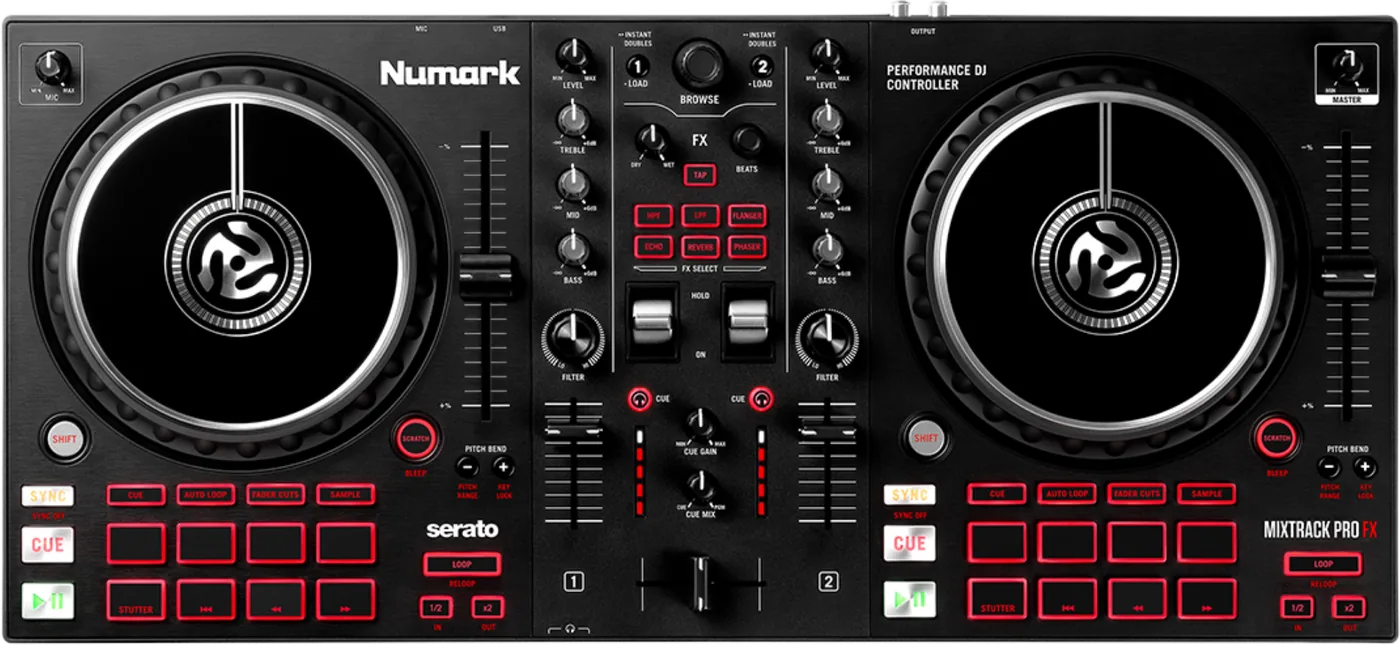
Booth briefing. The MixTrack Pro FX is Numark's two channel controller for Serato DJ Lite, and the model in the MixTrack FX pair without jog wheel displays; the MixTrack Platinum FX is the same controller with them. It has a microphone input with its own Mic Gain knob, summed into the mix after the Master Gain, a three position FX toggle per deck, and a Shift layer on the transport controls: Shift plus Scratch is Censor here, where the Platinum FX uses the same chord to change software layer. Serato DJ Lite runs on the laptop and the unit is the control surface.
When it goes wrong: The computer cannot see the controller No sound from the controller
Fast Lane
The five things that decide your gig
The five things on the MixTrack Pro FX that change what happens next, if you are reading this in the booth. All five are explained in full further down this page.
Master Gain down does not silence the microphone. Only Mic Gain does.
Pulling the Master Gain down does not silence the microphone. Numark state that the master gain does not affect the microphone volume, which is summed with the final output of the Master Gain to the Master Output, and that the Mic Gain knob is what controls it. There is no microphone on or off switch described anywhere in the guide.
So the reflex of dropping the master to kill a hot mic leaves the mic exactly where it was. Reach for Mic Gain, and know before the set that there is no switch to fall back on.
On the FX toggle, down is on. Only the middle position is off.
On the FX toggle, DOWN turns the effects on. Numark describe up as latching the effects on, down as turning them on momentarily, and only the middle position as off.
A toggle knocked downward on the way past reads as off to the eye and is momentary on to the audience, so centre it when you are done with it.
Tap BPM four times and the software stops using the analysed BPM.
Tap BPM is not a nudge. Numark state that pressing it four or more times makes the software ignore the track BPM and follow the manually entered tempo, and this model has no display to show you that it happened.
It is a one way door in the middle of a set, and there is no readout on the unit to tell you which side of it you are on. Tap it only when you already know the analysis is wrong.
A pad mode gives you four pads, not eight. The bottom row never changes.
Only the top row of four pads changes with the pad mode. Numark state that the bottom row is fixed to Stutter, Previous Track, Search Backward and Search Forward.
Plan a routine around four hot cues rather than eight, and remember that the fixed row puts Search Backward and Search Forward under your hand at all times.
One output goes to a PA, and the table counts your headphones as two more.
The specification table lists three Outputs, and two of them are the front panel headphone sockets, which the table does not label as headphones. There is exactly one output to a PA on this unit and it is unbalanced RCA.
One RCA stereo pair to a PA, and headphone jacks on 6.35 mm and 3.5 mm on the front. No booth output and no balanced output of any kind.
What to watch for
Where the five language editions differ, and which one to follow
The MixTrack Pro FX guide carries five languages in one PDF, and three entries in the Spanish edition do not match the rest. Where this site records a difference between the English and the Spanish of a Numark manual, it is recording a documentation slip and nothing more. One PDF carrying five languages is translated and laid out by different people under different deadlines, and the differences below are different in every document, which is what ordinary editing slips look like. None of it suggests a manufacturer trying to mislead anyone, and this site does not read it that way.
The Spanish edition describes a Shift chord that switches a time display between elapsed and remaining. This model has no display, in any language, and no other edition carries that sentence.
The Spanish pad mode key prints Fader Cuts twice, as items 32 and 33, and never prints Sampler at all. The French, Italian and German editions list both correctly.
In the Spanish edition the censor function is attached to the jog wheel entry rather than to the Scratch button, and the Scratch button entry never uses the word scratch.
Where the editions disagree, the English is the one this site follows, and on all three points the English matches the French, the Italian and the German.
There is no firmware section in this guide
Nothing in the MixTrack Pro FX guide tells an owner that a firmware exists. The guide never mentions firmware, drivers or system requirements. There is nothing in the document to tell an owner a firmware exists.
Numark publish a support knowledge base with per-model articles, and on several points it answers what the manual does not. Coverage is uneven: the NS7 II, the NS7 III, the SCRATCH and the Mixstream family have articles, and no model-specific article could be found for the MixTrack Platinum FX, the MixTrack Pro FX or the NS6 II, checked 2026-09-06.
What the guide does not answer
On the MixTrack Pro FX the published record stops well short of the panel. The guide contains no troubleshooting section.
None of the seven user guides states what the product is. There is no sentence in any of them calling the unit a controller, a mixer or a standalone system. The SCRATCH guide never uses the word mixer at all, and the NS6 II guide has no introduction section whatsoever.
None of the seven guides contains safety or warranty text. All seven defer it to a separate Safety and Warranty manual, so the document a DJ keeps is not the one carrying the warnings.
Compatibility
The software, named once in the whole guide
Serato DJ Lite, named exactly once in the whole guide. The guide never lists a single Serato DJ Lite limitation, never mentions Serato DJ Pro, and never says whether an internet connection or an account is needed to claim it.
So the MixTrack Pro FX guide is not the document to plan a software setup from. Take the download card out of the box before the gig rather than on the day.
Which Serato you actually get, and what the upgrade costs you
Serato answer the question the guide leaves open. Their hardware page states this controller unlocks Serato DJ Lite for free when it is plugged into the software, and offers a paid upgrade to Serato DJ Pro alongside a free trial for the fuller feature set, naming recording and extra cues and loops as examples of what the upgrade adds.
So the answer is not that the guide undersold the unit. Serato DJ Lite is what the hardware unlocks, Serato DJ Pro is a purchase, and the guide names neither of those facts.
Does it work without a computer?
The MixTrack Pro FX guide does not answer this, and this site will not answer it by inference either. The guide never says whether the unit passes audio with no computer. It documents no operating mode other than with the software, and it is bus powered from that computer.
What can be said is what the guide documents: one microphone input, one unbalanced RCA output pair, and no operating mode other than the one with the software running.
Features explained
The FX toggle, and the only position that is off
On the FX toggle, DOWN turns the effects on. Numark describe up as latching the effects on, down as turning them on momentarily, and only the middle position as off.
Two of the three positions on the MixTrack Pro FX are doing something, and the difference between them is whether the effect stays on when you let go. Up latches, down is momentary, and the centre is the only rest position.
Tap BPM, and the four presses that replace the analysed tempo
Tap BPM is not a nudge. Numark state that pressing it four or more times makes the software ignore the track BPM and follow the manually entered tempo, and this model has no display to show you that it happened.
On the MixTrack Pro FX that makes Tap BPM a decision rather than a check, and the computer screen is the only place the result of it shows up.
The pads, and the row that never changes
Only the top row of four pads changes with the pad mode. Numark state that the bottom row is fixed to Stutter, Previous Track, Search Backward and Search Forward.
Four pads per mode is the number to build a routine around on the MixTrack Pro FX, and the fixed row is worth learning as a permanent part of the surface rather than as something you switch to.
Shift plus Scratch censors, and the layers this guide does not reach
Shift plus Scratch censors the track on this model. On the near identical MixTrack Platinum FX the same chord moves the deck to a different software layer instead, so the two panels look the same and the chord does two different jobs.
This guide documents no way to reach software layers 3 and 4. The layer chord exists on the Platinum FX and is absent here.
So plan a set on the MixTrack Pro FX around two decks. If a four deck layout is what you need, the guide in front of you gives you no way to reach the other two.
There is no display, and what that costs you
There is no display on this model and nothing in the guide refers to one. Everything the Platinum FX shows on its jog wheels, including BPM, pitch and time, has to be read off the computer here.
It is the one difference between the MixTrack Pro FX and its sibling that you feel every minute of a set, so put the laptop where you can read it standing up rather than leaning in.
The microphone, and the knob that actually controls it
Pulling the Master Gain down does not silence the microphone. Numark state that the master gain does not affect the microphone volume, which is summed with the final output of the Master Gain to the Master Output, and that the Mic Gain knob is what controls it. There is no microphone on or off switch described anywhere in the guide.
One microphone input on a 6.35 mm TS jack, for which Numark specify a standard dynamic microphone. There is no line, aux or phono input. No input level, impedance or gain figure is printed.
Plan for that on the MixTrack Pro FX: with no on and off switch described, the working position between announcements is Mic Gain at zero, and a dynamic microphone is what Numark specify the socket for.
Connections and setup
What comes out, and what the specification table counts
The specification table lists three Outputs, and two of them are the front panel headphone sockets, which the table does not label as headphones. There is exactly one output to a PA on this unit and it is unbalanced RCA.
One RCA stereo pair to a PA, and headphone jacks on 6.35 mm and 3.5 mm on the front. No booth output and no balanced output of any kind.
44.1 kHz at 24-bit. No 48 kHz option appears anywhere in the guide.
Read the row before you rider the MixTrack Pro FX into a venue: one unbalanced RCA pair is what the engineer gets, so a DI box or a short cable run is the difference between a clean feed and a noisy one.
Two setup steps that describe a different product
Work from the panel rather than from the setup list when you first plug the MixTrack Pro FX in. The setup steps in several of these guides are inherited from an older mixer manual and were not edited for the product. Both MixTrack guides tell you to plug all devices into AC power, on a unit whose own specification table says USB bus power and which has no mains inlet, and both tell you to connect the outputs to audio sources.
USB bus power. There is no mains inlet.
The practical reading is the simple one: the USB cable powers the unit and connects it to the software, and the RCA pair goes out to whatever is amplifying you.
Firmware, drivers and manuals
Official downloads and documents
Go to Numark for the files themselves. We link their pages instead of hosting a copy, because a manual copied here is a snapshot of release day and theirs is the one that stays current.
Manuals. Official Numark manual page →
Broken link? Let us know and we'll fix it.
Frequently asked questions
What is it, and why does the guide not say?
A two channel controller for Serato DJ Lite, and the model in this pair without jog wheel displays. The guide itself never says so: it contains no product-class sentence anywhere.
How big is it, and what does it draw?
53.6 x 24.6 x 5.1 cm, which Numark also print as 21.1 by 9.7 by 2.0 inches. 2.3 kg, which Numark also print as 5.0 lbs.
USB bus power. There is no mains inlet.
What comes in the box?
The controller, a USB cable, a software download card, the user guide and a separate Safety and Warranty manual. No power supply, no audio cables.
Related controllers
Playing soon and it is not working?
Emergency Mode walks you through the checks in order, and it works with no signal once you have opened it.
Start Emergency ModeKeep the Emergency Card
We will email you the printable PDF so it is on your phone before the next dark booth. Occasional notes that save gigs. No spam, unsubscribe in one click.
Registering is free and counts everywhere on Save My Gig. We send a confirmation email first. Your address is stored with Brevo, our email provider. Unsubscribe any time. Privacy