

KONTROL X1, the field manual
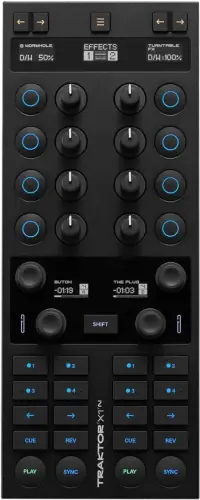
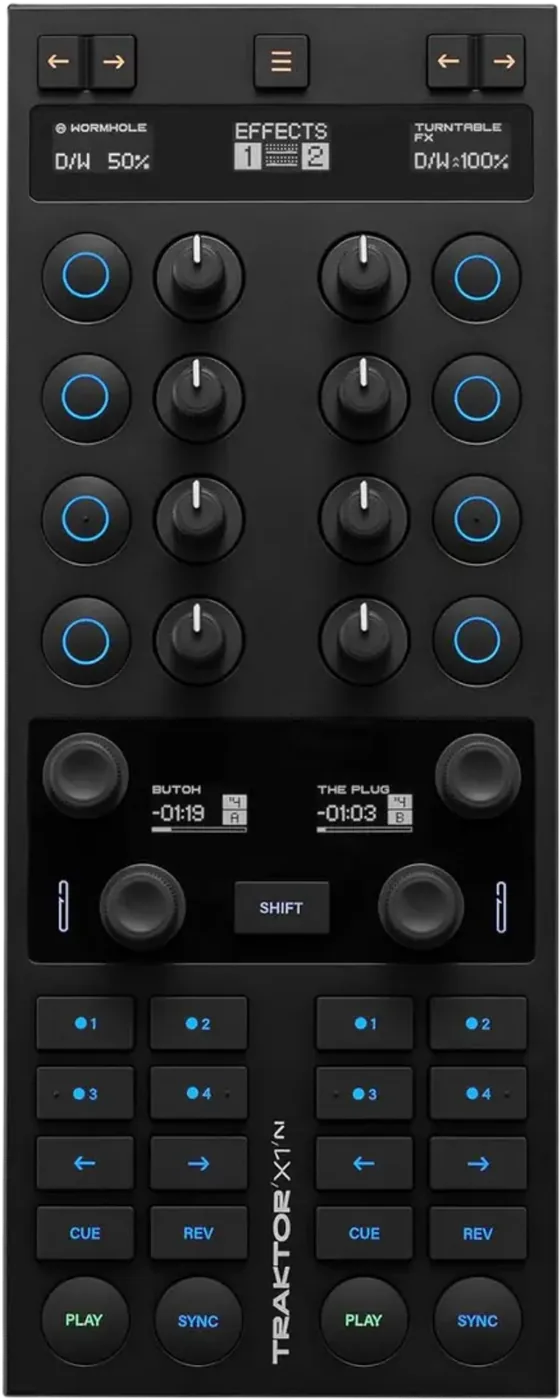
Booth briefing. Look at the back of it. There is no audio output and no soundcard on the TRAKTOR KONTROL X1 MK3, because it is a control surface and nothing else. It cannot make a sound, which means it is only ever used on top of a rig somebody else chose. So the question in an unfamiliar booth is never about the X1. It is where your audio leaves the laptop, and what the house mixer is expecting to receive. The unit itself runs on the USB cable to the computer. The power supply in the box is what switches on its built in USB hub and brightens the lit controls, so leaving that at home costs you the hub.
When it goes wrong: The computer cannot see the controller No sound from the controller
Fast Lane
The five things that decide your gig
The five things on the TRAKTOR KONTROL X1 that change what happens next, if you are reading this in the booth. All five are explained in full further down this page.
It cannot make a sound. Something else has to turn TRAKTOR into audio.
There is no audio output and no audio interface on this controller. Native Instruments sum the whole rear panel in one line, "The rear panel connects the controller to the computer and includes a powered USB hub", and the three sockets they then list are the computer connection, the hub inputs and the power inlet. No audio leaves this unit.
In a booth there are only three candidates for where the sound comes from: an interface you brought, a house mixer with one built in, or the installed players if you are driving them rather than playing off the laptop.
The power supply is not for the controller. It is for the hub.
It runs on the computer connection alone. Native Instruments: "The controller itself is USB powered and will work with only this connection." No adapter is needed to play.
The supplied power supply exists for the hub rather than for the controller. Native Instruments give the socket two jobs in one sentence: "Connect the included power supply to this socket. This enables the USB hub and allows for brighter lit controls." Without the supply the hub inputs on the back are not usable, which is the maker’s own note beside them.
Lit up with no sound is the normal shape of this, not a fault.
A lit X1 tells you it has USB power and that the software sees it. It says nothing at all about audio, because it has no audio.
Check the interface and the routing before you check the controller, every time.
A knob that seems dead is usually a knob that has not picked up yet.
A knob that seems dead is usually a knob that has not picked up the parameter yet. Native Instruments: "the knob will not force the new effect to jump to its current value. Instead, the X1 MK3’s top displays will give you a visual indication of where the new effect parameter value is via two up or down arrows next to the parameter name." Down arrows mean turn it counter clockwise before it takes hold, up arrows mean turn it clockwise.
That is the single most misread behaviour on this unit, because it looks exactly like a broken encoder in a dark booth.
The bundled licence does not arrive until the hardware is registered.
The bundled Traktor Pro licence does not unlock itself. Native Instruments: "Registering your hardware is required to access any bundled offers including the full Traktor Pro license." Registration runs through their Native Access application with a Native ID, and the licence appears once the serial is added.
The number you need is fifteen digits and it lives in two places: "Enter the 15-digit serial number which can be found on the card in the box or at the bottom of the controller." So a unit bought second hand with no box still carries its own serial underneath it.
If something goes wrong
The X1 is lit up and there is no sound
This is the expected behaviour, not a fault. A lit TRAKTOR KONTROL X1 only tells you it has USB power and TRAKTOR sees it. It says nothing at all about audio, because it has no audio.
Work backwards from the speakers. Mixer channel up and unmuted, mixer input set to line, cable into the interface, interface selected as the output device in TRAKTOR's audio preferences. The fault is somewhere on that chain, and the X1 is not on it.
A knob that changes nothing. A knob that seems dead is usually a knob that has not picked up the parameter yet. Native Instruments: "the knob will not force the new effect to jump to its current value. Instead, the X1 MK3’s top displays will give you a visual indication of where the new effect parameter value is via two up or down arrows next to the parameter name." Down arrows mean turn it counter clockwise before it takes hold, up arrows mean turn it clockwise.
The whole unit has stopped controlling Traktor. One shortcut takes the whole unit away from Traktor: "Holding SHIFT while pressing this button puts the controller in MIDI mode", where the button is the mode select button at the top of the effects section. The active mode is shown in the display right below it, so a controller that has stopped driving Traktor is worth reading before it is worth unplugging.
A deck display reading Live Input. A deck display that has gone blank apart from two words is not a fault: "If a deck is configured as live input, the display will just show Live Input." That deck holds no track, which is why nothing you press moves anything.
Compatibility
Registration, the licence and what installs what
Short answer. The TRAKTOR KONTROL X1 arrives with a Traktor Pro licence and it does not unlock itself. The bundled Traktor Pro licence does not unlock itself. Native Instruments: "Registering your hardware is required to access any bundled offers including the full Traktor Pro license." Registration runs through their Native Access application with a Native ID, and the licence appears once the serial is added.
Where the serial number is. The number you need is fifteen digits and it lives in two places: "Enter the 15-digit serial number which can be found on the card in the box or at the bottom of the controller." So a unit bought second hand with no box still carries its own serial underneath it.
Installing and connecting. The MK3 needs no driver installed. Native Instruments say it works out of the box with an up to date Traktor Pro: start the software, connect the controller with the included USB cable, and the software recognises the device on its own. The route for installing the software itself is their Native Access application, and the manual’s install step names Traktor Pro 3. The MK2 is the opposite case, and its setup guide walks through installing a Traktor Kontrol X1 driver on both operating systems.
One thing on the unit is behind a subscription. The Pattern Player is behind a subscription. Native Instruments state that "Traktor Pro Plus subscribers can control the Pattern Player using the X1 MK3", and it is one of three things an FX unit can be set to hold, alongside a single effect and an effect group.
And almost everything else can be moved. Almost every control on it is remappable in the Traktor Pro preferences, across two pages the maker call Color and Main. Sixteen colours over the FX buttons, number buttons, transport buttons and bottom LEDs, and changed behaviour for the browse encoders, the loop encoders, the number buttons, the nudge buttons and the deck displays. There is a restore to defaults in the same place, and using it makes the unit ask for a deck and effects layout again.
The booth is another maker's players and mixer
Short answer. The TRAKTOR KONTROL X1 was built for exactly this and the maker say so in one line: it is a modular controller for effects, looping and mixing, described as a versatile addition to any DJ setup. Nothing in its documentation assumes the rest of the rig is theirs.
What that means practically. You are taking two channels of the house mixer as line inputs from your interface, and the X1 rides on top controlling TRAKTOR. The installed players may sit unused, or the other DJ may be using them, and both are fine.
Set the layout when you plug in, not later. The unit asks a question the first time it wakes and it is easy to click straight through: "Upon startup, the controller will ask you to configure a layout for the FX units and decks." The arrow buttons at the top cycle the FX unit assignments, any of the four centre encoders cycles the deck assignments, and pressing one confirms. Native Instruments add that both can be changed at any time on the Decks Layout page of the Traktor Pro preferences.
What to confirm with the promoter. Two free line inputs on the mixer, and a place to physically put a laptop and the X1. Booth shelf space is the constraint nobody mentions until you arrive.
Features explained
A control surface, not an instrument
Short answer. The TRAKTOR KONTROL X1 is a control surface for Traktor and nothing else. The top panel divides into four sections and each has an identical left and right half, so it always drives two decks or two FX units at once. An effects and mixer section with a display per side, deck assign buttons and four knobs and four buttons per side. A loop and browse section with a display for each deck, a browse encoder, a loop encoder and the SHIFT button. Four hotcue buttons. A transport section that Native Instruments describe as dedicated Cue, Start, Stop and Sync buttons, and which in detail carries nudge arrows, REV, CUE, PLAY and SYNC.
Which one you are holding. The manual for the generation this page describes is titled "Traktor X1 MK3" and dated 9/2023, and Native Instruments introduce the unit there as "a modular DJ controller for manipulating effects, looping, and mixing". The two earlier generations are documented separately as TRAKTOR KONTROL X1 and Traktor Kontrol X1 MK2, and they are different objects, so a fact from one of them is labelled here rather than blended in.
The displays, because the count has been got wrong before. Five OLED displays, not two. Native Instruments open the manual with the count: "With five OLED displays, color-coded buttons, tactile features, and bottom lights working as a notification system, the X1 MK3 is designed to provide control in any environment." Three sit across the effects row, one on each side and one in the centre for the mode, and one more sits over each deck in the loop and browse section. The MK2 is the unit with two, and its displays are seven segment LED rather than OLED.
There is a mixer mode, and it moves no audio. It does have a mixer mode, and no audio passes through it. Pressing the mode select button until the centre display reads MIXER turns the top section into control over Traktor’s own mixer: high, mid and low on each side with a cut filter on each of those buttons, then cue and volume on the last pair. The knobs move the software. The sound still leaves the computer somewhere else.
The lights under it are a notification system. The bottom panel carries an independent LED on each side and Native Instruments give them two default meanings: "By default, a green light is activated if a loop is active. A blinking red light indicates a track is nearing its end." Both can be switched off in the Traktor Pro preferences, so a unit that is not warning you may be a unit somebody turned the warning off on.
What it is for. Hands on effects, cues and loops without reaching for a trackpad. On a crowded booth shelf it is the difference between performing and operating a laptop.
Why it is on this site at all. Because a piece of gear with no audio path can only ever be used on top of equipment you did not choose, and making those two things work together in a room you have never played is exactly the problem this site exists for.
Where your audio actually comes from
Short answer. Not from the TRAKTOR KONTROL X1. There is no audio output and no audio interface on this controller. Native Instruments sum the whole rear panel in one line, "The rear panel connects the controller to the computer and includes a powered USB hub", and the three sockets they then list are the computer connection, the hub inputs and the power inlet. No audio leaves this unit. Something else has to turn TRAKTOR into sound, and in a booth there are only three candidates: an audio interface you brought, a house mixer with a built-in interface, or the venue's own players if you are driving them rather than playing from the laptop.
Work it out beforehand, not at the gig. The X1 will light up and respond the moment you plug it in, which makes it feel like the setup is working. Nothing about that tells you the audio path is solved. Confirm the interface, then confirm the mixer input, then plug in the X1 last.
Cue is part of the audio path too. Whatever provides your master output has to provide your headphone cue as well, or you are mixing blind. That is an interface question, never an X1 question.
Professional tips
Worth doing before you travel
Rehearse the rig, not the set. Interface, cables and X1 together, exactly as they will be in the booth. A mapping that works at home with a different interface selected is not a tested rig.
Carry a spare USB cable, and carry the power supply. Laptop, interface and X1 is at least two ports, often three, and a modern laptop may not have them. The supply is what turns the socket on the back of the X1 into a working hub, so it is the piece that solves the port problem rather than a spare you leave behind.
Know your fallback. If the X1 fails you can still play, because everything it does is available on screen. Say that to yourself before the gig so you do not treat a control surface dropping out as an emergency.
Connections and setup
The power supply, and the hub you did not know you had
Short answer. The TRAKTOR KONTROL X1 needs no adapter to work. It runs on the computer connection alone. Native Instruments: "The controller itself is USB powered and will work with only this connection." No adapter is needed to play.
So what is the supply for. The supplied power supply exists for the hub rather than for the controller. Native Instruments give the socket two jobs in one sentence: "Connect the included power supply to this socket. This enables the USB hub and allows for brighter lit controls." Without the supply the hub inputs on the back are not usable, which is the maker’s own note beside them.
Which changes what you pack. The advice to carry a third party hub is the wrong advice for this unit. Carry the supply that came with it and the hub is already on the back of the controller, with the lit surface brighter as well. Leave the supply at home and you have a working X1 and no hub.
The rear panel in full. Three sockets and no more. A USB host connector to the computer, the USB hub inputs for other devices, and the power supply input. Native Instruments attach one condition to the middle one: "Note that the hub will only function correctly when the included power supply is connected."
Safety
The handling rules the maker prints
The TRAKTOR KONTROL X1 ships with a list of prohibitions and most owners never read it. Do not open the controller or attempt to disassemble or modify any internal parts, and treat a unit that appears to be malfunctioning as one to stop using and have inspected by qualified service personnel. Do not expose it to rain or use it near water or in damp or wet conditions. Keep objects and liquids out of it, and clean it with a soft dry cloth rather than paint thinners, solvents, cleaning fluids or chemical infused wiping cloths. Never use or store it in areas subject to extreme temperatures or high levels of vibration, and let it adapt to room temperature after cold storage. Do not place it where it could accidentally fall. Remove all connected cables before moving it. Use no excessive force on buttons, knobs, switches and connectors, and place no heavy objects on top of it.
The one that matters most in a booth. Remove every connected cable before you move it. A control surface dragged along a shelf by its own USB lead is how the socket dies, and the socket is the only connection this unit has to the computer.
Where these come from. Native Instruments print that list in the setup guide for the original X1 rather than in the MK3 manual, which carries no handling section of its own, and the MK2 ships its safety instructions on a separate flyer. So the wording is the first generation’s, and it is labelled that way here rather than presented as a sentence about the MK3.
Frequently asked questions
Quick answers
- Does audio pass through the X1?
- No. There is no audio output and no audio interface on this controller. Native Instruments sum the whole rear panel as the USB connector to the computer, the USB hub inputs and the power supply input.
- It has a MIXER mode. Does that mean audio goes through it?
- No. Pressing the mode select button until the centre display reads MIXER turns the top section into control over Traktor's own mixer. No audio passes through the unit in that mode or in any other.
- Does it need the power supply?
- Not for the controller itself. Native Instruments state that the controller is USB powered and will work with only that connection. The supplied power supply exists for the USB hub built into it.
- Do I need a driver, and how do I unlock the bundled Traktor?
- No driver. Native Instruments say the MK3 works out of the box with an up to date Traktor Pro. The bundled licence does need the hardware registered first, using the 15 digit serial number on the card in the box or on the bottom of the unit.
Related controllers
Commonly paired with
What you usually find beside it in working booths, from club, festival and rental installs rather than from a manufacturer document.
Native Instruments All brands Knowledge base FAQ and Fixes Dictionary
Sources: the maker's own hardware manuals, checked 31 August 2026. Specifications theirs, priorities ours.
Keep the Emergency Card
We will email you the printable PDF so it is on your phone before the next dark booth. Occasional notes that save gigs. No spam, unsubscribe in one click.
Registering is free and counts everywhere on Save My Gig. We send a confirmation email first. Your address is stored with Brevo, our email provider. Unsubscribe any time. Privacy