

LC6000 PRIME, the field manual
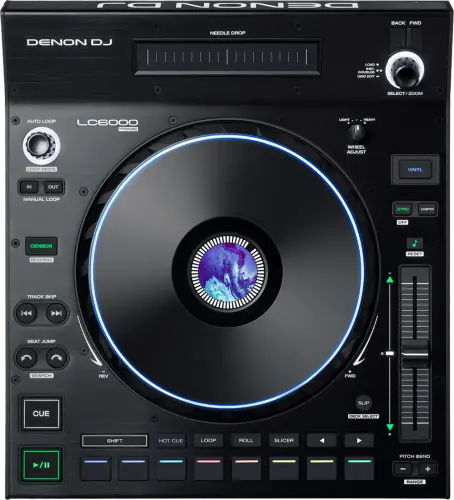
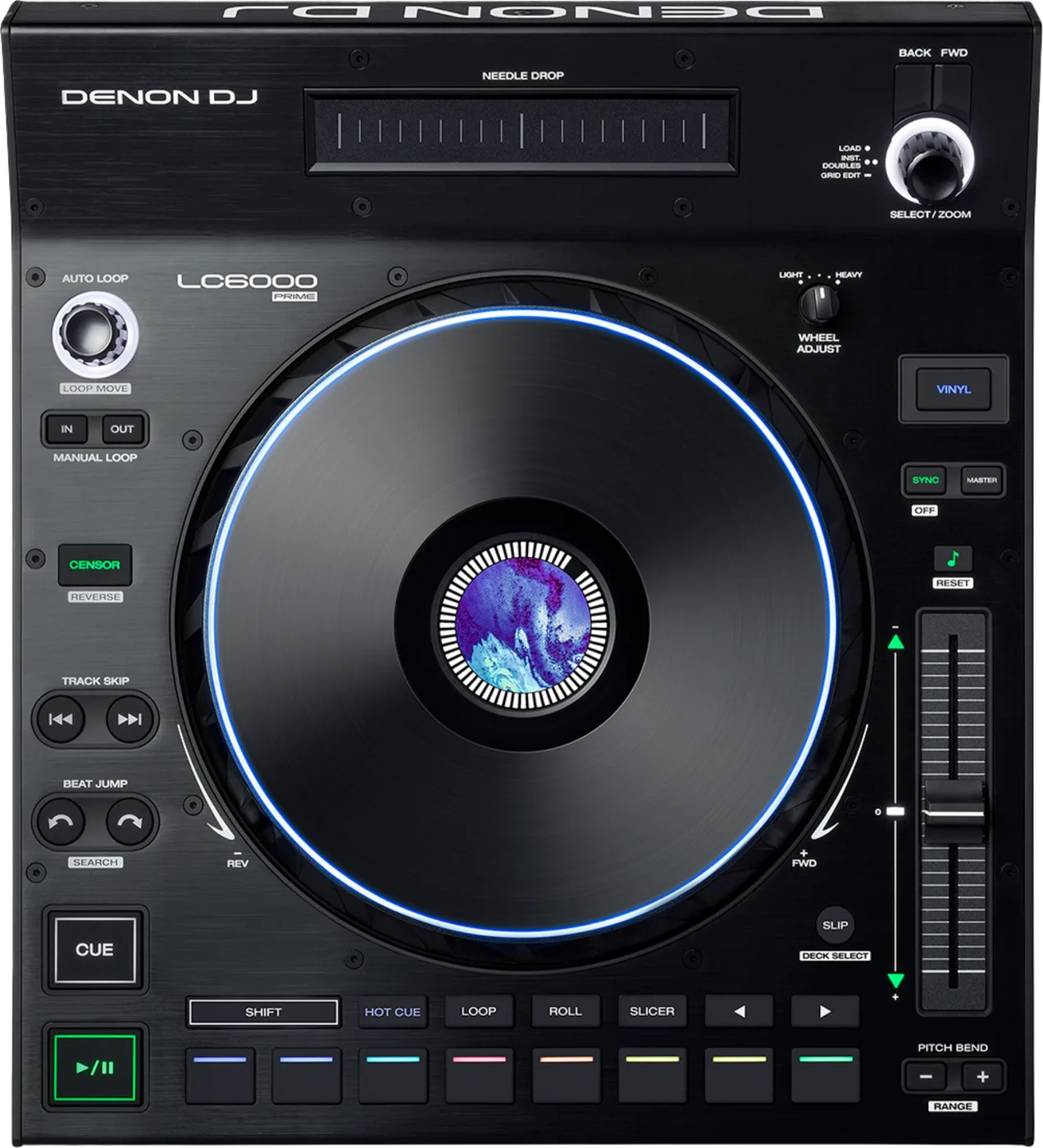
Booth briefing. The LC6000 PRIME is Denon's layer controller for the PRIME range. It is a control surface rather than a player: its connections are a USB port and a power input, and it has no audio output, input or soundcard of its own. Denon give it two roles. Connected to a Denon DJ dual-layer media player it drives layer B of that player, putting the second layer on its own surface. Connected to a computer it controls compatible DJ software. On a PRIME 4 it plugs into rear USB port 3 or 4.
When it goes wrong: The computer cannot see the controller No sound from the controller
Fast Lane
The five things that decide your gig
The five things on the LC6000 PRIME that change what happens next, if you are reading this in the booth. All five are explained in full further down this page.
It makes no sound. There is nothing on it for sound to come out of.
It makes no sound. Denon’s entire CONNECTIONS specification is a USB Type-B port and a DC power input: no audio output, no audio input, no headphone socket and no soundcard. Their support FAQ puts it as "does not play media on its own".
It has to be connected to a Denon DJ dual-layer media player or to a computer running compatible DJ software. Those are Denon’s own two options, and there is no third.
On a dual-layer player it drives layer B, and only layer B.
With a dual-layer media player it controls LAYER B, and only layer B. Denon state that plainly and it cannot be reassigned.
So one player and one of these is two decks under two pairs of hands, and the LC6000 is always the B side of whatever it is plugged into. It is not a way to get four decks out of one player.
On a PRIME 4 it rearranges the host as you plug it in.
On a PRIME 4 it goes in rear USB port 3 or 4, and those ports decide whether it is deck 3 or deck 4. Connecting one REARRANGES the host: anything loaded on decks 3 or 4 moves down to decks 1 or 2, and the PRIME 4’s own Deck buttons stop working.
That happens at the moment of connection, so it is a thing to do before you load in rather than mid set with tracks already on those decks.
Serato call it an accessory, not a controller, and that word decides your rig.
Serato list it as an Official Serato Accessory from Serato DJ Pro 2.5.1, not as a controller. An accessory does NOT unlock Serato DJ Pro: you still need a Serato-enabled mixer or controller somewhere in the chain.
Turning up with this and a laptop and nothing else leaves you with an accessory and no unlock. The Serato-enabled mixer or controller still has to be somewhere in the chain.
It runs on bus power until it does not, and nobody publishes the threshold.
It runs on USB bus power, and the DC adapter in the box is there for hosts whose port does not supply enough. The User Guide puts it this way: "While most media players and computers can power LC6000 PRIME using the USB port, some may not supply enough power and will require the power adapter to be used." The only electrical figure Denon print is the adapter itself, 12.0 V and 2.0 A, and no threshold is published, so "enough" is something you find out.
The adapter is in the box. Pack it, because the failure it prevents looks like a faulty unit rather than a hungry one.
If something goes wrong
The host does not see it
Check the version on the HOST first. On a PRIME 4, Engine DJ below 2.1 will not accept an LC6000 at all, and nothing on either unit says so. That is the single most likely cause and it looks exactly like a dead cable.
Then the port. On a PRIME 4 it has to be rear USB port 3 or 4. Another port is not a slower version of the same thing, it is nothing.
Then the power button. It is on the rear panel, the only control on this unit that is not on the top surface, and it is easy to walk past.
Then power. It runs on USB bus power, and the DC adapter in the box is there for hosts whose port does not supply enough. The User Guide puts it this way: "While most media players and computers can power LC6000 PRIME using the USB port, some may not supply enough power and will require the power adapter to be used." The only electrical figure Denon print is the adapter itself, 12.0 V and 2.0 A, and no threshold is published, so "enough" is something you find out. Plug the adapter in and try again before you suspect the unit.
Avoid it next time. Set it up once at home with the exact host you gig with, and note the Engine DJ version that worked.
It is connected and there is no sound
There will never be sound from this unit. It has no audio output. Whatever you can hear is coming from the player or the computer it is driving, into your mixer, and the LC6000 is not in that path at any point.
So look at the host. If the platter moves and the display responds, the LC6000 is working and the silence is somewhere between the host and the mixer. That is a different problem with a different answer.
Fix it now. Check the channel on the mixer, the input selector, and the cable from the player. Leave this unit out of the diagnosis entirely.
What to watch for
The firmware record, and how little of it there is
What exists. Two version numbers, 00.31 and 00.50, both carried by the same standalone desktop updater.
What does not. Denon publish no date and no release notes for either firmware version. There is no changelog, so there is no way to separate a fix from a feature, and this page will not invent one. Firmware does not arrive through Engine OS: it is a separate updater application run from a computer.
When Denon say to check. Denon tie the firmware check to your software rather than to a calendar: "Occasionally, we may update LC6000 PRIME’s firmware to add exciting new features and improvements. Visit denondj.com to check for available firmware updates, especially after you update your software (firmware updates may address new software features)."
Where the installed version is not. The User Guide documents no menu, no utility page and no procedure for reading the installed firmware version from the unit. Whatever version is on it, this unit is not where you read it back.
There is a change record, and it is the manual. Two revisions of the User Guide are published and they do not describe the same unit. In v1.1 the beat jump size came from the Auto Loop knob and Shift plus a Beat Jump button searched through the track. In v1.4 Shift plus a Beat Jump button sets the beat jump size and searching moved to Shift plus a Track Skip button. The v1.1 guide also calls the sync leader the "master" where v1.4 calls it the "primary". Neither revision carries a date, so the version on the cover is the only marker there is.
And no fault list at all. Denon publish no known-issues article for this unit at all. The entire Denon and Engine knowledge base holds exactly two LC6000 articles, an FAQ and a PRIME 4 setup guide, and neither describes a fault. That is not the same as a unit with no problems; it is a unit with no published record, and this page will not fill the gap with forum consensus.
Do this. Update from a computer before a run of gigs rather than the day of one, because the updater is a separate application and not something Engine OS will do for you.
Layer B, and only layer B
Short answer. With a dual-layer media player it controls LAYER B, and only layer B. Denon state that plainly and it cannot be reassigned.
What the manual itself says. The User Guide never prints the letter B. Its connection example reads "This example shows an LC6000 PRIME controlling the second layer of an SC6000 PRIME or SC5000 PRIME media player connected to an X1850 PRIME mixer", and everywhere else it says "the layer in focus" or "the layer controlled by LC6000 PRIME". The plain statement that it is layer B is in Denon’s FAQ, not in the manual.
The feature that looks like the answer and is not. Deck Select, the Shift plus Slip feature that chooses which deck you are driving, is for third-party software only. Denon name Serato DJ, VirtualDJ and Algoriddim djay Pro. It does nothing when the host is Denon hardware, which is why people report it as broken. So a DJ holding Shift and pressing Slip on a Denon rig, watching nothing happen, is looking at a working unit doing exactly what it is documented to do.
With software it is the opposite. With DJ software the unit is assigned to one deck at a time, chosen from decks 1 to 4. It enters deck selection mode by itself when you open supported software, and you can enter it again by holding Shift and pressing Slip, at which point pads 1 to 4 flash for you to pick one.
Reading the pads in deck selection mode. In deck selection mode the pads report what is available. Decks you could move to are dimly lit, and Denon are specific about a dark pad: "When a pad is completely off in deck selection mode, the corresponding deck is not available for selection, either because the software does not support that number of decks or another unit is already using that deck." To release a deck, hold Shift and press Slip to enter deck selection mode, then hold the pad for that deck for 3 seconds. The assignment clears and you can select again.
Loading to it. Double-pressing the Select/Zoom knob loads a track "from an active deck to the layer controlled by LC6000 PRIME", and if more than one active deck is available an overlay appears on the host touchscreen so you can choose which deck to double.
What that means for a plan. One player plus one LC6000 is two decks under two pairs of hands. It is not a way to get four decks out of one player.
Compatibility
What it works with, and what Denon do not say
Named by Denon. The SC6000, SC6000M, SC5000 and SC5000M dual-layer players, and the PRIME 4 and PRIME 4+. On the software side, Serato DJ Pro, VirtualDJ and Algoriddim djay Pro.
Not named, in either direction. PRIME 2, PRIME GO, PRIME GO+, SC LIVE 2 and SC LIVE 4 are not mentioned in the LC6000 documentation, and the combined User Guide names the LC6000 only in the PRIME 4 section. Denon neither confirm nor deny those hosts, so this page reports the silence rather than guessing either way.
And a gap worth knowing about. The current SC6000, SC6000M, SC5000 and SC5000M User Guide does not contain the string LC6000 anywhere. The players’ own manual is silent about their dedicated layer controller. So if you go looking in the manual for the player you own, expect to find nothing, and do not read that as an answer.
Other software. VirtualDJ from v8.5 build 6418, and Algoriddim djay Pro from v3.1 on macOS and v3.7 on iOS. It also works with an iPad through the Apple Camera Connection Kit. TRAKTOR is not officially supported. Denon note that the unit is a USB MIDI controller and can be mapped by hand to any software that accepts MIDI mapping, which is a different promise from support.
What the MIDI actually gets you. Denon publish a MIDI specification for it. The USB connection "sends and receives MIDI messages to and from the media player or computer": buttons, pads, platter touch and needle drop touch go out as notes on channel 1, the Select and Auto Loop knobs go out as control changes, the jog wheel, the pitch fader and needle drop scrubbing go out as two-byte control change pairs, and messages coming back set button brightness to off, dim or full and set pad and platter ring colour from a published table.
The one part a hand mapping cannot reach. One line in the MIDI specification decides what a non-Denon host can do with the wheel display: "The wheel display requires SysEx programming and is not available through manual MIDI mapping." Pads, buttons and the platter ring answer to ordinary MIDI, and the screen in the middle of the platter does not.
No network. There is no Ethernet port. It never joins the Engine LINK network: it is a USB peripheral hanging off one host.
Serato calls it an accessory, and that word matters
Short answer. Serato's word for the LC6000 PRIME is chosen carefully. Serato list it as an Official Serato Accessory from Serato DJ Pro 2.5.1, not as a controller. An accessory does NOT unlock Serato DJ Pro: you still need a Serato-enabled mixer or controller somewhere in the chain.
Why that catches people. A DJ who has read that connecting Serato hardware unlocks Serato DJ Pro can reasonably expect this to do it. It will not. It is plug and play WITH a Serato rig, and it is not the thing that makes the rig Serato.
Stems. Serato Stems through pad-mode replacement needs Serato DJ Pro 3.1.0 or later, per Denon’s own compatibility list.
On a PRIME 4 it rearranges the host as you plug it in
Short answer. On a PRIME 4 it goes in rear USB port 3 or 4, and those ports decide whether it is deck 3 or deck 4. Connecting one REARRANGES the host: anything loaded on decks 3 or 4 moves down to decks 1 or 2, and the PRIME 4’s own Deck buttons stop working.
Read that again before a changeover. Connecting an LC6000 mid-set moves tracks between decks on the host and disables buttons the previous DJ may be using. This is documented behaviour, not a fault, and it is the wrong moment to discover it.
How many, and what you need first. Two units maximum on a PRIME 4 or PRIME 4+, which is what makes four independent decks. Engine DJ 2.1 or later, published 15 December 2021, is required before a PRIME 4 will accept one at all.
What else changes on the host. Once it is connected to a PRIME 4, "the Deck buttons on PRIME 4 will be disabled, and the Select/Zoom knob on LC6000 PRIME can be used to browse and load tracks directly to the selected deck". Port 4 has a second behaviour: "If you have an LC6000 PRIME unit connected to Port 4 and enable the Playlist Deck feature on PRIME 4, this unit will be used to control the playlist, and certain features will be disabled." Denon do not list which features those are.
Do this. Plug in and power up before doors, never during. Check the Engine DJ version on the host first, because below the threshold nothing happens at all and the cable looks like the suspect.
Features explained
What it is, and the three names Denon give it
Short answer. A control surface. It makes no sound. Denon’s entire CONNECTIONS specification is a USB Type-B port and a DC power input: no audio output, no audio input, no headphone socket and no soundcard. Their support FAQ puts it as "does not play media on its own".
The three names, all official. Performance Expansion Controller on the product page, "the world’s most versatile DJ controller" in the copy on the same page, and "Layer controller for PRIME Series Media Players" on the cover of the User Guide. This site uses their word, controller, and then says what kind, because "controller" on its own is what lets somebody picture a deck.
What it has to be plugged into. It has to be connected to a Denon DJ dual-layer media player or to a computer running compatible DJ software. Those are Denon’s own two options, and there is no third. There is no configuration in which it works alone. An LC6000 and a mixer is not a DJ setup, because nothing in that chain is a source.
Why the absence is hard to find. Denon never write a sentence saying there is no audio output. You get there from the specification, which lists a USB port and a power input and nothing else, from the rear panel in the manual, which lists the same two plus a power button, and from the setup section, which sends every output to your mixer. Three documents to establish one fact.
What the specification actually says. Denon’s CONNECTIONS specification is two lines and no more: "(1) USB Type-B port (for computer/media player connection)" and "(1) DC power adapter input". The rear panel is three items: a Power Button that powers the unit on or off, a Power Input for the included adapter, and the USB Type-B port that both powers the unit and carries the MIDI in both directions.
The platter, the pads and the fader
Short answer. An 8.5 inch capacitive touch platter with an RGB ring, a 3.5 inch colour display in the centre, and mechanical tension adjustment. Eight performance pads, with Hot Cue, Manual Loop, Auto Loop, Roll, Slicer and Slicer Loop modes documented in the User Guide. Plus a 100 mm pitch fader, needle drop, beat jump, censor and loop controls.
On the motor question. Denon claim no motor anywhere: not in the specification, not in the feature list, not in the manual. They also never write the words "not motorised". Read the absence as an absence rather than as a specification. If a motorised platter is what you are buying, that is a question to put to a dealer rather than one this page can answer from the documentation.
What the platter display shows. The platter display normally shows "the current position of the playhead" and "the album artwork of the current track", and it shows two more things for a moment each: the size of an auto loop after you turn the Auto Loop knob, and the position of the secondary playhead when Slip is active.
The knob that stops it drifting. The Wheel Adjust knob sets how resistant the platter is to adjustments, and the User Guide says what it is for: "This knob applies a brake to the platter to prevent unintentional drifting due to environmental vibrations from bass frequencies, surface instability, etc."
Scratch or nudge is a mode, not a preference. The Vinyl button decides what the platter does. With Vinyl on, moving the platter scratches the track like a record. With Vinyl off, or when you touch only the side of the platter, moving it temporarily adjusts the track’s speed instead.
The needle drop strip has a condition on it. The Needle Drop strip depends on a setting in the host, not in this unit. The User Guide: "Make sure that Needle Lock is disabled on your connected Denon DJ media player in order to use the Needle Drop strip." With Needle Lock left on at the player, the strip does nothing and there is nothing wrong with the LC6000.
The pitch fader, and the moment it does nothing
Short answer. The LC6000 PRIME has a 100 mm pitch fader that stops being a pitch fader the moment the deck is synced. The pitch fader is conditional on Sync. The User Guide states it twice: "To adjust the track’s pitch, move the pitch fader. You can do this only when the deck is not synced", and "If Sync is activated, moving the pitch fader on the “primary” LC6000 PRIME unit will change the speed of all synced units, while moving the pitch fader on other units will do nothing."
Which unit is the primary. Sync makes one unit the primary and the rest follow it, and the User Guide covers the handover: "If you stop the “primary” LC6000 PRIME, the next-longest-playing LC6000 PRIME or compatible Denon DJ media player in the setup will automatically become the new “primary” (unless you change it manually)." Press Master to make this unit the primary, and hold Shift and press Sync to deactivate Sync on it.
Setting the range. The pitch fader range is set from the panel: hold Shift and press one of the Pitch Bend buttons to select +4%, 8%, 10%, 20%, 50%, or 100%.
One control the guide describes twice. Shift plus Key Lock is described two ways in the same guide. The panel section says it resets "the track to its original key regardless of the position of the pitch fader or edits made via key change menu on the connected Denon DJ media player", and the operation section says "the track’s pitch will return to its original pitch (0%) regardless of the position of the pitch fader". This page prints both rather than picking one.
Professional tips
Before you play on one
Know what it is before you plan around it. On a Denon player it is the second layer under its own hands. It is not a deck, and buying one does not add a source to the booth.
Never connect one to a PRIME 4 mid-set. It moves loaded tracks between decks and disables buttons on the host.
Carry the adapter. Bus power is documented with a caveat and no figure attached to it.
If you gig Serato, sort the unlock elsewhere. This is an accessory in Serato's own words, and an accessory unlocks nothing.
Set the wheel tension before the bass is up. Denon describe Wheel Adjust as a brake against drifting caused by vibration from bass frequencies and an unstable surface, so set it on the table you are actually playing on.
Turn Needle Lock off at the player. The needle drop strip on this unit does nothing while the host has Needle Lock enabled, and the unit looks faulty rather than configured.
Power up in the order Denon give. This unit and the other sources first, then the mixer, then the output devices, and the reverse when you finish.
Connections and setup
Power, and the figure nobody publishes
Short answer. The LC6000 PRIME takes its power from the USB cable, most of the time. It runs on USB bus power, and the DC adapter in the box is there for hosts whose port does not supply enough. The User Guide puts it this way: "While most media players and computers can power LC6000 PRIME using the USB port, some may not supply enough power and will require the power adapter to be used." The only electrical figure Denon print is the adapter itself, 12.0 V and 2.0 A, and no threshold is published, so "enough" is something you find out.
The order Denon give. Denon give an order for the whole rig. "When starting a session, power on (1) LC6000 PRIME and other accessories or input sources, (2) your mixer, and then (3) output devices." Ending a session runs the other way: "power off (1) output devices, (2) your mixer, and then (3) LC6000 PRIME and other accessories or input sources."
Before anything is plugged in. Before anything is connected, the User Guide says to "make sure all of your devices are powered off or all of their volume levels are at their minimum positions", and it sends headphones, power amplifiers and loudspeakers to the outputs of your mixer rather than to this unit.
It does not switch itself off. Nothing in the User Guide describes this unit sleeping, standing by or powering itself down. The only power control documented is the rear Power Button, and the only power condition documented is a host port that does not supply enough.
Do this. Carry the adapter. It is in the box, it weighs nothing next to the unit, and the alternative is discovering at a venue that this particular host port is one of the marginal ones.
Firmware, drivers and manuals
Official downloads and documents
Go to Denon DJ for the files themselves. We link their pages instead of hosting a copy, because a manual copied here is a snapshot of release day and theirs is the one that stays current.
Manuals. Official Denon DJ manual page →
Broken link? Let us know and we'll fix it.
Frequently asked questions
Quick answers
- Does it have audio outputs?
- No. It makes no sound. Denon’s entire CONNECTIONS specification is a USB Type-B port and a DC power input: no audio output, no audio input, no headphone socket and no soundcard. Their support FAQ puts it as "does not play media on its own".
- Can I use it on its own with a mixer?
- No. There is no configuration in which it works alone. An LC6000 and a mixer is not a DJ setup, because nothing in that chain is a source.
- Can I make it control layer A?
- No. With a dual-layer media player it controls LAYER B, and only layer B. Denon state that plainly and it cannot be reassigned. Deck Select, the Shift plus Slip feature that chooses which deck you are driving, is for third-party software only. Denon name Serato DJ, VirtualDJ and Algoriddim djay Pro. It does nothing when the host is Denon hardware, which is why people report it as broken.
- How many can I connect to a PRIME 4?
- Two units maximum on a PRIME 4 or PRIME 4+, which is what makes four independent decks. Engine DJ 2.1 or later, published 15 December 2021, is required before a PRIME 4 will accept one at all.
- Does it work with a PRIME 2, a PRIME GO or an SC LIVE?
- PRIME 2, PRIME GO, PRIME GO+, SC LIVE 2 and SC LIVE 4 are not mentioned in the LC6000 documentation, and the combined User Guide names the LC6000 only in the PRIME 4 section. Denon neither confirm nor deny those hosts, so this page reports the silence rather than guessing either way.
- Will it unlock Serato DJ Pro?
- No. Serato list it as an Official Serato Accessory from Serato DJ Pro 2.5.1, not as a controller. An accessory does NOT unlock Serato DJ Pro: you still need a Serato-enabled mixer or controller somewhere in the chain.
- Does it work with TRAKTOR?
- TRAKTOR is not officially supported. Denon note that the unit is a USB MIDI controller and can be mapped by hand to any software that accepts MIDI mapping, which is a different promise from support.
- Is the platter motorised?
- Denon claim no motor anywhere: not in the specification, not in the feature list, not in the manual. They also never write the words "not motorised". Read the absence as an absence rather than as a specification.
- Does it need its own power supply?
- It runs on USB bus power, and the DC adapter in the box is there for hosts whose port does not supply enough. The User Guide puts it this way: "While most media players and computers can power LC6000 PRIME using the USB port, some may not supply enough power and will require the power adapter to be used." The only electrical figure Denon print is the adapter itself, 12.0 V and 2.0 A, and no threshold is published, so "enough" is something you find out.
- Is there newer firmware?
- Denon publish 00.31 and 00.50, both carried by the same standalone desktop updater. Denon publish no date and no release notes for either firmware version. There is no changelog, so there is no way to separate a fix from a feature, and this page will not invent one. Firmware does not arrive through Engine OS: it is a separate updater application run from a computer.
- What does the display in the platter show?
- The platter display normally shows "the current position of the playhead" and "the album artwork of the current track", and it shows two more things for a moment each: the size of an auto loop after you turn the Auto Loop knob, and the position of the secondary playhead when Slip is active.
- Why does the pitch fader do nothing?
- The pitch fader is conditional on Sync. The User Guide states it twice: "To adjust the track’s pitch, move the pitch fader. You can do this only when the deck is not synced", and "If Sync is activated, moving the pitch fader on the “primary” LC6000 PRIME unit will change the speed of all synced units, while moving the pitch fader on other units will do nothing."
- Does it sleep or switch itself off?
- Nothing in the User Guide describes this unit sleeping, standing by or powering itself down. The only power control documented is the rear Power Button, and the only power condition documented is a host port that does not supply enough.
- How do I read the firmware version on the unit?
- The User Guide documents no menu, no utility page and no procedure for reading the installed firmware version from the unit. Whatever version is on it, this unit is not where you read it back.
- What does it weigh?
- 2.83 kg, at 359.5 x 319.5 x 119.5 mm.
- Is it discontinued?
- Current on the evidence Denon publish: a live product page with no legacy marker, the only product on their DJ Controllers category page, listed in the PRIME Series line-up, and marked Supported on both macOS 26 Tahoe and Windows 11. No discontinuation notice exists.
Related controllers
Commonly paired with
What you usually find beside it in working booths, from club, festival and rental installs rather than from a manufacturer document.
Playing soon and it is not working?
Start Emergency ModeKeep the Emergency Card
We will email you the printable PDF so it is on your phone before the next dark booth. Occasional notes that save gigs. No spam, unsubscribe in one click.
Registering is free and counts everywhere on Save My Gig. We send a confirmation email first. Your address is stored with Brevo, our email provider. Unsubscribe any time. Privacy
Sources: Denon DJ's LC6000 PRIME product page, their FAQ, the User Guide, the PRIME 4 setup article, the Serato Stems compatibility list, the downloads page and Serato's own hardware entry, checked 11 August 2026. Specifications theirs, priorities ours.