

PRIME GO+, the field manual
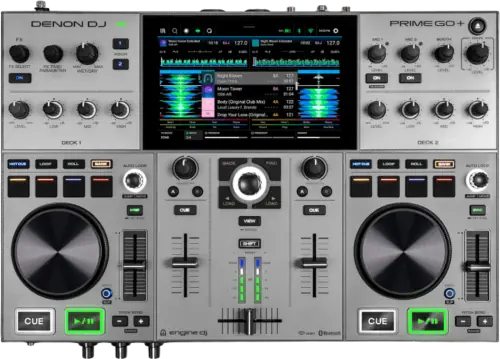
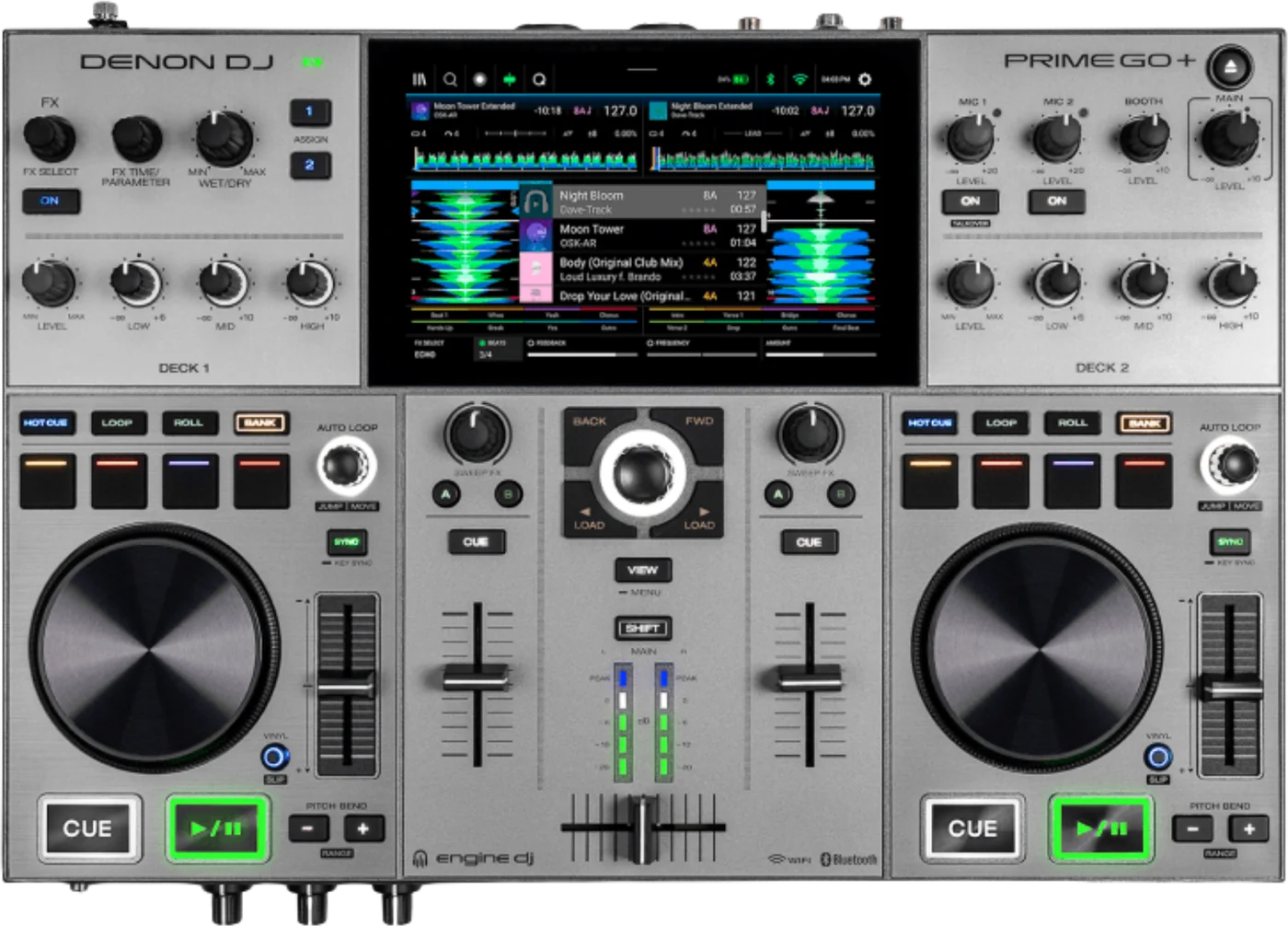
Booth briefing. The PRIME GO+ is the battery powered standalone in Denon's Engine OS range: a 7 inch screen, one USB port and an SD slot, and up to four hours away from a wall. It reads exFAT and FAT32 and no HFS+. The specification block it shares with the PRIME GO carries an Ethernet port marked for the GO only, so this unit does not have one, and Slicer Mode and the panel mounted BPM effects both belong to other models in the same guide.
When it goes wrong: Denon USB format, exFAT or FAT32 The Denon will not read the drive
Fast Lane
The five things that decide your gig
The five things on the PRIME GO+ that change what happens next, if you are reading this in the booth. All five are explained in full further down this page.
The battery is the point, and the hours figure is not published for this model on its own.
It has a built-in rechargeable lithium-ion battery whose runtime Denon publish only in a specification block headed "PRIME GO / PRIME GO+", where it reads up to 4 hours of use and up to 2 hours to recharge without saying which of the two models those hours belong to. Their own PRIME GO+ product page gives no hours figure at all and describes the battery only as a 25 percent performance improvement over the original PRIME GO.
Four hours is a figure from a specification table that covers two models, not a promise about your set. Screen brightness, a hot room and a hard working output all take from it, and the only reading the unit gives you back is the battery icon.
It has no Ethernet port, and the reason you did not notice is a bracket.
The specification block is headed "PRIME GO / PRIME GO+" and its connections list carries the line "1 Ethernet port (PRIME GO only)". So the GO+ does not have one, and the exclusion is a parenthetical inside a shared list rather than a line in a comparison.
So a plan that involves linking this unit to other Engine OS hardware over a cable is a plan for a different model.
A drive that will not mount is a format question, and there is no HFS+ here.
The shared guide that covers all seven Engine OS all-in-ones lists the supported file systems as exFAT, marked recommended, and FAT32. HFS+ appears nowhere in it, unlike the guide covering the SC6000 pair, which grants HFS+ to those two models by name.
A Mac formatted drive is the common case, and this unit has one USB port to try it in rather than four.
One USB port and one card slot is the whole of the storage.
It has one USB port for a drive and an SD card slot, plus a USB port to a computer.
There is no internal drive bay and no second USB port to fall back on, so the drive you brought is the set you are playing.
The effects are on the screen, not under your hand.
The guide states BPM FX are selectable through the top panel FX buttons and knobs on PRIME 4 and PRIME 4+ only. On this unit the effects are reached from the touchscreen.
That is a real difference in a transition. An effect you have to look at is an effect you use differently from one you can reach blind.
If something goes wrong
The USB drive will not mount or shows no tracks
Short answer. The PRIME GO+ is refusing a file system before it is refusing a drive. It reads exFAT, which Denon mark as recommended, and FAT32, and that is the whole list in the guide that covers it.
Why this happens. The shared guide that covers all seven Engine OS all-in-ones lists the supported file systems as exFAT, marked recommended, and FAT32. HFS+ appears nowhere in it, unlike the guide covering the SC6000 pair, which grants HFS+ to those two models by name. A drive formatted on a Windows machine without a second thought is often NTFS, which is not on the list either.
Fix it now, and there is less to try than on a bigger unit. This unit has one USB port and one card slot, so moving the drive somewhere else is a single move rather than a process of elimination. Try the SD slot if you have a card, then treat it as a format problem.
Avoid it next time. Format to exFAT and test on this unit before you leave the house. With one port and no internal drive, a refused stick is the whole set.
Taking a drive out safely
Short answer. The PRIME GO+ has a printed procedure with a condition on it. Make sure none of its tracks are being played on any connected Engine OS media players. Ejecting a device unloads its tracks from all networked media players.
What that means on a unit like this one. This unit has no Ethernet port, so it cannot be cabled to other Engine OS hardware. Denon do not say whether the condition reaches through any other connection, so eject as if it does.
Avoid it next time. Eject before you unplug, every time, including at the end of the set when the temptation to just pull it is strongest.
What to watch for
The Ethernet port belongs to the other model in the same table
Short answer. The PRIME GO+ has no network port, and the way you find that out is the problem. The specification block is headed "PRIME GO / PRIME GO+" and its connections list carries the line "1 Ethernet port (PRIME GO only)". So the GO+ does not have one, and the exclusion is a parenthetical inside a shared list rather than a line in a comparison.
Why a bracket is a bad place for this. A missing connector is the kind of thing a buyer checks a specification list for, and this specification list appears to grant it. The qualifier is easy to read past because everything around it is true of both units.
What it costs you. No wired link to other Engine OS hardware. On a unit designed to be carried and played away from a booth that is a defensible trade, but it is a trade, and it is worth making it knowingly rather than discovering it.
What we cannot tell you. Denon do not explain the difference anywhere we can find, so this page reports the difference and does not offer a reason for it.
The battery figure, and what it is not
Short answer. The PRIME GO+ has a built-in rechargeable lithium-ion battery whose runtime Denon publish only in a specification block headed "PRIME GO / PRIME GO+", where it reads up to 4 hours of use and up to 2 hours to recharge without saying which of the two models those hours belong to. Their own PRIME GO+ product page gives no hours figure at all and describes the battery only as a 25 percent performance improvement over the original PRIME GO. It also has a battery readout in the toolbar, which the guide marks as PRIME GO and PRIME GO+ only, which is the only battery reading the guide describes.
What a specification figure means. It is a measurement taken under conditions Denon do not publish here. It is not a promise about a set on a hot roof with the screen at full brightness, and it is not a fault when it does not match.
What to do about it in practice. Treat the number as a ceiling rather than a plan, arrive charged, and carry the adapter even when the whole point of the unit is not needing it. Two hours to recharge is a long time to discover halfway through an evening.
What we cannot tell you. Denon publish no figure for how much a bright screen or a loud output costs. So this page will not offer a rule of thumb it cannot source.
Compatibility
Which drives and formats it reads
Short answer. exFAT, which Denon mark as recommended, and FAT32. The shared guide that covers all seven Engine OS all-in-ones lists the supported file systems as exFAT, marked recommended, and FAT32. HFS+ appears nowhere in it, unlike the guide covering the SC6000 pair, which grants HFS+ to those two models by name.
What it will play. AAC/M4A, AIF/AIFF, ALAC, FLAC, MP3, MP4, Ogg Vorbis and WAV, with AIF/AIFF and WAV documented at 44.1 to 192 kHz and 16 to 32 bit, and MP3 at 32 to 320 kbps.
Why it is worth checking before you leave. On a four port unit a refused drive is an inconvenience. Here it is the set.
What each slot takes
Short answer. The PRIME GO+ has one USB port for a drive and an SD card slot, plus a USB port to a computer.
What that means for a library. There is no internal drive bay on this unit, so everything you play comes off the stick or the card you brought, or off a computer on the USB port.
Why the card slot is worth using. It is a second, separate device that stays in the unit and cannot be knocked out of a socket. On a unit with one USB port that is a genuine backup rather than a spare.
Features explained
What this unit does not have, and which models do
Short answer. Two things in the shared guide belong to other models, and the PRIME GO+ is not one of them. Slicer Mode is marked in the guide as PRIME 4, PRIME 2 or SC LIVE 4 only, so this unit does not have it.
And the effects live on the screen. The guide states BPM FX are selectable through the top panel FX buttons and knobs on PRIME 4 and PRIME 4+ only. On this unit the effects are reached from the touchscreen.
Why this page states absences at all. One guide covers seven products. A reader working through it will meet Slicer Mode and the panel FX described as though they were general, with the qualifier in brackets at the end of a sentence. Naming what this unit does not have is the only way to make those brackets visible.
What it does have. The screen, the pads and the library are the same Engine OS as the rest of the range, so what you learn here transfers to the bigger units in the guide.
Professional tips
Before you play on one
Arrive charged and bring the adapter anyway. Four hours is a ceiling, and a recharge is two.
Put the set on the SD card as well as the stick. One USB port means no second try.
Format to exFAT before you leave. There is no HFS+ in this guide.
Do not plan on linking it. No Ethernet port, whatever the shared specification block looks like.
Learn the effects on the screen before the gig. They are not under your hand on this unit and that is a different reflex.
Connections and setup
What comes out of the back, and what goes in
Outputs. two balanced XLR master outputs, an unbalanced RCA master pair, two balanced 6.35 mm booth outputs, and 6.35 mm and 3.5 mm headphone outputs.
Inputs. one RCA line pair and two combination XLR and 6.35 mm microphone inputs.
The physical facts. It has a 7 inch display, 178 mm on the diagonal, and no platter displays, measures 411 x 274 x 53 mm and weighs 3.68 kg.
The microphone path. Denon print one line about it: "The audio signals from the microphones are routed directly to the Master/Main Outputs." That is what the guide says and all it says. It also has a Talkover button, which automatically reduces the volume level of the main mix when you speak into the microphone, with the amount set under Settings and Mic
Firmware, drivers and manuals
Official downloads and documents
Go to Denon DJ for the files themselves. We link their pages instead of hosting a copy, because a manual copied here is a snapshot of release day and theirs is the one that stays current.
Manuals. Official Denon DJ manual page →
Broken link? Let us know and we'll fix it.
Frequently asked questions
Quick answers
- How long does the battery last?
- It has a built-in rechargeable lithium-ion battery whose runtime Denon publish only in a specification block headed "PRIME GO / PRIME GO+", where it reads up to 4 hours of use and up to 2 hours to recharge without saying which of the two models those hours belong to. Their own PRIME GO+ product page gives no hours figure at all and describes the battery only as a 25 percent performance improvement over the original PRIME GO. Treat the four hour figure as a ceiling rather than a plan, and note it is not published for this model on its own.
- Does it have an Ethernet port?
- No. The specification block is headed "PRIME GO / PRIME GO+" and its connections list carries the line "1 Ethernet port (PRIME GO only)". So the GO+ does not have one, and the exclusion is a parenthetical inside a shared list rather than a line in a comparison.
- What file systems does it read?
- exFAT, which Denon mark as recommended, and FAT32. There is no HFS+ anywhere in the guide that covers it.
- What file formats does it play?
- AAC/M4A, AIF/AIFF, ALAC, FLAC, MP3, MP4, Ogg Vorbis and WAV, with AIF/AIFF and WAV documented at 44.1 to 192 kHz and 16 to 32 bit, and MP3 at 32 to 320 kbps.
- What can I put a library on?
- It has one USB port for a drive and an SD card slot, plus a USB port to a computer. There is no internal drive bay.
- Does it have Slicer mode?
- No. Slicer Mode is marked in the guide as PRIME 4, PRIME 2 or SC LIVE 4 only, so this unit does not have it.
- Can I reach the effects without the touchscreen?
- No. The guide states BPM FX are selectable through the top panel FX buttons and knobs on PRIME 4 and PRIME 4+ only. On this unit the effects are reached from the touchscreen.
- How do I take a drive out?
- Make sure none of its tracks are being played on any connected Engine OS media players. Ejecting a device unloads its tracks from all networked media players.
- Where does the microphone go?
- The audio signals from the microphones are routed directly to the Master/Main Outputs. That is the whole of what the guide states about it.
- How heavy is it?
- 3.68 kg, measuring 411 x 274 x 53 mm.
Playing soon and it is not working?
Start Emergency ModeKeep the Emergency Card
We will email you the printable PDF so it is on your phone before the next dark booth. Occasional notes that save gigs. No spam, unsubscribe in one click.
Registering is free and counts everywhere on Save My Gig. We send a confirmation email first. Your address is stored with Brevo, our email provider. Unsubscribe any time. Privacy
Sources: Denon DJ's shared PRIME 4, 4+, 2, GO, GO+, SC LIVE 4, 2 User Guide version 5.0.0, and Denon DJ's own product and downloads pages, checked 9 September 2026. Specifications theirs, priorities ours.