

SC5000M PRIME, the field manual
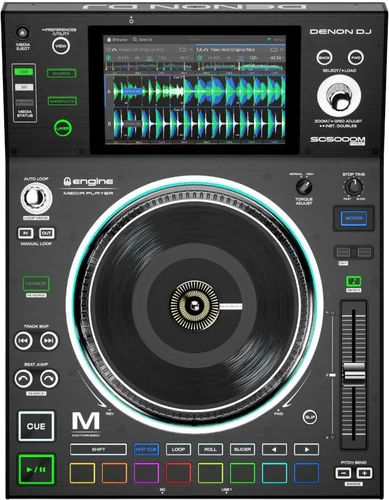
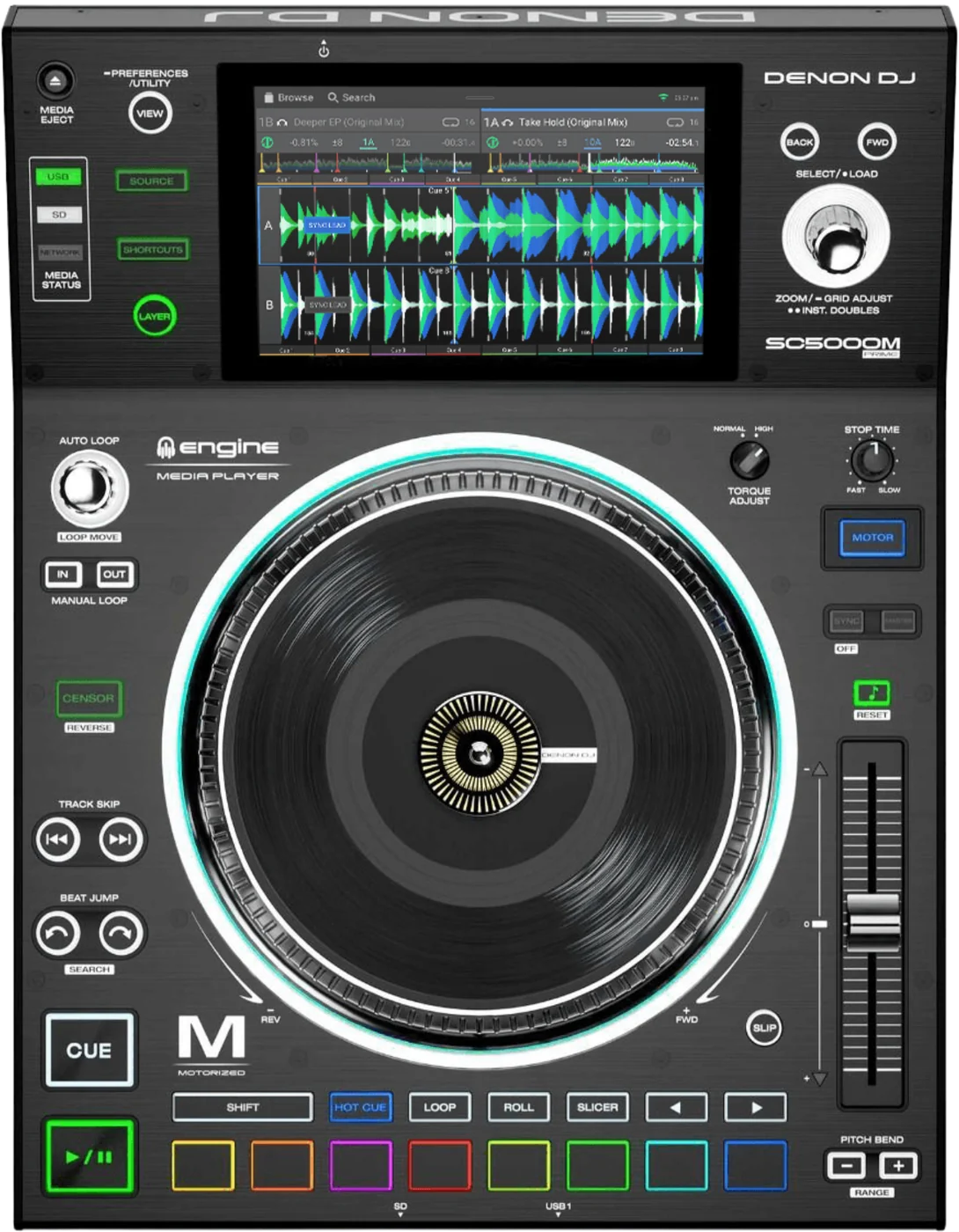
Booth briefing. The SC5000M PRIME is the motorised deck of Denon's first standalone generation, and the vinyl on the platter is a real record rather than a control disc. It plays from three USB ports or an SD card with no computer in the signal path, and it reads exFAT, which Denon mark as recommended, and FAT32: the shared guide grants HFS+ to the SC6000 pair only, by name. The platter is fitted by hand, and Denon document setting the slip friction while the spindle screw is tightened, so the feel on a deck you did not build is somebody else's setting.
When it goes wrong: Denon USB format, exFAT or FAT32 The Denon will not read the drive
Fast Lane
The five things that decide your gig
The five things on the SC5000M PRIME that change what happens next, if you are reading this in the booth. All five are explained in full further down this page.
The feel of the platter was set by somebody else, with an Allen wrench, and nothing reports it.
Denon document it as part of assembly: "By pressing down on or lifting up the vinyl while you tighten the spindle screw, you can adjust the slip friction to your preferred feel."
So the slip friction on a house or rented deck is whatever the person who built it preferred. There is no control on the panel and no menu page for it, and the only way to change it is to loosen the spindle screw and set it again.
A Mac-formatted drive that works on the SC6000M next to it is refused here, by name.
Denon's shared guide lists the supported file systems as "exFAT (recommended), FAT32, HFS+ (SC6000/SC6000M PRIME only)". The exclusion is printed in the same line that grants it.
This deck's own v1.5 guide agrees independently: "Supported file systems: exFAT (recommended), FAT32". Two Denon documents, one of them model specific.
The torque switch has two positions, not a range, and it is where the last DJ left it.
It is a rotary switch with two positions rather than a range: at the high setting "the platters will have the heavier, stronger feel of modern turntables", and at the normal setting "they are lighter and more graceful", the feel of a classic turntable.
Two positions means there is no middle to settle on and no display to read. Find the switch before the first record rather than during it, because the difference between the two is not subtle under the hand.
A deck that has stopped responding has a documented reset, and it is on the back.
Press and hold this button for 10 seconds to reset SC5000M PRIME. It is the rear panel Power Button, the same one that switches the deck on and off, so a short press only turns it off and the ten seconds is the whole difference between the two.
Only the deck you are holding restarts. The other players, the mixer and the network stay up, which is the reason to try this before anyone reaches for the power strip.
Three settings under Safety each look exactly like broken hardware.
Needle Lock, Lock Playing Deck and Pad Lock all sit in the User Profile menu under Safety. One makes the screen ignore a tap, one refuses to load a track, one makes the whole pad section inert.
None of them is a fault, none of them announces itself on the panel, and on a house or rented deck all three are somebody else’s earlier choice.
If something goes wrong
The USB drive will not mount or shows no tracks
Short answer. The SC5000M PRIME is refusing a file system before it is refusing a drive. It reads exFAT, which Denon mark as recommended, and FAT32, and that is the whole list in both of the documents that cover it.
Why this happens, and why it can catch you out in a booth that has newer decks in it. The shared v5.0.0 guide lists the supported file systems as "exFAT (recommended), FAT32, HFS+ (SC6000/SC6000M PRIME only)". HFS+ is excluded from the SC5000 and SC5000M by name, in the same line that grants it to the SC6000 pair. So a Mac-formatted drive can read perfectly on the SC6000 at the other end of the booth and show nothing here, on the same network, in the same set. A drive formatted on a Windows machine without a second thought is often NTFS, which is not on the list either.
Fix it now. Move the drive to another of the three USB ports, or to the SD card slot, before you assume the drive is at fault. If the format is wrong, reformat to exFAT on another computer and copy the music back on. If there is no computer, borrow a drive that already reads on this deck rather than on the one beside it.
Avoid it next time. Format and test every drive on an SC5000 rather than on whatever Engine OS unit is nearest. The two generations do not read the same list, and only one of them tells you so.
The deck has stopped responding
Short answer. The SC5000M PRIME has a documented reset, and it is the rear panel Power Button. Press and hold this button for 10 seconds to reset SC5000M PRIME.
Where the button is. Denon list it as item 2 in the rear panel section of the user guide, beside the power input, and it is the same button that switches the deck on and off. A short press switches the deck off, which is not what you want mid set. The ten seconds is the entire difference between the two actions, so hold it and count.
What Denon do not say. The guide gives the reset and does not give a list of what makes a deck stop responding in the first place. So this page does not offer a cause either. What it can give you is the documented way out and the order to try things in.
Fix it now. Reach round the back, hold the Power Button in for a full ten seconds, and let the deck restart. Only the deck you are holding restarts, so the other players, the mixer and the network stay up.
Before you pull the mains. Try the reset before the wall switch. Denon do build in a protection circuit to safely eject all media after an unexpected power loss to protect your data from corruption, after which reconnecting the power returns it to normal operation, so a sudden power cut is survivable, but on a rig where several PRIME units and the mixer share one power strip the wall switch is not a per deck option. It takes the whole booth down to recover one deck.
Avoid it next time. Find the Power Button during setup rather than during the problem. It is on the rear panel, out of sight, and on an installed deck it can sit behind a rack panel or a cable loom.
Taking a drive out safely
Short answer. The SC5000M PRIME has a printed procedure for this and a condition attached to it. Press Media Eject, then tap the Eject icon beside the device name on the touchscreen. Denon ask first that you "make sure none of its tracks are being played on any connected SC5000M PRIME units", and if a track on that device is playing you are asked whether to continue, which stops the track.
The condition is the part that gets skipped. Denon ask first that no track on that device is playing on any connected SC5000M PRIME. On a networked booth that is not the same as no track playing on the deck in front of you: a drive in this player can be feeding a track on another one, and the deck you are standing at will not look busy.
If the power goes instead. The deck carries a protection circuit to safely eject all media after an unexpected power loss to protect your data from corruption, after which reconnecting the power returns it to normal operation. That is the same problem solved for the case where nobody gets the chance to press anything, and it is a reason not to treat a power cut as a lost library.
Avoid it next time. Eject before you unplug, every time, including at the end of the set when the temptation to just pull it is strongest.
What to watch for
Three settings under Safety that look like a broken deck
Short answer. The SC5000M PRIME has three deliberate locks, all of them in the User Profile menu under Safety, and each one presents as a hardware fault to somebody who does not know it exists. None of them is a fault. All three are somebody's earlier choice on a deck you did not set up.
The screen ignores a tap on the track overview. Needle Lock, a setting under Profile and Safety that decides whether tapping the track overview jumps the playhead during playback. With it on you can still do it by pausing, or by making sure the motor is on and stopping the platter with your hand or palm while you swipe.
A track will not load onto a deck that is playing. The deck has Lock Playing Deck, which when on requires the deck to be paused before a track can be loaded to it. So a load that does nothing on a running deck is this setting, not a dead Select/Load knob.
The pads and the mode buttons do nothing at all. The deck also has Pad Lock, which disables the pads and the Hot Cue, Loop, Roll and Slicer buttons. A pad section that is completely inert, with the rest of the deck working normally, is the one to suspect first.
Fix it now. All three live in the same place, so one trip answers all three. Open the User Profile menu, go to Safety, and read the three settings rather than changing them blind. On a house or rental deck, change back what you turn off, because the next person is expecting the deck as they left it.
Avoid it next time. Read the Safety page at soundcheck on any deck you did not set up yourself. It takes seconds and it removes three separate ways to lose time later, none of which announce themselves on the panel.
The slip friction was set by somebody else, and nothing on the deck reports it
Short answer. On the SC5000M PRIME the feel of the vinyl against the platter is set during assembly, not from the panel. Denon put it in the setup instructions: "By pressing down on or lifting up the vinyl while you tighten the spindle screw, you can adjust the slip friction to your preferred feel."
Why this is unusual enough to have its own section. Almost every adjustment on a modern deck is a control or a menu page, and both of those report their own state. This one does not. There is no indicator, no default marked anywhere, and no way to read the current setting except by putting a hand on the record. A deck that feels wrong is not telling you anything, and it is not broken either.
What it means on a deck you did not build. A house or rented SC5000M carries the preference of whoever assembled it, which may have been years ago and may have been nobody in particular. If the vinyl feels loose or stiff against what you are used to, that is the most likely reason, and it is ahead of the torque switch in the order of things to suspect because the torque switch at least has a position you can see.
What to do about it, and what not to. On your own deck, set it once and learn it. On somebody else's, leave it alone: it needs the spindle screw loosened, and a booth in the middle of a set is not the place. Adjust to the deck instead, and if the room is yours to set up, do it at load-in with the Allen wrench that came in the box.
What we cannot tell you. Denon give the method and do not give a target, a measurement or a default. There is no correct value to hand you, only the fact that the value exists and that it is somebody's choice rather than a property of the deck.
Two Denon documents disagree about an internal drive bay
Short answer. Whether the SC5000M PRIME has an internal drive bay is not something this page can tell you, because Denon's own documents do not agree. The SC5000M’s own v1.5 guide never mentions SATA at all and its Connections specification lists no internal bay, and Denon’s SC5000M product page lists none either. The shared v5.0.0 guide that covers this deck alongside the SC6000, SC6000M and SC5000 does: its general feature list gives the media inputs as three USB, SD and an internal SATA drive bay, and it carries a SATA Drive Installation appendix addressed to your PRIME hardware. Both are Denon documents and this page prints both rather than picking one.
Why the shared guide reads the way it does. That feature bullet sits in a general list printed above the two model-specific lists, so it is written for the document rather than for one deck in it. The SATA chapter is written the same way. Neither names a model, which is exactly why neither settles the question.
What to do before you buy a drive for one. Turn the deck over and look. The bay, where it exists on this range, is a panel in the centre of the bottom held by screws. That is a thirty second answer about the unit in front of you and it beats any document, including this one.
Why the page says this rather than picking a side. Guessing would be worth something only if the guess were right, and it would read exactly the same if it were wrong. A DJ who buys a drive on the strength of a sentence here and finds no bay to put it in has been let down by us, not by Denon.
Compatibility
Which drives and formats it reads
Short answer. exFAT, which Denon mark as recommended, and FAT32. Both documents that cover this deck say so, and the shared one says what it does not read in the same breath.
The exclusion, in full. The shared v5.0.0 guide lists the supported file systems as "exFAT (recommended), FAT32, HFS+ (SC6000/SC6000M PRIME only)". HFS+ is excluded from the SC5000 and SC5000M by name, in the same line that grants it to the SC6000 pair.
Its own guide agrees, on its own. The v1.5 guide states it directly in its Devices and File Analysis section: "Supported file systems: exFAT (recommended), FAT32". Two documents, one of them model specific, is a stronger answer than either alone.
One small disagreement, and it changes nothing. The two documents do not mark the same one. Both model guides print "exFAT (recommended)" and then FAT32; Denon’s own SC5000M product page prints exFAT and then "FAT32 (recommended)". The pair of formats is not in dispute, only which one Denon are pointing at.
What it will play. AAC/M4A, AIF/AIFF, ALAC, FLAC, MP3, MP4, Ogg Vorbis and WAV, with AIF/AIFF and WAV documented at 44.1 to 192 kHz and 16 to 32 bit, and MP3 at 32 to 320 kbps.
What it will read from. SD, SDHC and SDXC cards, and USB mass storage devices, which Denon give as flash memory and external HDD enclosures.
What each slot takes
Short answer. The SC5000M PRIME has three USB Type-A ports, one on the front and two on the rear, and an SD card slot, and the card slot takes SD, SDHC and SDXC cards.
The three USB ports are not equal. the rear ports supply 900 mA for USB 3.0 devices and 500 mA for USB 2.0, and the front port supplies 500 mA for USB 2.0 devices only. So a bus powered drive that behaves on the rear can misbehave on the front, and that is a specification rather than a fault. On a deck built into a rack the front port is often the only one you can reach, which is exactly when this matters.
Why it matters. A deck with one dead USB port is not a dead deck. There are two more ports and a card slot before anything is actually wrong.
Linking players together
Short answer. You can network up to four players over the Link port, which then share track databases, timing and BPM information and other track data.
What the cable goes to. Denon describe the Link port as connecting to another SC5000M PRIME or to your Denon DJ mixer with the included networking cable, and each networked unit can share track databases, timing and BPM information and other track data over that connection.
Why it matters in a booth. One drive in one player can feed every player on the network, so the stick in your hand does not have to be in the deck you are playing. It also means a drive you are about to pull may be feeding somebody else, which is the condition on the eject procedure.
The pitch fader rule, and it looks like a fault. If Sync is activated, moving the pitch fader on the "primary" SC5000M PRIME unit will change the speed of all synced units, while moving the pitch fader on other units will do nothing. A pitch fader that moves and changes nothing is that rule rather than a broken fader.
The platter ring can report the mixer. The deck has an On Air Mode that changes the platter ring illumination with the channel fader on a Denon DJ mixer: with it on, raising the fader changes the ring from white to your chosen colour, and with it off your colour is shown whatever the fader is doing. Denon note it requires a connection to a compatible Denon DJ mixer over Ethernet.
Features explained
The motor, the torque and the brake
Short answer. The SC5000M PRIME has a motorised platter with a real record on it, and three controls decide how it behaves: the Motor button, the Torque Adjust switch and Stop Time.
The platter. Denon describe it as "This 7" motorized platter controls the audio playhead in the software, and can be used to scratch and spin or act as a static pitch platter depending on the setting of the Motor button."
The motor button, and what it does when it is off. The deck has a Motor button that turns the platter motor on and off. With the motor off and audio playing the platter nudges the speed, which Denon give as useful for beat alignment; with the motor off and audio paused it scratches. Denon add that "audio will not be interrupted if the motor is activated during playback".
The torque switch. It is a rotary switch with two positions rather than a range: at the high setting "the platters will have the heavier, stronger feel of modern turntables", and at the normal setting "they are lighter and more graceful", the feel of a classic turntable. Two positions rather than a range means there is no middle to settle on, and no display to read it from.
The brake time. There is also a Stop Time control for the rate at which the track slows to a complete stop, the brake time, when it is paused with Play/Pause, which the SC5000 has as well.
How quickly the track starts. The deck carries a Motorized Platter Start setting: Normal starts the track in relation to the motor start up speed, and Instant starts the song immediately and lets the motor and platter catch up "within a few milliseconds".
The size Denon publish twice. Denon publish two diameters for it. The v1.5 guide’s specification table gives the platter as 7 inches, 178 mm, and Denon’s own SC5000M product page gives it as 203.5 mm plus or minus 0.5, aluminium die cast and 900 g, which is 8 inches. Both documents agree the vinyl on top of it is a real 7 inch record. This page prints both rather than picking one.
The two layers
Short answer. The SC5000M PRIME does dual layer playback with individual audio outputs, so the two layers reach the mixer on separate channels.
Why that is the point of the deck. Two players in one box, on separate channels, is how two of these become a four deck booth without a fourth unit or a second network cable.
What one set of controls means. One screen, one platter and one set of transport controls serve whichever layer has focus, so the Layer button decides what the hardware is driving. A control that appears to do the wrong thing is usually the right thing to the other layer.
Wi-Fi, streaming and the thing people assume this deck does not have
Short answer. The SC5000M PRIME has wireless, and its own guide documents it in full: a Wi-Fi toggle in Settings with its own settings page, a Wi-Fi menu in the Control Center, and a Wi-Fi icon at the top of the Source screen. Denon document streaming and cloud services browsed over it, each of which asks you to sign in or activate the device before it will list anything.
Why this surprises people, including us. A player of this vintage is easy to assume is the offline one in a booth of newer gear. It is not. We assumed it and checked, and the guide answered plainly.
What that changes on a gig. A streaming service is an account and a network before it is a feature. Denon document that each service asks you to sign in or activate the device before it will list anything, which is not a thing to discover in front of a room. Venue Wi-Fi is also the least reliable component in most booths, and a set built on it has a dependency that a USB drive does not.
Do this. Carry the music on a drive whatever else you plan to do. Streaming is a way to reach for a track you do not have, not a way to carry the set you do have.
Professional tips
Before you play on one
Format for the oldest deck in the booth. If the room has SC5000s and SC6000s in it, the SC5000 is the one with the shorter list, and a drive it will not read is a drive the whole booth cannot share. exFAT reads on both.
Read the Safety page at soundcheck. Three settings in there each look like broken hardware, and a deck you did not set up carries somebody else's answers.
Know where the Power Button is before you need it. It is on the rear panel and the documented reset is ten seconds on it. In a rack, find it while the lights are on.
Eject before you pull, and check the network first. A drive in this deck can be feeding a track on another one, and this deck will not look busy while it happens.
Never update on gig day. That is true everywhere on this site, and elsewhere in this range there is a documented case of a player build that needed a mixer update first.
Connections and setup
How the platter goes on
Short answer. The SC5000M PRIME ships with its platter off, and it is fitted by hand. The platter goes onto the base by aligning the pins in the bottom of the platter with the holes in the motor, and Denon ask you to press it down firmly and then "check to make sure that it rotates uniformly and does not wobble excessively". Then the slipmat, then the vinyl over it. The notch in the spindle lines up with the screw in the spindle lock adapter, which is tightened with the included Allen wrench.
The check Denon ask for is the one people skip. They ask you to press the platter down firmly and then confirm that it "rotates uniformly and does not wobble excessively". A wobble at load-in is an assembly check before it is anything else, and it is a great deal easier to answer at load-in than during a set.
The Allen wrench matters more than it looks. It is in the box and no other model in the shared guide gets one. It is what tightens the spindle screw, and the spindle screw is where the slip friction is set, so the wrench is not a spare part. It is a control.
What is on top, in order. Platter, then slipmat, then the vinyl over it, then the spindle lock adapter with its notch lined up to the screw.
What comes out of the back
Short answer. The SC5000M PRIME carries two RCA output pairs, one per layer, two coaxial digital outputs at 24 bit and 96 kHz, a 3.5 mm mini TS remote start input, a USB Type-B port for a computer, one Ethernet Link port and an IEC power inlet.
Two output pairs, and that is the layers. One RCA pair per layer is what puts the two layers on separate mixer channels. A booth wired with one pair is a booth using half the deck.
The audio figures. Denon publish 2.0 Vrms analog output at 0 dBFS and 1 kHz, a 116 dB signal to noise ratio, distortion below 0.0015 percent and a 22 to 22,000 Hz frequency range, with the digital output at 96 kHz and 24 bit.
The physical facts. It measures 32.0 x 41.9 x 13.5 cm and weighs 6.31 kg, against the SC6000's 5.75 kg. It runs on IEC, 110 to 240 VAC at 50/60 Hz, and 75 W.
What is in the box. Denon list the player, the platter assembly with its aluminium platter, slipmat, vinyl with the spindle lock adapter and spindle screw attached and the Allen wrench, two stereo pairs of RCA audio cables, a USB cable, a USB extension cable, a networking cable, a power cable, a cleaning cloth, a software download card, the user guide and the Safety and Warranty Manual.
Powering it up, and the order Denon insist on
Short answer. The SC5000M PRIME has a printed power order and it is a prohibition rather than a suggestion. Power on SC5000M PRIME only after you have connected all of your input devices and before you power on your amplifiers and loudspeakers. Power off your amplifiers and loudspeakers before powering off SC5000M PRIME.
Why it is printed at all. Amplifiers and speakers powered before their source are what turn a startup thump into a blown driver. The order is about the room, not about the deck.
If it stops responding. There is a documented reset on the rear panel Power Button, and it has its own section: the deck has stopped responding.
Updating from a drive, without a computer
Short answer. From version 1.2.0 onward Denon document updating from a drive rather than a computer: copy the update img file to the root of a USB drive or SD card, insert it in USB port 1, hold VIEW for two seconds, open the UTILITY page, scroll to Update and tap REBOOT. Denon give the update as taking about two minutes.
Which firmware line this deck is on. Firmware here is Engine OS, one line for the whole PRIME range rather than a per model matrix, and both this deck and the SC5000 appear on Engine DJ's own compatible hardware list. The documented line is Engine DJ 5.0, point releases follow it, and the published notes stop there.
What the 1.2.2 notes record for this deck. They add scratchable and playable empty space before the start of a track, and they repair momentary hot cues that did not reset to the proper position on release, a search that could end up searching only inside the previous results, a downgrade that could break network connectivity, small pops while scratching forward and backwards on some audio content, On Air mode that did not reset when players were disconnected from the mixer, and a player that could reset while reading a corrupted database.
Which notes name this deck, and which do not. The 1.2.2 release notes are headed for the SC5000 and the SC5000M together, so they cover this player. The earlier 1.0.2 notes are written for the SC5000 alone and carry a requirement about a mixer that is stated for that build. This page does not repeat that requirement, because Denon did not make it about this deck.
Never on gig day. An update is a thing you do on a day when a broken deck costs nothing.
Safety
Radio separation, and the warning Denon print
Short answer. The SC5000M PRIME has a transmitter in it, and Denon print a separation warning for it: "This is a mobile device. Maintain a distance of at least 8 inches / 20 centimeters of separation between the transmitter’s radiating structure(s) and your body or other people nearby."
What that means in a booth. Eight inches is roughly the distance between a deck and the front of a booth, so this is a real instruction rather than a legal footnote, and it is one more reason the deck belongs on the surface rather than pressed against you.
What Denon do not print for this model. Neither document in front of us carries an overheat warning or a ventilation instruction for the SC5000M, the way the shared guide does for the newer pair. That is an absence in the documents, not a claim that the deck runs cool, and this page will not turn one into the other.
Firmware, drivers and manuals
Official downloads and documents
Go to Denon DJ for the files themselves. We link their pages instead of hosting a copy, because a manual copied here is a snapshot of release day and theirs is the one that stays current.
Manuals. Official Denon DJ manual page →
Broken link? Let us know and we'll fix it.
Frequently asked questions
Quick answers
- Is the vinyl on it a real record?
- Yes. Denon list the feature as a "Motorized platter with real 7" vinyl", and the box carries a platter assembly and an Allen wrench that no other model in the shared guide receives.
- Why does the platter feel different from the one I am used to?
- Most likely the slip friction, which is set by hand while the spindle screw is tightened and is not reported anywhere on the deck. The slip friction section covers it. After that, the Torque Adjust switch, which has two positions.
- What file systems does it read?
- exFAT, which Denon mark as recommended, and FAT32. The shared guide that also covers the SC6000M grants HFS+ to that pair only, naming them, so a Mac-formatted drive is refused here.
- Will a drive from my SC6000M work in it?
- If the drive is exFAT or FAT32, yes. If it is HFS+, no, and that is documented rather than a fault.
- What file formats does it play?
- AAC/M4A, AIF/AIFF, ALAC, FLAC, MP3, MP4, Ogg Vorbis and WAV, with AIF/AIFF and WAV documented at 44.1 to 192 kHz and 16 to 32 bit, and MP3 at 32 to 320 kbps.
- What can I put a library on?
- It has three USB Type-A ports, one on the front and two on the rear, and an SD card slot.
- How big is the platter?
- Denon publish two figures. Denon publish two diameters for it. The v1.5 guide’s specification table gives the platter as 7 inches, 178 mm, and Denon’s own SC5000M product page gives it as 203.5 mm plus or minus 0.5, aluminium die cast and 900 g, which is 8 inches. Both documents agree the vinyl on top of it is a real 7 inch record. This page prints both rather than picking one.
- How do I take a drive out?
- Press Media Eject, then tap the Eject icon beside the device name on the touchscreen. Denon ask first that you "make sure none of its tracks are being played on any connected SC5000M PRIME units", and if a track on that device is playing you are asked whether to continue, which stops the track.
- How do I reset a deck that has frozen?
- Press and hold this button for 10 seconds to reset SC5000M PRIME. It is the rear panel Power Button.
- How many players can I link?
- You can network up to four players over the Link port, which then share track databases, timing and BPM information and other track data.
- Why is the pitch fader doing nothing?
- If Sync is activated, moving the pitch fader on the "primary" SC5000M PRIME unit will change the speed of all synced units, while moving the pitch fader on other units will do nothing.
- Does it have Wi-Fi?
- Yes. Its own guide documents a Wi-Fi menu, a Wi-Fi toggle in Settings and streaming and cloud services browsed over it.
- How is it different from the SC5000?
- the motorised platter with its real vinyl, the Torque Adjust switch, the Motor button and a Motorized Platter Start setting, in place of the SC5000’s platter display, its Wheel Adjust brake and its Vinyl button. It is also 2.3 kg heavier in the same enclosure size. The screen, the Stop Time control, the audio figures, the connections, the media slots and the file systems are the same.
- How is it different from the SC6000M?
- a 7 inch screen rather than 10.1, and a smaller platter whichever of Denon’s two figures you take. The SC6000M is the later deck with the larger screen and the quick release control disc; this one has real vinyl, an Allen wrench and a slip friction you set by hand at assembly.
Where this sits in the line
- Next generation SC6000M PRIME
- Static-platter version SC5000 PRIME
Related players
Commonly paired with
What you usually find beside it in working booths, from club, festival and rental installs rather than from a manufacturer document.
Playing soon and it is not working?
Start Emergency ModeKeep the Emergency Card
We will email you the printable PDF so it is on your phone before the next dark booth. Occasional notes that save gigs. No spam, unsubscribe in one click.
Registering is free and counts everywhere on Save My Gig. We send a confirmation email first. Your address is stored with Brevo, our email provider. Unsubscribe any time. Privacy
Sources: Denon DJ's SC5000M PRIME User Guide v1.5, the shared SC6000, SC6000M, SC5000, SC5000M PRIME User Guide v5.0.0, the SC5000M PRIME firmware release notes 1.2.2, Denon DJ's own SC5000M PRIME product page and Engine DJ's compatible hardware list, checked 9 September 2026. Specifications theirs, priorities ours.