

X1800 PRIME, the field manual
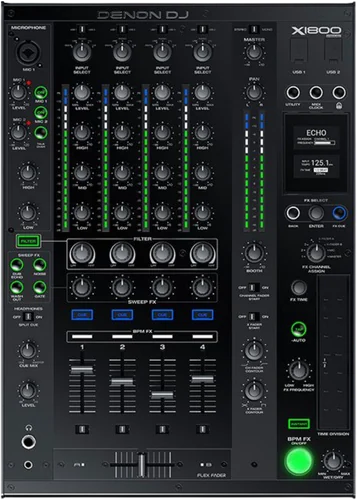
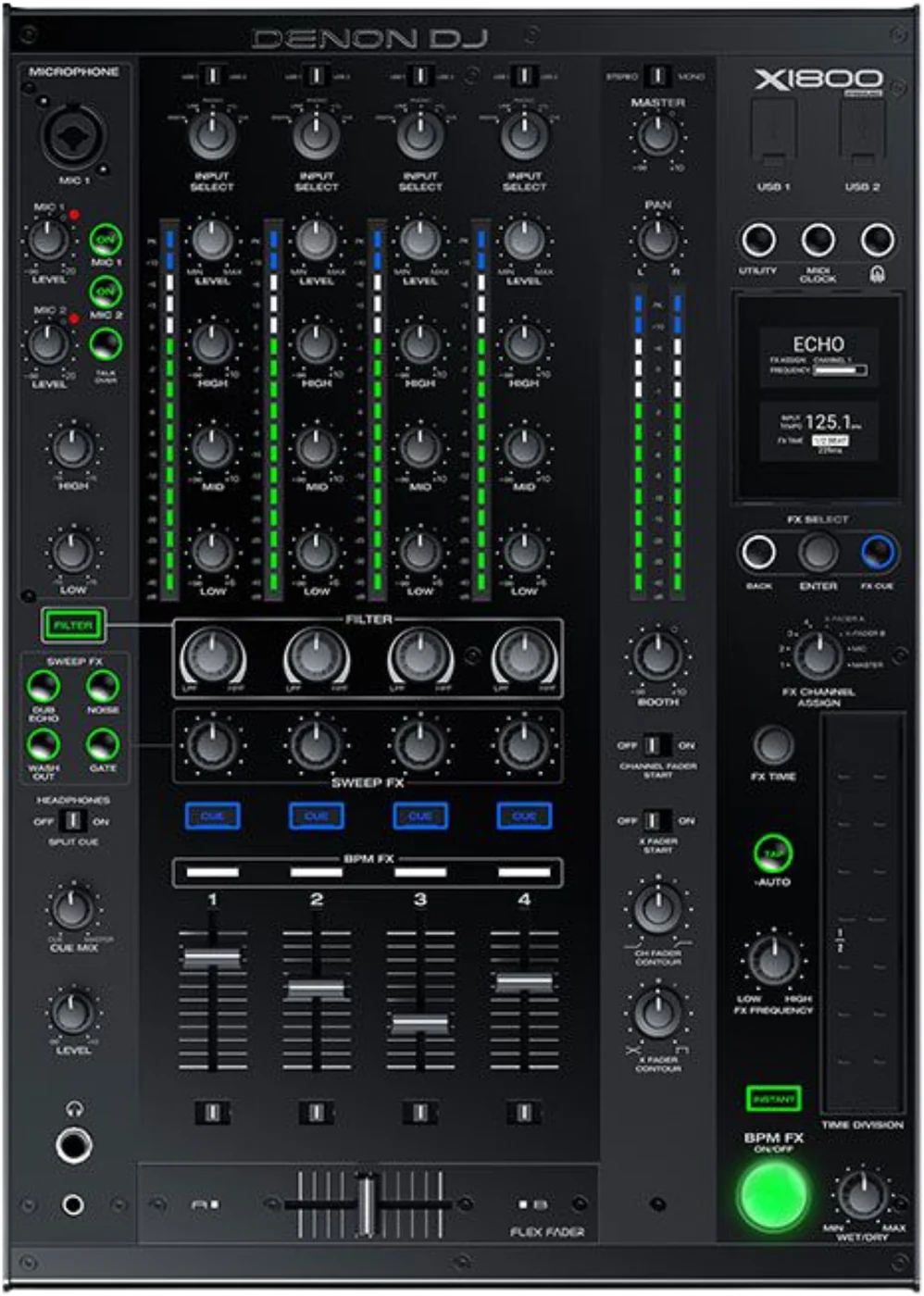
Booth briefing. The X1800 PRIME is the four channel mixer of Denon's first PRIME generation, and the desk the SC5000 players were built around. Every channel picks its own source on an Input Select knob. The microphone inputs are specified for a dynamic microphone. Two of its behaviours are menu settings rather than hardware: the EQ type, which decides whether the EQ knobs kill or only cut, and Broadcast Mode, which turns DVS off on channel one.
When it goes wrong: No sound from the mixer
Fast Lane
The five things that decide your gig
The five things on the X1800 PRIME that change what happens next, if you are reading this in the booth. All five are explained in full further down this page.
Turning Broadcast Mode on disables DVS on channel one, and it warns you in a dialog.
Denon print it as a confirmation: "When Broadcast Mode is enabled, a message will appear to indicate that DVS on Channel 1 will be disabled. Press Enter to continue."
So a desk set up for a stream is a desk with one DVS channel missing, and the warning was pressed through by whoever set it up rather than by you.
A silent channel is the Input Select knob first.
Each channel chooses its own source: Digital, Line, Phono, USB and DVS, plus a USB 1 or USB 2 switch that decides which computer port a channel listens to when Input Select is on USB or DVS.
A channel pointed at a source with nothing plugged into it is silent with the fader up and the meter dead, and no fault anywhere.
Neither guide mentions phantom power anywhere. Bring a dynamic microphone.
The word phantom does not appear anywhere in the user guide, and the microphone specification is given as a dynamic microphone. Nothing in Denon's documents says this desk supplies phantom power, and there is no switch for it on the panel, so bring a dynamic microphone.
What Denon do specify: Denon specify "a standard dynamic microphone" on the Mic 1 input, which takes XLR or 6.35 mm jack. Mic 2 is a 6.35 mm jack.
One menu setting decides whether the EQ knobs kill or only cut.
"Select ISO to set the Channel EQ knobs’ ranges to -∞ to +6 dB/+10 dB (as labeled). Select EQ to set the Channel EQ knobs’ ranges to -24 dB to +6 dB (for other players that may need this setting)."
So the same knob on two X1800s can behave in opposite ways at the bottom of its travel, and nothing on the panel reports which one you are standing at.
This mixer is the reason an SC5000 firmware build has a requirement printed in capitals.
Firmware 1.1.0 records a fix for the X1800 PRIME "sometimes assigning duplicate player number to multiple SC5000 PRIME units". Denon do not say why the SC5000 1.0.2 release notes require the mixer to be on 1.1 before that player build is used. The 1.1.0 entry is the nearest thing to an explanation in their own record, and this page prints the two side by side rather than joining them.
Update the players and the mixer as one system, and never on gig day.
If something goes wrong
A channel is silent, or it is playing the wrong source
Short answer. The X1800 PRIME routes every channel through its own Input Select knob, and a channel pointed at a source nothing is plugged into is silent with the fader up and the meter dead. Check that knob before anything else.
Fix it now, in this order. Input Select first: each channel chooses Digital, Line, Phono, USB and DVS, plus a USB 1 or USB 2 switch that decides which computer port a channel listens to when Input Select is on USB or DVS. If it is on a USB position, the USB 1 and USB 2 switch decides which computer port that channel is listening to, and two computers on one desk is exactly when that gets set wrong. Then the channel level, then the crossfader assignment.
If the channel is on DVS and there is nothing. Two separate things can do that. The desk has a DVS Setup page that sets the input level each channel uses when its selector is on DVS: Phono for control vinyl, Line for control CDs, so a control vinyl deck on a channel set to Line is a level mismatch rather than a dead channel. And Broadcast Mode takes channel one's DVS away entirely, which has its own section.
What Denon do not give you. Neither published guide carries a troubleshooting chapter. There is no fault table, no symptom list and no diagnostic section anywhere in either document, so everything on this page that reads as a fault was found in the setup chapter or in the release notes.
A microphone does nothing on either input
Short answer. Nothing in Denon's documents says the X1800 PRIME supplies phantom power. The word phantom does not appear anywhere in the user guide, and the microphone specification is given as a dynamic microphone. Nothing in Denon's documents says this desk supplies phantom power, and there is no switch for it on the panel, so bring a dynamic microphone.
What Denon do specify. Denon specify "a standard dynamic microphone" on the Mic 1 input, which takes XLR or 6.35 mm jack. Mic 2 is a 6.35 mm jack.
If the microphone is dynamic and still silent. The desk has a Gate Threshold from -40 dB to -79 dB, which sets how much audio is needed before the mic signal opens, and which Denon note different microphones may need adjusting. A gate set for a different microphone in a different room can hold a quiet voice out entirely, and it looks exactly like a dead input. There is also an Attenuation setting for the microphone inputs, from -15 dB to 0 dB, which is the second thing to look at.
If it is loud out front and absent in your headphones. That is a setting rather than a fault: the desk has a Headphone Receive setting: On sends the microphone into the headphones, Off sends it only to the master outputs
Avoid it next time. Carry a dynamic microphone, or carry a phantom supply, and check the gate at soundcheck with the voice that is actually going to use it.
Broadcast mode and DVS cannot both have channel one
Short answer. On the X1800 PRIME these two features are mutually exclusive on one channel, and Denon say so in the moment you turn the first one on: "When Broadcast Mode is enabled, a message will appear to indicate that DVS on Channel 1 will be disabled. Press Enter to continue."
Why this is on the fault list rather than the feature list. It is documented, deliberate and not a defect. It reaches a DJ as a defect anyway, because the warning appears once, to whoever opened the Utility menu, and is dismissed with the same key that continues. A desk handed over after that is a desk where channel one silently has no DVS.
What Broadcast Mode is for. Broadcast Mode, added in firmware 1.5.0, sends the master mix to a computer over USB audio channels 1 and 2 for broadcasting software. So the trade is a stream feed against a control vinyl channel, and on a four channel desk that is usually an acceptable trade if you know you are making it.
Fix it now. Open the Utility menu and look at Broadcast Mode before you look at the deck, the cartridge or the control record. If you need both, move DVS to another channel: the restriction is on channel one specifically.
Avoid it next time. On an installed desk, ask what the stream is set up on before you plan a timecode set. This is a setting somebody chose once and nobody wrote down.
What to watch for
One menu setting, and the EQ knobs behave in opposite ways
Short answer. The X1800 PRIME has two EQ behaviours and the menu decides which one you are holding: "Select ISO to set the Channel EQ knobs’ ranges to -∞ to +6 dB/+10 dB (as labeled). Select EQ to set the Channel EQ knobs’ ranges to -24 dB to +6 dB (for other players that may need this setting)."
What that means with a hand on the knob. On ISO the bottom of the knob's travel is silence, which is what a DJ who mixes by killing the bass expects. On EQ the bottom is a 24 dB cut, which is quiet and is not gone. Same desk, same knob, same label printed on the panel, opposite result at the point in a transition where it matters most.
The crossovers move with it. The desk also carries a High Cross Over between the High and Mid knobs from 1000 Hz to 8000 Hz and a Low Cross Over between the Mid and Low knobs from 100 Hz to 800 Hz, both of which apply when the type is ISO. So two X1800s in ISO can still divide the bands at different frequencies, which is why a desk can feel wrong without any setting being wrong.
Do this. Read the EQ page in Utility at soundcheck on any desk you did not set up. It takes seconds and it is the difference between a transition working and a transition being loud.
Firmware, and the record of what each version repaired
Short answer. Denon publish a full release note history for the X1800 PRIME, which is more than most desks on this site get, and five entries in it matter to a working booth.
The one another product depends on. Firmware 1.1.0 records a fix for the X1800 PRIME "sometimes assigning duplicate player number to multiple SC5000 PRIME units". Denon do not say why the SC5000 1.0.2 release notes require the mixer to be on 1.1 before that player build is used. The 1.1.0 entry is the nearest thing to an explanation in their own record, and this page prints the two side by side rather than joining them.
The one that is an audio fault. Firmware 1.1.1 records a fix for the master output "favoring the left or right channel depending on position of the knob while in mono". A desk older than 1.1.1 left in mono is a documented imbalance rather than a failing output stage.
The one that changes the update procedure itself. Firmware 1.1.1 also records that "the FX list is now automatically refreshed after updating so a factory reset is no longer required", which means on a desk updated to anything earlier a factory reset after a firmware update was part of the procedure.
The one that decides whether a booth can move on. Firmware 1.6.0 added support for Engine DJ 2.0 compatibility, which is the version to be on before a booth of players moves to that generation.
And DVS was not there at the start. DVS is not original to this mixer. Denon added "support for 3rd party software and DVS" in firmware 1.1.0, so a desk that has never been updated does not have it.
Never on gig day. An update is a thing you do on a day when a broken desk costs nothing, and on this mixer an update has historically been a two device job.
Neither guide has a troubleshooting section
Short answer. Denon published no troubleshooting for the X1800 PRIME. Neither published guide carries a troubleshooting chapter. There is no fault table, no symptom list and no diagnostic section anywhere in either document, so everything on this page that reads as a fault was found in the setup chapter or in the release notes.
Why we say so out loud. A reader who cannot find a fault table in the manual should know the table does not exist, rather than assume they missed it. It is also the fourth Denon guide read for this site with the same shape, which makes it a house style rather than an oversight on one product.
Where the fault content actually is. In the setup chapter, where a warning like the Broadcast and DVS dialog is printed as a note, and in the release notes, where a repaired defect is the only record that the defect existed.
What that means for this page. Everything above that reads as a fault came from one of those two places. Nothing here is a symptom Denon list, because Denon list none.
Compatibility
DVS, and the firmware that added it
Short answer. DVS is not original to this mixer. Denon added "support for 3rd party software and DVS" in firmware 1.1.0, so a desk that has never been updated does not have it.
How it is set up. The desk carries a DVS Setup page that sets the input level each channel uses when its selector is on DVS: Phono for control vinyl, Line for control CDs. Getting that wrong is a level problem rather than a silence problem, so a timecode signal that will not calibrate is worth checking there before the needle or the record.
The channel one restriction. Broadcast Mode takes DVS off channel one, which has its own section.
Linking players, and which fader they land on
Short answer. The X1800 PRIME carries five Ethernet link ports, which Denon describe as connecting compatible Denon DJ media players and a computer, sharing timing and BPM information with the mixer so effect tempos synchronise, and track and user profile data between the players.
What decides the channel. The desk runs the Engine Connect protocol, which is what locks the mixer’s effects to the beatgrid of the players and what decides which channel a player layer lands on. So a player appearing on a fader you did not expect is a network and menu question rather than something set on the player.
And it has been wrong before. Firmware 1.1.0 records a fix for the X1800 PRIME "sometimes assigning duplicate player number to multiple SC5000 PRIME units". Denon do not say why the SC5000 1.0.2 release notes require the mixer to be on 1.1 before that player build is used. The 1.1.0 entry is the nearest thing to an explanation in their own record, and this page prints the two side by side rather than joining them. A desk older than that firmware, on a network of several players, is a documented case rather than a mystery.
Features explained
The filter, its resonance and its extremes
Short answer. The X1800 PRIME gives the filter two settings that change how it sounds rather than what it does. It has a Resonance setting from 0 to 15 for the channel filters, where 0 is flat and frequencies just past the cutoff are not heard at all, and 15 lets adjacent frequencies through.
The end of the sweep is a choice. There is also an Extreme Type setting: Kill makes the filter extremes end in silence, Bleed lets the extreme end play. A filter that goes to silence on one desk and leaves a whisper on another is that setting, and both are correct.
What Denon claim, and what this page will not add to it. Their wording is about which frequencies are heard, not about level: at 0 the frequencies just past the cutoff are not heard at all, and at 15 some adjacent ones are. They publish no figure for how much louder anything gets, so this page does not offer one.
The effects, and one that changed its name
Short answer. The X1800 PRIME has a Sweep FX knob and a BPM FX section, with the BPM effects locked to the players' beatgrid through Engine Connect. The desk also carries a Tap button, which Denon document as being set by tapping it at least three times at the tempo you want.
One effect has two names, and both are correct. The BPM effect called TRANS in the v1.5 guide is called AUTO GATE in the v1.7 guide. Denon record the change in the 1.5.0 release notes as "Renamed ‘TRANS’ BPM FX to ‘AUTO GATE’ (functionality unchanged)", so two desks of the same model can print different names for the same effect depending on their firmware and their manual.
The menu that holds them moved as well. The Utility menu was restructured between the two published guides. Settings the v1.5 guide places under FX are under Advanced Audio in v1.7, so a printed procedure from the older manual sends you to a menu page that no longer holds what it names.
Why this is on the page at all. A DJ following a printed procedure, or a booth note taped inside a flight case, can be looking for a name and a menu page that this desk no longer uses. That is not a fault and it is not the reader being wrong.
Professional tips
Before you play on one
Read two Utility pages at soundcheck. EQ type, and Broadcast Mode. Between them they decide whether your bass kill kills and whether channel one has DVS. Neither is visible from the panel.
Check Input Select on all four before the first record. It is the fastest fault on this desk and the one that looks worst.
Bring a dynamic microphone. Phantom power is not documented anywhere for this desk and there is no switch for it on the panel.
Treat the mixer and the players as one system. There is a documented case of a player build requiring a specific mixer version. Update them together, on a day that is not gig day.
On an old desk, ask what firmware it is on. DVS, Broadcast Mode and Engine DJ 2.0 support all arrived by firmware, so an X1800 that has never been updated is missing features you may be planning around.
Connections and setup
What comes out of the back, and what goes in
Outputs. balanced XLR master, unbalanced RCA master, an RCA record output, two 6.35 mm booth outputs, two 6.35 mm send outputs, a 6.35 mm and a 3.5 mm headphone output, a coaxial digital output and a 5 pin DIN MIDI output.
Inputs. eight RCA input pairs across four line and four phono, an XLR and 6.35 mm combination input for Mic 1, a 6.35 mm input for Mic 2, two 6.35 mm return inputs and five RCA digital inputs, four audio and one link.
The levels, which matter to a house engineer. the balanced master at +24 dBu maximum and +4 dBu unity, the unbalanced master at +20 dBu maximum and 0 dBu unity, booth at +24 dBu maximum, and record and send at +10 dBV maximum and -10 dBV unity.
The audio figures. Denon publish a master dynamic range above 117 dB A-weighted, a 22 to 22,000 Hz frequency range at plus 1 dB, signal to noise above 93 dB on line and 87 dB on phono, distortion below 0.02 percent and channel separation below -90 dB at 1 kHz, with the digital output at 44.1, 48 or 96 kHz at 24 bit.
The physical facts. It measures 31.1 x 44.5 x 11.0 cm, weighs 7.00 kg and runs on IEC, 100 to 240 V at 50/60 Hz, and 65 W. The panel carries two monochromatic LED backlit displays, each 1.6 inch on the diagonal.
What is in the box. a USB cable, a power cable, the user guide and the safety and warranty manual.
Safety
What the guides do and do not warn about
Short answer. The X1800 PRIME ships with a separate Safety and Warranty Manual, and the user guide itself carries no ventilation instruction, no overheat warning and no radio separation notice of the kind the SC5000 guide prints, and neither guide describes a transmitter in this desk.
What that is and is not. It is an absence in the documents we read, not a claim that the desk runs cool or that it can be buried in a case. A 65 W mixer in a sealed booth is still a 65 W mixer in a sealed booth.
The one physical thing worth saying. The safety content Denon do publish for this product is in a separate printed manual rather than in the user guide, so a downloaded PDF is not the whole document set.
Firmware, drivers and manuals
Official downloads and documents
Go to Denon DJ for the files themselves. We link their pages instead of hosting a copy, because a manual copied here is a snapshot of release day and theirs is the one that stays current.
Manuals. Official Denon DJ manual page →
Broken link? Let us know and we'll fix it.
Frequently asked questions
Quick answers
- Why did my DVS stop working on channel one?
- Almost certainly Broadcast Mode. When Broadcast Mode is enabled, a message will appear to indicate that DVS on Channel 1 will be disabled. Press Enter to continue.
- Does it have phantom power?
- The word phantom does not appear anywhere in the user guide, and the microphone specification is given as a dynamic microphone. Nothing in Denon's documents says this desk supplies phantom power, and there is no switch for it on the panel, so bring a dynamic microphone.
- Why will my bass knob not fully kill?
- The EQ type is set to EQ rather than ISO. Select ISO to set the Channel EQ knobs’ ranges to -∞ to +6 dB/+10 dB (as labeled). Select EQ to set the Channel EQ knobs’ ranges to -24 dB to +6 dB (for other players that may need this setting).
- Does it do DVS at all?
- Yes, from firmware 1.1.0. DVS is not original to this mixer. Denon added "support for 3rd party software and DVS" in firmware 1.1.0, so a desk that has never been updated does not have it.
- How many players can I link?
- It carries five Ethernet link ports, which Denon describe as connecting compatible Denon DJ media players and a computer, sharing timing and BPM information with the mixer so effect tempos synchronise, and track and user profile data between the players
- Why is a player on the wrong fader?
- It runs the Engine Connect protocol, which is what locks the mixer’s effects to the beatgrid of the players and what decides which channel a player layer lands on A player on an unexpected channel is that, and on old firmware there is a documented duplicate player number fault.
- What does an SC5000 need from this mixer?
- Firmware 1.1.0 records a fix for the X1800 PRIME "sometimes assigning duplicate player number to multiple SC5000 PRIME units". Denon do not say why the SC5000 1.0.2 release notes require the mixer to be on 1.1 before that player build is used. The 1.1.0 entry is the nearest thing to an explanation in their own record, and this page prints the two side by side rather than joining them.
- Is there a troubleshooting section in the manual?
- No. Neither published guide carries a troubleshooting chapter. There is no fault table, no symptom list and no diagnostic section anywhere in either document, so everything on this page that reads as a fault was found in the setup chapter or in the release notes.
- Where did the TRANS effect go?
- The BPM effect called TRANS in the v1.5 guide is called AUTO GATE in the v1.7 guide. Denon record the change in the 1.5.0 release notes as "Renamed ‘TRANS’ BPM FX to ‘AUTO GATE’ (functionality unchanged)", so two desks of the same model can print different names for the same effect depending on their firmware and their manual.
- What are the outputs?
- balanced XLR master, unbalanced RCA master, an RCA record output, two 6.35 mm booth outputs, two 6.35 mm send outputs, a 6.35 mm and a 3.5 mm headphone output, a coaxial digital output and a 5 pin DIN MIDI output.
- What is the difference from the X1850?
- The X1800 PRIME is the earlier desk of the same four channel design. The X1850 is the later mixer of the SC6000 generation. This page does not compare their audio specifications, because Denon publish the two in different documents and a specification lifted across generations is how a wrong number gets printed.
Where this sits in the line
- Next generation X1850 PRIME
Related mixers
Commonly paired with
What you usually find beside it in working booths, from club, festival and rental installs rather than from a manufacturer document.
Playing soon and it is not working?
Start Emergency ModeKeep the Emergency Card
We will email you the printable PDF so it is on your phone before the next dark booth. Occasional notes that save gigs. No spam, unsubscribe in one click.
Registering is free and counts everywhere on Save My Gig. We send a confirmation email first. Your address is stored with Brevo, our email provider. Unsubscribe any time. Privacy
Sources: Denon DJ's X1800 Prime User Guide v1.7, the earlier v1.5 guide, the published Release Note History for the X1800 PRIME, and the 1.1 and 1.1.1 firmware release notes, checked 9 September 2026. Specifications theirs, priorities ours.