

X1850 PRIME, the field manual
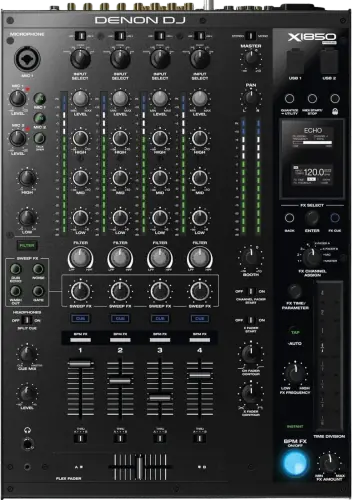
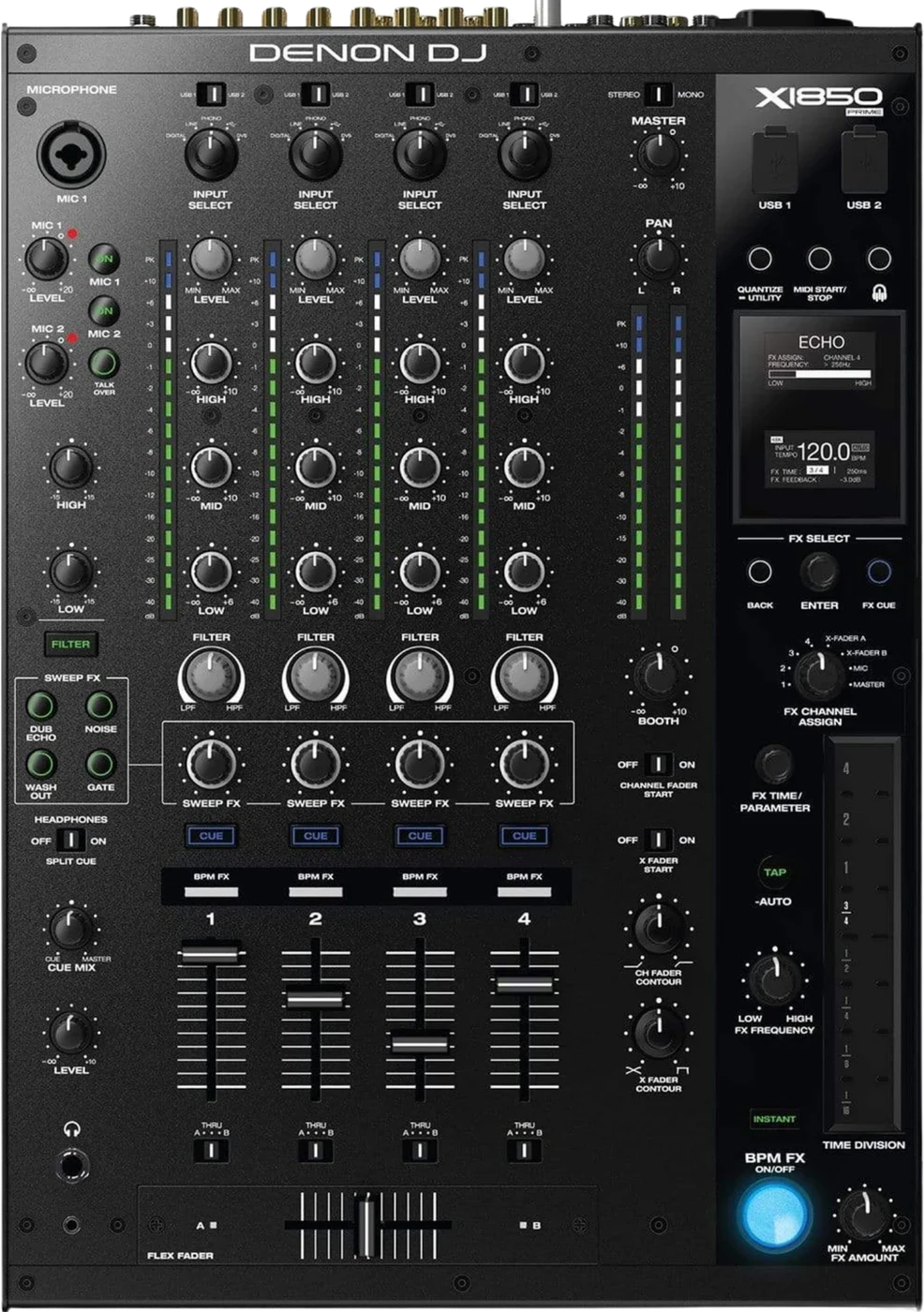
Booth briefing. The X1850 PRIME has 4 channels and every one of them picks its own source on an Input Select knob: Digital, Line, Phono, USB or DVS. Three of those five involve no computer, so the desk mixes on its own. Which fader a networked deck lands on is set by the Link port it is plugged into, not by the deck. There is no Zone output and no booth EQ, and no phantom power, Denon specifying a standard dynamic microphone for both mic inputs. Firmware on the desk is 1.7 while the published history covers 1.5.0 and below.
When it goes wrong: No sound from the mixer
Fast Lane
The five things that decide your gig
The five things on the X1850 PRIME that change what happens next, if you are reading this in the booth. All five are explained in full further down this page.
A silent channel is the Input Select knob first. Each channel chooses Digital, Line, Phono, USB or DVS.
Set that knob to a source nothing is plugged into and the channel is silent with the fader up, the meter dead and no fault anywhere. If it is on USB, a USB 1/2 switch beside each Input Select knob decides which of the two USB ports that channel listens to.
It also answers the computer question in one look: the Digital, Line and Phono positions involve no computer at all, and Denon describe both USB ports in one line, "Use standard USB cables to connect computers to these USB ports".
Which fader a networked deck lands on is decided by the Link port, not by the deck.
Link Port 1 puts Layer A on Channel 1 and Layer B on Channel 2, Link Port 2 reverses that pair, Link Port 3 puts Layer A on Channel 3 and Layer B on Channel 4, and Link Port 4 reverses that pair. Plug the same player into a different port and it appears somewhere else.
Nothing on the deck itself moves it, so a player on the wrong fader is a cable at the back of the mixer.
There is no phantom power. Denon specify a standard dynamic microphone on both inputs.
A condenser mic will not work here regardless of gain or EQ, and there is no switch to find, because there is nothing to switch on.
Before you get that far, three things silence a working mic on this desk: the Mic On/Off button, a Gate Threshold setting in the Utility menu, which Denon describe as changing "the amount of audio required to engage the mic signal", adjustable from -40dB to -79dB, and Booth Receive and Headphone Receive, either of which can take the microphones out of the booth outputs or out of the headphones without touching the master mix.
There is no Zone output on this desk. The outputs are Master (XLR/RCA), Booth (1/4 inch), Record (RCA), Send (1/4 inch), Digital Out (RCA), Headphones (1/4 inch, 1/8 inch).
If an engineer asks you to route something to Zone, this is not the mixer that does it, and there is no menu page that adds one.
Whatever the Zone feed was for has to come off one of those instead, decided before the desk goes in.
It is not Serato DJ Enabled, and no Serato licence comes with it.
Denon state that in writing. An assumption that Serato support ships with the hardware, the way it does on some competing mixers, is wrong here.
DVS itself is a position on the Input Select knob and the desk has a menu for it: a DVS Setup page in the Utility menu sets each of the four channels for its control signal, in Denon's words "Select Phono to use control vinyl records or Line to use control CDs". What it does not carry is the entitlement.
If something goes wrong
A channel is silent, or the wrong deck is on the fader
Short answer. The X1850 PRIME routes every channel through an Input Select knob, and a channel pointed at a source nothing is plugged into is silent with the fader up and the meter dead. Check that knob before anything else.
Fix it now, in this order. Input Select first, one of Digital, Line, Phono, USB or DVS. Then, if it is on USB, a USB 1/2 switch beside each Input Select knob decides which of the two USB ports that channel listens to. Then the Crossfader Assign switch for that channel, which sends it to the A side, the B side or straight past the crossfader on Thru. Then the Filter button, which is a single control acting on all four channels at once.
When a switch does nothing at all. Two locks in the menu can make a control feel broken: Contour Lock, which pins the crossfader contour knob where it is, and Through Position Lock, which pins the Crossfader Assign switches in the Thru position so moving one changes nothing. A Crossfader Assign switch you can move that changes nothing is that lock, not a failed switch.
When the wrong deck is on the fader. Link Port 1 puts Layer A on Channel 1 and Layer B on Channel 2, Link Port 2 reverses that pair, Link Port 3 puts Layer A on Channel 3 and Layer B on Channel 4, and Link Port 4 reverses that pair. Move the network cable, or use the manual assignment: Engine Connect runs as Auto, where the desk detects and configures each media player once the Link ports are connected, or Manual, which disables the automatic linking until the Engine Connect button is pressed and held long enough for the channel assignment screen to appear on the players.
When a deck starts on its own. There is an X Fader Start switch and a Channel Fader Start switch, either of which starts playback on a connected media player when you move a fader. A track that starts the moment you lift a fader is that switch, and it is on the top panel.
A microphone is silent or distorted
Short answer. The X1850 PRIME has 2 mic inputs, Mic 1 on a combined XLR and 1/4 inch input, Mic 2 on 1/4 inch only, and no phantom power: Denon specifies a standard dynamic microphone for both, and a condenser mic simply will not work here regardless of gain or EQ.
Check the desk before you blame the mic. There is a Mic On/Off button for each microphone, one shared pair of High and Low mic EQ knobs across both, and a Talk Over button that ducks the master mix while somebody speaks. A mic that is plugged in, gained up and still silent is usually its On/Off button. Then there is a Gate Threshold setting in the Utility menu, which Denon describe as changing "the amount of audio required to engage the mic signal", adjustable from -40dB to -79dB, which is the setting that makes a mic cut in and out on a quiet speaker.
Silent in one place only. If the mic is in the master but not in the booth or the headphones, that is routing rather than a fault: Booth Receive and Headphone Receive, either of which can take the microphones out of the booth outputs or out of the headphones without touching the master mix.
Why this happens. A condenser mic that arrived in the bag for a different booth is the most common cause of the dead-mic version. It is not a fault on this desk, the input was never designed to power one.
Fix it now. Swap to a dynamic microphone. If none is available, route the mic through an external mixer or interface with its own phantom power and feed that into a line channel instead.
Avoid it next time. Confirm mic type against this desk before you pack, not at the booth. The mic EQ is shared across both inputs, so two hosts with very different voices cannot be shaped separately here.
Two effects that cancel each other, and the rest of the FX list
Short answer. The X1850 PRIME release history names its faults, and almost all of them are in the effects. Version 1.3.0 fixed Instant FX not working for Reverb when Noise was on, Noise not working when Reverb was on, both at 44.1 and 48 kHz, and an Autogate FX initialisation fault. Version 1.2.0 fixed more: Gate Sweep reducing the audio level when turned from centre to the right, FX length coming out wrong when quantize was on and the deck was in a loop, Sweep FX not disengaging properly when the control was centred, an audio pop when switching EQ type, and a network fault that latched Instant FX unexpectedly. Read that as a description of a desk below 1.3.0 rather than as history, because every one of those is something an un-updated X1850 still does, and a pair of effects that cancel each other is the kind of fault a DJ blames on their own hands.
You were told to route to "Zone" and there is no such output
Short answer. There is none. Outputs on the X1850 PRIME are Master (XLR/RCA), Booth (1/4 inch), Record (RCA), Send (1/4 inch), Digital Out (RCA), Headphones (1/4 inch, 1/8 inch).
Why this happens. Zone outputs exist on some other club mixers for a second room or a patio feed. This model does not carry one, and no firmware update adds it, it is a hardware limitation.
Fix it now. Use the Booth or Send output for a secondary feed if the room's routing allows it. There is also a digital output, which Denon document as going to "the digital input of another X1850 PRIME unit or an external interface, mixer, or other device", so a second desk or a digital interface is a real path rather than a borrowed analogue one. Confirm with the house engineer before doors what each output is actually carrying.
One thing to settle at the same time. The record output and the booth output each have a menu setting for whether the microphones are in them, and the master is balanced XLR and unbalanced RCA, with a Stereo/Mono selector switch and a Pan knob on the top panel. A mono selector left in the wrong position is the other reason a second feed sounds wrong.
What to watch for
The firmware history: what it covers, and what it never says
What is documented. The X1850 PRIME ships on 1.7, and Denon's published release note history for this model covers 1.2.0 through 1.5.0, with one of those entries marked an unreleased version and 1.5.0 carrying a single line, "Added support for Engine DJ 2.0 compatibility". There are no entries for 1.6 or 1.7.
The history has no dates. not one entry in that history carries a date, so it says what changed and never when. So a history exists, which is more than several models get, and it cannot tell you whether the desk in front of you is a year behind or a week.
What is not documented. That history is not even linked from this model's section of the downloads page, though the X1800 PRIME's equivalent is linked from its own section on the same page. The archives page states plainly that older X1850 firmware "is not available at this time," so an X1850 cannot currently be downgraded to an older firmware release using Denon-supplied files.
Do this. Read the version off the desk before anyone touches it: System, then Info, then Version, which is where the desk shows the firmware version installed on it. If a rental or venue unit is behaving strangely after an update, there is no official path to confirm what 1.6 or 1.7 actually changed, or to revert. Report it through Denon support rather than guessing at a downgrade.
Firmware downloads. Official Denon DJ downloads page →
Broken link? Let us know and we'll fix it.
TRANS is called AUTO GATE now, and nothing says so
Short answer. One X1850 PRIME control changed its name in firmware and the old name is the one still in circulation. Version 1.2.0 renamed the TRANS BPM effect to AUTO GATE, and Denon state the functionality is unchanged. So a DJ who learned this desk on early firmware, or from a tutorial recorded on one, looks for TRANS on an updated unit and does not find it, while a DJ on an old desk looks for AUTO GATE and does not find that. Same effect, two names, and nothing on the desk explains the change. The 1.3.0 entry also added Broadcast mode, which sends the main output mix over USB audio channels 1 and 2 for computer applications, so a desk below that version has no Broadcast mode to select at all.
The booth output has no EQ section
Short answer. The X1850 PRIME documents no EQ for its booth output. Do not go looking for a booth EQ knob that does not exist.
What the booth feed does have. More than the level knob, which is worth knowing before you decide the menu is empty: a Booth knob on the top panel, a booth output level offset in the Utility menu, a Booth Pan setting that decides whether the booth audio pans with the master or not, and a Booth Receive setting that puts the microphones into the booth feed or takes them out of it.
One point the documents disagree on. the v1.2 guide says Booth Receive sends the microphone signal to "the booth outputs and record outputs", and the v1.4 guide drops the record outputs from that sentence, so the two published guides do not agree on what this one setting reaches. If the record feed matters to the booking, set it and then listen to it rather than trusting either sentence.
Why it matters. A DJ arriving from a desk that does have booth EQ can lose time hunting for a control that is simply not here. Placement and level are what this desk gives you.
Compatibility
Players and firmware
Short answer. The X1850 PRIME is commonly run beside the SC6000 and SC6000M PRIME, and it runs its own numbered firmware line, separate from the Engine OS version running on the players beside it. Engine OS is what the players run: the shared line across the PRIME range sits at 5.0.4 with Denon's own published notes stopping at 5.0. Those numbers belong to the decks, not to this desk.
Where to read this desk's own version. System, then Info, then Version, which is where the desk shows the firmware version installed on it. That screen also shows the IP and MAC addresses the mixer is using, which is the place to look when a player will not appear on the network.
One behaviour that crosses between them. Engine DJ documents that raising a channel fader on the mixer changes the platter ring colour on a connected player, which Engine DJ call On Air Mode. So a platter changing colour when you touch a fader is the two talking to each other, not a fault.
Why it matters. The mixer's own firmware history has the real gap documented below, and it is a different history from the one the players follow. Do not read a player's version number as this desk's.
Serato compatibility, and the DVS the desk does have
Short answer. Denon states in writing that this mixer is not "Serato DJ Enabled" and includes no separate Serato DJ Pro licence.
What the hardware does carry. DVS is a fifth position on the same Input Select knob, which Denon describe as "a computer connected to a USB port while using control vinyl with a digital vinyl system", and a DVS Setup page in the Utility menu sets each of the four channels for its control signal, in Denon's words "Select Phono to use control vinyl records or Line to use control CDs". So the desk has a documented DVS path and a menu to set it up; what it does not come with is the software entitlement to use it.
Why it matters. A DJ who assumes Serato support ships with the hardware, the way it does on some competing mixers, will be wrong here. Confirm your own licence covers whatever interface you plan to route through this desk.
Features explained
Every channel picks its own source
Short answer. The X1850 PRIME gives each of its 4 channels an Input Select knob, and the positions are Digital, Line, Phono, USB or DVS. Nothing about the channel strip below it tells you which one is selected, so this is the first control to read on a desk somebody else set up.
The two USB positions. a USB 1/2 switch beside each Input Select knob decides which of the two USB ports that channel listens to, and the ports themselves are documented for one thing only: the Digital, Line and Phono positions involve no computer at all, and Denon describe both USB ports in one line, "Use standard USB cables to connect computers to these USB ports".
DVS is one of the positions, not an add-on. DVS is a fifth position on the same Input Select knob, which Denon describe as "a computer connected to a USB port while using control vinyl with a digital vinyl system". The control signal is set per channel: a DVS Setup page in the Utility menu sets each of the four channels for its control signal, in Denon's words "Select Phono to use control vinyl records or Line to use control CDs". There is one documented interaction worth knowing before a broadcast: Broadcast Mode sends the master mix to a computer on USB audio channels 1 and 2, and Denon warn that when it is enabled "a message will appear to indicate that DVS on Channel 1 will be disabled".
What the EQ knobs do is also a setting. Denon give two types, ISO, which Denon give as minus infinity to +6dB/+10dB as labelled, or EQ, which gives -24dB to +6dB for other players that may need it, so a low knob that will not kill on one desk and will on another is the menu, not the hardware.
The effects, the filter, and where the BPM comes from
Two separate effect systems. The X1850 PRIME has a BPM effect module that is applied to one destination at a time (Channel 1, 2, 3 or 4, either side of the crossfader, Mic for both microphone signals, or Master for the whole mix), and a Sweep FX section that is a knob per channel: Dub Echo, Noise, Wash Out and Gate, one at a time across all four channels, with the centre position of each Sweep FX knob bypassing the effect.
Where the tempo comes from. The BPM effect module takes its rate from tapping the Tap button at least three times, holding it for a second to detect the tempo from the channel selected on the FX Channel Assign knob, or a connected media player over Engine Connect, in which case Denon say "the media player will control the BPM effect module". This is the effect module's own tempo and nothing else: there is no deck sync on this mixer, and moving a fader here does not change what a player is playing at.
Getting effects to land on the beat. There is FX Quantize, a Utility menu setting of 1, 1/2, 1/4 or 1/8 beat that holds the effect off until the beat grid of a connected media player comes round, which is why an effect can appear not to trigger the instant you press the button.
The filter. There is one Filter knob per channel, counter-clockwise for a low-pass filter and clockwise for a high-pass, a single Filter button that enables or disables the filters on all four channels at once, a resonance setting from 0 to 15, and an Extreme Type setting that either ends the sweep in silence (Kill) or lets the extreme end play (Bleed). The single Filter button is the one that surprises people: it works across all four channels rather than the one you are looking at.
The Link ports decide which fader a deck lands on
Short answer. The X1850 PRIME has five Ethernet Link ports on the rear panel, listed in Denon's own feature list as a "LAN hub for up to four players or accessories" and documented as taking media players and a computer alike. Denon set the desk by default to detect and configure each connected player on its own, and the port a player is plugged into is what decides its channels.
The map. Link Port 1 puts Layer A on Channel 1 and Layer B on Channel 2, Link Port 2 reverses that pair, Link Port 3 puts Layer A on Channel 3 and Layer B on Channel 4, and Link Port 4 reverses that pair. That is a property of the cable, not of the player, so a deck showing up on the wrong fader is fixed at the back of the mixer rather than in a menu on the deck.
The two modes. Engine Connect runs as Auto, where the desk detects and configures each media player once the Link ports are connected, or Manual, which disables the automatic linking until the Engine Connect button is pressed and held long enough for the channel assignment screen to appear on the players. Manual is the one to reach for when a booth is wired in an order nobody can change.
What the link carries. Timing and BPM information to synchronise effect tempos, and track and user profile data between the players, which is what lets one player browse drives sitting in the others. The drives themselves live in the players. There is nowhere on this mixer to put one.
Professional tips
Before you take a set on one
Read all four Input Select knobs before you touch a fader. The X1850 PRIME gives each channel Digital, Line, Phono, USB or DVS, and nothing else on the strip tells you which one is selected. Thirty seconds at get-in is the whole of this problem.
Note which Link port each player is in. Link Port 1 puts Layer A on Channel 1 and Layer B on Channel 2, Link Port 2 reverses that pair, Link Port 3 puts Layer A on Channel 3 and Layer B on Channel 4, and Link Port 4 reverses that pair, so the map from deck to fader is decided by the cabling you inherited. Write it down before the first record.
Confirm the mic is dynamic while you are still packing. There is no phantom power on this desk: Denon specifies a standard dynamic microphone for both inputs, so a condenser is silent here no matter what you do with gain. If the booking includes a host who brings their own mic, ask what it is before the day.
Settle the second feed with the house engineer before doors. There is no Zone output. Outputs are Master (XLR/RCA), Booth (1/4 inch), Record (RCA), Send (1/4 inch), Digital Out (RCA), Headphones (1/4 inch, 1/8 inch), so a patio, a second room or a broadcast feed has to come off one of those, and that decision changes what you can do with them for the rest of your set.
Do not plan to shape the booth feed on this desk. There is no booth EQ. What the menu does give you is a Booth knob on the top panel, a booth output level offset in the Utility menu, a Booth Pan setting that decides whether the booth audio pans with the master or not, and a Booth Receive setting that puts the microphones into the booth feed or takes them out of it, and if the monitors need anything beyond that, it has to happen somewhere else in the chain.
Agree the power order with whoever owns the amplifiers. Power on X1850 PRIME only after you have connected all of your input devices and before you power on your amplifiers and loudspeakers. Power off your amplifiers and loudspeakers before powering off X1850 PRIME. Getting that backwards is the loudest mistake available in the room.
Bring your own Serato licence and check what it covers. Denon state in writing that this mixer is not "Serato DJ Enabled" and includes no licence, so the entitlement travels with you and your interface rather than with the desk you are handed.
Write down the firmware version before anyone updates it. Shipping firmware is 1.7, the published history stops at 1.5.0 and carries no dates, and Denon's archives page says older releases are not available, so there is no rollback to fall back on. Note what a desk was on while you still can.
Connections and setup
The order Denon give for powering up and powering down
Short answer. The X1850 PRIME sits in the middle of a documented order in both directions. Power on the media players and other input sources first, then the X1850 PRIME, and then the output devices. Power off the output devices first, then the X1850 PRIME, and then the media players and other input sources.
Denon's own sentence for the power button. Power on X1850 PRIME only after you have connected all of your input devices and before you power on your amplifiers and loudspeakers. Power off your amplifiers and loudspeakers before powering off X1850 PRIME.
Why it matters. Getting it backwards puts the thump of a mixer waking up or shutting down into an amplifier that is already live, which is a room-sized noise and, on a big system, a repair bill. This is the one move to get right at get-in and again at the end.
The power cable is not an ordinary one. The desk ships with a locking IEC cable, and Denon's instruction for getting it out again is to "push down on the yellow tab and then pull the cable out of the input", though a standard IEC cable can be used in its place. It draws 100 to 240 V, 50/60 Hz, 65 W. There is no standby and no automatic power-down documented anywhere in either user guide, so a desk left switched on stays switched on.
Firmware, drivers and manuals
Official downloads and documents
Go to Denon DJ for the files themselves. We link their pages instead of hosting a copy, because a manual copied here is a snapshot of release day and theirs is the one that stays current.
Manuals. Official Denon DJ manual page →
Broken link? Let us know and we'll fix it.
Frequently asked questions
Quick answers
- Does it need a computer to make a sound?
- No. Each channel selects Digital, Line, Phono, USB or DVS, and the Digital, Line and Phono positions involve no computer at all, and Denon describe both USB ports in one line, "Use standard USB cables to connect computers to these USB ports".
- Why is one channel silent with the fader up?
- Check the Input Select knob for that channel first, then, if it is on USB, a USB 1/2 switch beside each Input Select knob decides which of the two USB ports that channel listens to.
- Which channel does a networked player land on?
- Link Port 1 puts Layer A on Channel 1 and Layer B on Channel 2, Link Port 2 reverses that pair, Link Port 3 puts Layer A on Channel 3 and Layer B on Channel 4, and Link Port 4 reverses that pair.
- Does it have phantom power?
- No. Both mic inputs specify a standard dynamic microphone, and the desk has 2 of them, Mic 1 on a combined XLR and 1/4 inch input, Mic 2 on 1/4 inch only.
- Is there a Zone output?
- No. Outputs are Master (XLR/RCA), Booth (1/4 inch), Record (RCA), Send (1/4 inch), Digital Out (RCA), Headphones (1/4 inch, 1/8 inch).
- Is it Serato DJ Enabled?
- No, and it includes no separate Serato DJ Pro licence. DVS is still a position on the Input Select knob, with a DVS Setup page in the Utility menu sets each of the four channels for its control signal, in Denon's words "Select Phono to use control vinyl records or Line to use control CDs".
- What order do I power the booth up in?
- Power on the media players and other input sources first, then the X1850 PRIME, and then the output devices. Coming down again: Power off the output devices first, then the X1850 PRIME, and then the media players and other input sources.
- What firmware is it on, and can I roll it back?
- Shipping is 1.7. The published history covers 1.2.0 through 1.5.0, with one of those entries marked an unreleased version and 1.5.0 carrying a single line, "Added support for Engine DJ 2.0 compatibility", not one entry in that history carries a date, so it says what changed and never when, and older firmware is not currently available from Denon for a rollback.
Where this sits in the line
- Previous generation X1800 PRIME
Commonly paired with
What you usually find beside it in working booths, from club, festival and rental installs rather than from a manufacturer document.
Playing soon and it is not working?
Start Emergency ModeKeep the Emergency Card
We will email you the printable PDF so it is on your phone before the next dark booth. Occasional notes that save gigs. No spam, unsubscribe in one click.
Registering is free and counts everywhere on Save My Gig. We send a confirmation email first. Your address is stored with Brevo, our email provider. Unsubscribe any time. Privacy
Sources: Denon DJ's official X1850 PRIME product page, the v1.2 and v1.4 user guides, the published release note history, the downloads and archives pages, and official support articles, checked 28 August 2026. Specifications theirs, priorities ours.