

Traktor Z1 MK2, the field manual
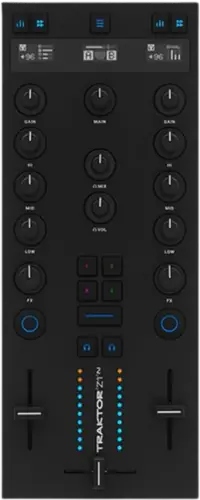
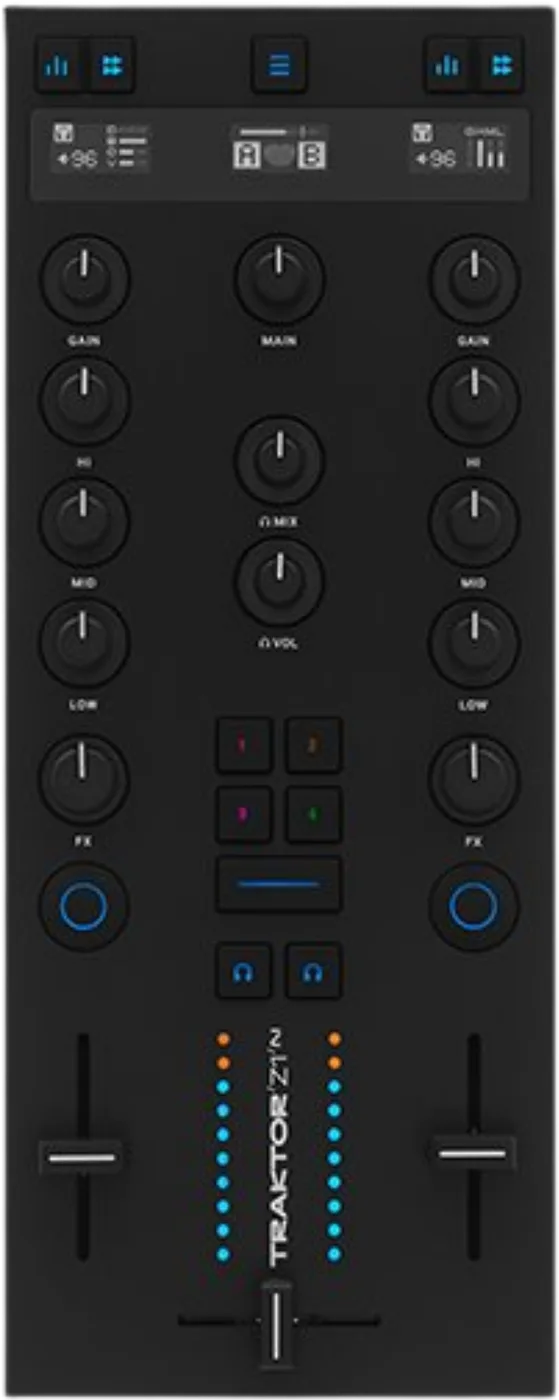
Booth briefing. The Traktor Z1 MK2 is where your sound leaves the rig: a real 24-bit interface up to 96 kHz, class compliant, with a main output and a headphone socket. And it does nothing at all without a computer, so a soundcard in the box is not the same promise as a unit that works alone. There is no audio input of any kind on it, no phono, no line, no microphone. It is bus powered over USB. Two channel strips reach four decks by button.
When it goes wrong: The computer cannot see the controller No sound from the controller
Fast Lane
The five things that decide your gig
The five things on the Traktor Z1 MK2 that change what happens next, if you are reading this in the booth. All five are explained in full further down this page.
With no laptop it does nothing at all.
Nothing. With no computer attached the Z1 MK2 does not work. Native Instruments describe it throughout as a controller and audio interface for Traktor running on a computer, their specification page adds that "Traktor Pro version 4.1 or above is required", and their manual’s power section begins "When using the Z1 with your computer". There is no line input to pass through even if there were a mode to do it in.
A soundcard in the box is not the same promise as a unit that works alone, and this is the difference between the two.
There is no audio input of any kind on it.
It has no audio input of any kind. No phono, no line, no aux and no microphone. Native Instruments’ hardware reference lists the USB socket and the main output at the rear and a headphone socket at the front, and nothing else; their specification table gives four analogue OUTPUT channels and has no input row at all.
So nothing external gets mixed here. Everything you play has to already be inside the computer.
It is where your sound leaves the rig, and it needs nothing installed.
A 24-bit interface running at 44.1, 48, 88.2 and 96 kHz, four analogue output channels, over "USB 2.0 high-speed, audio class compliant" in Native Instruments’ own words. Class compliant means nothing to install, on any host.
Outputs: Main output on unbalanced RCA and on a 3.5 mm mini jack at +12.1 dBu. Headphones on a 3.5 mm stereo jack at +8.5 dBu, 62 mW per side.
Two channel strips reach four decks, by button.
Two physical channel strips. Native Instruments call it a two-channel mixer controller in the manual and add that some control possibilities are limited to Decks A and B and are not available for Decks C and D. A button toggles the two faders between all four Traktor decks, so four decks are reachable but not simultaneously under your hands.
That is worth knowing before you plan a four deck set on two faders, because the fourth deck is a press away rather than under your hand.
There is no firmware version anyone can quote you.
No firmware version, change history or updater for the Z1 MK2 could be reached, so this site names no version threshold for it.
So there is no version number to check yours against and no threshold this site can name. Check the maker’s own downloads page before a run of bookings and do any updating at home.
If something goes wrong
Nothing is coming out
Lights are not audio. The Z1 MK2 draws its power from the USB connection, which is the maker's own wording, so a lit unit proves the cable is delivering power and says nothing at all about whether the software is sending anything to it.
Check the mode before anything else. Two buttons together put this unit in MIDI mode, and the centre display says MIDI MODE when it is. A unit in that state is not driving Traktor at all.
Work the software side next. This unit is the audio device, so the software has to be pointing at it. Confirm that, then the deck assignment, then the channel fader, then the main knob, then the lead into the house.
Nothing in the headphones has two documented causes. Silent headphones on a Z1 MK2 have two documented causes and neither of them is the socket. With the MIX knob at the cue end, Native Instruments state that "when both Cue buttons are off (unilluminated), there is no signal at all coming through the headphones". With the MIX knob at the main mix end they state that "when both channel faders are down, there is no signal at all coming through the headphones". Work those two before you doubt the hardware.
Your cue is inside the same box. If the headphone feed is gone and both of those are ruled out, the main output is usually gone too and you have one problem rather than two. Check the room before you assume the headphone socket has failed.
Deck C or D is not responding. Two strips reach four decks by button, so a strip that seems dead may simply be pointed at the other pair. The Z1 MK2 moves its two strips between deck pairs with one button, and it tells you where they are. Native Instruments give three steps: "Press the ☰ button to switch from Channels A and B to C and D", then "The center display at the top reflects your current assignment", then "Press the ☰ button again to switch back to Channels A and B". So a strip that appears dead is worth reading before it is worth doubting.
A meter is moving and the room is silent. That is not a contradiction on this unit. The Z1 MK2 level meters sit above the crossfader and they read before the fader. Native Instruments: "They show the individual decks’ pre fader output." So a meter that is moving while the channel fader is down is doing its job, and it is not evidence that any of that audio is reaching the room.
What to watch for
Firmware, and the absence of a version history
Short answer. There is no version number anyone can quote you for the Traktor Z1 MK2. No firmware version, change history or updater for the Z1 MK2 could be reached, so this site names no version threshold for it.
What that means for you. There is no number this site can tell you to be at or above. Check the maker's own downloads page before a run of gigs and do any updating at home.
On reliability, nothing is claimed. No recall and no Native Instruments service notice was found for this unit. Owner threads and video complaints exist and none of them yielded an attributable, repeatable fault, so no reliability claim is made here in either direction.
One shortcut takes it out of Traktor
Short answer. Two buttons together take the Z1 MK2 out of Traktor entirely and turn it into a MIDI controller for other software. Native Instruments print the shortcut as "Press the --- button together with the ☰ to switch to MIDI mode (the center display will display MIDI MODE)", and the same pair presses it back. This site reproduces the two panel legends exactly as the manual prints them and names them no further. A unit that has stopped driving Traktor is worth reading before it is worth unplugging, because the centre display is where the answer already is.
Why this belongs on a list of things to watch for. A unit in that mode still lights up, still moves its knobs and still shows a display, and it is driving nothing you can hear. It is a two button combination, which means a cleaner, a case lid or a curious guest can find it, and the only evidence is two words on a small screen.
Compatibility
Software, hosts and the iOS question
Class compliant, so there is nothing to install. The maker describe the interface as USB 2.0 high-speed and audio class compliant, which means the host handles it with its own drivers on every platform that speaks the standard.
The licence comes with the box. Traktor Pro 4 is included, and the manual treats it as part of the product rather than as a trial: Native Instruments write of "the included Traktor Pro 4 software" in their naming section. They also state a floor rather than a recommendation, and they state it without the number. The manual says only that "The Traktor Z1 MK2 requires a specific minimum Traktor software version to function" and sends the reader to the specifications page for it, where the figure is version 4.1 or above. No time limit and no expiry is stated for the bundled licence on any Native Instruments page reached.
The iOS question, answered as an absence. The original Z1 was launched as an iPad and iPhone mixing interface. Native Instruments say nothing about iOS for the MK2 on the product page, the specification page, the manual or the launch release, and this site does not carry the older unit’s claim across to the newer one.
The computer. macOS 13, 14 or 15, or Windows 11, on an Intel Core i5 or an Apple M1, M2 or M3, with 4 GB of RAM, a 1280 by 800 display, USB 2.0 and 1 GB of free space. No Apple Silicon trap is documented and this unit is listed as compatible in the maker's macOS 26 Tahoe statement.
With no laptop it does nothing
Short answer. Nothing. With no computer attached the Z1 MK2 does not work. Native Instruments describe it throughout as a controller and audio interface for Traktor running on a computer, their specification page adds that "Traktor Pro version 4.1 or above is required", and their manual’s power section begins "When using the Z1 with your computer". There is no line input to pass through even if there were a mode to do it in.
There is nothing to pass through either. Even if a mode existed, this unit has no audio input, so there would be no source for it to mix. That is a stronger statement than "no standalone mode is documented": there is no physical route in.
What that means for a fallback plan. The laptop is the rig. If it goes, everything goes, including your headphone feed, because the cue path runs through the same box. Anyone playing on this should know what the house can put up on its own while a machine reboots.
A software floor, not a recommendation. The maker state that Traktor Pro version 4.1 or above is required. That is worth checking on the machine you actually travel with rather than the one you set the unit up on.
Features explained
Two channel strips, four decks, and one job
Short answer. Two physical channel strips. Native Instruments call it a two-channel mixer controller in the manual and add that some control possibilities are limited to Decks A and B and are not available for Decks C and D. A button toggles the two faders between all four Traktor decks, so four decks are reachable but not simultaneously under your hands.
Which pair you are on, and how the unit tells you. The Z1 MK2 moves its two strips between deck pairs with one button, and it tells you where they are. Native Instruments give three steps: "Press the ☰ button to switch from Channels A and B to C and D", then "The center display at the top reflects your current assignment", then "Press the ☰ button again to switch back to Channels A and B". So a strip that appears dead is worth reading before it is worth doubting.
What is on the surface. Three OLED displays, a gain knob and three band EQ per strip with a stem layer over them, an FX knob per channel with four Mixer FX shortcut buttons and a filter only button between them, two line faders and a crossfader, cue controls and level meters.
Why it is filed as a modular controller here. Because it is one part of a rig rather than the whole of one. The maker's own pitch for it is that you add another unit from the same family beside it, and this site files it the way they describe it rather than beside the units that replace a booth.
Which Z1 this is. The original Z1 arrived in 2013 and this is not that unit. Native Instruments still host the original’s getting started guide and user manual, listed separately from the MK2’s, and their catalogue lists one Z1. They nowhere print the word discontinued and nowhere say the MK2 replaces it, so this site records the filing and not a succession.
The soundcard, and what it does not mean
Short answer. A 24-bit interface running at 44.1, 48, 88.2 and 96 kHz, four analogue output channels, over "USB 2.0 high-speed, audio class compliant" in Native Instruments’ own words. Class compliant means nothing to install, on any host.
So this is where your audio leaves. That is the useful half of the fact. In an unfamiliar room you are handing the house a main output and cueing through the unit's own headphone socket, with nothing else to carry, and no driver to install on any machine.
And here is the half people get wrong. This is where it parts company with the KONTROL S4, which does run as a mixer with no computer. Both units have a real soundcard, so "it has an audio interface" answers nothing about whether it works alone. Ask the second question separately, every time.
Levels, for planning the hand-off. Main output is quoted at +12.1 dBu and headphones at +8.5 dBu with 62 mW per side. Both connectors are consumer sizes rather than balanced professional ones, so a long run into a house desk is a cable question worth asking before you arrive.
The gain knob, the EQ and the stem layer over them
Short answer. The Z1 MK2 GAIN knob covers a range Native Instruments give as minus infinity to +12dB, and it always moves the User-Gain level. Auto-Gain is a second reading of the same knob and it is conditional rather than standing: "Auto-Gain can be activated in the preferences via Mixer > Level > Set Autogain When Loading Track." With that reading showing, Native Instruments print the part that confuses people: "turning the GAIN knob on the Z1, will still alter the User-Gain level, not the Auto-Gain level." They add that the User-Gain level is not stored in your song file, while the Auto-Gain level is.
The EQ, and where its centre is. The Z1 MK2 gives each channel a HI, MID and LOW knob over the software's own EQ bands. The maker put the neutral point in the same place on all three: the centre position corresponds to 0dB and neither boosts nor cuts, so anticlockwise attenuates that band and clockwise boosts it.
The stem layer, which is not always there. The Z1 MK2 stem layer is not always there. Native Instruments condition it on what is loaded: "If a Stem track is loaded the Stem Mode becomes available via its dedicated button." Once it is, the four knobs on the strip stop being gain and EQ and become four stems, in an order nothing on the panel tells you: "the Gain Knob will control the Drums Stem, the Hi Knob will control the Bass Stem, the Mid Knob will control the Other Stem and the Low Knob will control the Vocal Stem." Turning one of them fully counter clockwise takes that stem to zero volume.
The meter that moves while the fader is down. The Z1 MK2 level meters sit above the crossfader and they read before the fader. Native Instruments: "They show the individual decks’ pre fader output." So a meter that is moving while the channel fader is down is doing its job, and it is not evidence that any of that audio is reaching the room.
The FX knobs, the four shortcut buttons and the filter
Short answer. The Z1 MK2 carries one FX knob above each channel fader with its own ON button, four Mixer FX shortcut buttons numbered 1 to 4, and a filter only button sitting between the two FX knobs. The centre position of an FX knob is always safe: Native Instruments say it "always results in being neutral and having no effect on the sound", and the two halves of the sweep are different treatments, the first slot dialling in a reverb paired with a highpass filter clockwise and the same reverb paired with a lowpass filter counter clockwise. What the numbered buttons hold is not fixed in the hardware. Native Instruments: "The Effects linked to the 1-4 buttons can be customized in the Traktor Preferences on the Mixer Page under Mixer FX." Button 1 is a reverb only until somebody changes it.
Why that last part matters in a strange booth. If this unit is not yours, the numbered buttons hold whatever the last person put in the software preferences, and nothing on the panel says which effect is behind which number. The centre detent on the knob is the safe place to leave it, because the maker document that position as having no effect on the sound at all.
The cue system, and the two ways it goes silent
Short answer. The Z1 MK2 headphone section is two knobs and two buttons, and Native Instruments describe the MIX knob by its ends: "When it is turned all the way counterclockwise, the headphones will output the cue channel only. When the knob is all the way clockwise, it will output the master signal only. When the knob is at the center position, the headphones will receive a blend of both output busses." The VOL knob sets the level and is off at the fully counter clockwise end. A lit cue button beats the crossfader in your headphones and changes nothing in the room: "no matter where you move the crossfader, you will still hear Deck B, because its cue is on", and separately, "no matter what mix you are hearing in your headphones, the main mix is still controlled by the crossfader and channel faders".
When there is nothing in the headphones. Silent headphones on a Z1 MK2 have two documented causes and neither of them is the socket. With the MIX knob at the cue end, Native Instruments state that "when both Cue buttons are off (unilluminated), there is no signal at all coming through the headphones". With the MIX knob at the main mix end they state that "when both channel faders are down, there is no signal at all coming through the headphones". Work those two before you doubt the hardware.
Do this. Learn which end of the MIX knob is the cue end on this unit before you are standing at one in the dark. The two silence rules above are the difference between a thirty second check and a set spent mixing blind.
Professional tips
Before you travel
Carry the adapters, not just the unit. The main output is on RCA and a mini jack. A house desk expects neither of those in a hurry, and the whole appeal of this box is that it fits in a bag, which is wasted if the lead does not.
One USB port, and it is not optional. Bus power and audio and control all run down the same cable, so a marginal hub or a frayed lead takes out everything at once. Carry a spare cable you have actually tested.
Know what it is not. It is not a mixer you can hand to the next DJ, it has no microphone input, and it plays nothing on its own. Saying that to a promoter before the gig is a much better conversation than saying it during one.
It is designed to be added to. The maker's own argument for this format is that you put another unit from the same family next to it when you need more surface. If that is the plan, rehearse the pair together, on the machine you travel with.
Connections and setup
Every socket on it, and the ones that are not there
Short answer. It has no audio input of any kind. No phono, no line, no aux and no microphone. Native Instruments’ hardware reference lists the USB socket and the main output at the rear and a headphone socket at the front, and nothing else; their specification table gives four analogue OUTPUT channels and has no input row at all.
Outputs. Main output on unbalanced RCA and on a 3.5 mm mini jack at +12.1 dBu. Headphones on a 3.5 mm stereo jack at +8.5 dBu, 62 mW per side.
No microphone, and this catches people. A unit with a crossfader and a mixer layout looks like something an MC can plug into. Nothing can plug into it. If the gig has a microphone in it, that is the house desk's problem or yours to solve separately.
Power. Bus powered over USB. Native Instruments: "When using the Z1 with your computer, the device will be powered by the standard USB connection." No external supply is mentioned anywhere and none is listed for it. There is no external supply to forget, which is the one thing this unit makes easier than its larger stablemates.
What is not published. Native Instruments publish no current draw figure for this unit, so there is no number here to size a hub against.
Safety
What the manual does not tell you to do
Short answer. The Z1 MK2 manual carries no handling section at all. There are no precautions, no prohibitions, no cleaning or storage instructions, no switch-on order, and no safe power-down or safe removal procedure anywhere in it. That is an absence in the documentation rather than a statement that none of those things matter, and this site does not import another controller’s list to close it.
Why this is here rather than left blank. Every other controller page on this site carries the maker's own handling list, and a reader who finds no such section here would reasonably assume somebody forgot to write it. Nobody forgot. The document has none, and saying so is more useful than silence.
What this site will not do about it. The precautions printed for the maker's other controllers are not reproduced here. They describe different objects with different power arrangements, and borrowing one unit's safety text for another is exactly the kind of blending this site exists to avoid.
Firmware, drivers and manuals
Official downloads and documents
Go to Native Instruments for the files themselves. We link their pages instead of hosting a copy, because a manual copied here is a snapshot of release day and theirs is the one that stays current.
Manuals. Official Native Instruments manual page →
Broken link? Let us know and we'll fix it.
Frequently asked questions
Quick answers
- Does the Z1 MK2 work without a computer?
- No. With no computer attached it does nothing. Native Instruments describe it throughout as a controller and audio interface for Traktor running on a computer. That is where it parts company with the KONTROL S4, which does run as a mixer on its own.
- Can I plug turntables or a microphone into it?
- No. It has no audio input of any kind: no phono, no line, no aux and no microphone. The rear carries the USB socket and the main output.
- Does it work with an iPad?
- There is no published answer. The original Z1 was launched as an iPad and iPhone mixing interface, and for the MK2 Native Instruments say nothing about iOS on the product page or the specification page. That is an absence of documentation rather than a statement that it does not work.
- Does it need a power supply?
- No. It is bus powered over the standard USB connection and no external supply is mentioned. Native Instruments publish no current draw figure for it, so there is no number here to size a powered hub against.
Commonly paired with
What you usually find beside it in working booths, from club, festival and rental installs rather than from a manufacturer document.
Native Instruments All brands Knowledge base FAQ and Fixes Dictionary
Playing soon and it is not working?
Start Emergency ModeKeep the Emergency Card
We will email you the printable PDF so it is on your phone before the next dark booth. Occasional notes that save gigs. No spam, unsubscribe in one click.
Registering is free and counts everywhere on Save My Gig. We send a confirmation email first. Your address is stored with Brevo, our email provider. Unsubscribe any time. Privacy
Sources: the maker's own product page, specification table, the online manual and its hardware reference, the PDF manual and the launch release, checked 13 August 2026. Specifications theirs, priorities ours.