

KONTROL S4, the field manual
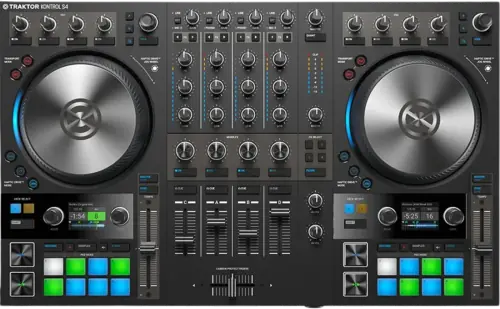
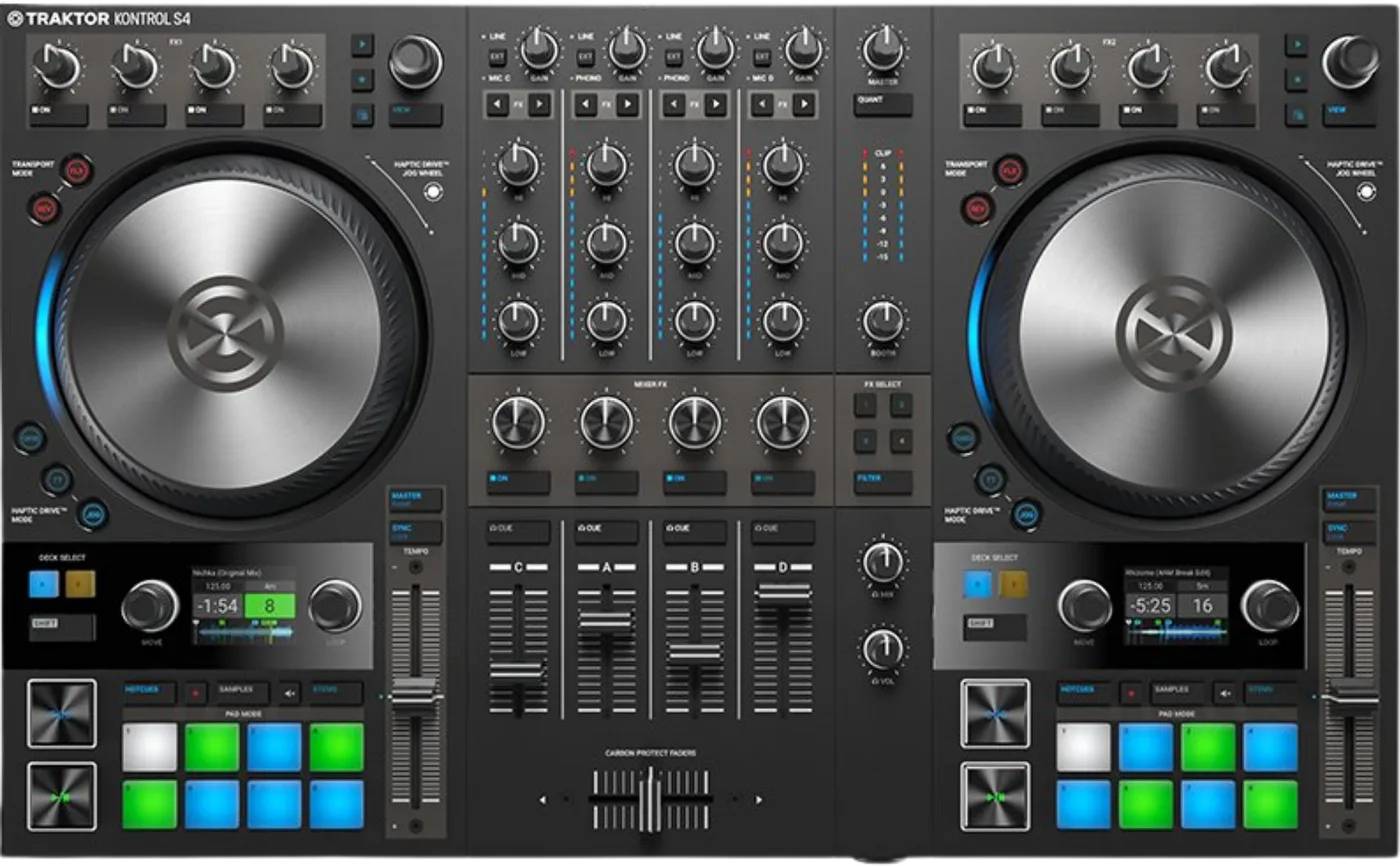
Booth briefing. The TRAKTOR KONTROL S4 MK3 is Native Instruments' four channel Traktor controller, and it has a standalone mixer mode that works with no computer attached. Standalone and Traktor are separate modes: the unit mixes its external inputs on its own, or it controls Traktor, and it holds no music itself, so standalone means mixer rather than player. Switching into standalone is done with the unit powered off and the USB cable unplugged. Phono inputs are on channels A and B, and channels C and D take microphones. The power supply is required rather than optional, and firmware is published for it.
Fast Lane
The five things that decide your gig
The five things on the TRAKTOR KONTROL S4 that change what happens next, if you are reading this in the booth. All five are explained in full further down this page.
It mixes with no computer, and it will not do that at the same time as Traktor.
It runs as a mixer with no computer. Native Instruments’ FAQ: "The S4 can be used in the alternative standalone mixer mode without a computer", and their product page describes mixing "four channels of external audio in the alternative standalone capability".
Standalone mode is not entered by pulling the USB cable out mid set. Native Instruments give three steps in order: "Switch off the S4", then "Disconnect the S4 from your computer by disconnecting the USB cable", then "Switch on the S4". The unit goes quiet and comes back, which makes this a plan you rehearse rather than a recovery you improvise.
Standalone means mixer, never player. It holds no music either way.
Standalone means MIXER, not player. There is no drive, no media slot and nothing on this unit that holds a track, so with no computer attached it mixes sources you plug into it and plays nothing of its own.
Standalone mode is the mixer and nothing else. Native Instruments: "In Standalone mode the Decks and the FX Units have no function. Only the Mixer operates as a conventional DJ mixer. This means the Mixer FX are not available, but you can use the Filter on each Mixer channel."
Phono is on channels A and B. C and D take microphones instead.
Phono is on channels A and B, and only A and B. Native Instruments say it in their own FAQ: "You can connect turntables and play real vinyl using the phono inputs on channels A and B." There is no PHONO/LINE switch to find: the manual’s procedure is "While holding SHIFT press the EXT button on the corresponding Mixer channel", and a PHONO LED lights to confirm it. There is one earth screw between the two channels.
The channel tells you which input type it is on, and the manual names the lamps. On channels A and B "the PHONO LED lights up if the external input for the Mixer channel is set to receive a phono level signal from a turntable". On C and D "the MIC LED lights up if the external input for the Mixer channel is set to receive a microphone signal". Alongside them a LINE LED "indicates if the external input for the Mixer channel is set to receive a line level signal, for example, from a CD player". A turntable that sounds thin is usually a channel still showing LINE.
The power supply is required, not an accessory.
External power supply, and it is not optional. Native Instruments: "The TRAKTOR KONTROL S4 is shipped with and requires a power supply." There is no bus powered mode.
Pack it with the unit rather than with the spares, because without it there is no standalone mode to fall back on.
Firmware exists. A version history does not.
Native Instruments ship a firmware updater for this unit and publish no version list and no change history for it that could be reached. So there is no version to check yours against, and no threshold this site can name. That is a different claim from "there is no firmware".
A documentation gap rather than a missing feature, but it still means nobody can tell you what a given version changed.
If something goes wrong
No sound, and which half of the unit you are in
Ask the mode question first. Standalone and software are two different signal paths through the same TRAKTOR KONTROL S4. Before you check a cable, establish which one the unit is in, because the answer changes what "correct" looks like on every knob in front of you.
In standalone. Work backwards from the speakers: main output level, channel fader, channel gain, then the source. If it is a turntable, the channel has to be A or B and its switch has to be on phono.
With the software running. The unit lighting up tells you it has power and is seen. It says nothing about routing. Check that the controller is selected as the audio device, then that the deck is assigned to the channel you are opening.
One channel is thin rather than silent. That is the phono symptom, not a cable. Read the lamp on that channel before you change anything: The channel tells you which input type it is on, and the manual names the lamps. On channels A and B "the PHONO LED lights up if the external input for the Mixer channel is set to receive a phono level signal from a turntable". On C and D "the MIC LED lights up if the external input for the Mixer channel is set to receive a microphone signal". Alongside them a LINE LED "indicates if the external input for the Mixer channel is set to receive a line level signal, for example, from a CD player". A turntable that sounds thin is usually a channel still showing LINE. See phono is on A and B.
The jog wheels are behaving oddly
There is a support article for exactly this. The maker publish one covering the whole S series, the TRAKTOR KONTROL S4 included: playback that will not scratch when the wheel moves, a deck starting and stopping at random, playback that will not stop when the top plate is pressed, and a blinking LOAD button.
Check the colour of the JOG button first. The JOG button also switches the top plate off, and a red JOG button is the tell: "The JOG button now illuminates red indicating the touch-sensitivity of that top plate is disabled." Native Instruments state the cost in the same place: "When you disable the touch-sensitivity of the top plate, you cannot perform backspins."
Tension is adjustable and people forget it. On this revision you hold the JOG button and turn the wheel. A platter that feels wrong is often a setting somebody else changed rather than a fault.
These are motors, so treat the surface as mechanical. Nothing resting on a platter, nothing spilled near one, and no attempt to hold one still against its drive for longer than a cue needs.
What to watch for
Firmware exists. A version history does not.
Short answer. On the TRAKTOR KONTROL S4 this is a documentation gap rather than a missing feature. Native Instruments ship a firmware updater for this unit and publish no version list and no change history for it that could be reached. So there is no version to check yours against, and no threshold this site can name. That is a different claim from "there is no firmware".
What that means for you. There is no version number this site can tell you to be at or above, because none is published to cite. Update from the maker's own downloads page before a run of gigs, at home, on a day with nothing booked, and never in a booth.
A forum report, and it is only that. One thread on Native Instruments’ own community forum reports the standalone S4 MK3 firmware updater failing to run on an M1 Mac, with a second user’s Rosetta suggestion reported as not working. No Native Instruments staff replied and the thread is unresolved. Two users is a forum report, not a specification, and Native Instruments acknowledge no such problem anywhere. That is the difference between this and the updater traps elsewhere on this site that a manufacturer documents in writing themselves.
Compatibility
Software, drivers and what the computer has to be
The licence comes with the box. Traktor Pro 4 is included, and the maker's own FAQ separately sets a floor: Traktor Pro 3 or higher is required to use the TRAKTOR KONTROL S4. No expiry and no time limit is stated anywhere on the product page, the specification page or the FAQ, so none is claimed here either.
Drivers. On macOS there is nothing to install. On Windows it needs the maker's ASIO driver, which arrives with the software rather than as a separate download, and their own support article on finding it names this controller in its title.
The computer. macOS 13, 14 or 15, or Windows 11, on an Intel Core i5 or an Apple M1, M2 or M3, with 4 GB of RAM, a 1280 by 800 display, USB 2.0 and 1 GB of free space.
Apple Silicon. There is no documented trap. Apple M1, M2 and M3 are named in the requirements and the whole hardware line is listed as compatible in the maker's macOS 26 Tahoe statement. One forum report says otherwise about the updater specifically, and it is in the firmware section labelled as what it is.
Standalone mixer mode, and the choice it forces on you
Short answer. The TRAKTOR KONTROL S4 keeps working as a four channel mixer with no computer attached. Native Instruments describe mixing four channels of external audio in what they call the alternative standalone capability, and the unit runs it on its own power supply with nothing else attached.
The sentence to read twice. Standalone mode and Traktor are mutually exclusive, and this is the sentence to read twice. Native Instruments: "The technical setup of the S4 MK3 does not allow it to be used as a hybrid standalone mixer in conjunction with TRAKTOR." If you want external players inside a Traktor set, they have to come in as a Live Input instead.
Getting into the mode is not a cable pull. Standalone mode is not entered by pulling the USB cable out mid set. Native Instruments give three steps in order: "Switch off the S4", then "Disconnect the S4 from your computer by disconnecting the USB cable", then "Switch on the S4". The unit goes quiet and comes back, which makes this a plan you rehearse rather than a recovery you improvise.
And the channels do not open by themselves. Nothing passes until you open the channels. After the startup sequence "the EXT buttons flash and the ON buttons light up red in the Mixer channels", and you press each EXT button to enable that channel. Every channel then starts in the same place: "When enabling Standalone mode, the input type for any Mixer channel is set to LINE by default." A turntable or a microphone needs SHIFT held and EXT pressed to move the channel off LINE.
What still works once you are in it. Standalone mode is the mixer and nothing else. Native Instruments: "In Standalone mode the Decks and the FX Units have no function. Only the Mixer operates as a conventional DJ mixer. This means the Mixer FX are not available, but you can use the Filter on each Mixer channel."
Standalone means MIXER, not player. There is no drive, no card slot and nothing on this unit that holds a track. With no computer attached it mixes whatever you plug into it and plays nothing of its own. If your fallback plan is "the S4 keeps going when the laptop dies", the plan needs a second source of music in it.
What the maker rules out, stated precisely. Not players on C and D. The manual walks you through cabling a player into any of the four channels and mixing it alongside Traktor decks, and the route it gives is a button on the surface rather than a menu: External audio reaches a Traktor set through the EXT button on the channel, on the hardware rather than in a menu: "Press the EXT button on the Mixer channel you want to insert the external audio from. The Deck has switched to Live Input." The input type behind it is set by holding SHIFT and pressing that same EXT button. What is ruled out is running that standalone mixer mode and Traktor together, which is a different arrangement and the one the sentence above denies.
Phono is on A and B. C and D are microphones.
Short answer. Phono is on channels A and B, and only A and B. Native Instruments say it in their own FAQ: "You can connect turntables and play real vinyl using the phono inputs on channels A and B." There is no PHONO/LINE switch to find: the manual’s procedure is "While holding SHIFT press the EXT button on the corresponding Mixer channel", and a PHONO LED lights to confirm it. There is one earth screw between the two channels.
The two halves are not interchangeable. The maker states the split as a design decision rather than an accident of layout: A and B carry a phono preamplifier, C and D carry microphone inputs instead. There is no setting that moves a phono stage onto C or D.
The exception, and it is the maker's own. A turntable is not automatically wrong on C or D, and the manual draws the line by what is inside the turntable: "A turntable that requires a separate phono pre-amplifier stage has to be connected to Mixer channel A or B. A turntable that has an integrated phono pre-amplifier can be connected to any Mixer channel." So a deck with its own preamplifier travels anywhere on this mixer, and a deck without one has two channels and no others.
What that failure sounds like. Thin, quiet and missing its bottom end, with the channel meter barely moving. It is not silence, which is what makes it hard: the first instinct is a dying cartridge or a bad lead.
The panel does tell you, if you know which lamp to read. The channel tells you which input type it is on, and the manual names the lamps. On channels A and B "the PHONO LED lights up if the external input for the Mixer channel is set to receive a phono level signal from a turntable". On C and D "the MIC LED lights up if the external input for the Mixer channel is set to receive a microphone signal". Alongside them a LINE LED "indicates if the external input for the Mixer channel is set to receive a line level signal, for example, from a CD player". A turntable that sounds thin is usually a channel still showing LINE.
Timecode. Timecode is not only a turntable arrangement on this unit. Native Instruments run the Scratch function from "the connected turntable(s) or CD player(s)", and a CD player can go anywhere: "Connect your CD player to any of the inputs PHONO / LINE IN A or B or LINE IN C or D respectively". The control record or control CD itself is not part of what arrives with the unit. The maker attach a restriction to the vinyl side of it, their own timecode records only, so someone else's control record is not supported here.
Features explained
A four channel mixer that outlives the laptop
Short answer. Four channels, two motorised jog wheels, two colour displays, sixteen pads and a 24-bit interface running at 96 kHz. Four stereo inputs and two stereo outputs, which is eight in and four out.
Which revision you are looking at. Native Instruments call it the "TRAKTOR KONTROL S4 Mk3" in their own FAQ, and the English manual held here prints "Hardware version: TRAKTOR KONTROL S4 MK3" with "Software version: 3.2 (07/2019)" beside it. The product page itself just says TRAKTOR KONTROL S4, so the number on the box and the number in the documentation are not the same string. Everything on this page is the MK3. The MK2 manual describes a different machine, with LINE/PHONO switches on the panel, one microphone socket and bus power as an option, and none of that is true here.
Why it is on this site. Because it behaves like two different objects depending on one setting, and because the difference between them is the difference between a working set and a silent booth. Every other question below follows from that.
The pads and the jog wheels, mode by mode
The pads. Eight pads on each deck and three modes over them. HOTCUES stores and fires cue points and loops and is the default on Track Decks and STEM Decks, SAMPLES drives the sample slots of a Remix Deck, STEMS controls the individual parts of a STEM file. One conditional is worth knowing before you press it: "HOTCUES mode is not available for Remix Decks. When a Remix Deck is focused, the HOTCUES button is disabled."
The jog wheels. Three modes, which Native Instruments call HAPTIC DRIVE MODEs. JOG mode leaves the platter still and gives you bending, nudging, cueing and scratching. TT mode turns the platters during playback so they behave like conventional turntables, at a base speed you set to 33.3 or 45 revolutions per minute. GRID mode hands the same wheels to beatgrid correction instead.
The setting that quietly removes a move. The JOG button also switches the top plate off, and a red JOG button is the tell: "The JOG button now illuminates red indicating the touch-sensitivity of that top plate is disabled." Native Instruments state the cost in the same place: "When you disable the touch-sensitivity of the top plate, you cannot perform backspins."
Turntable mode narrows the tempo fader. Turntable mode narrows the tempo fader whatever the software says: "In Turntable mode, the tempo fader range is limited to +-8 %. If you have set another tempo fader range, for example, 16 % on the Transport page in the Preferences, the tempo fader on the S4 changes values only by +-8 % relatively from the current tempo fader position."
Professional tips
Before you travel
Pack the brick first. It is the single component that turns this unit into furniture, and it is the one most likely to stay plugged into a studio wall.
Decide the mode before you leave. If the gig involves other people's players, you are either giving them two channels in standalone and not using the software, or you are bringing them into Traktor as Live Inputs and configuring that at home. Both work. Discovering the choice at the venue does not.
Label A and B. A strip of tape on the two channels that take a deck costs nothing and removes the whole class of thin quiet turntable problems at four in the morning.
Rehearse the fallback out loud. With no computer this is a mixer with no music in it. Know what your second source is, and know that plugging it in means leaving the software behind for the rest of the set.
Connections and setup
The back panel, socket by socket
Outputs. Main on RCA and on XLR, both live at once, and a booth output on quarter inch jacks. Main and booth are quoted at 110 dB of dynamic range with 0.001% distortion.
Inputs. Phono or line on A and B, on RCA, with a switch each and one earth screw between them. Line only on C and D, on RCA. Phono input impedance is 48.5 kilohms.
Microphones, and there are two of them. MIC C is a quarter inch socket at the back. MIC D is an XLR at the front. Two different connectors on two different panels is worth knowing before somebody hands you an XLR lead in the dark.
A microphone plugged in is not a microphone you can hear. A microphone does not arrive in the mix on its own. The channel needs its preamplifier turned on first, by holding SHIFT and pressing EXT until "The MIC C or MIC D LED lights up indicating the microphone pre-amplifier stage is enabled for the Mixer channel", and then the deck has to be switched to Live Input by pressing EXT on its own. Native Instruments name no phantom power for either socket anywhere in the MK3 manual, so none is claimed here.
Do the cabling with the unit switched off. Native Instruments open every external device procedure the same way, for the microphone, the turntable and the CD player alike: "Switch off the S4", then connect the device, then "Switch on the S4". Cabling a source into a live unit is not the order they document.
Headphones. Both sizes sit on the front, one eighth inch and one quarter inch, and they share what the amplifier can give: "Connect one or two pairs of headphones. When two pairs of headphones are connected, the maximum headphone volume level is decreased."
The two USB sockets are not the same socket. One goes to the computer. The other is a hub for other USB devices. Plugging the computer into the hub port is a five second mistake that looks like a dead unit.
The power supply is not an accessory
Short answer. External power supply, and it is not optional. Native Instruments: "The TRAKTOR KONTROL S4 is shipped with and requires a power supply." There is no bus powered mode.
Why that is worth a section. Plenty of controllers this size run off the USB cable, so the habit of leaving the brick in the studio is a real one and it costs you the whole gig here rather than degrading something. There is no reduced mode to fall back on.
What is not published. No voltage and no current rating for the supplied adapter appears on any of the maker's pages, so no figure is printed here. Take the original brick rather than shopping for an equivalent by eye.
Safety
What the manual tells you to do, and in what order
The TRAKTOR KONTROL S4 has a published switch on order. Native Instruments publish an order for switching on and recommend you follow it. Volume controls down to minimum first, using the MASTER knob, the BOOTH knob and the VOL knob, then the amplification system, then the computer, then the S4, and Traktor last.
Connect external sources with the unit off. Native Instruments open every external device procedure the same way, for the microphone, the turntable and the CD player alike: "Switch off the S4", then connect the device, then "Switch on the S4". Cabling a source into a live unit is not the order they document.
Hearing. The manual carries one hearing warning and it sits beside the booth level control: "To avoid damaging your ears, always watch the listening level of the connected speakers or power amplifier, and set it to a comfortable listening level."
The crossfader precaution nobody reads until it costs them. Every channel has a crossfader assign selector on the front panel, and Native Instruments attach a booth precaution to it: "If you do not intend to use the crossfader, we recommend you to unassign the Mixer channels from the crossfader to prevent accidental usage in a live situation."
Firmware, drivers and manuals
Official downloads and documents
Go to Native Instruments for the files themselves. We link their pages instead of hosting a copy, because a manual copied here is a snapshot of release day and theirs is the one that stays current.
Manuals. Official Native Instruments manual page →
Broken link? Let us know and we'll fix it.
Frequently asked questions
Quick answers
- Does the S4 work without a computer?
- Yes, as a mixer and nothing else. Native Instruments state that in Standalone mode the decks and the FX units have no function and only the mixer operates. There is no drive and no media slot on it, so with no computer attached it mixes sources you plug into it.
- Can I run Traktor and standalone mode at the same time?
- No. Native Instruments state that the technical setup of the S4 MK3 does not allow it. The two modes are mutually exclusive.
- Can I connect turntables?
- Yes, on channels A and B, which carry the phono preamplifier. C and D do not. Native Instruments draw the line by what is inside the turntable: one that has its own separate phono preamplifier can go on C or D as a line source.
- Does it need the power supply?
- Yes. Native Instruments state that the S4 is shipped with and requires a power supply, and there is no bus powered mode. They publish no voltage or current rating for that adapter anywhere reached, so a replacement cannot be specified from their documentation. Travel with the original.
- Do I need to install a driver?
- On macOS no, it uses Core Audio. On Windows yes, Native Instruments' ASIO driver, which arrives with Traktor rather than as a separate download.
Related all-in-ones
Commonly paired with
What you usually find beside it in working booths, from club, festival and rental installs rather than from a manufacturer document.
Native Instruments All brands Knowledge base FAQ and Fixes Dictionary
Playing soon and it is not working?
Start Emergency ModeKeep the Emergency Card
We will email you the printable PDF so it is on your phone before the next dark booth. Occasional notes that save gigs. No spam, unsubscribe in one click.
Registering is free and counts everywhere on Save My Gig. We send a confirmation email first. Your address is stored with Brevo, our email provider. Unsubscribe any time. Privacy
Sources: the maker's own product page, specification table, FAQ, the MK3 user manual and two support articles, checked 13 August 2026. Specifications theirs, priorities ours.