

DJS-1000, the field manual
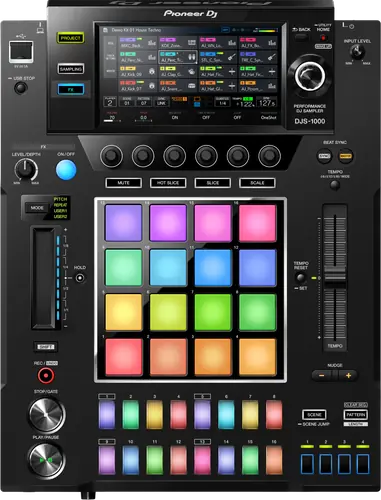
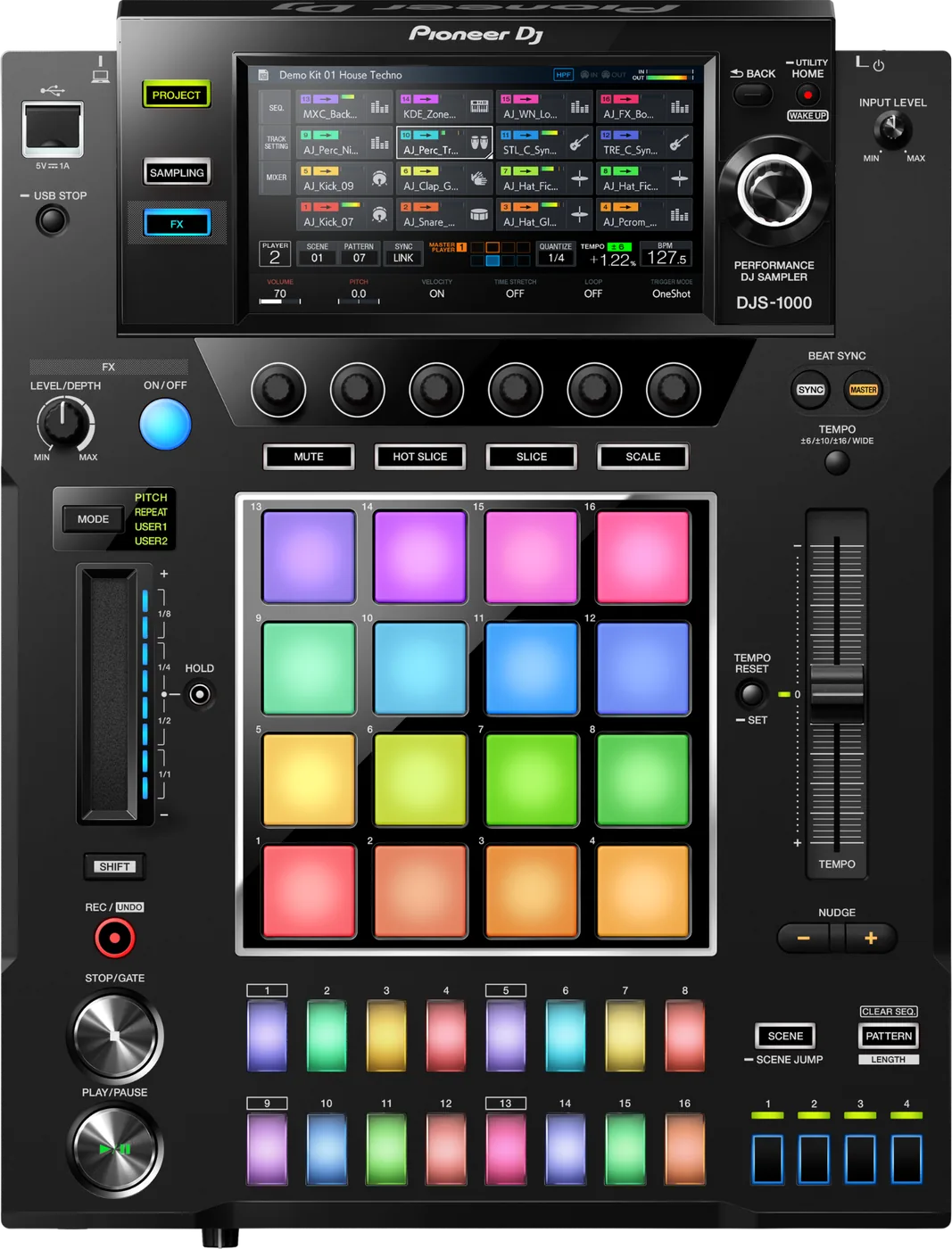
Booth briefing. The DJS-1000 is a standalone 16 track sampler and step sequencer, not a media player: it loads WAV and AIFF samples, there is no track playback and no jog wheel, and its specification lists no SD card slot. What puts it in a booth is its LINK terminal. Since firmware 1.20 up to six CDJ-3000 and DJS-1000 units share one PRO DJ LINK chain, and the same version added a Utility mode that stops it taking master.
Fast Lane
The five things that decide your gig
The five things on the DJS-1000 that change what happens next, if you are reading this in the booth. All five are explained in full further down this page.
It is a sampler, not a player. Nothing from a CDJ applies.
It is not a media player and nothing about a CDJ transfers to it. It loads samples, not tracks. Nothing in AlphaTheta’s documentation describes track playback, hot cues on a track, or a jog wheel, because it has none of those. The relative worth comparing it to is the TORAIZ SP-16, not a CDJ.
Six on a chain, but only with CDJ-3000 and CDJ-3000X units, and only with both up to date.
Three separate AlphaTheta documents say the same thing, near enough word for word: "A total of up to 6 CDJ-3000 and DJS-1000 units can now be connected via PRO DJ LINK." That arrived with DJS-1000 firmware 1.20 and CDJ-3000 firmware 2.03, and it is conditional: AlphaTheta ask for both the CDJ-3000 and the DJS-1000 to be brought up to date first.
Six is only for a chain made of CDJ-3000, CDJ-3000X and DJS-1000 units. Put any other model in the chain and AlphaTheta’s ceiling drops: "You can connect a total of up to 4 units via PRO DJ LINK".
There is a hidden mode that decides whether it can grab master.
Firmware 1.20 added a setting worth knowing about before you stand behind one. In the Utility there is now a playback mode: "In addition to Player mode, you can now select Drum Machine mode, which enables the DJS-1000 to not become the master player when using Beat Sync." In Player mode it behaves like another player and can take master. In Drum Machine mode it stays a follower, which is what you want when the CDJs own the tempo. It is invisible from the panel and it is exactly the kind of setting the last person leaves behind.
A silent track that looks fine is often the amp envelope, not the mix.
If a track is sequenced and un-muted and still silent, AlphaTheta’s check list ends somewhere non-obvious: HOLD under TRACK MENU and AMP ENVELOPE must not be set to zero. A track whose amplitude envelope holds for no time at all meters nothing and makes no sound, and it looks exactly like a dead track.
Its desktop half is Windows only and was last updated in 2019.
The desktop half of this unit is a Windows application and AlphaTheta name no Mac version. DJS-TSP Project Creator, version 1.1.1, last updated 24 October 2019, creates project and scene files for the DJS-1000 and the TORAIZ SP-16, and its supported systems are Windows 10, 8.1 and 7. Nothing says it runs on Windows 11 and nothing says it does not. Loading its project files was added to the unit by firmware 1.10.
If something goes wrong
A track that is sequenced, un-muted and silent
Short answer. If a track is sequenced and un-muted and still silent, AlphaTheta’s check list ends somewhere non-obvious: HOLD under TRACK MENU and AMP ENVELOPE must not be set to zero. A track whose amplitude envelope holds for no time at all meters nothing and makes no sound, and it looks exactly like a dead track.
AlphaTheta’s order, and it is worth following. Set all the volumes on the GUI correctly, check the master level meters on the MIXER screen are moving and that MUTE is not on for every track, then the HOLD value, then the headphone level.
Why the HOLD case is the one to remember. The first three checks are things anybody would try. The fourth is a per track envelope parameter two menus deep, and a DJS-1000 track set that way looks completely normal and meters nothing.
A burst of noise when you change the tempo
Short answer. A burst of noise on a tempo change is documented behaviour, not a fault: "If the DELAY FX is set and then the tempo is changed, noise may be generated." AlphaTheta’s remedy is to not change the tempo with DELAY FX on, or to turn it off.
Read that as documented behaviour. AlphaTheta print it as something a DJS-1000 may do, not as a fault to report. They do not explain the mechanism and this page will not invent one for them.
What to do about it live. If you know you are going to move the tempo, take DELAY off first. That is AlphaTheta’s own remedy.
Input that sounds distorted with the limiter on
Short answer. The SOFT LIMITER is an analogue limiter that suppresses hard clipping near the converter’s maximum, and AlphaTheta warn about how it sounds: "waveforms that have been prepared to be similar to a sine wave may seem to be distorted due to soft clipping effect." Their advice is to try it both ways per source and choose. On near sine material it softens the peaks audibly and that is not a fault.
The practical version. On material that is close to a pure tone, the DJS-1000 limiter is doing exactly its job and you can hear it doing it. AlphaTheta do not say how it behaves on other material, so try it rather than assume.
What AlphaTheta actually advise. Try it both ways for the source in front of you and pick. There is no correct setting for every input.
A firmware update that will not complete
The two messages. Two failure messages are named: "MAIN update file is corrupt" and "MAIN firmware update failed". Both mean the file or the stick, so re-download or use a different USB device.
The procedure that avoids most of it. Read the version by holding HOME, then the rotary selector to Version No., second from the bottom. To update, put DJS1000.UPD at the root of a FAT or FAT32 stick without renaming it, power the unit off with nothing else connected, hold SAMPLING and FX while powering on, release when the display asks for the storage device, and use the TOP USB port. It takes about two minutes and the power does not come off during it. If the bar stalls beyond ten minutes, stop and contact support.
The threshold. If the DJS-1000 progress bar stalls past ten minutes, that is AlphaTheta’s own line for stopping and contacting support rather than waiting longer.
What to watch for
What it is, and what it is not
Short answer. It is not a media player and nothing about a CDJ transfers to it. It loads samples, not tracks. Nothing in AlphaTheta’s documentation describes track playback, hot cues on a track, or a jog wheel, because it has none of those. The relative worth comparing it to is the TORAIZ SP-16, not a CDJ.
What it does not have. Its terminal list contains no SD card slot, which is one of the sharpest differences between this and a CDJ. Read that as an absence from the specification rather than as a denial from AlphaTheta. No source states an internal memory size, a project count or a scene count. Projects and scenes are made and moved as files, and the media section of the manual describes USB devices. This page prints no number for it.
And one hard denial, which is different. Asked whether it has MASTER FX and SEND FX like the TORAIZ SP-16, AlphaTheta answer: "This unit does not have MASTER FX and SEND FX functions."
Why this section leads the page. The DJS-1000 sits in a CDJ booth, it takes a LAN cable, it has a touch screen and a USB port. Everything about its context suggests a player. It is not one, and a DJ who arrives expecting to load a set on it has a problem no setting fixes.
The Utility setting that decides who owns the tempo
Short answer. Firmware 1.20 added a setting worth knowing about before you stand behind one. In the Utility there is now a playback mode: "In addition to Player mode, you can now select Drum Machine mode, which enables the DJS-1000 to not become the master player when using Beat Sync." In Player mode it behaves like another player and can take master. In Drum Machine mode it stays a follower, which is what you want when the CDJs own the tempo. It is invisible from the panel and it is exactly the kind of setting the last person leaves behind.
Why it is worth checking on a unit you did not set up. It is in the Utility and there is nothing on the panel to say which mode you are in. A house unit left in Player mode can take master off the CDJs; one left in Drum Machine mode will refuse to when you want it to.
The condition on sync, whichever mode you are in. Beat Sync and Bar Sync work against whichever DJ player is master, and there is a condition on them: "The tracks played with the DJ player need to have been analyzed by rekordbox in advance." A sync that refuses to lock is usually an unanalysed track on the other deck.
Compatibility
The link chain, and the number that decides your booth
Short answer. Three separate AlphaTheta documents say the same thing, near enough word for word: "A total of up to 6 CDJ-3000 and DJS-1000 units can now be connected via PRO DJ LINK." That arrived with DJS-1000 firmware 1.20 and CDJ-3000 firmware 2.03, and it is conditional: AlphaTheta ask for both the CDJ-3000 and the DJS-1000 to be brought up to date first.
And the condition that shrinks it. Six is only for a chain made of CDJ-3000, CDJ-3000X and DJS-1000 units. Put any other model in the chain and AlphaTheta’s ceiling drops: "You can connect a total of up to 4 units via PRO DJ LINK".
What the link actually carries. AlphaTheta describe loading samples from a USB device plugged into the DJS-1000 itself and nowhere describe pulling files off a linked player's storage, so plan on carrying the samples rather than fetching them over the link. Music Sharing, Traffic Light, Fader Start and Quantize are listed as PRO DJ LINK functions in general, and no DJS-1000 document claims any of them for this unit.
The cable and the hub. AlphaTheta name the cable: "be sure to use either the LAN cable included with this product or an STP (shielded twisted pair) cable." A switching hub may be needed depending on the models, and it has to be 100 Mbps or better. And: "Do not disconnect the LAN cable when information is being shared with PRO DJ LINK."
The precondition on sync. Beat Sync and Bar Sync work against whichever DJ player is master, and there is a condition on them: "The tracks played with the DJ player need to have been analyzed by rekordbox in advance." A sync that refuses to lock is usually an unanalysed track on the other deck.
The computer half, and the operating system it stops at
Short answer. The desktop half of this unit is a Windows application and AlphaTheta name no Mac version. DJS-TSP Project Creator, version 1.1.1, last updated 24 October 2019, creates project and scene files for the DJS-1000 and the TORAIZ SP-16, and its supported systems are Windows 10, 8.1 and 7. Nothing says it runs on Windows 11 and nothing says it does not. Loading its project files was added to the unit by firmware 1.10.
What it is for. It builds project and scene files for this unit and for the TORAIZ SP-16, and firmware 1.10 is what taught the DJS-1000 to load them.
The other reason a computer touches this unit. The USB-B port is how a computer moves files onto the unit, and AlphaTheta note that a USB connection file sharing driver is needed to use it.
Splice. Splice cloud sample library integration is listed as a product feature and there is an addendum document for it. Splice as a service has changed since 2018, so check what the current service offers before you plan a set around it.
What this page will not say. Whether that Windows application still runs on Windows 11. Nothing says it does and nothing says it does not, and a guess would be worth nothing to you.
Features explained
What it will load
Samples. WAV and AIFF at a 44.1 kHz sampling frequency, 16 or 24 bit. That is the whole list.
Length. Up to 64 seconds since firmware 1.10, which extended it. AlphaTheta do not publish what the limit was before that, so this page does not guess.
Drives. The manual lists FAT, FAT32 and HFS+ for the media it reads. For a firmware update the path is narrower: "Please use a USB memory device (Mass Storage Class) formatted in FAT or FAT32." exFAT is named nowhere, in either direction.
Storage. No source states an internal memory size, a project count or a scene count. Projects and scenes are made and moved as files, and the media section of the manual describes USB devices. This page prints no number for it.
And the slot it does not have. Its terminal list contains no SD card slot, which is one of the sharpest differences between this and a CDJ. Read that as an absence from the specification rather than as a denial from AlphaTheta.
Firmware, and the version that changed the booth
The version they publish today. Version 1.22, 7 November 2024, is the highest published version. It changed the automatic shut off time to 20 minutes to comply with the EU Ecodesign Directive and renamed the energy saving function from Auto Standby or Auto Power-Off to Power Management. Version 1.21 does not appear in the published history.
The history in full. Six versions in the official history. 1.03 on 19 October 2017 fixed a potential freeze when repeating manual live sampling with a beat length selected. 1.10 on 14 February 2018 extended the maximum sample length to 64 seconds and added project file loading. 1.11 on 19 June 2018 fixed sample playback distortion under an external MIDI master clock in live sampling mode. 1.12 on 21 January 2020 fixed minor issues on the touch display. 1.20 on 13 October 2022 raised the link ceiling to six with CDJ-3000s and added Drum Machine mode, and AlphaTheta's change history prints 2020 for it while their own release announcement is dated 2022. 1.22 is above.
Why 1.20 is the one that matters. It is the version that made this unit a full member of a modern CDJ-3000 chain and, in the same release, gave it a way to stay out of the master role. Two opposite capabilities in one update, and both of them are about the booth around it rather than the box itself.
How to run it. Read the version by holding HOME, then the rotary selector to Version No., second from the bottom. To update, put DJS1000.UPD at the root of a FAT or FAT32 stick without renaming it, power the unit off with nothing else connected, hold SAMPLING and FX while powering on, release when the display asks for the storage device, and use the TOP USB port. It takes about two minutes and the power does not come off during it. If the bar stalls beyond ten minutes, stop and contact support.
Professional tips
Before you play on one
Check the playback mode in the Utility before the doors open. Player or Drum Machine decides whether this box can take master off the CDJs.
Bring it and the CDJ-3000s up to date together. The six unit chain is conditional on both, and AlphaTheta say so in the same sentence that grants it.
Bring the samples on the stick. AlphaTheta describe loading from a USB device connected to this unit and nowhere describe loading over PRO DJ LINK, whatever the LAN cable suggests.
Convert to WAV or AIFF at 44.1 kHz. That is the whole list AlphaTheta publish, so an MP3 collection is not a library this unit can use.
Use the top USB port for a firmware update, on a FAT or FAT32 stick, with the file left at the root under its own name.
Connections and setup
What goes in and what comes out
Inputs. It has one 6.35 mm TS input, plus MIDI IN on 5 pin DIN.
Outputs. OUTPUT1 on RCA, THRU and OUTPUT2 on 6.35 mm TS, two headphone outputs at 6.35 mm and 3.5 mm, and MIDI OUT and THRU on 5 pin DIN.
USB and network. one USB-A at 5 V and 1 A, one USB-B, and one LINK terminal on LAN 100Base-TX.
Power. It runs from AC 110 V to 240 V, 50 Hz/60 Hz, drawing 26 W and 0.4 W on standby.
The physical facts. It measures 320.0 x 421.6 x 110.1 mm as width, then depth, then height, and weighs 5.4 kg. Its audio path is 44.1 kHz with a 24 bit A/D and a 32 bit D/A converter, 20 Hz to 20 kHz, and total harmonic distortion of 0.003 percent.
Where these figures come from. Pioneer’s Quick Start Guide, document UCP0516, read on a mirror because no official host for the specification page could be reached, corroborated line by line by Pioneer DJ New Zealand’s own listing.
Firmware, drivers and manuals
What the maker publishes
The firmware documentation is complete. The manual is not current. The change history covers every published version and the firmware article is live. The Operating Instructions are dated 2017 and have not been revised since, so they describe none of the behaviour added by firmware 1.10, 1.20 or 1.22, including the 64 second sample length, the six unit chain and Drum Machine mode.
There is no audio driver article, and that is correct rather than missing. This is not a computer audio interface. Its USB-B port exists for file sharing, and the only driver AlphaTheta mention is the one that enables it.
Official downloads and documents
Go to AlphaTheta for the files themselves. We link their pages instead of hosting a copy, because a manual copied here is a snapshot of release day and theirs is the one that stays current.
Firmware downloads. Official Pioneer DJ firmware page →
Manuals. Official Pioneer DJ manual page →
Broken link? Let us know and we'll fix it.
Frequently asked questions
Quick answers
- Can it play my tracks like a CDJ?
- No. It is not a media player and nothing about a CDJ transfers to it. It loads samples, not tracks. Nothing in AlphaTheta’s documentation describes track playback, hot cues on a track, or a jog wheel, because it has none of those. The relative worth comparing it to is the TORAIZ SP-16, not a CDJ.
- What sample formats does it take?
- WAV and AIFF at a 44.1 kHz sampling frequency, 16 or 24 bit. That is the whole list.
- How long can a sample be?
- Up to 64 seconds since firmware 1.10, which extended it. AlphaTheta do not publish what the limit was before that, so this page does not guess.
- What file systems does it read?
- The manual lists FAT, FAT32 and HFS+ for the media it reads. For a firmware update the path is narrower: "Please use a USB memory device (Mass Storage Class) formatted in FAT or FAT32." exFAT is named nowhere, in either direction.
- Does it have an SD card slot?
- Its terminal list contains no SD card slot, which is one of the sharpest differences between this and a CDJ. Read that as an absence from the specification rather than as a denial from AlphaTheta.
- How many units can share a PRO DJ LINK chain?
- Three separate AlphaTheta documents say the same thing, near enough word for word: "A total of up to 6 CDJ-3000 and DJS-1000 units can now be connected via PRO DJ LINK." That arrived with DJS-1000 firmware 1.20 and CDJ-3000 firmware 2.03, and it is conditional: AlphaTheta ask for both the CDJ-3000 and the DJS-1000 to be brought up to date first. Six is only for a chain made of CDJ-3000, CDJ-3000X and DJS-1000 units. Put any other model in the chain and AlphaTheta’s ceiling drops: "You can connect a total of up to 4 units via PRO DJ LINK".
- Can I load samples off a linked CDJ?
- AlphaTheta describe loading samples from a USB device plugged into the DJS-1000 itself and nowhere describe pulling files off a linked player's storage, so plan on carrying the samples rather than fetching them over the link. Music Sharing, Traffic Light, Fader Start and Quantize are listed as PRO DJ LINK functions in general, and no DJS-1000 document claims any of them for this unit.
- Why will Beat Sync not lock?
- Beat Sync and Bar Sync work against whichever DJ player is master, and there is a condition on them: "The tracks played with the DJ player need to have been analyzed by rekordbox in advance." A sync that refuses to lock is usually an unanalysed track on the other deck.
- Can I stop it becoming the sync master?
- Yes, since firmware 1.20. Firmware 1.20 added a setting worth knowing about before you stand behind one. In the Utility there is now a playback mode: "In addition to Player mode, you can now select Drum Machine mode, which enables the DJS-1000 to not become the master player when using Beat Sync." In Player mode it behaves like another player and can take master. In Drum Machine mode it stays a follower, which is what you want when the CDJs own the tempo. It is invisible from the panel and it is exactly the kind of setting the last person leaves behind.
- Does it have MASTER FX or SEND FX?
- Asked whether it has MASTER FX and SEND FX like the TORAIZ SP-16, AlphaTheta answer: "This unit does not have MASTER FX and SEND FX functions."
- Is the project software available for Mac?
- The desktop half of this unit is a Windows application and AlphaTheta name no Mac version. DJS-TSP Project Creator, version 1.1.1, last updated 24 October 2019, creates project and scene files for the DJS-1000 and the TORAIZ SP-16, and its supported systems are Windows 10, 8.1 and 7. Nothing says it runs on Windows 11 and nothing says it does not. Loading its project files was added to the unit by firmware 1.10.
- Which firmware version should it be on?
- Version 1.22, 7 November 2024, is the highest published version. It changed the automatic shut off time to 20 minutes to comply with the EU Ecodesign Directive and renamed the energy saving function from Auto Standby or Auto Power-Off to Power Management. Version 1.21 does not appear in the published history.
- A track is sequenced and makes no sound.
- If a track is sequenced and un-muted and still silent, AlphaTheta’s check list ends somewhere non-obvious: HOLD under TRACK MENU and AMP ENVELOPE must not be set to zero. A track whose amplitude envelope holds for no time at all meters nothing and makes no sound, and it looks exactly like a dead track.
- Is it discontinued?
- No AlphaTheta or Pioneer DJ statement of end of life was found. The product page is live and unmarked and the support hub is active.
Commonly paired with
What you usually find beside it in working booths, from club, festival and rental installs rather than from a manufacturer document.
Pioneer DJ All brands Knowledge base FAQ and Fixes Dictionary
Playing soon and it is not working?
Start Emergency ModeKeep the Emergency Card
We will email you the printable PDF so it is on your phone before the next dark booth. Occasional notes that save gigs. No spam, unsubscribe in one click.
Registering is free and counts everywhere on Save My Gig. We send a confirmation email first. Your address is stored with Brevo, our email provider. Unsubscribe any time. Privacy
Sources: AlphaTheta's Help Center articles for the DJS-1000, the official firmware change history, the Operating Instructions DRI1489A, Pioneer DJ's October 2017 announcement, the CDJ-3000 and CDJ-3000X link articles, and Pioneer's Quick Start Guide UCP0516 read on a mirror, checked 10 September 2026. Specifications theirs, priorities ours.