

DDJ-RZX, the field manual
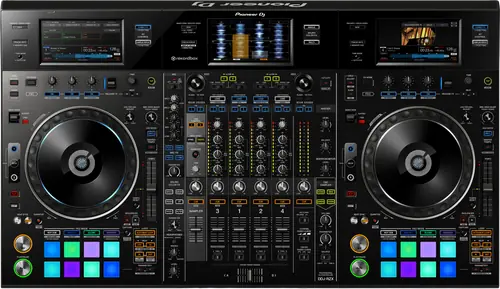
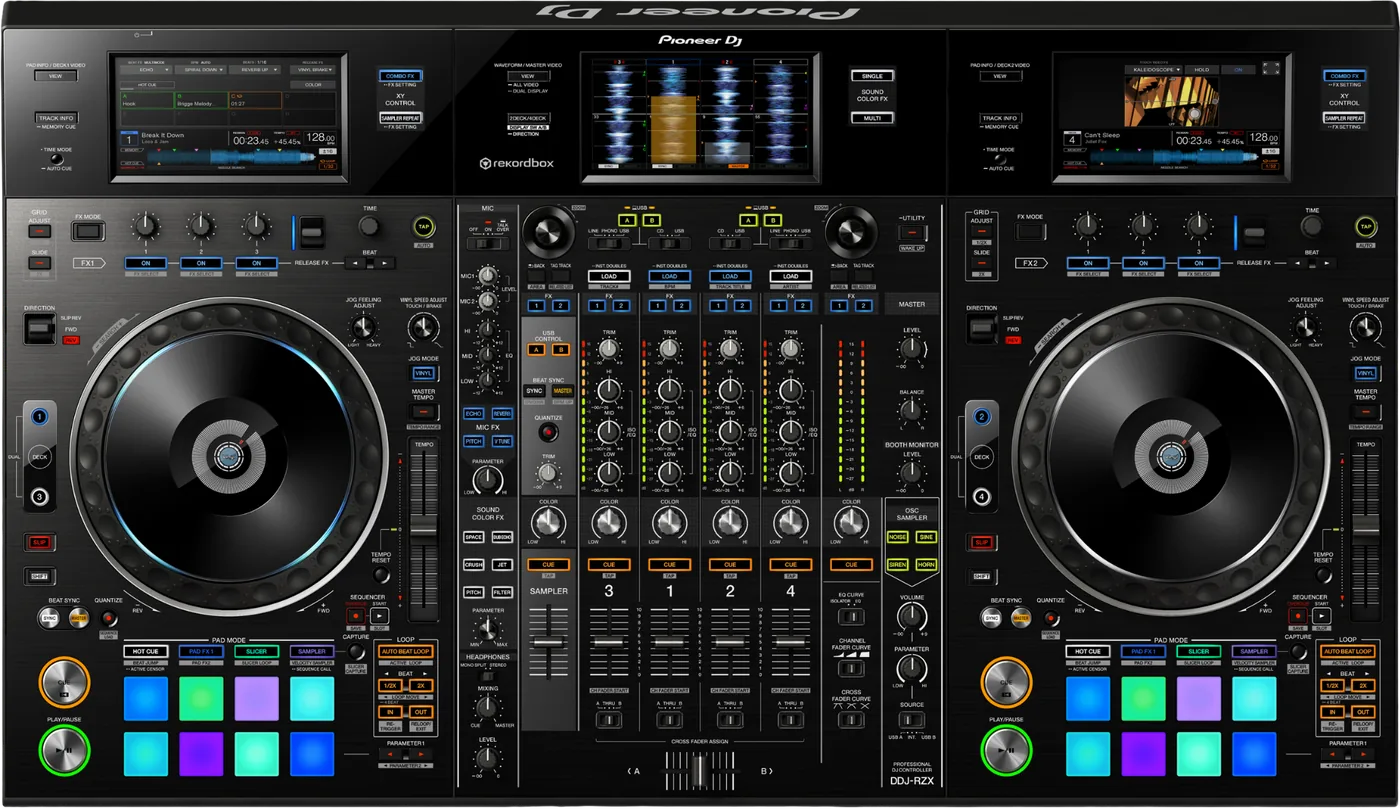
Booth briefing. The DDJ-RZX is Pioneer DJ's four channel rekordbox controller with three 7 inch touch screens, built for the rekordbox video Plus Pack, so video is part of the job rather than an add-on. It runs with rekordbox version 6, which is still free, and that is the software this unit lives in. The video itself goes out of the laptop, not out of the controller: the DDJ-RZX is the control surface and the computer is the source.
When it goes wrong: The computer cannot see the controller No sound from the controller
Fast Lane
The five things that decide your gig
The five things on the DDJ-RZX that change what happens next, if you are reading this in the booth. All five are explained in full further down this page.
rekordbox 7 does not support it. Three dark screens is what that looks like.
This unit lives in rekordbox ver. 6 and it cannot follow rekordbox to ver. 7. AlphaTheta print it twice: "DDJ-RZX is not supported on rekordbox ver. 7", and "DDJ-RZX is not compatible with rekordbox ver. 7. Please use rekordbox ver. 6." The first of those is their answer to the question "There is nothing displayed on the DDJ-RZX hardware screen", which is what the failure looks like from the booth.
rekordbox ver. 6 is still available free of charge from AlphaTheta, which is the whole reason this unit is still workable. Install 7 on the machine you gig with and you lose the screens and the video unlock on this controller.
The audience screen comes off the laptop, not off this controller.
The audience screen hangs off the laptop, not off this controller. No video output connector appears in any specification for the unit. rekordbox's own video FAQ says the same thing generally, about compatible controllers rather than this one by name: "Video output from a compatible controller to external monitor, etc. is not supported." The three screens on the unit are preview and monitor surfaces for the DJ.
MIDI CONTROL on the deck display has a documented four step answer.
A specific and very confusing symptom has a documented four step answer: "MIDI CONTROL is shown on the deck display section and an enlarged waveform, video and other information are not shown." AlphaTheta check, in order: the unit’s own MIDI MODE, which should be AUTO so that operation changes depending on whether rekordbox is running, verified by the HOT CUE button colour; the rekordbox Waveform Drawing Rate, which must be Medium Speed or High Speed and not Low Speed; the Windows Firewall on Windows; and the driver installation.
It is not on Serato’s supported hardware list.
It is not on Serato’s supported hardware list. The DDJ-RZX does not appear there at all, which is an absence from a list rather than a statement that Serato refuses to run on it. AlphaTheta’s position is generic MIDI only: "DDJ-RZX works with other MIDI-compatible software besides rekordbox, by assigning MIDI message." They add one instruction that catches people: "Please do not run multiple DJ Software on your computer at the same time. When switching from one DJ software to use another, please turn the DDJ-RZX power off and then power back on after software switch has been completed."
It is 15.9 kg and 945 mm wide. Measure the booth first.
It measures 945 x 547 x 119.7 mm as width, then depth, then height, and weighs 15.9 kg.
That is not a controller you carry to a bar on public transport. It is an installation, or a two person load in.
If something goes wrong
A screen showing MIDI CONTROL, or no waveform at all
The four step answer AlphaTheta publish. A specific and very confusing symptom has a documented four step answer: "MIDI CONTROL is shown on the deck display section and an enlarged waveform, video and other information are not shown." AlphaTheta check, in order: the unit’s own MIDI MODE, which should be AUTO so that operation changes depending on whether rekordbox is running, verified by the HOT CUE button colour; the rekordbox Waveform Drawing Rate, which must be Medium Speed or High Speed and not Low Speed; the Windows Firewall on Windows; and the driver installation.
The single most common one of those. If the centre screen has no waveform, the fix is one preference: "Select [High speed] or [Medium speed] in following item of rekordbox preference. View > Waveform > Waveform Drawing Rate". A machine set to low speed leaves the screen blank and nothing on the unit explains why.
And if all three screens are dark rather than wrong. Check which rekordbox you are running. This unit lives in rekordbox ver. 6 and it cannot follow rekordbox to ver. 7. AlphaTheta print it twice: "DDJ-RZX is not supported on rekordbox ver. 7", and "DDJ-RZX is not compatible with rekordbox ver. 7. Please use rekordbox ver. 6." The first of those is their answer to the question "There is nothing displayed on the DDJ-RZX hardware screen", which is what the failure looks like from the booth.
Two DJ applications at once
Short answer. It is not on Serato’s supported hardware list. The DDJ-RZX does not appear there at all, which is an absence from a list rather than a statement that Serato refuses to run on it. AlphaTheta’s position is generic MIDI only: "DDJ-RZX works with other MIDI-compatible software besides rekordbox, by assigning MIDI message." They add one instruction that catches people: "Please do not run multiple DJ Software on your computer at the same time. When switching from one DJ software to use another, please turn the DDJ-RZX power off and then power back on after software switch has been completed."
Why the power cycle instruction is worth following. AlphaTheta give the instruction and no reason for it, and this page will not supply one. Take it as written: do not have two DJ applications open, and power cycle between them.
What to do. Close everything, power the unit off, open the application you want, then power the unit on.
What to watch for
The software version that decides everything
Short answer. This unit lives in rekordbox ver. 6 and it cannot follow rekordbox to ver. 7. AlphaTheta print it twice: "DDJ-RZX is not supported on rekordbox ver. 7", and "DDJ-RZX is not compatible with rekordbox ver. 7. Please use rekordbox ver. 6." The first of those is their answer to the question "There is nothing displayed on the DDJ-RZX hardware screen", which is what the failure looks like from the booth.
And the reason it is still workable. rekordbox ver. 6 is still available free of charge from AlphaTheta, which is the whole reason this unit is still workable. Install 7 on the machine you gig with and you lose the screens and the video unlock on this controller.
What you get on version 6. Under the subscription model the DDJ-RZX is a Hardware Unlock device for rekordbox ver. 6: "When you connect a Hardware Unlock device, you can use it to control PERFORMANCE mode without subscribing to a paid plan." On that list it appears against performance mode control, recording, sharing a mix, MIDI LEARN, MERGE FX, SAMPLE SCRATCH, DVS, Video and sampler sequence saving. AlphaTheta date that list March 2024.
What it shipped with. It shipped with licence keys for rekordbox dj, rekordbox dvs and rekordbox video, which was the Plus Pack licence model of the rekordbox 4 and 5 era.
And what is not there any more. It is absent from the current rekordbox Hardware Unlock table and absent from the Compatible DJ units page. Absence from a list is not a printed denial, and the ver. 7 statements above are the printed part.
The practical rule. Do not let rekordbox update itself on the machine you gig with. That is the whole risk on this unit and it is one checkbox.
What AlphaTheta do and do not say about it
Short answer. AlphaTheta’s Help Center marks the product page Archived. That is their word and it is the only status word any maker source uses for this unit.
What is documented instead. This unit lives in rekordbox ver. 6 and it cannot follow rekordbox to ver. 7. AlphaTheta print it twice: "DDJ-RZX is not supported on rekordbox ver. 7", and "DDJ-RZX is not compatible with rekordbox ver. 7. Please use rekordbox ver. 6." The first of those is their answer to the question "There is nothing displayed on the DDJ-RZX hardware screen", which is what the failure looks like from the booth. That is a narrow, printed, quotable restriction and it is more useful than a status word.
Why the difference matters. Archived means the page is no longer maintained. It does not tell you whether the unit works, and on this one the answer is that it works well on the version it was built for.
Compatibility
Drivers, and how far each one reaches
macOS. Version 4.0.3, released 30 April 2024, and its release note fix is macOS Sonoma support. AlphaTheta ship a driver for both platforms and never say the unit works without one, so this page does not claim it is class compliant. Install the driver.
Windows. Version 1.021, released 11 January 2017, containing integrated installers for Windows 10, 8.1 and 7. That is the highest Windows driver version AlphaTheta publish for this model, and there is no Windows 11 driver listed.
And a list on the model page that needs reading carefully. The DDJ-RZX rekordbox article carries an operating system block naming macOS Sequoia 15, Sonoma 14, Ventura 13 and Monterey 12 plus Windows 11 and 10. Read it for what it is: the rekordbox application’s own list, carried on the model page. It sits awkwardly beside the statement that this unit does not run rekordbox 7 at all, and beside a Windows driver that stops at Windows 10.
The requirements to follow. The 2016 requirements AlphaTheta published for this unit are higher than rekordbox dj’s own, and they say which to follow: "When using rekordbox dj in combination DDJ-RZX, please follow the minimum system requirements for DDJ-RZX." Those are a 2.5 GHz dual core Intel Core i5 or better, 8 GB of RAM or more, 250 MB of free space and a display of 1280 x 768 or greater.
Firmware updates are Windows only. The firmware update guide covers Windows and OS X, but the Help Center publishes a Windows firmware package only. AlphaTheta publish no macOS firmware updater for this model, so plan on a Windows machine.
Features explained
The video story, and where the picture actually comes from
Short answer. The audience screen hangs off the laptop, not off this controller. No video output connector appears in any specification for the unit. rekordbox's own video FAQ says the same thing generally, about compatible controllers rather than this one by name: "Video output from a compatible controller to external monitor, etc. is not supported." The three screens on the unit are preview and monitor surfaces for the DJ.
What the controller gives you that a subscription does not. The controller is one of the named routes to the full video feature set. In rekordbox’s own video guide: "When using rekordbox connected to DDJ-RZX: all video functions are available." Without it, a Core plan or no subscription gives limited output.
What the screens are for. Three 7 inch touch screens. Pioneer describe deck display mode for titles, BPM and key, and mixer display mode for enlarged waveforms, loops and hot cues, plus previewing video and image files, triggering Beat FX and Release FX, and Touch FX by tracing on the x and y axes. No screen resolution is published.
What to bring. Video files are mpg, mp4, m4v, mov and, on Windows, avi, in h.264, mpeg-4 or mpeg-2, at up to 1920 x 1080. Images are jpeg, png and gif, and animated GIFs are not supported.
Plan the output before the gig. The picture leaves the laptop, so the adapter, the cable and the resolution the venue wants are laptop questions. Nothing on the back of this unit solves them.
Firmware, and one version that may not exist
The version they publish today. Version 1.10, 27 June 2019, and its whole note is that minor issues on the touch display were fixed. That is the highest firmware version AlphaTheta publish.
The published history. Five versions are in the official history. 1.10 on 27 June 2019 fixed minor issues on the touch display. 1.09 on 21 September 2017 fixed the demo mode, screen saver and auto standby functions activating. 1.08 on 7 March 2017 improved the accuracy of the tempo slider. 1.05 on 26 July 2016 fixed a clicking noise when using the FILTER of SOUND COLOR FX. 1.04 on 1 July 2016 fixed SOUND COLOR FX and pad colour faults and occasional failures to receive MIDI. Versions 1.00 to 1.03, 1.06 and 1.07 are not in the published history and this page does not describe them.
The disputed one. A version 1.11 is claimed by a third party blog, dated 30 June 2020, said to fix information, enlarged waveform and video not being displayed. AlphaTheta’s own firmware page and change history both stop at 1.10, and the change history document for a 1.11 returns a not found error. This page records the claim and does not publish it as fact.
How to run an update. Read the version in the Settings Utility, About tab. During the update, keep both the power cable and the USB cable securely connected, and run a laptop from its mains adapter rather than the battery. It takes about three minutes. The firmware update guide covers Windows and OS X, but the Help Center publishes a Windows firmware package only. AlphaTheta publish no macOS firmware updater for this model, so plan on a Windows machine.
Professional tips
Before you play on one
Pin rekordbox at version 6 on the gig machine. Version 7 does not support this unit and the symptom is three dark screens.
Sort the video output at the laptop. There is no video connector on this controller, so the adapter and the cable are a laptop problem to solve at home.
Set the Waveform Drawing Rate to medium or high. On low, the centre screen shows no waveform and nothing explains why.
Keep a Windows machine for firmware. The Help Center publishes a Windows firmware package only.
Measure the booth. 945 mm wide and 15.9 kg is a two person load in and a table that has to take it.
Connections and setup
What goes in and what comes out
Inputs. It has four sets of RCA CD and line inputs, two sets of RCA phono inputs, and two microphone inputs on XLR and 6.35 mm TRS combination connectors.
Outputs. MASTER 1 on XLR and MASTER 2 on RCA, and a 6.35 mm stereo headphone jack. No booth output and no 3.5 mm headphone jack appear in the specification text that could be read, so this page claims neither.
To the computer. two USB-B ports.
Power. It runs from AC 110 V to 240 V, 50 Hz/60 Hz, drawing 48 W.
The physical facts. It has four channels, measures 945 x 547 x 119.7 mm as width, then depth, then height, and weighs 15.9 kg. Its audio path is 44.1, 48 or 96 kHz with a 32 bit master D/A converter and 24 bit converters elsewhere, 20 Hz to 20 kHz, a 116 dB signal to noise ratio on USB and total harmonic distortion of 0.002 percent.
Where these figures come from. the DDJ-RZX service manual specifications page, read on a mirror because the Operating Instructions PDF was unreachable, with the dimensions and weight corroborated by Pioneer DJ’s own launch announcement.
Firmware, drivers and manuals
What the maker publishes
Five documents are live and two are gone. The macOS driver, the Windows driver, the Windows firmware package, the change history and a dedicated troubleshooting document all resolve. The Operating Instructions and the quick start manual do not: both links returned a not found error during research.
Two specification lines could not be read. The Operating Instructions PDF was unreachable during research, so the figures on this page come from the service manual specifications page on a mirror. That page shows no booth output and no 3.5 mm headphone jack, and this site claims neither rather than assuming they exist.
Official downloads and documents
Go to AlphaTheta for the files themselves. We link their pages instead of hosting a copy, because a manual copied here is a snapshot of release day and theirs is the one that stays current.
Firmware downloads. Official Pioneer DJ firmware page →
Manuals. Official Pioneer DJ manual page →
Broken link? Let us know and we'll fix it.
Frequently asked questions
Quick answers
- Does it work with rekordbox 7?
- This unit lives in rekordbox ver. 6 and it cannot follow rekordbox to ver. 7. AlphaTheta print it twice: "DDJ-RZX is not supported on rekordbox ver. 7", and "DDJ-RZX is not compatible with rekordbox ver. 7. Please use rekordbox ver. 6." The first of those is their answer to the question "There is nothing displayed on the DDJ-RZX hardware screen", which is what the failure looks like from the booth.
- The screens are blank. What is wrong?
- This unit lives in rekordbox ver. 6 and it cannot follow rekordbox to ver. 7. AlphaTheta print it twice: "DDJ-RZX is not supported on rekordbox ver. 7", and "DDJ-RZX is not compatible with rekordbox ver. 7. Please use rekordbox ver. 6." The first of those is their answer to the question "There is nothing displayed on the DDJ-RZX hardware screen", which is what the failure looks like from the booth.
- Can I still get rekordbox 6?
- rekordbox ver. 6 is still available free of charge from AlphaTheta, which is the whole reason this unit is still workable. Install 7 on the machine you gig with and you lose the screens and the video unlock on this controller.
- Do I need a subscription?
- Under the subscription model the DDJ-RZX is a Hardware Unlock device for rekordbox ver. 6: "When you connect a Hardware Unlock device, you can use it to control PERFORMANCE mode without subscribing to a paid plan." On that list it appears against performance mode control, recording, sharing a mix, MIDI LEARN, MERGE FX, SAMPLE SCRATCH, DVS, Video and sampler sequence saving. AlphaTheta date that list March 2024.
- Where does the video go out?
- The audience screen hangs off the laptop, not off this controller. No video output connector appears in any specification for the unit. rekordbox's own video FAQ says the same thing generally, about compatible controllers rather than this one by name: "Video output from a compatible controller to external monitor, etc. is not supported." The three screens on the unit are preview and monitor surfaces for the DJ.
- What video files does it take?
- Video files are mpg, mp4, m4v, mov and, on Windows, avi, in h.264, mpeg-4 or mpeg-2, at up to 1920 x 1080. Images are jpeg, png and gif, and animated GIFs are not supported.
- Does it work with Serato?
- It is not on Serato’s supported hardware list. The DDJ-RZX does not appear there at all, which is an absence from a list rather than a statement that Serato refuses to run on it. AlphaTheta’s position is generic MIDI only: "DDJ-RZX works with other MIDI-compatible software besides rekordbox, by assigning MIDI message." They add one instruction that catches people: "Please do not run multiple DJ Software on your computer at the same time. When switching from one DJ software to use another, please turn the DDJ-RZX power off and then power back on after software switch has been completed."
- What is the current macOS driver?
- Version 4.0.3, released 30 April 2024, and its release note fix is macOS Sonoma support. AlphaTheta ship a driver for both platforms and never say the unit works without one, so this page does not claim it is class compliant. Install the driver.
- Is there a Windows 11 driver?
- Version 1.021, released 11 January 2017, containing integrated installers for Windows 10, 8.1 and 7. That is the highest Windows driver version AlphaTheta publish for this model, and there is no Windows 11 driver listed.
- Which firmware version should it be on?
- Version 1.10, 27 June 2019, and its whole note is that minor issues on the touch display were fixed. That is the highest firmware version AlphaTheta publish.
- Is there a firmware version 1.11?
- A version 1.11 is claimed by a third party blog, dated 30 June 2020, said to fix information, enlarged waveform and video not being displayed. AlphaTheta’s own firmware page and change history both stop at 1.10, and the change history document for a 1.11 returns a not found error. This page records the claim and does not publish it as fact.
- Can I update the firmware from a Mac?
- The firmware update guide covers Windows and OS X, but the Help Center publishes a Windows firmware package only. AlphaTheta publish no macOS firmware updater for this model, so plan on a Windows machine.
- The centre screen has no waveform.
- If the centre screen has no waveform, the fix is one preference: "Select [High speed] or [Medium speed] in following item of rekordbox preference. View > Waveform > Waveform Drawing Rate". A machine set to low speed leaves the screen blank and nothing on the unit explains why.
- Does it have a booth output?
- MASTER 1 on XLR and MASTER 2 on RCA, and a 6.35 mm stereo headphone jack. No booth output and no 3.5 mm headphone jack appear in the specification text that could be read, so this page claims neither
- Is it discontinued?
- AlphaTheta’s Help Center marks the product page Archived. That is their word and it is the only status word any maker source uses for this unit.
Playing soon and it is not working?
Start Emergency ModeKeep the Emergency Card
We will email you the printable PDF so it is on your phone before the next dark booth. Occasional notes that save gigs. No spam, unsubscribe in one click.
Registering is free and counts everywhere on Save My Gig. We send a confirmation email first. Your address is stored with Brevo, our email provider. Unsubscribe any time. Privacy
Sources: AlphaTheta's Help Center articles for the DDJ-RZX, rekordbox's own version 6 and version 7 FAQs, the rekordbox 6.0.0 Video function Operation Guide, Pioneer DJ's July 2016 announcement and product page, the official firmware change history and troubleshooting document, and the service manual specifications page read on a mirror, checked 10 September 2026. Specifications theirs, priorities ours.