

DDJ-SX3, the field manual
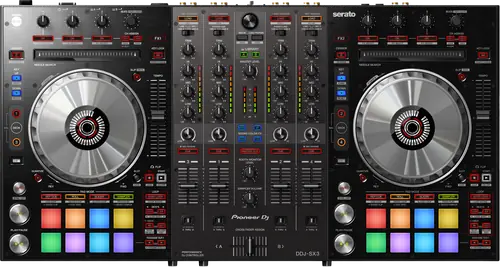
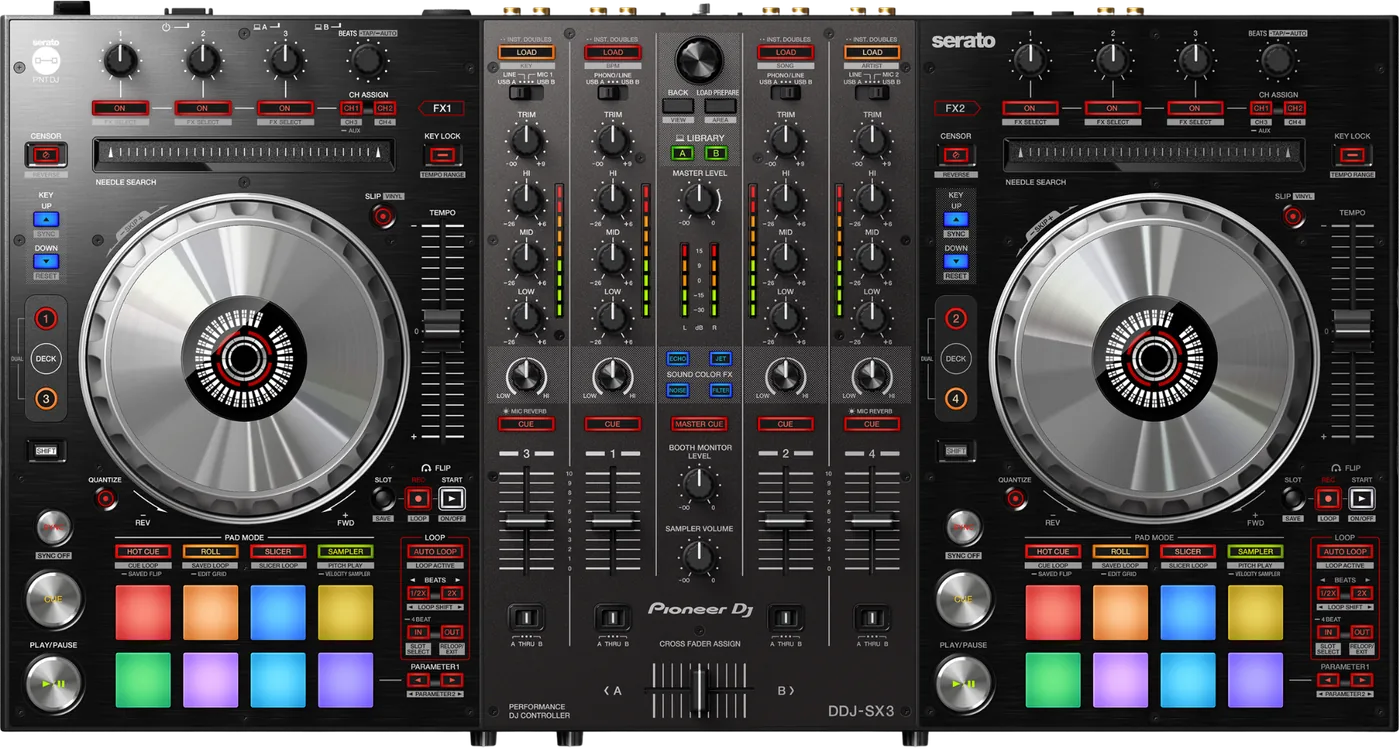
Booth briefing. The DDJ-SX3 is Pioneer's four channel Serato controller from 2018, and it is the one unit in this family that AlphaTheta are still maintaining: the current macOS driver is version 4.0.4 of 12 May 2026 and it adds Tahoe support. Three microphone inputs, two USB-B ports for two computers, and a firmware updater whose own guide stops at High Sierra and wants Java. rekordbox does not list it, while it does list the older DDJ-SX2.
When it goes wrong: The computer cannot see the controller No sound from the controller
Fast Lane
The five things that decide your gig
The five things on the DDJ-SX3 that change what happens next, if you are reading this in the booth. All five are explained in full further down this page.
This is the one in the family whose Mac driver is still being built.
The current Mac driver is version 4.0.4, released 12 May 2026, and its stated improvement is "macOS Tahoe support." Among the four channel units in this family it is the only one with a current macOS driver: AlphaTheta publish no macOS driver for the DDJ-SX2 at all because it is class compliant, and the highest one published for the DDJ-SZ2 stopped at Sonoma support in 2023. The two channel DDJ-SR2 has a current one too, version 4.0.2 of 16 June 2026. Separately, and this is Serato's statement rather than AlphaTheta's, the DDJ-SX3 is the only unit in the family in the Supported column of Serato's macOS 26 Tahoe page.
Serato list the DDJ-SX3 under Supported hardware for macOS 26 Tahoe from Serato DJ Pro and Lite 4.0.1, under supported hardware for macOS 15 Sequoia from 3.2.3, and under supported hardware for Windows 11. On the same Tahoe page the DDJ-SX2 sits under In Testing and the DDJ-SZ and DDJ-SZ2 sit under Currently Unsupported. The DDJ-SX3 is the only unit in this family in the supported column.
The driver reaches Tahoe. The firmware updater does not, and they are different things.
The audio driver is current to macOS Tahoe 26. The firmware updater is not the same piece of software and its guide names no macOS newer than High Sierra 10.13, and on Windows nothing newer than Windows 10. The updater is also a Java .jar and AlphaTheta tell you to install the Java Runtime Environment first, noting that macOS does not ship with Java. Nobody has tested whether the .jar fails on a modern Mac, so treat this as documentation that stops rather than as a known failure.
rekordbox does not list it, and it does list the older DDJ-SX2.
rekordbox does not list the DDJ-SX3 as a compatible unit in any mode. It is absent from the compatible DJ units page, absent from the hardware unlock page, and absent from AlphaTheta’s rekordbox ver. 5 compatible units list, where the rekordbox dj row reads "DDJ-SZ/SX2/SX/SR/SB2/SB/SP1/WeGO3/WeGO2/WeGO/ERGO" and the dvs row reads "DDJ-RX/RR/SZ/SX2". This runs the opposite way to what most people assume: the older DDJ-SX2 is on both rows and the newer DDJ-SX3 is on neither. That is an omission from a list and not a printed denial.
A deck that stops after a scratch is a known firmware bug with a fix.
Ver. 1.02, released 06/Feb/2020. Its listed fixes are "The deck stopped playing after scratching or spinning the platter" and "Sometimes performance pads and buttons lit incorrectly when connecting a PC/Mac when Serato DJ Pro was running". A unit below 1.02 carries a documented deck stops after scratching bug.
If you are buying one used, read the version out of the Setting Utility before you hand over the money.
An unresponsive jog wheel has a documented setting behind it.
For an unresponsive jog wheel the maker’s own answer is three checks and one setting. Is the wheel dirty, is the touch sensor sensitivity set correctly, and does it respond if you touch a metal part at the same time. Clean it with a soft cloth, or diluted neutral detergent if it is very dirty, and "Use the utilities mode to adjust the touch sensor sensitivity". This is the documented remedy for the most common complaint about this model.
If something goes wrong
The computer does not see the controller
Short answer. When the unit is not recognised after installing the driver, AlphaTheta document a full reinstall rather than a retry. On Windows, open Device Manager, look under "Sound, video and game controllers", "Right-click the item where ‘?’ or ‘!’ is displayed, and then click [Uninstall]", uninstall the correctly shown DDJ-SX3 entries the same way, disconnect the USB cable and leave it disconnected, uninstall the driver software, restart, reinstall, then reconnect. On macOS they say the driver "may not have been installed properly": disconnect USB, uninstall the driver, restart, reinstall.
Why a reinstall rather than a retry. A half installed driver looks exactly like a broken cable from where you are standing. AlphaTheta’s procedure deliberately removes every trace of the device from the system before putting the driver back, because a stale entry is what usually survives a simple reinstall.
The cheap checks first. The manual’s own troubleshooting table says to connect the USB cable directly with no hub, quit background applications, remove other USB devices, try a different port, and uninstall unnecessary ASIO drivers if several are installed.
And one rule that catches people out. AlphaTheta publish a DDJ-SX3 MIDI Message List and one instruction that is easy to skip: "Please do not run multiple DJ Software on your computer at the same time. When switching from one DJ software to use another, please turn the DDJ-SX3 power off and then power back on after software switch has been completed."
The jog wheels, and the setting behind them
Short answer. For an unresponsive jog wheel the maker’s own answer is three checks and one setting. Is the wheel dirty, is the touch sensor sensitivity set correctly, and does it respond if you touch a metal part at the same time. Clean it with a soft cloth, or diluted neutral detergent if it is very dirty, and "Use the utilities mode to adjust the touch sensor sensitivity". This is the documented remedy for the most common complaint about this model.
Why the metal test is in there. A capacitive touch sensor reads your body, not your hand. If the DDJ-SX3 wheel responds when you touch a metal part at the same time, the sensor works and the sensitivity is the thing to change.
What people report that is not confirmed. Users on Pioneer’s own forum report a crossfader that does not fade properly in normal use but works while SHIFT is held. No maker source documents that fault, the thread closed unresolved, and this site will not name a cause for it.
Tracks that are missing, or files that will not edit
Short answer. Both of these are settings and not faults. Two library problems have settings rather than causes. iTunes tracks not showing needs "[Show iTunes Library]" ticked in the [Library + Display] tab, and if it is already ticked, untick it and tick it again. Files that cannot be edited means "[Protect Library]" is enabled under [SETUP], [Library + Display].
The other two in the same table. Tracks missing from the library usually means the files were never imported, or an empty crate is selected. Recording that produces nothing usually means the level was too low, or the file was never saved after the recording stopped.
Why they are on a page about hardware. Because from the booth they present as the DDJ-SX3 having lost your music, and the fix is three clicks in software.
What to watch for
The updater and the driver are not the same software
Short answer. The audio driver is current to macOS Tahoe 26. The firmware updater is not the same piece of software and its guide names no macOS newer than High Sierra 10.13, and on Windows nothing newer than Windows 10. The updater is also a Java .jar and AlphaTheta tell you to install the Java Runtime Environment first, noting that macOS does not ship with Java. Nobody has tested whether the .jar fails on a modern Mac, so treat this as documentation that stops rather than as a known failure.
Why this bites. A DJ reads that the driver supports Tahoe, concludes the DDJ-SX3 is fully current, and then finds the firmware tool is a Java jar whose documentation was written for macOS High Sierra. Those are two separate pieces of software from the same maker with two separate histories.
What this page does not claim. Nobody has tested whether the jar fails on a modern Mac. The sourced fact is that AlphaTheta’s guide names no newer system, not that the tool is broken.
The practical answer. If you have an older machine, that is the one to run the firmware update from.
A macOS issue that names this model
Short answer. Serato’s known issue about losing audio output on macOS when another application takes focus names the DDJ-SX3 on its affected list. The macOS versions named are Catalina, Big Sur and Monterey, and the resolution Serato give is Pioneer driver 4.0.1 or 4.0.1.1, or Serato DJ Pro 2.6.0 or higher. The current Mac driver is 4.0.4, which is past both of the versions Serato name.
What it looks like. The controller keeps working and the audio stops, after you click on something else on the computer. It is not the sort of failure anyone diagnoses from the booth.
What to do. Check your driver version. The current Mac driver is well past the one Serato name as the fix, so a unit that is up to date is not exposed.
Compatibility
Drivers, and how far each one reaches
Short answer. The current Mac driver is version 4.0.4, released 12 May 2026, and its stated improvement is "macOS Tahoe support." Among the four channel units in this family it is the only one with a current macOS driver: AlphaTheta publish no macOS driver for the DDJ-SX2 at all because it is class compliant, and the highest one published for the DDJ-SZ2 stopped at Sonoma support in 2023. The two channel DDJ-SR2 has a current one too, version 4.0.2 of 16 June 2026. Separately, and this is Serato's statement rather than AlphaTheta's, the DDJ-SX3 is the only unit in the family in the Supported column of Serato's macOS 26 Tahoe page.
The systems AlphaTheta name. AlphaTheta name macOS Tahoe 26, Sequoia 15, Sonoma 14 and Ventura 13, all on Intel and Apple M series, plus Windows 11 and Windows 10 with their service packs up to date. The page lists what is supported and carries no support ended statement for anything.
The macOS driver history in full. Version 4.0.4 on 12 May 2026 added macOS Tahoe support; 4.0.3 on 28 November 2023 added Sonoma; 4.0.1 on 9 June 2022 improved stability; 4.0.0 on 9 December 2021 added Monterey on both Intel and M1 and fixed a driver not being recognised after restarting a Mac on Big Sur; 3.0.0 on 4 February 2021 added Big Sur.
The gap that is not a gap. There is no Sequoia specific driver release. The Mac driver history goes from Sonoma straight to Tahoe, and Sequoia is nonetheless on AlphaTheta’s supported list. Read that as version 4.0.3 having carried Sequoia without a version bump, not as a gap in support.
Windows. Version 1.010, released 9 December 2021, with the change note "[FIXED] Minor issues." The article itself names no Windows version and defers to the supported OS page, which names Windows 11 and Windows 10.
Where Serato place it, against its siblings
Short answer. Serato list the DDJ-SX3 under Supported hardware for macOS 26 Tahoe from Serato DJ Pro and Lite 4.0.1, under supported hardware for macOS 15 Sequoia from 3.2.3, and under supported hardware for Windows 11. On the same Tahoe page the DDJ-SX2 sits under In Testing and the DDJ-SZ and DDJ-SZ2 sit under Currently Unsupported. The DDJ-SX3 is the only unit in this family in the supported column.
Why that is the buying advice. Four broadly similar four channel and two channel Serato controllers, and only one of them is in the supported column on macOS 26 Tahoe. If you are choosing between them on a second hand listing, that is the difference that will still matter in two years.
And check the date. Serato revise those pages as testing progresses. Look before you update a machine you have to work on.
rekordbox, and the list this unit is not on
Short answer. rekordbox does not list the DDJ-SX3 as a compatible unit in any mode. It is absent from the compatible DJ units page, absent from the hardware unlock page, and absent from AlphaTheta’s rekordbox ver. 5 compatible units list, where the rekordbox dj row reads "DDJ-SZ/SX2/SX/SR/SB2/SB/SP1/WeGO3/WeGO2/WeGO/ERGO" and the dvs row reads "DDJ-RX/RR/SZ/SX2". This runs the opposite way to what most people assume: the older DDJ-SX2 is on both rows and the newer DDJ-SX3 is on neither. That is an omission from a list and not a printed denial.
Why the phrasing is careful. An omission from a list is not a printed denial. AlphaTheta have not written that the DDJ-SX3 does not work with rekordbox, and this site will not write it for them. What can be said is that it appears nowhere on any of their three compatibility pages while its predecessor appears on two rows of one.
What that means if rekordbox is your library. Do not buy this unit expecting rekordbox hardware unlock. It is a Serato controller and every maker statement about it is about Serato.
Features explained
Serato DJ Pro, and what comes with the unit
The licence. AlphaTheta state "Those who use DDJ-SX3 do not have to activate the unit or buy the license." Serato say the hardware "unlocks Serato DJ Pro for free when plugged into the software" and that it also works with Serato Studio.
Flip and Pitch ’n Time. Pioneer state "A voucher for the Serato Flip and Pitch ’n Time DJ Expansion Packs is included with the DDJ-SX3", and their product page says both packs are included. Serato list both licences as included with dedicated hardware controls. Whether that entitlement follows a second hand unit is not stated by anyone.
DVS, and there is no argument about this one. AlphaTheta answer this one directly in an article of its own: "You need to purchase the DVS Expansion Packs from Serato separately to use the DVS functions of Serato DJ Pro." Pioneer’s launch material says the same, calling it a paid upgrade. There is no disagreement between sources on this model.
Serato Video. No source names Serato Video for the DDJ-SX3. Pioneer ran free Serato Video voucher campaigns on the DDJ-SX2 and again on the DDJ-SZ2, and neither of them transfers to this model.
What changed from the DDJ-SX2
Short answer. Pioneer frame it as an improvement on the DDJ-SX2 with "a familiar layout and lower latency jog wheels". The sourced differences are three: a third microphone input with its own level knob on the front panel, added to the twin rear inputs inherited from the DDJ-SX2; jog wheels with "reduced latency compared to those on the DDJ-SX2"; and two USB-B ports so two computers running Serato DJ Pro can be connected at once. The jog wheel difference is about latency and not about size or material, and no source compares the two units’ dimensions, weight, converters or faders.
The microphones are the substantial change. Three microphone inputs, each with level, three band EQ, low cut filter, compressor and reverb control. Sound Colour FX such as Echo and Serato DJ Pro effects can be applied to the two microphones plugged into the rear. Pioneer say the third input and its level knob are on the front panel. What no source does is map the numbered MIC1, MIC2 and MIC3 terminals in the specification table onto front and rear, so this page does not tell you which numbered terminal is the front one.
And one thing went the other way. The older DDJ-SX2 is on AlphaTheta’s rekordbox compatible units list and this one is not, which is a section of its own.
Firmware, and the updater that needs an older machine
The version they publish today. Ver. 1.02, released 06/Feb/2020. Its listed fixes are "The deck stopped playing after scratching or spinning the platter" and "Sometimes performance pads and buttons lit incorrectly when connecting a PC/Mac when Serato DJ Pro was running". A unit below 1.02 carries a documented deck stops after scratching bug.
How to run it. Check the installed version in the DDJ-SX3 Setting Utility, power the unit off, close all applications, connect the USB cable to the unit’s [USB A] port, then power on while holding [SHIFT] and [SYNC] on the LEFT deck until the level meter LEDs flash. Run the .jar and click [Start]. It takes roughly three to five minutes.
The catch. The audio driver is current to macOS Tahoe 26. The firmware updater is not the same piece of software and its guide names no macOS newer than High Sierra 10.13, and on Windows nothing newer than Windows 10. The updater is also a Java .jar and AlphaTheta tell you to install the Java Runtime Environment first, noting that macOS does not ship with Java. Nobody has tested whether the .jar fails on a modern Mac, so treat this as documentation that stops rather than as a known failure.
Nothing before 1.02 is published. AlphaTheta show only that version’s changes and no earlier change history could be found, so this page does not say what 1.00 or 1.01 did.
Professional tips
Before you play on one
Read the firmware version out of the Setting Utility before you buy used. A unit below 1.02 has a documented deck stops after scratching bug.
Keep an older machine for firmware work. The updater guide names no macOS newer than High Sierra, and it needs Java installed first.
Power the controller off and on when you switch DJ software. That is AlphaTheta’s own instruction, and they also say not to run two DJ applications at once.
Two USB-B ports means a real back to back. Two computers running Serato DJ Pro can be connected at the same time, which is the fastest changeover there is.
Do not carry the DDJ-SR2 power supply. This unit takes DC 5 V and that one takes DC 12 V.
Connections and setup
What goes in and what comes out
Inputs. It has two sets of RCA line inputs and two sets of RCA line or phono inputs, so four rear inputs of which two switch to phono, plus MIC1 on XLR or 6.3 mm jack, MIC2 on XLR and MIC3 on 6.3 mm jack.
The microphone caveat. Three microphone inputs, each with level, three band EQ, low cut filter, compressor and reverb control. Sound Colour FX such as Echo and Serato DJ Pro effects can be applied to the two microphones plugged into the rear. Pioneer say the third input and its level knob are on the front panel. What no source does is map the numbered MIC1, MIC2 and MIC3 terminals in the specification table onto front and rear, so this page does not tell you which numbered terminal is the front one.
Outputs. MASTER OUT 1 on XLR, MASTER OUT 2 on RCA, one 6.3 mm BOOTH output, and 6.3 mm and 3.5 mm headphone outputs.
To the computer. two USB type B ports, so two computers can be connected at the same time.
Power. It runs from a DC 5 V, 3 A adapter whose AC side is rated 100 V to 240 V, 50 Hz/60 Hz at 800 mA.
The physical facts. It measures 664 x 354.4 x 70.4 mm as width, then depth, then height, weighs 6.1 kg and is rated for +5 to +35 degrees C and 5 to 85 percent humidity with no condensation. Its audio path is 44.1 kHz sampling rate, 24 bit A/D and D/A conversion, 20 Hz to 20 kHz, with signal to noise ratios of 107 dB on USB, 96 dB on line, 87 dB on phono and 80 dB on the microphones, and total harmonic distortion of 0.003 percent on USB and 0.005 percent on line.
Where these figures come from. The Pioneer DJ DDJ-SX3 Operating Instructions (Quick Start Guide) specifications table, read on a third party mirror, with the signal to noise figures cross checked against a second mirror. The two agree.
Firmware, drivers and manuals
What the maker still publishes
This model is well documented and most of it still resolves. AlphaTheta list four documents dated 31 May 2018, including a separate addendum covering specifications and the external power supply, plus a current operating system article, a current macOS driver, a Windows driver and a firmware article.
One document could not be opened. The specifications addendum is still linked and did not open during research, which is why the power consumption figure in watts is not published on this page. It is not that the unit has no figure; it is that this site has not read one.
Official downloads and documents
Go to AlphaTheta for the files themselves. We link their pages instead of hosting a copy, because a manual copied here is a snapshot of release day and theirs is the one that stays current.
Firmware downloads. Official Pioneer DJ firmware page →
Manuals. Official Pioneer DJ manual page →
Broken link? Let us know and we'll fix it.
Frequently asked questions
Quick answers
- Does it work on macOS Tahoe?
- The current Mac driver is version 4.0.4, released 12 May 2026, and its stated improvement is "macOS Tahoe support." Among the four channel units in this family it is the only one with a current macOS driver: AlphaTheta publish no macOS driver for the DDJ-SX2 at all because it is class compliant, and the highest one published for the DDJ-SZ2 stopped at Sonoma support in 2023. The two channel DDJ-SR2 has a current one too, version 4.0.2 of 16 June 2026. Separately, and this is Serato's statement rather than AlphaTheta's, the DDJ-SX3 is the only unit in the family in the Supported column of Serato's macOS 26 Tahoe page. Serato list the DDJ-SX3 under Supported hardware for macOS 26 Tahoe from Serato DJ Pro and Lite 4.0.1, under supported hardware for macOS 15 Sequoia from 3.2.3, and under supported hardware for Windows 11. On the same Tahoe page the DDJ-SX2 sits under In Testing and the DDJ-SZ and DDJ-SZ2 sit under Currently Unsupported. The DDJ-SX3 is the only unit in this family in the supported column.
- What operating systems does AlphaTheta name?
- AlphaTheta name macOS Tahoe 26, Sequoia 15, Sonoma 14 and Ventura 13, all on Intel and Apple M series, plus Windows 11 and Windows 10 with their service packs up to date. The page lists what is supported and carries no support ended statement for anything.
- What is the Windows driver version?
- Version 1.010, released 9 December 2021, with the change note "[FIXED] Minor issues." The article itself names no Windows version and defers to the supported OS page, which names Windows 11 and Windows 10.
- Why is there no macOS Sequoia driver?
- There is no Sequoia specific driver release. The Mac driver history goes from Sonoma straight to Tahoe, and Sequoia is nonetheless on AlphaTheta’s supported list. Read that as version 4.0.3 having carried Sequoia without a version bump, not as a gap in support.
- Which firmware version should it be on?
- Ver. 1.02, released 06/Feb/2020. Its listed fixes are "The deck stopped playing after scratching or spinning the platter" and "Sometimes performance pads and buttons lit incorrectly when connecting a PC/Mac when Serato DJ Pro was running". A unit below 1.02 carries a documented deck stops after scratching bug.
- How do I update the firmware?
- Check the installed version in the DDJ-SX3 Setting Utility, power the unit off, close all applications, connect the USB cable to the unit’s [USB A] port, then power on while holding [SHIFT] and [SYNC] on the LEFT deck until the level meter LEDs flash. Run the .jar and click [Start]. It takes roughly three to five minutes. The audio driver is current to macOS Tahoe 26. The firmware updater is not the same piece of software and its guide names no macOS newer than High Sierra 10.13, and on Windows nothing newer than Windows 10. The updater is also a Java .jar and AlphaTheta tell you to install the Java Runtime Environment first, noting that macOS does not ship with Java. Nobody has tested whether the .jar fails on a modern Mac, so treat this as documentation that stops rather than as a known failure.
- Do I get Serato DJ Pro for free?
- AlphaTheta state "Those who use DDJ-SX3 do not have to activate the unit or buy the license." Serato say the hardware "unlocks Serato DJ Pro for free when plugged into the software" and that it also works with Serato Studio.
- Is Serato DVS included?
- AlphaTheta answer this one directly in an article of its own: "You need to purchase the DVS Expansion Packs from Serato separately to use the DVS functions of Serato DJ Pro." Pioneer’s launch material says the same, calling it a paid upgrade. There is no disagreement between sources on this model.
- Does it work with rekordbox?
- rekordbox does not list the DDJ-SX3 as a compatible unit in any mode. It is absent from the compatible DJ units page, absent from the hardware unlock page, and absent from AlphaTheta’s rekordbox ver. 5 compatible units list, where the rekordbox dj row reads "DDJ-SZ/SX2/SX/SR/SB2/SB/SP1/WeGO3/WeGO2/WeGO/ERGO" and the dvs row reads "DDJ-RX/RR/SZ/SX2". This runs the opposite way to what most people assume: the older DDJ-SX2 is on both rows and the newer DDJ-SX3 is on neither. That is an omission from a list and not a printed denial.
- How is it different from the DDJ-SX2?
- Pioneer frame it as an improvement on the DDJ-SX2 with "a familiar layout and lower latency jog wheels". The sourced differences are three: a third microphone input with its own level knob on the front panel, added to the twin rear inputs inherited from the DDJ-SX2; jog wheels with "reduced latency compared to those on the DDJ-SX2"; and two USB-B ports so two computers running Serato DJ Pro can be connected at once. The jog wheel difference is about latency and not about size or material, and no source compares the two units’ dimensions, weight, converters or faders.
- How many microphone inputs does it have?
- Three. It has two sets of RCA line inputs and two sets of RCA line or phono inputs, so four rear inputs of which two switch to phono, plus MIC1 on XLR or 6.3 mm jack, MIC2 on XLR and MIC3 on 6.3 mm jack.
- Can I connect two computers?
- Yes. It has two USB type B ports, so two computers can be connected at the same time.
- Is it discontinued?
- Pioneer DJ serve the product page from an /archive/ path and the support documents URL redirects into the AlphaTheta Help Center. No page found carries the words discontinued or no longer available, so this site says archived and does not say discontinued.
Playing soon and it is not working?
Start Emergency ModeKeep the Emergency Card
We will email you the printable PDF so it is on your phone before the next dark booth. Occasional notes that save gigs. No spam, unsubscribe in one click.
Registering is free and counts everywhere on Save My Gig. We send a confirmation email first. Your address is stored with Brevo, our email provider. Unsubscribe any time. Privacy
Sources: AlphaTheta's Help Center articles for the DDJ-SX3, their published macOS driver change history and firmware update guide, Pioneer DJ's 2018 launch announcement and archived product page, Serato's compatibility pages, and Pioneer's own Quick Start Guide read on a third party mirror, checked 10 September 2026. Specifications theirs, priorities ours.