

Xone:24 and Xone:24C, the field manual
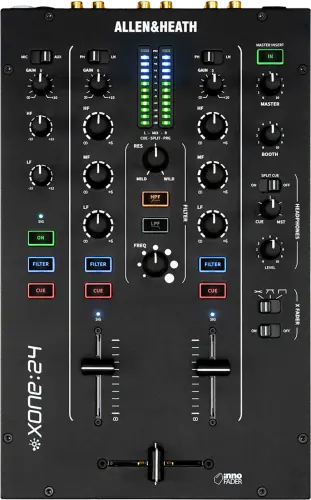
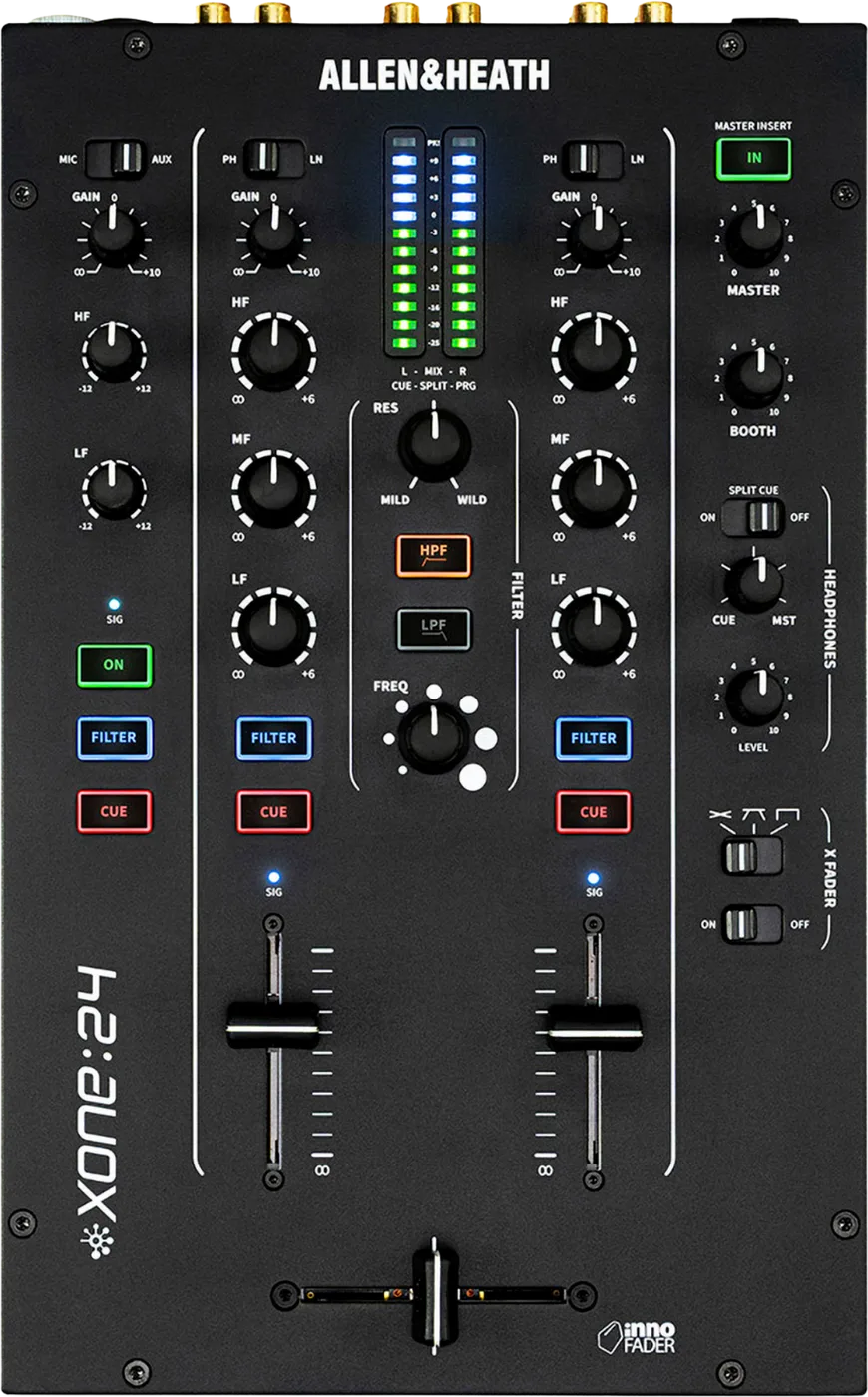
Which one am I standing at?
Two mixers, the same analogue circuit, one difference you can see from the front.
Xone:24
PH / LNMIC / AUX
A Xone:24 has no USB socket anywhere on it, and its two input selectors read PH / LN and MIC / AUX. Two positions each.
Xone:24C
PH / USB / LNMIC / USB / AUX
A Xone:24C has three USB-C sockets on the rear, and the same two selectors read PH / USB / LN and MIC / USB / AUX. Three positions each, and the middle one is USB.
The trap, and it can only happen on a 24C. On a Xone:24C the channel input selector can be sitting in the middle, on USB, and a working turntable is silent with nothing else on the mixer looking wrong. On a Xone:24 there is no middle position to be sitting in, so this particular failure cannot happen to you.
Two more tells if you are round the back: a Xone:24C has a pair of USB IN LN/PH switches for channels 1 and 2 that a Xone:24 does not. It also weighs 2.8 kg against 2.7 kg, which helps at all in a dark booth.
Booth briefing. The Xone:24 and Xone:24C are Allen & Heath's two channel mixers, and the 24C is the one whose input switches carry a USB position beside the analogue sources. Both channels take a turntable. Crossfader assignment is fixed, CH1 to X and CH2 to Y, with an X FADER ON/OFF switch that takes the crossfader out of the circuit. There is one filter, high pass and low pass, and a channel is in it when its blue FILTER button is lit. A MASTER INSERT button switches an insert point into the master path for an external processor.
When it goes wrong: No sound from the mixer
Fast Lane
The five things that decide your gig
The five things on the Xone:24 that change what happens next, if you are reading this in the booth. All five are explained in full further down this page.
A lit MASTER INSERT button with nothing patched into it is a dead master.
The mixer ships with shorting plugs in the insert sockets, and Allen & Heath caption their own product photography of both models "Top view with master insert shorting plugs", which tells you they expect them to be there. If those plugs have walked and the MASTER INSERT button is lit with nothing patched, the master output is dead while every other light on the mixer looks completely normal.
It is the first thing to look at when the room goes quiet and the mixer looks fine, because nothing on the panel is going to tell you.
On a Xone:24C the input selector has a middle position, and it is USB.
On a Xone:24C the channel input selector can be sitting in the middle, on USB, and a working turntable is silent with nothing else on the mixer looking wrong. On a Xone:24 there is no middle position to be sitting in, so this particular failure cannot happen to you.
Tell the two mixers apart from the front: A Xone:24C has three USB-C sockets on the rear, and the same two selectors read PH / USB / LN and MIC / USB / AUX. Three positions each, and the middle one is USB.
A channel is in the filter only while its FILTER button is lit blue.
A channel is only in the filter when that channel's FILTER button is lit blue, and all three channels can be assigned, including the aux and mic channel. The frequency sweep runs below 20 Hz to above 20 kHz at the minus 3 dB cut-off point, with a resonance control marked MILD to WILD.
There is one filter and it does high pass and low pass only. There is no band pass on this mixer, unlike the Xone:43, the Xone:92 and the Xone:96, so the notch and all-pass tricks those desks can do are not available here.
There is no crossfader assign switch on this mixer. CH1 is X, CH2 is Y, always.
Crossfader assign is fixed and there is no assign switch. CH1 is always X and CH2 is always Y. What this mixer has instead is an X FADER ON/OFF switch, which is how you take the crossfader out of the signal path, and a DJ used to the Xone:43's per-channel assign will look for something that does not exist.
It runs on a DC brick, and an IEC lead from the venue will not save you.
An external DC power supply brick, supplied with the mixer, taking 100 to 240 V at 50 or 60 Hz and drawing 35 W maximum, into a two-pin DC socket with a cable clamp. There is a mains power switch on the rear.
This is not the Xone:43 arrangement. The 43 has its supply inside the mixer and needs only an IEC lead, which any venue can find. If this brick walks off, the mixer does not work and no cable in the building will save it.
If something goes wrong
The master is dead and everything on the mixer looks normal
Short answer. Look at the Xone:24 MASTER INSERT button. The mixer ships with shorting plugs in the insert sockets, and Allen & Heath caption their own product photography of both models "Top view with master insert shorting plugs", which tells you they expect them to be there. If those plugs have walked and the MASTER INSERT button is lit with nothing patched, the master output is dead while every other light on the mixer looks completely normal.
Why this happens. Engaging the insert breaks the master signal path and routes it out of the rear SND sockets and back in through the RTN sockets. With nothing patched, the shorting plugs are what completes that loop. No plugs and no outboard means the signal goes out and never comes back, and nothing on the panel is designed to tell you.
Fix it now. Press MASTER INSERT so it is not lit. The master comes straight back. If you actually need the insert, patch something into it or find the shorting plugs.
Avoid it next time. Look at the insert button during the line check, before the room fills. In a rental or a shared booth, check the rear sockets have their plugs in while you are cabling rather than after.
A deck is silent and the input switch is sitting in the middle
This one is Xone:24C only. On a Xone:24C the channel input selector can be sitting in the middle, on USB, and a working turntable is silent with nothing else on the mixer looking wrong. On a Xone:24 there is no middle position to be sitting in, so this particular failure cannot happen to you.
Why this happens. On the C the selector has a third position between PH and LN, and it feeds the channel from the computer instead of from the socket. With no computer attached, or with the computer attached and playing nothing, the channel is fed from silence. The gain works, the EQ works, the meter reads nothing, and the turntable is fine.
Fix it now. Push the switch fully to PH for a turntable, or fully to LN for a line source. Do the same on the aux channel if a microphone has gone quiet: its selector is MIC / USB / AUX and it has the same middle position.
Avoid it next time. Set both channel selectors and the aux selector to a hard end position during the line check, and look at them rather than feeling for them. A switch parked centrally looks a lot like a switch parked anywhere else in a dark booth.
The mixer sounds fine and the software sees no timecode
Short answer. Two things do this on a 24C and neither of them touches what the room hears.
The rear switch. Those two rear switches decide what channels 1 and 2 send UP to the computer, for timecode control or for recording the hardware inputs. They do not touch the analogue mix at all, which is exactly why they are dangerous: with timecode vinyl and the switch on LN the RIAA stage is bypassed on the way to the computer, so the mixer sounds completely fine while the software sees nothing it can use.
The mode. The mode is not a software setting and it does not reset. It is changed only by a power-on button combination, it survives being switched off, and nothing on the panel tells you which mode you are in, so the mode the last DJ left it in is the mode you have arrived to. If the mixer was left in DAW mode, your timecode is not on the input pairs your software expects.
Fix it now. Set the rear USB IN switch for that channel to PH, then check the mode. The mixer has to be off before you start. Hold both the Channel 1 and Channel 2 CUE buttons down, switch the mixer on at the rear panel standby switch, keep the two cue buttons held for about three seconds after it comes on, then release them. The AUX channel CUE button blinks red rapidly to show the setup state, and the flashing blue FILTER button shows the mode you are in. Then it is one of three buttons, and which one matters: the AUX FILTER button is STREAM mode, the Channel 1 FILTER button is DVS PRO mode and the Channel 2 FILTER button is DAW mode. DVS PRO puts CH1 on USB in 1 and 2 and CH2 on 3 and 4. It is a power cycle, so do it before the doors open.
Avoid it next time. Set the mode when you arrive, not when it fails, and remember that whatever you set is what the next DJ inherits.
The filter knob is doing nothing to the channel you are playing
Short answer. That Xone:24 channel is not assigned into the filter. A channel is only in the filter when that channel's FILTER button is lit blue, and all three channels can be assigned, including the aux and mic channel. The frequency sweep runs below 20 Hz to above 20 kHz at the minus 3 dB cut-off point, with a resonance control marked MILD to WILD.
Why this happens. There is one filter and three doors into it, and the door is the blue FILTER button on the channel strip. Unlit means the frequency and resonance controls are working perfectly on nothing.
And a power cycle is enough to clear them. Switching the mains power off resets two things about the filter. Allen & Heath state that the filter response defaults to HPF output and that the channel FILTER assignments are set OFF when mains power to the mixer is turned off, so after any power cycle no channel is in the filter and the filter is a high pass until you press something.
Fix it now. Press FILTER on the channel you want, and check which others are lit before you sweep, because everything in there moves together.
Avoid it next time. Set the assignments in the same pass as the gains. And if you were looking for a band pass, there is none on this mixer.
The power brick is missing and there is an IEC lead in the bag
Short answer. An IEC lead will not help. An external DC power supply brick, supplied with the mixer, taking 100 to 240 V at 50 or 60 Hz and drawing 35 W maximum, into a two-pin DC socket with a cable clamp. There is a mains power switch on the rear.
Why this happens. Most of the analogue mixers a DJ meets have their supply inside them and take a kettle lead, and a venue can always find a kettle lead. This is not the Xone:43 arrangement. The 43 has its supply inside the mixer and needs only an IEC lead, which any venue can find. If this brick walks off, the mixer does not work and no cable in the building will save it. A missing brick on a Xone:24 is a mixer that does not turn on and cannot be improvised around.
Fix it now. There is no fix in the room. Borrow the mixer's own brick from wherever it lives, or borrow a mixer.
Avoid it next time. If this mixer is yours, the brick is part of it and travels in the same case. If it is a rental, confirm the brick is in the box at pickup and not at the depot.
What to watch for
Where these mixers stand, and what the C does not stand for
Status. 14 October 2025, the date on Allen & Heath's own press page, which announced this mixer and the Xone:24C together. Both mixers are on Allen & Heath's current Xone range page and in stock at multiple retailers.
What the C stands for. Allen & Heath never say what the C stands for. It is absent from the press release, from both product pages, from both resources pages and from both user guides. USB-C and the 23C and 43C convention for a mixer with a soundcard are both plausible readings, and neither is theirs, so neither is printed here as fact.
Faults. No faults, service bulletins or recalls for either mixer were found in Allen & Heath's knowledge base. The product is under a year old, so that is a null result rather than a reliability verdict, and this page does not turn it into one in either direction. One owner reported USB connectivity problems with an iPad and a Mac that were resolved by a warranty replacement. One report, on a young product, is not a pattern and is not a recall, and it is recorded here as what it is.
What is not documented, and will not be invented here
What came before them. Nobody has said on the record what the Xone:24 replaced. gearnews describe these two as updates to the Xone:23 and Xone:23C. Allen & Heath's press release does not say so and neither does the quote in it, so this site records no succession. The circumstantial case is real, the 23 and 23C are off the current range page and the mini innoFADER that was an option on the 23 is standard here, and it is still a review's claim rather than the manufacturer's.
What the CleanFeed stage removes. Allen & Heath describe the USB master capture as "Post Insert / Post CleanFeed / Pre Master Level". Their own published definition of a clean feed elsewhere is a feed with the microphone channels removed, and yet this mixer's aux channel is documented as routing the mic to the record output. Those two cannot both be true in the same sense, so what the CleanFeed stage actually removes from the USB capture is not stated on this page. If a stream needs the mic in it, test it before you go live.
Firmware. There is no firmware section in the user guide and no firmware file on the resources page, only a Windows driver. That means Allen & Heath publish no update path, which is not the same as proving there is no firmware inside. By the same token, the Apple Silicon updater trap that catches an old Xone:K2 is not documented for this mixer, and nor is it ruled out.
How identical the two really are. The two mixers share a specification table in Allen & Heath's own documents, which is strong evidence that the analogue paths are the same and is not a schematic. Nobody has published a statement that they are identical in production, so this page says identically specified rather than identical.
Rack mounting. No rack kit was found for either mixer in Allen & Heath's resources or on their support site. That means rack mounting is not documented, which is not the same as saying it is impossible, and this page says only the first thing.
When they shipped. Allen & Heath announced both mixers on 14 October 2025 and published no shipping date. Both were in stock at multiple retailers by 12 August 2026, which is an observation about shops rather than a manufacturer statement.
Size and weight. Neither user guide prints a size or a weight for either mixer. No dimensions, no weight, no operating temperature or humidity range and no fuse rating appear in either document, so any figure for those comes from somewhere other than the guide and this page says so rather than passing them off as manual specifications.
Where they are built. Allen & Heath publish no country of manufacture for this mixer. What they publish is a policy: they build in both the United Kingdom and China, to the same standard, and they name no models on either side of that line.
Compatibility
The Xone:24C soundcard, in full, and the mode that survives a power cut
This section is about the 24C only. A Xone:24 has none of it. The Xone:24 has no USB socket, no MIDI, no soundcard and no firmware. The rear panel connector list contains no USB socket of any kind, so a laptop has nowhere to plug in. That is an absent connector rather than a disabled feature.
The interface. 6 channels in and 6 channels out, which Allen & Heath market as "12 Channel: 3 x Stereo In / 3 x Stereo Out" by counting both directions. 16-bit and 24-bit, at 44.1, 48, 88.2 and 96 kHz, over USB 2.0 on Type-C. Line-up is 0 dBu at minus 15 dBFS, and buffer sizes run from 32 to 8192 samples.
Drivers. Class compliant on macOS and iOS, where Allen & Heath publish no download because it presents as a Core Audio and Core MIDI device. Windows 10 and 11 need their driver, version 5.72.0.
The three sockets. One USB-C HOST port carrying the soundcard and the MIDI, and two USB-C HUB ports for controllers and other devices. Allen & Heath rate every one of the three at up to 7.5 W. Owners report that the computer has to go into the dedicated HOST port, the one marked with a laptop logo, and that a charge-only USB-C cable connects nothing at all. The port distinction itself is in Allen & Heath's guide; the cable is a field report and the fix is a data cable.
What the two hub ports are, and what they need. The two HUB ports are what replaces X:Link on this mixer. Allen & Heath describe them as dual USB-C hub ports that replace X:Link, carrying expanded MIDI control and audio aggregation for DJ or DAW software via a connected computer, and they support the Xone:K3 and the legacy K Series controllers as well as third-party class-compliant USB-C devices, in a star topology so the host recognises each connected device individually. The specification is explicit that the hub ports run host to hub and hub to host only, so a controller plugged into a hub port with no computer on the HOST port reaches nothing.
Bus power, and charging off the HOST port. Each of the three USB-C ports supplies up to 7.5 W of bus power, and Allen & Heath state that the HOST port can provide reverse power to charge class-compliant USB host devices such as tablets and smartphones while they are connected and in use.
The three modes. There are three USB modes. STREAM, the default, sends the master on USB IN 1/2 and the CH1 and CH2 RCA inputs on 3/4 and 5/6. DVS PRO sends CH1 on 1/2, CH2 on 3/4 and the master on 5/6. DAW sends CH1 and CH2 post-EQ and pre-fader on 1/2 and 3/4, with the master on 5/6.
Where each mode taps the channel, which is the part that decides your recording. Where the mixer taps the channels for USB changes with the mode, and the EQ is the thing that moves. In STREAM and in DVS PRO, Channel 1 and Channel 2 go up to the computer from their RCA inputs pre-gain and pre-EQ, which is what timecode needs and which also means none of your gain or EQ is in that feed. Only DAW mode takes them post-EQ and pre-fader, which is why Allen & Heath describe that mode as the one for stem capture and post-production.
Recording the moves as well as the audio. In DAW mode Allen & Heath say real-time fader movements from Channel 1, Channel 2 and the crossfader can be recorded as MIDI automation, so the moves land in the session alongside the audio.
How you change them, and why that matters. The mode is not a software setting and it does not reset. It is changed only by a power-on button combination, it survives being switched off, and nothing on the panel tells you which mode you are in, so the mode the last DJ left it in is the mode you have arrived to. Allen & Heath's precondition, in their own words: Press and hold down both Channel 1 and Channel 2 CUE buttons on the top panel. Power the mixer ON using the rear panel standby switch... Press the FILTER button for the required USB MODE.
The button combination, in full. The USB mode is set only while the mixer is being switched on. Allen & Heath state that the USB MODE routing configuration options can only be set while turning the mixer on, using the power-up setup process, and that the mixer must be off before that process is begun. There is no way to change it from a running mixer. Hold both the Channel 1 and Channel 2 CUE buttons down, switch the mixer on at the rear panel standby switch, keep the two cue buttons held for about three seconds after it comes on, then release them. The AUX channel CUE button blinks red rapidly to show the setup state, and the flashing blue FILTER button shows the mode you are in. Then it is one of three buttons, and which one matters: the AUX FILTER button is STREAM mode, the Channel 1 FILTER button is DVS PRO mode and the Channel 2 FILTER button is DAW mode.
And it is not the cue mode setup. Two different setups on this mixer use the same two cue buttons, and confusing them gets you the wrong result with nothing on the panel to say so. The USB mode is changed from cold, holding both channel cue buttons while you power the mixer on. The cue mode, latching or non-latching, is changed on a mixer that is already running, holding those same two buttons for five seconds. Same buttons, different starting condition, different thing changed.
The USB return. Selecting USB on a channel's input selector feeds that channel from the matching stereo output pair on the HOST port. Three stereo returns, one per channel.
The two rear switches nobody notices. Those two rear switches decide what channels 1 and 2 send UP to the computer, for timecode control or for recording the hardware inputs. They do not touch the analogue mix at all, which is exactly why they are dangerous: with timecode vinyl and the switch on LN the RIAA stage is bypassed on the way to the computer, so the mixer sounds completely fine while the software sees nothing it can use. Allen & Heath's own description: Set Channel 1 & 2 USB IN ('upstream' - mixer to USB host) to LN (for Line level) or PH (for RIAA level) signal input to the USB host.
MIDI. MIDI goes out over the USB HOST port and nowhere else, and every message is fixed to channel 16. There is no MIDI DIN socket. Mapped: the CH1 and CH2 faders on CC 05 and 06, the crossfader on CC 04, the VCF HPF and LPF buttons and the FREQ control on CC 07, the channel FILTER assign buttons, the cue assign buttons as note commands, and the MASTER INSERT IN button.
DVS, and who actually supports this mixer
Short answer. So the correct sentence is this one: the mixer has a DVS PRO routing mode and is class compliant on Mac and iOS, so it will work with timecode software that lets you choose arbitrary inputs. It is not certified or officially supported by any DVS vendor that could be confirmed, and nothing on this site calls it Serato DVS ready.
What each vendor has said. No DJ software is named anywhere in Allen & Heath's user guide for this mixer. It says only "compatible DJ software". Serato do not list the Xone:24C for DVS; their Allen & Heath article names the Xone:DB2, the Xone:DB4 and the Xone:43C. Algoriddim staff state on their own forum that djay "is not currently officially supported by djay on any platform" for this hardware, with a request logged on 28 October 2025. Traktor, rekordbox and Virtual DJ have published nothing either way.
Why the distinction is worth this much space. Certified means the vendor has tested the hardware and will support you when it goes wrong. Compatible means the signal can get where it needs to go and you are on your own. Both are useful; only one of them is something to promise a promoter.
If you are running timecode anyway. Put the mixer in DVS PRO mode, set the rear USB IN switches for channels 1 and 2 to PH for timecode vinyl, and expect to pick the inputs by hand in the software rather than choosing a preset with this mixer's name on it.
Recording on a Mac. Allen & Heath publish an article covering all their current Xone models: if you cannot record from a Xone over USB on a Mac, the cause is the recording application's microphone permission in macOS, not the mixer. Their interfaces comply with Apple's Core Audio framework, so nothing on the hardware side is adjustable and nothing on it is broken.
Features explained
The master insert can kill the master, silently
Short answer. The mixer ships with shorting plugs in the insert sockets, and Allen & Heath caption their own product photography of both models "Top view with master insert shorting plugs", which tells you they expect them to be there. If those plugs have walked and the MASTER INSERT button is lit with nothing patched, the master output is dead while every other light on the mixer looks completely normal.
What it is. The send and return is a master insert rather than a per-channel send: RCA SND and RTN for left and right on the rear, engaged by the MASTER INSERT button on the top panel, at minus 2 dBu nominal and plus 18 dBu maximum.
The jumpers, in their own words. Allen & Heath's line: Jumpers, connected between MASTER INSERT SND L / RTN L and MASTER INSERT SND R / RTN R, maintain the continuity of the master signal path Those little plugs are the only thing keeping the master signal path continuous while the insert is engaged and nothing else is patched into it, and the word Allen & Heath use for them in the guide is jumpers rather than shorting plugs, which is what to search their document for.
And their instruction is to leave them in. By default, MASTER INSERT jumpers are connected between INSERT SND and RTN sockets. If no FX or processing hardware is connected, these must be left in place in order to prevent the main mix audio from cutting out if the MASTER INSERT switch is activated inadvertently.
Why it is the first thing to check. There is no warning light for this and no meter behaviour that gives it away. The channels work, the cue works, the booth works. Only the room is silent.
Common mistakes. Pressing MASTER INSERT to see what it does, during soundcheck, on a mixer whose shorting plugs left with the last renter.
Two channels, two turntables, and a mic channel that can be filtered
Short answer. Two stereo channels, CH1 and CH2, plus an auxiliary Channel A for a microphone or a line source. Allen & Heath count it as 2 + 1. Phono is on CH1 and CH2 only, so two turntables is the limit. The RIAA stage is specified at plus 42 dB of gain at 1 kHz, with 6 mV RMS reading 0 VU at 1 kHz.
The other inputs. Three RCA line inputs, one each for CH1, CH2 and the aux channel. One balanced combi socket on the rear taking an XLR or a quarter-inch TRS, with plus 40 dB of gain and an equivalent input noise of minus 115 dB at 40 dB of gain from a 150 ohm source.
The mic is on the recording, which is not what the bigger Xones do. The microphone reaches the record output on this mixer. That is the opposite of the Xone:92 and the Xone:96, where a clean feed removes the mic from the recording and only an authorised service centre or an internal jumper changes it, so a DJ who learned the habit on those desks should unlearn it here. The guide's own wording for the Channel A on/off switch: Turns the Channel's audio routed to the master LR MIX and REC outputs ON or OFF. Useful if an un-switched microphone is used to easily bring vocals in and out of a mix.
The loud failure. Do not plug in LINE level sources to the PHONO Inputs as these will overload the preamp and cause severe, high level, signal distortion.
And the same rule the other way round. Allen & Heath's note on the line inputs: Do not connect turntables requiring RIAA equalisation. And avoid using low grade cables such as those often supplied with domestic equipment as these can impact on the signal path quality and quickly prove unreliable in use.
The microphones this mixer will not take. Their note on the mic input: Do not use high impedance, or condenser microphones that require phantom power. And avoid unbalanced mics wherever possible.
Switching the aux channel off does not clear your headphones. Turning the aux Channel A off does not take it out of your headphones. The note against that switch is that it does not affect the Channel A signal output to CUE, so a microphone that is off to the room is still live in the monitor.
Common mistakes. Assuming an MC is absent from the recording because that is what a Xone:92 does. Here they are on it, and the switch that removes them is the channel on switch.
The crossfader assign is fixed, and there is a switch instead
Short answer. Crossfader assign is fixed and there is no assign switch. CH1 is always X and CH2 is always Y. What this mixer has instead is an X FADER ON/OFF switch, which is how you take the crossfader out of the signal path, and a DJ used to the Xone:43's per-channel assign will look for something that does not exist.
Allen & Heath's own wording. Channel 1 fader assignment is fixed to the left (X) side of the crossfader. Channel 2 fader assignment is fixed to the right (Y) side.
The fader itself. A 45 mm VCA mini innoFADER, fitted as standard, with three curves: constant power, transition and fast-cut. Cut-off is better than minus 90 dB at 1 kHz with plus 10 dBu in. A mini innoFADER fitted as standard is unusual on a mixer this small, and on the Xone:43 the same fader is a paid upgrade.
What else the crossfader is holding. The crossfader is a voltage controlled amplifier and it also affects the level of signals routed via the Xone:VCF, so a channel sitting in the filter is still under the crossfader. Turning the crossfader off with the X FADER ON/OFF switch makes both Channel 1 and Channel 2 bypass the crossfader entirely.
Why this catches people. It is the exact opposite of the Xone:43, which has per-channel X / OFF / Y assign switches and no on/off switch at all. A DJ moving between the two reaches for a control that is not there, in both directions.
One filter, no band pass, and the channel has to be sent into it
Short answer. There is one filter and it does high pass and low pass only. There is no band pass on this mixer, unlike the Xone:43, the Xone:92 and the Xone:96, so the notch and all-pass tricks those desks can do are not available here.
The specification, verbatim. 1 x Voltage Controlled Filter, HPF / LPF, Adjustable Frequency & Resonance, Assignable CH 1 & 2 + Aux CH
How a channel gets into it. A channel is only in the filter when that channel's FILTER button is lit blue, and all three channels can be assigned, including the aux and mic channel. The frequency sweep runs below 20 Hz to above 20 kHz at the minus 3 dB cut-off point, with a resonance control marked MILD to WILD.
Where it sits in the path. Allen & Heath state the tap point for this mixer: the filter sits after the gain, after the EQ and after the fader. That is worth knowing because it means the channel fader is upstream of the filter: pulling the fader down takes the filtered signal with it, rather than leaving a resonant tail hanging in the room.
One response at a time, and no click when you swap. HPF and LPF are one filter with two responses and they cannot both be on. Pressing one switch automatically deselects the other. Allen & Heath describe the switching as analogue soft-switching, so the mix output is not affected by audible electronic artefacts when you change filter type or assign a channel into the filter while the room is listening.
What the mains switch does to it. Switching the mains power off resets two things about the filter. Allen & Heath state that the filter response defaults to HPF output and that the channel FILTER assignments are set OFF when mains power to the mixer is turned off, so after any power cycle no channel is in the filter and the filter is a high pass until you press something.
Common mistakes. Looking for the band pass. There is no BPF button on this mixer, so the notch and all-pass combinations the Xone:43 and Xone:92 can do are not available here.
Three bands and a total kill, and a single LED per channel
Short answer. Three bands on CH1 and CH2, plus 6 dB of boost and a Total Kill of minus 75 dB on each band, so it is an isolator rather than a shelving EQ. HF is shelving above 3.5 kHz, MF is 1.1 kHz and LF is shelving below 500 Hz.
The aux channel. The aux channel has a 2-band shelving EQ, plus and minus 12 dB, at 4.4 kHz and 160 Hz.
Metering, and it is not a ladder. The mix meters are 12-LED ladders running minus 25 dBu to plus 12 dBu. Channel metering is not a ladder at all: it is a single tri-colour LED per channel, green from minus 25 to 0 dBu, blue above 0 to plus 12 dBu and red above plus 12 dBu, so gain staging here is done by colour rather than by reading a scale.
How Allen & Heath say to set the gain against that colour. Allen & Heath say how to set the channel gain against that single LED. Set it so the LED displays green, averaging about 0 on the meters when the channel is cued, with peaks around plus 6 to plus 9 showing as blue. If the LED displays red continuously, turn the gain control down.
Setting levels, and what the meters are actually showing
Short answer. The Xone:24 main meters do not always show the master. The main meters follow whatever the monitor is set to rather than always showing the master. They display the main MIX level by default, that display is overridden by the input channel level whenever any channel CUE switch is active, and with SPLIT cue enabled the left MIX meter shows the cue signal level while the right MIX meter shows the mix bus. So a meter that has stopped agreeing with the room is usually a cue button rather than a fault.
The MASTER knob is not on the meters either. The MASTER rotary control does not move the meters and does not move the booth. Allen & Heath say in as many words that it does not affect BOOTH output level or the meters, and that cued MIX audio level is taken pre-MASTER to prevent a mismatch caused by where the MASTER control is sitting. A mixer metering correctly into a quiet room is a MASTER knob that is down.
Where to sit. Allen & Heath's own guidance is to run with the meters averaging around 0 and the loudest peaks between plus 6 and plus 9. If the PK indicator stays lit, the gain or the EQ is clipping.
Allen & Heath on levels, at length. The guide carries a full page on levels, and its figure for normal music is a signal ranging between minus 6 and plus 6 on the meters with an average around 0 dB. The argument for it is blunt: pushing the meters to peak hard does not produce more volume, it produces signal distortion, the maximum volume is set by the amplifier and speaker system rather than by the mixer, and staying in the normal range is what leaves headroom for unexpected peaks and keeps the signal well above the noise floor. They also warn that the ear compressing and shutting down at high levels is a warning about hearing damage rather than a reason to turn the system up.
Common mistakes. Reading the mix meters with a cue button down and concluding the master is healthy. What is on those meters is the cued channel, and the master could be anywhere.
Cue modes, split cue and the setup that mutes your headphones
Short answer. The Xone:24 and the Xone:24C both have two cue modes, and both guides publish how to move between them. Cue is non-latching by default: one cue stays on until its button is pressed again or another cue is selected. There is a CUE and MST blend knob, and headphones go into either a quarter-inch TRS or a 3.5 mm socket on the front.
The two modes. Allen & Heath give the CUE buttons two modes. Non-latching is the default, where one cue stays on until its button is pressed again or another channel cue is selected. Latching lets cue switches stay active while you select another channel cue, and any active cue is switched off by pressing its own button again.
The procedure, on a mixer that is already on. The procedure is in the Xone:24 user guide and it is done on a mixer that is already switched on. Hold both the Channel 1 and Channel 2 CUE buttons down for five seconds. The AUX channel CUE button then blinks red rapidly to show the mixer is in its setup state, and whichever of the Channel 1 or Channel 2 CUE buttons is flashing red is the mode you are in now. Press the Channel 1 CUE button for non-latching cues or the Channel 2 CUE button for latching cues, then press the AUX channel CUE button to store the change and leave setup.
Which is why it is not a mid-set move. This is not a move to make with a track running. Allen & Heath state that the headphones output is muted while the powered-on setup is active and is restored on exiting it, so a five second hold on both channel cue buttons takes your monitoring away until you press the AUX cue button to come out. If a cue button was already active when you went in, it comes back in the same state on the way out, and the mode you chose applies from the next cue button press.
It survives the mains switch. The chosen cue mode is stored in the mixer when it is powered off and is recalled the next time it is switched on, so the mode the last DJ left it in is the mode you have arrived to until somebody changes it.
On a Xone:24C, two different setups share these two buttons. Two different setups on this mixer use the same two cue buttons, and confusing them gets you the wrong result with nothing on the panel to say so. The USB mode is changed from cold, holding both channel cue buttons while you power the mixer on. The cue mode, latching or non-latching, is changed on a mixer that is already running, holding those same two buttons for five seconds. Same buttons, different starting condition, different thing changed.
Split cue. With SPLIT set ON, the CUE bus overrides just the left channel, leaving the program in the right channel. The CUE and MST blend knob stops working when split cue is on. Allen & Heath state that switching SPLIT CUE on automatically overrides that control, so a blend knob that has gone dead is usually the SPLIT button rather than the knob.
Headphones. Allen & Heath ask for good quality stereo headphones designed for DJ monitoring, and specifically for closed-ear headphones, which give the maximum acoustic isolation when you are cueing a source against a loud room.
Professional tips
Before you open the first channel
Work out which mixer it is, first. Count the positions on a channel input switch. Two means a Xone:24 and there is no USB anywhere. Three means a Xone:24C, and the middle one is a way to be silent that does not exist on the other mixer.
Look at the MASTER INSERT button. Not lit is the state you want unless something is patched. This is the fault that looks like a dead PA and is a button.
Push every input selector to an end stop. On a 24C that means past the middle, deliberately, on both channels and on the aux. Do it by eye, not by feel.
Use X FADER ON/OFF, not an assign switch. There is no assign switch on this mixer. CH1 is X and CH2 is Y and neither of those can be changed, so the on/off switch is the only way the crossfader leaves the signal path.
Turn the amplifiers down before you touch the mains switch. Allen & Heath name the order for switching on and off, and it protects the speakers rather than the mixer. It is standard practice to turn connected power amplifiers, or active speakers, down or off before switching mains power to the mixer on or off, to prevent potential damage to speaker systems from switch-on transients. They also ask you to make sure the DC connector plug is pressed fully into the rear panel socket before switching on.
Do the cue mode before the doors open, not during. Holding both channel CUE buttons for five seconds on a running mixer puts it into setup and mutes your headphones until you press the AUX CUE button to leave. It is a useful thing to know is there and a bad thing to discover mid-mix.
On a 24C, set the USB mode when you arrive. It is a power-on button combination, it survives being switched off, and nothing on the panel shows it. Whatever the last DJ chose is what you have got until you change it.
Connections and setup
The rear panel, the outputs and the brick
Outputs. Master on one balanced XLR at plus 4 dBu nominal and plus 22 dBu maximum, with residual noise at minus 93 dBu. Booth on one unbalanced RCA at 0 dBu nominal and plus 18 dBu maximum, with its own level control. Record on one unbalanced RCA at minus 10 dBV nominal and plus 8 dBV maximum, taken before the master level.
In their own words. Booth is Unbalanced (RCA). LINE level stereo output feed with a dedicated level control to the DJ's local monitor. Record is Unbalanced (RCA). Pre-MASTER level, LR MIX output for connection to external hardware recording devices.
Power, and it is a brick. An external DC power supply brick, supplied with the mixer, taking 100 to 240 V at 50 or 60 Hz and drawing 35 W maximum, into a two-pin DC socket with a cable clamp. There is a mains power switch on the rear.
The order to switch it on in. Allen & Heath name the order for switching on and off, and it protects the speakers rather than the mixer. It is standard practice to turn connected power amplifiers, or active speakers, down or off before switching mains power to the mixer on or off, to prevent potential damage to speaker systems from switch-on transients. They also ask you to make sure the DC connector plug is pressed fully into the rear panel socket before switching on.
This is not the Xone:43 arrangement. This is not the Xone:43 arrangement. The 43 has its supply inside the mixer and needs only an IEC lead, which any venue can find. If this brick walks off, the mixer does not work and no cable in the building will save it.
The earth terminal, and the turntables it is for. The Xone:24 has a chassis earth terminal on the rear, a robust ground screw provided for connecting the earth straps from turntables to prevent ground hum. The warning printed with it is to avoid self-grounded turntables without a dedicated earth strap, because those give you nothing to land on that terminal.
Size and weight. 190 mm wide, 108 mm high, 314 mm deep. 2.7 kg for the Xone:24, and 2.8 kg for the Xone:24C. Neither user guide prints a size or a weight for either mixer. No dimensions, no weight, no operating temperature or humidity range and no fuse rating appear in either document, so any figure for those comes from somewhere other than the guide and this page says so rather than passing them off as manual specifications.
Rack mounting. No rack kit was found for either mixer in Allen & Heath's resources or on their support site. That means rack mounting is not documented, which is not the same as saying it is impossible, and this page says only the first thing.
Switching on and off in the right order
Short answer. The Xone:24 mains switch is the last thing on and the first thing off, with the amplifiers or active speakers turned down or off around it. Allen & Heath name the order for switching on and off, and it protects the speakers rather than the mixer. It is standard practice to turn connected power amplifiers, or active speakers, down or off before switching mains power to the mixer on or off, to prevent potential damage to speaker systems from switch-on transients. They also ask you to make sure the DC connector plug is pressed fully into the rear panel socket before switching on.
What it protects. The order is not about the mixer. A switch-on transient goes straight into whatever is amplified and pointed at the room, and that is where the damage lands.
The brick, before the switch. An external DC power supply brick, supplied with the mixer, taking 100 to 240 V at 50 or 60 Hz and drawing 35 W maximum, into a two-pin DC socket with a cable clamp. There is a mains power switch on the rear.
Safety
Earthing, and the connection you never lift
Short answer. The Xone:24 chassis is earthed through its power cable, and that connection is what keeps the metal you are holding at a safe potential. Allen & Heath's instruction about the mains earth is not negotiable: do not remove the earth connection from the console mains plug, because the console chassis is connected to mains earth through the power cable to ensure your safety, and audio 0V is connected to the console chassis internally. Where earth loops are the problem, the published fix is to operate the audio ground lift switches on the connected equipment, or to disconnect the cable screens at one end, usually at the destination.
The terminal on the back. The Xone:24 has a chassis earth terminal on the rear, a robust ground screw provided for connecting the earth straps from turntables to prevent ground hum. The warning printed with it is to avoid self-grounded turntables without a dedicated earth strap, because those give you nothing to land on that terminal.
Why it comes up at all. Lifting a mains earth does often silence a ground loop, which is exactly why it gets done in booths, and it works by removing the protection. This mixer sits between two hands, a microphone and two turntables, so the hum gets fixed in the audio cabling instead.
The booklet in the box. A Safety and Regulatory Information Booklet is packed with the mixer, and Allen & Heath say it contains important safety information and should be read before use. It is a separate booklet from the user guide, so a rental or second-hand unit that arrives without it has lost the safety document rather than a leaflet.
Firmware, drivers and manuals
Official downloads and documents
Go to Allen & Heath for the files themselves. We link their pages instead of hosting a copy, because a manual copied here is a snapshot of release day and theirs is the one that stays current.
Manuals. Official Allen & Heath manual page →
Broken link? Let us know and we'll fix it.
Frequently asked questions
Quick answers
- How do I tell a Xone:24 from a Xone:24C?
- A Xone:24 has no USB socket anywhere on it, and its two input selectors read PH / LN and MIC / AUX. Two positions each. A Xone:24C has three USB-C sockets on the rear, and the same two selectors read PH / USB / LN and MIC / USB / AUX. Three positions each, and the middle one is USB.
- Is anything else different between them?
- Two more tells if you are round the back: a Xone:24C has a pair of USB IN LN/PH switches for channels 1 and 2 that a Xone:24 does not. It also weighs 2.8 kg against 2.7 kg, which helps at all in a dark booth. Those are the only printed differences on the top panel. Every other legend is identical in name and in section order between the two guides: GAIN, the three EQ bands, FILTER, CUE, SIG, X FADER and its curve switch, X FADER ON/OFF, RES, HPF, LPF, FREQ, MASTER INSERT, MASTER, BOOTH, SPLIT, CUE/MST and HEADPHONES.
- Why is my turntable silent on a 24C?
- On a Xone:24C the channel input selector can be sitting in the middle, on USB, and a working turntable is silent with nothing else on the mixer looking wrong. On a Xone:24 there is no middle position to be sitting in, so this particular failure cannot happen to you.
- How many turntables can I run?
- Two. Phono is on CH1 and CH2 only, so two turntables is the limit. The RIAA stage is specified at plus 42 dB of gain at 1 kHz, with 6 mV RMS reading 0 VU at 1 kHz.
- Why is there no sound out of the master?
- The mixer ships with shorting plugs in the insert sockets, and Allen & Heath caption their own product photography of both models "Top view with master insert shorting plugs", which tells you they expect them to be there. If those plugs have walked and the MASTER INSERT button is lit with nothing patched, the master output is dead while every other light on the mixer looks completely normal.
- How do I take a channel off the crossfader?
- Crossfader assign is fixed and there is no assign switch. CH1 is always X and CH2 is always Y. What this mixer has instead is an X FADER ON/OFF switch, which is how you take the crossfader out of the signal path, and a DJ used to the Xone:43's per-channel assign will look for something that does not exist.
- Where is the band pass filter?
- There is one filter and it does high pass and low pass only. There is no band pass on this mixer, unlike the Xone:43, the Xone:92 and the Xone:96, so the notch and all-pass tricks those desks can do are not available here.
- Is the filter before or after the fader?
- Allen & Heath state the tap point for this mixer: the filter sits after the gain, after the EQ and after the fader.
- Why did my filter assignments disappear?
- Switching the mains power off resets two things about the filter. Allen & Heath state that the filter response defaults to HPF output and that the channel FILTER assignments are set OFF when mains power to the mixer is turned off, so after any power cycle no channel is in the filter and the filter is a high pass until you press something.
- How do I switch between latching and non-latching cue?
- The procedure is in the Xone:24 user guide and it is done on a mixer that is already switched on. Hold both the Channel 1 and Channel 2 CUE buttons down for five seconds. The AUX channel CUE button then blinks red rapidly to show the mixer is in its setup state, and whichever of the Channel 1 or Channel 2 CUE buttons is flashing red is the mode you are in now. Press the Channel 1 CUE button for non-latching cues or the Channel 2 CUE button for latching cues, then press the AUX channel CUE button to store the change and leave setup. This is not a move to make with a track running. Allen & Heath state that the headphones output is muted while the powered-on setup is active and is restored on exiting it, so a five second hold on both channel cue buttons takes your monitoring away until you press the AUX cue button to come out. If a cue button was already active when you went in, it comes back in the same state on the way out, and the mode you chose applies from the next cue button press.
- Why has the CUE and MST knob stopped doing anything?
- The CUE and MST blend knob stops working when split cue is on. Allen & Heath state that switching SPLIT CUE on automatically overrides that control, so a blend knob that has gone dead is usually the SPLIT button rather than the knob.
- Why are the mix meters not showing my master?
- The main meters follow whatever the monitor is set to rather than always showing the master. They display the main MIX level by default, that display is overridden by the input channel level whenever any channel CUE switch is active, and with SPLIT cue enabled the left MIX meter shows the cue signal level while the right MIX meter shows the mix bus. So a meter that has stopped agreeing with the room is usually a cue button rather than a fault.
- Can I use a condenser microphone?
- Do not use high impedance, or condenser microphones that require phantom power. And avoid unbalanced mics wherever possible.
- Does the mic reach the recording?
- The microphone reaches the record output on this mixer. That is the opposite of the Xone:92 and the Xone:96, where a clean feed removes the mic from the recording and only an authorised service centre or an internal jumper changes it, so a DJ who learned the habit on those desks should unlearn it here.
- Is the Xone:24C Serato DVS ready?
- So the correct sentence is this one: the mixer has a DVS PRO routing mode and is class compliant on Mac and iOS, so it will work with timecode software that lets you choose arbitrary inputs. It is not certified or officially supported by any DVS vendor that could be confirmed, and nothing on this site calls it Serato DVS ready.
- Do I need a driver?
- Class compliant on macOS and iOS, where Allen & Heath publish no download because it presents as a Core Audio and Core MIDI device. Windows 10 and 11 need their driver, version 5.72.0.
- How many channels does the soundcard have?
- 6 channels in and 6 channels out, which Allen & Heath market as "12 Channel: 3 x Stereo In / 3 x Stereo Out" by counting both directions. 16-bit and 24-bit, at 44.1, 48, 88.2 and 96 kHz, over USB 2.0 on Type-C. Line-up is 0 dBu at minus 15 dBFS, and buffer sizes run from 32 to 8192 samples.
- How do I change the USB mode?
- The USB mode is set only while the mixer is being switched on. Allen & Heath state that the USB MODE routing configuration options can only be set while turning the mixer on, using the power-up setup process, and that the mixer must be off before that process is begun. There is no way to change it from a running mixer. Hold both the Channel 1 and Channel 2 CUE buttons down, switch the mixer on at the rear panel standby switch, keep the two cue buttons held for about three seconds after it comes on, then release them. The AUX channel CUE button blinks red rapidly to show the setup state, and the flashing blue FILTER button shows the mode you are in. Then it is one of three buttons, and which one matters: the AUX FILTER button is STREAM mode, the Channel 1 FILTER button is DVS PRO mode and the Channel 2 FILTER button is DAW mode.
- Which USB-C port does the laptop go in?
- Owners report that the computer has to go into the dedicated HOST port, the one marked with a laptop logo, and that a charge-only USB-C cable connects nothing at all. The port distinction itself is in Allen & Heath's guide; the cable is a field report and the fix is a data cable.
- I cannot record from it on a Mac.
- Allen & Heath publish an article covering all their current Xone models: if you cannot record from a Xone over USB on a Mac, the cause is the recording application's microphone permission in macOS, not the mixer. Their interfaces comply with Apple's Core Audio framework, so nothing on the hardware side is adjustable and nothing on it is broken.
- What firmware version should it be on?
- There is no firmware section in the user guide and no firmware file on the resources page, only a Windows driver. That means Allen & Heath publish no update path, which is not the same as proving there is no firmware inside. By the same token, the Apple Silicon updater trap that catches an old Xone:K2 is not documented for this mixer, and nor is it ruled out.
- Does it take an IEC lead?
- An external DC power supply brick, supplied with the mixer, taking 100 to 240 V at 50 or 60 Hz and drawing 35 W maximum, into a two-pin DC socket with a cable clamp. There is a mains power switch on the rear.
- Can it be rack mounted?
- No rack kit was found for either mixer in Allen & Heath's resources or on their support site. That means rack mounting is not documented, which is not the same as saying it is impossible, and this page says only the first thing.
- How big is it?
- 190 mm wide, 108 mm high, 314 mm deep. 2.7 kg for the Xone:24, and 2.8 kg for the Xone:24C. Neither user guide prints a size or a weight for either mixer. No dimensions, no weight, no operating temperature or humidity range and no fuse rating appear in either document, so any figure for those comes from somewhere other than the guide and this page says so rather than passing them off as manual specifications.
- Do these replace the Xone:23?
- gearnews describe these two as updates to the Xone:23 and Xone:23C. Allen & Heath's press release does not say so and neither does the quote in it, so this site records no succession. The circumstantial case is real, the 23 and 23C are off the current range page and the mini innoFADER that was an option on the 23 is standard here, and it is still a review's claim rather than the manufacturer's.
- What does the C stand for?
- Allen & Heath never say what the C stands for. It is absent from the press release, from both product pages, from both resources pages and from both user guides. USB-C and the 23C and 43C convention for a mixer with a soundcard are both plausible readings, and neither is theirs, so neither is printed here as fact.
Playing soon and it is not working?
Start Emergency ModeKeep the Emergency Card
We will email you the printable PDF so it is on your phone before the next dark booth. Occasional notes that save gigs. No spam, unsubscribe in one click.
Registering is free and counts everywhere on Save My Gig. We send a confirmation email first. Your address is stored with Brevo, our email provider. Unsubscribe any time. Privacy
Sources: Allen & Heath's own Xone:24 and Xone:24C User Guides, the 24C at Issue 2, their two product pages, their resources pages and their press release of 14 October 2025, checked 13 August 2026. Specifications theirs, priorities ours.