

MC6000MK2, the field manual
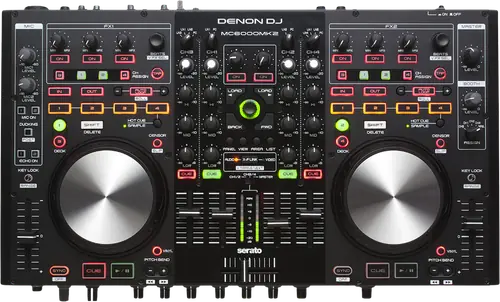
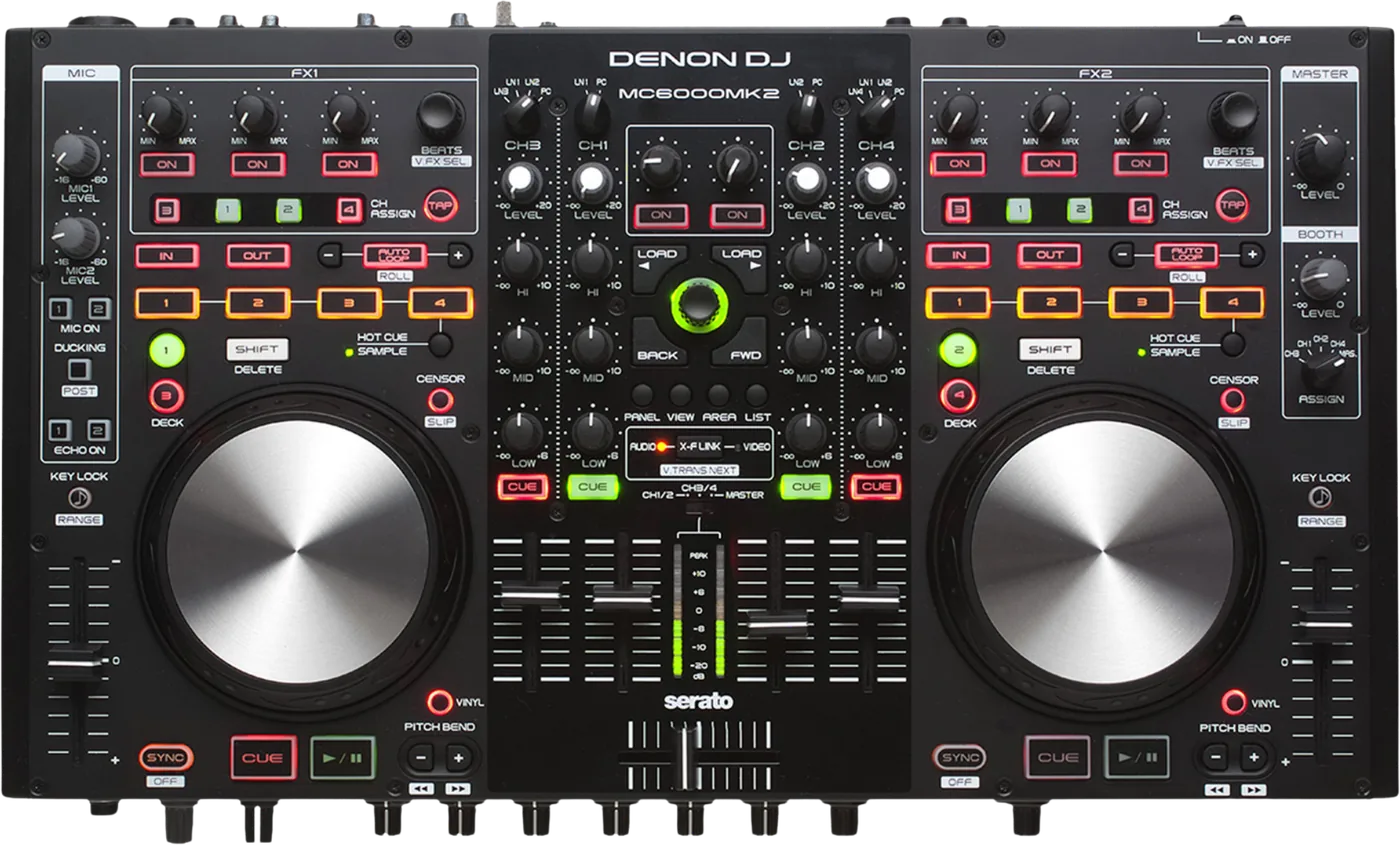
Booth briefing. The MC6000MK2 is a four channel digital mixer that is also a Serato controller and a USB soundcard, all in one desk. Denon's datasheet describes it as a stand-alone digital mixer, and that is how to think of it: the mixer section is a mixer in its own right, with the controller and the audio interface coming into play once a laptop is connected over USB. The software it unlocks today is Serato DJ Lite. A USB mode switch on the rear panel sets what the USB audio path carries, which is also what a recording on the computer contains.
When it goes wrong: No sound from the mixer
Fast Lane
The five things that decide your gig
The five things on the MC6000MK2 that change what happens next, if you are reading this in the booth. All five are explained in full further down this page.
The USB path is 16 bit. The 24 bit on the datasheet is something else.
Its USB path is 16 bit, not 24 bit, and both Denon documents agree: "USB Audio Inputs 2 Stereo (4 Monaural) 16 bit, Fs : 44.1 kHz USB B" and the same figures on the output. The 24 bit on the datasheet is the analogue audio engine and the master output D/A converter, and it is not the USB stream. This is the single most misreported fact about this mixer.
It unlocks Serato DJ Lite, not Pro, and that changed over time.
What it unlocks today is Serato DJ Lite, not Pro. Denon group the MC6000MK2 with the MC4000 and MC2000 as products that unlock "Serato DJ Lite ... while the product is plugged into your computer with a USB cable", and in the same article the MC7000 sits in the separate group that unlocks Serato DJ. Serato agree: "Unlocks Serato DJ Lite for free when plugged in", and "To use this mixer with HID mode or Serato DVS you will need a full Serato DJ Pro license."
A recording missing the microphone is a rear panel switch.
A rear panel switch decides what the unit sends to the computer, and it has three positions: LN3/4 THRU TO PC passes the Line 3/4 inputs straight through, INPUT CH3/4 sends the mixed channel output, and REC OUT/MIC sends the master and microphone channels. If a recording off this mixer has no microphone in it, or is only the line input, that switch is the answer and not the software.
Denon do call this one a stand-alone digital mixer.
Denon do describe this one as standalone, in one sentence in their own datasheet: "Operated as a fully functional DJ software controller or as a stand-alone digital mixer, the MC6000MK2 accommodates a multitude of connectivity options to suit a DJ's preferred workflow." That is the whole of the claim and they do not repeat the phrase in the Owner's Manual.
What the manual establishes independently is that the mixer functions are hardware functions: setting the input source per channel, the level, the three band EQ, the channel faders and crossfader, headphone monitoring, and the microphone processing including echo and ducking. What it is not is a player. There is no standalone playback and no standalone mode procedure. It is a mixer that keeps working when the laptop does not.
Missing from a Denon compatibility table has never meant dropped here.
Absence from a Denon compatibility table has demonstrably never meant dropped for this unit, and the evidence is Denon's own tables. The MC6000MK2 is Supported on Big Sur, then MISSING from the Monterey table, MISSING from the Ventura table, then back as Supported on Sonoma and Supported on Sequoia, then missing again from the Tahoe table. It has vanished twice and come back once. Read the Tahoe omission with that history in mind rather than as a verdict.
If something goes wrong
A recording with the wrong thing in it
Short answer. A rear panel switch decides what the unit sends to the computer, and it has three positions: LN3/4 THRU TO PC passes the Line 3/4 inputs straight through, INPUT CH3/4 sends the mixed channel output, and REC OUT/MIC sends the master and microphone channels. If a recording off this mixer has no microphone in it, or is only the line input, that switch is the answer and not the software.
Why it looks like a software problem. The recording arrives, it is the right length, the levels are fine and the content is wrong. Nothing in Serato is misconfigured, because the MC6000MK2 made the decision in hardware before the signal reached the computer.
Which position you want. For a set recording with your voice in it, REC OUT/MIC. For passing whatever is on the Line 3/4 inputs straight to the computer, LN3/4 THRU TO PC, and note that those are line level inputs and not the phono pair. Check it before the set rather than after.
A Windows driver that came on a CD you do not have
Short answer. Windows driver version 1.0.3, with no operating system label attached to it on Denon’s downloads page. The Owner’s Manual tells you to install it from the included Resource Disc, which is a physical CD. In 2026 there is no optical drive, so the download page is the only route.
Why this catches people. The MC6000MK2 Owner’s Manual walks you through inserting the Resource Disc and clicking Asio Driver Installation. On a machine bought in the last decade there is no optical drive, and the manual has no other route.
On a Mac there is nothing to install. No driver is needed on macOS. The Owner’s Manual says the unit works on USB connection with no driver installation, Serato call it a class compliant USB plug and play device, and Denon publish no macOS driver for it. That absence is exactly why this mixer survives new macOS releases as well as it does: there is no kernel extension to break.
What to watch for
The soundcard, and the number everyone gets wrong
Short answer. Its USB path is 16 bit, not 24 bit, and both Denon documents agree: "USB Audio Inputs 2 Stereo (4 Monaural) 16 bit, Fs : 44.1 kHz USB B" and the same figures on the output. The 24 bit on the datasheet is the analogue audio engine and the master output D/A converter, and it is not the USB stream. This is the single most misreported fact about this mixer.
What it actually presents. Two stereo pairs each way, so four mono channels in and four mono channels out, at 16 bit and 44.1 kHz over one USB-B port. Unlike the MC7000 there is one port and one interface, not two.
And the switch that decides the content. A rear panel switch decides what the unit sends to the computer, and it has three positions: LN3/4 THRU TO PC passes the Line 3/4 inputs straight through, INPUT CH3/4 sends the mixed channel output, and REC OUT/MIC sends the master and microphone channels. If a recording off this mixer has no microphone in it, or is only the line input, that switch is the answer and not the software.
Why the 16 bit matters and why it mostly does not. On the MC6000MK2 it matters if you are recording a master you intend to work on afterwards, because you are capturing at CD depth and not at production depth. It does not matter for a set recording anyone will listen to on a phone. Either way, know which one you have rather than believing the datasheet headline.
What it unlocks today, and what it used to
Today. What it unlocks today is Serato DJ Lite, not Pro. Denon group the MC6000MK2 with the MC4000 and MC2000 as products that unlock "Serato DJ Lite ... while the product is plugged into your computer with a USB cable", and in the same article the MC7000 sits in the separate group that unlocks Serato DJ. Serato agree: "Unlocks Serato DJ Lite for free when plugged in", and "To use this mixer with HID mode or Serato DVS you will need a full Serato DJ Pro license."
What shipped in the box, and why it is gone. What shipped in the box was Serato DJ Intro, which Serato have discontinued and replaced with Serato DJ Lite. Denon’s downloads page still hosts a Serato DJ Intro quick setup guide and mapping guide, and those describe software you can no longer get.
The rebate page that is still up. Denon still host a page for a 2014 Serato DJ Pro licence rebate on this unit, and a second hand buyer is excluded twice over. Its terms required a purchase on or after 12 August 2014 from an authorised dealer, and stated that "Used, B-stock, refurbished, or second-hand purchases not eligible" and that the voucher "may not be resold or transferred". The page currently says the rebate form is unavailable while the website is under maintenance.
DVS. DVS on this unit needs two purchases, not one. Serato require a full Serato DJ Pro licence for HID mode or DVS, and then the DVS expansion pack on top for control vinyl or control CDs. Serato DJ Suite covers both.
Stems. The MC6000MK2 is not on Denon’s Serato Stems compatible hardware list, where the MC7000 is present. That is an absence from a list rather than Denon saying it cannot.
A datasheet bullet with a footnote worth reading
Short answer. The datasheet bullet claiming native support for Serato DJ full version, VirtualDJ and Mixvibes Cross carries an asterisk, and the asterisk reads "Release timing of compatible third party software to be confirmed." That dates the document to before those integrations shipped. It is a promise rather than a status and this page does not print the bullet without the footnote.
Why it is worth a section. That MC6000MK2 bullet is quoted all over the internet without its asterisk, so the unit is described as natively supported by three applications on the strength of a document that says the timing is to be confirmed. Denon also still publish TRAKTOR mapping files and a MIDI command list for it, and a published mapping is not a support claim.
What to do about it. If a specific application matters to you, test it before you buy, and treat every native support claim about this unit as unverified unless the application maker says it themselves.
Compatibility
Operating systems, and a table it keeps falling off
The finding that changes how you read the rest. Absence from a Denon compatibility table has demonstrably never meant dropped for this unit, and the evidence is Denon's own tables. The MC6000MK2 is Supported on Big Sur, then MISSING from the Monterey table, MISSING from the Ventura table, then back as Supported on Sonoma and Supported on Sequoia, then missing again from the Tahoe table. It has vanished twice and come back once. Read the Tahoe omission with that history in mind rather than as a verdict.
The most recent position, and it comes from Serato. Serato go further than Denon on macOS 26 Tahoe: they list "Denon DJ MC6000MK2*" as supported hardware on macOS 26 Tahoe from Serato DJ Pro and Lite 4.0.1, and that asterisk carries the footnote that you should be able to connect but the firmware updaters are not yet supported there. Denon's highest positive macOS statement for this unit is Sequoia, and the highest Windows version they name is Windows 11.
What Denon’s asterisk means. Denon’s asterisk on this unit means one specific thing and they print it: "The product may have passed testing showing support for connection and MIDI communication, but firmware update software or other utilities may not have been tested or are found to be not supported."
macOS. No driver is needed on macOS. The Owner’s Manual says the unit works on USB connection with no driver installation, Serato call it a class compliant USB plug and play device, and Denon publish no macOS driver for it. That absence is exactly why this mixer survives new macOS releases as well as it does: there is no kernel extension to break.
Windows. Windows driver version 1.0.3, with no operating system label attached to it on Denon’s downloads page. The Owner’s Manual tells you to install it from the included Resource Disc, which is a physical CD. In 2026 there is no optical drive, so the download page is the only route.
And nobody has ended anything. Neither Denon nor Serato publish an end of support or end of life statement for this mixer.
Features explained
What it does with no computer attached
Denon’s own claim, in full. Denon do describe this one as standalone, in one sentence in their own datasheet: "Operated as a fully functional DJ software controller or as a stand-alone digital mixer, the MC6000MK2 accommodates a multitude of connectivity options to suit a DJ's preferred workflow." That is the whole of the claim and they do not repeat the phrase in the Owner's Manual.
What that actually means. What the manual establishes independently is that the mixer functions are hardware functions: setting the input source per channel, the level, the three band EQ, the channel faders and crossfader, headphone monitoring, and the microphone processing including echo and ducking. What it is not is a player. There is no standalone playback and no standalone mode procedure. It is a mixer that keeps working when the laptop does not.
And it is this model, not the other one. Denon never use the phrase standalone for the MC7000. This model has the sentence and that model does not, and the sentence does not travel between them.
Why a mobile DJ buys it. Two balanced microphone inputs with their own EQ, echo and ducking, four channels of source, and none of it stops when the laptop does. That is the whole argument for this mixer and it still holds.
Firmware, and a record that barely exists
Short answer. The firmware Denon publish today is v1003.01 and they publish no changelog for it anywhere, on their downloads site or their support site. There is no dated release notes post on their community forum for this unit either, in contrast to the MC7000 where Denon staff posted notes for two versions. No earlier version is published as a download.
And you cannot check it. There is no documented way to read the installed firmware version off this unit. A community thread asking exactly that produced no version numbers, no staff reply and no changelog. This page will not invent a key combination.
What to do with that. There is one firmware file on Denon’s download page and no way to tell whether you already have it. Running the updater on a unit that is already current is the ordinary outcome, and it is the only way to be sure.
Why this page says so rather than guessing. Inventing a key combination for a version display would be a fabricated instruction that somebody follows in a booth.
Professional tips
Before you play on one
Set the rear USB mode switch before the set, not after. It decides what your recording contains and there is no undo.
Download the Windows driver before you leave the house. The manual assumes a CD you do not have.
Expect Serato DJ Lite unless you own a Pro licence. The 2014 rebate never covered second hand units and its form is offline.
Do not count on 24 bit into the computer. The USB path is 16 bit and 44.1 kHz.
Keep it as the mixer, not the brain. Denon’s standalone sentence is about the mixer surviving; there is no player in it.
Connections and setup
What goes in and what comes out
Channels. It has four channels with eight selectable sources, described by Denon as a real time matrix mixer.
Inputs. two stereo unbalanced RCA phono inputs, four stereo unbalanced RCA line inputs, a microphone 1 combination jack taking balanced XLR or balanced 6.35 mm TRS, and a microphone 2 on balanced 6.35 mm TRS.
Outputs. a master on balanced XLR or unbalanced RCA at +4 dBu nominal and +24 dBu maximum, a booth on balanced TRS at the same levels, and a stereo headphone output at 40 ohms and 100 mW.
EQ. a three band channel EQ that cuts to minus 90 dB on all three bands and boosts plus 10 dB on the highs and mids and plus 6 dB on the lows, and a three band microphone EQ at plus or minus 15 dB.
USB. Two stereo pairs each way, so four mono channels in and four mono channels out, at 16 bit and 44.1 kHz over one USB-B port. Unlike the MC7000 there is one port and one interface, not two. A rear panel switch decides what the unit sends to the computer, and it has three positions: LN3/4 THRU TO PC passes the Line 3/4 inputs straight through, INPUT CH3/4 sends the mixed channel output, and REC OUT/MIC sends the master and microphone channels. If a recording off this mixer has no microphone in it, or is only the line input, that switch is the answer and not the software.
Power. It runs from 12 V DC from an adapter rated 12 V and 3 A, drawing 24 W. It is not USB bus powered and no Denon source says otherwise.
The physical facts. It measures 460 x 255 x 48 mm as width, then depth, then height, and weighs 4.3 kg. Those millimetres are the datasheet’s, and Denon’s own Owner’s Manual prints inch figures that do not convert to the same numbers. Both are theirs and the datasheet is the more precise.
Firmware, drivers and manuals
What Denon publish
Documents and downloads, and no product page. There is no live Denon product page for this mixer. What exists is the downloads page carrying the firmware and the Windows driver, an archives page with the older generic Denon ASIO driver, the Owner’s Manual and the datasheet on their content host, and a legacy Serato rebate page that no longer functions.
No changelog at all. The firmware Denon publish today is v1003.01 and they publish no changelog for it anywhere, on their downloads site or their support site. There is no dated release notes post on their community forum for this unit either, in contrast to the MC7000 where Denon staff posted notes for two versions. No earlier version is published as a download.
Official downloads and documents
Go to Denon DJ for the files themselves. We link their pages instead of hosting a copy, because a manual copied here is a snapshot of release day and theirs is the one that stays current.
Firmware downloads. Official Denon DJ firmware page →
Manuals. Official Denon DJ manual page →
Broken link? Let us know and we'll fix it.
Frequently asked questions
Quick answers
- Is the USB audio 24 bit?
- No. Its USB path is 16 bit, not 24 bit, and both Denon documents agree: "USB Audio Inputs 2 Stereo (4 Monaural) 16 bit, Fs : 44.1 kHz USB B" and the same figures on the output. The 24 bit on the datasheet is the analogue audio engine and the master output D/A converter, and it is not the USB stream. This is the single most misreported fact about this mixer.
- How many USB channels does it have?
- Two stereo pairs each way, so four mono channels in and four mono channels out, at 16 bit and 44.1 kHz over one USB-B port. Unlike the MC7000 there is one port and one interface, not two.
- My recording has no microphone in it.
- A rear panel switch decides what the unit sends to the computer, and it has three positions: LN3/4 THRU TO PC passes the Line 3/4 inputs straight through, INPUT CH3/4 sends the mixed channel output, and REC OUT/MIC sends the master and microphone channels. If a recording off this mixer has no microphone in it, or is only the line input, that switch is the answer and not the software.
- Does it work without a computer?
- Denon do describe this one as standalone, in one sentence in their own datasheet: "Operated as a fully functional DJ software controller or as a stand-alone digital mixer, the MC6000MK2 accommodates a multitude of connectivity options to suit a DJ's preferred workflow." That is the whole of the claim and they do not repeat the phrase in the Owner's Manual. What the manual establishes independently is that the mixer functions are hardware functions: setting the input source per channel, the level, the three band EQ, the channel faders and crossfader, headphone monitoring, and the microphone processing including echo and ducking. What it is not is a player. There is no standalone playback and no standalone mode procedure. It is a mixer that keeps working when the laptop does not.
- Do I get Serato DJ Pro with it?
- No. What it unlocks today is Serato DJ Lite, not Pro. Denon group the MC6000MK2 with the MC4000 and MC2000 as products that unlock "Serato DJ Lite ... while the product is plugged into your computer with a USB cable", and in the same article the MC7000 sits in the separate group that unlocks Serato DJ. Serato agree: "Unlocks Serato DJ Lite for free when plugged in", and "To use this mixer with HID mode or Serato DVS you will need a full Serato DJ Pro license."
- What about the Serato DJ rebate?
- Denon still host a page for a 2014 Serato DJ Pro licence rebate on this unit, and a second hand buyer is excluded twice over. Its terms required a purchase on or after 12 August 2014 from an authorised dealer, and stated that "Used, B-stock, refurbished, or second-hand purchases not eligible" and that the voucher "may not be resold or transferred". The page currently says the rebate form is unavailable while the website is under maintenance.
- Can I use it for DVS?
- DVS on this unit needs two purchases, not one. Serato require a full Serato DJ Pro licence for HID mode or DVS, and then the DVS expansion pack on top for control vinyl or control CDs. Serato DJ Suite covers both.
- Does it do Serato Stems?
- The MC6000MK2 is not on Denon’s Serato Stems compatible hardware list, where the MC7000 is present. That is an absence from a list rather than Denon saying it cannot.
- Do I need a driver?
- No driver is needed on macOS. The Owner’s Manual says the unit works on USB connection with no driver installation, Serato call it a class compliant USB plug and play device, and Denon publish no macOS driver for it. That absence is exactly why this mixer survives new macOS releases as well as it does: there is no kernel extension to break. Windows driver version 1.0.3, with no operating system label attached to it on Denon’s downloads page. The Owner’s Manual tells you to install it from the included Resource Disc, which is a physical CD. In 2026 there is no optical drive, so the download page is the only route.
- Does it work on macOS Tahoe?
- Serato go further than Denon on macOS 26 Tahoe: they list "Denon DJ MC6000MK2*" as supported hardware on macOS 26 Tahoe from Serato DJ Pro and Lite 4.0.1, and that asterisk carries the footnote that you should be able to connect but the firmware updaters are not yet supported there. Denon's highest positive macOS statement for this unit is Sequoia, and the highest Windows version they name is Windows 11. Absence from a Denon compatibility table has demonstrably never meant dropped for this unit, and the evidence is Denon's own tables. The MC6000MK2 is Supported on Big Sur, then MISSING from the Monterey table, MISSING from the Ventura table, then back as Supported on Sonoma and Supported on Sequoia, then missing again from the Tahoe table. It has vanished twice and come back once. Read the Tahoe omission with that history in mind rather than as a verdict.
- Which firmware version should it be on?
- The firmware Denon publish today is v1003.01 and they publish no changelog for it anywhere, on their downloads site or their support site. There is no dated release notes post on their community forum for this unit either, in contrast to the MC7000 where Denon staff posted notes for two versions. No earlier version is published as a download.
- How do I check the firmware version?
- There is no documented way to read the installed firmware version off this unit. A community thread asking exactly that produced no version numbers, no staff reply and no changelog. This page will not invent a key combination.
- Does it natively support VirtualDJ and Mixvibes?
- The datasheet bullet claiming native support for Serato DJ full version, VirtualDJ and Mixvibes Cross carries an asterisk, and the asterisk reads "Release timing of compatible third party software to be confirmed." That dates the document to before those integrations shipped. It is a promise rather than a status and this page does not print the bullet without the footnote.
- Is it discontinued?
- Denon publish no discontinuation notice, and there is also no live Denon product page for it: only downloads, a legacy Serato rebate page and documents on their content host. Retailers label it discontinued and a retail label is not a manufacturer statement.
Playing soon and it is not working?
Start Emergency ModeKeep the Emergency Card
We will email you the printable PDF so it is on your phone before the next dark booth. Occasional notes that save gigs. No spam, unsubscribe in one click.
Registering is free and counts everywhere on Save My Gig. We send a confirmation email first. Your address is stored with Brevo, our email provider. Unsubscribe any time. Privacy
Sources: Denon DJ's Owner's Manual and datasheet, their downloads and archives pages, their legacy Serato rebate page, their Serato unlock and Stems support articles, their macOS and Windows compatibility tables, and Serato's own hardware pages, checked 10 September 2026. Specifications theirs, priorities ours.